Measuring Current Using an Allegro ACS758 Current Sensor with an LCD1602 for Arduino
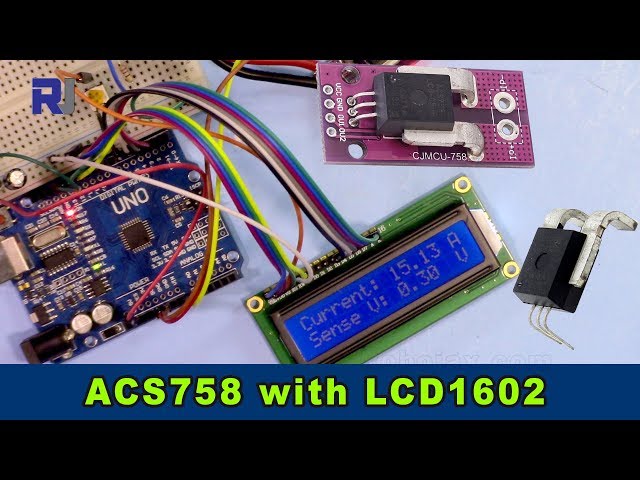
This project demonstrates how to measure current using an Allegro ACS758 current sensor and display the readings on an LCD1602 screen connected to an Arduino. The ACS758 is a versatile sensor capable of measuring currents up to 200 Amps, making it suitable for various applications.

This project provides a practical way to monitor current flow in a circuit, which is crucial for various applications, including:
- Monitoring power consumption in appliances
- Building a battery management system
- Designing an electric motor controller
- Creating a current-based security system
This guide will walk you through the necessary hardware, wiring, code, and a live demonstration.
Hardware pins

Hardware/Components
To build this project, you will need the following components:
- Arduino Uno (or compatible)
- Allegro ACS758 Current Sensor (the specific model number will determine the maximum current measurement; ensure to adjust the code accordingly. (in video at 00:14 and 03:18))
- LCD1602 Display without I2C module, the LCD has 12 wries
- Connecting wires
- Power supply (5V)
- Load (for testing the current measurement)

Wiring Guide

The wiring for the LCD1602 is explained in a separate video (in video at 01:24). The key connections for this project are as follows (in video at 01:24):
- ACS758: VCC to 5V, GND to GND, Signal Out (yellow wire) to A0 on the Arduino.
- The ACS758 sensor's two main wires are connected in series with the load (in video at 02:09).
Code Explanation
The Arduino code consists of two main parts: one for handling the ACS758 sensor and another for interacting with the LCD1602. The user-configurable parts of the code are:
#define VIN A0 // define the Arduino pin A0 as voltage input (V in)
const float VCC   = 5.0;// supply voltage 5V or 3.3V. If using PCB, set to 5V only.
const int model = 2;   // enter the model (see below)
float cutOffLimit = 1.00;// reading cutoff current. 1.00 is 1 Amper
The model variable needs to be set according to the specific ACS758 model used (in video at 03:18). Refer to the code comments for the model number mapping. The cutOffLimit variable determines the minimum current to be displayed (in video at 03:48). Adjust this value to filter out insignificant readings.
Live Project/Demonstration
The video demonstrates how to connect the ammeter to measure the current flowing through the load (in video at 02:18). The code displays the current and voltage readings on both the LCD1602 and the serial monitor (in video at 07:02). The demonstration shows how the readings update dynamically as the load current changes (in video at 07:14). It also highlights that when the current falls below the specified limit, "No Current" is displayed (in video at 07:59).
Chapters
- [00:06] Introduction
- [00:34] Prerequisites
- [01:24] Wiring Explanation
- [02:18] Current Measurement Demonstration
- [02:57] Code Explanation
- [07:02] Live Demonstration
- [08:18] Conclusion
图像
/*
 *
 * Arduino Sketch for Allegro ACS758 Current Sensor with LCD1602
 * This sensor can measure current at a range of up to 200A.
 * It operates with 3.3V or 5V.
 * This sketch requires you to watch the following two videos before using this code:
 * 1- ACS758 Sensor https://www.youtube.com/watch?v=SiHfjzcqnU4
 * 2- LCD1602 Display https://www.youtube.com/watch?v=S4ya3Q7uhJs
 *
 *
 * Written by Ahmad Shamshiri on Tuesday, June 22, 2018 at 17:57 in Ajax, Ontario, Canada
 * for Robojax.com
 * View the video instruction for this code at https://youtu.be/Co-DrCa2slk
 * This code has been downloaded from Robojax.com
 */
#define VIN A0 // define the Arduino pin A0 as voltage input (V in)
const float VCC   = 5.0;// supply voltage 5V or 3.3V. If using PCB, set to 5V only.
const int model = 2;   // enter the model (see below)

float cutOffLimit = 1.00;// reading cutoff current. 1.00 is 1 Amper

/*
          "ACS758LCB-050B",// for model use 0
          "ACS758LCB-050U",// for model use 1
          "ACS758LCB-100B",// for model use 2
          "ACS758LCB-100U",// for model use 3
          "ACS758KCB-150B",// for model use 4
          "ACS758KCB-150U",// for model use 5
          "ACS758ECB-200B",// for model use 6
          "ACS758ECB-200U"// for model use 7
Sensitivity array is holding the sensitivity of the ACS758
current sensors. Do not change.
*/
float sensitivity[] ={
          40.0,// for ACS758LCB-050B
          60.0,// for ACS758LCB-050U
          20.0,// for ACS758LCB-100B
          40.0,// for ACS758LCB-100U
          13.3,// for ACS758KCB-150B
          16.7,// for ACS758KCB-150U
          10.0,// for ACS758ECB-200B
          20.0,// for ACS758ECB-200U
         };

/*
 *   Quiescent output voltage is a factor of VCC that appears at the output
 *   when the current is zero.
 *   For bidirectional sensors it is 0.5 x VCC.
 *   For unidirectional sensors it is 0.12 x VCC.
 *   For model ACS758LCB-050B, the B at the end represents Bidirectional (polarity doesn't matter).
 *   For model ACS758LCB-100U, the U at the end represents Unidirectional (polarity must match).
 *   Do not change.
 */
float quiescent_Output_voltage [] ={
          0.5,// for ACS758LCB-050B
          0.12,// for ACS758LCB-050U
          0.5,// for ACS758LCB-100B
          0.12,// for ACS758LCB-100U
          0.5,// for ACS758KCB-150B
          0.12,// for ACS758KCB-150U
          0.5,// for ACS758ECB-200B
          0.12,// for ACS758ECB-200U
          };
const float FACTOR = sensitivity[model]/1000;// set sensitivity for selected model
const float QOV =   quiescent_Output_voltage [model] * VCC;// set quiescent Output voltage for selected model
float voltage;// internal variable for voltage
float cutOff = FACTOR/cutOffLimit;// convert current cut off to mV
 //************ END of ACS785 Settings

//******************** Start of LCD1602
// January 21, 2018 14:25
// original source https://www.arduino.cc/en/Tutorial/HelloWorld
// include the library code:
#include <LiquidCrystal.h>

// initialize the library by associating any needed LCD interface pin
// with the arduino pin number it is connected to
const int rs = 12, en = 11, d4 = 5, d5 = 4, d6 = 3, d7 = 2;
LiquidCrystal lcd(rs, en, d4, d5, d6, d7);

void setup() {
  // Robojax.com ACS758 Current Sensor with LCD1602
    Serial.begin(9600);// initialize serial monitor
    Serial.println("Robojax Tutorial");
    Serial.println("ACS758 Current Sensor");
    Serial.println("with LCD1602 display");
  // set up the LCD's number of columns and rows:
  lcd.begin(16, 2);
  // Print a message to the LCD.
    lcd.clear();
  lcd.print("Robojax");
  lcd.setCursor (0,1); // go to start of 2nd line
  lcd.print("ACS758 Current Sensor");
  delay(2000);
  lcd.clear();
}

void loop() {
  // Robojax.com ACS758 Current Sensor with LCD1602

  float voltage_raw =   (5.0 / 1023.0)* analogRead(VIN);// Read the voltage from sensor
  voltage =  voltage_raw - QOV + 0.007 ;// 0.007 is a value to make voltage zero when there is no current
  float current = voltage / FACTOR;
  if(abs(voltage) > cutOff ){
    Serial.print("V: ");
    Serial.print(voltage,3);// print voltage with 3 decimal places
    Serial.print("V, I: ");
    Serial.print(current,2); // print the current with 2 decimal places
    Serial.println("A");
  //start of loop Robojax code ACS758 with LCD1602 and I2C
  lcd.clear();
  lcd.setCursor (0,0); // set to line 1, char 0
  lcd.print("Current: ");
  lcd.setCursor (9,0); // go to start of 2nd line
  lcd.print(current);
  lcd.setCursor (15,0); // go to start of 2nd line
  lcd.print("A");

  lcd.setCursor (0,1);
  lcd.print("Sense V: ");
  lcd.setCursor (9,1); // go to start of 2nd line
  lcd.print(voltage);
  lcd.setCursor (15,1); // go to start of 2nd line
  lcd.print("V");

 //end of loopcode Robojax code ACS758 with LCD1602 and I2C


  }else{
    Serial.println("No Current");
  lcd.clear();
  lcd.setCursor (0,0);
  lcd.print("No Current");
  }


  delay(500);
  // Robojax.com ACS758 Current Sensor with LCD1602
}
|||您可能需要的东西
-
亚马逊从亚马逊购买Allegro ACS758电流传感器amzn.to
-
易趣从eBay购买Allegro ACS758电流传感器ebay.us
-
全球速卖通从AliExpress购买Allegro ACS758电流传感器s.click.aliexpress.com
资源与参考
文件📁
没有可用的文件。