Ẹkọ 20/31: Ṣíṣàfihàn ìwọ̀n-otútù àti ọ̀rinrin láti DHT11 lórí iboju LCD
Ikẹkọ yii ṣe afihan bi o ṣe le darapọ sensori iwọn otutu ati ọrinrin DHT11 pẹlu ifihan LCD1602 ti o ni I2C lati ṣẹda ibudo abojuto ayika iwapọ. Dipo kika data sensori aise lati inu atẹle serial, iwọ yoo kọ ẹkọ lati ṣe afihan awọn kika iwọn otutu ati ọrinrin laaye lori iboju ohun kikọ 16x2. Ise agbese yii dara fun kikọ ibudo oju-ọjọ tabili, atẹle ewe kekere, tabi fifi kika agbegbe kun si eyikeyi ise agbese adaṣe ile. Wiwo I2C ṣe irọrun okun waya, ṣiṣe eyi jẹ ise agbese wiwọle fun awọn olubere ati afikun iyara fun awọn oluṣe ti o ni iriri.
Eyi ni diẹ ninu awọn imọran iwulo ti o le kọ pẹlu imọ yii:
- Ibudo oju-ọjọ tabili ti n ṣe afihan awọn ipo yara lọwọlọwọ.
- Ifihan iwapọ fun ohun ọgbin tabi terrarium ẹranko.
- Kika agbegbe fun yara olupin tabi agbegbe iṣẹ-ọnà.
- Modulu ipilẹ fun eto adaṣe ile ti o ni idiju diẹ sii.
Ohun elo ati Awọn ẹya
Lati kọ ise agbese yii, iwọ yoo nilo awọn ẹya wọnyi:
- Arduino Uno (tabi bọọdi ibaramu)
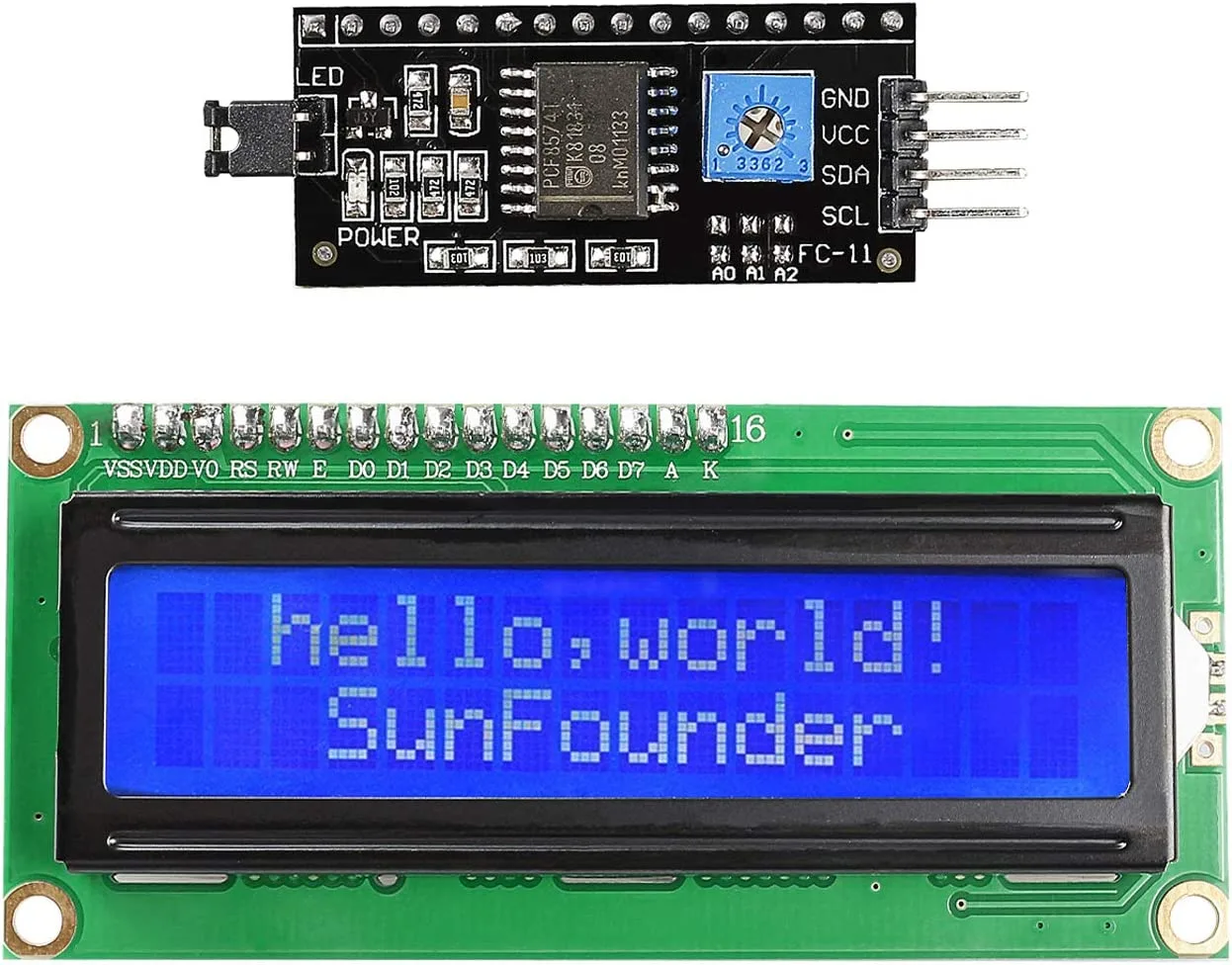
- Ifihan LCD1602 pẹlu modulu wiwo I2C
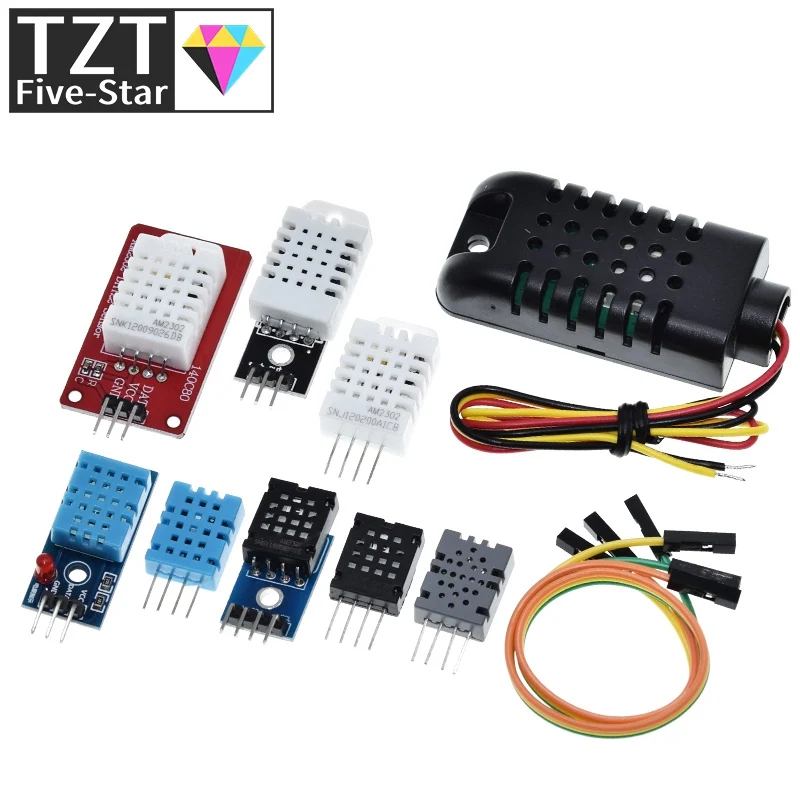
- Sensori iwọn otutu ati ọrinrin DHT11
- Resistor fifa 4.7kΩ tabi 10kΩ (ti o ba lo sensori DHT11 lasan)
- Awọn okun waya
- Breadboard (iyan, fun awọn asopọ rọrun)
Loye I2C LCD1602
LCD1602 jẹ ifihan ohun kikọ ti o wọpọ pẹlu awọn ọwọn 16 ati awọn ori ila 2. Modulu "I2C" ti a ta si ẹhin ifihan ni bọtini si irọrun rẹ. Modulu yii ṣe iyipada wiwo afiwera ti LCD sinu wiwo I2C tẹlentẹle, eyiti o nilo awọn okun meji nikan fun data (SDA ati SCL) ati meji fun agbara (VCC ati GND). Eyi dinku pupọ nọmba awọn pinni ti o nilo lori Arduino rẹ, nlọ diẹ sii fun awọn sensori ati awọn actuators miiran. Modulu naa tun pẹlu potentiometer kekere lati ṣatunṣe iyatọ ifihan, eyiti o ṣe pataki fun rira daju pe ọrọ han. Adirẹsi I2C ti modulu le yipada nipa lilo awọn jumper solder kekere (A0, A1, A2) lori bọọdi, gbigba ọpọlọpọ awọn ẹrọ I2C laaye lati wa papọ lori ọkọ kanna.
Itọsọna Okun Way
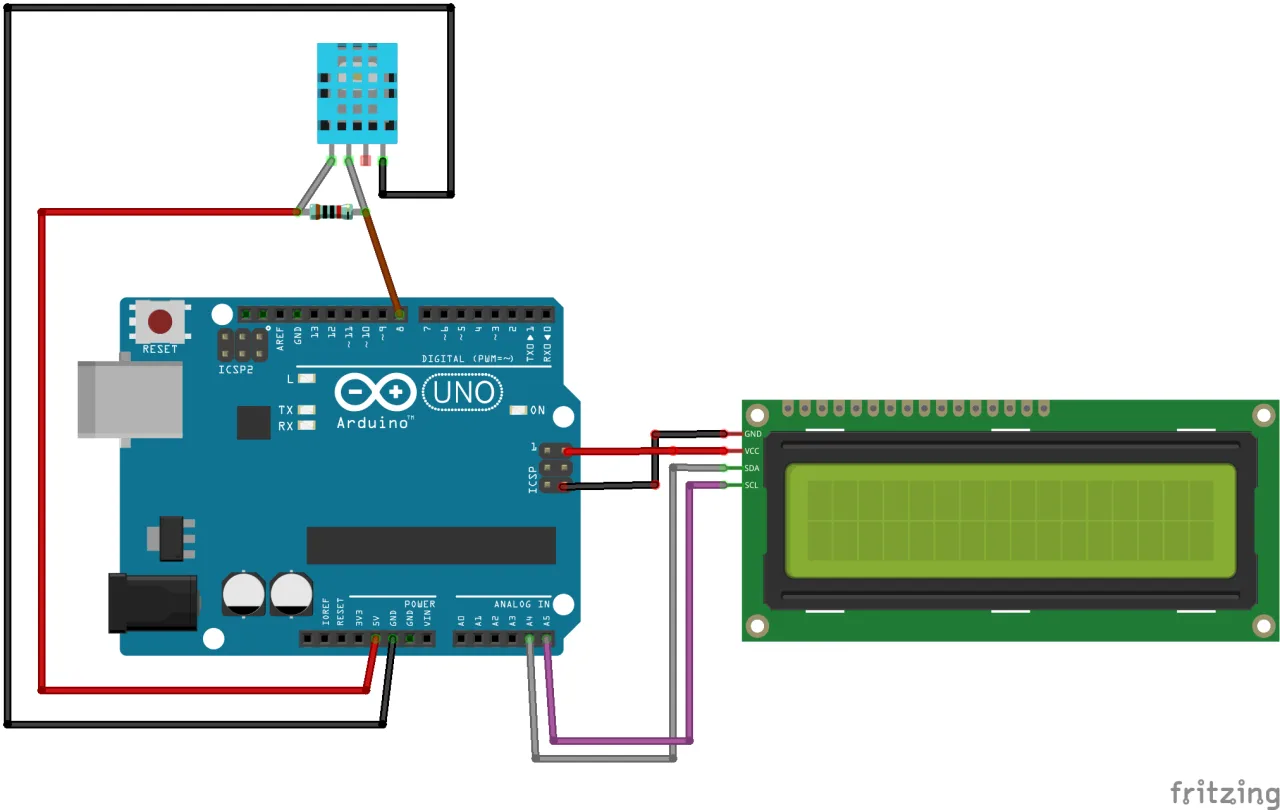
So awọn ẹya pọ bi o ṣe han ninu aworan atọka ni isalẹ. LCD I2C nlo awọn pinni I2C ti Arduino, lakoko ti sensori DHT11 nlo pinni oni-nọmba.
Fun LCD1602-I2C:
- VCC si Arduino 5V
- GND si Arduino GND
- SDA si Arduino A4
- SCL si Arduino A5
Fun sensori DHT11:
- VCC (Pinni 1) si Arduino 5V
- Data (Pinni 2) si Arduino Pinni Oni-nọmba 2 (pẹlu resistor fifa 10kΩ si 5V)
- NC (Pinni 3) - Ko ni asopọ
- GND (Pinni 4) si Arduino GND
(ninu fidio ni 25:16)
Ṣeto Awọn Ile-ikawe
Ise agbese yii nilo awọn ile-ikawe meji. Ile-ikawe Wire.h jẹ apakan ti fifi sori Arduino boṣewa. Iwọ yoo nilo lati fi sori ile-ikawe LiquidCrystal_I2C ati ile-ikawe dht11. Fidio naa ṣe afihan bi o ṣe le fi wọn sori. O le ṣe igbasilẹ awọn ile-ikawe lati awọn ọna asopọ ti a pese ninu apejuwe fidio tabi lati oju opo wẹẹbu Robojax. Ni kete ti o ba ti ṣe igbasilẹ wọn, o le fi wọn sori nipasẹ Arduino IDE nipa lilọ si Sketch > Include Library > Add .ZIP Library... ati yiyan awọn faili ti o ṣe igbasilẹ. (ninu fidio ni 06:16)
Wiwa Adirẹsi I2C ti LCD Rẹ
Ṣaaju ki o to lo ifihan naa, o gbọdọ pinnu adirẹsi I2C rẹ. Adirẹsi ti o wọpọ julọ ni 0x27 tabi 0x3F, ṣugbọn o le yatọ. Lati wa a, o le lo sketi ọlọja I2C. Eyi jẹ eto ti o rọrun ti o ṣe ọlọja ọkọ I2C ati ṣe ijabọ eyikeyi adirẹsi ti o rii si Atẹle Serial. Gbe koodu ọlọja soke, ṣii Atẹle Serial ni 9600 baud, ati pe yoo ṣe afihan adirẹsi ti LCD rẹ. (ninu fidio ni 08:11)
Alaye Koodu
Abala yii ṣe alaye awọn ẹya pataki, ti olumulo le ṣatunṣe ti koodu naa. Eto kikun wa fun igbasilẹ ni isalẹ nkan naa.
Koodu naa bẹrẹ nipa fifi awọn ile-ikawe pataki pẹlu asopọ ati asọye awọn pinni ati awọn nkan ti a lo.
// faili akọsori lati GetHub: https://github.com/adidax/dht11
#include <dht11.h>
dht11 DHT11; // ṣẹda nkan ti DHT11
#define dhtpin 2 // ṣeto pinni lati sopọ si DHT11

// ibẹrẹ awọn eto fun LCD1602-I2C
#include <Wire.h>
#include <LiquidCrystal_I2C.h>
// Ṣeto adirẹsi LCD si 0x3F fun ifihan awọn ohun kikọ 16 ati awọn ori ila 2
LiquidCrystal_I2C lcd(0x3F, 16, 2);
// opin awọn eto fun LCD1602-I2C
Iwọnyi ni awọn ila pataki julọ lati ṣatunṣe fun eto rẹ:
#define dhtpin 2: Eyi ṣe asọye pinni Arduino ti o sopọ si pinni data sensori DHT11. Yi nọmba2pada ti o ba lo pinni ti o yatọ.LiquidCrystal_I2C lcd(0x3F, 16, 2);: Ila yii ṣẹda nkan LCD. Paramita akọkọ,0x3F, ni adirẹsi I2C ti o rii ni igbesẹ ti tẹlẹ. Awọn16ati2ṣe asọye nọmba awọn ọwọn ati awọn ori ila ti ifihan rẹ. Ṣe imudojuiwọn adirẹsi ti ọlọja rẹ ba rii ọkan ti o yatọ (fun apẹẹrẹ,0x27).
Koodu na lo iṣẹ́ àṣà, getTemp(), láti ka iwọn otutu ati yíyí padà sí àwọn ẹyọ ọ̀tọ̀ọ̀tọ̀. Eyi jẹ ẹya agbara ti o jẹ ki koodu naa ṣee lo fún àwọn ohun elo ọ̀tọ̀ọ̀tọ̀.
float getTemp(char type) {
    float temp = (float)DHT11.temperature;// gba otutu
  if(type =='F')
  {
    return temp * 1.8 + 32;// yíyí padà sí Fahrenheit
  }else if(type =='K')
  {
    return temp + 274.15;// yíyí padà sí Kelvin
  }else{
   return temp;
  }
}
Láti lo iṣẹ́ yìí, o pè é pẹ̀lú àṣẹ ọ̀rọ̀ kan ṣoṣo tí o dúró fún ẹyọ tí o fẹ́. Fún àpẹẹrẹ, getTemp('C') dá otutu padà ní Celsius, getTemp('F') dá a padà ní Fahrenheit, ati getTemp('K') dá a padà ní Kelvin. Iṣẹ́ naa ka otutu aise lati inú sensori DHT11 ati lo agbekalẹ yíyí padà tí o yẹ. Eyi jẹ ki o rọrun láti yí ẹyọ tí o han ní loop() àkọkọ láìtún kọ ọgbọn kika sensori. Loop àkọkọ tẹ otutu ati ọrinrin sí LCD ní lílo àwọn iṣẹ́ lcd.setCursor() ati lcd.print() láti ṣàkóso ibi tí àwọn iye yóò han lórí iboju.
Fífi Àmì Ìwọ̀n (Degree Symbol) Hàn
Àkójọpọ̀ ohun kikọ HD44780 LCD ti o wọpọ kò ní àmì ìwọ̀n kan pàtó (°). Láti fi hàn, o gbọdọ̀ lo iṣẹ́ lcd.write() pẹ̀lú iye eleemewa ti ohun kikọ lati inú ROM LCD. Fún àmì ìwọ̀n, iye yìí jẹ́ 223. Koodu naa ṣàfihàn eyi ní lílo lcd.print((char)223); láti tẹ àmì naa lẹ́yìn iye otutu. (ní fídíò ní 30:16)
Ìfihàn Iṣẹ́-ìṣe Láàyè
Ní kété tí a ti gbé koodu naa sí orí ẹ̀rọ, iboju yóò fi ifiranṣẹ́ ìbẹ̀rẹ̀ hàn kí ó tó yọ́ kúrò ati fi otutu ati ọrinrin tí o wa lọ́wọ́lọ́wọ́ hàn. Ìlà àkọ́kọ́ ti iboju fi ọ̀rọ̀ "LCD1602 DHT11" hàn, nígbà tí ìlà kejì fi otutu ní Celsius hàn, pẹ̀lú àmì ìwọ̀n ati "C", ati lẹ́yìn náà otutu ní Fahrenheit, pẹ̀lú àmì ìwọ̀n ati "F". Iye ọrinrin ni a tẹ sí iboju serial. Ìfihàn nínú fídíò naa fi hàn pé iboju ń ṣe àtúnṣe gbogbo ìdajì-ìṣẹ́jú bí a ti ń di sensori mú, tí o ń fi àwọn ipo ayika hàn ní pípé. (ní fídíò ní 29:42)
Fífi foltiage lati potentiometer hàn lórí LCD ni a bo nínú Ẹ̀kọ́ 20/31: Fífi foltiage hàn lórí LCD1602.
Lílo LCD kanna láti fi ijinna lati sensori ultrasonic hàn ni a bo nínú Ẹ̀kọ́ 20/31: Lílo LCD1602 pẹ̀lú Arduino láti fi otutu, foltiage ati ijinna hàn | Robojax.
Àwọn iṣẹ́-ìṣe tí ó jọmọ́ fídíò yìí
- Ẹ̀kọ́ 20/31: Lílo LCD1602 pẹ̀lú Arduino láti fi otutu, foltiage ati ijinna hàn | Robojax
- Ẹ̀kọ́ 20/31: Fífi foltiage hàn lórí LCD1602
Àwọn orí-ọ̀rọ̀
- [00:00] Ìfihàn sí LCD1602 ati àkópọ̀ iṣẹ́-ìṣe
- [01:30] Àlàyé ohun èlò LCD1602 ati module I2C
- [02:47] Ṣíṣe àtúnṣe ìmúra LCD
- [03:14] Ìtòka LCD ati ìtòlẹ́sẹẹsẹ àdírẹ́sì I2C
- [05:28] Àwòrán ìsopọ̀ fún LCD1602
- [06:16] Fífi LiquidCrystal_I2C library sórí
- [08:11] Wíwá àdírẹ́sì I2C pẹ̀lú scanner
- [09:28] Koodu ìpìlẹ̀ láti tẹ ọ̀rọ̀ sí LCD
- [11:10] Àwọn àpẹẹrẹ: cursor tí ń ṣẹ́ ati àwọn ohun kikọ àṣà
- [13:46] Ṣíṣe ati lílo àwọn ohun kikọ àṣà
- [18:51] Àpẹẹrẹ ìfihàn serial
- [23:16] Yíyí ọ̀rọ̀ kọjá lórí LCD
- [24:36] Ìpapọ̀ koodu sensori DHT11 pẹ̀lú LCD
- [30:16] Fífi àmì ìwọ̀n hàn
- [32:03] Yíyọ àwọn àmì eleemewa kúrò nínú otutu
- [33:00] Fífi foltiage lati potentiometer hàn lórí LCD
- [35:56] Fífi ijinna lati sensori ultrasonic hàn
Aworan
/*
Lesson 20/31: Displaying Temperature and humidity from DHT11 on  LCD screen
Get this code and watch video Download and resource page https://robojax.com/RJT603
YouTube video https://www.youtube.com/watch?v=NXAswOc_2zg


 * This is the Arduino code for  DHT11 module to read temperature and humidity
 * This code can display temperature in:
 * C is used to get Celsius
 * F is used to get Fahrenheit
 * K is used for Kelvin

 *  *
 * Written by Ahmad Shamshiri for Robojax
 * on Jan 04, 2018
 * Robojax.com

   Please watch video instruction here https://youtu.be/0XMLnCYkvbE
 This code is available at http://robojax.com/course1/?vid=lecture11

with over 100 lectures Free On  YouTube Watch it here http://robojax.com/L/?id=338
Get the code for the course: http://robojax.com/L/?id=339


 * This code is "AS IS" without warranty or liability. Free to be used as long as you keep this note intact.*
 * This code has been download from Robojax.com
    This program is free software: you can redistribute it and/or modify
    it under the terms of the GNU General Public License as published by
    the Free Software Foundation, either version 3 of the License, or
    (at your option) any later version.

    This program is distributed in the hope that it will be useful,
    but WITHOUT ANY WARRANTY; without even the implied warranty of
    MERCHANTABILITY or FITNESS FOR A PARTICULAR PURPOSE.  See the
    GNU General Public License for more details.

    You should have received a copy of the GNU General Public License
    along with this program.  If not, see <https://www.gnu.org/licenses/>.
 */

// header file from GetHub: https://github.com/adidax/dht11
#include <dht11.h>

dht11 DHT11; // create object of DHT11
#define dhtpin 2 // set the pin to connect to DHT11

// start of settings for LCD1602-I2C
#include <Wire.h>
#include <LiquidCrystal_I2C.h>
// Set the LCD address to 0x3F for a 16 chars and 2 line display
LiquidCrystal_I2C lcd(0x3F, 16, 2);
// end of settings for LCD1602-I2C


void setup() {
    Serial.begin(9600);// setting up serial monitor

  // initialize the LCD,
  lcd.begin();
  // Turn on the blacklight and print a message.
  lcd.backlight();
  lcd.clear();
  lcd.setCursor (0,0); //
  lcd.print("DHT11 Sensor");
  delay(2000);
}

void loop() {
	//Robojax Step By Step Arduino Course YouTube Watch it here http://robojax.com/L/?id=338
  DHT11.read(dhtpin);// initialize the reading
  int humidity = DHT11.humidity;// get humidity

  lcd.clear();// clear previous values from screen
  lcd.setCursor (0,0); //character zero, line 1
  lcd.print("LCD1602 DHT11"); // print text

  // print distance in degrees C
  lcd.setCursor (0,1); //character 0, line 2
  lcd.print(getTemp('C'));// print Temperature Celsius
  lcd.setCursor (4,1); //character 5, line 2
  lcd.print((char)223);// print degree
  lcd.setCursor (5,1); //character 6, line 2
  lcd.print("C");// print C

   // print distance degrees F
  lcd.setCursor (7,1); //character 8, line 2
  lcd.print(getTemp('F'));// print distance in cm
  lcd.setCursor (13,1); //character 14, line 2
  lcd.print((char)223);// print degree
  lcd.setCursor (14,1); //character 16, line 2
  lcd.print("F");// print F


  //code for Robojax.com video
   Serial.print(getTemp('C'));
   Serial.print("C ");
   Serial.print(getTemp('F'));
   Serial.print("F ");
   Serial.print(getTemp('K'));
   Serial.print("K ");
   Serial.print(" humidity:");
   Serial.print (humidity);
   Serial.print("% ");
   Serial.println();
 delay(500);
}


/*
 * getTemp(char type)
 * type character of upper case
 * C is used to get Celsius
 * F is used to get Fahrenheit
 * K is used for Kelvin
 */
float getTemp(char type) {
	//Robojax Step By Step Arduino Course YouTube Watch it here http://robojax.com/L/?id=338
    float temp = (float)DHT11.temperature;//get temp
  if(type =='F')
  {
    return temp * 1.8 + 32;// convert to Fahrenheit
  }else if(type =='K')
  {
    return temp + 274.15;// convert to Kelvin
  }else{
   return temp;
  }

}
Ohun ti o le nilo
-
AmazonSunFounder Arduino Learning Kit on AliExpresss.click.aliexpress.com
-
Amazon
-
Amazon
-
Amazon
-
Amazon
Orisun & itọkasi
-
Iwe-ẹriDocumentation for SunFounder 3 in 1 IoT/Smart Car/Learning Kitdocs.sunfounder.com
-
Ita gbangbaPurchase SunFounder's 3-in-1 Smart car learning kitsunfounder.com
Fáìlìs📁
Awọn ile-ikawe Arduino (zip)
-
SunFounder's 3-in-1 Smart Car learning kit source code
3in1-kit-main-v2.zip12.80 MB
Iwe Itọsọna Olumulo
-
SunFounder 3-in-1 Arduino Smart Car assembly manualThis document shows step by step assembly of SunFounder 3-in-1 Arduino Smart Car
SunFounder_car_assembly_manual.pdf1.20 MB