This tutorial is part of: ESP32-S3 RGB LED Matrix
Cool project to create for fun and practical applications using ESP32-S3 RGB Matrix module. Links to other videos are below this article.
ESP32-S3 RGB LED Matrix Internet Clock Project - 5 Rainbow color
ESP32-S3 Internet Clock with Rainbow Color Effect
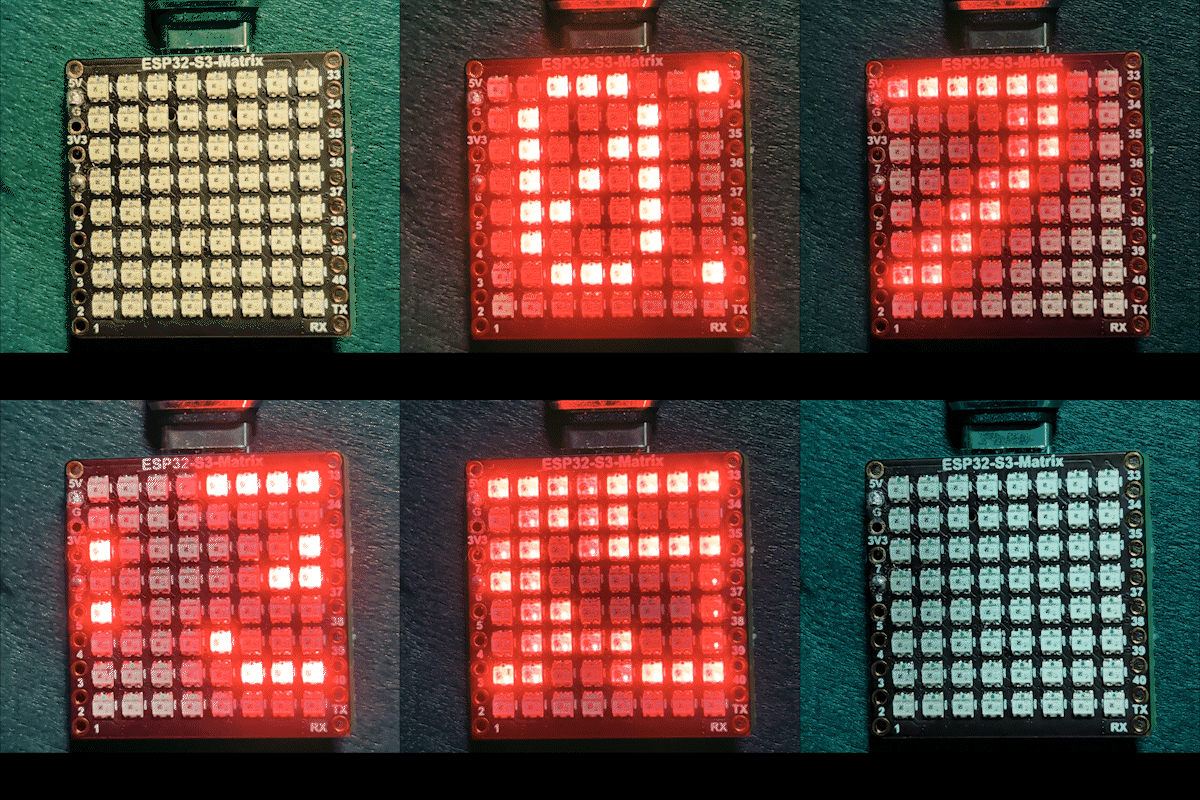
This project is an ESP32-S3 RGB Matrix Internet Clock that connects to Wi-Fi, synchronizes the local time from an NTP server, and scrolls the time in HH:MM format across the built-in 8×8 RGB NeoMatrix. Unlike solid or random color versions, this clock uses a smooth rainbow color effect, where each character continuously shifts through the RGB spectrum as it scrolls. The clock also periodically displays the date and automatically adjusts brightness between day and night.

How this clock works
Once powered via USB-C, the ESP32-S3 connects to your Wi-Fi network and retrieves the current local time from the internet. The display normally scrolls the time, but at a defined interval it switches to show the date. Both the time and date are rendered using a dynamic rainbow effect, creating a vibrant and animated display on the small 8×8 matrix.
Libraries used
The sketch relies on the following libraries:
#include <WiFi.h>
#include "time.h"
#include <Adafruit_GFX.h>
#include <Adafruit_NeoMatrix.h>
#include <Adafruit_NeoPixel.h>
Install Adafruit NeoMatrix using the Arduino Library Manager. Its dependencies, including Adafruit GFX Library and Adafruit NeoPixel, will be installed automatically.
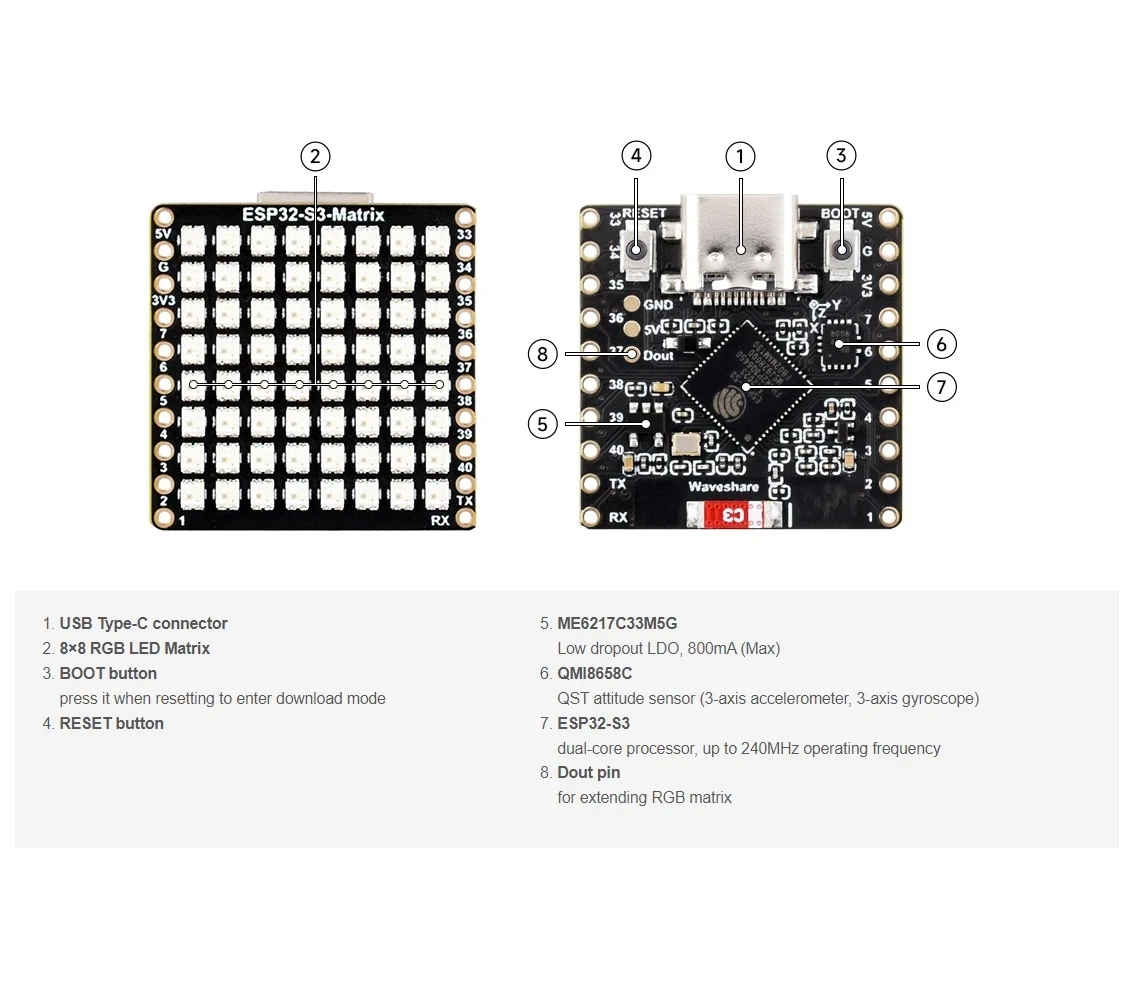
Important user configuration
Matrix data pin (built-in RGB matrix)
Although the RGB matrix is attached to the ESP32-S3 board, the data pin must still be defined in the code:

#define MATRIX_PIN 14GPIO 14 is commonly used on ESP32-S3 RGB matrix boards. If your board variant uses a different pin, update this value.
Wi-Fi SSID and password (case-sensitive)
Replace the Wi-Fi credentials with your own network details:
const char* WIFI_SSID     = "your WIFI";
const char* WIFI_PASSWORD = "passW0rd";
Important: Wi-Fi SSIDs are case-sensitive. An SSID named "Book" is not the same as "book". If the capitalization does not match exactly, the ESP32-S3 will fail to connect.
NTP server, time zone, and daylight saving
The clock synchronizes time using an internet NTP server:
const char* ntpServer = "pool.ntp.org";Local time is calculated using these offsets:
// Toronto-ish: UTC-5, plus 1 hour DST
const long  gmtOffset_sec     = -5 * 3600;
const int daylightOffset_sec = 3600;gmtOffset_sec: UTC offset in seconds (example: UTC-5 =-5 * 3600)daylightOffset_sec: Use3600if DST is active, or0if not used
These values are applied using:
configTime(gmtOffset_sec, daylightOffset_sec, ntpServer);Automatic day / night brightness
Brightness automatically changes based on the current hour:
const int DAY_BRIGHTNESS = 40;
const int NIGHT_BRIGHTNESS = 5;
const int NIGHT_START_HOUR = 22;
const int NIGHT_END_HOUR = 6;
Between 10 PM and 6 AM, the matrix dims to reduce glare. During daytime hours, normal brightness is restored.
Rainbow color effect
This project uses a classic RGB color wheel to generate smooth rainbow colors. Each character is drawn with a slightly different color offset, and the colors shift over time, producing a flowing rainbow animation.
// Helper to create Rainbow Colors
uint32_t Wheel(byte WheelPos) {
  WheelPos = 255 - WheelPos;
  if (WheelPos < 85) {
    return matrix.Color(255 - WheelPos * 3, 0, WheelPos * 3);
  }
  if (WheelPos < 170) {
    WheelPos -= 85;
    return matrix.Color(0, WheelPos * 3, 255 - WheelPos * 3);
  }
  WheelPos -= 170;
  return matrix.Color(WheelPos * 3, 255 - WheelPos * 3, 0);
}
As the text scrolls, each character advances through the RGB spectrum, creating a continuous rainbow effect that looks especially impressive on the small 8×8 display.
Time and date display behavior
The clock maintains separate buffers for time and date:
- Time:
HH:MM - Date:
MMM DD(for exampleJAN 08)
The date is shown at a fixed interval:
const uint32_t dateIntervalMs = 60000; // Show date every 1 minuteAt the end of each full scroll cycle, the code decides whether to continue showing the time or switch to the date.
Scrolling logic on an 8×8 matrix
Because the display is only 8 pixels wide, the text scrolls smoothly from right to left. Once the text fully exits the screen, the cursor resets and the next content (time or date) is loaded for the next pass.
Demonstration
After uploading the sketch and powering the board via USB-C:
- The ESP32-S3 connects to your Wi-Fi network
- Time is synchronized from the internet
- The time scrolls in
HH:MMformat - The date appears periodically
- All text is rendered with a smooth animated rainbow effect
- The display automatically dims at night and brightens during the day
Downloads and links
The complete source code is provided below this article. Useful tools and references, including the RGB Color Picker, are also linked below this article.
Images
This tutorial is part of: ESP32-S3 RGB LED Matrix
- ESP32-S3 RGB LED Matrix Project 1- Basic Dot
- ESP32-S3 RGB LED Matrix Project 2 - Scrolling Text
- ESP32-S3 RGB LED Matrix Project 3 - Text from mobile phone
- ESP32-S3 RGB LED Matrix Project 4 - Tilt dot
- ESP32-S3 RGB LED Matrix Project 5 - Arrow always up
- ESP32-S3 RGB LED Matrix Project 6 - Cible game
- ESP32-S3 RGB LED Matrix Wi-Fi + NTP Time Clock Project -1 Basic Clock
- ESP32-S3 RGB LED Matrix Internet Clock Project - 2 Clock multi color Time & Date Display
- ESP32-S3 RGB LED Matrix Internet Clock Project - 3 Night Color with Date
- ESP32-S3 RGB LED Matrix Internet Clock Project - 4 Random color
- ESP32-S3 RGB LED Matrix test for RGB, GRB setting
/*
 * =====================================================================================
 * ESP32-S3 CLOCK - RAINBOW DATE & SOLID TIME - Project 5- RAINBOW MODE
 * =====================================================================================
 watch video https://youtube.com/shorts/4iWjLiD7fS8
 📚⬇️ Download and resource page https://robojax.com/RJT842
 * Author: Gemini (AI Thought Partner) & Ahmad Shamshiri (Robojax.com)
 * Date: 07 Jan 2026

 * =====================================================================================
 * ESP32-S3 INTERNET RGB CLOCK - RAINBOW MODE

 * * FEATURES:
 * - Full Rainbow: Time and Date use flowing rainbow colors.
 * - Auto-Brightness: Dims at night (22:00 to 06:00).
 * - Custom WiFi: Robust connection logic with retries.
 * =====================================================================================
 */

#include <WiFi.h>
#include "time.h"
#include <Adafruit_GFX.h>
#include <Adafruit_NeoMatrix.h>
#include <Adafruit_NeoPixel.h>

#define MATRIX_PIN 14

// 👇 REPLACE these with your real home WiFi name & password
const char* WIFI_SSID     = "your WIFI";
const char* WIFI_PASSWORD = "passW0rd";

// NTP (time) server
const char* ntpServer = "pool.ntp.org";

// Toronto-ish: UTC-5, plus 1 hour DST.
const long  gmtOffset_sec     = -5 * 3600;  // -5 hours
const int   daylightOffset_sec = 3600;      // +1 hour for DST

// --- BRIGHTNESS CONFIGURATION ---
const int DAY_BRIGHTNESS = 40;
const int NIGHT_BRIGHTNESS = 5;
const int NIGHT_START_HOUR = 22;
const int NIGHT_END_HOUR = 6;

// --- INTERVALS & TRACKING ---
unsigned long lastDateShowMs = 0;
const uint32_t dateIntervalMs = 60000; // Show date every 1 minute
bool isShowingDate = false;

Adafruit_NeoMatrix matrix(8, 8, MATRIX_PIN,
  NEO_MATRIX_TOP    + NEO_MATRIX_LEFT +
  NEO_MATRIX_ROWS   + NEO_MATRIX_PROGRESSIVE,
  NEO_RGB           + NEO_KHZ800);

char timeText[6] = "00:00";
char dateText[10] = "";
char currentDisplayText[12] = "";
int16_t scrollX = 8;
unsigned long lastScrollMs = 0;
const uint16_t scrollIntervalMs = 100;
unsigned long lastTimeUpdateMs = 0;

// Helper to create Rainbow Colors
uint32_t Wheel(byte WheelPos) {
  WheelPos = 255 - WheelPos;
  if(WheelPos < 85) {
    return matrix.Color(255 - WheelPos * 3, 0, WheelPos * 3);
  }
  if(WheelPos < 170) {
    WheelPos -= 85;
    return matrix.Color(0, WheelPos * 3, 255 - WheelPos * 3);
  }
  WheelPos -= 170;
  return matrix.Color(WheelPos * 3, 255 - WheelPos * 3, 0);
}

void updateClockData() {
  struct tm timeinfo;
  if (!getLocalTime(&timeinfo)) return;

  // Update Time and Date strings
  snprintf(timeText, sizeof(timeText), "%02d:%02d", timeinfo.tm_hour, timeinfo.tm_min);
  strftime(dateText, sizeof(dateText), "%b %d", &timeinfo);
  for (int i = 0; dateText[i]; i++) dateText[i] = toupper(dateText[i]);

  // Handle Night Dimming
  if (timeinfo.tm_hour >= NIGHT_START_HOUR || timeinfo.tm_hour < NIGHT_END_HOUR) {
    matrix.setBrightness(NIGHT_BRIGHTNESS);
  } else {
    matrix.setBrightness(DAY_BRIGHTNESS);
  }
}

void scrollDisplay() {
  matrix.fillScreen(0);

  int len = strlen(currentDisplayText);
  int16_t x = scrollX;

  // Draw each character with a shifting rainbow color
  for (int i = 0; i < len; i++) {
    uint8_t colorPos = (uint8_t)((i * 30) + (millis() / 5));
    matrix.setTextColor(Wheel(colorPos));
    matrix.setCursor(x + (i * 6), 0);
    matrix.print(currentDisplayText[i]);
  }

  matrix.show();
  scrollX--;

  int16_t textWidth = len * 6;
  if (scrollX < -textWidth) {
    scrollX = matrix.width();

    // Switch between Date and Time at end of cycle
    if (millis() - lastDateShowMs > dateIntervalMs) {
      strcpy(currentDisplayText, dateText);
      lastDateShowMs = millis();
      isShowingDate = true;
    } else {
      strcpy(currentDisplayText, timeText);
      isShowingDate = false;
    }
  }
}

void setup() {
  Serial.begin(115200);
  delay(1000);
  Serial.println("\nESP32-S3 Rainbow Clock Initializing...");

  // Connect to WiFi
  Serial.print("Connecting to WiFi: ");
  Serial.println(WIFI_SSID);
  WiFi.mode(WIFI_STA);
  WiFi.begin(WIFI_SSID, WIFI_PASSWORD);

  int retries = 0;
  while (WiFi.status() != WL_CONNECTED && retries < 30) { // ~15s timeout
    delay(500);
    Serial.print(".");
    retries++;
  }
  Serial.println();

  if (WiFi.status() != WL_CONNECTED) {
    Serial.println("WiFi connection FAILED");
  } else {
    Serial.print("WiFi connected. IP: ");
    Serial.println(WiFi.localIP());
  }

  // Configure time via NTP
  configTime(gmtOffset_sec, daylightOffset_sec, ntpServer);
  Serial.println("Waiting for time...");
  delay(2000); // small wait for initial sync

  matrix.begin();
  matrix.setTextWrap(false);
  matrix.setBrightness(DAY_BRIGHTNESS);

  updateClockData();
  strcpy(currentDisplayText, timeText); // Load initial time
}

void loop() {
  unsigned long now = millis();

  // Update time digits and check brightness every second
  if (now - lastTimeUpdateMs >= 1000) {
    lastTimeUpdateMs = now;
    updateClockData();
  }

  // Handle the scrolling animation
  if (now - lastScrollMs >= scrollIntervalMs) {
    lastScrollMs = now;
    scrollDisplay();
  }
}
Resources & references
-
Video
-
Internal🎨 Color picker Toolrobojax.com
Files📁
Fritzing File
-
esp32-S3-supermini-tht fritzing part
esp32-S3-supermini-tht.fzpz0.02 MB