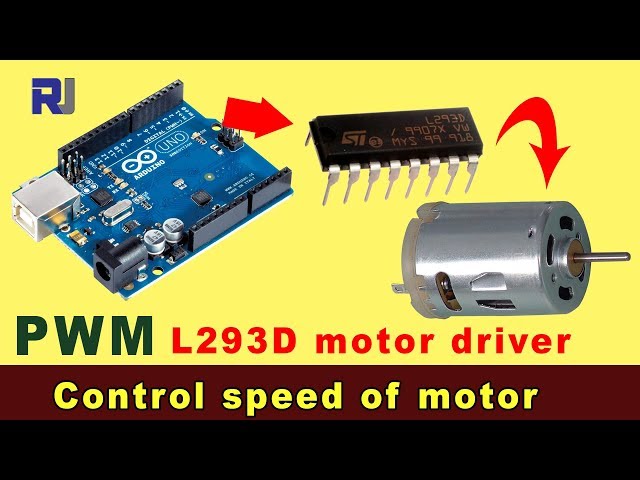
使用L293D电机驱动器和Arduino PWM控制直流电动机
该项目展示了如何使用L293D电机驱动芯片和Arduino的脉宽调制(PWM)功能来控制直流电机的速度和方向。该设置允许精确的电机控制,使其适用于各种应用。
以下是一些使用此设置的项目想法:
- 机器人技术:控制小机器人轮子的运动。
- 自动化设备:创建自动窗帘、百叶窗或小型传送带。
- 风扇控制:根据温度读数调整冷却风扇的速度。
- 太阳能追踪器:将小型太阳能电池板定位以全天跟随太阳。
硬件/组件
- Arduino Uno(或兼容板)
- L293D 电机驱动IC
- 直流电动机(针对L293D的电压和电流限制,额定电流最高至600毫安)
- 9V 电源(用于电机)
- 连接电线
- 面包板(推荐)
接线指南
L293D芯片充当Arduino与直流电机之间的接口。它允许Arduino控制电机的速度和方向。该芯片需要为电机提供单独的电源,因为Arduino无法为大多数电机提供足够的电流。(视频时间:04:04)
%%接线%%
代码解释
Arduino代码控制L293D驱动器,进而控制直流电机。该代码使用PWM调节电机速度,并通过数字信号切换方向。
以下是代码中可配置的关键参数:
#define P1A 10 // Arduino pin connected to L293D input 1A
#define P2A 11 // Arduino pin connected to L293D input 2A
#define EN12 9 // Arduino pin connected to L293D enable pin (1,2EN)

const int speedStep = 15; // Increment for speed changes
const int speedDelay = 1000; // Delay between speed steps (in milliseconds)
TheL293D()函数控制电机的方向和速度。'L' 设置电机顺时针旋转,'R' 设置电机逆时针旋转。spd参数控制速度(0-255)和en启用(1)或禁用(0)电机。(视频时间:09:24)
void L293D(char dir,int spd, int en)
{
  if(dir =='L') // Clockwise rotation
  {
    // ...
    analogWrite(P1A,spd); // Set speed using PWM
    digitalWrite(P2A,LOW);
  }else{ // Counter-clockwise rotation
    // ...
    digitalWrite(P1A,LOW);
    analogWrite(P2A,spd); // Set speed using PWM
  }
}
现场项目/演示
该视频展示了项目的运行情况,显示了电机的速度和方向变化。示波器读数可视化了控制电机的PWM信号。(视频中在11:07)
章节
- [00:00] L293D直流电机控制简介
- [00:30] 项目演示和说明
- [01:12] L293D 电机驱动器概览
- [02:08] 直流电机规格
- [02:30] L293D 数据表说明
- [04:40] 接线说明和演示
- [07:05] Arduino 代码解释
- [11:07] 项目演示和示波器读数
144-Arduino source for L293D motor driver (loop)
语言: C++
/*
 * This is the Arduino code to control the speed of a motor using an L293D DC motor driver.

Watch instructions for this video: https://youtu.be/akQoGNUzhHI

 // Written for Robojax.com video

 * Code is available at http://robojax.com/learn/arduino

 *
 // Written by Ahmad S. for Robojax.com on
// August 11, 2018 at 13:23 in Ajax, Ontario, Canada
// This code is AS IS without warranty. You may share it if you keep this note with the code.
*/
// DC motor control
#define P1A 10 // define pin 10 as P1A
#define P2A 11 // define pin 11 as P2A
#define EN12 9 // define pin 9 as the 1,2EN enable

const int speedStep =15;
const int speedDelay = 1000;// delay between speed increment

void setup() {
  // L293 Motor Control Code by Robojax.com 20180811
  Serial.begin(9600);// setup Serial Monitor to display information
  pinMode(P1A, OUTPUT);// define pin as OUTPUT for P1A
  pinMode(P2A, OUTPUT);// define pin as OUTPUT for P2A
  pinMode(EN12, OUTPUT);// define pin as OUTPUT for 1,2EN

  Serial.println("Robojax");
  Serial.println("L293D Motor Speed Control");

  // L293 Motor Control Code by Robojax.com 20180811
}

void loop() {
  // L293D Motor Control Code by Robojax.com 20180811

 for(int speed=0; speed<=255; speed +=speedStep)
 {
  L293D('L',speed, 0);//
  delay(speedDelay);// delay between each step
 }

  delay(50);// 50 millisecond delay
  // L293D Motor Control Code by Robojax.com 20180810
}//loop end


/*
 * L293D(char dir,int spd, int en)
 * dir is a character: 'L' for clockwise direction
 *  or 'R' for counter-clockwise direction
 *  en is an integer: 1 to rotate, 0 to stop
 *  spd is the speed value from 0 to 255
 */
void L293D(char dir,int spd, int en)
{
  if(dir =='L')
  {
    if(en ==0){
       Serial.println("CW Motor Stopped");
    }else{
       Serial.print("Rotating CW: ");
       Serial.println(spd);//print actual speed value
    }
    digitalWrite(EN12 ,en);// Enable 1A and 2A
    analogWrite(P1A,spd);// send PWM with spd value to P1A
    digitalWrite(P2A,LOW);// LOW signal to P2A

  }else{
    if(en ==0){
       Serial.println("CCW Motor Stopped");
    }else{
       Serial.print("Rotating CCW: ");
       Serial.println(spd);//print actual speed value
    }
    digitalWrite(EN12 ,en);// Disable 1A and 2A
    digitalWrite(P1A,LOW);// Keep this pin LOW
    analogWrite(P2A,spd);// send PWM with spd value to  P2A
  }
}//L293D end145-Source for a simple L293D motor controller using Arduino (CW, CCW, and STOP)
语言: C++
++
/*

 * This is the Arduino code to control the speed of a motor using an L293D DC motor driver.
 * This code will control the motor with different directions and speed.

Watch instructions for this video: https://youtu.be/akQoGNUzhHI

 // Written for Robojax.com video

 * Code is available at http://robojax.com/learn/arduino

 *
 // Written by Ahmad Shamshiri for Robojax.com on
// August 11, 2018 at 13:23 in Ajax, Ontario, Canada.
// This code is AS IS without warranty. You may share it if you keep this note with the code.
*/
// DC motor control
#define P1A 10 // define pin 10 as P1A
#define P2A 11 // define pin 11 as P2A
#define EN12 9 // define pin 9 as the 1,2EN enable

const int speedStep =15;
const int speedDelay = 1000;// delay between speed increment

void setup() {
  // L293 Motor Control Code by Robojax.com 20180811
  Serial.begin(9600);// setup Serial Monitor to display information
  pinMode(P1A, OUTPUT);// define pin as OUTPUT for P1A
  pinMode(P2A, OUTPUT);// define pin as OUTPUT for P2A
  pinMode(EN12, OUTPUT);// define pin as OUTPUT for 1,2EN

  Serial.println("Robojax");
  Serial.println("L293D Motor Speed Control");

  // L293 Motor Control Code by Robojax.com 20180811
}

void loop() {
  // L293D Motor Control Code by Robojax.com 20180811


  L293D('L',255, 1);// maximum speed to the LEFT
  delay(3000);// wait for 3 seconds

  L293D('L',255, 0);// stop motor
  delay(2000);// wait for 2 seconds

  L293D('L',127, 1);// half speed to the LEFT
  delay(3000);// wait for 3 seconds

  L293D('L',255, 0);// stop motor
  delay(2000);// wait for 2 seconds

  L293D('R',90, 1);// slow to the RIGHT
  delay(3000);// wait for 3 seconds

  L293D('L',255, 0);// stop motor
  delay(2000);// wait for 2 seconds

  // L293D Motor Control Code by Robojax.com 20180810
}//loop end


/*
 * L293D(char dir,int spd, int en)
 * dir is a character: 'L' for clockwise (CW) direction
 *  or 'R' for counter-clockwise (CCW) direction.
 *  en is an integer: 1 to rotate, 0 to stop.
 *  spd is the speed value from 0 to 255.
 */
void L293D(char dir,int spd, int en)
{
  if(dir =='L')
  {
    if(en ==0){
       Serial.println("CW Motor Stopped");
    }else{
       Serial.print("Rotating CW: ");
       Serial.println(spd);//print actual speed value
    }
    digitalWrite(EN12 ,en);// Enable 1A and 2A
    analogWrite(P1A,spd);// send PWM with spd value to P1A
    digitalWrite(P2A,LOW);// LOW signal to P2A

  }else{
    if(en ==0){
       Serial.println("CCW Motor Stopped");
    }else{
       Serial.print("Rotating CCW: ");
       Serial.println(spd);//print actual speed value
    }
    digitalWrite(EN12 ,en);//enable 1A and 2A
    digitalWrite(P1A,LOW);// Keep it LOW P1A
    analogWrite(P2A,spd);// send PWM with spd value to  P2A
  }
}//L293D end文件📁
没有可用的文件。