ESP32 教程 23/55 - 使用ESP32读取电位器电压 | SunFounder的ESP32物联网套件
在本教程中,我们将学习如何使用SunFounder的ESP32模块测量电位器的直流电压。该项目还将演示如何根据电位器的位置使LED渐亮渐暗。当您逆时针旋转电位器时,电压读数会降低,LED也会相应地变暗。本练习将帮助您实际理解ESP32中模数转换器(ADC)的使用。
 电位器
电位器
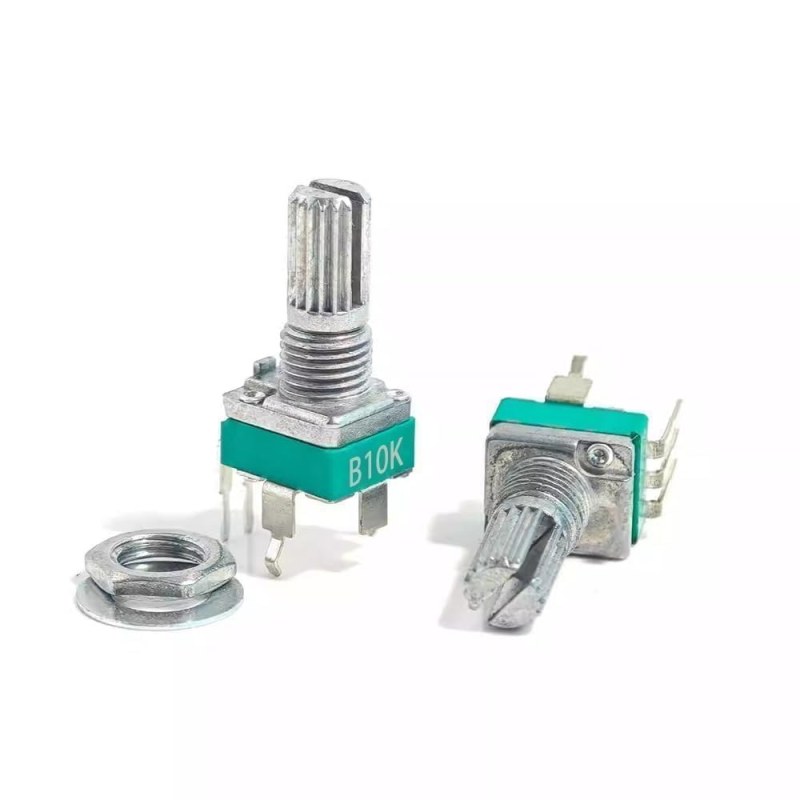 电位器或可变电阻
ESP32是一款功能强大的微控制器,内置Wi-Fi和蓝牙功能,非常适合物联网项目。在本教程中,我们将利用其模拟输入功能读取电位器的电压电平,同时根据这些读数控制LED的亮度。最终效果将是一个响应灵敏的LED,其亮度会随着您调节电位器而变化。
硬件说明
对于本项目,我们需要以下组件:
- ESP32模块:主微控制器,用于读取电位器的电压并控制LED。
- 电位器:用于调节电压的可变电阻。它有三个引脚:两个用于固定电阻,一个用于可变电阻。
- LED:一种发光二极管,其亮度将根据电位器的位置进行控制。
- 电阻:一个220欧姆的电阻,用于限制通过LED的电流。
电位器通过改变其引脚之间的电阻来工作,从而产生ESP32可以通过其ADC读取的电压。LED的亮度使用脉冲宽度调制(PWM)来控制,根据模拟读数调整输送给LED的功率。
数据手册详情
接线说明
 ESP32-23-fading-LED_pot-wiring
要连接组件,首先连接电位器。将其一个外侧引脚连接到ESP32上的3.3V电源。将另一个外侧引脚连接到地(GND)。电位器的中间引脚将连接到ESP32上的引脚35,该引脚用于读取模拟电压。
接下来,对于LED,将较长的引脚(阳极)通过一个220欧姆的电阻连接到ESP32上的引脚26。将LED较短的引脚(阴极)连接到地。确保所有连接牢固,并仔细检查LED的方向,以防止损坏。
代码示例与讲解
以下代码片段演示了如何设置ESP32以读取电位器并控制LED:
const int potPin = 35; // 电位器连接到
const int ledPin = 26; // LED连接到

// PWM设置
const int freq = 5000; // PWM频率
const int resolution = 12; // PWM分辨率(位)
在此代码段中,我们定义了电位器和LED的引脚。还设置了PWM频率和分辨率,这将决定LED的亮度级别。
接下来,我们将初始化设置:
void setup() {
  Serial.begin(115200);

  // 配置PWM
  ledcAttach(ledPin, freq, resolution);
}
在设置函数中,我们初始化串行通信并为LED配置PWM设置。此设置在程序启动时运行一次。
最后,循环函数持续读取电位器的值并调整LED的亮度:
void loop() {
  int potValue = analogRead(potPin); // 读取电位器的值
  uint32_t voltage_mV = analogReadMilliVolts(potPin); // 以毫伏为单位读取电压

  ledcWrite(ledPin, potValue);
  // 为简洁起见,省略串行输出
}
在循环中,我们读取电位器的模拟值并将其转换为控制LED的亮度。串行输出显示电位器的值和电压,有助于验证读数。
演示/预期效果
当电路正确连接并上传代码后,旋转电位器应导致串行监视器中显示的电压读数发生相应变化。LED应随着电位器的调节而平滑地渐亮和渐暗。如果LED没有按预期响应,请检查接线连接,并确保电位器正常工作(视频中11:30处)。
视频时间戳
- 00:00 开始
- 2:02 什么是电位器
- 4:15 测量电位器的电阻
- 6:59 文档页面
- 8:56 接线说明
- 12:28 Arduino代码讲解
- 15:58 在Arduino IDE中选择ESP32开发板和COM端口
- 17:40 使用ESP32读取电位器值的演示
图像
Potentiometer or variable resistor

ESP32-23-fading-LED_pot-schematic
ESP32-23-fading-LED_pot-wiring
potentiometer
Potentiometer or variable resistor
ESP32-23-fading-LED_pot-schematic
ESP32-23-fading-LED_pot-wiring
822-ESP32 Tutorial 23/55- Arduino code for fading LED
语言: C++
const int potPin = 35; // 连接到的电位器
const int ledPin = 26; // 连接到LED

 // PWM设置
const int freq = 5000; // PWM频率
const int resolution = 12; // PWM 分辨率(位)

void setup() {
  Serial.begin(115200);

 // 配置 PWM
  ledcAttach(ledPin, freq, resolution);
}

void loop() {

  int potValue = analogRead(potPin); // 读取电位器的值
  uint32_t voltage_mV = analogReadMilliVolts(potPin); // 以毫伏为单位读取电压

  ledcWrite(ledPin, potValue);

  Serial.print("Potentiometer Value: ");
  Serial.print(potValue);
  Serial.print(", Voltage: ");
  Serial.print(voltage_mV / 1000.0); // 将毫伏转换为伏特
  Serial.println(" V");

  delay(100);
}