
Lesson 53: Using L298N Motor Driver for DC Motor Control | Arduino Step By Step Course
Lesson 53: Using L298N Motor Driver for DC Motor Control | Arduino Step By Step Course
Please select other codes for this lecture from the links below.
Related or required files and link to this lesson
- Robojax L298N Library (zip file)
- Purchase L298N module from eBay (Affiliated)
- Purchase L298N relay from Amazon USA (Affiliated)
- Purchase Dual channel relay from Amazon Canada(Affiliated)
- Purchase L298N module from AliExpress (Affiliated)
- L298N Datasheet (pdf)
Part 5: DC Motors
In this lesson we learn how to contorl a DC motor using L298N Motor driver module and Arduino .
Please watch the video for full details.
This code controls two L298N Modules and as a result, we can control 4 motors. We have Module A (moduleA) and Module B (moduleB) and each module can control 2 motors motor1 and motor2.
- 00:00 Introduction
- 09:13 Wiring Explained
- 13;24 Code Explained
- 24:12 Wiring for parallel connection
- 27:38 Demonstration of parallel driver
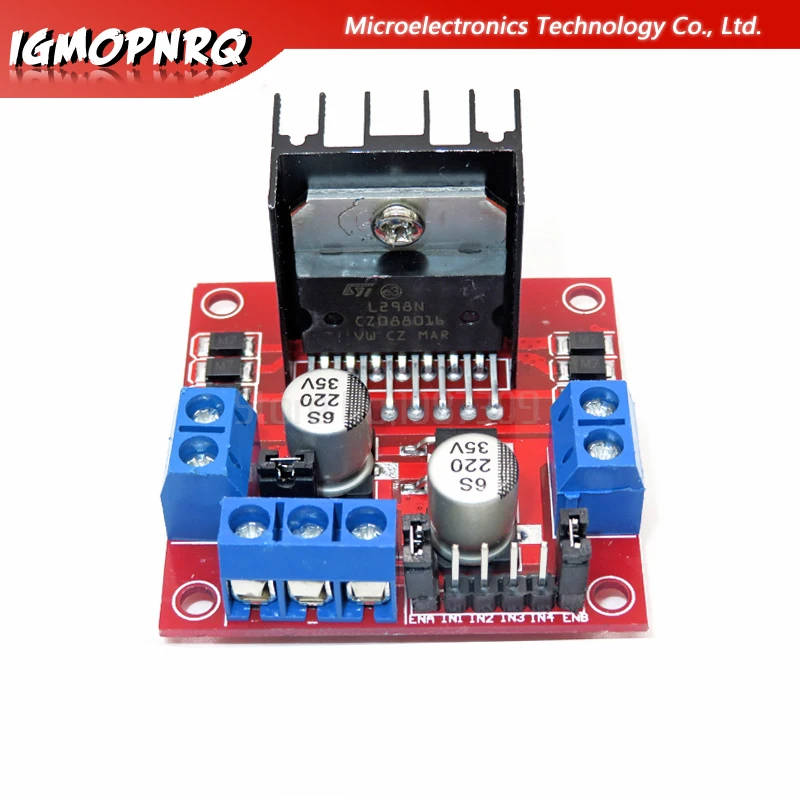 AliExpress.com Product - 1pcs L298N MOTOR DRIVER module New Dual H Bridge DC Stepper Motor Drive Controller Board Module
  /*
Lesson 53: Using L298N Motor Driver for DC Motor Control
This code is to use Two L298N Modules to control 4 motors
Watch full detailed Video https://youtu.be/fqBLIrwq2YA

 * Library Example for L298N Module to control DC motors
 *
 * This code is to control single motor_front. For two motor control, please open L298N_DC_2_Motors
 P
 *
 * Written by Ahmad Shamshiri on October 01, 2019 at 21:26
 * in Ajax, Ontario, Canada. www.robojax.com
 *
 *

 *

If you found this tutorial helpful, please support me so I can continue creating
content like this. You can support me on Patreon http://robojax.com/L/?id=63

or make donation using PayPal https://bit.ly/donate-robojax

 *  * This code is "AS IS" without warranty or liability. Free to be used as long as you keep this note intact.*
 * This code has been download from Robojax.com
    This program is free software: you can redistribute it and/or modify
    it under the terms of the GNU General Public License as published by
    the Free Software Foundation, either version 3 of the License, or
    (at your option) any later version.

    This program is distributed in the hope that it will be useful,
    but WITHOUT ANY WARRANTY; without even the implied warranty of
    MERCHANTABILITY or FITNESS FOR A PARTICULAR PURPOSE.  See the
    GNU General Public License for more details.

    You should have received a copy of the GNU General Public License
    along with this program.  If not, see <https://www.gnu.org/licenses/>.
 */

// motor 1 settings for module A
#define IN1_A 2
#define IN2_A 4
#define ENA_A 3 // this pin must be PWM enabled pin

// motor 2 settings for module A
#define IN3_A 7
#define IN4_A 8
#define ENB_A 9 // this pin must be PWM enabled pin

// motor 3 settings for module B
#define IN1_B 6
#define IN2_B 10
#define ENA_B 5 // this pin must be PWM enabled pin

// motor 4 settings for module B
#define IN3_B 12
#define IN4_B 13
#define ENB_B 11 // this pin must be PWM enabled pin

const int CCW = 2; // do not change
const int CW  = 1; // do not change

#define motor1 1 // do not change as this is used by both ModuleA and moduleB
#define motor2 2 // do not change as this is used by both ModuleA and moduleB


// use the line to control module A (motor 1 and motor 2)
Robojax_L298N_DC_motor moduleA(IN1_A, IN2_A, ENA_A, IN2_A, IN3_A, ENB_A, true);

// use the line to contorl module B (motor 3 and mootor 4)
Robojax_L298N_DC_motor moduleB(IN1_B, IN2_B, ENA_B, IN2_B, IN3_B, ENB_B, true);

void setup() {
  Serial.begin(115200);
  moduleA.begin();
  moduleB.begin();
  //L298N DC Motor by Robojax.com

}

void loop() {

  moduleA.demo(1);
  moduleA.demo(2);
  moduleA.rotate(motor1, 60, CW);//run motor1 of moduleA at 60% speed in CW direction
  moduleB.rotate(motor2, 60, CCW);//run motor2 of moduleB at 60% speed in CCW direction
  delay(3000);

  moduleA.brake(1);
  moduleB.brake(2);
  delay(2000);


  moduleA.rotate(motor1, 100, CW);//run motor1 of module A at 60% speed in CW direction
  moduleA.rotate(motor2, 100, CCW);//run motor2 of module A at 60% speed in CCW direction

  moduleB.rotate(motor1, 100, CW);//run motor1 of module A at 60% speed in CW direction
  moduleB.rotate(motor2, 100, CCW);//run motor2 of module A at 60% speed in CCW direction

  delay(3000);

  moduleA.brake(1);
  moduleA.brake(2);

  moduleB.brake(1);
  moduleB.brake(2);
  delay(2000);

  for(int i=0; i<=100; i++)
  {
    moduleA.rotate(motor1, i, CW);// turn motor1 with i% speed in CW direction (whatever is i)
    delay(100);
  }
  delay(2000);

  moduleA.brake(1);
  moduleA.brake(2);
  delay(2000);

  moduleA.rotate(motor1, 70, CCW);//run motor1 at 70% speed in CCW direction
  moduleA.rotate(motor2, 5, CW);//run motor2 at 50% speed in CW direction
  delay(4000);

  moduleA.brake(3);
  delay(2000);

}