میں نے اس $40 ESP32 بورڈ پر ایک سرکٹ بنایا اور AI نے اس کی وضاحت کی
اپنی انگلی سے سرکٹ بنائیں اور AI اس کی وضاحت کرے
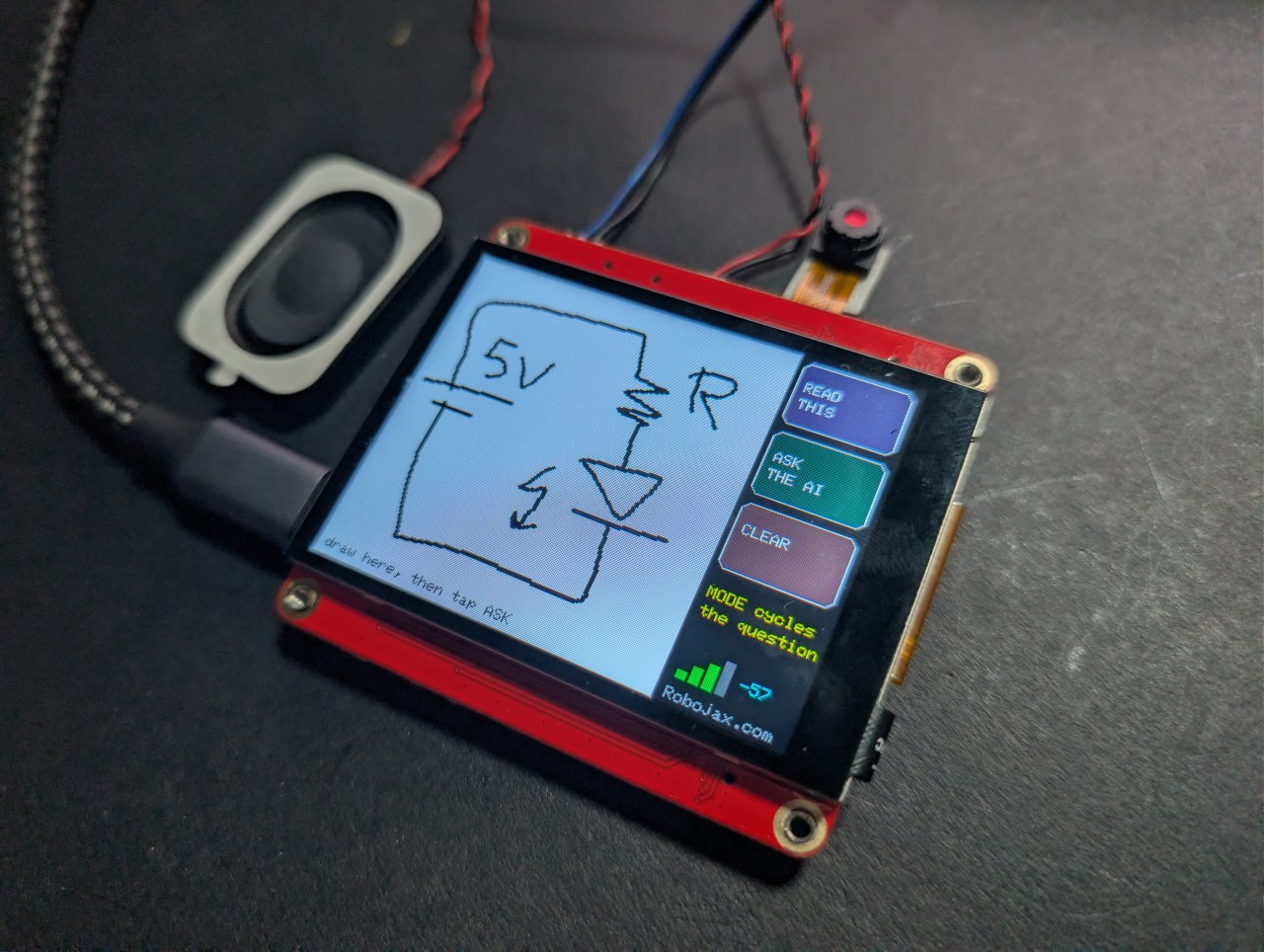
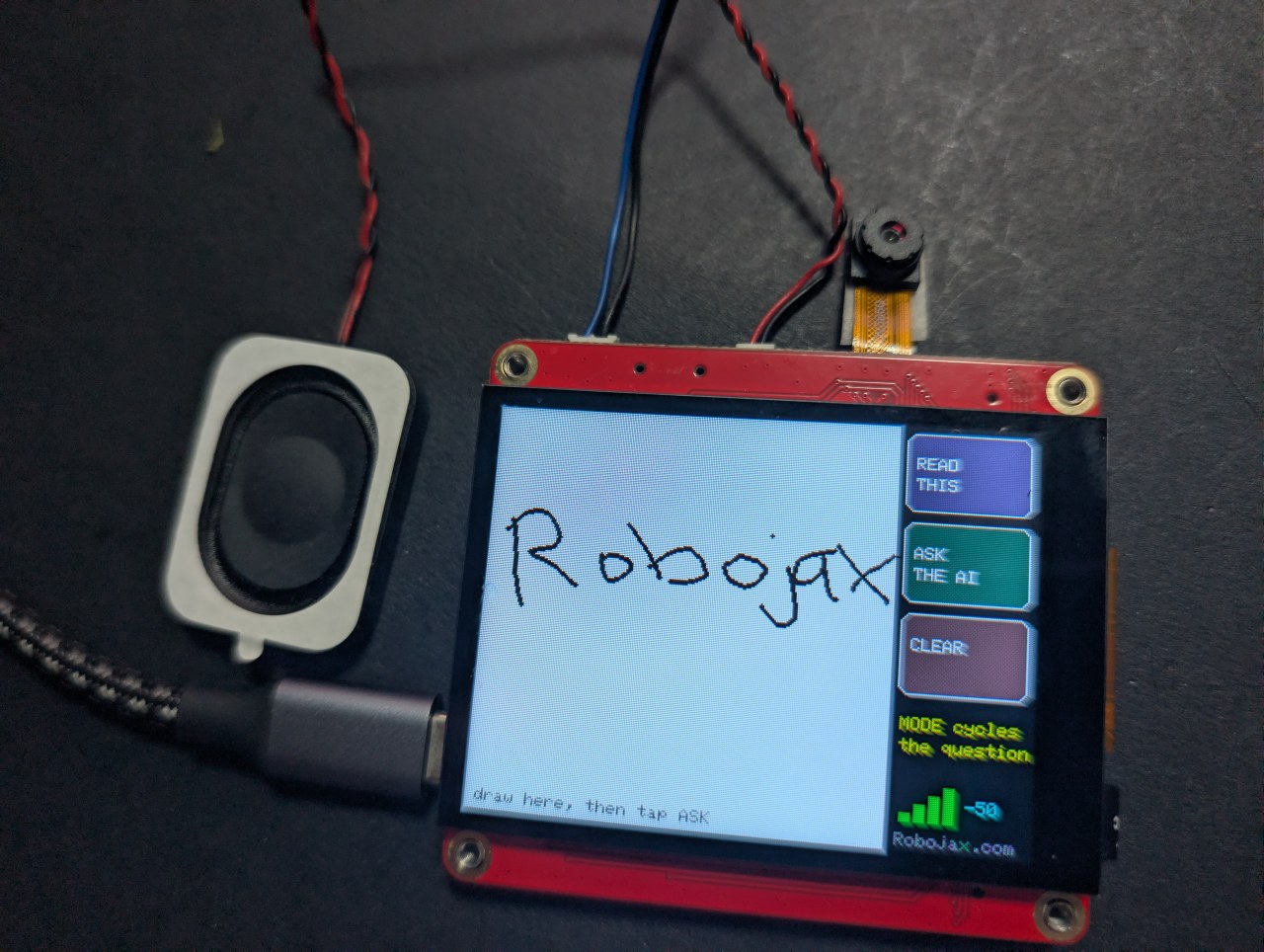
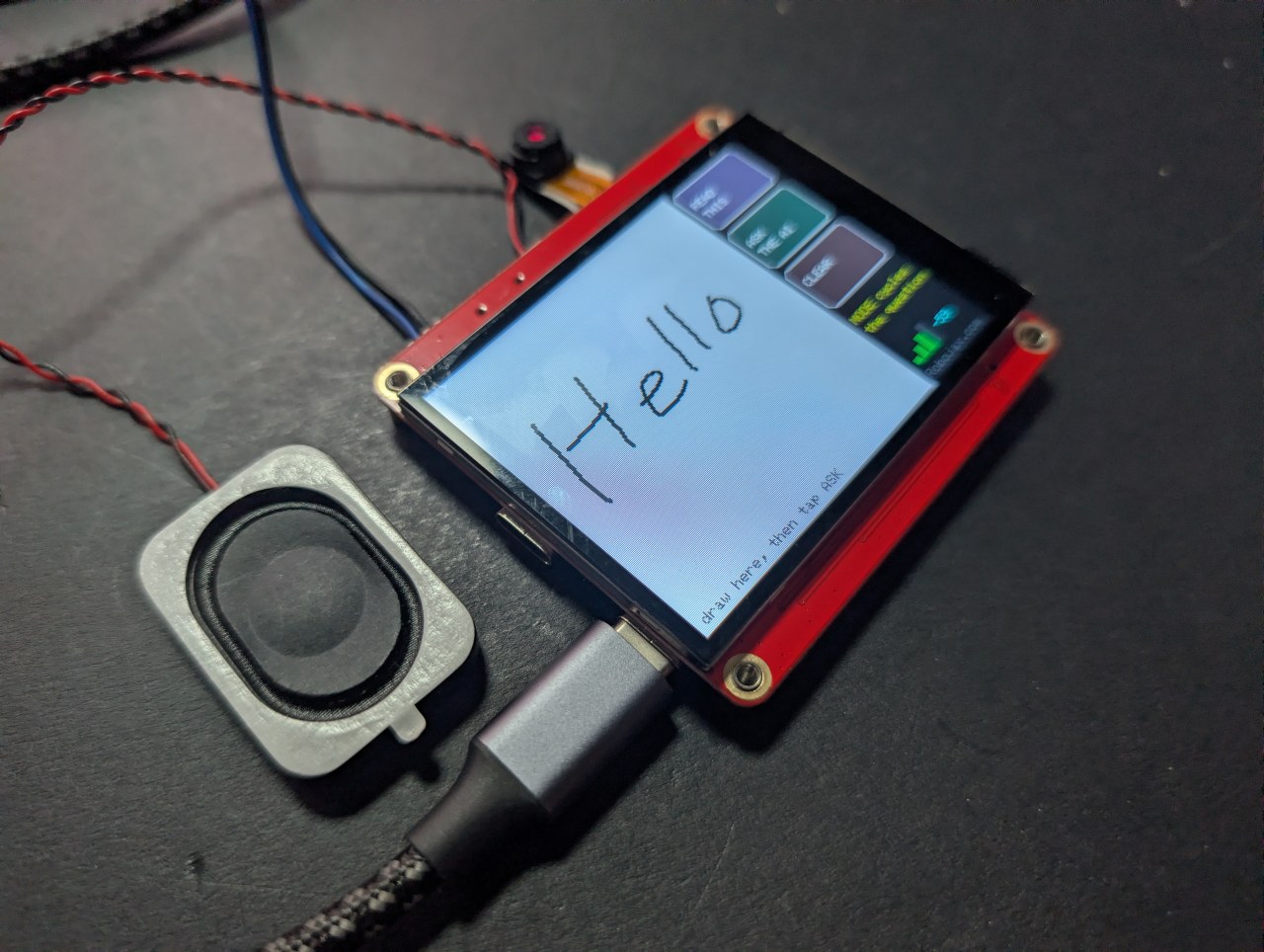
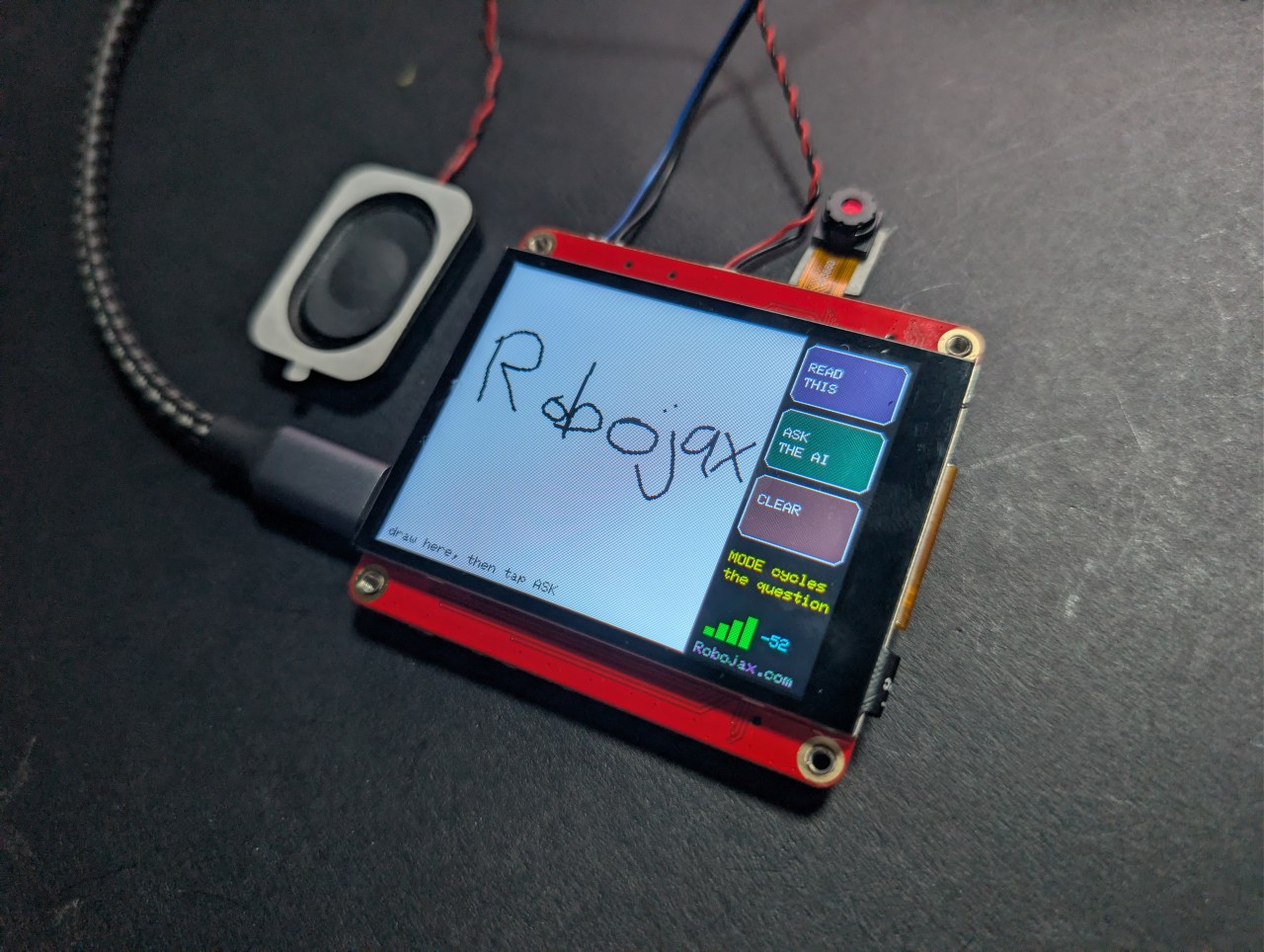
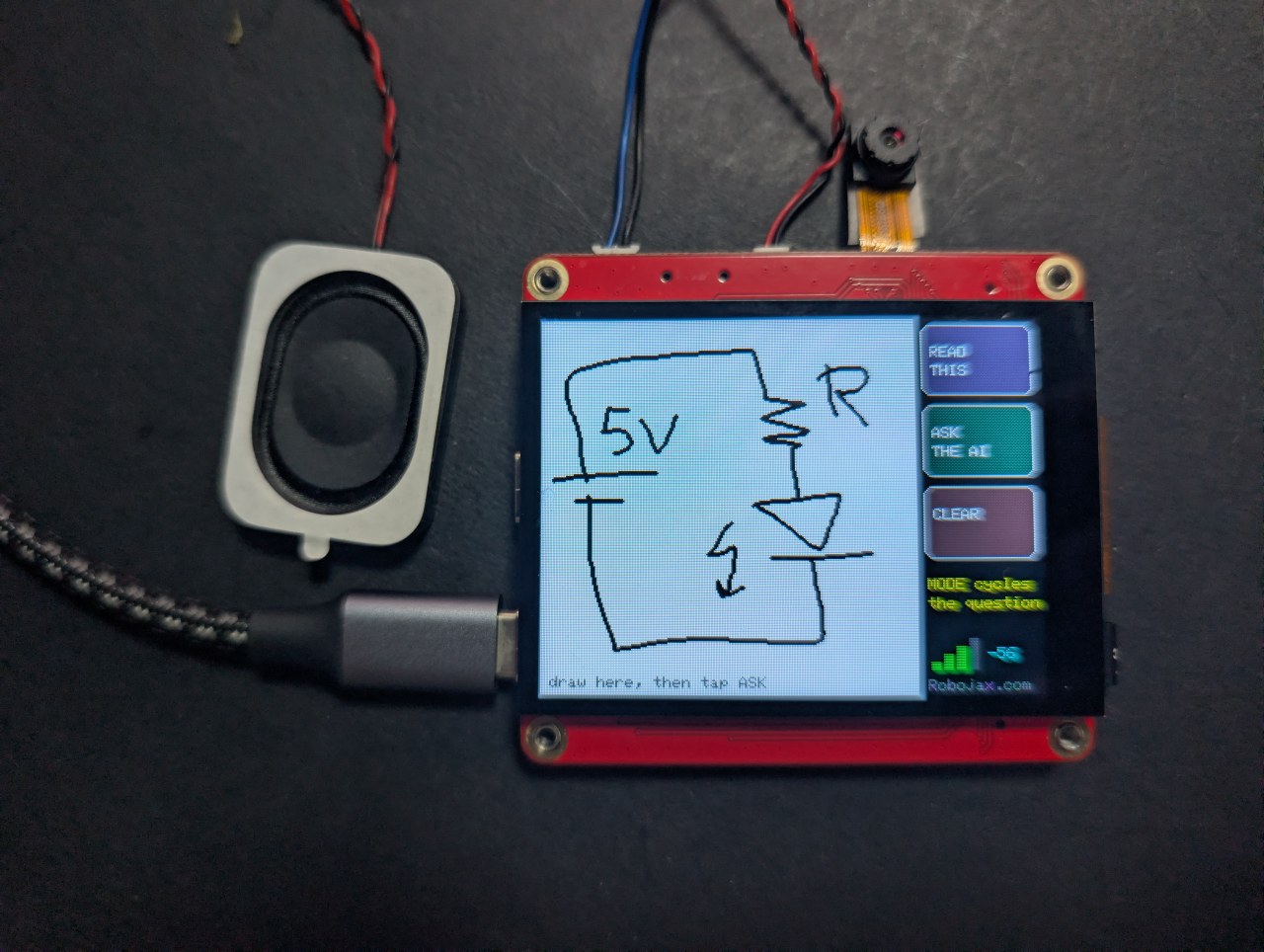
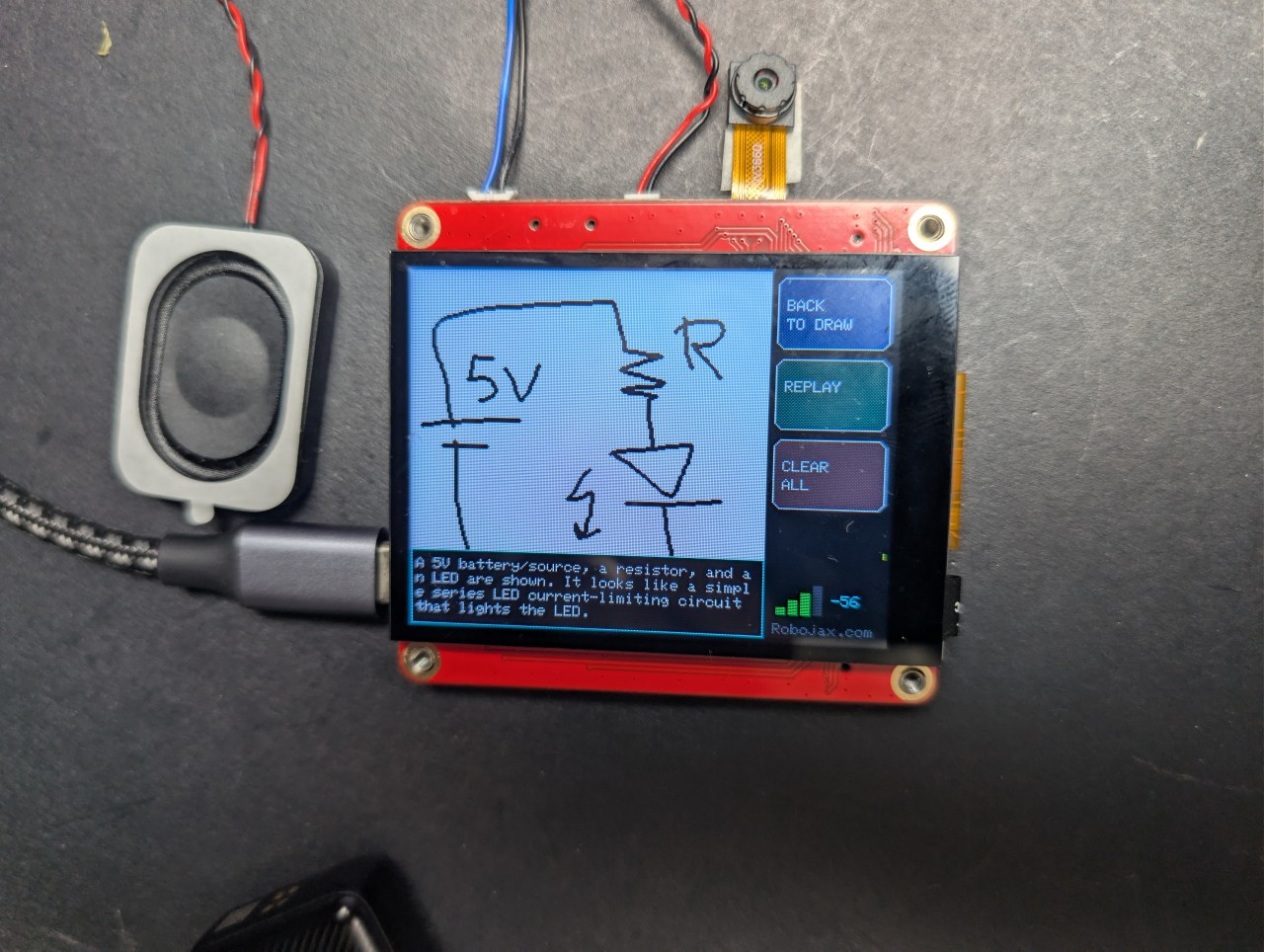
اپنی انگلی سے ٹچ اسکرین پر ڈرائنگ یا تحریر کریں، ASK پر تھپتھپائیں، اور AI آپ کو بتائے گا کہ آپ نے کیا بنایا ہے - اسکرین پر اور آواز سے۔ تین طریقے: شکل کا نام بتائیں، ہینڈ رائٹنگ پڑھیں، یا ہاتھ سے بنائے گئے سرکٹ کی وضاحت کریں۔
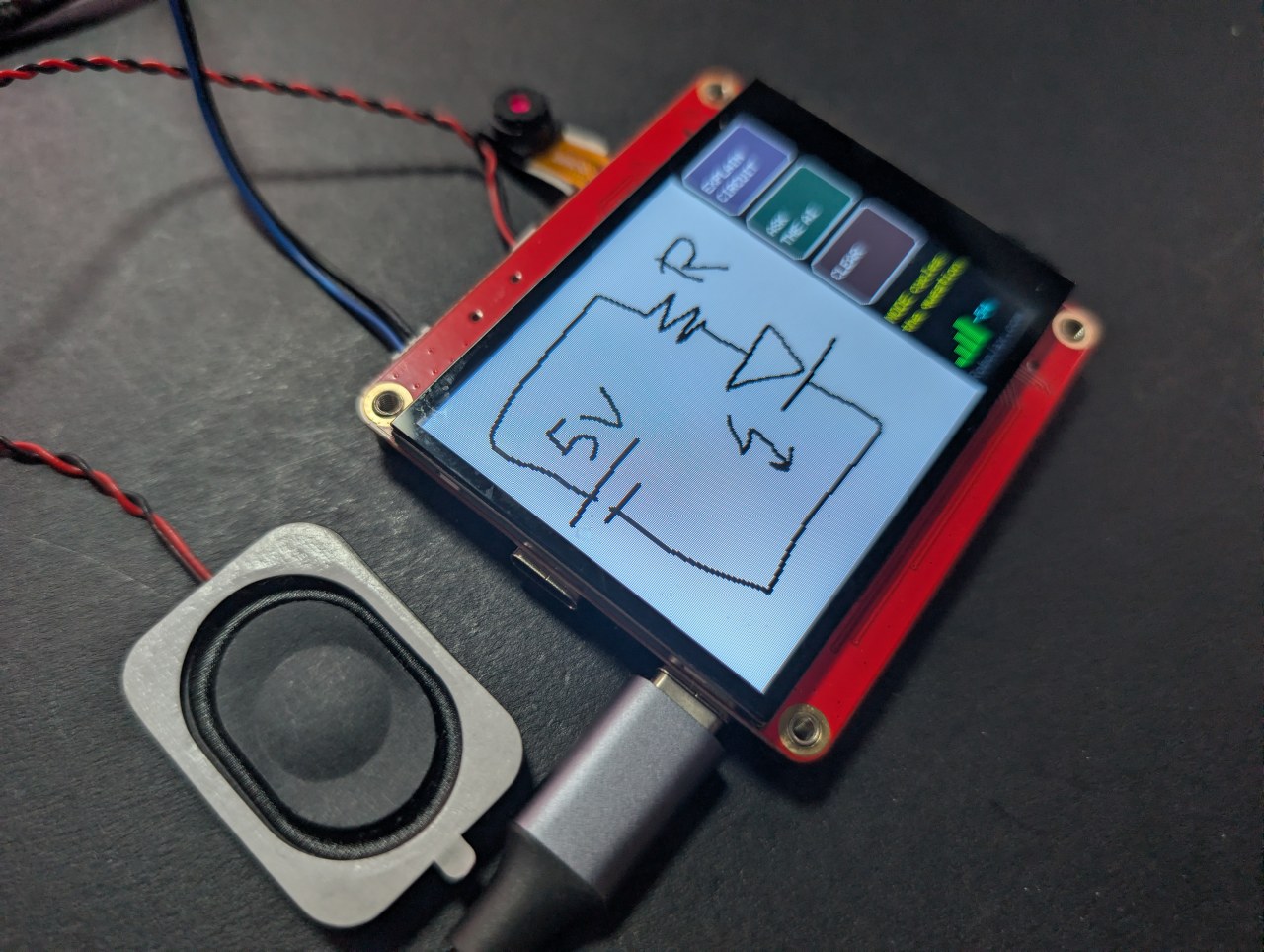
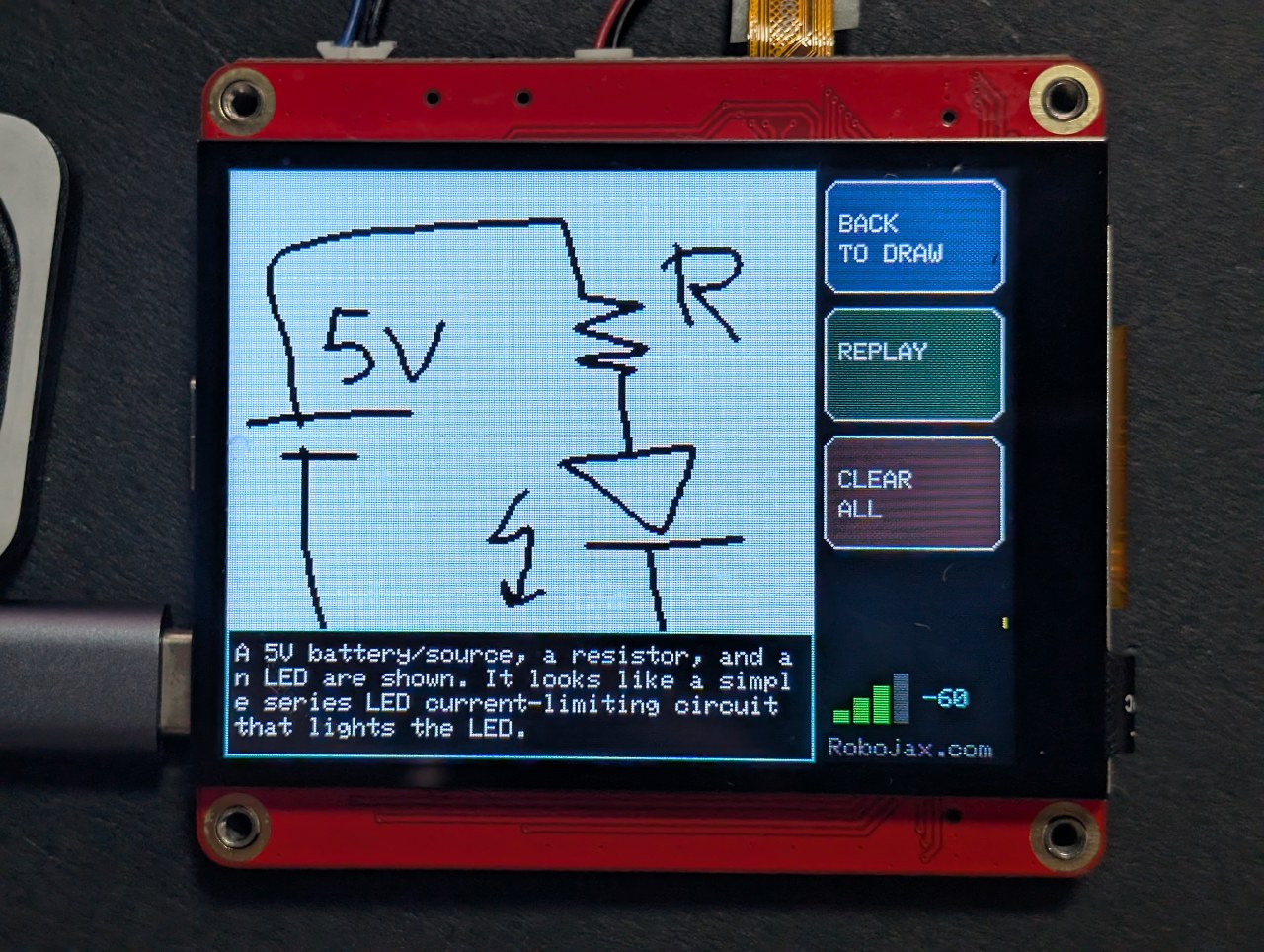
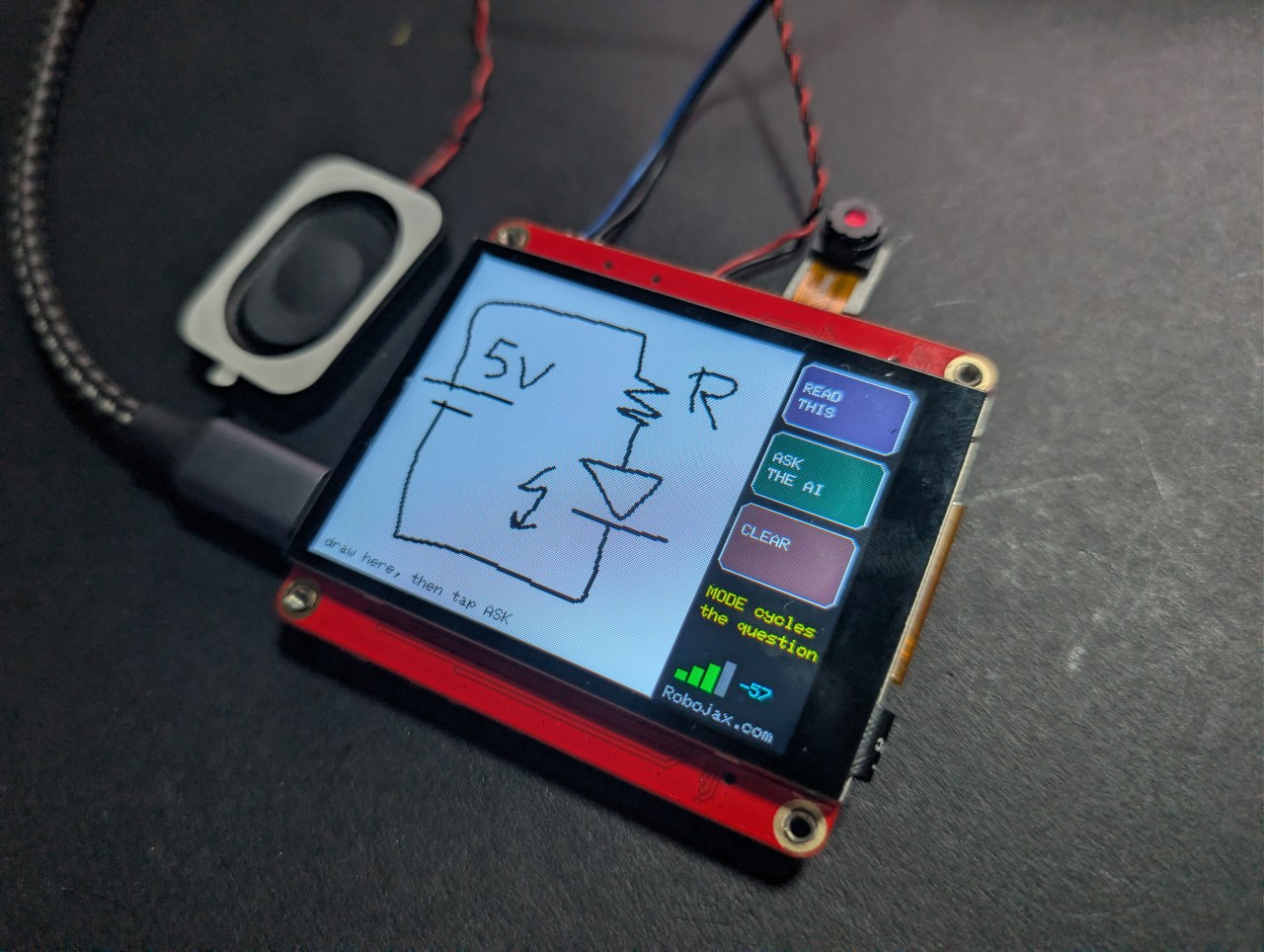
آخری طریقہ سب سے دلچسپ ہے۔ بیٹری، ریزسٹر اور ایل ای ڈی بنائیں، اور بورڈ اجزاء کے نام بتائے گا اور یہ بھی کہ سرکٹ کیا کرتا ہے۔
Robojax_Makerfab درج کریں۔ اسے استعمال کرنے میں آپ کا کچھ خرچ نہیں ہوتا، اور یہ یہاں کے مفت کوڈ اور ٹیوٹوریلز کی حمایت کرتا ہے۔وہ مسئلہ جسے اس پروجیکٹ کو حل کرنا تھا
آپ اس ڈسپلے سے SPI کے ذریعے پکسلز واپس نہیں پڑھ سکتے، اور گرافکس لائبریری عام طور پر میموری میں کوئی کاپی کیے بغیر براہ راست پینل پر ڈرا کرتی ہے - لہذا کہیں بھیجنے کے لیے کوئی اسکرین شاٹ نہیں ہوتا۔ حل یہ ہے کہ پینل پر براہ راست کبھی ڈرا نہ کریں۔ یہ اسکیچ Arduino_Canvas میں ڈرا کرتا ہے، جو PSRAM میں مکمل فریم بفر رکھتا ہے۔ وہ بفر ہی تصویر ہے، لہذا fmt2jpg() اسے براہ راست JPEG میں تبدیل کر دیتا ہے۔
سیاہی سفید پر سیاہ کیوں ہے
ویژن ماڈل ہلکے پس منظر پر گہرے نشانات کو الٹ کے مقابلے میں کہیں زیادہ قابل اعتماد طریقے سے پڑھتے ہیں، اور یہ کیمرے پر کاغذ جیسا لگتا ہے۔ بٹن پینل پر ڈرا کیے جاتے ہیں نہ کہ کینوس میں، لہذا وہ کبھی بھی اس تصویر کا حصہ نہیں ہوتے جو AI دیکھتا ہے - اسے صاف سفید میدان پر صرف آپ کی ڈرائنگ ملتی ہے۔
اسٹروکس کو اسٹروکس جیسا بنانا
ڈرائنگ کو ڈاٹ میٹرکس کے بجائے قلم جیسا محسوس کرنے کے لیے دو چیزیں درست ہونی تھیں:
- کینوس ہر ٹچ نمونے پر اسکرین پر نہیں بھیجا جاتا - یہ ہر بار SPI پر 115 KB دھکیلتا ہے اور سب کچھ سست کر دیتا ہے۔ ہر اسٹروک کینوس میں ڈرا کیا جاتا ہے اور پینل پر الگ سے پینٹ کیا جاتا ہے، جس کی لاگت تقریباً کچھ نہیں ہوتی۔
- ایک اسٹروک صرف اس وقت ختم ہوتا ہے جب پینل تقریباً 70 ملی سیکنڈ تک خاموش رہا ہو۔ ٹچ کنٹرولر ہر پول پر پوائنٹ واپس نہیں کرتا، اور ہر خالی پول کو اٹھی ہوئی انگلی سمجھنا لائن کو منقطع ڈاٹس میں توڑ دیتا ہے۔
تین موڈز، ایک ڈرائنگ
آپ کی ڈرائنگ جواب کے نیچے محفوظ رہتی ہے، لہذا آپ BACK TO DRAW پر ٹیپ کر سکتے ہیں، موڈ تبدیل کر سکتے ہیں، اور اسی اسکیچ کے بارے میں ایک مختلف سوال پوچھ سکتے ہیں۔ بطور تصویر یہ لکیریں اور شکلیں ہیں؛ انجینئر کے طور پر پوچھے جانے پر، یہ ایک سرکٹ بن جاتا ہے۔
اچھے نتائج کے لیے تجاویز
- ایک سستا کیپسیٹو اسٹائلس انگلی کے مقابلے میں کہیں بہتر کام کرتا ہے۔
- بڑا ڈرا کریں - کینوس 240×240 ہے، لہذا باریک تفصیل نہیں، بلکہ چند بڑے عناصر۔
- پام ریجیکشن نہیں ہے۔ اپنا ہاتھ شیشے سے دور رکھیں۔
MaTouch AI ESP32-S3 2.8" بورڈ کے بارے میں
اس صفحے کا ہر پروجیکٹ Makerfabs کے MaTouch AI ESP32-S3 2.8" TFT ST7789V پر چلتا ہے۔ یہ ایک آل ان ون بورڈ ہے: ایک رنگین ٹچ اسکرین، ایک 3 میگاپکسل کیمرہ، دو مائیکروفون اور ایک حقیقی اسپیکر ایمپلیفائر، سب ایک ESP32-S3 کے ذریعے 8 MB PSRAM کے ساتھ چلتے ہیں۔ یہ مجموعہ ہی ان AI پروجیکٹس کو ایک ہی بورڈ پر ممکن بناتا ہے جس میں کچھ اور منسلک نہ ہو۔
8 MB PSRAM یہاں کسی بھی دوسرے نمبر سے زیادہ اہم ہے۔ یہ بورڈ کو ایک ہی وقت میں کیمرہ فریم، چند سیکنڈ کی ریکارڈ شدہ آڈیو، یا بیس64-انکوڈڈ تصویر میموری میں رکھنے دیتا ہے - ان میں سے کوئی بھی ESP32 کی عام RAM میں فٹ نہیں ہوتا۔
مینوفیکچرر دستاویزات: Makerfabs وکی پیج۔
اہم خصوصیات
- پروسیسر: ESP32-S3، ڈوئل کور 240 MHz، WiFi 2.4 GHz + Bluetooth 5.0
- میموری: 16 MB فلیش، 8 MB PSRAM (یہاں تقریباً ہر پروجیکٹ کے لیے ضروری)
- ڈسپلے: 2.8" IPS، 320×240، ST7789V ڈرائیور، SPI
- ٹچ: GT911 کیپسیٹو، ایک ساتھ 5 انگلیاں ٹریک کرتا ہے
- کیمرہ: OV3660، 3 میگاپکسل، 2048×1536 تک
- مائیکروفون: دو INMP441 I2S ڈیجیٹل مائکس (ایک حقیقی سٹیریو جوڑا)
- اسپیکر: MAX98357A کلاس-D ایمپلیفائر، 4 Ω پر 3.2 W
- اسٹوریج: microSD کارڈ سلاٹ (SPI موڈ)
- پاور: USB-C، JST بیٹری کنیکٹر، TP4056 چارجر، پاور سوئچ
- بورڈ پر بھی: WS2812B RGB LED، PCF8563T بیٹری بیکڈ ریئل ٹائم کلاک، اور ایک MAX17048 بیٹری فیول گیج جو سرکاری خصوصیات میں درج نہیں ہے
USB CDC On Boot کو Disabled پر سیٹ کریں۔ غلط پورٹ استعمال کریں تو آڈیو خراب ہوگی یا اپ لوڈ ناکام ہوگا۔اسے بیٹری سے پاور کر رہے ہیں؟ دو USB-C ساکٹ، TP4056 چارجر اور پاور سوئچ مکمل طور پر، اسکیمیٹک کے ساتھ، بورڈ ٹیسٹ آرٹیکل میں بیان کیے گئے ہیں — بشمول کون سا ساکٹ چارج کرتا ہے اور سوئچ آن یا آف ہونا چاہیے۔
Arduino IDE سیٹنگز
یہ سیٹنگز اہم ہیں۔ لوگ اس بورڈ کے ساتھ زیادہ تر مسائل ان میں سے کسی ایک کے غلط ہونے کی وجہ سے رپورٹ کرتے ہیں، اور وہ کور ورژن تبدیل کرنے پر ری سیٹ ہو جاتی ہیں، لہذا کسی بھی تبدیلی کے بعد انہیں دوبارہ چیک کریں۔
| سیٹنگ | ویلیو |
|---|---|
| بورڈ | ESP32S3 Dev Module |
| ESP32 کور ورژن | 2.0.17 |
| PSRAM | OPI PSRAM |
| فلیش سائز | 16MB (128Mb) |
| پارٹیشن اسکیم | 16M Flash (3MB APP/9.9MB FATFS) |
| USB CDC On Boot | Disabled |
| اپ لوڈ اسپیڈ | 921600 |
| اپ لوڈ سے پہلے تمام فلیش مٹائیں | Disabled |
| پورٹ | CH340K USB-C پورٹ |
مطلوبہ لائبریریاں
اس پروجیکٹ کو نیچے دیے گئے ٹیبل کی ہر لائبریری کی ضرورت ہے - اس سے زیادہ کچھ نہیں، کم کچھ نہیں۔ زیادہ تر Arduino IDE میں Tools → Manage Libraries سے براہ راست انسٹال ہوتی ہیں، لیکن GFX Library for Arduino کو ZIP فائل سے انسٹال کرنا ہوتا ہے۔ ورژن نمبر اہم ہیں، لہذا براہ کرم بالکل وہی استعمال کریں جو درج ہیں۔
| لائبریری | ورژن | مصنف | انسٹال کہاں سے |
|---|---|---|---|
| GFX Library for Arduino | 1.5.6 | moononournation | ZIP فائل - نیچے دیکھیں |
| bb_captouch | 1.3.1 | Larry Bank | لائبریری مینیجر |
| ArduinoJson | 7.x | Benoit Blanchon | لائبریری مینیجر |
| Adafruit NeoPixel | کوئی بھی حالیہ | Adafruit | لائبریری مینیجر |
ZIP فائل سے GFX لائبریری انسٹال کرنا
- ZIP ڈاؤن لوڈ کریں۔ یہ اس پروجیکٹ کے ڈاؤن لوڈ میں شامل ہے، یا آپ اسے Arduino_GFX ریپوزٹری سے حاصل کر سکتے ہیں - سبز Code بٹن پر کلک کریں، پھر Download ZIP۔
- اسے کہیں محفوظ کریں جہاں آپ اسے دوبارہ ڈھونڈ سکیں۔ اسے ان زپ نہ کریں۔
- Arduino IDE میں، Sketch → Include Library → Add .ZIP Library پر کلک کریں۔
- ڈاؤن لوڈ کی گئی ZIP فائل پر براؤز کریں اور Open پر کلک کریں۔
- IDE اسے انسٹال کرتا ہے اور ونڈو کے نیچے تصدیق کرتا ہے۔ اگر آپ کے پاس پہلے سے 1.6 ورژن انسٹال ہے، تو پہلے اس فولڈر کو
Documents/Arduino/librariesسے حذف کریں، ورنہ دونوں میں تصادم ہوگا۔
secrets.h سیٹ اپ کرنا
آپ کی WiFi تفصیلات اور کوئی بھی API کیز secrets.h میں جاتی ہیں، جو پلیس ہولڈر ویلیوز کے ساتھ ڈاؤن لوڈ میں شامل ہے۔ Arduino IDE میں اس ٹیب کو کھولیں اور انہیں اپنی اپنی سے تبدیل کریں۔
secrets.h میں استعمال کریں۔اپنی API کیز حاصل کرنا
یہ پروجیکٹ کلاؤڈ AI سروس سے بات کرتا ہے، لہذا آپ کو اپنی کلید کی ضرورت ہے۔ اگر آپ نے پہلے کبھی ایسا نہیں کیا، تو پریشان نہ ہوں - یہ ایک پاس ورڈ کی طرح ہے جو سروس کو آپ کے اکاؤنٹ کی شناخت کرتا ہے۔ اس میں چند منٹ لگتے ہیں، ایک بار۔
OpenAI - آنکھیں
OpenAI وہ ویژن ماڈل فراہم کرتا ہے جو تصاویر دیکھتا ہے۔ صرف وہ پروجیکٹ جنہیں تصویر بھیجنی ہوتی ہے انہیں اس کی ضرورت ہوتی ہے۔
- platform.openai.com/api-keys پر جائیں اور سائن ان کریں یا اکاؤنٹ بنائیں۔
- Create new secret key پر کلک کریں، اسے ایک نام دیں، اور اسے بنائیں۔
- اسے فوراً کاپی کریں - یہ صرف ایک بار دکھائی جاتی ہے۔
- Billing کھولیں اور تھوڑی سی کریڈٹ شامل کریں۔ API پری پیڈ ہے اور کسی بھی ChatGPT سبسکرپشن سے الگ ہے جو آپ کے پاس پہلے سے ہو سکتی ہے۔
کلید کو secrets.h میں OPENAI_KEY کے طور پر رکھیں۔
Microsoft Azure Speech - سننے اور بولنے کے لیے
Azure آپ کی تقریر کو متن میں بدلتا ہے اور جواب کو واپس آواز میں بدلتا ہے۔ مفت ٹیئر اس صفحے کی ہر چیز کے لیے کافی فراخ ہے۔
- portal.azure.com پر جائیں اور Microsoft اکاؤنٹ سے سائن ان کریں (مفت اکاؤنٹ ٹھیک ہے)۔
- اگر آپ نے پہلے کبھی Azure استعمال نہیں کیا تو آپ کو Welcome to Azure اسکرین نظر آئے گی جس میں تین اختیارات ہوں گے۔ Start with an Azure free trial منتخب کریں - Azure میں کچھ بنانے سے پہلے آپ کو سبسکرپشن کی ضرورت ہوتی ہے۔ (طالب علموں کو اس کے بجائے Azure for Students منتخب کرنا چاہیے: ایک ہی نتیجہ، کوئی کارڈ درکار نہیں۔) Manage Microsoft Entra ID کو نظر انداز کریں، جو بالکل کچھ اور ہے۔
- Create a resource پر کلک کریں، Speech تلاش کریں، اور Microsoft کے شائع کردہ Speech service کا انتخاب کریں۔
- فارم بھریں: کوئی بھی ریسورس گروپ، کوئی بھی نام، اور اپنے قریب ایک Region منتخب کریں - اس ریجن کو بالکل لکھیں جیسا ظاہر ہوتا ہے، مثال کے طور پر
eastus۔ - Pricing tier کے لیے F0 (Free) منتخب کریں۔ یہ ہر ماہ تقریباً پانچ گھنٹے اسپیچ ٹو ٹیکسٹ اور نصف ملین حروف ٹیکسٹ ٹو اسپیچ کی اجازت دیتا ہے۔
- Review + create پر کلک کریں، پھر Create۔ تقریباً ایک منٹ انتظار کریں، پھر Go to resource پر کلک کریں۔
- بائیں مینو میں Keys and Endpoint کھولیں۔ KEY 1 اور Location/Region کاپی کریں۔
انہیں secrets.h میں AZURE_SPEECH_KEY اور AZURE_REGION کے طور پر رکھیں۔
چلانے کی لاگت کیا ہے
بہت کم، لیکن یہ مفت نہیں ہے، اور آپ کو تقریباً معلوم ہونا چاہیے کہ پروجیکٹ چھوڑنے سے پہلے آپ کتنا خرچ کر رہے ہیں۔
| سروس | تقریبی لاگت |
|---|---|
| OpenAI ویژن | ماڈل کے لحاظ سے تقریباً ایک یا دو سینٹ فی تصویر |
| Azure Speech | مفت ٹیئر ہر ماہ تقریباً 5 گھنٹے سننے اور 0.5 M حروف بولنے کا احاطہ کرتا ہے |
قیمتیں بدلتی ہیں، لہذا انہیں کوٹیشن کے بجائے رہنما کے طور پر لیں۔ ان میں سے ہر سروس کا ایک استعمال پیج ہے جہاں آپ دیکھ سکتے ہیں کہ آپ نے کتنا خرچ کیا ہے، اور سب آپ کو خرچ کی حد مقرر کرنے دیتی ہیں - جو پہلے دن کرنے کے قابل ہے۔
مسائل کا حل
| علامت | وجہ اور حل |
|---|---|
| اسکرین سیاہ رہتی ہے | غلط GFX لائبریری ورژن (1.5.6 استعمال کریں) یا غلط بورڈ سیٹنگز۔ |
PSRAM alloc failed |
Tools → PSRAM OPI PSRAM پر سیٹ نہیں ہے۔ |
| کچھ اپ لوڈ نہیں ہوتا / کوئی COM پورٹ نہیں | غلط USB-C پورٹ، یا CH340 ڈرائیور انسٹال نہیں ہے۔ |
تصاویر
/*
* ===========================================================================
* 08_Draw_AI — MaTouch AI ESP32-S3 2.8" TFT ST7789V
* ===========================================================================
*
* ---------------------------------------------------------------------------
* ROBOJAX.COM - MaTouch AI ESP32-S3 2.8" project series
*
* WATCH THE Introduction and face recognition VIDEO
* https://youtu.be/6AL3g3tC_Hk
* Video 2: Draw AI - https://youtu.be/FaIW1MVIsj4
*
* WRITTEN TUTORIALS - every project, with photos and full explanation
* Camera and touchscreen.... https://robojax.com/RTJ849
* Offline face recognition.. https://robojax.com/RTJ850
* AI voice assistant........ https://robojax.com/RTJ851
* AI vision................. https://robojax.com/RTJ852
* Draw AI ................. https://robojax.com/RTJ867 (this code)
*
* GET THE BOARD - SAVE $5 with coupon code: Robojax_Makerfab
* https://www.makerfabs.com/matouch-ai-esp32s3-2-8-tft-st7789v.html
* (enter the code at checkout)
*
* All of this code is free. If it helped you, a subscribe on YouTube is
* the best way to support more of it.
* ---------------------------------------------------------------------------
*
* Draw or write on the touchscreen with your finger, tap ASK, and an AI
* tells you what you drew - on the screen and out loud.
*
* THREE MODES (tap MODE to cycle):
*
* WHAT IS THIS? draw a house, a cat, a triangle -> it names it
* READ THIS write HELLO in big letters -> it reads it back
* EXPLAIN CIRCUIT sketch a battery, resistor and LED -> it tells you
* what the components are and what the circuit does
*
* That last mode is the interesting one: a hand-drawn schematic, explained
* by an AI, on a forty-dollar board with no computer attached.
*
* NO CAMERA IS USED by this sketch. That means the J1/J3 Mabee sockets are
* free GPIO here (see 07_GPIO_Test), and there is no camera/SD memory
* contention to worry about.
*
* ---------------------------------------------------------------------------
* HOW IT WORKS (the trick worth knowing)
*
* You cannot read pixels back out of the ST7789 over SPI, and Arduino_GFX
* normally draws straight to the panel with no copy in memory - so there is
* no "screenshot" to send anywhere. The fix: draw into an Arduino_Canvas,
* which keeps a full framebuffer in PSRAM and flushes it to the display.
* That buffer IS the image, so fmt2jpg() turns it straight into a JPEG and
* the rest of the path is identical to 05_Vision_AI.
*
* Black ink on a white canvas, deliberately: vision models read dark-on-light
* far more reliably than the reverse, and it looks like paper on camera.
*
* ---------------------------------------------------------------------------
* TIPS
* - A cheap capacitive stylus is MUCH better than a fingertip.
* - Write BIG. The canvas is 240x240 - a few large characters, not a
* sentence.
* - There is no palm rejection: only the first touch point is used, so
* keep your palm off the glass.
*
* ---------------------------------------------------------------------------
* FILL IN secrets.h BEFORE FLASHING (WIFI_* and OPENAI_*; AZURE_* only if
* SPEAK_REPLIES is 1).
*
* BOARD SETTINGS (Tools menu - EVERY line matters)
* Board : ESP32S3 Dev Module
* ESP32 core : 2.0.17
* PSRAM : OPI PSRAM <-- required, the canvas lives there
* Flash Size : 16MB (128Mb)
* Partition Scheme : 16M Flash (3MB APP/9.9MB FATFS)
* USB CDC On Boot : Disabled
* Upload Speed : 921600
* Port : the CH340K USB-C port (the one near RESET)
*
* LIBRARIES
* GFX Library for Arduino v1.5.6 (NOT 1.6.x - that pairs with core 3)
* bb_captouch v1.3.1
* ArduinoJson v7.x
* Adafruit NeoPixel any recent
*
* ---------------------------------------------------------------------------
* FUNCTIONS IN THIS SKETCH
* led(r,g,b) set the RGB status LED colour
* getTouch(&x,&y) read the touch panel, mapped to screen coordinates
* clearCanvas() wipe to white and redraw the hint
* drawStroke(...) one thick line segment, into the canvas AND the panel
* handleDrawing(...) turn touch samples into continuous strokes
* waitData()/readHttpResponse() robust HTTPS reply reader (de-chunking)
* canvasToJpeg(&len) RGB565 canvas -> JPEG in PSRAM
* askVision(...) send the drawing + prompt to OpenAI, get an answer
* spkInit()/speak()/playLastAnswer() Azure voice out, with free REPLAY
* drawButtons()/drawAnswerSide()/showAnswer()/drawWifi() the UI
* askAboutDrawing() one full cycle: encode -> ask -> show -> speak
* setup() / loop() boot + WiFi / drawing and button handling
*
* Robojax.com
* ===========================================================================
*/
#define SPEAK_REPLIES 1 // 1 = read the answer aloud with Azure TTS
#define LED_BRIGHTNESS 15 // WS2812 is on the power rail - 15 is plenty
#include <Arduino_GFX_Library.h>
#include <bb_captouch.h>
#include <Adafruit_NeoPixel.h>
#include <ArduinoJson.h>
#include <WiFi.h>
#include <WiFiClientSecure.h>
#include "mbedtls/base64.h"
#include "img_converters.h" // fmt2jpg()
#include "esp_camera.h" // for the pixformat_t enum used by fmt2jpg
#include "pins.h"
#include "secrets.h"
#if SPEAK_REPLIES
#include "driver/i2s.h"
#define WAV_HEADER_LEN 44
#endif
Arduino_HWSPI *bus = new Arduino_HWSPI(
TFT_DC, TFT_CS, TFT_SCLK, TFT_MOSI, TFT_MISO, &SPI, true);
Arduino_GFX *panel = new Arduino_ST7789(bus, TFT_RES, 1, true);
/* The canvas is what we actually draw into: a real framebuffer in PSRAM that
* we can both flush to the panel AND hand to the JPEG encoder. */
#define CANVAS_W 240
#define CANVAS_H 240
Arduino_Canvas *canvas = new Arduino_Canvas(CANVAS_W, CANVAS_H, panel, 0, 0);
BBCapTouch bbct;
Adafruit_NeoPixel rgb(RGB_LED_NUM, RGB_LED_PIN, NEO_GRB + NEO_KHZ800);
/* --- the three modes ------------------------------------------------------ */
struct DrawMode { const char *l1, *l2; const char *prompt; };
const DrawMode MODES[] = {
{"WHAT IS", "THIS?",
"This is a drawing made with a finger on a small touchscreen. Name the "
"shape or object in ONE short sentence of at most 15 words. Plain text only."},
{"READ", "THIS",
"This image contains handwriting drawn with a finger. Reply with ONLY the "
"text you can read, nothing else. If you cannot read it, say: cannot read it."},
{"EXPLAIN", "CIRCUIT",
"This is a hand-drawn electronic circuit diagram. In at most two short "
"sentences, name the components you can identify and say what the circuit "
"does. Plain text only. If it is not a circuit, say so."},
};
#define N_MODES 3
int mode = 0;
/* --- layout: 240 canvas on the left, buttons on the right ----------------- */
#define BTN_X 244
#define BTN_W 72
#define BTN_H 46
#define BTN_MODE_Y 4
#define BTN_ASK_Y 56
#define BTN_CLEAR_Y 108
bool showing_answer = false;
/* --- drawing state -------------------------------------------------------- */
int last_x = -1, last_y = -1;
bool has_ink = false;
/* --- kept audio for REPLAY ------------------------------------------------ */
uint8_t *last_audio = nullptr;
size_t last_audio_len = 0;
void led(uint8_t r, uint8_t g, uint8_t b) { rgb.setPixelColor(0, rgb.Color(r, g, b)); rgb.show(); }
void playLastAnswer();
void drawButtons();
/* ===========================================================================
* Touch
* =========================================================================== */
bool getTouch(uint16_t *x, uint16_t *y) {
TOUCHINFO ti;
if (!bbct.getSamples(&ti)) return false;
if (ti.count < 1) return false; // first point only - no palm rejection
*x = ti.y[0];
*y = (ti.x[0] > 240) ? 0 : (240 - ti.x[0]);
return true;
}
/* ===========================================================================
* Canvas / drawing
* =========================================================================== */
void clearCanvas() {
canvas->fillScreen(WHITE);
canvas->flush(); // one full push: paint it white
has_ink = false;
last_x = last_y = -1;
/* The hint goes on the PANEL, never into the canvas - anything drawn into
* the canvas becomes part of the image the AI sees, and it would happily
* read this text back to you. */
panel->setTextSize(1);
panel->setTextColor(panel->color565(170, 170, 170));
panel->setCursor(6, CANVAS_H - 12);
panel->print("draw here, then tap ASK");
}
/* One thick line segment, drawn into BOTH the canvas and the panel.
*
* Why both: the canvas is the image we will send to the AI, but flushing the
* whole 240x240 buffer to the screen costs ~115 KB of SPI. Doing that per
* touch sample throttled the loop so hard that most samples were missed -
* which is exactly what "it only draws dots" looks like. Painting the same
* few pixels directly to the panel is essentially free, so the canvas is only
* flushed when the screen genuinely has to be rebuilt. */
static const int8_t STROKE_OFFS[5][2] = {{0,0},{1,0},{-1,0},{0,1},{0,-1}};
void drawStroke(int x0, int y0, int x1, int y1) {
for (int i = 0; i < 5; i++) {
int ox = STROKE_OFFS[i][0], oy = STROKE_OFFS[i][1];
canvas->drawLine(x0 + ox, y0 + oy, x1 + ox, y1 + oy, BLACK);
panel->drawLine(x0 + ox, y0 + oy, x1 + ox, y1 + oy, BLACK);
}
}
/* Touch is read once per loop and handed in here.
*
* THE IMPORTANT BIT - why this is time-based rather than "no touch = lifted":
* the GT911 does not return a point on every poll. It reports when its own
* internal sample is ready, so a poll in between comes back empty even though
* your finger never left the glass. Treating each empty poll as a lift resets
* the stroke, and every real sample then lands as an isolated dot instead of
* a line joined to the previous one - which is exactly what "it only draws
* dots" looks like. So a stroke only ends after the panel has been quiet for
* LIFT_MS, which bridges the dropouts but is still far shorter than a genuine
* lift-and-reposition. */
#define LIFT_MS 70
void handleDrawing(bool touched, int x, int y) {
static uint32_t last_seen = 0;
if (touched && x >= 0 && x < CANVAS_W) {
if (last_x >= 0) drawStroke(last_x, last_y, x, y); // join to the last point
else drawStroke(x, y, x, y); // start of a stroke
last_x = x; last_y = y;
last_seen = millis();
has_ink = true;
} else if (last_x >= 0 && millis() - last_seen > LIFT_MS) {
last_x = last_y = -1; // really lifted now
}
}
/* ===========================================================================
* HTTP — the same robust reader proven in 04 and 05
* =========================================================================== */
static bool waitData(WiFiClientSecure &c, uint32_t ms) {
uint32_t t0 = millis();
while (!c.available()) {
if (!c.connected()) return false;
if (millis() - t0 > ms) return false;
delay(10);
}
return true;
}
static int readHttpResponse(WiFiClientSecure &client, String &body_out, uint32_t idle_ms) {
body_out = "";
if (!waitData(client, idle_ms)) { Serial.println("HTTP: no response at all"); return 0; }
String status_line = client.readStringUntil('\n');
int code = 0;
sscanf(status_line.c_str(), "HTTP/%*s %d", &code);
bool chunked = false;
while (waitData(client, idle_ms)) {
String h = client.readStringUntil('\n');
if (h == "\r" || h.length() <= 1) break;
h.toLowerCase();
if (h.startsWith("transfer-encoding:") && h.indexOf("chunked") >= 0) chunked = true;
}
if (chunked) {
int blanks = 0;
while (true) {
if (!waitData(client, idle_ms)) { Serial.println("HTTP: chunk timeout"); break; }
String szline = client.readStringUntil('\n');
szline.trim();
if (szline.length() == 0) { if (++blanks > 4) break; continue; }
blanks = 0;
long sz = strtol(szline.c_str(), NULL, 16);
if (sz <= 0) break;
long got = 0;
while (got < sz) {
if (!waitData(client, idle_ms)) break;
while (client.available() && got < sz) { body_out += (char)client.read(); got++; }
}
if (waitData(client, 3000)) client.readStringUntil('\n');
if (got < sz) break;
}
} else {
while (waitData(client, idle_ms))
while (client.available()) body_out += (char)client.read();
}
return code;
}
/* ===========================================================================
* Canvas -> JPEG
* The canvas framebuffer is plain RGB565, which fmt2jpg() accepts directly.
* =========================================================================== */
uint8_t *canvasToJpeg(size_t *len_out) {
*len_out = 0;
uint16_t *fb = canvas->getFramebuffer();
if (!fb) { Serial.println("no canvas framebuffer"); return nullptr; }
uint8_t *jpg = NULL;
size_t jpg_len = 0;
if (!fmt2jpg((uint8_t *)fb, (size_t)CANVAS_W * CANVAS_H * 2,
CANVAS_W, CANVAS_H, PIXFORMAT_RGB565, 90, &jpg, &jpg_len)) {
Serial.println("fmt2jpg failed");
return nullptr;
}
*len_out = jpg_len;
return jpg; // caller frees
}
/* ===========================================================================
* OpenAI vision — identical shape to 05_Vision_AI
* =========================================================================== */
bool askVision(const uint8_t *jpg, size_t jpg_len, const char *prompt, String &answer_out) {
size_t b64_cap = ((jpg_len + 2) / 3) * 4 + 16;
unsigned char *b64 = (unsigned char *)ps_malloc(b64_cap);
if (!b64) return false;
size_t b64_len = 0;
if (mbedtls_base64_encode(b64, b64_cap, &b64_len, jpg, jpg_len) != 0) { free(b64); return false; }
const char *head_fmt =
"{\"model\":\"%s\",\"max_completion_tokens\":%d,\"messages\":[{\"role\":\"user\","
"\"content\":[{\"type\":\"text\",\"text\":\"%s\"},"
"{\"type\":\"image_url\",\"image_url\":{\"url\":\"data:image/jpeg;base64,";
const char *tail = "\"}}]}]}";
char head[900];
int head_len = snprintf(head, sizeof(head), head_fmt, OPENAI_MODEL, LLM_MAX_TOKENS, prompt);
size_t body_len = head_len + b64_len + strlen(tail);
char *body = (char *)ps_malloc(body_len + 1);
if (!body) { free(b64); return false; }
memcpy(body, head, head_len);
memcpy(body + head_len, b64, b64_len);
strcpy(body + head_len + b64_len, tail);
free(b64);
WiFiClientSecure client;
client.setInsecure();
client.setTimeout(45);
if (!client.connect(OPENAI_HOST, 443)) {
Serial.println("Vision: TLS connect failed");
free(body);
return false;
}
client.print(String("POST /v1/chat/completions HTTP/1.1\r\n"
"Host: " OPENAI_HOST "\r\n"
"Authorization: Bearer " OPENAI_KEY "\r\n"
"Content-Type: application/json\r\n"
"Connection: close\r\n"
"Content-Length: ") + String(body_len) + "\r\n\r\n");
size_t sent = 0;
while (sent < body_len) {
size_t n = min((size_t)4096, body_len - sent);
size_t w = client.write((uint8_t *)body + sent, n);
if (w == 0) { delay(50); w = client.write((uint8_t *)body + sent, n); if (w == 0) break; }
sent += w;
yield();
}
free(body);
if (sent < body_len) { client.stop(); Serial.println("Vision: upload stalled"); return false; }
String resp;
int code = readHttpResponse(client, resp, 45000);
client.stop();
if (code != 200) { Serial.printf("Vision HTTP %d: %s\n", code, resp.c_str()); return false; }
JsonDocument doc;
if (deserializeJson(doc, resp)) {
Serial.printf("Vision: JSON parse failed, %u bytes\n", resp.length());
return false;
}
const char *content = doc["choices"][0]["message"]["content"];
if (!content) return false;
answer_out = String(content);
answer_out.trim();
return answer_out.length() > 0;
}
/* ===========================================================================
* Azure voice out — same de-chunked player as 04/05
* =========================================================================== */
#if SPEAK_REPLIES
void spkInit() {
i2s_config_t cfg = {
.mode = (i2s_mode_t)(I2S_MODE_MASTER | I2S_MODE_TX),
.sample_rate = 16000,
.bits_per_sample = I2S_BITS_PER_SAMPLE_16BIT,
.channel_format = I2S_CHANNEL_FMT_ONLY_LEFT,
.communication_format = I2S_COMM_FORMAT_STAND_I2S,
.intr_alloc_flags = ESP_INTR_FLAG_LEVEL1,
.dma_buf_count = 8,
.dma_buf_len = 256,
.use_apll = false,
.tx_desc_auto_clear = true,
.fixed_mclk = 0
};
i2s_pin_config_t pins = {
.mck_io_num = I2S_PIN_NO_CHANGE,
.bck_io_num = I2S_SPK_BCLK,
.ws_io_num = I2S_SPK_LRC,
.data_out_num = I2S_SPK_DOUT,
.data_in_num = I2S_PIN_NO_CHANGE
};
i2s_driver_install(I2S_SPK_PORT, &cfg, 0, NULL);
i2s_set_pin(I2S_SPK_PORT, &pins);
i2s_zero_dma_buffer(I2S_SPK_PORT);
}
void playLastAnswer() {
if (!last_audio || last_audio_len <= WAV_HEADER_LEN) return;
static const uint8_t lead_in[640] = {0};
size_t w = 0;
i2s_write(I2S_SPK_PORT, lead_in, sizeof(lead_in), &w, portMAX_DELAY);
i2s_write(I2S_SPK_PORT, last_audio + WAV_HEADER_LEN,
last_audio_len - WAV_HEADER_LEN, &w, portMAX_DELAY);
i2s_write(I2S_SPK_PORT, lead_in, sizeof(lead_in), &w, portMAX_DELAY);
delay(150);
i2s_zero_dma_buffer(I2S_SPK_PORT);
}
/* Read exactly n bytes into a raw buffer. BINARY SAFE - unlike the String
* based reader used for JSON, which cannot carry audio: PCM is full of 0x00
* bytes, and an Arduino String treats those as end-of-string. */
static size_t readExact(WiFiClientSecure &c, uint8_t *dst, size_t n) {
size_t got = 0;
uint32_t t0 = millis();
while (got < n && millis() - t0 < 10000) {
int r = c.read(dst + got, n - got);
if (r > 0) { got += r; t0 = millis(); }
else if (!c.connected() && !c.available()) break;
else delay(2);
}
return got;
}
void speak(const String &text) {
String safe = text;
safe.replace("&", "&"); safe.replace("<", "<"); safe.replace(">", ">");
String ssml = "<speak version='1.0' xml:lang='" AZURE_TTS_LANG "'>"
"<voice name='" AZURE_TTS_VOICE "'>" + safe + "</voice></speak>";
WiFiClientSecure client;
client.setInsecure();
client.setTimeout(30);
const char *host = AZURE_REGION ".tts.speech.microsoft.com";
if (!client.connect(host, 443)) { Serial.println("TTS: TLS connect failed"); return; }
client.print(String("POST /cognitiveservices/v1 HTTP/1.1\r\nHost: ") + host + "\r\n"
"Ocp-Apim-Subscription-Key: " AZURE_SPEECH_KEY "\r\n"
"Content-Type: application/ssml+xml\r\n"
"X-Microsoft-OutputFormat: riff-16khz-16bit-mono-pcm\r\n"
"User-Agent: MaTouchRobojax\r\nConnection: close\r\n"
"Content-Length: " + String(ssml.length()) + "\r\n\r\n");
client.print(ssml);
/* --- status line + headers (text, so String is fine here) --- */
if (!waitData(client, 30000)) { Serial.println("TTS: no response"); client.stop(); return; }
String status_line = client.readStringUntil('\n');
int code = 0;
sscanf(status_line.c_str(), "HTTP/%*s %d", &code);
bool chunked = false;
long content_len = -1;
while (waitData(client, 30000)) {
String h = client.readStringUntil('\n');
if (h == "\r" || h.length() <= 1) break;
h.toLowerCase();
if (h.startsWith("transfer-encoding:") && h.indexOf("chunked") >= 0) chunked = true;
if (h.startsWith("content-length:")) content_len = h.substring(15).toInt();
}
if (code != 200) { Serial.printf("TTS HTTP %d\n", code); client.stop(); return; }
/* --- body straight into PSRAM as raw bytes --- */
const size_t AUDIO_CAP = 1200 * 1024; // ~37 s of 16 kHz mono
uint8_t *audio = (uint8_t *)ps_malloc(AUDIO_CAP);
if (!audio) { Serial.println("TTS: PSRAM alloc failed"); client.stop(); return; }
size_t alen = 0;
if (chunked) {
int blanks = 0;
while (alen < AUDIO_CAP) {
if (!waitData(client, 15000)) break;
String szline = client.readStringUntil('\n');
szline.trim();
if (szline.length() == 0) { if (++blanks > 4) break; continue; }
blanks = 0;
long sz = strtol(szline.c_str(), NULL, 16);
if (sz <= 0) break; // final chunk
if ((size_t)sz > AUDIO_CAP - alen) sz = (long)(AUDIO_CAP - alen);
size_t got = readExact(client, audio + alen, (size_t)sz);
alen += got;
if (waitData(client, 3000)) client.readStringUntil('\n'); // CRLF
if (got < (size_t)sz) break;
}
} else if (content_len > 0) {
size_t want = (size_t)content_len < AUDIO_CAP ? (size_t)content_len : AUDIO_CAP;
alen = readExact(client, audio, want);
} else {
uint32_t idle = millis();
while (millis() - idle < 5000 && alen < AUDIO_CAP) {
int r = client.read(audio + alen, AUDIO_CAP - alen);
if (r > 0) { alen += r; idle = millis(); }
else if (!client.connected()) break;
else delay(5);
}
}
client.stop();
if (alen <= WAV_HEADER_LEN) { Serial.println("TTS: no audio"); free(audio); return; }
if (last_audio) free(last_audio);
last_audio = audio; // kept for REPLAY
last_audio_len = alen;
Serial.printf("TTS: %u KB clean audio (%s), playing\n",
(unsigned)(alen / 1024), chunked ? "de-chunked" : "plain");
playLastAnswer();
}
#else
void spkInit() {}
void speak(const String &t) { (void)t; }
void playLastAnswer() {}
#endif
/* ===========================================================================
* UI — right-hand button column (drawn on the PANEL, not the canvas, so
* it is never part of the image sent to the AI)
* =========================================================================== */
void drawWifi() {
panel->fillRect(BTN_X, 196, BTN_W, 44, BLACK);
bool up = (WiFi.status() == WL_CONNECTED);
long rssi = up ? WiFi.RSSI() : -100;
int bars = rssi > -55 ? 4 : rssi > -65 ? 3 : rssi > -75 ? 2 : rssi > -85 ? 1 : 0;
for (int b = 0; b < 4; b++) {
int bh = 5 + b * 5;
panel->fillRect(BTN_X + 4 + b * 8, 224 - bh, 6, bh,
(b < bars) ? GREEN : panel->color565(60, 60, 60));
}
panel->setTextSize(1);
panel->setCursor(BTN_X + 40, 210);
panel->setTextColor(up ? CYAN : RED);
if (up) panel->printf("%ld", rssi); else panel->print("--");
panel->setCursor(BTN_X + 2, 230);
panel->setTextColor(panel->color565(120, 120, 120));
panel->print("Robojax.com");
}
void drawButton(int y, const char *l1, const char *l2, uint16_t colour) {
panel->fillRoundRect(BTN_X, y, BTN_W, BTN_H, 6, colour);
panel->drawRoundRect(BTN_X, y, BTN_W, BTN_H, 6, WHITE);
panel->setTextSize(1);
panel->setTextColor(WHITE);
panel->setCursor(BTN_X + 6, y + 14);
panel->print(l1);
panel->setCursor(BTN_X + 6, y + 26);
panel->print(l2);
}
void drawButtons() {
panel->fillRect(BTN_X, 0, BTN_W, 196, BLACK);
drawButton(BTN_MODE_Y, MODES[mode].l1, MODES[mode].l2, panel->color565(90, 60, 140));
drawButton(BTN_ASK_Y, "ASK", "THE AI", panel->color565(0, 100, 60));
drawButton(BTN_CLEAR_Y, "CLEAR", "", panel->color565(110, 35, 35));
panel->setTextColor(YELLOW);
panel->setCursor(BTN_X + 2, 166);
panel->print("MODE cycles");
panel->setCursor(BTN_X + 2, 178);
panel->print("the question");
drawWifi();
showing_answer = false;
}
void drawAnswerSide() {
panel->fillRect(BTN_X, 0, BTN_W, 196, BLACK);
drawButton(BTN_MODE_Y, "BACK", "TO DRAW", panel->color565(0, 90, 160));
#if SPEAK_REPLIES
if (last_audio_len) drawButton(BTN_ASK_Y, "REPLAY", "", panel->color565(0, 110, 60));
#endif
drawButton(BTN_CLEAR_Y, "CLEAR", "ALL", panel->color565(110, 35, 35));
drawWifi();
showing_answer = true;
}
/* The answer is drawn on the PANEL over the canvas area, and stays until the
* user taps BACK or CLEAR - the canvas underneath is untouched. */
void showAnswer(const String &text) {
const int max_chars = 38;
int lines = (text.length() + max_chars - 1) / max_chars;
if (lines > 8) lines = 8;
int h = lines * 10 + 12;
int y = CANVAS_H - h;
panel->fillRect(0, y, CANVAS_W, h, BLACK);
panel->drawRect(0, y, CANVAS_W, h, CYAN);
panel->setTextSize(1);
panel->setTextColor(WHITE);
for (int i = 0; i < lines; i++) {
panel->setCursor(4, y + 6 + i * 10);
panel->print(text.substring(i * max_chars,
min((int)text.length(), (i + 1) * max_chars)));
}
}
/* ===========================================================================
* One full ask cycle
* =========================================================================== */
void askAboutDrawing() {
if (!has_ink) {
showAnswer("Draw something first, then tap ASK.");
drawAnswerSide();
return;
}
led(255, 120, 0); // amber: working
panel->fillRect(0, CANVAS_H - 22, CANVAS_W, 22, BLACK);
panel->setTextSize(1);
panel->setTextColor(YELLOW);
panel->setCursor(6, CANVAS_H - 15);
panel->printf("asking the AI (%s)...", MODES[mode].l1);
size_t jpg_len = 0;
uint8_t *jpg = canvasToJpeg(&jpg_len);
if (!jpg) {
showAnswer("Could not encode the drawing.");
drawAnswerSide();
led(255, 0, 0);
return;
}
Serial.printf("drawing encoded: %u KB\n", (unsigned)(jpg_len / 1024));
String answer;
uint32_t t0 = millis();
bool ok = askVision(jpg, jpg_len, MODES[mode].prompt, answer);
uint32_t ms = millis() - t0;
free(jpg);
if (!ok) {
showAnswer("No answer - see the serial monitor.");
drawAnswerSide();
led(255, 0, 0);
return;
}
Serial.printf("AI (%lu ms): %s\n", (unsigned long)ms, answer.c_str());
showAnswer(answer);
drawAnswerSide();
#if SPEAK_REPLIES
led(0, 255, 40);
speak(answer);
#endif
led(0, 0, 0);
}
/* ===========================================================================
* SETUP
* =========================================================================== */
void setup() {
Serial.begin(115200);
delay(400);
Serial.println("\n=== 08 Draw + AI | Robojax.com ===");
pinMode(TFT_BLK, OUTPUT);
digitalWrite(TFT_BLK, LOW);
pinMode(SD_CS, OUTPUT);
digitalWrite(SD_CS, HIGH);
SPI.begin(TFT_SCLK, TFT_MISO, TFT_MOSI);
panel->begin();
panel->fillScreen(BLACK);
digitalWrite(TFT_BLK, HIGH);
if (!canvas->begin()) {
panel->setTextColor(RED);
panel->setTextSize(2);
panel->setCursor(10, 100);
panel->print("Canvas alloc failed!");
panel->setTextSize(1);
panel->setCursor(10, 130);
panel->print("Tools > PSRAM > OPI PSRAM must be set.");
while (1) delay(1000);
}
bbct.init(TOUCH_SDA, TOUCH_SCL, TOUCH_RST, TOUCH_INT);
delay(50);
rgb.begin();
rgb.setBrightness(LED_BRIGHTNESS);
led(0, 0, 0);
spkInit();
clearCanvas();
panel->setTextSize(1);
panel->setTextColor(YELLOW);
panel->setCursor(BTN_X + 2, 4);
panel->printf("WiFi...");
WiFi.mode(WIFI_STA);
WiFi.begin(WIFI_SSID, WIFI_PASS);
uint32_t t0 = millis();
while (WiFi.status() != WL_CONNECTED && millis() - t0 < 20000) delay(300);
Serial.println(WiFi.status() == WL_CONNECTED
? "WiFi ok" : "WiFi FAILED (2.4GHz only - check secrets.h)");
drawButtons();
Serial.println("Draw on the screen, then tap ASK. MODE cycles the question.");
}
/* ===========================================================================
* LOOP
* =========================================================================== */
void loop() {
/* edge-detected buttons: one action per tap, finger must lift first */
static bool btn_down = false;
static uint8_t misses = 0;
uint16_t ux, uy;
bool touched = getTouch(&ux, &uy);
int x = touched ? (int)ux : -1;
int y = touched ? (int)uy : -1;
if (touched && x >= BTN_X) {
misses = 0;
if (!btn_down) {
btn_down = true;
last_x = last_y = -1; // never draw from a button tap
if (y >= BTN_MODE_Y && y < BTN_MODE_Y + BTN_H) {
if (showing_answer) { // BACK TO DRAW
canvas->flush(); // repaint the drawing
drawButtons();
} else { // MODE
mode = (mode + 1) % N_MODES;
drawButtons();
Serial.printf("mode: %s %s\n", MODES[mode].l1, MODES[mode].l2);
}
} else if (y >= BTN_ASK_Y && y < BTN_ASK_Y + BTN_H) {
if (showing_answer) {
#if SPEAK_REPLIES
led(0, 255, 40); playLastAnswer(); led(0, 0, 0);
#endif
} else {
askAboutDrawing();
}
} else if (y >= BTN_CLEAR_Y && y < BTN_CLEAR_Y + BTN_H) {
clearCanvas();
drawButtons();
}
}
} else {
if (btn_down && ++misses >= 4) { btn_down = false; misses = 0; }
/* Draw only when no answer overlay is up and we are not mid-button-press. */
if (!btn_down && !showing_answer) handleDrawing(touched, x, y);
}
/* The WiFi meter repaints only when the pen has been up for a moment, so it
* can never steal SPI time in the middle of a stroke. */
static uint32_t last_wifi = 0;
if (last_x < 0 && millis() - last_wifi > 3000) { last_wifi = millis(); drawWifi(); }
/* Poll as fast as possible while the pen is down - every millisecond spent
* sleeping here is a touch sample missed and a gap in the line. */
if (last_x < 0) delay(5);
}
آپ کو جن چیزوں کی ضرورت ہو سکتی ہے
-
ایمیزون
-
دیگرProduct page for MaTouch AI ESP32S3 2.8" TFT ST7789Vmakerfabs.com
وسائل اور حوالہ جات
-
دستاویزاتMakerfabs MaTouch ESP32-S3 2.8" Camera and Touchscreen: user's manualwiki.makerfabs.com
-
دستاویزات
-
دستاویزاتProduct page for MaTouch AI ESP32S3 2.8" TFT ST7789Vmakerfabs.com
-
باہرونیMakerfabs websitemakerfabs.com
فائلیں📁
آردوینو کوڈ (.ino)
-
makerfabs_ESP32S3_Draw_AI.zip Arduino sketchincludes the pin header and secrete header .h files
makerfabs_ESP32S3_Draw_AI.zip0.02 MB