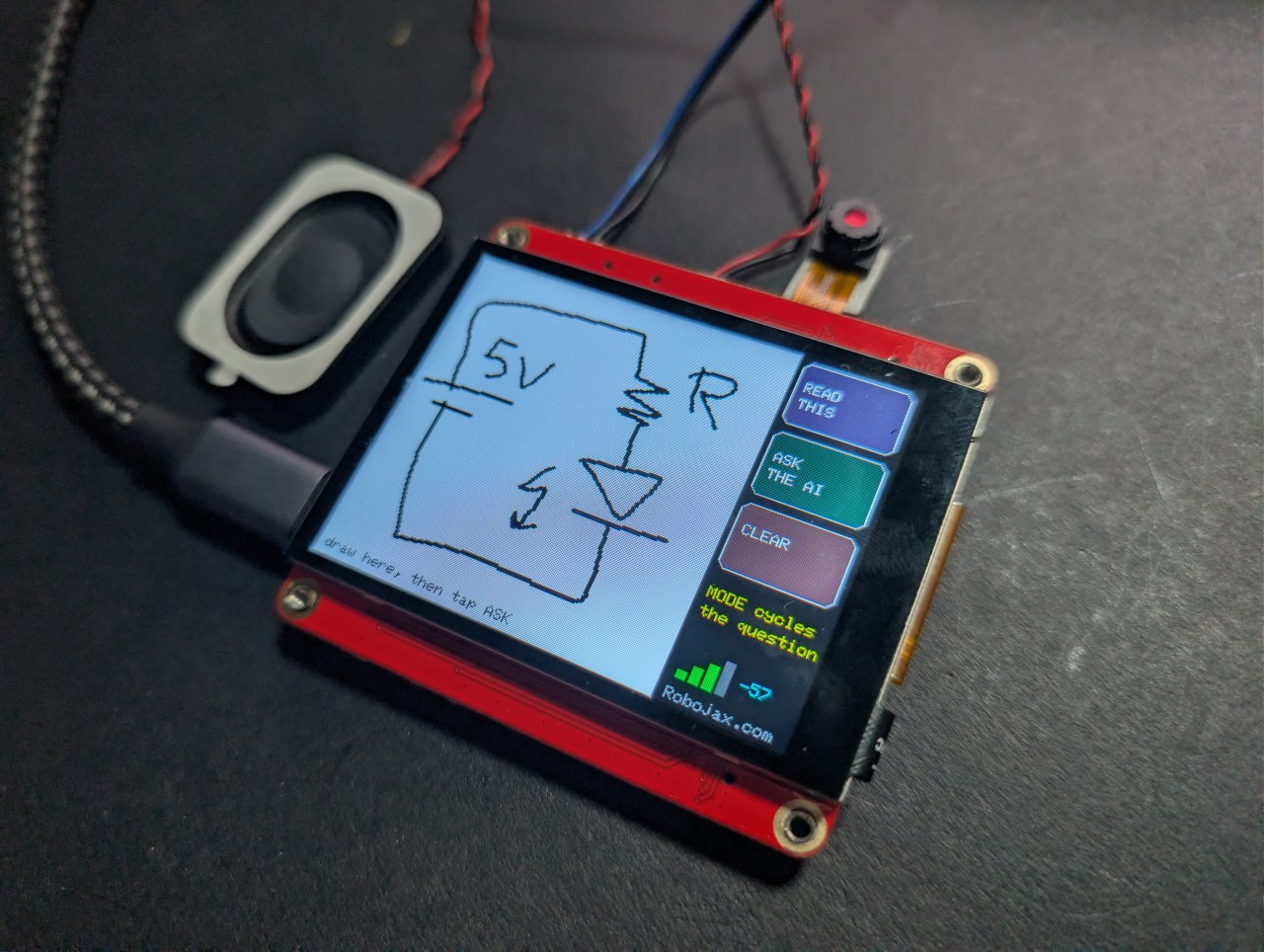
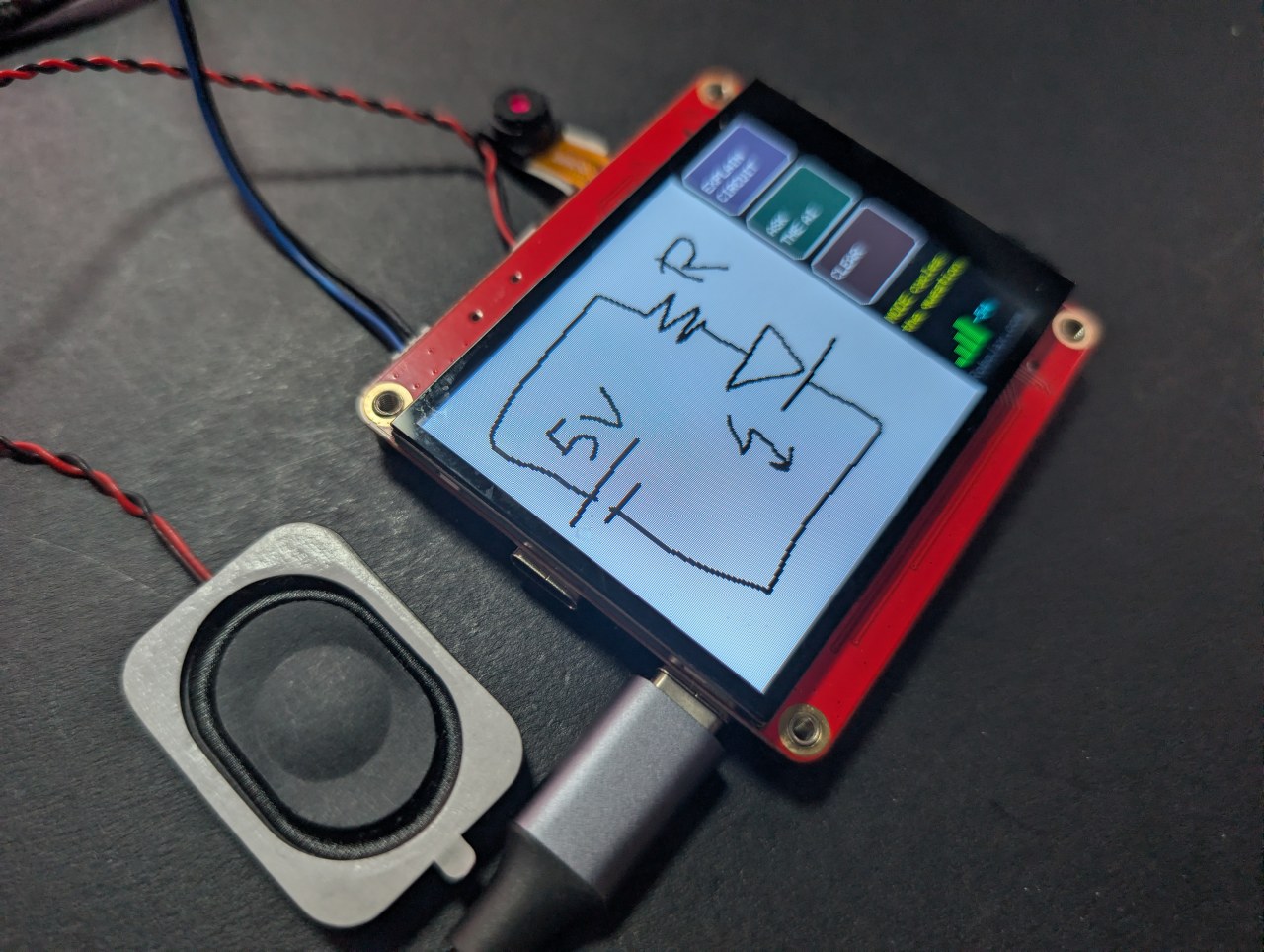
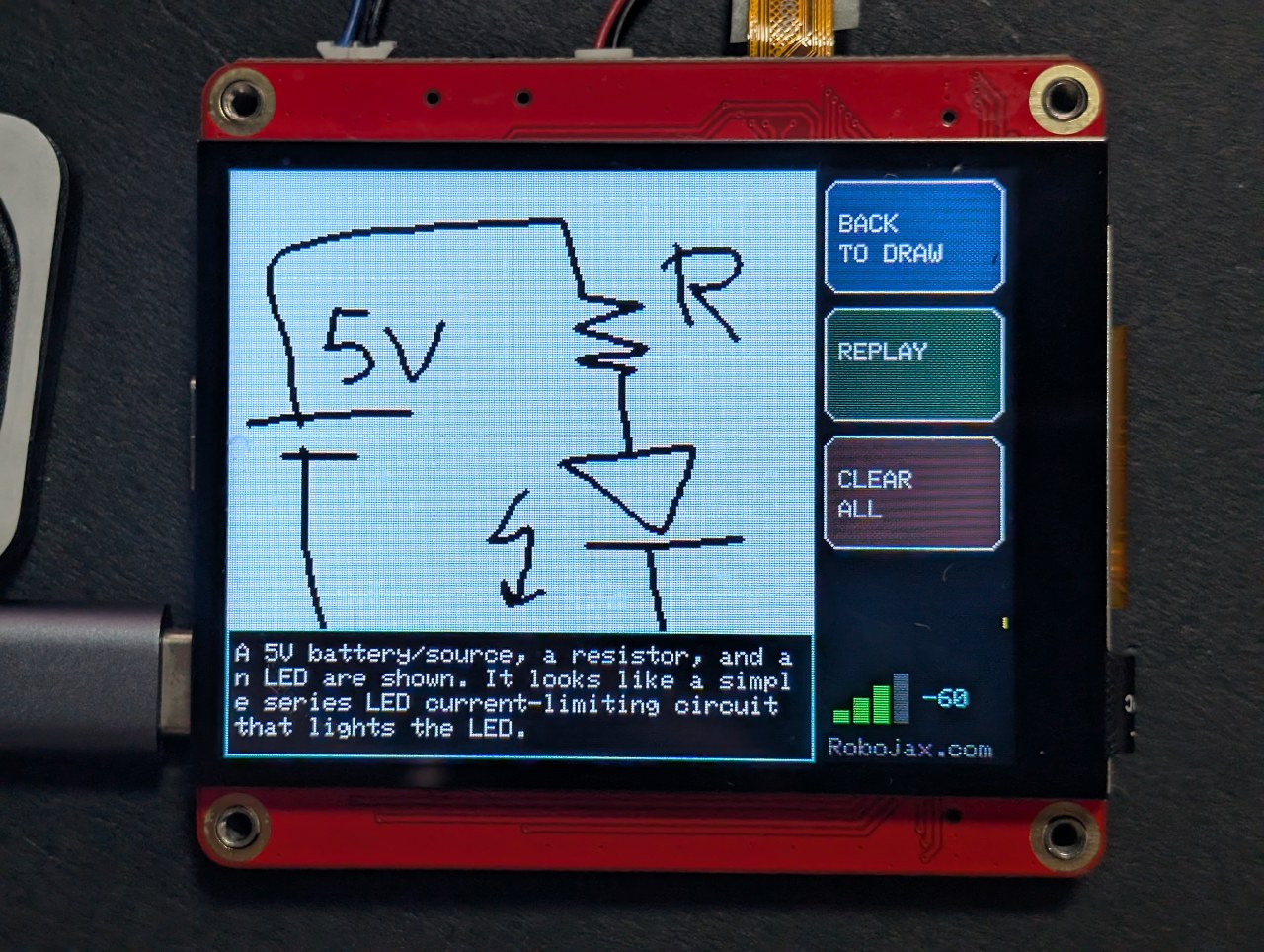
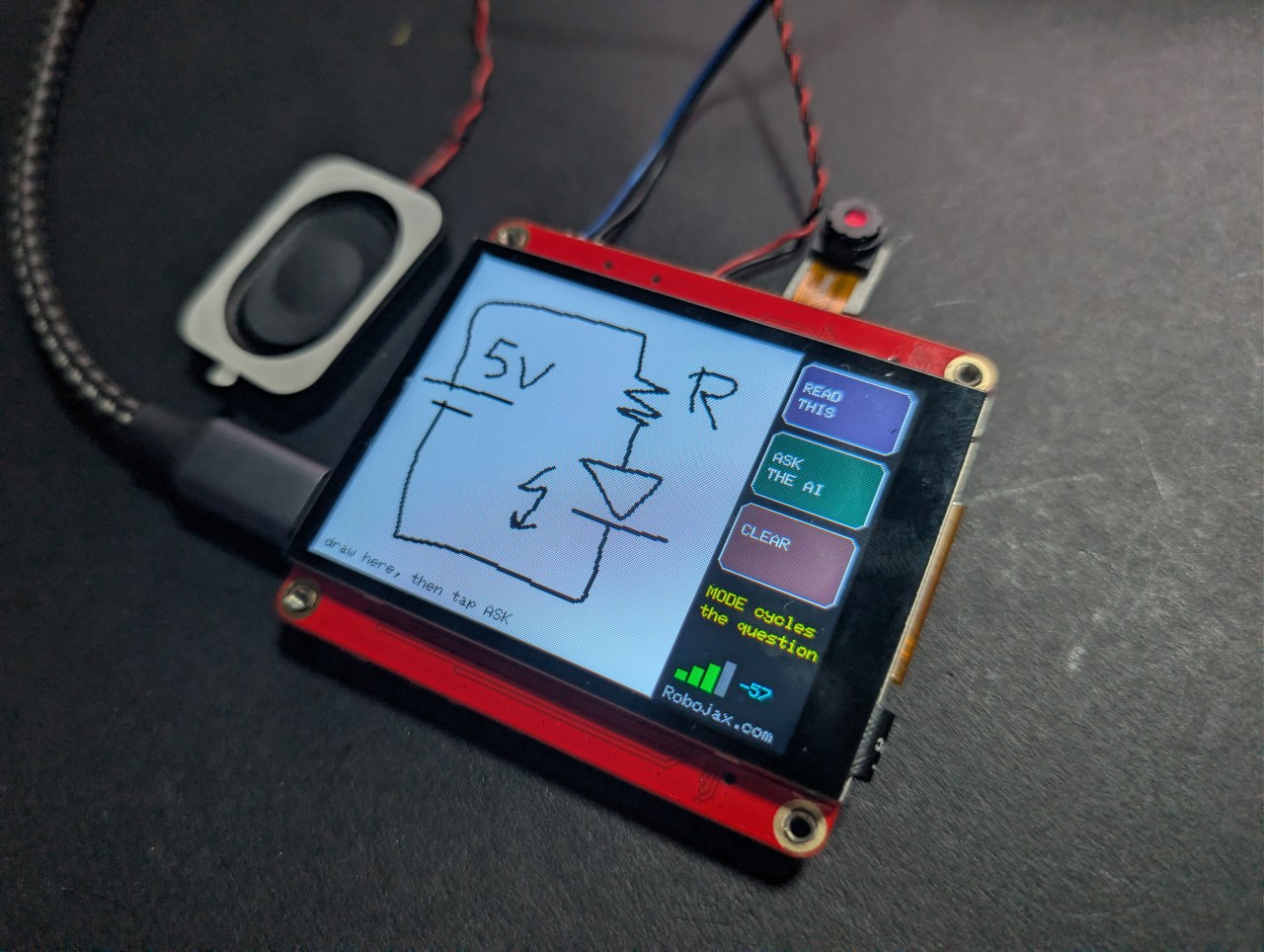
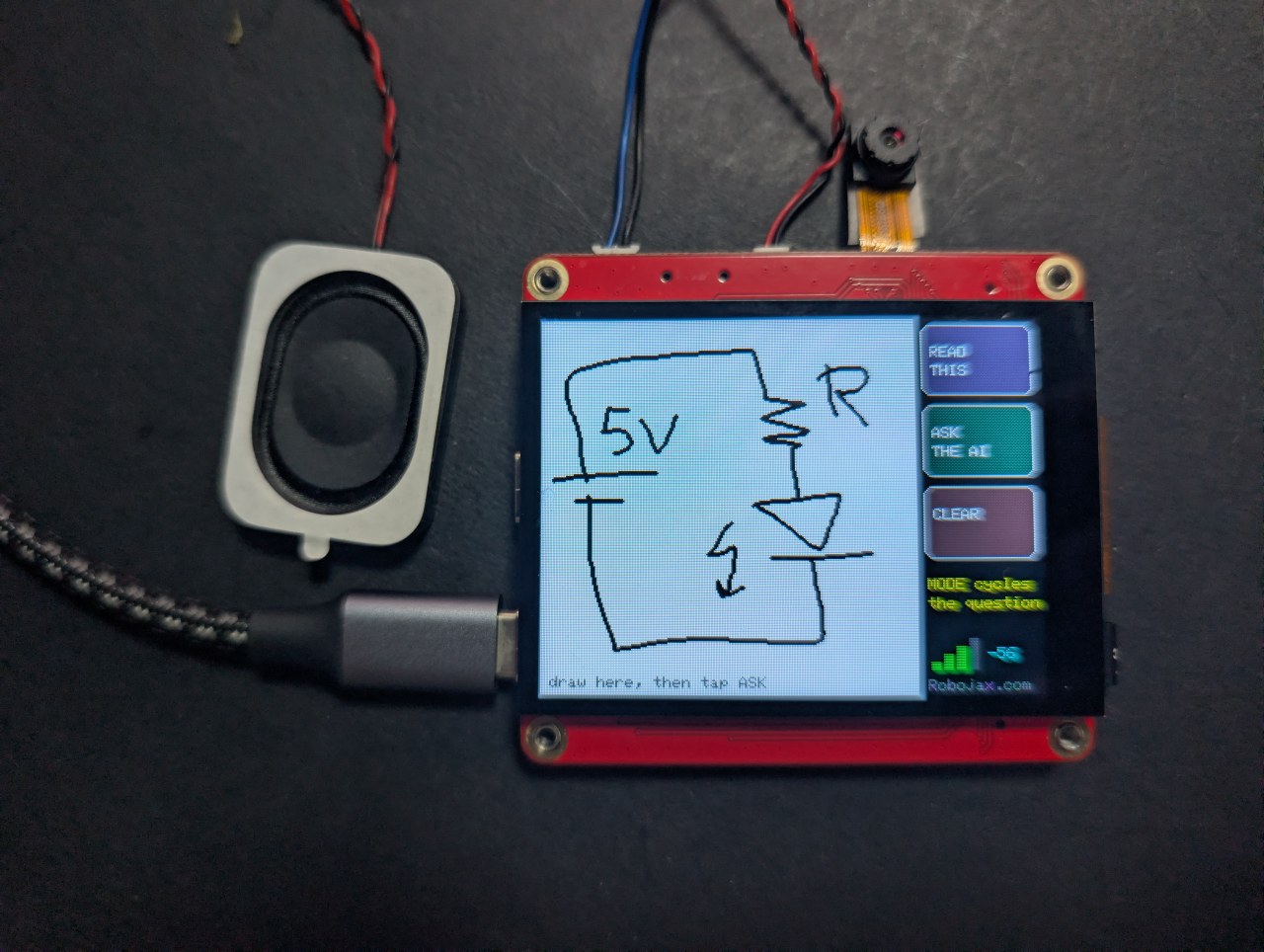
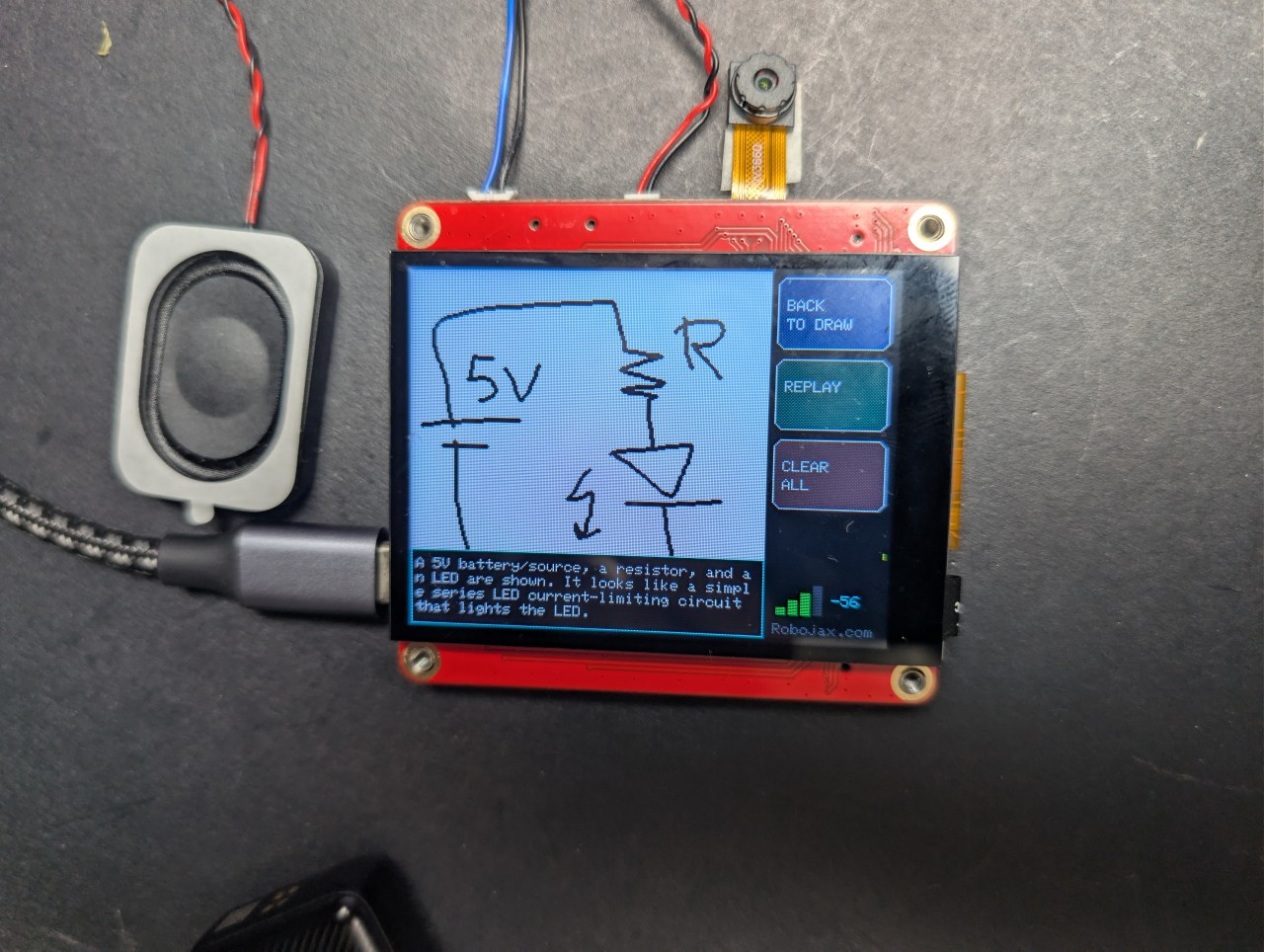
Waxaan ku sawiray wareegga loo yaqaan 'circuit' tahtan sabuuradda ESP32 ee $40, AI-na waa u sharaxday.
Farta wareeg oo far ku qor oo AI kuu sharaxo
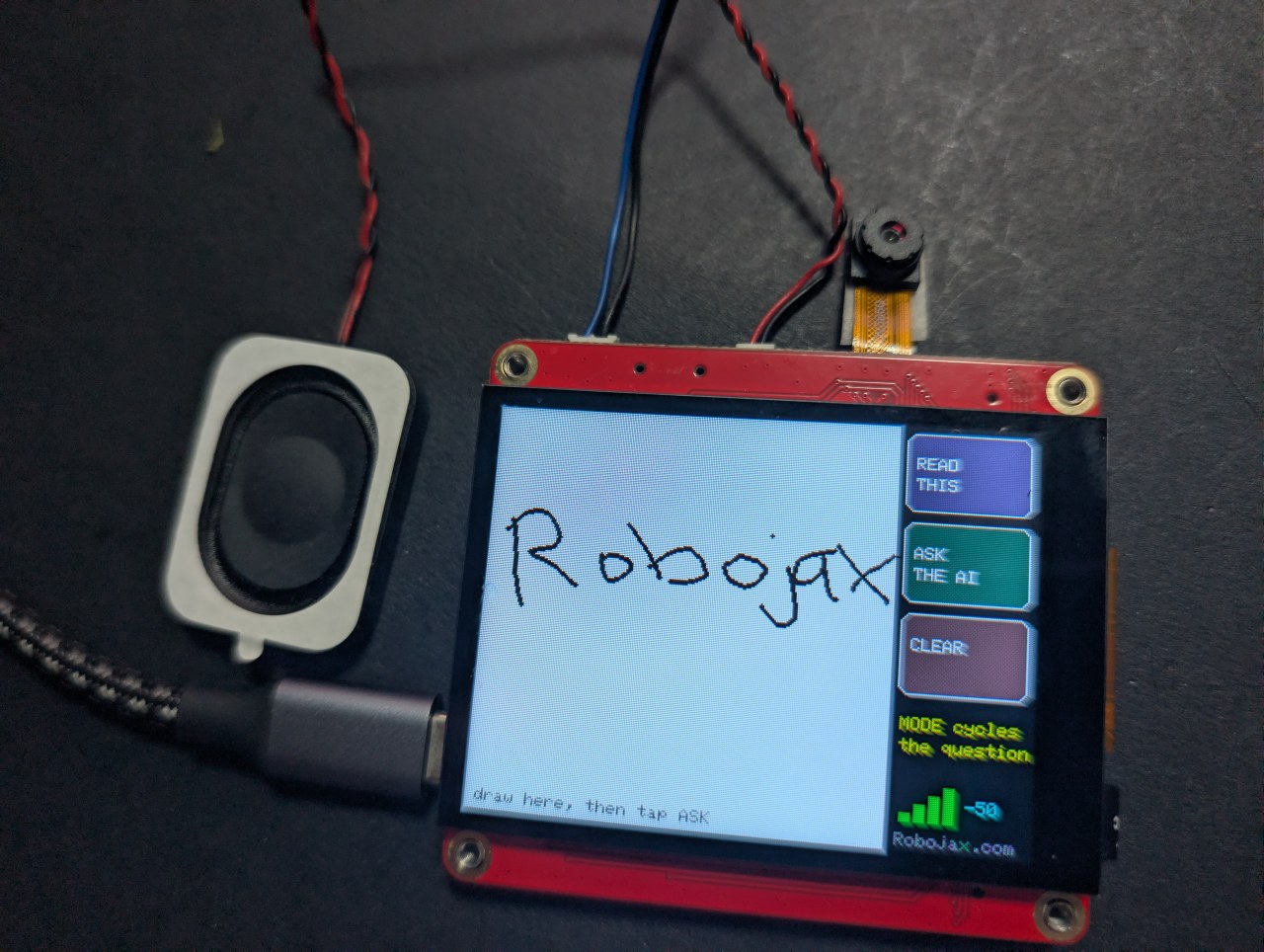
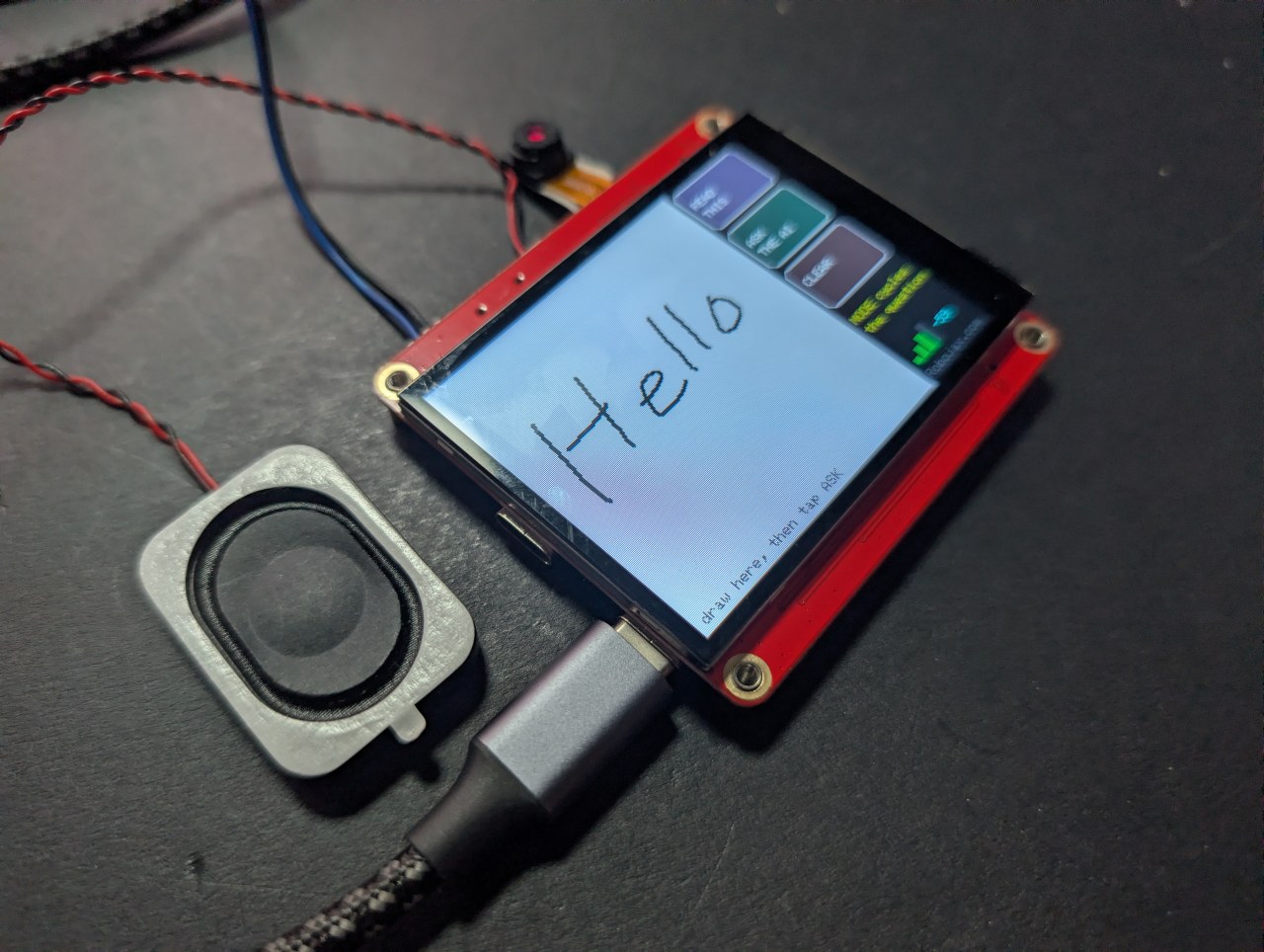
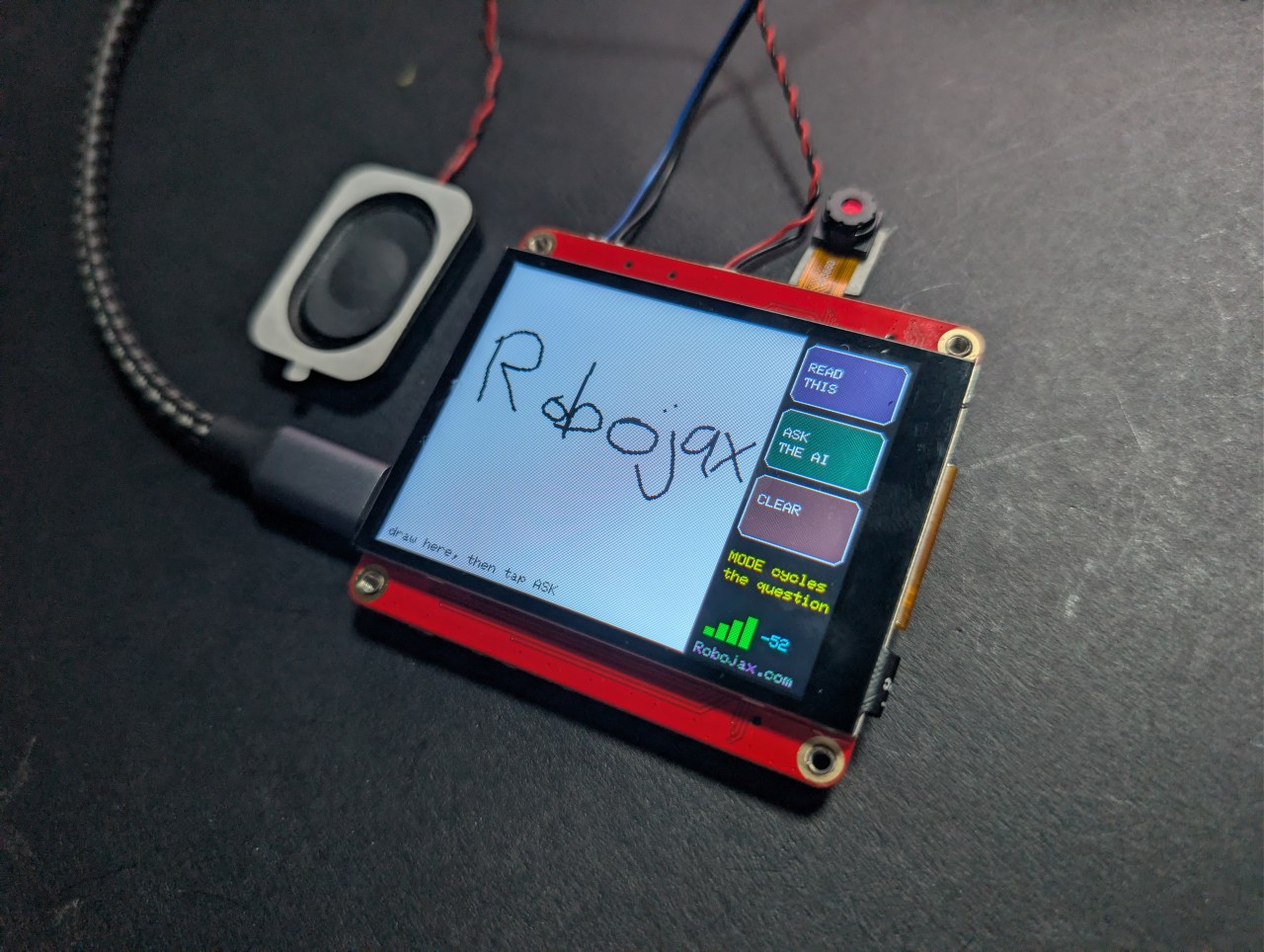
Ku sawir ama ku qor shaashadda taabashada ee far, taabo ASK, oo AI kuu sheego waxa aad sawirtay - shaashadda iyo cod ahaanba. Saddex qaab: magacaab qaabka, akhri far-qorista, ama sharax wareegga gacanta lagu sawiray.
Kan dambe waa kan xiisaha leh. Sawir batari, resistor iyo LED, oo looxa wuxuu magacaabi doonaa qaybaha oo kuu sheegi doonaa waxa wareeggu sameeyo.
Robojax_Makerfab markaad bixiso ee bogga alaabta MaTouch AI ESP32-S3. Kuma kaa qaadayo waxba inaad isticmaasho, waxayna ka caawinaysaa taageerida koodhka iyo tababarka bilaashka ah halkan.Dhibaatada mashruucan uu u baahnaa inuu xalliyo
Ma awoodi kartid inaad dib u akhrido pixels-ka shaxdan korka SPI, maktabadda garaafyada waxay caadi ahaan si toos ah u sawirtaa panel-ka iyada oo aan wax nuqul ah ku jirin xusuusta - sidaas darteed ma jiro sawir-qaadis lagu diro meel. Xalku waa in aan si toos ah loogu sawirin panel-ka. Sketch-kani wuxuu ku sawiraa Arduino_Canvas, kaas oo ku haysta framebuffer buuxa oo ku jira PSRAM. Buffer-kaasi wuxuu yahay sawirka, sidaas darteed fmt2jpg() wuxuu si toos ah ugu beddelaa JPEG.
Sababta khadka uu u yahay madow oo cad
Moodellada aragga waxay si aad ah u fiiriyaan calaamadaha madow ee asalka iftiinka leh marka loo eego lidka, waxayna u eg tahay warqad kamarad. Badhamada waxaa lagu sawiraa panel-ka halkii lagu sawiri lahaa canvas-ka, sidaas darteed waligood kama mid aha sawirka AI-ga uu arko - waxay helaysaa wax aan ahayn sawirkaaga oo ku yaal garoon cad oo nadiif ah.
Sameynta khadadka u eg khadadka
Laba shay ayaa ahayd inay sax noqdaan ka hor inta aan sawirku u ekaan qalin halkii uu ka ekaan lahaa dhibco:
- Canvas-ka lama sii daayo shaashadda marka kasta oo la taabto - taas waxay ku riixdaa 115 KB korka SPI mar kasta waxayna joojisaa wax kasta. Khad kasta waxaa lagu sawiraa canvas-ka waxaana si gooni ah loogu sawiraa panel-ka, taas oo qaali ah waxba.
- Khadku wuxuu ku dhamaadaa kaliya ka dib marka panel-ku aamusnaado ilaa 70 milliseken. Kontoroolka taabashada kuma soo celiyo dhibic poll kasta, iyo in la daweeyo poll kasta oo madhan sidii far la kordhiyey ayaa khadka u kala gooya dhibco isku xidhan.
Sadddex qaab, hal sawir
Sawirkaagu wuxuu ku sii nool yahay jawaabta hoosteeda, sidaas darteed waxaad taabtaa KU NOQO SAWIRKA, beddel qaabka, oo weydii su'aal kale oo ku saabsan isla sawirka. Sida sawir waa xariiqyo iyo qaabab; haddii loo weydiiyo sidii injineer, wuxuu noqdaa wareeg.
Talooyin natiijooyin wanaagsan
- Qalin capacitive jaban ayaa aad uga fiican far.
- Ku sawir weyn - canvas-ku waa 240×240, sidaas darteed dhowr walxood oo waaweyn, ma aha faahfaahin fiican.
- Ma jiro diidmo calaacal. Gacantaada ka fogee muraayadda.
Ku saabsan shaxda MaTouch AI ESP32-S3 2.8"
Mashruuc kasta oo ku yaal boggan wuxuu ku shaqeeyaa MaTouch AI ESP32-S3 2.8" TFT ST7789V oo ka socda Makerfabs. Waa shax isku-dhafan: shaashad taabasho midab leh, kamarad 3 megapixel ah, laba makarafoon iyo cod-weyneyaasha dhabta ah, dhammaantood waxaa wadaa ESP32-S3 oo leh 8 MB PSRAM. Isku-darkaasi waa waxa ka dhigaya mashruucyadan AI-ga ku suurtagal inay ku shaqeeyaan hal shax iyada oo aan wax kale lagu xirin.
8 MB ee PSRAM ayaa ka muhiimsan wax kasta oo kale halkan. Waa waxa u oggolaanaya shaxda inay ku hayso framebuffer kamarad, dhawr ilbiriqsi oo maqal duuban, ama sawir base64-encoded xusuusta isla waqti - midna kuma habboona RAM-ka caadiga ah ee ESP32.
Dokumeentiyada soo saaraha: bogga wiki-ga Makerfabs.
Qodobada muhiimka ah
- Processor: ESP32-S3, laba xudun 240 MHz, WiFi 2.4 GHz + Bluetooth 5.0
- Xusuusta: 16 MB flash, 8 MB PSRAM (loo baahan yahay ku dhawaad mashruuc kasta halkan)
- Shaashadda: 2.8" IPS, 320×240, ST7789V driver, SPI
- Taabashada: GT911 capacitive, waxay raadraacdaa 5 far isla mar
- Kamaradda: OV3660, 3 megapixel, ilaa 2048×1536
- Makarafoonnada: laba INMP441 I2S digital mics (laba dhab ah oo stereo ah)
- Cod-weyneyaasha: MAX98357A class-D amplifier, 3.2 W ilaa 4 Ω
- Kaydinta: godka kaadhka microSD (qaabka SPI)
- Korontada: USB-C, JST battery connector, TP4056 charger, power switch
- Sidoo kale shaxda: WS2812B RGB LED, PCF8563T battery-backed real-time clock, iyo MAX17048 battery fuel gauge oo aan ku qoran qodobada rasmiga ah
USB CDC On Boot inuu ahaado Disabled. Isticmaal dekedda khaldan oo maqalku wuu khaldami doonaa ama upload-ku wuu guuldareysan doonaa.Koronto ka shideysa battery? Labada god ee USB-C, charger-ka TP4056 iyo power switch-ka waxaa si buuxda loo sharaxay, oo leh schematic, maqaalka tijaabada shaxda — oo ay ku jirto godka uu ku shubo iyo in switch-ku uu qarxan yahay ama qarxan yahay.
Dejinta Arduino IDE
Dejintani waa muhiim. Inta badan dhibaatooyinka dadku ay ka sheegaan shaxdan waa mid ka mid ah kuwan oo khaldan, waxayna dib u dejiyaan markaad beddesho nooca core-ka, sidaas darteed dib u hubi ka dib isbeddel kasta.
| Dejinta | Qiimaha |
|---|---|
| Shaxda | ESP32S3 Dev Module |
| Nooca core-ka ESP32 | 2.0.17 |
| PSRAM | OPI PSRAM |
| Cabbirka Flash | 16MB (128Mb) |
| Qorshaha Qaybinta | 16M Flash (3MB APP/9.9MB FATFS) |
| USB CDC On Boot | Disabled |
| Xawaaraha Upload | 921600 |
| Erase All Flash Before Upload | Disabled |
| Dekedda | dekedda CH340K USB-C |
Maktabadaha loo baahan yahay
Mashruucan wuxuu u baahan yahay maktabad kasta oo ku jirta shaxda hoose - wax ka badan ama ka yar ma aha. Inta badan waxay si toos ah ugu rakibaan Tools → Manage Libraries ee Arduino IDE, laakiin GFX Library for Arduino waa in laga rakibaa faylka ZIP. Nambarada noocyada ayaa muhiim ah, sidaas darteed fadlan isticmaal kuwa si sax ah u qoran.
| Maktabadda | Nooca | Qoraaga | Ka rakib |
|---|---|---|---|
| GFX Library for Arduino | 1.5.6 | moononournation | Faylka ZIP - hoos ka eeg |
| bb_captouch | 1.3.1 | Larry Bank | Library Manager |
| ArduinoJson | 7.x | Benoit Blanchon | Library Manager |
| Adafruit NeoPixel | mid kasta oo dhow | Adafruit | Library Manager |
Rakibista maktabadda GFX faylka ZIP
- Soo deji ZIP-ka. Waxaa ku jira soo-dejinta mashruucan, ama waxaad ka heli kartaa kaydka Arduino_GFX - guji badhanka cagaaran ee Code, ka dib Download ZIP.
- Ku kaydi meel aad dib uga heli karto. Ha furin ZIP-ka.
- Arduino IDE, guji Sketch → Include Library → Add .ZIP Library.
- Raadi faylka ZIP ee aad soo dejisay oo guji Open.
- IDE-ku wuu rakibaa oo wuxuu ku xaqiijiyaa hoosta daaqadda. Haddii aad horey u rakibtay nooc 1.6, tirtir faylkaas ka
Documents/Arduino/librariesmarka hore, ama labadoodu waxay isku khilaafi doonaan.
Dejinta secrets.h
Faahfaahinta WiFi-gaaga iyo furaha API kasta waxay galaan secrets.h, kaas oo ku jira soo-dejinta oo leh qiimayaal meel-mariye ah. Fur tab-kaas Arduino IDE oo ku beddel kuwaaga.
secrets.h.Helitaanka furaha API-gaaga
Mashruucan wuxuu la hadlaa adeeg AI-ga daruuraha ah, sidaas darteed waxaad u baahan tahay furahaaga. Haddii aadan waligaa tan samayn, ha welwelin - waa isla fikradda erayga sirta ah ee aqoonsada akoonkaaga adeegga. Waxay qaadataa dhowr daqiiqo, hal mar.
OpenAI - indhaha
OpenAI waxay bixisaa moodelka aragga ee eega sawirada. Kaliya mashruucyada soo dira sawir ayaa u baahan kan.
- Tag platform.openai.com/api-keys oo gal ama abuur akoon.
- Guji Create new secret key, sii magac, oo abuur.
- Ku koobiyeey isla markiiba - waxaa la muujiyaa kaliya hal mar.
- Fur Billing oo ku dar qadar yar oo credit ah. API-ga waa lacag-cashuur-prepaid ah oo ka duwan rukun kasta oo ChatGPT ah oo aad horey u haysato.
Ku rid furaha secrets.h sida OPENAI_KEY.
Microsoft Azure Speech - dhegaynta iyo hadalka
Azure wuxuu hadalkaaga u beddelaa qoraal oo jawaabta dib ugu beddelaa cod. Heerka bilaashka ah ayaa ku filan wax kasta oo ku yaal boggan.
- Tag portal.azure.com oo gal akoon Microsoft ah (mid bilaash ah ayaa fiican).
- Haddii aadan waligaa isticmaalin Azure waxaad arki doontaa shaashad Welcome to Azure oo bixisa saddex ikhtiyaar. Dooro Start with an Azure free trial - waxaad u baahan tahay rukun ka hor inta Azure uu kuu oggolaanayo inaad wax abuurto. (Ardaydu waa inay dooran Azure for Students: natiijo isku mid ah, kaadh looma baahna.) Iska indhatiir Manage Microsoft Entra ID, kaas oo ah wax kale oo gebi ahaanba ka duwan.
- Guji Create a resource, raadi Speech, oo dooro Speech service oo uu daabacay Microsoft.
- Buuxi foomka: koox kheyraad kasta, magac kasta, oo dooro Region ku dhowaad - qor gobolkaas si sax ah sida uu u muuqdo, tusaale
eastus. - Wixii Pricing tier dooro F0 (Free). Taasi waxay u oggolaanaysaa ilaa shan saacadood oo hadal-ku-qoris ah iyo nus milyan oo xarfo ah oo qoraal-ku-hadal ah bishiiba.
- Guji Review + create, ka dib Create. Sug ilaa daqiiqad, ka dib guji Go to resource.
- Menu-ka bidixda fur Keys and Endpoint. Koobiyeey KEY 1 iyo Location/Region.
Ku rid kuwaas secrets.h sida AZURE_SPEECH_KEY iyo AZURE_REGION.
Waxa ay ku kacdo in la shideeyo
Aad u yar, laakiin ma aha bilaash, waxaadna ogaan tahay qiyaastii waxa aad ku bixi doonto ka hor intaadan mashruuc ka tagin oo shaqeeya.
| Adeegga | Qiimaha qiyaastii |
|---|---|
| OpenAI vision | qiyaastii senti ama laba sawirkiiba, iyadoo ku xiran moodelka |
| Azure Speech | heerka bilaashka ah wuxuu daboolaa ilaa 5 saacadood oo dhegaynta ah iyo 0.5 M xarfo oo hadalka ah bishiiba |
Qiimuhu wuu isbeddelaa, sidaas darteed ula dhaqan kuwan sidii tilmaan halkii ay ka ahaan lahaayeen qiime. Mid kasta oo ka mid ah adeegyadan wuxuu leeyahay bog isticmaalka halkaas oo aad ka daawato waxa aad ku bixisay, dhammaantoodna waxay kuu oggolaanayaan inaad dejiso xad kharash - taas oo mudan in la sameeyo maalinta koowaad.
Xallinta dhibaatooyinka
| Calaamadda | Sababta iyo xalka |
|---|---|
| Shaashaddu madow ahaato | Nooca maktabadda GFX khaldan (isticmaal 1.5.6) ama dejinta shaxda khaldan. |
PSRAM alloc failed |
Tools → PSRAM looma dejin OPI PSRAM. |
| Waxba ma soo upload-gareeyaan / ma jiro COM port | Dekedda USB-C khaldan, ama driver-ka CH340 lama rakibin. |
Sawirro
/*
* ===========================================================================
* 08_Draw_AI — MaTouch AI ESP32-S3 2.8" TFT ST7789V
* ===========================================================================
*
* ---------------------------------------------------------------------------
* ROBOJAX.COM - MaTouch AI ESP32-S3 2.8" project series
*
* WATCH THE Introduction and face recognition VIDEO
* https://youtu.be/6AL3g3tC_Hk
* Video 2: Draw AI - https://youtu.be/FaIW1MVIsj4
*
* WRITTEN TUTORIALS - every project, with photos and full explanation
* Camera and touchscreen.... https://robojax.com/RTJ849
* Offline face recognition.. https://robojax.com/RTJ850
* AI voice assistant........ https://robojax.com/RTJ851
* AI vision................. https://robojax.com/RTJ852
* Draw AI ................. https://robojax.com/RTJ867 (this code)
*
* GET THE BOARD - SAVE $5 with coupon code: Robojax_Makerfab
* https://www.makerfabs.com/matouch-ai-esp32s3-2-8-tft-st7789v.html
* (enter the code at checkout)
*
* All of this code is free. If it helped you, a subscribe on YouTube is
* the best way to support more of it.
* ---------------------------------------------------------------------------
*
* Draw or write on the touchscreen with your finger, tap ASK, and an AI
* tells you what you drew - on the screen and out loud.
*
* THREE MODES (tap MODE to cycle):
*
* WHAT IS THIS? draw a house, a cat, a triangle -> it names it
* READ THIS write HELLO in big letters -> it reads it back
* EXPLAIN CIRCUIT sketch a battery, resistor and LED -> it tells you
* what the components are and what the circuit does
*
* That last mode is the interesting one: a hand-drawn schematic, explained
* by an AI, on a forty-dollar board with no computer attached.
*
* NO CAMERA IS USED by this sketch. That means the J1/J3 Mabee sockets are
* free GPIO here (see 07_GPIO_Test), and there is no camera/SD memory
* contention to worry about.
*
* ---------------------------------------------------------------------------
* HOW IT WORKS (the trick worth knowing)
*
* You cannot read pixels back out of the ST7789 over SPI, and Arduino_GFX
* normally draws straight to the panel with no copy in memory - so there is
* no "screenshot" to send anywhere. The fix: draw into an Arduino_Canvas,
* which keeps a full framebuffer in PSRAM and flushes it to the display.
* That buffer IS the image, so fmt2jpg() turns it straight into a JPEG and
* the rest of the path is identical to 05_Vision_AI.
*
* Black ink on a white canvas, deliberately: vision models read dark-on-light
* far more reliably than the reverse, and it looks like paper on camera.
*
* ---------------------------------------------------------------------------
* TIPS
* - A cheap capacitive stylus is MUCH better than a fingertip.
* - Write BIG. The canvas is 240x240 - a few large characters, not a
* sentence.
* - There is no palm rejection: only the first touch point is used, so
* keep your palm off the glass.
*
* ---------------------------------------------------------------------------
* FILL IN secrets.h BEFORE FLASHING (WIFI_* and OPENAI_*; AZURE_* only if
* SPEAK_REPLIES is 1).
*
* BOARD SETTINGS (Tools menu - EVERY line matters)
* Board : ESP32S3 Dev Module
* ESP32 core : 2.0.17
* PSRAM : OPI PSRAM <-- required, the canvas lives there
* Flash Size : 16MB (128Mb)
* Partition Scheme : 16M Flash (3MB APP/9.9MB FATFS)
* USB CDC On Boot : Disabled
* Upload Speed : 921600
* Port : the CH340K USB-C port (the one near RESET)
*
* LIBRARIES
* GFX Library for Arduino v1.5.6 (NOT 1.6.x - that pairs with core 3)
* bb_captouch v1.3.1
* ArduinoJson v7.x
* Adafruit NeoPixel any recent
*
* ---------------------------------------------------------------------------
* FUNCTIONS IN THIS SKETCH
* led(r,g,b) set the RGB status LED colour
* getTouch(&x,&y) read the touch panel, mapped to screen coordinates
* clearCanvas() wipe to white and redraw the hint
* drawStroke(...) one thick line segment, into the canvas AND the panel
* handleDrawing(...) turn touch samples into continuous strokes
* waitData()/readHttpResponse() robust HTTPS reply reader (de-chunking)
* canvasToJpeg(&len) RGB565 canvas -> JPEG in PSRAM
* askVision(...) send the drawing + prompt to OpenAI, get an answer
* spkInit()/speak()/playLastAnswer() Azure voice out, with free REPLAY
* drawButtons()/drawAnswerSide()/showAnswer()/drawWifi() the UI
* askAboutDrawing() one full cycle: encode -> ask -> show -> speak
* setup() / loop() boot + WiFi / drawing and button handling
*
* Robojax.com
* ===========================================================================
*/
#define SPEAK_REPLIES 1 // 1 = read the answer aloud with Azure TTS
#define LED_BRIGHTNESS 15 // WS2812 is on the power rail - 15 is plenty
#include <Arduino_GFX_Library.h>
#include <bb_captouch.h>
#include <Adafruit_NeoPixel.h>
#include <ArduinoJson.h>
#include <WiFi.h>
#include <WiFiClientSecure.h>
#include "mbedtls/base64.h"
#include "img_converters.h" // fmt2jpg()
#include "esp_camera.h" // for the pixformat_t enum used by fmt2jpg
#include "pins.h"
#include "secrets.h"
#if SPEAK_REPLIES
#include "driver/i2s.h"
#define WAV_HEADER_LEN 44
#endif
Arduino_HWSPI *bus = new Arduino_HWSPI(
TFT_DC, TFT_CS, TFT_SCLK, TFT_MOSI, TFT_MISO, &SPI, true);
Arduino_GFX *panel = new Arduino_ST7789(bus, TFT_RES, 1, true);
/* The canvas is what we actually draw into: a real framebuffer in PSRAM that
* we can both flush to the panel AND hand to the JPEG encoder. */
#define CANVAS_W 240
#define CANVAS_H 240
Arduino_Canvas *canvas = new Arduino_Canvas(CANVAS_W, CANVAS_H, panel, 0, 0);
BBCapTouch bbct;
Adafruit_NeoPixel rgb(RGB_LED_NUM, RGB_LED_PIN, NEO_GRB + NEO_KHZ800);
/* --- the three modes ------------------------------------------------------ */
struct DrawMode { const char *l1, *l2; const char *prompt; };
const DrawMode MODES[] = {
{"WHAT IS", "THIS?",
"This is a drawing made with a finger on a small touchscreen. Name the "
"shape or object in ONE short sentence of at most 15 words. Plain text only."},
{"READ", "THIS",
"This image contains handwriting drawn with a finger. Reply with ONLY the "
"text you can read, nothing else. If you cannot read it, say: cannot read it."},
{"EXPLAIN", "CIRCUIT",
"This is a hand-drawn electronic circuit diagram. In at most two short "
"sentences, name the components you can identify and say what the circuit "
"does. Plain text only. If it is not a circuit, say so."},
};
#define N_MODES 3
int mode = 0;
/* --- layout: 240 canvas on the left, buttons on the right ----------------- */
#define BTN_X 244
#define BTN_W 72
#define BTN_H 46
#define BTN_MODE_Y 4
#define BTN_ASK_Y 56
#define BTN_CLEAR_Y 108
bool showing_answer = false;
/* --- drawing state -------------------------------------------------------- */
int last_x = -1, last_y = -1;
bool has_ink = false;
/* --- kept audio for REPLAY ------------------------------------------------ */
uint8_t *last_audio = nullptr;
size_t last_audio_len = 0;
void led(uint8_t r, uint8_t g, uint8_t b) { rgb.setPixelColor(0, rgb.Color(r, g, b)); rgb.show(); }
void playLastAnswer();
void drawButtons();
/* ===========================================================================
* Touch
* =========================================================================== */
bool getTouch(uint16_t *x, uint16_t *y) {
TOUCHINFO ti;
if (!bbct.getSamples(&ti)) return false;
if (ti.count < 1) return false; // first point only - no palm rejection
*x = ti.y[0];
*y = (ti.x[0] > 240) ? 0 : (240 - ti.x[0]);
return true;
}
/* ===========================================================================
* Canvas / drawing
* =========================================================================== */
void clearCanvas() {
canvas->fillScreen(WHITE);
canvas->flush(); // one full push: paint it white
has_ink = false;
last_x = last_y = -1;
/* The hint goes on the PANEL, never into the canvas - anything drawn into
* the canvas becomes part of the image the AI sees, and it would happily
* read this text back to you. */
panel->setTextSize(1);
panel->setTextColor(panel->color565(170, 170, 170));
panel->setCursor(6, CANVAS_H - 12);
panel->print("draw here, then tap ASK");
}
/* One thick line segment, drawn into BOTH the canvas and the panel.
*
* Why both: the canvas is the image we will send to the AI, but flushing the
* whole 240x240 buffer to the screen costs ~115 KB of SPI. Doing that per
* touch sample throttled the loop so hard that most samples were missed -
* which is exactly what "it only draws dots" looks like. Painting the same
* few pixels directly to the panel is essentially free, so the canvas is only
* flushed when the screen genuinely has to be rebuilt. */
static const int8_t STROKE_OFFS[5][2] = {{0,0},{1,0},{-1,0},{0,1},{0,-1}};
void drawStroke(int x0, int y0, int x1, int y1) {
for (int i = 0; i < 5; i++) {
int ox = STROKE_OFFS[i][0], oy = STROKE_OFFS[i][1];
canvas->drawLine(x0 + ox, y0 + oy, x1 + ox, y1 + oy, BLACK);
panel->drawLine(x0 + ox, y0 + oy, x1 + ox, y1 + oy, BLACK);
}
}
/* Touch is read once per loop and handed in here.
*
* THE IMPORTANT BIT - why this is time-based rather than "no touch = lifted":
* the GT911 does not return a point on every poll. It reports when its own
* internal sample is ready, so a poll in between comes back empty even though
* your finger never left the glass. Treating each empty poll as a lift resets
* the stroke, and every real sample then lands as an isolated dot instead of
* a line joined to the previous one - which is exactly what "it only draws
* dots" looks like. So a stroke only ends after the panel has been quiet for
* LIFT_MS, which bridges the dropouts but is still far shorter than a genuine
* lift-and-reposition. */
#define LIFT_MS 70
void handleDrawing(bool touched, int x, int y) {
static uint32_t last_seen = 0;
if (touched && x >= 0 && x < CANVAS_W) {
if (last_x >= 0) drawStroke(last_x, last_y, x, y); // join to the last point
else drawStroke(x, y, x, y); // start of a stroke
last_x = x; last_y = y;
last_seen = millis();
has_ink = true;
} else if (last_x >= 0 && millis() - last_seen > LIFT_MS) {
last_x = last_y = -1; // really lifted now
}
}
/* ===========================================================================
* HTTP — the same robust reader proven in 04 and 05
* =========================================================================== */
static bool waitData(WiFiClientSecure &c, uint32_t ms) {
uint32_t t0 = millis();
while (!c.available()) {
if (!c.connected()) return false;
if (millis() - t0 > ms) return false;
delay(10);
}
return true;
}
static int readHttpResponse(WiFiClientSecure &client, String &body_out, uint32_t idle_ms) {
body_out = "";
if (!waitData(client, idle_ms)) { Serial.println("HTTP: no response at all"); return 0; }
String status_line = client.readStringUntil('\n');
int code = 0;
sscanf(status_line.c_str(), "HTTP/%*s %d", &code);
bool chunked = false;
while (waitData(client, idle_ms)) {
String h = client.readStringUntil('\n');
if (h == "\r" || h.length() <= 1) break;
h.toLowerCase();
if (h.startsWith("transfer-encoding:") && h.indexOf("chunked") >= 0) chunked = true;
}
if (chunked) {
int blanks = 0;
while (true) {
if (!waitData(client, idle_ms)) { Serial.println("HTTP: chunk timeout"); break; }
String szline = client.readStringUntil('\n');
szline.trim();
if (szline.length() == 0) { if (++blanks > 4) break; continue; }
blanks = 0;
long sz = strtol(szline.c_str(), NULL, 16);
if (sz <= 0) break;
long got = 0;
while (got < sz) {
if (!waitData(client, idle_ms)) break;
while (client.available() && got < sz) { body_out += (char)client.read(); got++; }
}
if (waitData(client, 3000)) client.readStringUntil('\n');
if (got < sz) break;
}
} else {
while (waitData(client, idle_ms))
while (client.available()) body_out += (char)client.read();
}
return code;
}
/* ===========================================================================
* Canvas -> JPEG
* The canvas framebuffer is plain RGB565, which fmt2jpg() accepts directly.
* =========================================================================== */
uint8_t *canvasToJpeg(size_t *len_out) {
*len_out = 0;
uint16_t *fb = canvas->getFramebuffer();
if (!fb) { Serial.println("no canvas framebuffer"); return nullptr; }
uint8_t *jpg = NULL;
size_t jpg_len = 0;
if (!fmt2jpg((uint8_t *)fb, (size_t)CANVAS_W * CANVAS_H * 2,
CANVAS_W, CANVAS_H, PIXFORMAT_RGB565, 90, &jpg, &jpg_len)) {
Serial.println("fmt2jpg failed");
return nullptr;
}
*len_out = jpg_len;
return jpg; // caller frees
}
/* ===========================================================================
* OpenAI vision — identical shape to 05_Vision_AI
* =========================================================================== */
bool askVision(const uint8_t *jpg, size_t jpg_len, const char *prompt, String &answer_out) {
size_t b64_cap = ((jpg_len + 2) / 3) * 4 + 16;
unsigned char *b64 = (unsigned char *)ps_malloc(b64_cap);
if (!b64) return false;
size_t b64_len = 0;
if (mbedtls_base64_encode(b64, b64_cap, &b64_len, jpg, jpg_len) != 0) { free(b64); return false; }
const char *head_fmt =
"{\"model\":\"%s\",\"max_completion_tokens\":%d,\"messages\":[{\"role\":\"user\","
"\"content\":[{\"type\":\"text\",\"text\":\"%s\"},"
"{\"type\":\"image_url\",\"image_url\":{\"url\":\"data:image/jpeg;base64,";
const char *tail = "\"}}]}]}";
char head[900];
int head_len = snprintf(head, sizeof(head), head_fmt, OPENAI_MODEL, LLM_MAX_TOKENS, prompt);
size_t body_len = head_len + b64_len + strlen(tail);
char *body = (char *)ps_malloc(body_len + 1);
if (!body) { free(b64); return false; }
memcpy(body, head, head_len);
memcpy(body + head_len, b64, b64_len);
strcpy(body + head_len + b64_len, tail);
free(b64);
WiFiClientSecure client;
client.setInsecure();
client.setTimeout(45);
if (!client.connect(OPENAI_HOST, 443)) {
Serial.println("Vision: TLS connect failed");
free(body);
return false;
}
client.print(String("POST /v1/chat/completions HTTP/1.1\r\n"
"Host: " OPENAI_HOST "\r\n"
"Authorization: Bearer " OPENAI_KEY "\r\n"
"Content-Type: application/json\r\n"
"Connection: close\r\n"
"Content-Length: ") + String(body_len) + "\r\n\r\n");
size_t sent = 0;
while (sent < body_len) {
size_t n = min((size_t)4096, body_len - sent);
size_t w = client.write((uint8_t *)body + sent, n);
if (w == 0) { delay(50); w = client.write((uint8_t *)body + sent, n); if (w == 0) break; }
sent += w;
yield();
}
free(body);
if (sent < body_len) { client.stop(); Serial.println("Vision: upload stalled"); return false; }
String resp;
int code = readHttpResponse(client, resp, 45000);
client.stop();
if (code != 200) { Serial.printf("Vision HTTP %d: %s\n", code, resp.c_str()); return false; }
JsonDocument doc;
if (deserializeJson(doc, resp)) {
Serial.printf("Vision: JSON parse failed, %u bytes\n", resp.length());
return false;
}
const char *content = doc["choices"][0]["message"]["content"];
if (!content) return false;
answer_out = String(content);
answer_out.trim();
return answer_out.length() > 0;
}
/* ===========================================================================
* Azure voice out — same de-chunked player as 04/05
* =========================================================================== */
#if SPEAK_REPLIES
void spkInit() {
i2s_config_t cfg = {
.mode = (i2s_mode_t)(I2S_MODE_MASTER | I2S_MODE_TX),
.sample_rate = 16000,
.bits_per_sample = I2S_BITS_PER_SAMPLE_16BIT,
.channel_format = I2S_CHANNEL_FMT_ONLY_LEFT,
.communication_format = I2S_COMM_FORMAT_STAND_I2S,
.intr_alloc_flags = ESP_INTR_FLAG_LEVEL1,
.dma_buf_count = 8,
.dma_buf_len = 256,
.use_apll = false,
.tx_desc_auto_clear = true,
.fixed_mclk = 0
};
i2s_pin_config_t pins = {
.mck_io_num = I2S_PIN_NO_CHANGE,
.bck_io_num = I2S_SPK_BCLK,
.ws_io_num = I2S_SPK_LRC,
.data_out_num = I2S_SPK_DOUT,
.data_in_num = I2S_PIN_NO_CHANGE
};
i2s_driver_install(I2S_SPK_PORT, &cfg, 0, NULL);
i2s_set_pin(I2S_SPK_PORT, &pins);
i2s_zero_dma_buffer(I2S_SPK_PORT);
}
void playLastAnswer() {
if (!last_audio || last_audio_len <= WAV_HEADER_LEN) return;
static const uint8_t lead_in[640] = {0};
size_t w = 0;
i2s_write(I2S_SPK_PORT, lead_in, sizeof(lead_in), &w, portMAX_DELAY);
i2s_write(I2S_SPK_PORT, last_audio + WAV_HEADER_LEN,
last_audio_len - WAV_HEADER_LEN, &w, portMAX_DELAY);
i2s_write(I2S_SPK_PORT, lead_in, sizeof(lead_in), &w, portMAX_DELAY);
delay(150);
i2s_zero_dma_buffer(I2S_SPK_PORT);
}
/* Read exactly n bytes into a raw buffer. BINARY SAFE - unlike the String
* based reader used for JSON, which cannot carry audio: PCM is full of 0x00
* bytes, and an Arduino String treats those as end-of-string. */
static size_t readExact(WiFiClientSecure &c, uint8_t *dst, size_t n) {
size_t got = 0;
uint32_t t0 = millis();
while (got < n && millis() - t0 < 10000) {
int r = c.read(dst + got, n - got);
if (r > 0) { got += r; t0 = millis(); }
else if (!c.connected() && !c.available()) break;
else delay(2);
}
return got;
}
void speak(const String &text) {
String safe = text;
safe.replace("&", "&"); safe.replace("<", "<"); safe.replace(">", ">");
String ssml = "<speak version='1.0' xml:lang='" AZURE_TTS_LANG "'>"
"<voice name='" AZURE_TTS_VOICE "'>" + safe + "</voice></speak>";
WiFiClientSecure client;
client.setInsecure();
client.setTimeout(30);
const char *host = AZURE_REGION ".tts.speech.microsoft.com";
if (!client.connect(host, 443)) { Serial.println("TTS: TLS connect failed"); return; }
client.print(String("POST /cognitiveservices/v1 HTTP/1.1\r\nHost: ") + host + "\r\n"
"Ocp-Apim-Subscription-Key: " AZURE_SPEECH_KEY "\r\n"
"Content-Type: application/ssml+xml\r\n"
"X-Microsoft-OutputFormat: riff-16khz-16bit-mono-pcm\r\n"
"User-Agent: MaTouchRobojax\r\nConnection: close\r\n"
"Content-Length: " + String(ssml.length()) + "\r\n\r\n");
client.print(ssml);
/* --- status line + headers (text, so String is fine here) --- */
if (!waitData(client, 30000)) { Serial.println("TTS: no response"); client.stop(); return; }
String status_line = client.readStringUntil('\n');
int code = 0;
sscanf(status_line.c_str(), "HTTP/%*s %d", &code);
bool chunked = false;
long content_len = -1;
while (waitData(client, 30000)) {
String h = client.readStringUntil('\n');
if (h == "\r" || h.length() <= 1) break;
h.toLowerCase();
if (h.startsWith("transfer-encoding:") && h.indexOf("chunked") >= 0) chunked = true;
if (h.startsWith("content-length:")) content_len = h.substring(15).toInt();
}
if (code != 200) { Serial.printf("TTS HTTP %d\n", code); client.stop(); return; }
/* --- body straight into PSRAM as raw bytes --- */
const size_t AUDIO_CAP = 1200 * 1024; // ~37 s of 16 kHz mono
uint8_t *audio = (uint8_t *)ps_malloc(AUDIO_CAP);
if (!audio) { Serial.println("TTS: PSRAM alloc failed"); client.stop(); return; }
size_t alen = 0;
if (chunked) {
int blanks = 0;
while (alen < AUDIO_CAP) {
if (!waitData(client, 15000)) break;
String szline = client.readStringUntil('\n');
szline.trim();
if (szline.length() == 0) { if (++blanks > 4) break; continue; }
blanks = 0;
long sz = strtol(szline.c_str(), NULL, 16);
if (sz <= 0) break; // final chunk
if ((size_t)sz > AUDIO_CAP - alen) sz = (long)(AUDIO_CAP - alen);
size_t got = readExact(client, audio + alen, (size_t)sz);
alen += got;
if (waitData(client, 3000)) client.readStringUntil('\n'); // CRLF
if (got < (size_t)sz) break;
}
} else if (content_len > 0) {
size_t want = (size_t)content_len < AUDIO_CAP ? (size_t)content_len : AUDIO_CAP;
alen = readExact(client, audio, want);
} else {
uint32_t idle = millis();
while (millis() - idle < 5000 && alen < AUDIO_CAP) {
int r = client.read(audio + alen, AUDIO_CAP - alen);
if (r > 0) { alen += r; idle = millis(); }
else if (!client.connected()) break;
else delay(5);
}
}
client.stop();
if (alen <= WAV_HEADER_LEN) { Serial.println("TTS: no audio"); free(audio); return; }
if (last_audio) free(last_audio);
last_audio = audio; // kept for REPLAY
last_audio_len = alen;
Serial.printf("TTS: %u KB clean audio (%s), playing\n",
(unsigned)(alen / 1024), chunked ? "de-chunked" : "plain");
playLastAnswer();
}
#else
void spkInit() {}
void speak(const String &t) { (void)t; }
void playLastAnswer() {}
#endif
/* ===========================================================================
* UI — right-hand button column (drawn on the PANEL, not the canvas, so
* it is never part of the image sent to the AI)
* =========================================================================== */
void drawWifi() {
panel->fillRect(BTN_X, 196, BTN_W, 44, BLACK);
bool up = (WiFi.status() == WL_CONNECTED);
long rssi = up ? WiFi.RSSI() : -100;
int bars = rssi > -55 ? 4 : rssi > -65 ? 3 : rssi > -75 ? 2 : rssi > -85 ? 1 : 0;
for (int b = 0; b < 4; b++) {
int bh = 5 + b * 5;
panel->fillRect(BTN_X + 4 + b * 8, 224 - bh, 6, bh,
(b < bars) ? GREEN : panel->color565(60, 60, 60));
}
panel->setTextSize(1);
panel->setCursor(BTN_X + 40, 210);
panel->setTextColor(up ? CYAN : RED);
if (up) panel->printf("%ld", rssi); else panel->print("--");
panel->setCursor(BTN_X + 2, 230);
panel->setTextColor(panel->color565(120, 120, 120));
panel->print("Robojax.com");
}
void drawButton(int y, const char *l1, const char *l2, uint16_t colour) {
panel->fillRoundRect(BTN_X, y, BTN_W, BTN_H, 6, colour);
panel->drawRoundRect(BTN_X, y, BTN_W, BTN_H, 6, WHITE);
panel->setTextSize(1);
panel->setTextColor(WHITE);
panel->setCursor(BTN_X + 6, y + 14);
panel->print(l1);
panel->setCursor(BTN_X + 6, y + 26);
panel->print(l2);
}
void drawButtons() {
panel->fillRect(BTN_X, 0, BTN_W, 196, BLACK);
drawButton(BTN_MODE_Y, MODES[mode].l1, MODES[mode].l2, panel->color565(90, 60, 140));
drawButton(BTN_ASK_Y, "ASK", "THE AI", panel->color565(0, 100, 60));
drawButton(BTN_CLEAR_Y, "CLEAR", "", panel->color565(110, 35, 35));
panel->setTextColor(YELLOW);
panel->setCursor(BTN_X + 2, 166);
panel->print("MODE cycles");
panel->setCursor(BTN_X + 2, 178);
panel->print("the question");
drawWifi();
showing_answer = false;
}
void drawAnswerSide() {
panel->fillRect(BTN_X, 0, BTN_W, 196, BLACK);
drawButton(BTN_MODE_Y, "BACK", "TO DRAW", panel->color565(0, 90, 160));
#if SPEAK_REPLIES
if (last_audio_len) drawButton(BTN_ASK_Y, "REPLAY", "", panel->color565(0, 110, 60));
#endif
drawButton(BTN_CLEAR_Y, "CLEAR", "ALL", panel->color565(110, 35, 35));
drawWifi();
showing_answer = true;
}
/* The answer is drawn on the PANEL over the canvas area, and stays until the
* user taps BACK or CLEAR - the canvas underneath is untouched. */
void showAnswer(const String &text) {
const int max_chars = 38;
int lines = (text.length() + max_chars - 1) / max_chars;
if (lines > 8) lines = 8;
int h = lines * 10 + 12;
int y = CANVAS_H - h;
panel->fillRect(0, y, CANVAS_W, h, BLACK);
panel->drawRect(0, y, CANVAS_W, h, CYAN);
panel->setTextSize(1);
panel->setTextColor(WHITE);
for (int i = 0; i < lines; i++) {
panel->setCursor(4, y + 6 + i * 10);
panel->print(text.substring(i * max_chars,
min((int)text.length(), (i + 1) * max_chars)));
}
}
/* ===========================================================================
* One full ask cycle
* =========================================================================== */
void askAboutDrawing() {
if (!has_ink) {
showAnswer("Draw something first, then tap ASK.");
drawAnswerSide();
return;
}
led(255, 120, 0); // amber: working
panel->fillRect(0, CANVAS_H - 22, CANVAS_W, 22, BLACK);
panel->setTextSize(1);
panel->setTextColor(YELLOW);
panel->setCursor(6, CANVAS_H - 15);
panel->printf("asking the AI (%s)...", MODES[mode].l1);
size_t jpg_len = 0;
uint8_t *jpg = canvasToJpeg(&jpg_len);
if (!jpg) {
showAnswer("Could not encode the drawing.");
drawAnswerSide();
led(255, 0, 0);
return;
}
Serial.printf("drawing encoded: %u KB\n", (unsigned)(jpg_len / 1024));
String answer;
uint32_t t0 = millis();
bool ok = askVision(jpg, jpg_len, MODES[mode].prompt, answer);
uint32_t ms = millis() - t0;
free(jpg);
if (!ok) {
showAnswer("No answer - see the serial monitor.");
drawAnswerSide();
led(255, 0, 0);
return;
}
Serial.printf("AI (%lu ms): %s\n", (unsigned long)ms, answer.c_str());
showAnswer(answer);
drawAnswerSide();
#if SPEAK_REPLIES
led(0, 255, 40);
speak(answer);
#endif
led(0, 0, 0);
}
/* ===========================================================================
* SETUP
* =========================================================================== */
void setup() {
Serial.begin(115200);
delay(400);
Serial.println("\n=== 08 Draw + AI | Robojax.com ===");
pinMode(TFT_BLK, OUTPUT);
digitalWrite(TFT_BLK, LOW);
pinMode(SD_CS, OUTPUT);
digitalWrite(SD_CS, HIGH);
SPI.begin(TFT_SCLK, TFT_MISO, TFT_MOSI);
panel->begin();
panel->fillScreen(BLACK);
digitalWrite(TFT_BLK, HIGH);
if (!canvas->begin()) {
panel->setTextColor(RED);
panel->setTextSize(2);
panel->setCursor(10, 100);
panel->print("Canvas alloc failed!");
panel->setTextSize(1);
panel->setCursor(10, 130);
panel->print("Tools > PSRAM > OPI PSRAM must be set.");
while (1) delay(1000);
}
bbct.init(TOUCH_SDA, TOUCH_SCL, TOUCH_RST, TOUCH_INT);
delay(50);
rgb.begin();
rgb.setBrightness(LED_BRIGHTNESS);
led(0, 0, 0);
spkInit();
clearCanvas();
panel->setTextSize(1);
panel->setTextColor(YELLOW);
panel->setCursor(BTN_X + 2, 4);
panel->printf("WiFi...");
WiFi.mode(WIFI_STA);
WiFi.begin(WIFI_SSID, WIFI_PASS);
uint32_t t0 = millis();
while (WiFi.status() != WL_CONNECTED && millis() - t0 < 20000) delay(300);
Serial.println(WiFi.status() == WL_CONNECTED
? "WiFi ok" : "WiFi FAILED (2.4GHz only - check secrets.h)");
drawButtons();
Serial.println("Draw on the screen, then tap ASK. MODE cycles the question.");
}
/* ===========================================================================
* LOOP
* =========================================================================== */
void loop() {
/* edge-detected buttons: one action per tap, finger must lift first */
static bool btn_down = false;
static uint8_t misses = 0;
uint16_t ux, uy;
bool touched = getTouch(&ux, &uy);
int x = touched ? (int)ux : -1;
int y = touched ? (int)uy : -1;
if (touched && x >= BTN_X) {
misses = 0;
if (!btn_down) {
btn_down = true;
last_x = last_y = -1; // never draw from a button tap
if (y >= BTN_MODE_Y && y < BTN_MODE_Y + BTN_H) {
if (showing_answer) { // BACK TO DRAW
canvas->flush(); // repaint the drawing
drawButtons();
} else { // MODE
mode = (mode + 1) % N_MODES;
drawButtons();
Serial.printf("mode: %s %s\n", MODES[mode].l1, MODES[mode].l2);
}
} else if (y >= BTN_ASK_Y && y < BTN_ASK_Y + BTN_H) {
if (showing_answer) {
#if SPEAK_REPLIES
led(0, 255, 40); playLastAnswer(); led(0, 0, 0);
#endif
} else {
askAboutDrawing();
}
} else if (y >= BTN_CLEAR_Y && y < BTN_CLEAR_Y + BTN_H) {
clearCanvas();
drawButtons();
}
}
} else {
if (btn_down && ++misses >= 4) { btn_down = false; misses = 0; }
/* Draw only when no answer overlay is up and we are not mid-button-press. */
if (!btn_down && !showing_answer) handleDrawing(touched, x, y);
}
/* The WiFi meter repaints only when the pen has been up for a moment, so it
* can never steal SPI time in the middle of a stroke. */
static uint32_t last_wifi = 0;
if (last_x < 0 && millis() - last_wifi > 3000) { last_wifi = millis(); drawWifi(); }
/* Poll as fast as possible while the pen is down - every millisecond spent
* sleeping here is a touch sample missed and a gap in the line. */
if (last_x < 0) delay(5);
}
Waad u baahan tahay
-
Amaazon
-
QalProduct page for MaTouch AI ESP32S3 2.8" TFT ST7789Vmakerfabs.com
Kheyraadka & Tixraacyada
-
DukumentiMakerfabs MaTouch ESP32-S3 2.8" Camera and Touchscreen: User's Manualwiki.makerfabs.com
-
Dukumenti
-
DukumentiProduct page for MaTouch AI ESP32S3 2.8" TFT ST7789Vmakerfabs.com
-
DibeddaMakerfabs websitemakerfabs.com
Faylasha📁
Koodhka Arduino (.ino)
-
makerfabs_ESP32S3_Draw_AI.zip Arduino sketchincludes the pin header and secrete header .h files
makerfabs_ESP32S3_Draw_AI.zip0.02 MB