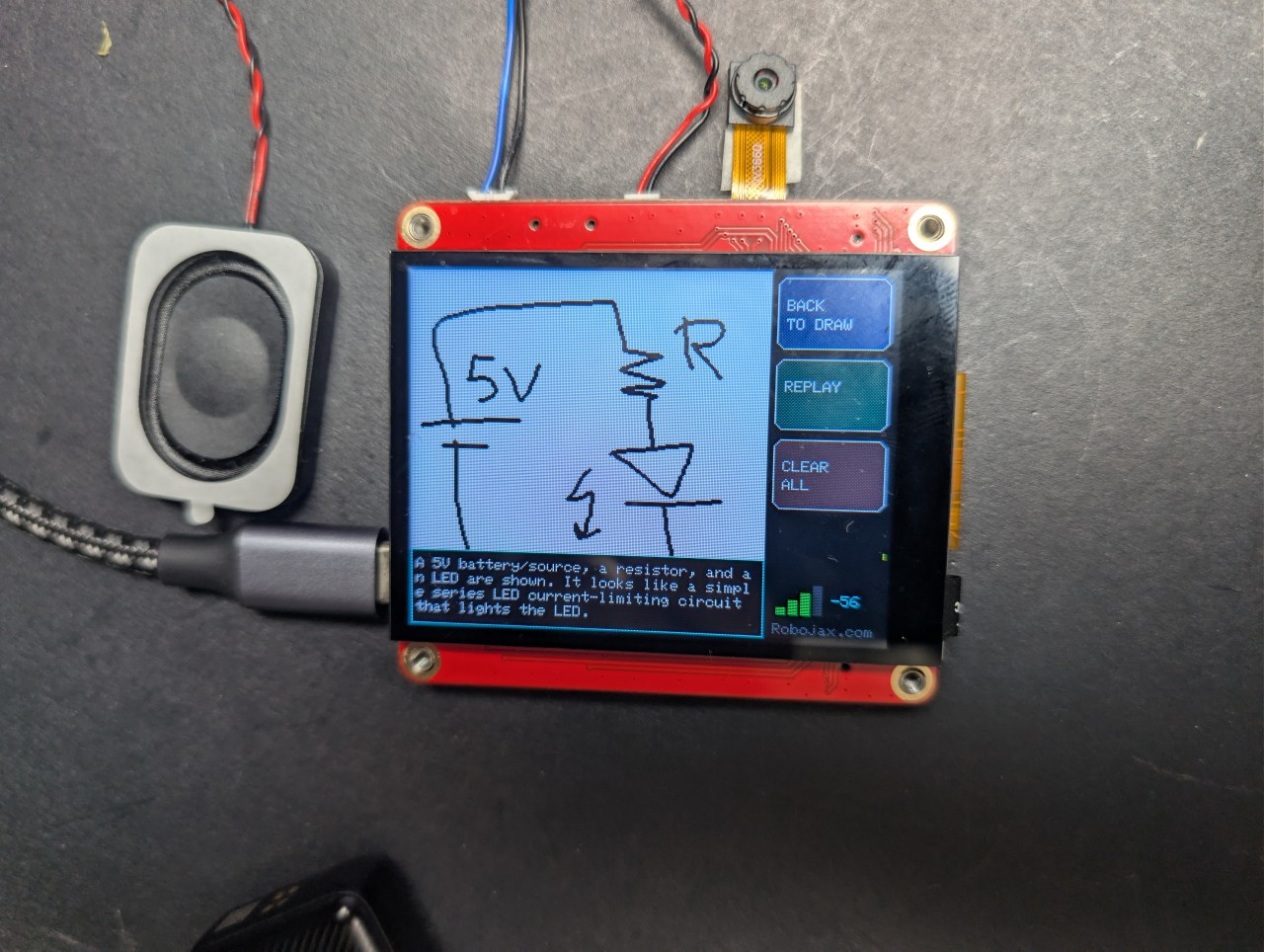
በዚህ $40 ESP32 ቦርድ ላይ ሰርክዩት ሳልኩ እና AI ገለጸው
በጣትዎ ወረውቱን ይሳሉ እና AI ያብራራዋል
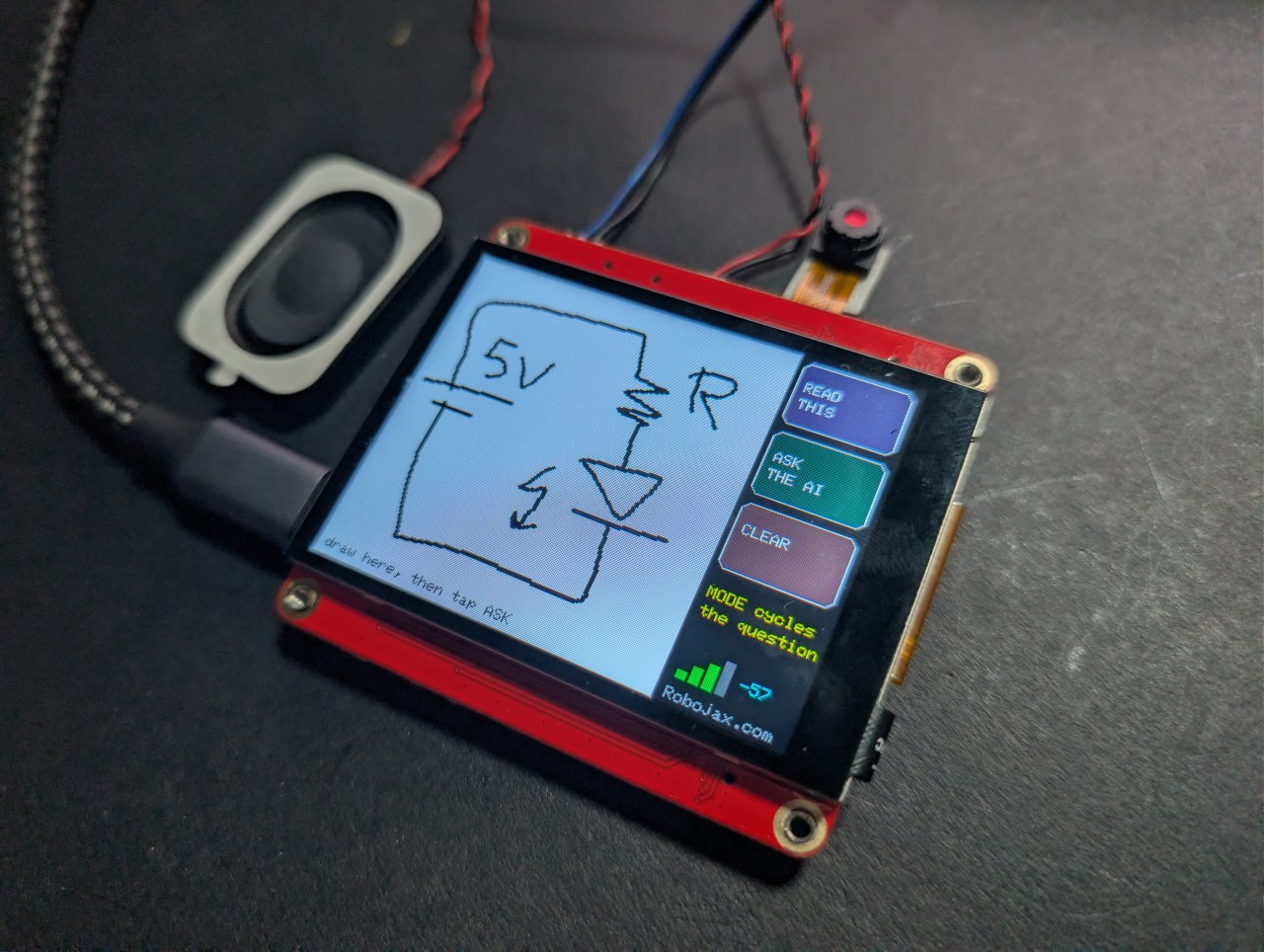
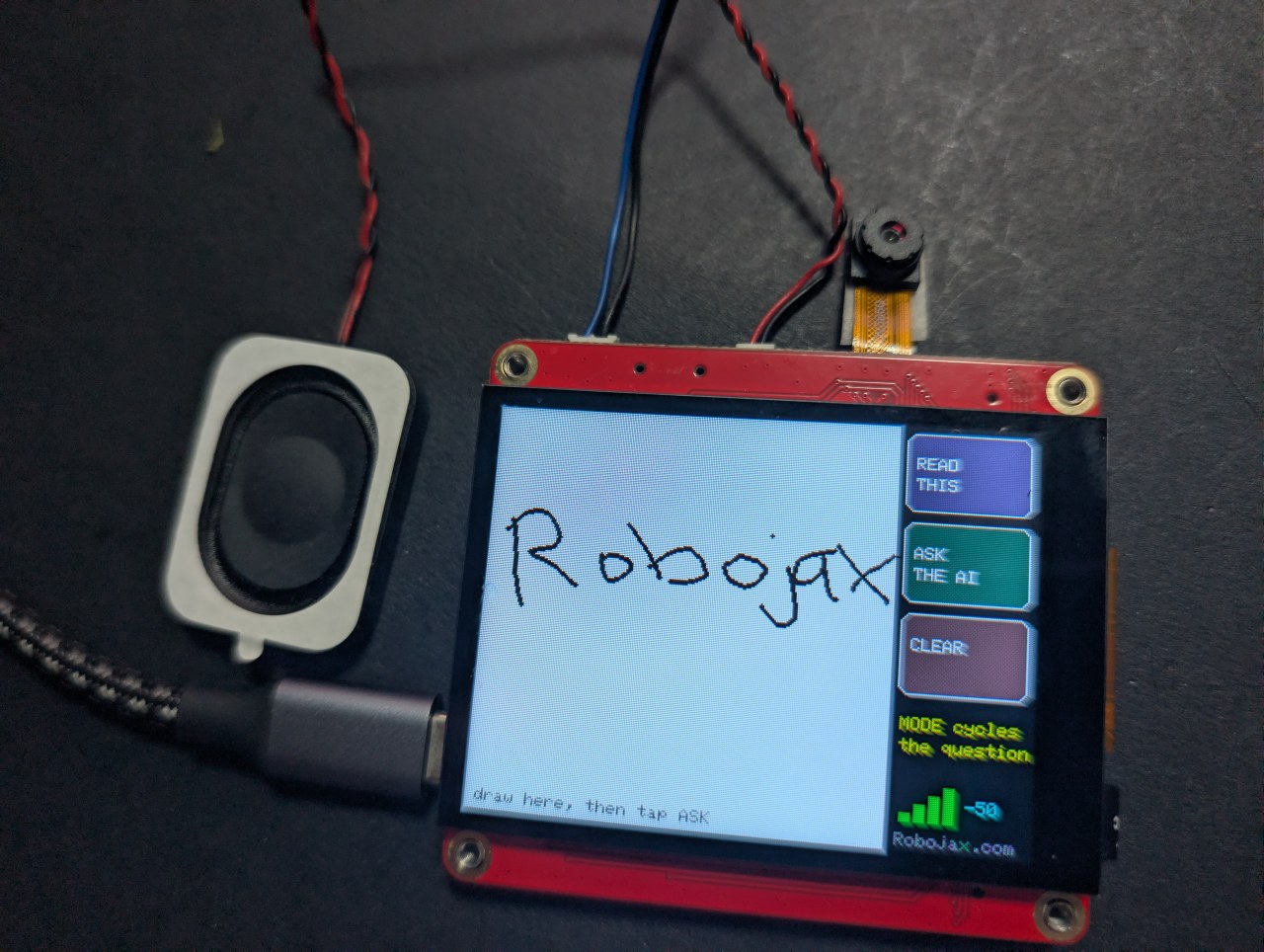
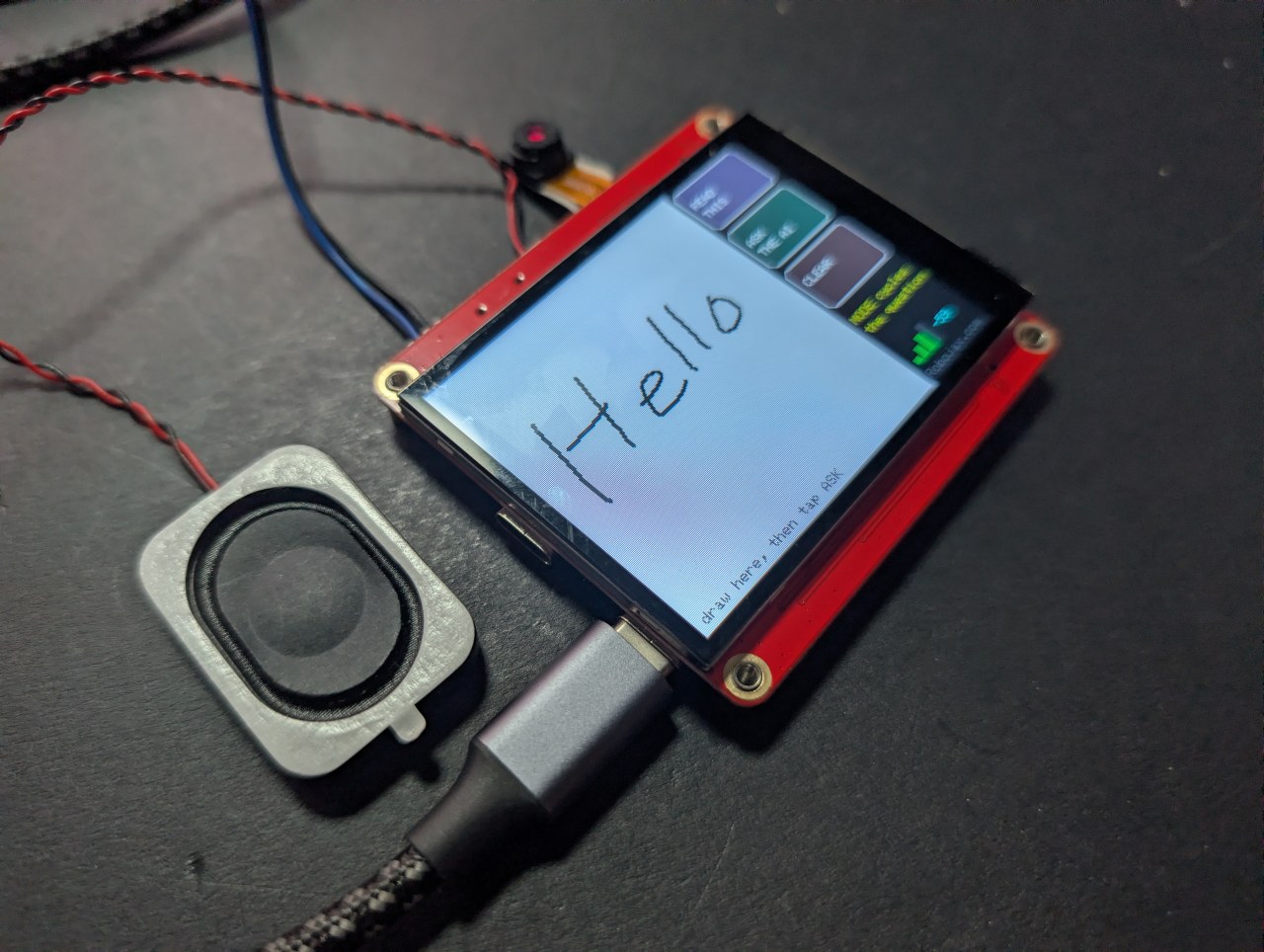
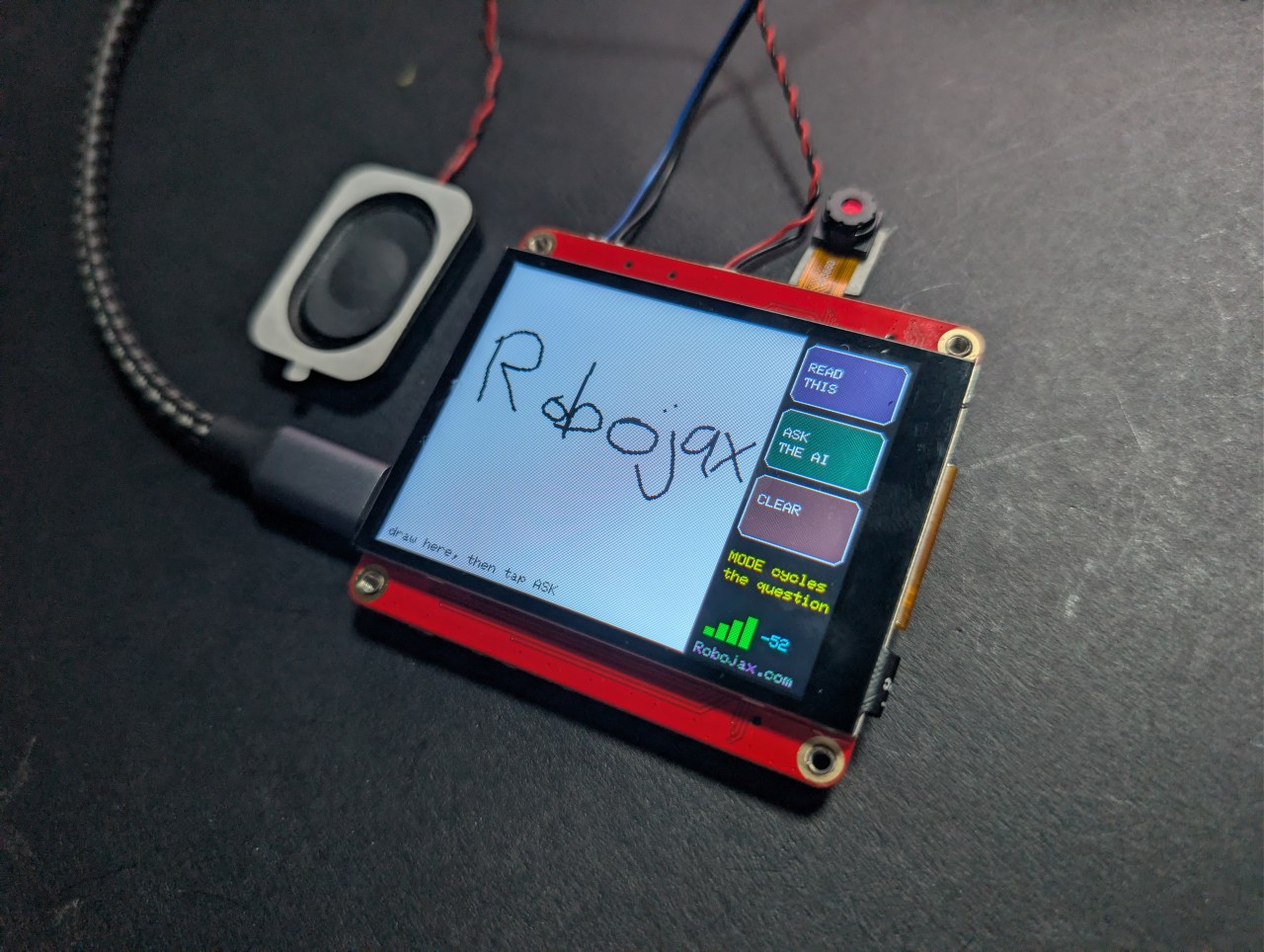
በጣትዎ በመዳሰሻ ስክሪን ላይ ይሳሉ ወይም ይጻፉ፣ ASK ን ይንኩ፣ እና AI የሳሉትን በስክሪን እና በድምጽ ይነግርዎታል። ሶስት ሁነታዎች፡ ቅርጹን ይሰይሙ፣ የእጅ ጽሁፍን ያንብቡ፣ ወይም በእጅ የተሳለውን ወረውት ያብራሩ።
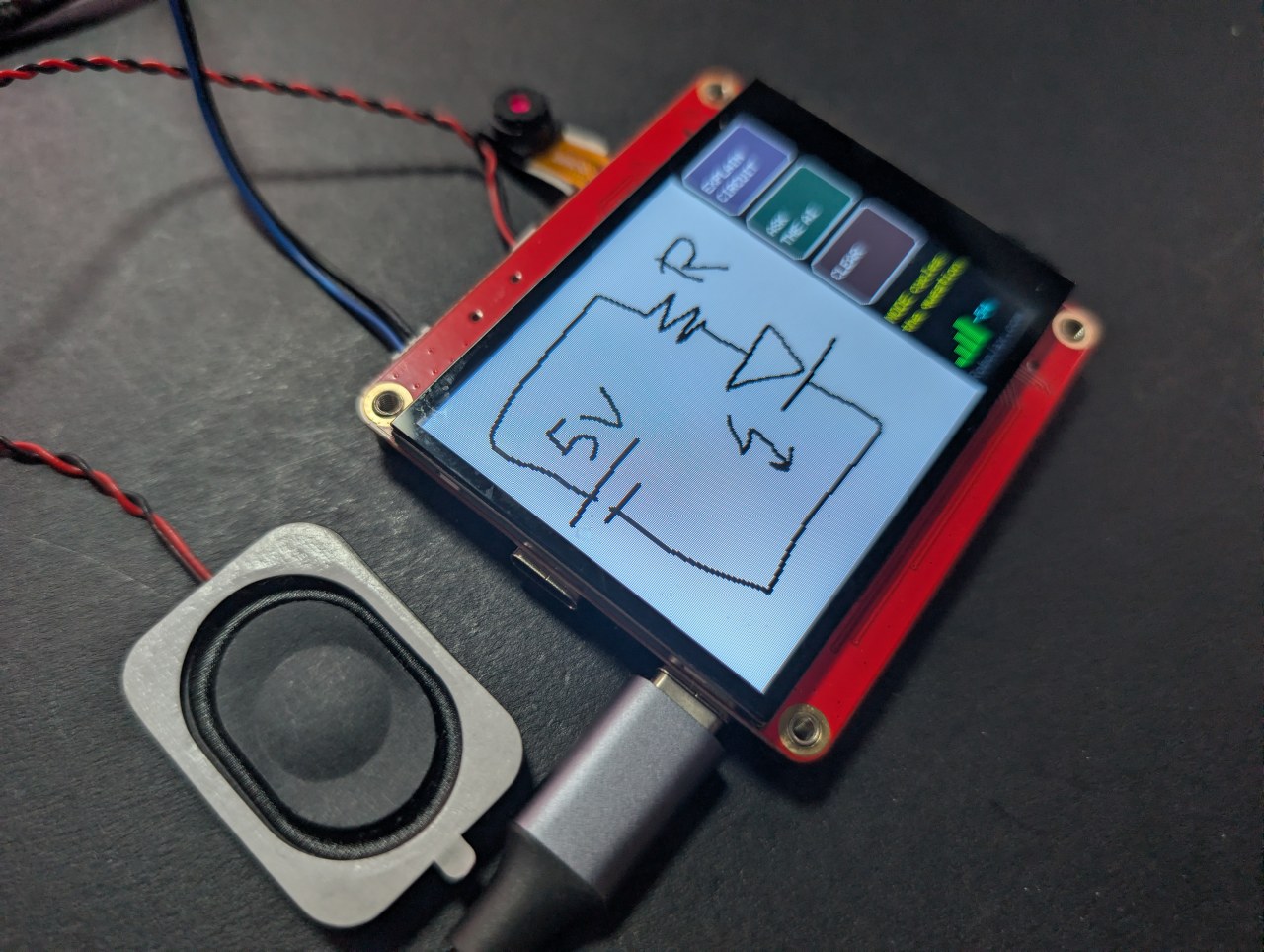
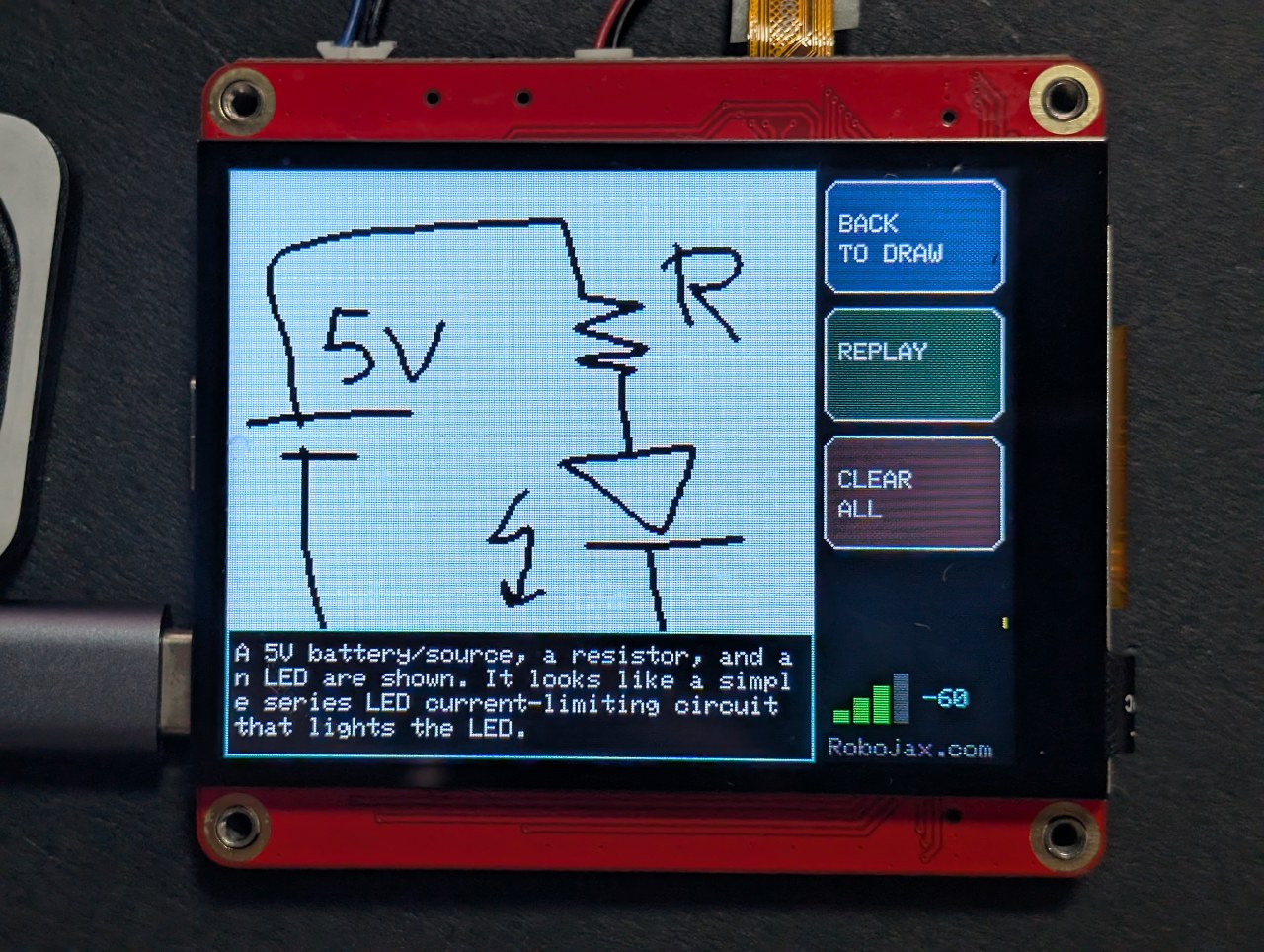
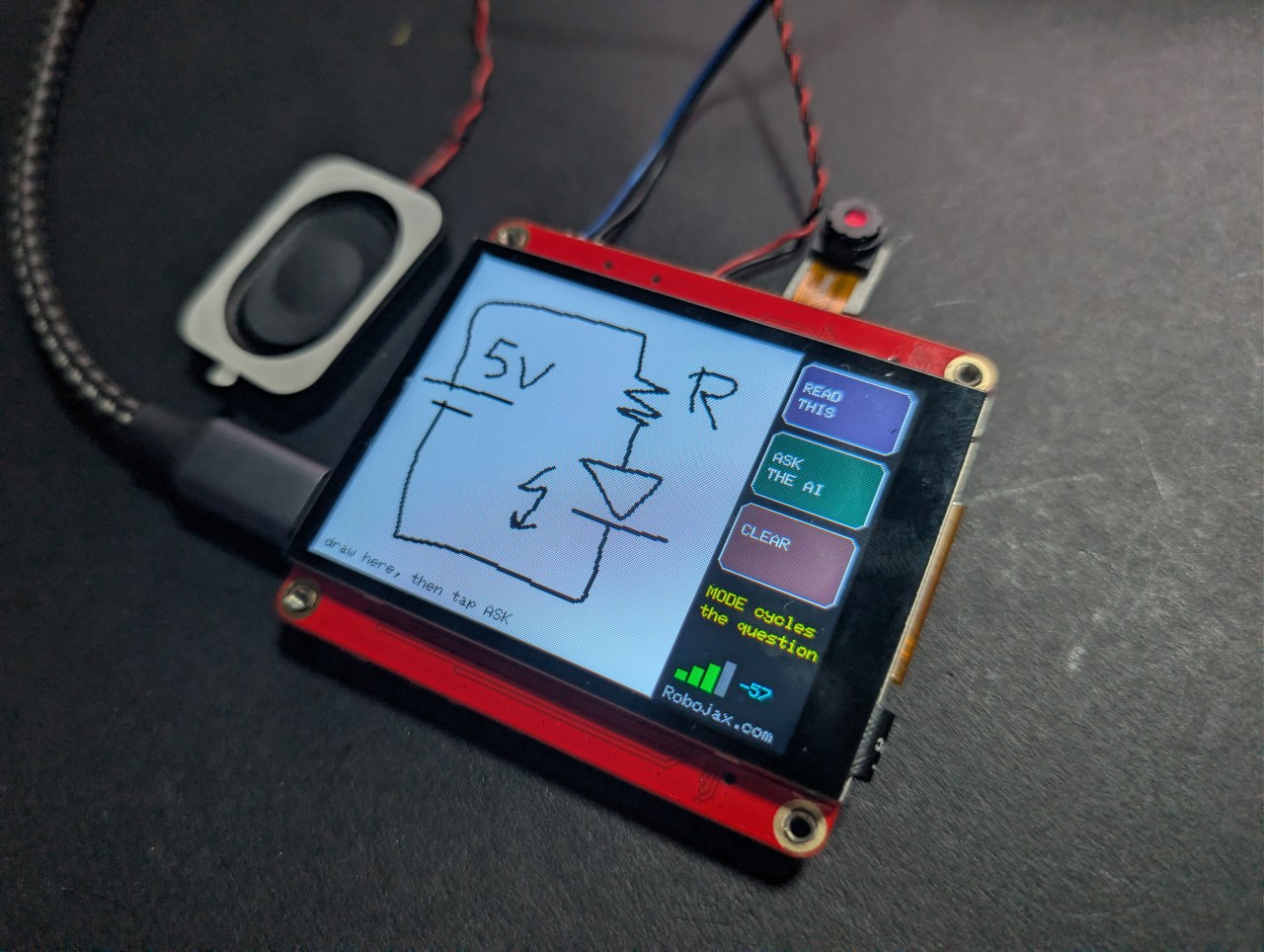
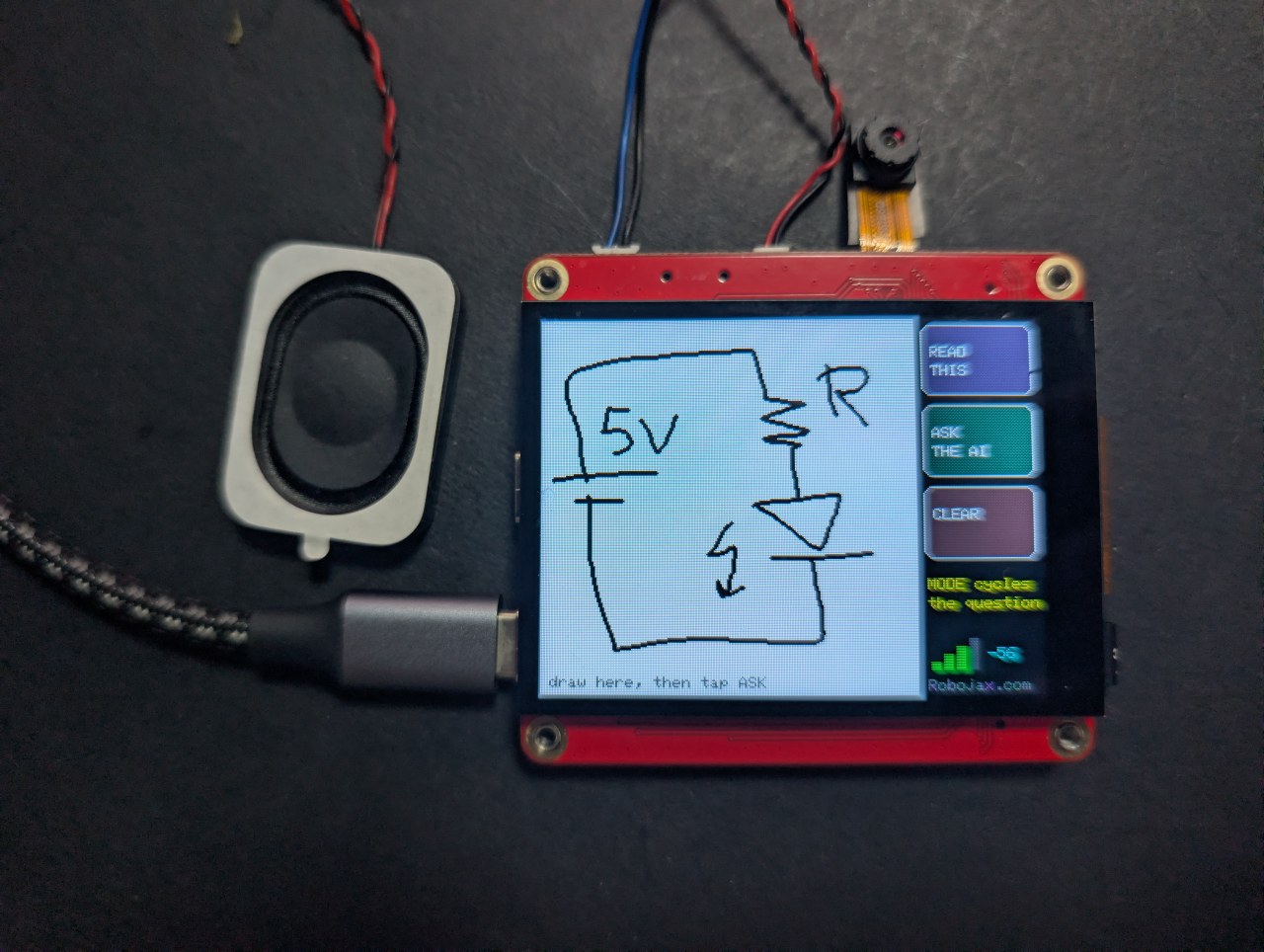
የመጨረሻው አስደሳች ነው። ባትሪ፣ ተከላካይ እና LED ይሳሉ፣ እና ቦርዱ ክፍሎቹን ይሰይማል እና ወረውቱ ምን እንደሚሰራ ይነግርዎታል።
Robojax_Makerfab ን በMaTouch AI ESP32-S3 ምርት ገጽ ላይ በመክፈያ ጊዜ ያስገቡ። ለመጠቀም ምንም አያስከፍልዎትም፣ እና እዚህ ያሉትን ነፃ ኮድ እና አጋዥ ስልጠናዎች ለመደገፍ ይረዳል።ይህ ፕሮጀክት ሊፈታው የነበረበት ችግር
ከዚህ ማሳያ ላይ ፒክስሎችን በSPI መልሰው ማንበብ አይችሉም፣ እና የግራፊክስ ቤተ-መጻሕፍት በተለምዶ በማስታወሻ ውስጥ ቅጂ ሳይኖር በቀጥታ ወደ ፓነሉ ይሳላል - ስለዚህ የሚላክ ስክሪንሾት የለም። መፍትሄው በቀጥታ ወደ ፓነሉ መሳል አለመሆን ነው። ይህ ስኬች በArduino_Canvas ውስጥ ይሳላል፣ ይህም ሙሉ የፍሬም ቋት በPSRAM ውስጥ ያቆያል። ያ ቋት ምስሉ ነው፣ ስለዚህ fmt2jpg() በቀጥታ ወደ JPEG ይለውጠዋል።
ቀለሙ በነጭ ላይ ጥቁር የሆነው ለምንድነው
የእይታ ሞዴሎች በብርሃን ዳራ ላይ ጥቁር ምልክቶችን ከተቃራኒው ይልቅ በጣም በአስተማማኝ ሁኔታ ያነባሉ፣ እና በካሜራ ላይ እንደ ወረቀት ይመስላል። አዝራሮቹ በካንቫስ ውስጥ ሳይሆን በፓነሉ ላይ ይሳሉ፣ ስለዚህ AI በሚያየው ምስል ውስጥ በጭራሽ አይካተቱም - በንጹህ ነጭ መስክ ላይ ስዕልዎን ብቻ ያገኛል።
ስትሮኮችን እንደ ስትሮክ ማድረግ
መሳል እንደ ነጥብ ማትሪክስ ሳይሆን እንደ ብዕር እንዲሰማ ሁለት ነገሮች ትክክል መሆን ነበረባቸው፦
- ካንቫሱ በእያንዳንዱ የመዳሰሻ ናሙና ላይ ወደ ስክሪኑ አይላክም - ይህ በእያንዳንዱ ጊዜ 115 KB በSPI ላይ ይገፋል እና ሁሉንም ነገር ያዘገያል። እያንዳንዱ ስትሮክ ወደ ካንቫሱ ይሳላል እና በፓነሉ ላይ በተናጠል ይቀባል፣ ይህም ምንም የማያስከፍል ነው።
- ስትሮክ የሚያልቀው ፓነሉ ለ70 ሚሊሰከንድ ያህል ከዝምታ በኋላ ብቻ ነው። የመዳሰሻ መቆጣጠሪያው በእያንዳንዱ ድምጽ መስጫ ላይ ነጥብ አይመልስም፣ እና እያንዳንዱን ባዶ ድምጽ መስጫ እንደ ተነሳ ጣት አድርጎ መያዝ መስመሩን ወደ የተቆራረጡ ነጥቦች ይከፍለዋል።
ሶስት ሁነታዎች፣ አንድ ስዕል
ስዕልዎ ከመልሱ በታች ይቆያል፣ ስለዚህ BACK TO DRAW ን መንካት፣ ሁነታውን መቀየር እና ስለ ተመሳሳይ ስእል የተለየ ጥያቄ መጠየቅ ይችላሉ። እንደ ስዕል መስመሮች እና ቅርጾች ነው፤ እንደ መሐንዲስ ሲጠየቅ፣ ወረውት ይሆናል።
ጥሩ ውጤት ለማግኘት ምክሮች
- ርካሽ የካፓሲቲቭ ስታይለስ ከጣት ጫፍ እጅግ የተሻለ ነው።
- ትልቅ ይሳሉ - ካንቫሱ 240×240 ነው፣ ስለዚህ ጥቂት ትላልቅ ክፍሎች፣ ጥሩ ዝርዝር ሳይሆን።
- የመዳፍ መከላከያ የለም። እጅዎን ከመስታወቱ ላይ ያርቁ።
ስለ MaTouch AI ESP32-S3 2.8" ቦርድ
በዚህ ገጽ ላይ ያለ እያንዳንዱ ፕሮጀክት ከMakerfabs በMaTouch AI ESP32-S3 2.8" TFT ST7789V ላይ ይሰራል። ሁሉን-በአንድ ቦርድ ነው፡ የቀለም መዳሰሻ ስክሪን፣ የ3 ሜጋፒክስል ካሜራ፣ ሁለት ማይክሮፎኖች እና እውነተኛ የድምጽ ማጉያ አምፕሊፋየር፣ ሁሉም በESP32-S3 ከ8 MB PSRAM ጋር የሚመራ። ያ ጥምረት እነዚህን AI ፕሮጀክቶች በአንድ ቦርድ ላይ ሌላ ምንም ሳይያያዝ ሊቻል የሚያደርገው ነው።
የ8 MB PSRAM መጠን እዚህ ካሉ ሌሎች ቁጥሮች ሁሉ የበለጠ አስፈላጊ ነው። ቦርዱ የካሜራ ፍሬም፣ ጥቂት ሰከንድ የተቀዳ ድምጽ፣ ወይም በbase64 የተቀመጠ ፎቶ በማስታወሻ ውስጥ በአንድ ጊዜ እንዲይዝ የሚያስችለው ይህ ነው - የትኛውም በESP32 መደበኛ RAM ውስጥ አይገባም።
የአምራች ሰነዶች፡ Makerfabs wiki ገጽ።
ቁልፍ ዝርዝሮች
- ፕሮሰሰር፡ ESP32-S3፣ ባለሁለት ኮር 240 MHz፣ WiFi 2.4 GHz + ብሉቱዝ 5.0
- ማስታወሻ፡ 16 MB ፍላሽ፣ 8 MB PSRAM (እዚህ ባሉ ሁሉም ፕሮጀክቶች ማለት ይቻላል የሚፈለግ)
- ማሳያ፡ 2.8" IPS፣ 320×240፣ ST7789V ሾፌር፣ SPI
- መዳሰሻ፡ GT911 ካፓሲቲቭ፣ በአንድ ጊዜ 5 ጣቶችን ይከታተላል
- ካሜራ፡ OV3660፣ 3 ሜጋፒክስል፣ እስከ 2048×1536
- ማይክሮፎኖች፡ ሁለት INMP441 I2S ዲጂታል ማይክሮፎኖች (እውነተኛ የስቲሪዮ ጥንድ)
- ድምጽ ማጉያ፡ MAX98357A ክፍል-D አምፕሊፋየር፣ 3.2 W ወደ 4 Ω
- ማከማቻ፡ ማይክሮኤስዲ ካርድ ቀዳዳ (SPI ሁነታ)
- ኃይል፡ USB-C፣ JST ባትሪ ማገናኛ፣ TP4056 ቻርጀር፣ የኃይል መቀየሪያ
- በቦርዱ ላይም፡ WS2812B RGB LED፣ PCF8563T በባትሪ የሚደገፍ የእውነተኛ ጊዜ ሰዓት፣ እና MAX17048 የባትሪ ነዳጅ መለኪያ በይፋዊ ዝርዝሮች ውስጥ ያልተዘረዘረ
USB CDC On Boot ን ወደ Disabled ያዘጋጁ። የተሳሳተ ወደብ ከተጠቀሙ ድምጽ ያልተለመደ ባህሪ ያሳያል ወይም መስቀሎች ይሳካሉ።ከባትሪ ማጎልበት? ሁለቱ የUSB-C ሶኬቶች፣ የTP4056 ቻርጀር እና የኃይል መቀየሪያው በዝርዝር ተብራርተዋል፣ ከስዕላዊ መግለጫው ጋር፣ በየቦርድ ሙከራ ጽሑፍ ውስጥ — የትኛው ሶኬት እንደሚሞላ እና መቀየሪያው መብራት ወይም ማጥፋት እንዳለበት ጨምሮ።
የArduino IDE ቅንብሮች
እነዚህ ቅንብሮች አስፈላጊ ናቸው። ብዙ ሰዎች በዚህ ቦርድ ላይ የሚዘግቧቸው ችግሮች ከእነዚህ ውስጥ አንዱ የተሳሳተ በመሆኑ ነው፣ እና እነሱ የኮር ስሪት ሲቀይሩ ዳግም ይጀመራሉ፣ ስለዚህ ከማንኛውም ለውጥ በኋላ እንደገና ያረጋግጧቸው።
| ቅንብር | እሴት |
|---|---|
| ቦርድ | ESP32S3 Dev Module |
| የESP32 ኮር ስሪት | 2.0.17 |
| PSRAM | OPI PSRAM |
| የፍላሽ መጠን | 16MB (128Mb) |
| የክፍልፍል እቅድ | 16M Flash (3MB APP/9.9MB FATFS) |
| USB CDC በመነሻ | የተሰናከለ |
| የመስቀል ፍጥነት | 921600 |
| ከመስቀል በፊት ሁሉንም ፍላሽ አጥፋ | የተሰናከለ |
| ወደብ | የCH340K USB-C ወደብ |
የሚፈለጉ ቤተ-መጻሕፍት
ይህ ፕሮጀክት ከዚህ በታች ባለው ሠንጠረዥ ውስጥ ያሉትን ሁሉንም ቤተ-መጻሕፍት ይፈልጋል - ከዚያ በላይ ምንም፣ ከዚያ በታች ምንም። አብዛኛዎቹ በቀጥታ ከArduino IDE ውስጥ ከTools → Manage Libraries ይጫናሉ፣ ግን GFX Library for Arduino ከZIP ፋይል መጫን አለበት። የስሪት ቁጥሮች አስፈላጊ ናቸው፣ ስለዚህ እባክዎ በትክክል የተዘረዘሩትን ይጠቀሙ።
| ቤተ-መጻሕፍት | ስሪት | ደራሲ | ከየት ይጫኑ |
|---|---|---|---|
| GFX Library for Arduino | 1.5.6 | moononournation | ZIP ፋይል - ከዚህ በታች ይመልከቱ |
| bb_captouch | 1.3.1 | Larry Bank | Library Manager |
| ArduinoJson | 7.x | Benoit Blanchon | Library Manager |
| Adafruit NeoPixel | ማንኛውም የቅርብ | Adafruit | Library Manager |
የGFX ቤተ-መጻሕፍትን ከZIP ፋይል መጫን
- ZIP ያውርዱ። በዚህ ፕሮጀክት ማውረጃ ውስጥ ተካትቷል፣ ወይም ከየArduino_GFX ማከማቻ ማግኘት ይችላሉ - አረንጓዴውን Code ቁልፍ ይጫኑ፣ ከዚያ Download ZIP።
- እንደገና ሊያገኙት በሚችሉበት ቦታ ያስቀምጡት። አይጭመቁት።
- በArduino IDE ውስጥ፣ Sketch → Include Library → Add .ZIP Library ይጫኑ።
- ወደ ያወረዱት ZIP ፋይል ይሂዱ እና Open ይጫኑ።
- IDE ይጭነዋል እና በመስኮቱ ግርጌ ያረጋግጣል። ቀድሞ የ1.6 ስሪት ከጫኑ፣ መጀመሪያ ያንን አቃፊ ከ
Documents/Arduino/librariesይሰርዙት፣ ወይም ሁለቱ ይጋጫሉ።
secrets.h ማዋቀር
የWiFi ዝርዝሮችዎ እና ማንኛውም የAPI ቁልፎች በsecrets.h ውስጥ ይሄዳሉ፣ ይህም በማውረጃው ውስጥ በቦታ ይያዥ እሴቶች ተካትቷል። ያንን ትር በArduino IDE ውስጥ ይክፈቱ እና በራስዎ ይተኩዋቸው።
secrets.h ውስጥ ይጠቀሙ።የAPI ቁልፎችዎን ማግኘት
ይህ ፕሮጀክት ከክላውድ AI አገልግሎት ጋር ይነጋገራል፣ ስለዚህ የራስዎ ቁልፍ ያስፈልግዎታል። ይህን ከዚህ በፊት አድርገው የማያውቁ ከሆነ አይጨነቁ - ለአገልግሎቱ መለያዎን ከሚለይ የይለፍ ቃል ጋር ተመሳሳይ ነው። አንድ ጊዜ ጥቂት ደቂቃዎችን ይወስዳል።
OpenAI - ዓይኖቹ
OpenAI ስዕሎችን የሚመለከተውን የእይታ ሞዴል ያቀርባል። ምስል የሚልኩ ፕሮጀክቶች ብቻ ይህን ያስፈልጋቸዋል።
- ወደ platform.openai.com/api-keys ይሂዱ እና ይግቡ ወይም መለያ ይፍጠሩ።
- Create new secret key ን ጠቅ ያድርጉ፣ ስም ይስጡት እና ይፍጠሩት።
- ወዲያውኑ ይቅዱት - አንድ ጊዜ ብቻ ነው የሚታየው።
- Billing ን ይክፈቱ እና አነስተኛ መጠን ያለው ክሬዲት ያክሉ። API አስቀድሞ የሚከፈል እና ከማንኛውም ከሌለዎት ChatGPT የደንበኝነት ምዝገባ የተለየ ነው።
ቁልፉን በsecrets.h ውስጥ እንደ OPENAI_KEY ያስቀምጡ።
Microsoft Azure Speech - ለማዳመጥ እና ለማውራት
Azure ንግግርዎን ወደ ጽሑፍ ይቀይራል እና መልሱን ወደ ድምጽ ይመልሳል። ነፃ ደረጃው በዚህ ገጽ ላይ ላለው ሁሉም ነገር በቂ ለጋስ ነው።
- ወደ portal.azure.com ይሂዱ እና በMicrosoft መለያ ይግቡ (ነፃ መለያ ጥሩ ነው)።
- ከዚህ በፊት Azure ተጠቅመው ካላወቁ ሶስት ምርጫዎችን የሚያቀርብ Welcome to Azure ስክሪን ያያሉ። Start with an Azure free trial ን ይምረጡ - Azure ማንኛውንም ነገር እንዲፈጥሩ ከመፍቀዱ በፊት የደንበኝነት ምዝገባ ያስፈልግዎታል። (ተማሪዎች በምትኩ Azure for Students ን መምረጥ አለባቸው፡ ተመሳሳይ ውጤት፣ ካርድ አያስፈልግም።) Manage Microsoft Entra ID ን ችላ ይበሉ፣ እሱ ሙሉ ለሙሉ ሌላ ነገር ነው።
- Create a resource ን ጠቅ ያድርጉ፣ Speech ን ይፈልጉ እና በMicrosoft የታተመውን Speech service ይምረጡ።
- ቅጹን ይሙሉ፡ ማንኛውም የሀብት ቡድን፣ ማንኛውም ስም፣ እና በአቅራቢያዎ ያለን Region ይምረጡ - ያንን ክልል በትክክል እንደታየ ይፃፉት፣ ለምሳሌ
eastus። - ለPricing tier F0 (Free) ይምረጡ። ይህ በወር ወደ አምስት ሰዓት የሚጠጋ የንግግር-ወደ-ጽሑፍ እና ግማሽ ሚሊዮን ቁምፊዎችን የጽሑፍ-ወደ-ንግግር ይፈቅዳል።
- Review + create ን ጠቅ ያድርጉ፣ ከዚያ Create ን ጠቅ ያድርጉ። አንድ ደቂቃ ያህል ይጠብቁ፣ ከዚያ Go to resource ን ጠቅ ያድርጉ።
- በግራ በኩል ባለው ምናሌ ውስጥ Keys and Endpoint ን ይክፈቱ። KEY 1 እና Location/Region ን ይቅዱ።
እነዚያን በsecrets.h ውስጥ እንደ AZURE_SPEECH_KEY እና AZURE_REGION ያስቀምጡ።
�ለማስኬድ ምን ያስከፍላል
በጣም ትንሽ ነው፣ ግን ነፃ አይደለም፣ እና ፕሮጀክት እንዲሰራ ከመተውዎ በፊት በግምት ምን እንደሚያወጡ ማወቅ አለብዎት።
| አገልግሎት | ግምታዊ ወጪ |
|---|---|
| OpenAI እይታ | እንደ ሞዴሉ በመመስረት በአንድ ስዕል አንድ ወይም ሁለት ሳንቲም ያህል |
| Azure Speech | ነፃ ደረጃ በወር ወደ 5 ሰዓት ማዳመጥ እና 0.5 M ቁምፊዎችን መናገር ይሸፍናል |
ዋጋዎች ይለወጣሉ፣ ስለዚህ እነዚህን እንደ ጥቅስ ሳይሆን እንደ መመሪያ ይያዙ። እያንዳንዳቸው እነዚህ አገልግሎቶች ያወጡትን የሚመለከቱበት የአጠቃቀም ገጽ አላቸው፣ እና ሁሉም የወጪ ገደብ እንዲያዘጋጁ ይፈቅዱልዎታል - ይህም በመጀመሪያው ቀን ማድረግ የሚገባ ነው።
መላ ፍለጋ
| ምልክት | መንስኤ እና መፍትሄ |
|---|---|
| ስክሪኑ ጥቁር ሆኖ ይቆያል | የተሳሳተ GFX ቤተ-መጻሕፍት ስሪት (1.5.6 ይጠቀሙ) ወይም የተሳሳቱ የቦርድ ቅንብሮች። |
PSRAM alloc failed |
Tools → PSRAM ወደ OPI PSRAM አልተዋቀረም። |
| ምንም አይሰቀልም / የCOM ወደብ የለም | የተሳሳተ USB-C ወደብ፣ ወይም የCH340 ሾፌር አልተጫነም። |
ምስሎች
/*
* ===========================================================================
* 08_Draw_AI — MaTouch AI ESP32-S3 2.8" TFT ST7789V
* ===========================================================================
*
* ---------------------------------------------------------------------------
* ROBOJAX.COM - MaTouch AI ESP32-S3 2.8" project series
*
* WATCH THE Introduction and face recognition VIDEO
* https://youtu.be/6AL3g3tC_Hk
* Video 2: Draw AI - https://youtu.be/FaIW1MVIsj4
*
* WRITTEN TUTORIALS - every project, with photos and full explanation
* Camera and touchscreen.... https://robojax.com/RTJ849
* Offline face recognition.. https://robojax.com/RTJ850
* AI voice assistant........ https://robojax.com/RTJ851
* AI vision................. https://robojax.com/RTJ852
* Draw AI ................. https://robojax.com/RTJ867 (this code)
*
* GET THE BOARD - SAVE $5 with coupon code: Robojax_Makerfab
* https://www.makerfabs.com/matouch-ai-esp32s3-2-8-tft-st7789v.html
* (enter the code at checkout)
*
* All of this code is free. If it helped you, a subscribe on YouTube is
* the best way to support more of it.
* ---------------------------------------------------------------------------
*
* Draw or write on the touchscreen with your finger, tap ASK, and an AI
* tells you what you drew - on the screen and out loud.
*
* THREE MODES (tap MODE to cycle):
*
* WHAT IS THIS? draw a house, a cat, a triangle -> it names it
* READ THIS write HELLO in big letters -> it reads it back
* EXPLAIN CIRCUIT sketch a battery, resistor and LED -> it tells you
* what the components are and what the circuit does
*
* That last mode is the interesting one: a hand-drawn schematic, explained
* by an AI, on a forty-dollar board with no computer attached.
*
* NO CAMERA IS USED by this sketch. That means the J1/J3 Mabee sockets are
* free GPIO here (see 07_GPIO_Test), and there is no camera/SD memory
* contention to worry about.
*
* ---------------------------------------------------------------------------
* HOW IT WORKS (the trick worth knowing)
*
* You cannot read pixels back out of the ST7789 over SPI, and Arduino_GFX
* normally draws straight to the panel with no copy in memory - so there is
* no "screenshot" to send anywhere. The fix: draw into an Arduino_Canvas,
* which keeps a full framebuffer in PSRAM and flushes it to the display.
* That buffer IS the image, so fmt2jpg() turns it straight into a JPEG and
* the rest of the path is identical to 05_Vision_AI.
*
* Black ink on a white canvas, deliberately: vision models read dark-on-light
* far more reliably than the reverse, and it looks like paper on camera.
*
* ---------------------------------------------------------------------------
* TIPS
* - A cheap capacitive stylus is MUCH better than a fingertip.
* - Write BIG. The canvas is 240x240 - a few large characters, not a
* sentence.
* - There is no palm rejection: only the first touch point is used, so
* keep your palm off the glass.
*
* ---------------------------------------------------------------------------
* FILL IN secrets.h BEFORE FLASHING (WIFI_* and OPENAI_*; AZURE_* only if
* SPEAK_REPLIES is 1).
*
* BOARD SETTINGS (Tools menu - EVERY line matters)
* Board : ESP32S3 Dev Module
* ESP32 core : 2.0.17
* PSRAM : OPI PSRAM <-- required, the canvas lives there
* Flash Size : 16MB (128Mb)
* Partition Scheme : 16M Flash (3MB APP/9.9MB FATFS)
* USB CDC On Boot : Disabled
* Upload Speed : 921600
* Port : the CH340K USB-C port (the one near RESET)
*
* LIBRARIES
* GFX Library for Arduino v1.5.6 (NOT 1.6.x - that pairs with core 3)
* bb_captouch v1.3.1
* ArduinoJson v7.x
* Adafruit NeoPixel any recent
*
* ---------------------------------------------------------------------------
* FUNCTIONS IN THIS SKETCH
* led(r,g,b) set the RGB status LED colour
* getTouch(&x,&y) read the touch panel, mapped to screen coordinates
* clearCanvas() wipe to white and redraw the hint
* drawStroke(...) one thick line segment, into the canvas AND the panel
* handleDrawing(...) turn touch samples into continuous strokes
* waitData()/readHttpResponse() robust HTTPS reply reader (de-chunking)
* canvasToJpeg(&len) RGB565 canvas -> JPEG in PSRAM
* askVision(...) send the drawing + prompt to OpenAI, get an answer
* spkInit()/speak()/playLastAnswer() Azure voice out, with free REPLAY
* drawButtons()/drawAnswerSide()/showAnswer()/drawWifi() the UI
* askAboutDrawing() one full cycle: encode -> ask -> show -> speak
* setup() / loop() boot + WiFi / drawing and button handling
*
* Robojax.com
* ===========================================================================
*/
#define SPEAK_REPLIES 1 // 1 = read the answer aloud with Azure TTS
#define LED_BRIGHTNESS 15 // WS2812 is on the power rail - 15 is plenty
#include <Arduino_GFX_Library.h>
#include <bb_captouch.h>
#include <Adafruit_NeoPixel.h>
#include <ArduinoJson.h>
#include <WiFi.h>
#include <WiFiClientSecure.h>
#include "mbedtls/base64.h"
#include "img_converters.h" // fmt2jpg()
#include "esp_camera.h" // for the pixformat_t enum used by fmt2jpg
#include "pins.h"
#include "secrets.h"
#if SPEAK_REPLIES
#include "driver/i2s.h"
#define WAV_HEADER_LEN 44
#endif
Arduino_HWSPI *bus = new Arduino_HWSPI(
TFT_DC, TFT_CS, TFT_SCLK, TFT_MOSI, TFT_MISO, &SPI, true);
Arduino_GFX *panel = new Arduino_ST7789(bus, TFT_RES, 1, true);
/* The canvas is what we actually draw into: a real framebuffer in PSRAM that
* we can both flush to the panel AND hand to the JPEG encoder. */
#define CANVAS_W 240
#define CANVAS_H 240
Arduino_Canvas *canvas = new Arduino_Canvas(CANVAS_W, CANVAS_H, panel, 0, 0);
BBCapTouch bbct;
Adafruit_NeoPixel rgb(RGB_LED_NUM, RGB_LED_PIN, NEO_GRB + NEO_KHZ800);
/* --- the three modes ------------------------------------------------------ */
struct DrawMode { const char *l1, *l2; const char *prompt; };
const DrawMode MODES[] = {
{"WHAT IS", "THIS?",
"This is a drawing made with a finger on a small touchscreen. Name the "
"shape or object in ONE short sentence of at most 15 words. Plain text only."},
{"READ", "THIS",
"This image contains handwriting drawn with a finger. Reply with ONLY the "
"text you can read, nothing else. If you cannot read it, say: cannot read it."},
{"EXPLAIN", "CIRCUIT",
"This is a hand-drawn electronic circuit diagram. In at most two short "
"sentences, name the components you can identify and say what the circuit "
"does. Plain text only. If it is not a circuit, say so."},
};
#define N_MODES 3
int mode = 0;
/* --- layout: 240 canvas on the left, buttons on the right ----------------- */
#define BTN_X 244
#define BTN_W 72
#define BTN_H 46
#define BTN_MODE_Y 4
#define BTN_ASK_Y 56
#define BTN_CLEAR_Y 108
bool showing_answer = false;
/* --- drawing state -------------------------------------------------------- */
int last_x = -1, last_y = -1;
bool has_ink = false;
/* --- kept audio for REPLAY ------------------------------------------------ */
uint8_t *last_audio = nullptr;
size_t last_audio_len = 0;
void led(uint8_t r, uint8_t g, uint8_t b) { rgb.setPixelColor(0, rgb.Color(r, g, b)); rgb.show(); }
void playLastAnswer();
void drawButtons();
/* ===========================================================================
* Touch
* =========================================================================== */
bool getTouch(uint16_t *x, uint16_t *y) {
TOUCHINFO ti;
if (!bbct.getSamples(&ti)) return false;
if (ti.count < 1) return false; // first point only - no palm rejection
*x = ti.y[0];
*y = (ti.x[0] > 240) ? 0 : (240 - ti.x[0]);
return true;
}
/* ===========================================================================
* Canvas / drawing
* =========================================================================== */
void clearCanvas() {
canvas->fillScreen(WHITE);
canvas->flush(); // one full push: paint it white
has_ink = false;
last_x = last_y = -1;
/* The hint goes on the PANEL, never into the canvas - anything drawn into
* the canvas becomes part of the image the AI sees, and it would happily
* read this text back to you. */
panel->setTextSize(1);
panel->setTextColor(panel->color565(170, 170, 170));
panel->setCursor(6, CANVAS_H - 12);
panel->print("draw here, then tap ASK");
}
/* One thick line segment, drawn into BOTH the canvas and the panel.
*
* Why both: the canvas is the image we will send to the AI, but flushing the
* whole 240x240 buffer to the screen costs ~115 KB of SPI. Doing that per
* touch sample throttled the loop so hard that most samples were missed -
* which is exactly what "it only draws dots" looks like. Painting the same
* few pixels directly to the panel is essentially free, so the canvas is only
* flushed when the screen genuinely has to be rebuilt. */
static const int8_t STROKE_OFFS[5][2] = {{0,0},{1,0},{-1,0},{0,1},{0,-1}};
void drawStroke(int x0, int y0, int x1, int y1) {
for (int i = 0; i < 5; i++) {
int ox = STROKE_OFFS[i][0], oy = STROKE_OFFS[i][1];
canvas->drawLine(x0 + ox, y0 + oy, x1 + ox, y1 + oy, BLACK);
panel->drawLine(x0 + ox, y0 + oy, x1 + ox, y1 + oy, BLACK);
}
}
/* Touch is read once per loop and handed in here.
*
* THE IMPORTANT BIT - why this is time-based rather than "no touch = lifted":
* the GT911 does not return a point on every poll. It reports when its own
* internal sample is ready, so a poll in between comes back empty even though
* your finger never left the glass. Treating each empty poll as a lift resets
* the stroke, and every real sample then lands as an isolated dot instead of
* a line joined to the previous one - which is exactly what "it only draws
* dots" looks like. So a stroke only ends after the panel has been quiet for
* LIFT_MS, which bridges the dropouts but is still far shorter than a genuine
* lift-and-reposition. */
#define LIFT_MS 70
void handleDrawing(bool touched, int x, int y) {
static uint32_t last_seen = 0;
if (touched && x >= 0 && x < CANVAS_W) {
if (last_x >= 0) drawStroke(last_x, last_y, x, y); // join to the last point
else drawStroke(x, y, x, y); // start of a stroke
last_x = x; last_y = y;
last_seen = millis();
has_ink = true;
} else if (last_x >= 0 && millis() - last_seen > LIFT_MS) {
last_x = last_y = -1; // really lifted now
}
}
/* ===========================================================================
* HTTP — the same robust reader proven in 04 and 05
* =========================================================================== */
static bool waitData(WiFiClientSecure &c, uint32_t ms) {
uint32_t t0 = millis();
while (!c.available()) {
if (!c.connected()) return false;
if (millis() - t0 > ms) return false;
delay(10);
}
return true;
}
static int readHttpResponse(WiFiClientSecure &client, String &body_out, uint32_t idle_ms) {
body_out = "";
if (!waitData(client, idle_ms)) { Serial.println("HTTP: no response at all"); return 0; }
String status_line = client.readStringUntil('\n');
int code = 0;
sscanf(status_line.c_str(), "HTTP/%*s %d", &code);
bool chunked = false;
while (waitData(client, idle_ms)) {
String h = client.readStringUntil('\n');
if (h == "\r" || h.length() <= 1) break;
h.toLowerCase();
if (h.startsWith("transfer-encoding:") && h.indexOf("chunked") >= 0) chunked = true;
}
if (chunked) {
int blanks = 0;
while (true) {
if (!waitData(client, idle_ms)) { Serial.println("HTTP: chunk timeout"); break; }
String szline = client.readStringUntil('\n');
szline.trim();
if (szline.length() == 0) { if (++blanks > 4) break; continue; }
blanks = 0;
long sz = strtol(szline.c_str(), NULL, 16);
if (sz <= 0) break;
long got = 0;
while (got < sz) {
if (!waitData(client, idle_ms)) break;
while (client.available() && got < sz) { body_out += (char)client.read(); got++; }
}
if (waitData(client, 3000)) client.readStringUntil('\n');
if (got < sz) break;
}
} else {
while (waitData(client, idle_ms))
while (client.available()) body_out += (char)client.read();
}
return code;
}
/* ===========================================================================
* Canvas -> JPEG
* The canvas framebuffer is plain RGB565, which fmt2jpg() accepts directly.
* =========================================================================== */
uint8_t *canvasToJpeg(size_t *len_out) {
*len_out = 0;
uint16_t *fb = canvas->getFramebuffer();
if (!fb) { Serial.println("no canvas framebuffer"); return nullptr; }
uint8_t *jpg = NULL;
size_t jpg_len = 0;
if (!fmt2jpg((uint8_t *)fb, (size_t)CANVAS_W * CANVAS_H * 2,
CANVAS_W, CANVAS_H, PIXFORMAT_RGB565, 90, &jpg, &jpg_len)) {
Serial.println("fmt2jpg failed");
return nullptr;
}
*len_out = jpg_len;
return jpg; // caller frees
}
/* ===========================================================================
* OpenAI vision — identical shape to 05_Vision_AI
* =========================================================================== */
bool askVision(const uint8_t *jpg, size_t jpg_len, const char *prompt, String &answer_out) {
size_t b64_cap = ((jpg_len + 2) / 3) * 4 + 16;
unsigned char *b64 = (unsigned char *)ps_malloc(b64_cap);
if (!b64) return false;
size_t b64_len = 0;
if (mbedtls_base64_encode(b64, b64_cap, &b64_len, jpg, jpg_len) != 0) { free(b64); return false; }
const char *head_fmt =
"{\"model\":\"%s\",\"max_completion_tokens\":%d,\"messages\":[{\"role\":\"user\","
"\"content\":[{\"type\":\"text\",\"text\":\"%s\"},"
"{\"type\":\"image_url\",\"image_url\":{\"url\":\"data:image/jpeg;base64,";
const char *tail = "\"}}]}]}";
char head[900];
int head_len = snprintf(head, sizeof(head), head_fmt, OPENAI_MODEL, LLM_MAX_TOKENS, prompt);
size_t body_len = head_len + b64_len + strlen(tail);
char *body = (char *)ps_malloc(body_len + 1);
if (!body) { free(b64); return false; }
memcpy(body, head, head_len);
memcpy(body + head_len, b64, b64_len);
strcpy(body + head_len + b64_len, tail);
free(b64);
WiFiClientSecure client;
client.setInsecure();
client.setTimeout(45);
if (!client.connect(OPENAI_HOST, 443)) {
Serial.println("Vision: TLS connect failed");
free(body);
return false;
}
client.print(String("POST /v1/chat/completions HTTP/1.1\r\n"
"Host: " OPENAI_HOST "\r\n"
"Authorization: Bearer " OPENAI_KEY "\r\n"
"Content-Type: application/json\r\n"
"Connection: close\r\n"
"Content-Length: ") + String(body_len) + "\r\n\r\n");
size_t sent = 0;
while (sent < body_len) {
size_t n = min((size_t)4096, body_len - sent);
size_t w = client.write((uint8_t *)body + sent, n);
if (w == 0) { delay(50); w = client.write((uint8_t *)body + sent, n); if (w == 0) break; }
sent += w;
yield();
}
free(body);
if (sent < body_len) { client.stop(); Serial.println("Vision: upload stalled"); return false; }
String resp;
int code = readHttpResponse(client, resp, 45000);
client.stop();
if (code != 200) { Serial.printf("Vision HTTP %d: %s\n", code, resp.c_str()); return false; }
JsonDocument doc;
if (deserializeJson(doc, resp)) {
Serial.printf("Vision: JSON parse failed, %u bytes\n", resp.length());
return false;
}
const char *content = doc["choices"][0]["message"]["content"];
if (!content) return false;
answer_out = String(content);
answer_out.trim();
return answer_out.length() > 0;
}
/* ===========================================================================
* Azure voice out — same de-chunked player as 04/05
* =========================================================================== */
#if SPEAK_REPLIES
void spkInit() {
i2s_config_t cfg = {
.mode = (i2s_mode_t)(I2S_MODE_MASTER | I2S_MODE_TX),
.sample_rate = 16000,
.bits_per_sample = I2S_BITS_PER_SAMPLE_16BIT,
.channel_format = I2S_CHANNEL_FMT_ONLY_LEFT,
.communication_format = I2S_COMM_FORMAT_STAND_I2S,
.intr_alloc_flags = ESP_INTR_FLAG_LEVEL1,
.dma_buf_count = 8,
.dma_buf_len = 256,
.use_apll = false,
.tx_desc_auto_clear = true,
.fixed_mclk = 0
};
i2s_pin_config_t pins = {
.mck_io_num = I2S_PIN_NO_CHANGE,
.bck_io_num = I2S_SPK_BCLK,
.ws_io_num = I2S_SPK_LRC,
.data_out_num = I2S_SPK_DOUT,
.data_in_num = I2S_PIN_NO_CHANGE
};
i2s_driver_install(I2S_SPK_PORT, &cfg, 0, NULL);
i2s_set_pin(I2S_SPK_PORT, &pins);
i2s_zero_dma_buffer(I2S_SPK_PORT);
}
void playLastAnswer() {
if (!last_audio || last_audio_len <= WAV_HEADER_LEN) return;
static const uint8_t lead_in[640] = {0};
size_t w = 0;
i2s_write(I2S_SPK_PORT, lead_in, sizeof(lead_in), &w, portMAX_DELAY);
i2s_write(I2S_SPK_PORT, last_audio + WAV_HEADER_LEN,
last_audio_len - WAV_HEADER_LEN, &w, portMAX_DELAY);
i2s_write(I2S_SPK_PORT, lead_in, sizeof(lead_in), &w, portMAX_DELAY);
delay(150);
i2s_zero_dma_buffer(I2S_SPK_PORT);
}
/* Read exactly n bytes into a raw buffer. BINARY SAFE - unlike the String
* based reader used for JSON, which cannot carry audio: PCM is full of 0x00
* bytes, and an Arduino String treats those as end-of-string. */
static size_t readExact(WiFiClientSecure &c, uint8_t *dst, size_t n) {
size_t got = 0;
uint32_t t0 = millis();
while (got < n && millis() - t0 < 10000) {
int r = c.read(dst + got, n - got);
if (r > 0) { got += r; t0 = millis(); }
else if (!c.connected() && !c.available()) break;
else delay(2);
}
return got;
}
void speak(const String &text) {
String safe = text;
safe.replace("&", "&"); safe.replace("<", "<"); safe.replace(">", ">");
String ssml = "<speak version='1.0' xml:lang='" AZURE_TTS_LANG "'>"
"<voice name='" AZURE_TTS_VOICE "'>" + safe + "</voice></speak>";
WiFiClientSecure client;
client.setInsecure();
client.setTimeout(30);
const char *host = AZURE_REGION ".tts.speech.microsoft.com";
if (!client.connect(host, 443)) { Serial.println("TTS: TLS connect failed"); return; }
client.print(String("POST /cognitiveservices/v1 HTTP/1.1\r\nHost: ") + host + "\r\n"
"Ocp-Apim-Subscription-Key: " AZURE_SPEECH_KEY "\r\n"
"Content-Type: application/ssml+xml\r\n"
"X-Microsoft-OutputFormat: riff-16khz-16bit-mono-pcm\r\n"
"User-Agent: MaTouchRobojax\r\nConnection: close\r\n"
"Content-Length: " + String(ssml.length()) + "\r\n\r\n");
client.print(ssml);
/* --- status line + headers (text, so String is fine here) --- */
if (!waitData(client, 30000)) { Serial.println("TTS: no response"); client.stop(); return; }
String status_line = client.readStringUntil('\n');
int code = 0;
sscanf(status_line.c_str(), "HTTP/%*s %d", &code);
bool chunked = false;
long content_len = -1;
while (waitData(client, 30000)) {
String h = client.readStringUntil('\n');
if (h == "\r" || h.length() <= 1) break;
h.toLowerCase();
if (h.startsWith("transfer-encoding:") && h.indexOf("chunked") >= 0) chunked = true;
if (h.startsWith("content-length:")) content_len = h.substring(15).toInt();
}
if (code != 200) { Serial.printf("TTS HTTP %d\n", code); client.stop(); return; }
/* --- body straight into PSRAM as raw bytes --- */
const size_t AUDIO_CAP = 1200 * 1024; // ~37 s of 16 kHz mono
uint8_t *audio = (uint8_t *)ps_malloc(AUDIO_CAP);
if (!audio) { Serial.println("TTS: PSRAM alloc failed"); client.stop(); return; }
size_t alen = 0;
if (chunked) {
int blanks = 0;
while (alen < AUDIO_CAP) {
if (!waitData(client, 15000)) break;
String szline = client.readStringUntil('\n');
szline.trim();
if (szline.length() == 0) { if (++blanks > 4) break; continue; }
blanks = 0;
long sz = strtol(szline.c_str(), NULL, 16);
if (sz <= 0) break; // final chunk
if ((size_t)sz > AUDIO_CAP - alen) sz = (long)(AUDIO_CAP - alen);
size_t got = readExact(client, audio + alen, (size_t)sz);
alen += got;
if (waitData(client, 3000)) client.readStringUntil('\n'); // CRLF
if (got < (size_t)sz) break;
}
} else if (content_len > 0) {
size_t want = (size_t)content_len < AUDIO_CAP ? (size_t)content_len : AUDIO_CAP;
alen = readExact(client, audio, want);
} else {
uint32_t idle = millis();
while (millis() - idle < 5000 && alen < AUDIO_CAP) {
int r = client.read(audio + alen, AUDIO_CAP - alen);
if (r > 0) { alen += r; idle = millis(); }
else if (!client.connected()) break;
else delay(5);
}
}
client.stop();
if (alen <= WAV_HEADER_LEN) { Serial.println("TTS: no audio"); free(audio); return; }
if (last_audio) free(last_audio);
last_audio = audio; // kept for REPLAY
last_audio_len = alen;
Serial.printf("TTS: %u KB clean audio (%s), playing\n",
(unsigned)(alen / 1024), chunked ? "de-chunked" : "plain");
playLastAnswer();
}
#else
void spkInit() {}
void speak(const String &t) { (void)t; }
void playLastAnswer() {}
#endif
/* ===========================================================================
* UI — right-hand button column (drawn on the PANEL, not the canvas, so
* it is never part of the image sent to the AI)
* =========================================================================== */
void drawWifi() {
panel->fillRect(BTN_X, 196, BTN_W, 44, BLACK);
bool up = (WiFi.status() == WL_CONNECTED);
long rssi = up ? WiFi.RSSI() : -100;
int bars = rssi > -55 ? 4 : rssi > -65 ? 3 : rssi > -75 ? 2 : rssi > -85 ? 1 : 0;
for (int b = 0; b < 4; b++) {
int bh = 5 + b * 5;
panel->fillRect(BTN_X + 4 + b * 8, 224 - bh, 6, bh,
(b < bars) ? GREEN : panel->color565(60, 60, 60));
}
panel->setTextSize(1);
panel->setCursor(BTN_X + 40, 210);
panel->setTextColor(up ? CYAN : RED);
if (up) panel->printf("%ld", rssi); else panel->print("--");
panel->setCursor(BTN_X + 2, 230);
panel->setTextColor(panel->color565(120, 120, 120));
panel->print("Robojax.com");
}
void drawButton(int y, const char *l1, const char *l2, uint16_t colour) {
panel->fillRoundRect(BTN_X, y, BTN_W, BTN_H, 6, colour);
panel->drawRoundRect(BTN_X, y, BTN_W, BTN_H, 6, WHITE);
panel->setTextSize(1);
panel->setTextColor(WHITE);
panel->setCursor(BTN_X + 6, y + 14);
panel->print(l1);
panel->setCursor(BTN_X + 6, y + 26);
panel->print(l2);
}
void drawButtons() {
panel->fillRect(BTN_X, 0, BTN_W, 196, BLACK);
drawButton(BTN_MODE_Y, MODES[mode].l1, MODES[mode].l2, panel->color565(90, 60, 140));
drawButton(BTN_ASK_Y, "ASK", "THE AI", panel->color565(0, 100, 60));
drawButton(BTN_CLEAR_Y, "CLEAR", "", panel->color565(110, 35, 35));
panel->setTextColor(YELLOW);
panel->setCursor(BTN_X + 2, 166);
panel->print("MODE cycles");
panel->setCursor(BTN_X + 2, 178);
panel->print("the question");
drawWifi();
showing_answer = false;
}
void drawAnswerSide() {
panel->fillRect(BTN_X, 0, BTN_W, 196, BLACK);
drawButton(BTN_MODE_Y, "BACK", "TO DRAW", panel->color565(0, 90, 160));
#if SPEAK_REPLIES
if (last_audio_len) drawButton(BTN_ASK_Y, "REPLAY", "", panel->color565(0, 110, 60));
#endif
drawButton(BTN_CLEAR_Y, "CLEAR", "ALL", panel->color565(110, 35, 35));
drawWifi();
showing_answer = true;
}
/* The answer is drawn on the PANEL over the canvas area, and stays until the
* user taps BACK or CLEAR - the canvas underneath is untouched. */
void showAnswer(const String &text) {
const int max_chars = 38;
int lines = (text.length() + max_chars - 1) / max_chars;
if (lines > 8) lines = 8;
int h = lines * 10 + 12;
int y = CANVAS_H - h;
panel->fillRect(0, y, CANVAS_W, h, BLACK);
panel->drawRect(0, y, CANVAS_W, h, CYAN);
panel->setTextSize(1);
panel->setTextColor(WHITE);
for (int i = 0; i < lines; i++) {
panel->setCursor(4, y + 6 + i * 10);
panel->print(text.substring(i * max_chars,
min((int)text.length(), (i + 1) * max_chars)));
}
}
/* ===========================================================================
* One full ask cycle
* =========================================================================== */
void askAboutDrawing() {
if (!has_ink) {
showAnswer("Draw something first, then tap ASK.");
drawAnswerSide();
return;
}
led(255, 120, 0); // amber: working
panel->fillRect(0, CANVAS_H - 22, CANVAS_W, 22, BLACK);
panel->setTextSize(1);
panel->setTextColor(YELLOW);
panel->setCursor(6, CANVAS_H - 15);
panel->printf("asking the AI (%s)...", MODES[mode].l1);
size_t jpg_len = 0;
uint8_t *jpg = canvasToJpeg(&jpg_len);
if (!jpg) {
showAnswer("Could not encode the drawing.");
drawAnswerSide();
led(255, 0, 0);
return;
}
Serial.printf("drawing encoded: %u KB\n", (unsigned)(jpg_len / 1024));
String answer;
uint32_t t0 = millis();
bool ok = askVision(jpg, jpg_len, MODES[mode].prompt, answer);
uint32_t ms = millis() - t0;
free(jpg);
if (!ok) {
showAnswer("No answer - see the serial monitor.");
drawAnswerSide();
led(255, 0, 0);
return;
}
Serial.printf("AI (%lu ms): %s\n", (unsigned long)ms, answer.c_str());
showAnswer(answer);
drawAnswerSide();
#if SPEAK_REPLIES
led(0, 255, 40);
speak(answer);
#endif
led(0, 0, 0);
}
/* ===========================================================================
* SETUP
* =========================================================================== */
void setup() {
Serial.begin(115200);
delay(400);
Serial.println("\n=== 08 Draw + AI | Robojax.com ===");
pinMode(TFT_BLK, OUTPUT);
digitalWrite(TFT_BLK, LOW);
pinMode(SD_CS, OUTPUT);
digitalWrite(SD_CS, HIGH);
SPI.begin(TFT_SCLK, TFT_MISO, TFT_MOSI);
panel->begin();
panel->fillScreen(BLACK);
digitalWrite(TFT_BLK, HIGH);
if (!canvas->begin()) {
panel->setTextColor(RED);
panel->setTextSize(2);
panel->setCursor(10, 100);
panel->print("Canvas alloc failed!");
panel->setTextSize(1);
panel->setCursor(10, 130);
panel->print("Tools > PSRAM > OPI PSRAM must be set.");
while (1) delay(1000);
}
bbct.init(TOUCH_SDA, TOUCH_SCL, TOUCH_RST, TOUCH_INT);
delay(50);
rgb.begin();
rgb.setBrightness(LED_BRIGHTNESS);
led(0, 0, 0);
spkInit();
clearCanvas();
panel->setTextSize(1);
panel->setTextColor(YELLOW);
panel->setCursor(BTN_X + 2, 4);
panel->printf("WiFi...");
WiFi.mode(WIFI_STA);
WiFi.begin(WIFI_SSID, WIFI_PASS);
uint32_t t0 = millis();
while (WiFi.status() != WL_CONNECTED && millis() - t0 < 20000) delay(300);
Serial.println(WiFi.status() == WL_CONNECTED
? "WiFi ok" : "WiFi FAILED (2.4GHz only - check secrets.h)");
drawButtons();
Serial.println("Draw on the screen, then tap ASK. MODE cycles the question.");
}
/* ===========================================================================
* LOOP
* =========================================================================== */
void loop() {
/* edge-detected buttons: one action per tap, finger must lift first */
static bool btn_down = false;
static uint8_t misses = 0;
uint16_t ux, uy;
bool touched = getTouch(&ux, &uy);
int x = touched ? (int)ux : -1;
int y = touched ? (int)uy : -1;
if (touched && x >= BTN_X) {
misses = 0;
if (!btn_down) {
btn_down = true;
last_x = last_y = -1; // never draw from a button tap
if (y >= BTN_MODE_Y && y < BTN_MODE_Y + BTN_H) {
if (showing_answer) { // BACK TO DRAW
canvas->flush(); // repaint the drawing
drawButtons();
} else { // MODE
mode = (mode + 1) % N_MODES;
drawButtons();
Serial.printf("mode: %s %s\n", MODES[mode].l1, MODES[mode].l2);
}
} else if (y >= BTN_ASK_Y && y < BTN_ASK_Y + BTN_H) {
if (showing_answer) {
#if SPEAK_REPLIES
led(0, 255, 40); playLastAnswer(); led(0, 0, 0);
#endif
} else {
askAboutDrawing();
}
} else if (y >= BTN_CLEAR_Y && y < BTN_CLEAR_Y + BTN_H) {
clearCanvas();
drawButtons();
}
}
} else {
if (btn_down && ++misses >= 4) { btn_down = false; misses = 0; }
/* Draw only when no answer overlay is up and we are not mid-button-press. */
if (!btn_down && !showing_answer) handleDrawing(touched, x, y);
}
/* The WiFi meter repaints only when the pen has been up for a moment, so it
* can never steal SPI time in the middle of a stroke. */
static uint32_t last_wifi = 0;
if (last_x < 0 && millis() - last_wifi > 3000) { last_wifi = millis(); drawWifi(); }
/* Poll as fast as possible while the pen is down - every millisecond spent
* sleeping here is a touch sample missed and a gap in the line. */
if (last_x < 0) delay(5);
}
እንደሚያስፈልግዎት ይችላል
-
ሌላProduct page for MaTouch AI ESP32S3 2.8" TFT ST7789Vmakerfabs.com
ምንጮች እና ምንጮች
-
ሰነዶችMakerfabs MaTouch ESP32-S3 2.8" Camera and Touchscreen: User's Manualwiki.makerfabs.com
-
ሰነዶች
-
ሰነዶችProduct page for MaTouch AI ESP32S3 2.8" TFT ST7789Vmakerfabs.com
-
ውስጥMakerfabs websitemakerfabs.com
ፋይሎች📁
Arduino ኮድ (.ino)
-
makerfabs_ESP32S3_Draw_AI.zip Arduino sketchincludes the pin header and secrete header .h files
makerfabs_ESP32S3_Draw_AI.zip0.02 MB