This tutorial is part of: Seeed Studio XIAO ESP32-S3 AI Camera tutoial and codes
Series of video tutorial, article and codes to learn how to use XIAO ESP32-S3 AI Camera.
د XIAO ESP32-S3 Sense: د Wi-Fi کیمره + آفلاین د مخ پېژندنه: د مخ نوملیکنه
دا خلک په نوم پېژني، په لوړ غږ سلام کوي، او یو ریلې چلوي — پرته له انټرنیټ، پرته له کلاوډ او پرته له حساب څخه. د هیچا مخ هیڅکله له بورډ څخه نه وځي.
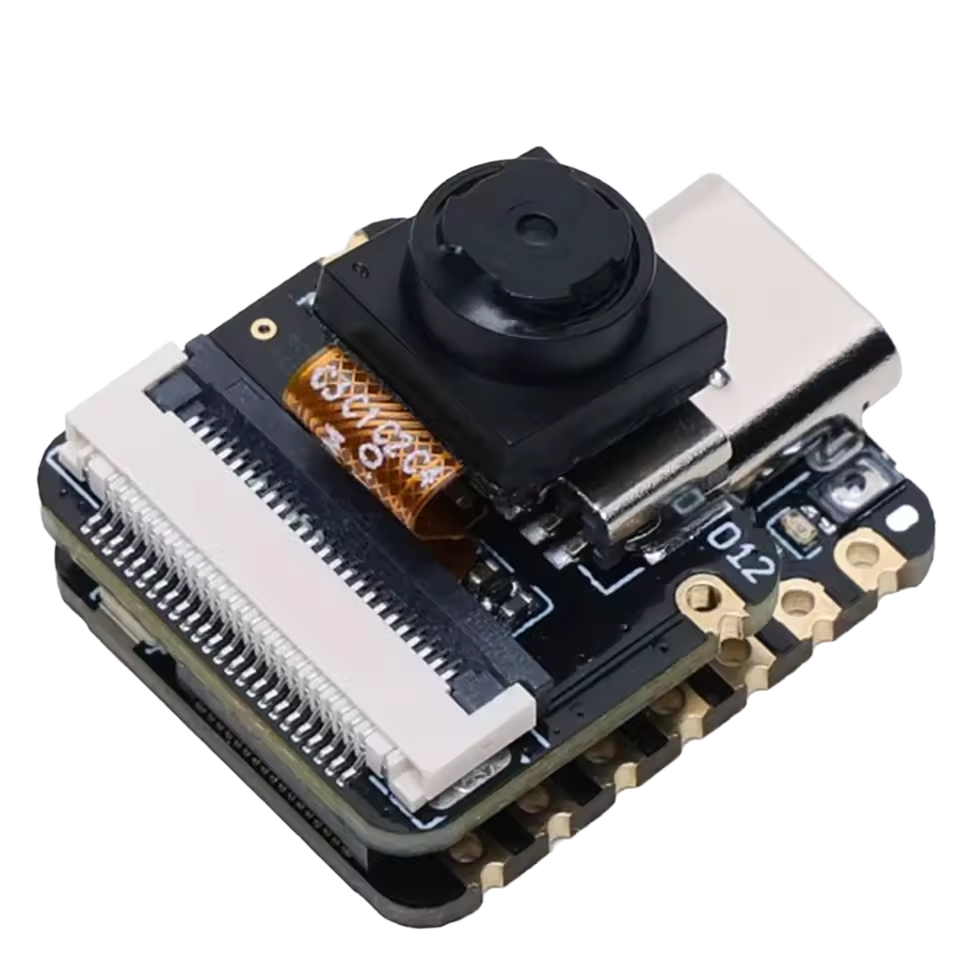
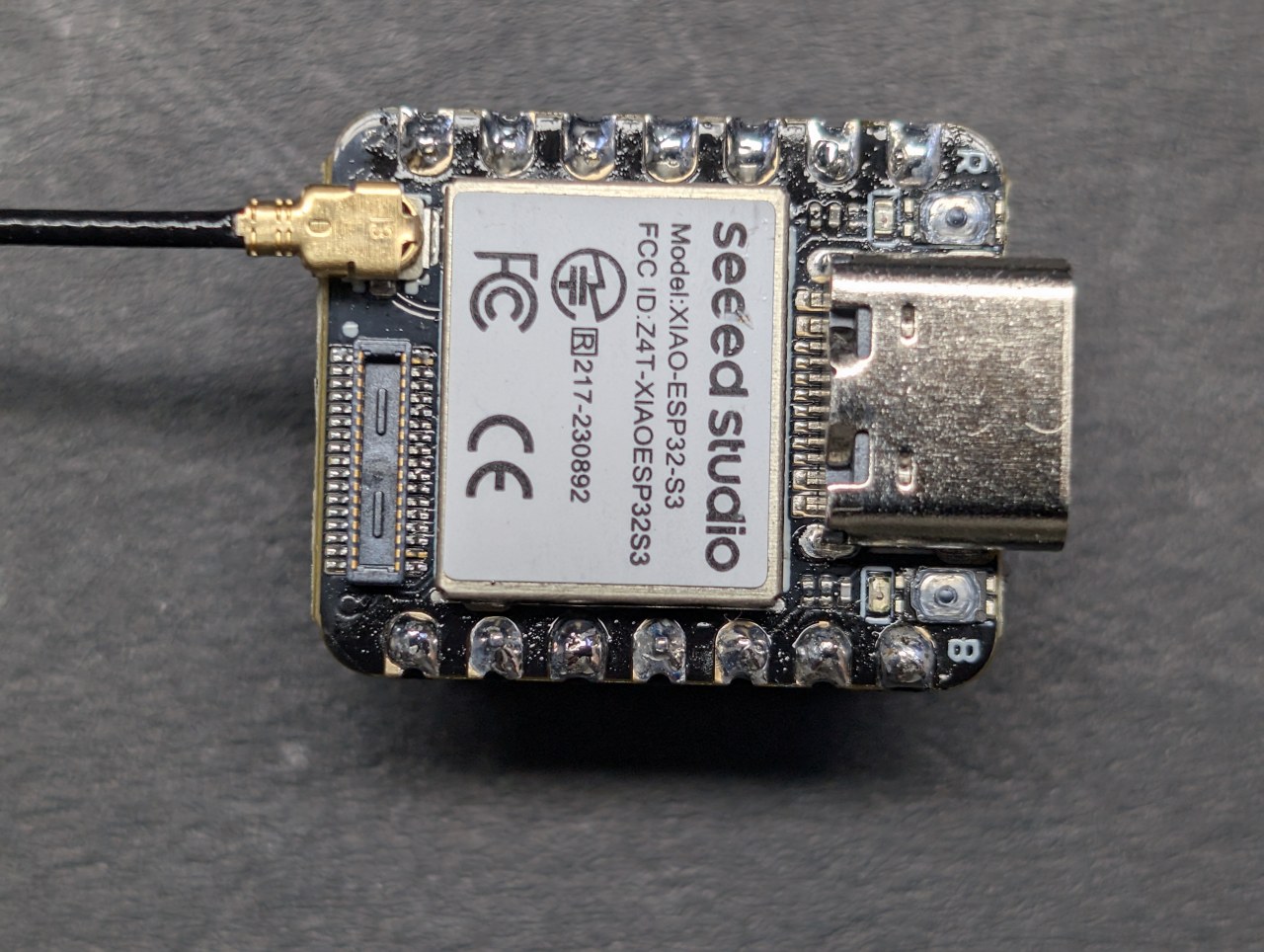
دا هغه پروژه ده چې خلک یې باور نه کوي. یوه ۱۵ ډالره کامره په خپل پروسیسر کې دوه عصبي شبکې او د مخ پېژندونکی چلوي، ثبت شوي خلک په نوم سلاموي، او د وتلو یو پن چلوي چې تاسو کولی شئ د دروازې قفل سره وتړئ. بورډ خپله وای-فای شبکه جوړوي، نو تاسو ثابتولی شئ چې په خونه کې انټرنیټ نشته — ځکه چې روټر هم نشته.

د کوډ دوه نسخې
په ډاونلوډ کې دوه سکیچونه شته. دوی ورته د مخ پېژندنه کوي؛ دوی یوازې په دې کې توپیر لري چې د غږیز هرکلي کلپونه څنګه بورډ ته ځي.
| سکیچ | آډیو کلپونه | د چا لپاره دی |
|---|---|---|
02_Face_Offlineساده ترین |
د Arduino IDE پلګ-ان سره اپلوډ شوی، یا په بشپړه توګه نه کارول شوی | مستقیمه نسخه. که تاسو هیڅکله غږیز سلامونه نه غواړئ — بورډ پرځای چغې وهي — دا وکاروئ او آډیو په بشپړه توګه له پامه غورځوئ. |
02_Face_Offline_Wavسپارښودل شوی |
د ویب پاڼې څخه پخپله اپلوډ شوی | هماغه پروژه، د پاڼې دننه د غږ کلپ مدیر سره: کلپونه اپلوډ، ازموئ، غږوئ او حذف کړئ د ویډیو له هماغه سکرین څخه، که وغواړئ له تلیفون څخه. هیڅ پلګ-ان نشته، هیڅ data فولډر نشته، د نصبولو لپاره هیڅ نشته. |
AI چیرته چلیږي
په ESP32-S3 باندې، ستاسو په براوزر کې نه. هره فريم دا لاره تیریږي:
camera 240x240 RGB565
  -> HumanFaceDetectMSR01     (لومړی پړاو: احتمالي مخونه ومومئ)
  -> HumanFaceDetectMNP01     (دوهم پړاو: اصلاح، د ۵ کلیدي نقطو سره)
  -> FaceRecognition112V1S8   (دا څوک دی؟)
  -> بکسونه په فريم کې رسم شوي
  -> JPEG -> ستاسو تلیفون ته سټریم شوی
بکسونه د کمپریشن څخه مخکې په انځور کې سوځول شوي، نو دوی هیڅکله د مخ سره له سمون څخه نه وتلی شي. براوزر یوازې هغه څه ښیې چې بورډ دمخه پریکړه کړې ده.
د Arduino IDE ترتیبات
XIAO_ESP32S3 بورډ تعریف لري، کوم چې په 2.0.8 کې راغلی. په Boards Manager کې تاسو کولی شئ په آزاده توګه نسخې بدل کړئ.| ترتیب | ارزښت |
|---|---|
| بورډ | XIAO_ESP32S3 — نه ESP32S3 Dev Module |
| د ESP32 کور نسخه | 2.0.17 — اړین |
| PSRAM | OPI PSRAM — په ډیفالټ بند دی، پرته له دې هیڅ کار نه کوي |
| د فلش اندازه | 8MB (64Mb) |
| د پارټیشن سکیم | Default with spiffs (3MB APP/1.5MB SPIFFS) |
| USB CDC On Boot | فعال شوی |
| د اپلوډ سرعت | 921600 — که اپلوډ ناکام شي 460800 ته راټیټ کړئ |
| Erase All Flash Before Upload | بند شوی — فعالول ستاسو خوندي شوي نومونه په هر اپلوډ کې له منځه وړي |
د نوملړ جوړول
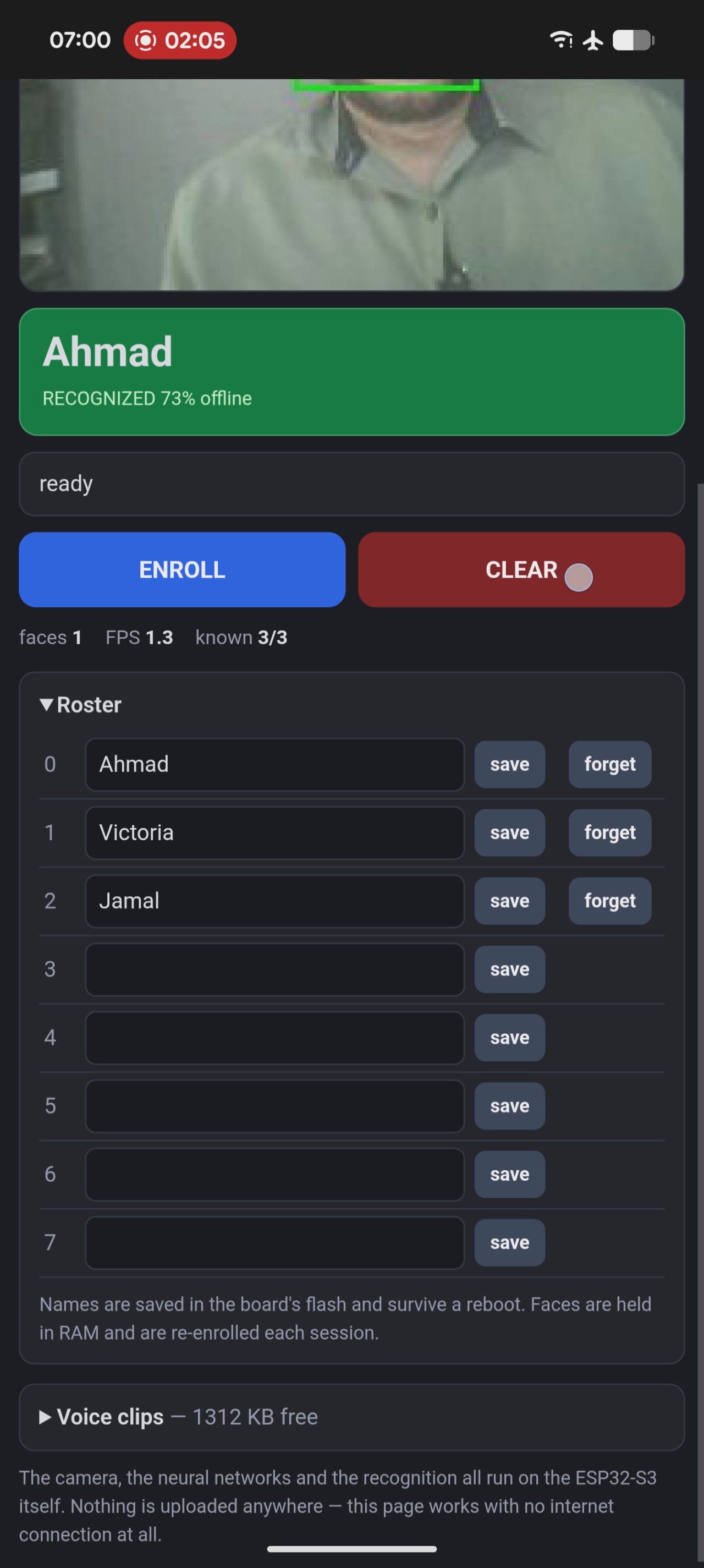
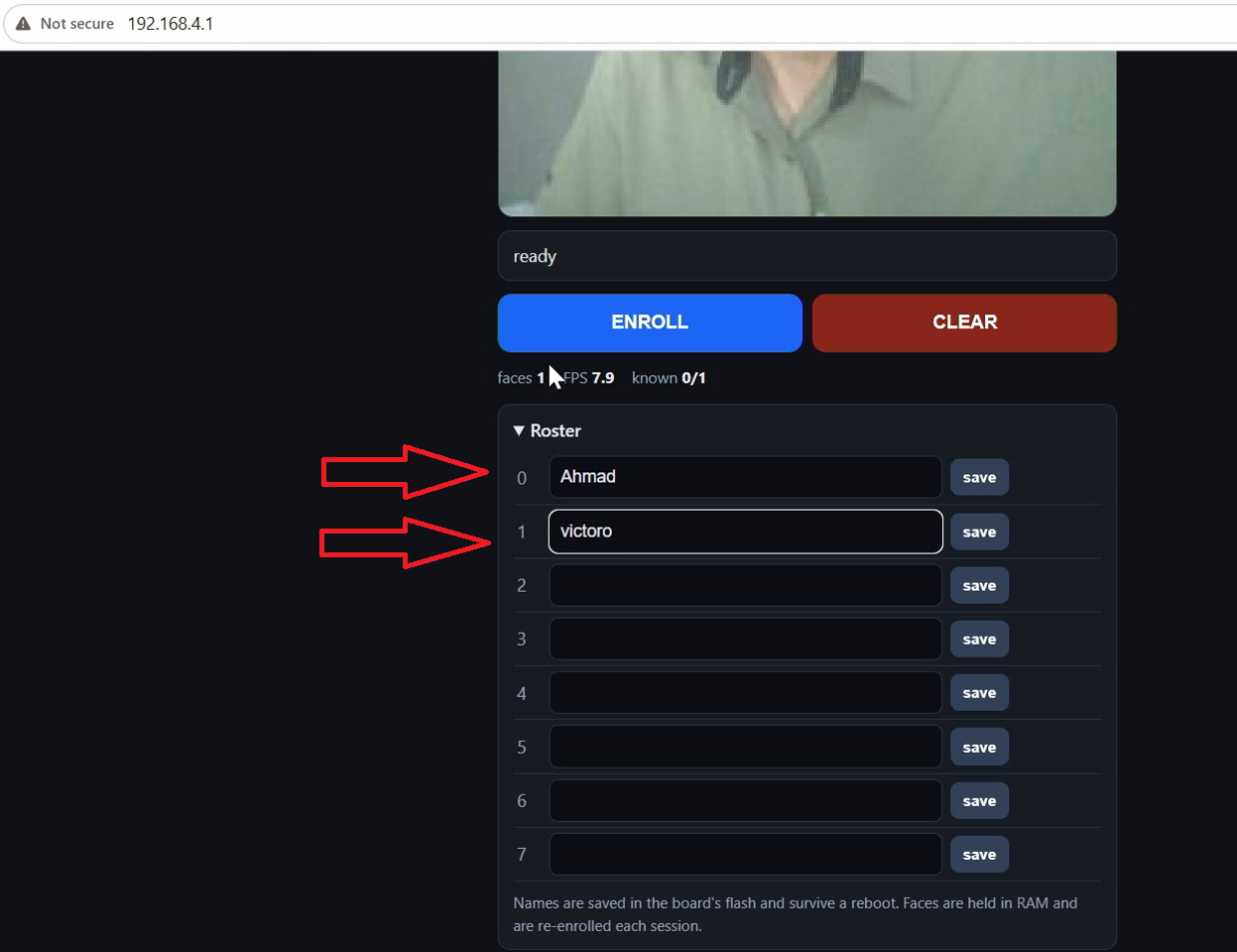
نومونه د بورډ په فلش کې ژوند کوي او له ریبوټ څخه ژوندي پاتې کیږي. تاسو کولی شئ دوه لارو یې وټاکئ.
د ویب پاڼې څخه
د Roster برخه خلاص کړئ، په هر سلاټ کې یو نوم ولیکئ، او save فشار ورکړئ.
د Serial Monitor څخه
د 115200 په سرعت سیریل مانیټر خلاص کړئ او مستقیم حکمونه ولیکئ:
name 0 Ahmad
name 1 Victoria
name 2 Jamal
list| حکم | هغه څه چې کوي |
|---|---|
list |
نوملړ وښیئ او څوک چې په دې ناسته کې شامل شوي |
name <n> <text> |
د n سلاټ لپاره نوم وټاکئ (0–7) |
del <n> |
د n سلاټ مخ هېر کړئ، نوم یې وساتئ |
play <n> |
د n سلاټ لپاره د ښه راغلاست کلیپ ازموئ |
unlock / lock |
د ریلې آوټ پوټ په زور چالان یا بند کړئ، ترڅو خپل تارونه وازموئ |
clear |
ټول نومونه او مخونه پاک کړئ |
help |
ټول حکمونه لیست کړئ |
د مخ ثبتول
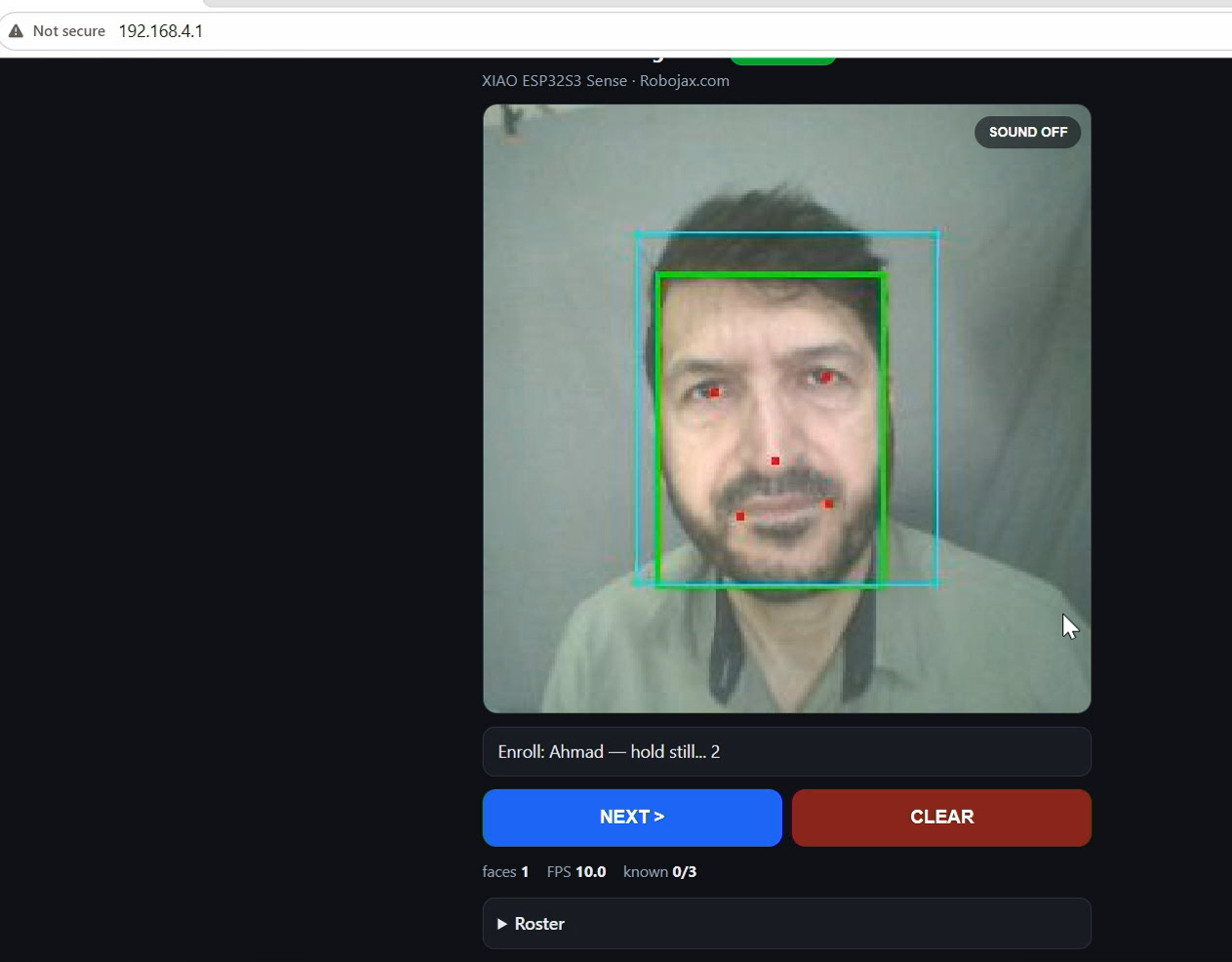
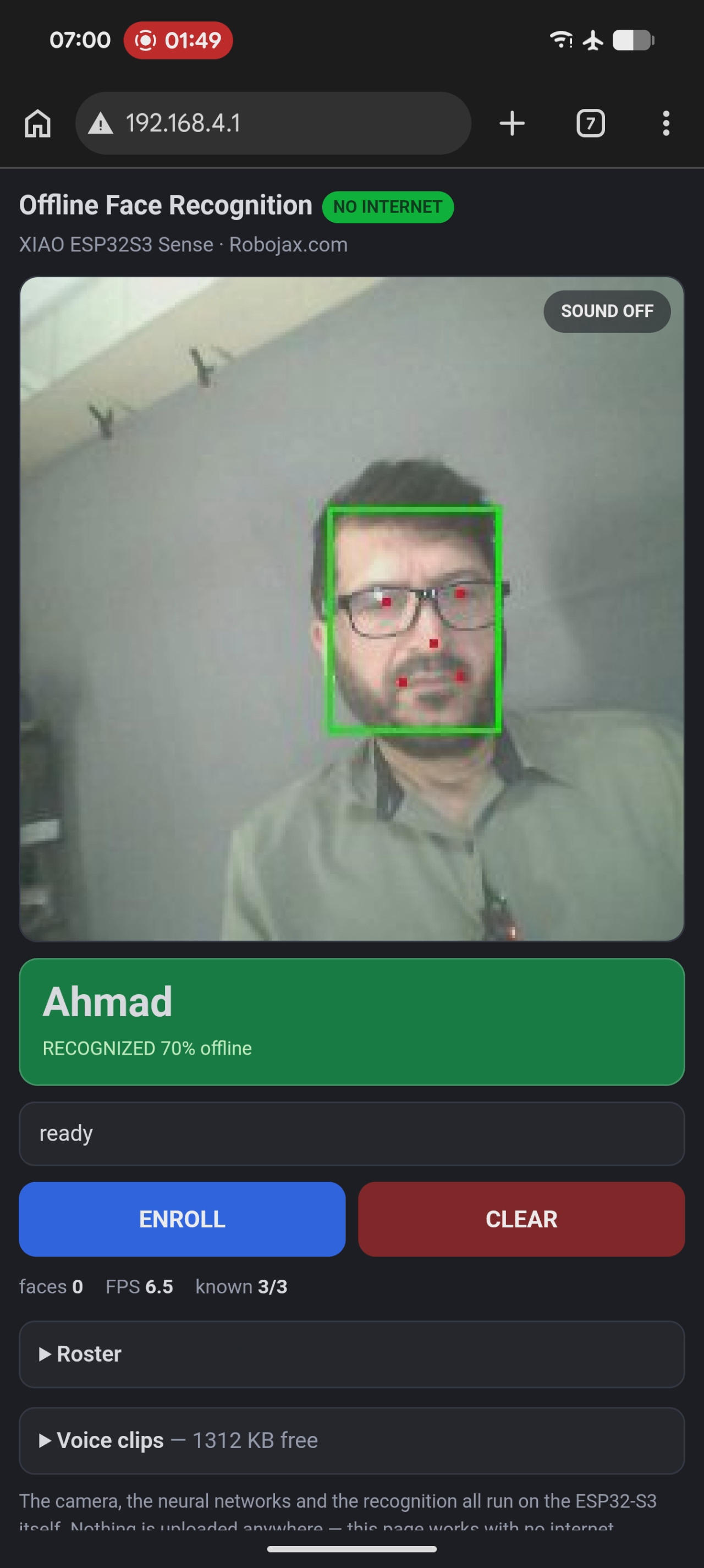
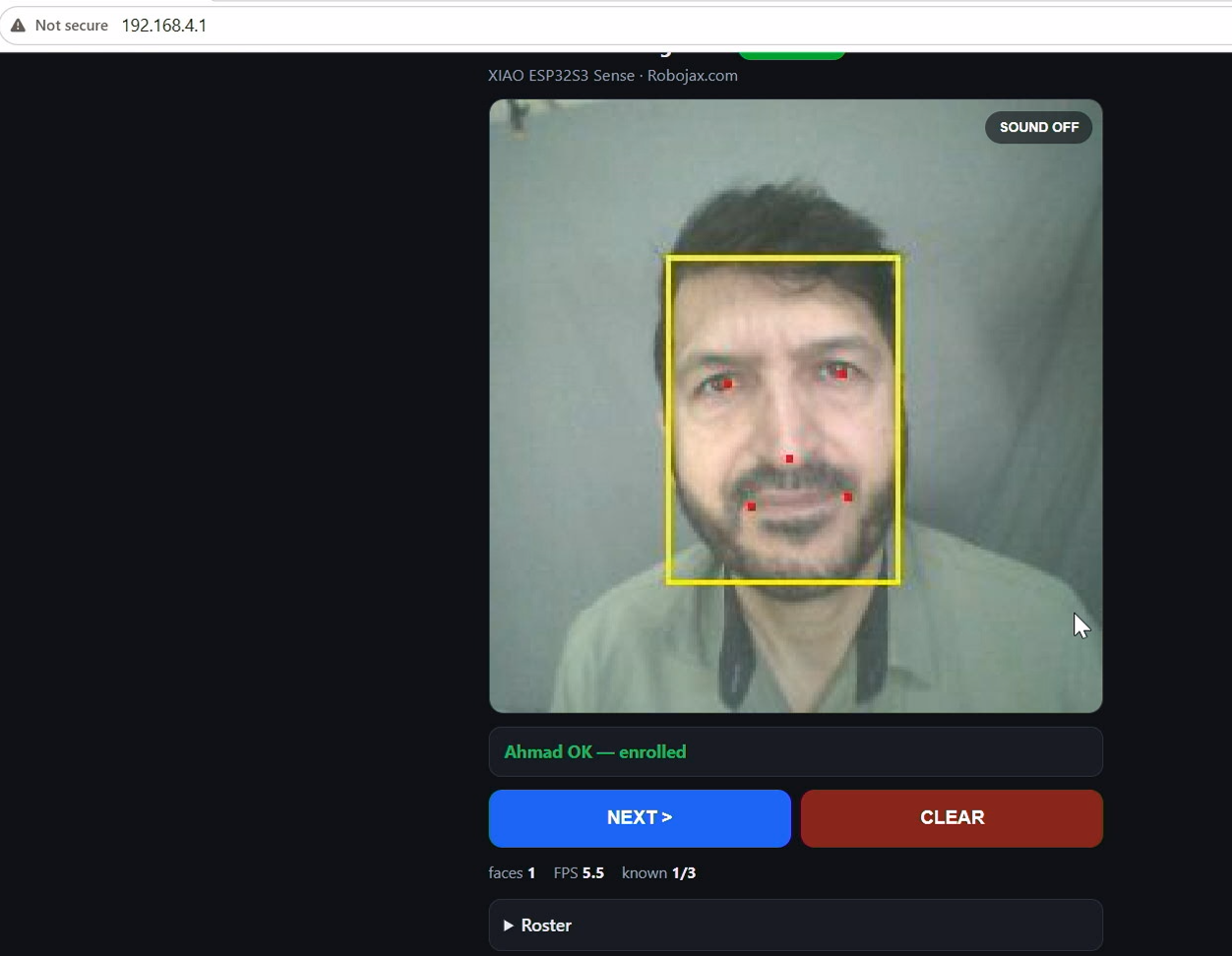
- په پاڼه کې ENROLL ټایپ کړئ. سټرپ ښیې "Enroll: Ahmad — step close, fill the box".
- بیا ټایپ کول راتلونکي نوم ته ځي؛ د وروستي نوم څخه تېرېدل لغوه کوي.
- د کیمرې مخې ته ودرېږئ، دومره نږدې چې د سیان لارښود بکس ډک کړئ.
- د 3–2–1 شمېرنه روانه وي او درې عکسونه شاوخوا 400 ms په واټن کې اخیستل کیږي.
- شین "Ahmad OK" تاییدوي، او ثبتول ځان غیر فعال کوي.

صادقانه محدودیت
نومونه له بیا پیل څخه ژوندي پاتې کیږي؛ مخونه نه. نومونه په فلش کې لیکل کیږي، مګر ثبت شوي مخونه په RAM کې ژوند کوي او په هر بریښنا دورې کې له لاسه ورکوي — د هر کس لپاره شاوخوا لس ثانیې د بیا ثبتولو لپاره. د دوی دایمي کول دودیز فلش پارټیشن ته اړتیا لري، کوم چې یو خپلواک پروژه ده.
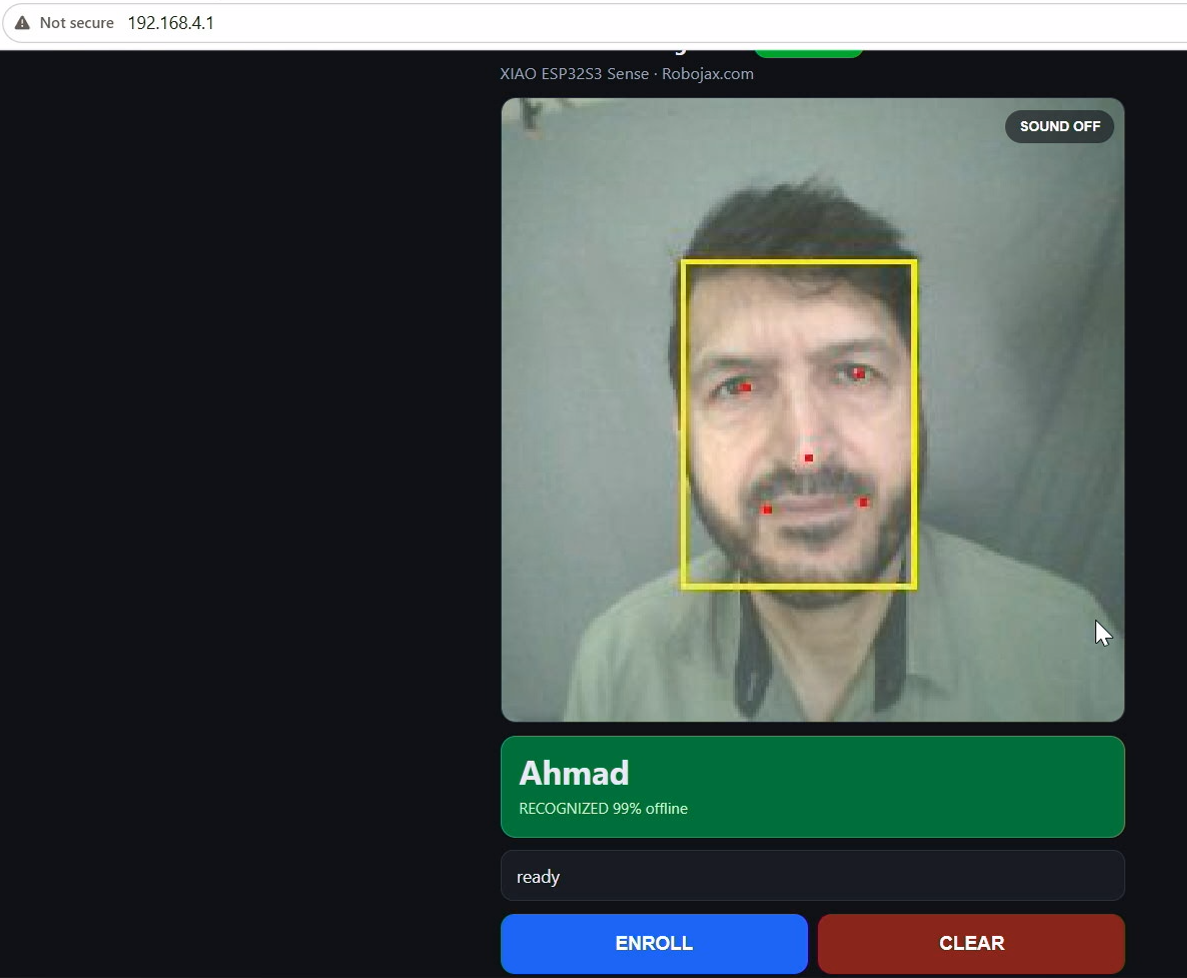
خبرې کوونکي ښه راغلاستونه
بورډ کولی شي هر کس په نوم په لوړ غږ سره سلام کړي. د هر نوملړ سلاټ لپاره یو 16-bit PCM WAV فایل په بورډ کې کېږدئ:
/welcome_0.wav   د "name 0" لپاره غږېږي
/welcome_1.wav   د "name 1" لپاره غږېږي
...تر /welcome_7.wav پورې
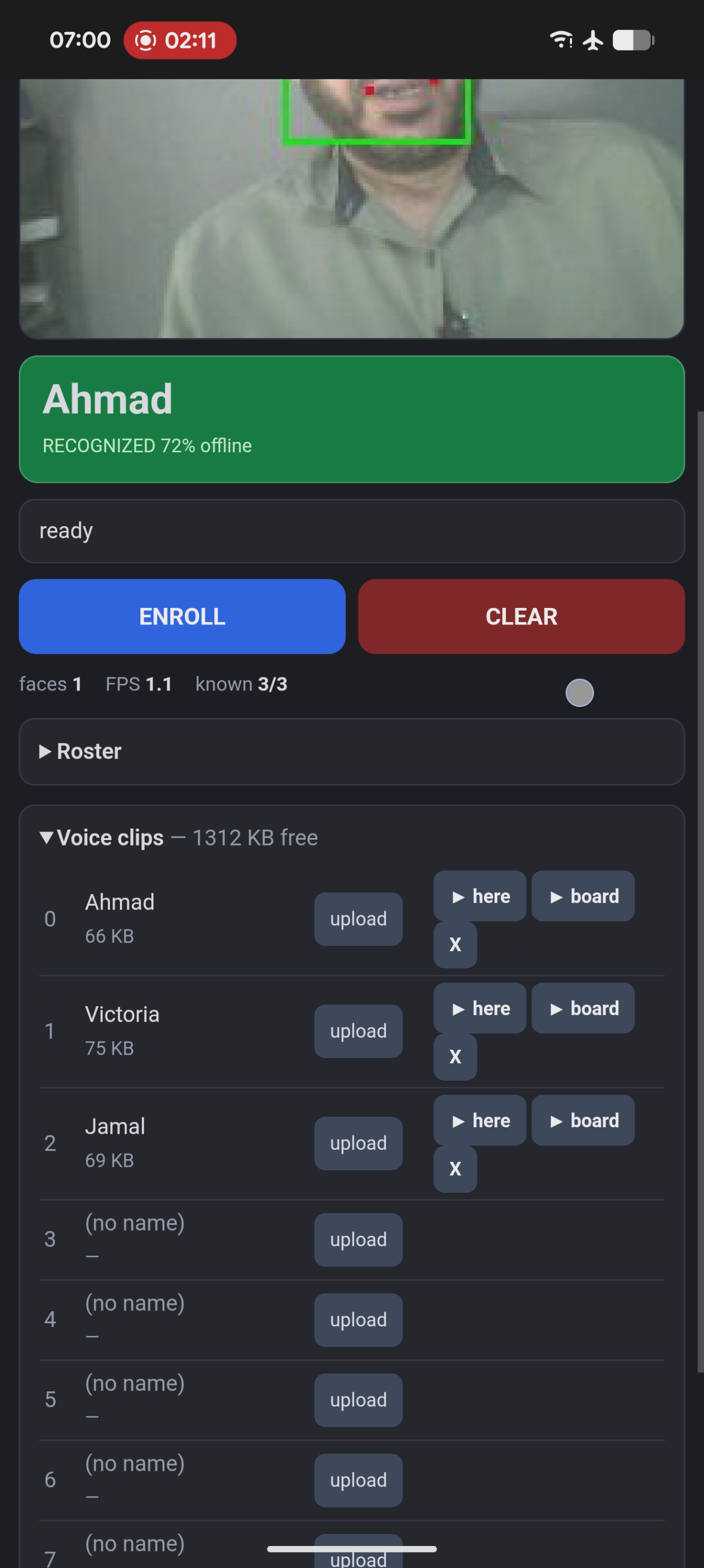
د 02_Face_Offline_Wav سره، تاسو یې د ویب پاڼې د Voice clips برخې څخه پورته کوئ — د یو سلاټ لپاره فایل غوره کړئ او په بورډ کې زیرمه کیږي. پاڼه ښیې چې څه زیرمه شوي، څومره ځای پاتې دی، او د هر کلیپ لپاره د پلی تڼۍ درکوي. فایلونه د دې مقالې لاندې د ډاونلوډ لپاره شتون لري.
د ښه راغلاست اوریدو دوه لارې:
| له لارې | هغه څه چې تاسو ورته اړتیا لرئ |
|---|---|
| ستاسو تلیفون یا PC | هیڅ نه. په ویډیو کې SOUND ON فشار کړئ او براوزر کلیپ غږوي. د ټول ډیمو د لیدو ترټولو چټکه لار. |
| خپل بورډ | یو MAX98357A امپلیفایر او یو کوچنی 4 Ω سپیکر، لکه څنګه چې لاندې تار شوي. اوس دا یو خپلواک وسیله ده چې پرته له تلیفون څخه خبرې کوي. |
د امپلیفایر تار کول (اختیاري)
| MAX98357A | XIAO | یادونه |
|---|---|---|
| VIN | 5V | 3V3 هم کار کوي — ډېر خاموش، مګر د بیټرۍ لپاره خوندي |
| GND | GND | |
| BCLK | D1 (GPIO2) |
بټ کلاک |
| LRC | D2 (GPIO3) |
د کلمې انتخاب |
| DIN | D3 (GPIO4) |
سیریل ډاټا |
| GAIN | بې تړلې پریږدئ | 9 dB |
| SD | لکه څنګه چې چمتو شوی پریږدئ | دا پن بندول / د چینل انتخاب دی — د SD کارت نه دی. |
د مخ انلاک کولو آوټ پوټ
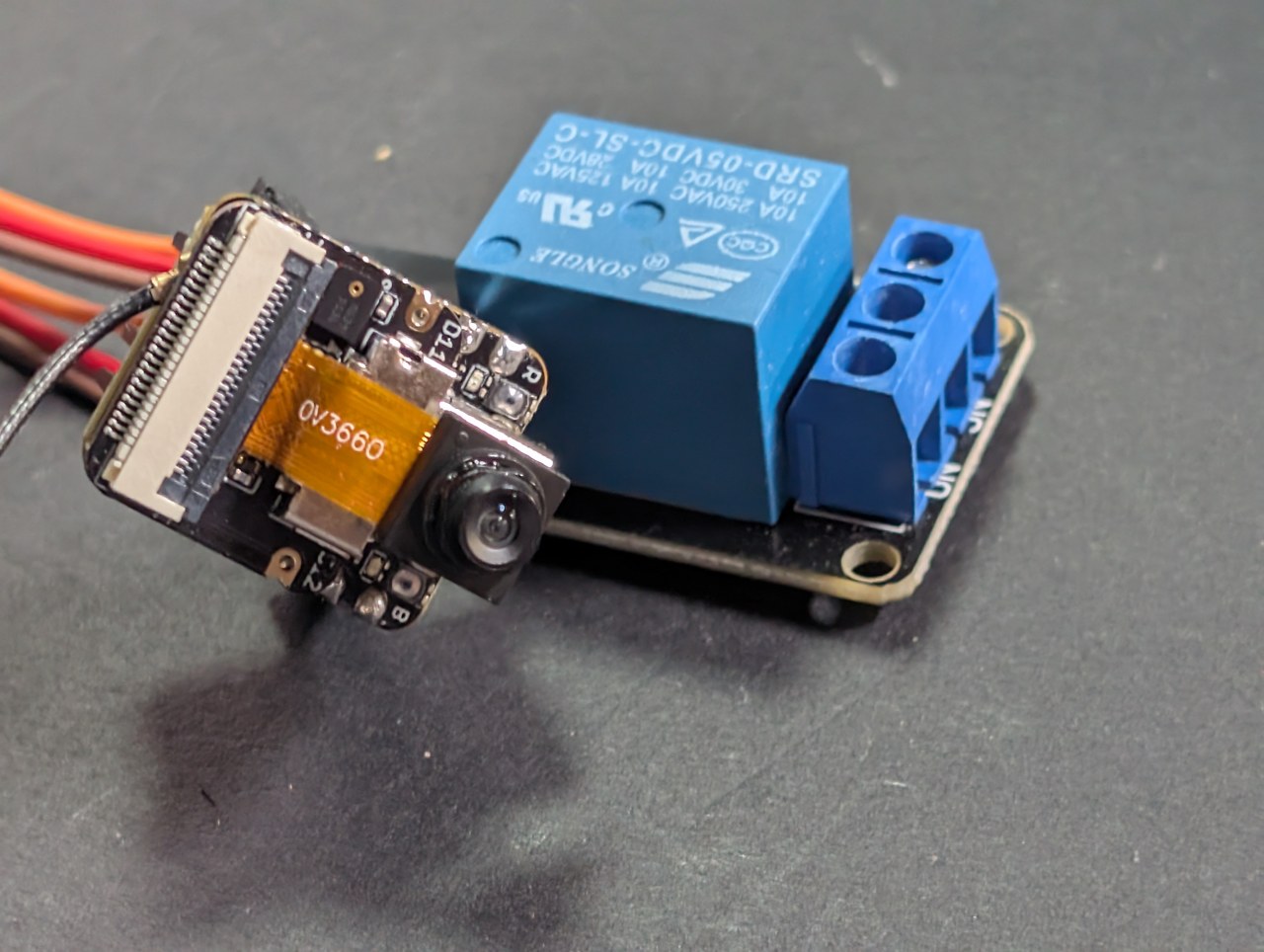
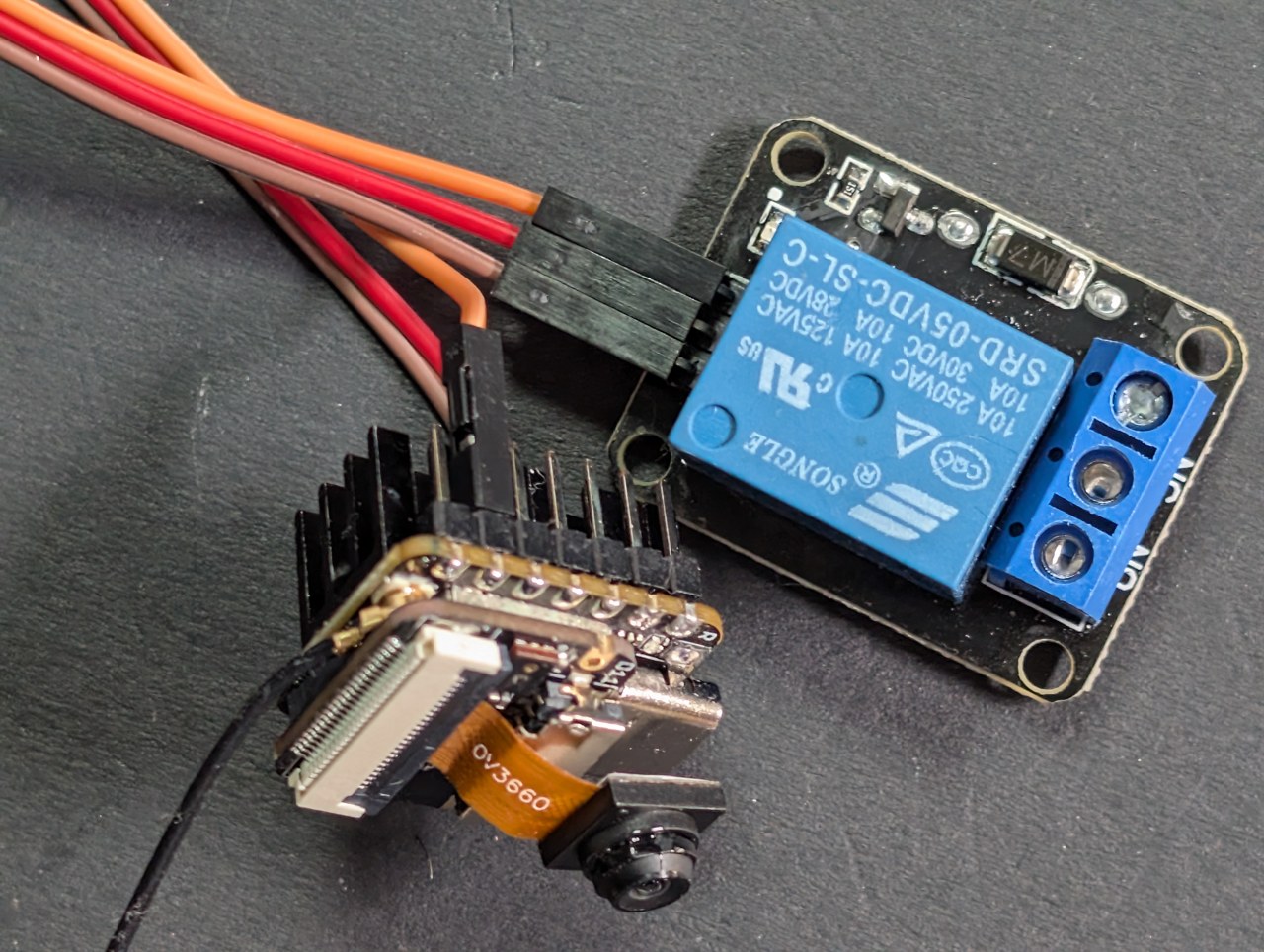
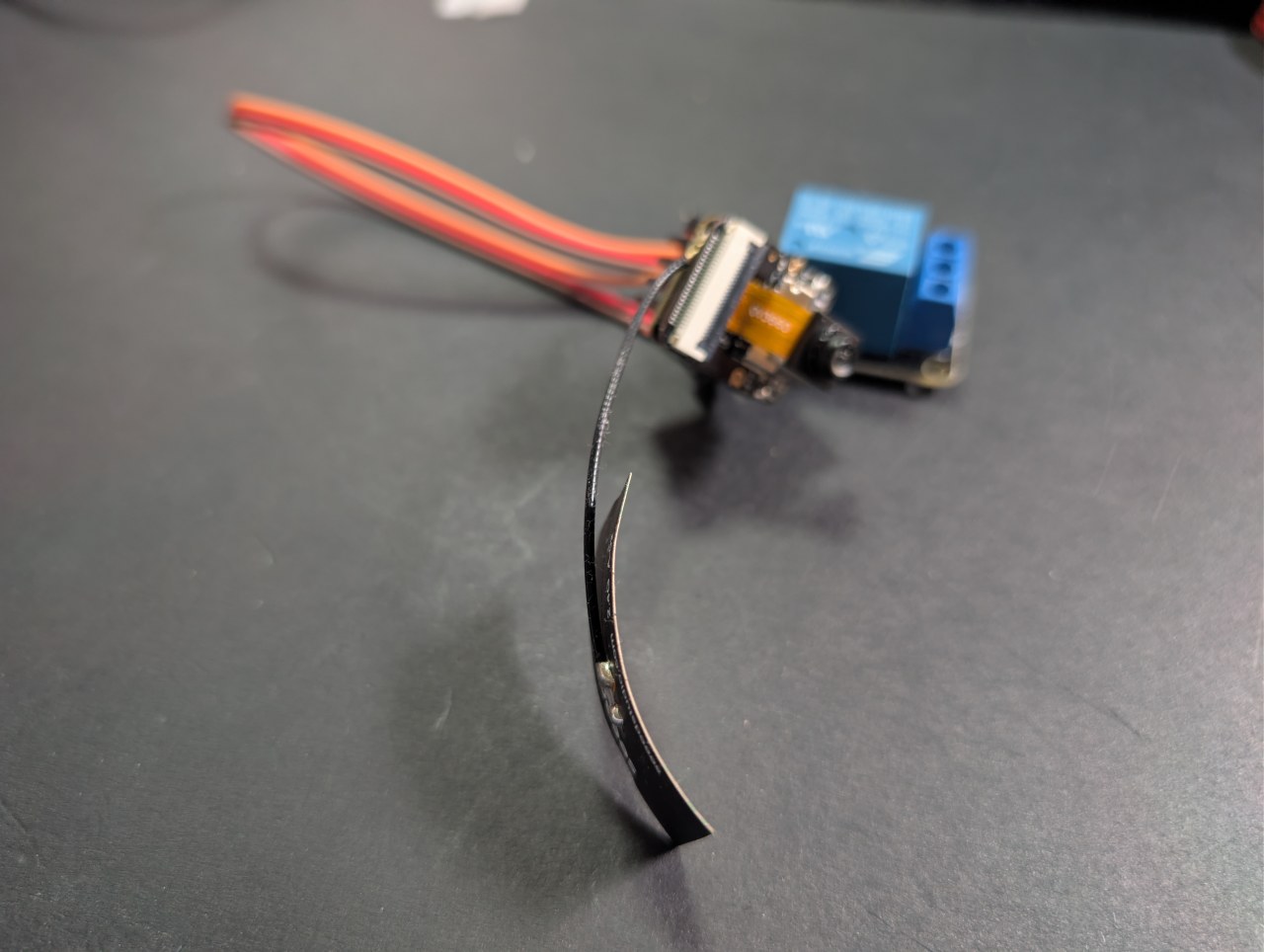
دا هغه برخه ده چې دا یې ګټور کوي، نه یوازې هوښیار. یو آوټ پوټ پن فعال کیږي کله چې یو ثبت شوی مخ وپیژندل شي. دا د ریلې ماډل سره وتړئ او دا به د دروازې سټرایک، دروازه، څراغ — هر څه پرمخ بوځي.
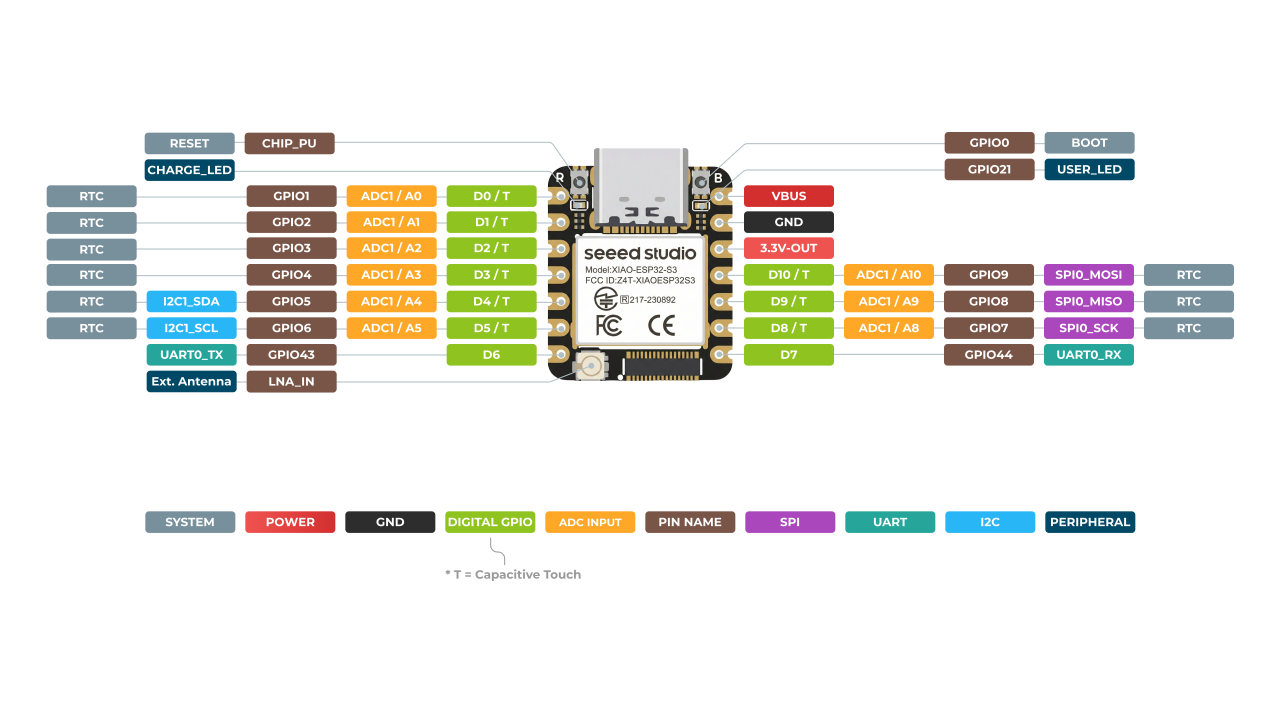
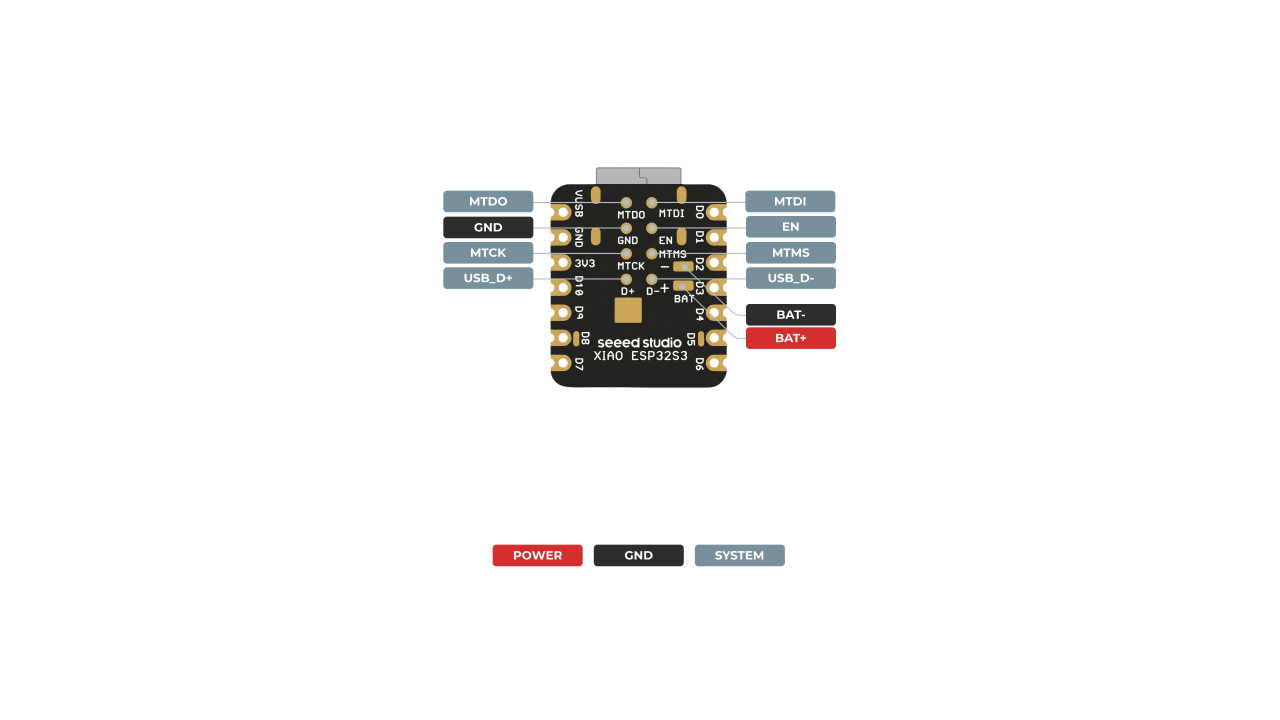
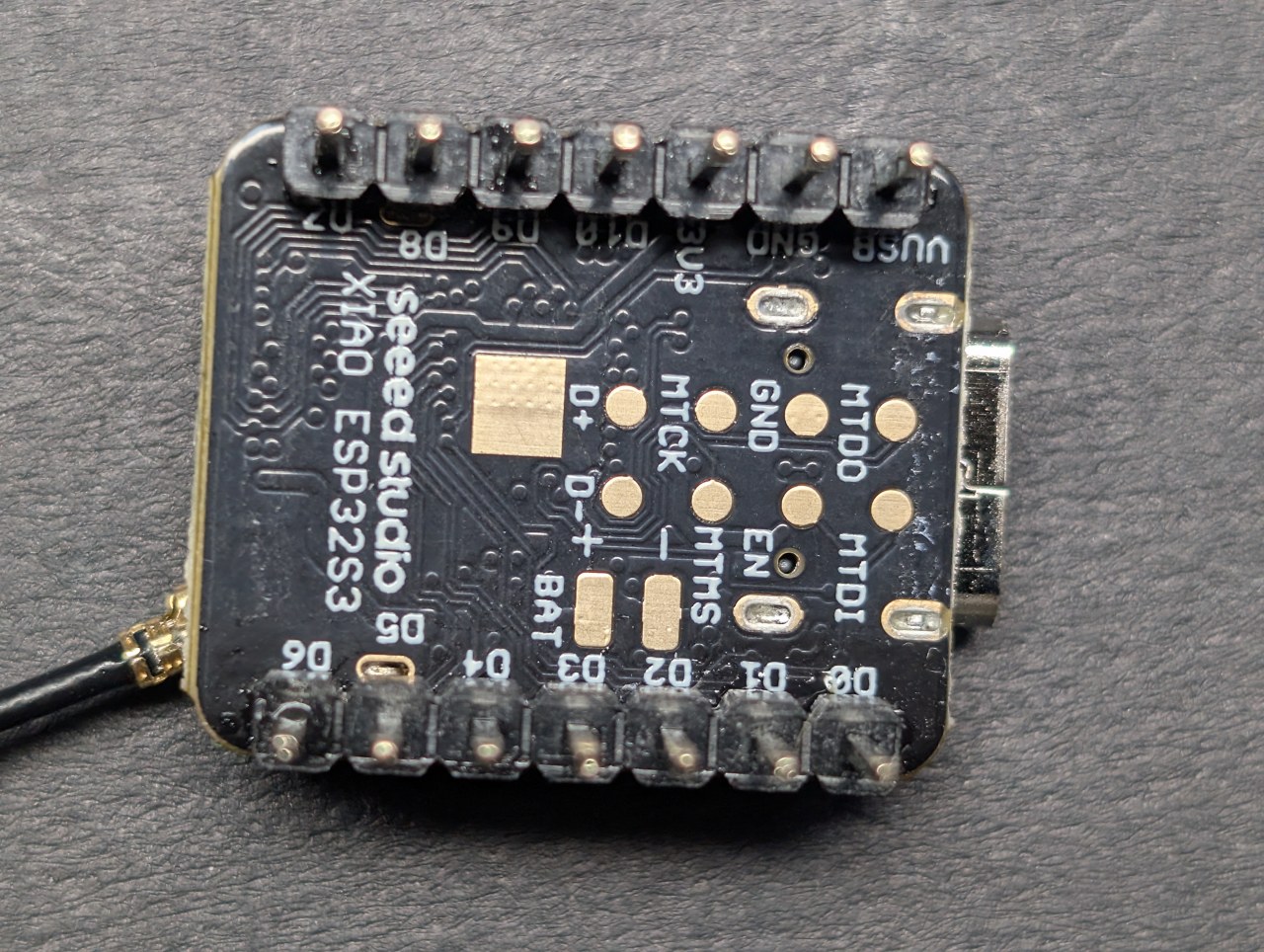
#define ACTION_PIN         5      // GPIO5 = هغه پن چې "D4" چاپ شوی. -1 غیر فعال کوي
#define ACTION_HOLD_MS  5000      // د وروستۍ لیدنې وروسته دومره اوږد خلاص پاتې شه
#define ACTION_ACTIVE_LOW 0 // 1 د هغو ریلې بورډونو لپاره چې په LOW فعالیږي| ترتیب | دا څه کوي |
|---|---|
ACTION_PIN |
کوم GPIO چلول کیږي. 5 هغه پن دی چې D4 چاپ شوی؛ 6 هغه پن دی چې D5 چاپ شوی. د فیچر غیر فعالولو لپاره -1 ته یې وټاکئ. |
ACTION_HOLD_MS |
د وروستۍ لیدنې وروسته پن څومره وخت فعال پاتې کیږي. پیژندنه په هر ثانیه کې په څو چوکاټونو کې روانه وي او کله ناکله یو چوکاټ له لاسه ورکوي، نو د ساتلو پرته ریلې ټکر کوي او د دروازې قفل ستاسو په لاس کې بندیږي. پنځه ثانیې د تیریدو لپاره کافي دي. |
ACTION_ACTIVE_LOW |
ډیری ارزانه نیلي ریلې بورډونه هغه وخت فعالیږي کله چې د دوی انپټ LOW ته راښکته شي. که ستاسو ریلې هغه وخت کلیک کوي چې هیڅوک نه وي او هغه وخت چوپه شي چې تاسو ښکاره شئ، دا 1 ته وټاکئ. |
| ریلې ماډل | XIAO |
|---|---|
| IN | D4 (GPIO5) |
| VCC | 5V |
| GND | GND |

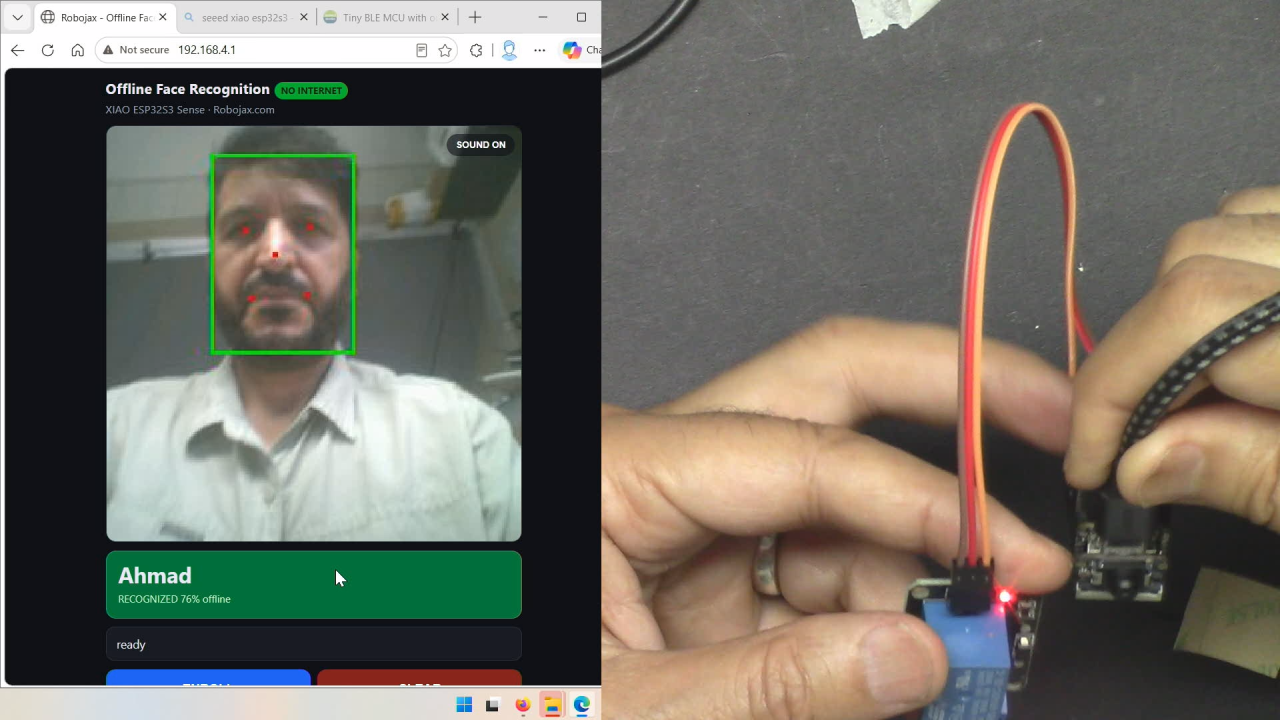
تاسو کولی شئ پرته له مخ څخه تارونه تایید کړئ — په سریال مانیټر کې unlock ټایپ کړئ او پن به د پنځو ثانیو لپاره فعال شي. دا د "ایا زما تارونه سم دي" او "ایا پیژندنه کار کوي" ترمنځ توپیر کوي، کوم چې کله هیڅ نه پیښیږي یو شان ښکاري.
اندازه شوي شمیرې
| میټریک | اندازه شوی |
|---|---|
| د پیژندنې سره د چوکاټ کچه | شاوخوا 8 FPS |
| د AI پرته د چوکاټ کچه (ویب کمره پروژه) | 28.3 FPS |
| د پیژندنې باور، ښه شرایط | 90–99% |
| د یو کس د ثبتولو وخت | شاوخوا 10 ثانیې |
| د سکیچ اندازه | 2.97 MB — 89% د اپ پارټیشن |
| د نوملړ ظرفیت | 8 کسان |
د 28 FPS څخه 8 ته راټیټیدل د دوو نیورل شبکو او یو پیژندونکي په ویډیو لاره کې اچولو صادقانه بیه ده. دا لاهم په آرامۍ سره دومره ګړندی دی چې یو څوک وپیژني چې دروازې ته راروان وي.
دا څه غلط کوي
- د خلکو عکسونه د خلکو په توګه پیژندل کیږي. یو چاپ شوی مخ پورته کړئ او دا به یې ثبت او وپیژني. دا د مخ پیژندنه ده، نه د ژوندیتوب کشف — دا یوازې د امنیت په توګه مه ګڼئ.
- حرکت دا ماتوي. هر چوکاټ په خپلواکه توګه معاینه کیږي، نو په لاس کې نیول شوی بورډ د نصب شوي بورډ په پرتله ډیر ناکامیږي.
- زاویه او رڼا مهم دي. په هغه رڼا کې چې تاسو به واقعیا کاروئ، د کمرې مخې ته ودریږئ او ثبت کړئ.
- عینکې پرته او سره کولی شي د دوو مختلفو خلکو په توګه ولوستل شي. هغه ډول ثبت کړئ چې تاسو معمولا ښکاري.
- مخونه په ریبوټ کې له لاسه ورکول کیږي. نومونه نه.
ستونزې حل کول
| نښه | علت او حل |
|---|---|
| کمپایل نه کېږي — د مخ ماډل سرلیکونه نه موندل کیږي | تاسو په ESP32 کور 3.x یاست. په Boards Manager کې 2.0.17 نصب کړئ. |
| بورډ پرله پسې بیا پیل کیږي، یوازې د ROM پیغامونه په سیریل کې | PSRAM غیر فعال دی، یا فلش د ناکامه اپلوډ له امله نیمګړی لیکل شوی. PSRAM په OPI وټاکئ؛ که دوام وکړي، د بوټلوډر څخه په 460800 کې بیا فلش کړئ. |
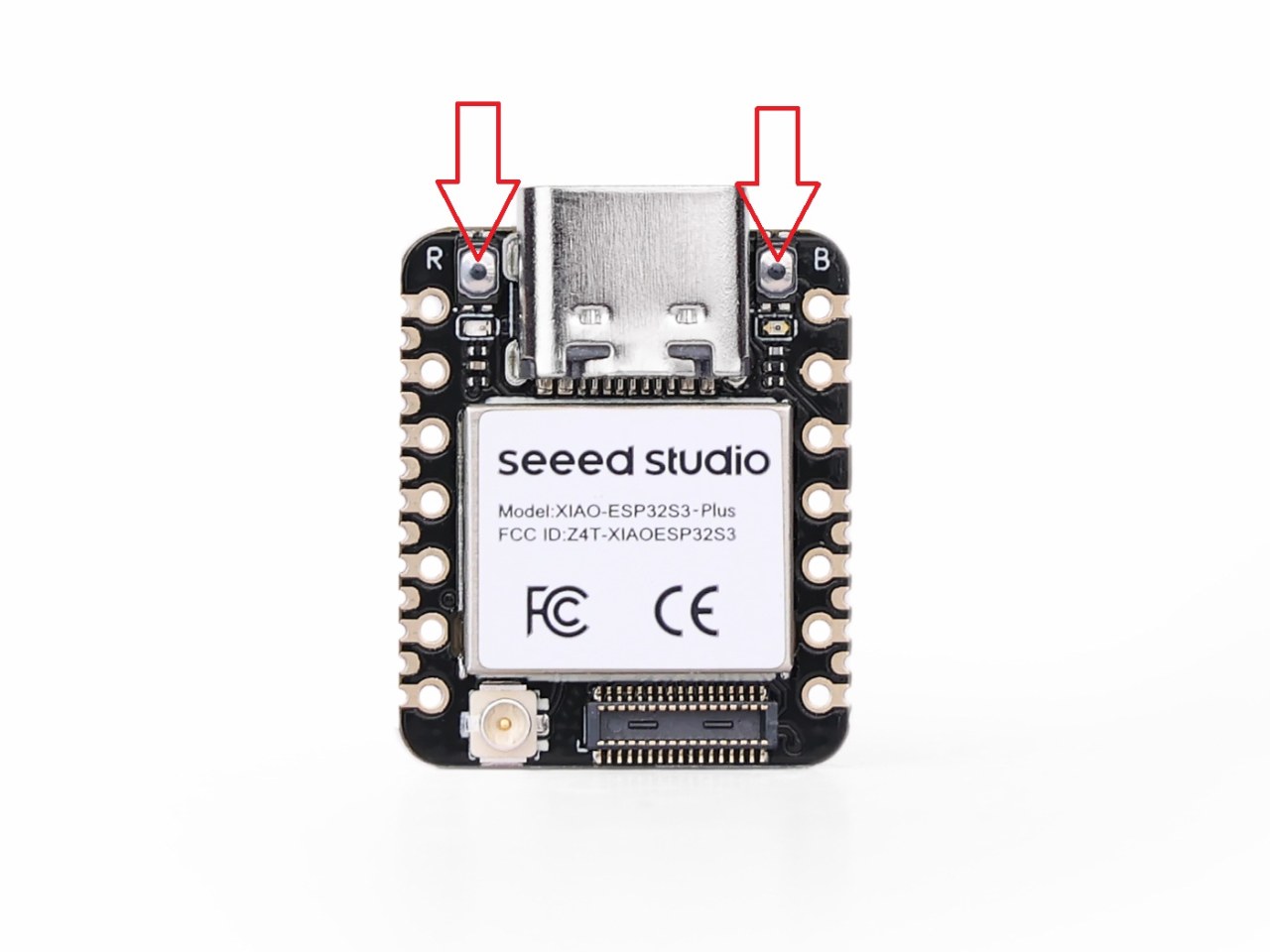
| اپلوډ شاوخوا 25–30٪ کې مړ کیږي | د 3 MB بائنري فایل د کمزوري USB اړیکې له امله. د بوټلوډر حالت (B + R) او د اپلوډ سرعت 460800. |
| خوندي شوي نومونه د هر اپلوډ وروسته ورک کیږي | Erase All Flash Before Sketch Upload فعال دی. هغه بند کړئ. |
| ریلي هیڅکله فعال نه کیږي | په سیریل کې unlock ولیکئ. که ریلي فعال شي، تارونه سم دي او دا پېژندنه ده چې ناکامه ده. که نه، وګورئ چې تاسو په هغه پن کې یاست چې D4 لیکل شوی، نه څلورم پن لاندې. |
| ریلي فعال دی کله چې هلته څوک نه وي | ستاسو د ریلي بورډ active-LOW دی. ACTION_ACTIVE_LOW په 1 وټاکئ. |
| د یو چا لپاره چې نوم لیکنه یې کړې "نامعلوم" وايي | بیا نوم لیکنه وکړئ پداسې حال کې چې بورډ نصب او ولاړ وي، د کیمرې مخې ته، په ورته رڼا کې. |
| له بورډ څخه غږ نه راځي | امپلیفایر اختیاري دی او په ډیفالټ نه نښلول کیږي. د کلیپ ښه والی تاییدولو لپاره په براوزر کې SOUND ON وکاروئ. |
| پاڼه نه خلاصیږي | په تلیفون کې د موبایل ډیټا بنده کړئ. د بشپړ توضیح لپاره د ویب کیمرې پاڼه وګورئ. |
Images
This tutorial is part of: Seeed Studio XIAO ESP32-S3 AI Camera tutoial and codes
/* ===========================================================================
* 02_Face_Offline — Seeed Studio XIAO ESP32S3 Sense
* ===========================================================================
SHORT DESCRIPTION
Face recognition running entirely on the Seeed Studio XIAO ESP32-S3 Sense,
with no internet, no cloud service and no account. Two neural networks and
a face recogniser run on the board itself: enrol up to eight people by
name, and it greets them by name on the web page and drives an output pin
you can wire to a relay for a door lock, a gate or a light. The board makes
its own Wi-Fi network, so nobody's face ever leaves it. Spoken welcome
clips are optional and play either through a MAX98357A amplifier on the
board or through the speaker of the phone you are watching on.
This is the simpler of the two face recognition sketches. If you want to
upload the welcome clips from the web page instead of using an Arduino IDE
plugin, use 02_Face_Offline_Wav.
*
* ---------------------------------------------------------------------------
* ROBOJAX.COM - XIAO ESP32S3 Sense project series
*
* WATCH THE VIDEO
* https://youtu.be/PuuTazJDKgA
*
* PROJECT RESOURCE PAGES - full write-up, photos, wiring and downloads
* 1 Web camera................ https://robojax.com/RTJ853
* 2 Offline face recognition.. https://robojax.com/RTJ854
* 3 What is this part?........ https://robojax.com/RTJ003
* 4 Making it talk............ https://robojax.com/RTJ004
* 5 The AI watcher............ https://robojax.com/RTJ005
*
* THE BOARD
* https://www.seeedstudio.com/XIAO-ESP32S3-Sense-p-5639.html?sensecap_affiliate=Vac9tOl&referring_service=link
* Bought at my own cost - this series is not sponsored.
*
* ARDUINO IDE SETTINGS - identical for every sketch in this series
*
* Board : XIAO_ESP32S3 (Tools > Board > esp32)
* ESP32 core : 2.0.17 <-- REQUIRED, see note below
* PSRAM : OPI PSRAM <-- required, nothing works without
* Flash Size : 8MB (64Mb)
* Partition Scheme : Default with spiffs (3MB APP/1.5MB SPIFFS)
* USB CDC On Boot : Enabled <-- the XIAO has ONE native USB
* port; Disabled = no Serial
* Upload Speed : 921600
*
* Erase All Flash Contents Before Sketch Upload : DISABLED
* Enabled wipes the flash where saved names live, on every upload.
*
* WHY CORE 2.0.17 AND NOT 3.x
* Espressif REMOVED the on-device face detection models in core 3, so
* the face project will not compile there. 2.0.17 is the last 2.x and
* the only version that has both those models and the XIAO_ESP32S3
* board definition, which was added in 2.0.8. One setting, whole series.
*
* LIBRARIES
* None to install. Camera, face models, LittleFS, Preferences and the
* web server all ship with the ESP32 core itself.
*
* All of this code is free. If it helped you, a subscribe on YouTube is
* the best way to support more of it.
* ---------------------------------------------------------------------------
*
* Named face enrollment and recognition, running ENTIRELY ON THE CHIP.
* No cloud, no API key, no internet. The board makes its own Wi-Fi network
* and your phone is the screen.
*
* This is a port of the Makerfabs 03b_Face_Enroll sketch to a board with no
* LCD, no touch panel and no SD card. The neural networks, the enrollment
* state machine and the quality gate are unchanged - only the user interface
* moved, from a 2.8" touchscreen to your phone's browser.
*
* WHERE THE AI RUNS
* -----------------
* On the ESP32-S3, not in your browser. Every frame goes:
*
* camera 240x240 RGB565
* -> HumanFaceDetectMSR01 (stage 1: find candidate faces)
* -> HumanFaceDetectMNP01 (stage 2: refine + 5 keypoints)
* -> FaceRecognition112V1S8 (who is it?)
* -> boxes drawn INTO the frame
* -> JPEG -> MJPEG stream -> your phone
*
* The boxes are burned into the picture before it is compressed, so they can
* never drift out of sync with the face. The browser only displays.
*
* HOW TO USE
* ----------
* 1. Upload, then open the Serial Monitor at 115200. It prints the address
* to open. In access point mode: join the Wi-Fi network "Robojax-XIAO"
* (password in secrets.h) and browse to http://192.168.4.1
*
* 2. Set up your roster ONCE - either on the web page, or over serial:
* name 0 Ahmad
* name 1 Sara
* list
* Names are stored in flash (NVS) and survive reboots.
*
* 3. Tap ENROLL. The strip shows "Enroll: Ahmad - step close". Tap again to
* cycle to the next name; cycling past the last one cancels.
*
* 4. That person steps in front of the camera, close enough to fill the cyan
* guide box. A 3-2-1 countdown runs, three samples are captured, and a
* green "Ahmad OK" confirms.
*
* 5. From now on the board greets that face BY NAME on the page, SAYS THE
* WELCOME OUT LOUD if the clip is in flash, and ACTION_PIN goes HIGH only
* for enrolled faces - a face unlock wire.
*
* BENCH TEST SEQUENCE - first run on a new board
* ----------------------------------------------
* Know before you judge what you see:
* - The binary is ~3 MB: the UPLOAD takes noticeably longer than a
* normal sketch. That is not a hang.
* - The FIRST boot formats the storage area (step 4/8 on the monitor)
* and can sit silent for up to 30 seconds. Every boot after is instant.
* - The FPS will be a LOW single digit compared to the plain web camera:
* every frame runs two neural networks plus a JPEG encoder. Whatever
* the page shows IS the honest number - it is a measurement, not a bug.
*
* The sequence:
* 1. Serial Monitor open at 115200, press RESET, keep the boot log.
* Boot prints steps [boot] 1/8 ... 8/8 - if it dies, the last line
* printed names the culprit. Send that log in for the bench notes.
* 2. Open the page: live video, and a box with five red dots on any
* face - BEFORE any enrollment. That is detection, on the chip.
* 3. Serial: name 0 YourName then list - confirms the name is in
* flash.
* 4. Page: tap ENROLL -> "step close, fill the box" -> 3-2-1 countdown
* -> green "YourName OK".
* 5. Step out of frame, come back: green banner, your name, confidence %.
* 6. Reboot test: press RESET. The NAME survives (flash); the FACE does
* not (RAM) - re-enroll after every boot. Expected at this stage; a
* custom partition table upgrade comes later (PERSIST_FACES).
* 7. Optional: multimeter on D4 (GPIO5) - 3.3 V only while an ENROLLED
* face is in frame. That is the door-latch wire working.
*
* Report back: the boot log, the FPS on the page, and every WRONG answer
* (wrong name, missed face) - failures are as useful as successes here.
*
* SPOKEN WELCOMES (optional - the sketch works fine without them)
* >> Full step-by-step instructions: WELCOME_WAVS.md in this folder <<
* ---------------------------------------------------------------
* Put WAV files in LittleFS, one per roster slot:
* /welcome_0.wav plays for whoever is "name 0"
* /welcome_1.wav plays for "name 1" ... up to /welcome_7.wav
* Format: 16-bit PCM WAV, mono preferred (stereo is downmixed), any rate.
* Missing file -> the triple chirp plays instead.
*
* Generate them with Makerfabs/make_welcome_wavs.ps1, which uses Azure
* text-to-speech and returns exactly 16 kHz / 16-bit / mono PCM. The cloud is
* used ONCE, when you make the files. The board never needs the internet.
*
* Upload them with the "ESP32 LittleFS Data Upload" IDE plugin (put the files
* in a "data" folder next to this sketch), or test with: play 0
*
* Serial commands:
* list show the roster and who is enrolled this session
* name <n> <text> set the name for slot n (0-7)
* del <n> forget slot n's face for this session (name kept)
* play <n> test-play /welcome_<n>.wav
* clear wipe all names from flash + forget all faces
* help this list
*
* HONEST LIMITATION (say it on camera): names persist across reboots,
* enrolled FACES do not - they live in RAM and are re-enrolled per session
* (~10 seconds per person). Making faces permanent needs a custom flash
* partition; see DESIGN.md section 4 and the PERSIST_FACES note below.
*
* ---------------------------------------------------------------------------
* WIRING
*
* MAX98357A amplifier XIAO
* VIN ................... 5V (or 3V3 - quieter but battery-safe)
* GND ................... GND
* BCLK ................... D1 (GPIO2)
* LRC ................... D2 (GPIO3)
* DIN ................... D3 (GPIO4)
* GAIN ................... leave unconnected (9 dB)
* SD ................... leave as the module has it. This pin is
* SHUTDOWN / channel select, NOT an SD card
* Speaker 4 ohm 3 W .......... amplifier screw terminals
*
* ACTION_PIN ................. D4 (GPIO5). HIGH only for an enrolled
* face. Drive a relay module from here for
* a real door latch
*
* The amplifier is optional. Set ENABLE_AUDIO to 0 and everything else works.
*
* ---------------------------------------------------------------------------
* Arduino IDE settings are in the block at the top of this file - they are
* the same for every sketch in the series. This one is the tightest fit:
* the compiled binary is about 2.97 MB, 88% of the 3 MB app partition,
* because the face recognition model is large. Do not switch to a partition
* scheme with a smaller app area.
* ---------------------------------------------------------------------------
* FUNCTIONS IN THIS SKETCH
* rosterLoad() load the 8 names from NVS flash at boot
* rosterSaveName(slot) save one name to NVS, and read it back to verify
* rosterClearAll() wipe names + session faces ("clear" command)
* namedCount() / enrolledCount() / nextNamedSlot(from) roster queries
* printHelp() / printRoster() serial command help + roster table
* handleSerialLine(l) parse one serial command
* pollSerial() non-blocking serial line reader
* spkInit() I2S output to the MAX98357A (on I2S port 1)
* playTone(f,ms) synthesised tone
* beepSeen()/beepEnrolled()/beepTick()/beepRecognized() event sounds
* playWavFromFS(path) play any WAV file in LittleFS, by name
* playWelcome(slot) play /welcome_<slot>.wav, by roster slot number
* px()/hLine()/vLine()/drawRect() box drawing straight into RGB565
* cameraInit() camera at 240x240 RGB565
* gatePasses(results) quality gate: one face, close, centred
* visionStep() ONE frame: detect, recognise, enroll, draw, encode
* startWiFi() access point (default) or join your network
* startServers() the page/control server (80) and stream (81)
* handleRoot/Status/Stream/Enroll/Cancel/SetName/Forget HTTP handlers
* setup() / loop() boot / run vision + serial forever
*
* Robojax.com
* ===========================================================================
*/
#define ENABLE_AUDIO 1 // 0 = no speaker needed, everything else works
/* ---------------------------------------------------------------------------
* THE FACE-UNLOCK OUTPUT
*
* ACTION_PIN goes ACTIVE when an ENROLLED face is recognised and STAYS active
* for ACTION_HOLD_MS after the last sighting. Wire it to a relay module and
* it drives a door strike, a gate, a light - anything mains or 12 V.
*
* WHY THE HOLD MATTERS. Recognition runs at only a few frames per second and
* misses the occasional frame, and you turn away the moment the door opens.
* Driving a relay straight from "is a face visible this instant" makes it
* chatter, and a door lock would slam shut in your hand. The hold turns it
* into something usable: unlock, stay unlocked long enough to walk through,
* then relock.
*
* ACTION_ACTIVE_LOW. Most cheap blue relay boards energise when their IN pin
* is pulled LOW, not HIGH. If your relay clicks when nobody is there and goes
* quiet when you appear, it is one of those - set this to 1.
*
* SAFETY: drive a RELAY MODULE, never a lock directly. This pin can supply a
* few milliamps at 3.3 V and nothing more. Mains wiring is not a beginner
* job - if the load is mains, use a ready-made relay module in an enclosure,
* or switch a low-voltage strike instead.
* ------------------------------------------------------------------------- */
/* ---------------------------------------------------------------------------
* !! THE NUMBER IN THE CODE IS THE GPIO NUMBER, NOT THE LABEL ON THE BOARD !!
*
* These two numbering systems are offset by one, and mixing them up is the
* single easiest mistake to make on this board. The pin printed "D4" is
* GPIO5 - it is NOT GPIO4, and it is the FIFTH pin down, not the fourth.
*
* Printed on the board Number to use in the code
* -------------------- -------------------------
* D0 1
* D1 2
* D2 3
* D3 4
* D4 5
* D5 6
* D6 43 (serial TX - avoid)
* D7 44 (serial RX - avoid)
* D8 7
* D9 8
* D10 9
*
* So ACTION_PIN 5 drives the pin printed D4; ACTION_PIN 6 drives D5.
* Count from the top and check the silkscreen - do not count pins.
* ------------------------------------------------------------------------- */
#define ACTION_PIN 5 // GPIO5 = the pin printed "D4". -1 disables
#define ACTION_HOLD_MS 5000 // stay unlocked this long after the last sighting
#define ACTION_ACTIVE_LOW 0 // 1 for relay boards that trigger on LOW
/* PERSIST_FACES — the stretch goal. Leave at 0 until you have added a custom
* partitions.csv with an "fr" partition (see DESIGN.md section 4). Turning it
* on without that partition makes enroll_id() fail, and you lose the working
* RAM-only behaviour for nothing. */
#define PERSIST_FACES 0
#define ROSTER_SIZE 8
#define NAME_LEN 16
#define SAMPLES_PER_FACE 3 // multi-sample enrollment = reliable recognition
#define GATE_MIN_WIDTH 90 // face box must be this wide (out of 240) - come close
#define ARMED_TIMEOUT_MS 30000
/* How long the name banner stays after the last time that face was seen. It
* refreshes on every successful recognition, so while the person is in front
* of the camera it simply stays up. */
#define GREET_HOLD_MS 6000
/* Quality for the fmt2jpg() encoder, scale 0-100 where HIGHER is better.
* Do not confuse it with the camera driver's jpeg_quality, whose scale runs
* the other way (lower = better) - passing a camera-style 12 here means
* quality 12 of 100, which looks like mud. */
#define STREAM_JPEG_QUALITY 80
#include <WiFi.h>
#include <Preferences.h>
#include <LittleFS.h>
#include <esp_log.h>
#include <esp_http_server.h>
#include "esp_camera.h"
#include "img_converters.h"
#include "camera_pins.h"
#include "secrets.h"
#include "human_face_detect_msr01.hpp"
#include "human_face_detect_mnp01.hpp"
#include "face_recognition_tool.hpp"
#include "face_recognition_112_v1_s8.hpp"
#if ENABLE_AUDIO
#include "driver/i2s.h"
/* The amplifier gets I2S port 1 on purpose. Port 0 is the only one that can
* do PDM, which is what the microphone needs in project 04 - so proving the
* amplifier works on port 1 here de-risks that project early. */
#define I2S_SPK_PORT I2S_NUM_1
#define I2S_SPK_BCLK 2 // D1
#define I2S_SPK_LRC 3 // D2
#define I2S_SPK_DOUT 4 // D3
#endif
/* --- the two detection stages + the recognizer ----------------------------
* Deliberately NOT global objects, and this is a hard-won lesson from this
* exact board: as globals their constructors run BEFORE setup() - before the
* USB serial port even exists - so any failure in them is a silent reboot
* loop showing nothing but ROM messages. Built in setup() instead, with a
* printed step before each one, so a failure has a name on the monitor. */
HumanFaceDetectMSR01 *stage1 = nullptr;
HumanFaceDetectMNP01 *stage2 = nullptr;
FaceRecognition112V1S8 *recognizer = nullptr;
Preferences prefs;
/* --- roster -------------------------------------------------------------- */
char names[ROSTER_SIZE][NAME_LEN]; // loaded from NVS at boot
uint8_t samples_of[ROSTER_SIZE] = {0}; // samples enrolled this session
/* esp-dl hands out sequential ids (0,1,2...) as we enroll. This maps each
* model id back to a roster slot; -1 = forgotten (del command). */
#define MAX_IDS 32
int8_t id2slot[MAX_IDS];
int ids_used = 0;
/* --- enrollment state machine -------------------------------------------- */
enum EnrollState { EN_IDLE, EN_ARMED, EN_COUNTDOWN, EN_CAPTURE, EN_DONE };
EnrollState en_state = EN_IDLE;
int en_slot = -1;
uint32_t en_t0 = 0;
int en_count = 0;
uint32_t en_last_sample = 0;
/* Requests arriving from the web page. The HTTP handlers only set a flag -
* the neural networks are never called from an HTTP task. */
volatile bool req_enroll = false;
volatile bool req_cancel = false;
/* --- the face-unlock output ---------------------------------------------- */
uint32_t action_until = 0; // millis() deadline; 0 = never triggered
/* Signed subtraction so this still behaves when millis() wraps (~49 days). */
static bool actionActive() {
return action_until != 0 && (int32_t)(action_until - millis()) > 0;
}
/* Writes the pin only when the state actually changes, and says so on serial -
* so you can watch the lock open and close without a multimeter. */
static void actionSet(bool on) {
#if ACTION_PIN >= 0
static int last = -1;
int level = on ? (ACTION_ACTIVE_LOW ? LOW : HIGH)
: (ACTION_ACTIVE_LOW ? HIGH : LOW);
if (level != last) {
digitalWrite(ACTION_PIN, level);
last = level;
Serial.printf("ACTION PIN D4 -> %s\n",
on ? "ACTIVE - unlocked" : "off - locked");
}
#else
(void)on;
#endif
}
/* --- the greeting, latched ------------------------------------------------
* Latched rather than drawn per recognition: the detector occasionally misses
* a frame, and without latching the name would flicker on and off. */
char greet_name[NAME_LEN] = "";
float greet_conf = 0;
uint32_t greet_until = 0;
int pending_welcome = -1;
/* Browser audio: each NEW greeting bumps greet_seq, and /status carries the
* sequence number plus the slot. The page plays /welcome_wav?slot=N exactly
* once per bump - so the phone can be the speaker too, no amplifier needed. */
volatile uint32_t greet_seq = 0;
volatile int greet_slot_v = -1;
/* --- live status, read by /status ---------------------------------------- */
volatile int st_faces = 0;
volatile float st_fps = 0;
volatile bool st_known = false;
char st_note[40] = ""; // "unknown" / "forgotten face" / ""
/* --- the shared JPEG the stream server hands out ------------------------- */
static uint8_t *g_jpg = NULL;
static size_t g_jpg_len = 0;
static volatile uint32_t g_frame_no = 0;
static SemaphoreHandle_t g_jpg_mux = NULL;
httpd_handle_t srv_page = NULL;
httpd_handle_t srv_stream = NULL;
/* --- serial line buffer --------------------------------------------------- */
char ser_line[48];
int ser_len = 0;
bool ok_fs = false;
/* ===========================================================================
* Roster storage — names in NVS, keys "n0".."n7"
* =========================================================================== */
void rosterLoad() {
bool opened = prefs.begin("faces", true); // read-only
int found = 0;
for (int i = 0; i < ROSTER_SIZE; i++) {
char key[4];
snprintf(key, sizeof(key), "n%d", i);
String v = prefs.getString(key, "");
strncpy(names[i], v.c_str(), NAME_LEN - 1);
names[i][NAME_LEN - 1] = 0;
if (names[i][0]) found++;
}
prefs.end();
Serial.printf("NVS \"faces\": %s, %d name(s) restored\n",
opened ? "found" : "not present", found);
if (!opened || found == 0)
Serial.println(F(" (first run, or the flash was erased - check that\n"
" 'Erase All Flash Contents Before Sketch Upload' is Disabled)"));
}
/* Writes the name AND reads it straight back, so a silent NVS failure can
* never look like success. */
void rosterSaveName(int slot) {
char key[4];
snprintf(key, sizeof(key), "n%d", slot);
prefs.begin("faces", false); // read-write
size_t written = prefs.putString(key, names[slot]);
String back = prefs.getString(key, "");
prefs.end();
bool ok = (written > 0) && (back == String(names[slot]));
Serial.printf("slot %d = \"%s\" -> flash %s\n",
slot, names[slot], ok ? "OK (survives reboot)" : "WRITE FAILED");
}
void rosterClearAll() {
prefs.begin("faces", false);
prefs.clear();
prefs.end();
memset(names, 0, sizeof(names));
memset(samples_of, 0, sizeof(samples_of));
for (int i = 0; i < MAX_IDS; i++) id2slot[i] = -1;
}
int namedCount() { int n = 0; for (int i = 0; i < ROSTER_SIZE; i++) if (names[i][0]) n++; return n; }
int enrolledCount() { int n = 0; for (int i = 0; i < ROSTER_SIZE; i++) if (samples_of[i]) n++; return n; }
/* next named slot at or after 'from'; -1 if none */
int nextNamedSlot(int from) {
for (int i = from; i < ROSTER_SIZE; i++) if (names[i][0]) return i;
return -1;
}
/* ===========================================================================
* Audio — MAX98357A on I2S port 1
* =========================================================================== */
#if ENABLE_AUDIO
void spkInit() {
i2s_config_t cfg = {
.mode = (i2s_mode_t)(I2S_MODE_MASTER | I2S_MODE_TX),
.sample_rate = 16000,
.bits_per_sample = I2S_BITS_PER_SAMPLE_16BIT,
.channel_format = I2S_CHANNEL_FMT_ONLY_LEFT,
.communication_format = I2S_COMM_FORMAT_STAND_I2S,
.intr_alloc_flags = ESP_INTR_FLAG_LEVEL1,
.dma_buf_count = 4,
.dma_buf_len = 256,
.use_apll = false,
.tx_desc_auto_clear = true,
.fixed_mclk = 0
};
i2s_pin_config_t pins = {
.mck_io_num = I2S_PIN_NO_CHANGE,
.bck_io_num = I2S_SPK_BCLK,
.ws_io_num = I2S_SPK_LRC,
.data_out_num = I2S_SPK_DOUT,
.data_in_num = I2S_PIN_NO_CHANGE
};
if (i2s_driver_install(I2S_SPK_PORT, &cfg, 0, NULL) != ESP_OK) {
Serial.println(F("I2S install failed - audio disabled this run"));
return;
}
i2s_set_pin(I2S_SPK_PORT, &pins);
i2s_zero_dma_buffer(I2S_SPK_PORT);
Serial.println(F("amplifier ready on I2S port 1 (D1/D2/D3)"));
}
void playTone(float freq, int ms) {
int n = 16 * ms; // 16 samples per ms at 16 kHz
int16_t *buf = (int16_t *)malloc(n * 2);
if (!buf) return;
int fade = n / 8; // fade in/out, or you hear a click
for (int i = 0; i < n; i++) {
float env = 1.0f;
if (i < fade) env = (float)i / fade;
else if (i > n - fade) env = (float)(n - i) / fade;
buf[i] = (int16_t)(sinf(2 * PI * freq * i / 16000.0f) * 11000 * env);
}
size_t w = 0;
i2s_write(I2S_SPK_PORT, buf, n * 2, &w, portMAX_DELAY);
free(buf);
}
/* playTone(0, ms) is silence - sin(0) is zero - which is how the triple
* chirp gets clean gaps between its beeps. */
void beepSeen() { playTone(1000, 90); } // a face arrived
void beepEnrolled() { playTone(900, 90); playTone(1400, 140); } // enrollment done
void beepTick() { playTone(1200, 45); } // countdown tick
void beepRecognized() { // "I know you"
playTone(1600, 80); playTone(0, 70);
playTone(1600, 80); playTone(0, 70);
playTone(1600, 80);
}
/* ---------------------------------------------------------------------------
* playWavFromFS(path) — play any WAV file in LittleFS, by name.
*
* Handles 16-bit PCM, mono or stereo (downmixed), at any sample rate - the
* I2S clock is retuned to match the file and put back to 16 kHz afterwards
* so the beeps still sound right.
*
* The clip is staged in PSRAM before playing rather than streamed from flash,
* which keeps playback smooth.
* ------------------------------------------------------------------------- */
bool playWavFromFS(const char *path) {
if (!ok_fs) { Serial.printf("no filesystem - cannot play %s\n", path); return false; }
File f = LittleFS.open(path, "r");
if (!f) { Serial.printf("not found: %s\n", path); return false; }
char riff[12];
if (f.read((uint8_t *)riff, 12) != 12 ||
memcmp(riff, "RIFF", 4) || memcmp(riff + 8, "WAVE", 4)) {
Serial.printf("%s is not a WAV file\n", path);
f.close();
return false;
}
uint32_t rate = 16000, data_len = 0;
uint16_t channels = 1, bits = 16;
/* Walk the RIFF chunks to find "fmt " and "data". Do not assume a 44-byte
* header - plenty of encoders add extra chunks. */
while (f.available() >= 8) {
char cid[4];
uint32_t csize = 0;
f.read((uint8_t *)cid, 4);
f.read((uint8_t *)&csize, 4);
if (!memcmp(cid, "fmt ", 4)) {
uint8_t fmt[16] = {0};
uint32_t want = csize < 16 ? csize : 16;
f.read(fmt, want);
channels = fmt[2] | (fmt[3] << 8);
rate = (uint32_t)fmt[4] | ((uint32_t)fmt[5] << 8) |
((uint32_t)fmt[6] << 16) | ((uint32_t)fmt[7] << 24);
bits = fmt[14] | (fmt[15] << 8);
if (csize > want) f.seek(f.position() + (csize - want));
} else if (!memcmp(cid, "data", 4)) {
data_len = csize;
break; // now positioned at the samples
} else {
f.seek(f.position() + csize + (csize & 1)); // chunks are word-aligned
}
}
if (bits != 16 || data_len == 0) {
Serial.printf("%s: need 16-bit PCM (got %u-bit, %u bytes)\n",
path, bits, (unsigned)data_len);
f.close();
return false;
}
const uint32_t CAP = 1024UL * 1024UL; // ~30 s at 16 kHz mono
if (data_len > CAP) data_len = CAP;
uint8_t *pcm = (uint8_t *)ps_malloc(data_len);
if (!pcm) { Serial.println(F("PSRAM alloc failed")); f.close(); return false; }
uint32_t got = f.read(pcm, data_len);
f.close();
if (got < 64) { free(pcm); return false; }
if (channels == 2) { // stereo -> mono, in place
int16_t *s = (int16_t *)pcm;
uint32_t pairs = got / 4;
for (uint32_t i = 0; i < pairs; i++)
s[i] = (int16_t)(((int32_t)s[i * 2] + s[i * 2 + 1]) / 2);
got = pairs * 2;
}
Serial.printf("playing %s (%u KB, %u Hz, %u ch)\n",
path, (unsigned)(got / 1024), (unsigned)rate, channels);
i2s_set_sample_rates(I2S_SPK_PORT, rate);
static const uint8_t lead_in[320] = {0}; // brief silence softens the pop
size_t w = 0;
i2s_write(I2S_SPK_PORT, lead_in, sizeof(lead_in), &w, portMAX_DELAY);
i2s_write(I2S_SPK_PORT, pcm, got, &w, portMAX_DELAY);
i2s_write(I2S_SPK_PORT, lead_in, sizeof(lead_in), &w, portMAX_DELAY);
delay(120);
i2s_zero_dma_buffer(I2S_SPK_PORT);
i2s_set_sample_rates(I2S_SPK_PORT, 16000); // back to the beep rate
free(pcm);
return true;
}
bool playWelcome(int slot) {
if (slot < 0 || slot >= ROSTER_SIZE) return false;
char path[24];
snprintf(path, sizeof(path), "/welcome_%d.wav", slot);
return playWavFromFS(path);
}
#else
void spkInit() {}
bool playWavFromFS(const char *p) { (void)p; return false; }
bool playWelcome(int slot) { (void)slot; return false; }
void beepSeen() {}
void beepEnrolled() {}
void beepTick() {}
void beepRecognized() {}
#endif
/* ===========================================================================
* Serial commands
* =========================================================================== */
void printHelp() {
Serial.println(F("\nCommands:"));
Serial.println(F(" list show roster"));
Serial.println(F(" name <n> <text> set name for slot n (0-7)"));
Serial.println(F(" del <n> forget slot n's face (this session; name kept)"));
Serial.println(F(" play <n> test-play /welcome_<n>.wav"));
Serial.println(F(" clear wipe all names + faces"));
Serial.println(F(" unlock force the relay/LED pin ON (tests wiring)"));
Serial.println(F(" lock force it OFF"));
Serial.println(F(" help this list\n"));
}
void printRoster() {
Serial.println(F("\nslot name enrolled"));
Serial.println(F("---- --------------- --------"));
for (int i = 0; i < ROSTER_SIZE; i++)
Serial.printf(" %d %-15s %s\n", i,
names[i][0] ? names[i] : "-",
samples_of[i] ? "YES" : "no");
Serial.printf("Names persist in flash. Faces are RAM-only (%d enrolled this session).\n\n",
enrolledCount());
}
void handleSerialLine(char *line) {
while (*line == ' ') line++;
if (strncmp(line, "list", 4) == 0) {
printRoster();
} else if (strncmp(line, "name ", 5) == 0) {
int slot = -1;
char text[NAME_LEN] = {0};
if (sscanf(line + 5, "%d %15[^\n]", &slot, text) == 2 &&
slot >= 0 && slot < ROSTER_SIZE && text[0]) {
strncpy(names[slot], text, NAME_LEN - 1);
names[slot][NAME_LEN - 1] = 0;
rosterSaveName(slot);
} else {
Serial.println(F("usage: name <0-7> <text>"));
}
} else if (strncmp(line, "del ", 4) == 0) {
int slot = atoi(line + 4);
if (slot >= 0 && slot < ROSTER_SIZE) {
/* esp-dl on core 2.x has no reliable per-id delete, so we unmap instead:
* the samples stay in the model but now report as "unknown". */
for (int i = 0; i < MAX_IDS; i++) if (id2slot[i] == slot) id2slot[i] = -1;
samples_of[slot] = 0;
Serial.printf("slot %d face forgotten (name \"%s\" kept)\n", slot, names[slot]);
}
} else if (strncmp(line, "play ", 5) == 0) {
int slot = atoi(line + 5);
if (!playWelcome(slot))
Serial.printf("no /welcome_%d.wav in LittleFS\n", slot);
} else if (strncmp(line, "unlock", 6) == 0) {
/* Force the relay/LED output on, without needing a face. This proves
* the WIRING works separately from whether RECOGNITION works - two
* different problems that look identical when nothing happens. */
action_until = millis() + ACTION_HOLD_MS;
actionSet(true);
Serial.printf("D4 (GPIO%d) forced ACTIVE for %d ms.\n"
" LED not lighting? This pin gives 3.3 V, not the 5 V\n"
" of VUSB. A blue or white LED needs about 3.1 V, so with\n"
" a resistor sized for 5 V it will not light. Try a red\n"
" LED, a smaller resistor, or measure the pin.\n",
ACTION_PIN, ACTION_HOLD_MS);
} else if (strncmp(line, "lock", 4) == 0) {
action_until = 0;
actionSet(false);
Serial.println(F("D4 forced OFF."));
} else if (strncmp(line, "clear", 5) == 0) {
rosterClearAll();
Serial.println(F("all names wiped from flash, all faces forgotten."));
Serial.println(F("(reboot to also empty the face model itself)"));
} else {
printHelp();
}
}
void pollSerial() {
while (Serial.available()) {
char c = Serial.read();
if (c == '\n' || c == '\r') {
if (ser_len > 0) { ser_line[ser_len] = 0; handleSerialLine(ser_line); ser_len = 0; }
} else if (ser_len < (int)sizeof(ser_line) - 1) {
ser_line[ser_len++] = c;
}
}
}
/* ===========================================================================
* Drawing straight into the RGB565 frame
*
* The camera hands us RGB565 with the two bytes swapped relative to the way
* the value is written here, so every pixel write swaps them back. Doing this
* BEFORE the JPEG encode is the whole point: the boxes are part of the
* picture, so they can never lag behind the face on the way to your phone.
* =========================================================================== */
#define C_GREEN 0x07E0
#define C_YELLOW 0xFFE0
#define C_CYAN 0x07FF
#define C_RED 0xF800
static inline void px(camera_fb_t *fb, int x, int y, uint16_t c) {
if (x < 0 || y < 0 || x >= (int)fb->width || y >= (int)fb->height) return;
((uint16_t *)fb->buf)[y * fb->width + x] = (uint16_t)((c >> 8) | (c << 8));
}
static void hLine(camera_fb_t *fb, int x, int y, int w, uint16_t c) {
for (int i = 0; i < w; i++) px(fb, x + i, y, c);
}
static void vLine(camera_fb_t *fb, int x, int y, int h, uint16_t c) {
for (int i = 0; i < h; i++) px(fb, x, y + i, c);
}
static void drawRect(camera_fb_t *fb, int x, int y, int w, int h, uint16_t c) {
hLine(fb, x, y, w, c); hLine(fb, x, y + h - 1, w, c);
vLine(fb, x, y, h, c); vLine(fb, x + w - 1, y, h, c);
}
static void fillDot(camera_fb_t *fb, int x, int y, uint16_t c) {
for (int dy = -1; dy <= 1; dy++)
for (int dx = -1; dx <= 1; dx++) px(fb, x + dx, y + dy, c);
}
/* ===========================================================================
* Camera
* =========================================================================== */
bool cameraInit() {
camera_config_t c = {};
c.ledc_channel = LEDC_CHANNEL_0;
c.ledc_timer = LEDC_TIMER_0;
c.pin_d0 = Y2_GPIO_NUM; c.pin_d1 = Y3_GPIO_NUM;
c.pin_d2 = Y4_GPIO_NUM; c.pin_d3 = Y5_GPIO_NUM;
c.pin_d4 = Y6_GPIO_NUM; c.pin_d5 = Y7_GPIO_NUM;
c.pin_d6 = Y8_GPIO_NUM; c.pin_d7 = Y9_GPIO_NUM;
c.pin_xclk = XCLK_GPIO_NUM;
c.pin_pclk = PCLK_GPIO_NUM;
c.pin_vsync = VSYNC_GPIO_NUM;
c.pin_href = HREF_GPIO_NUM;
c.pin_sscb_sda = SIOD_GPIO_NUM; // core 2.x spelling ("sscb" is their typo)
c.pin_sscb_scl = SIOC_GPIO_NUM;
c.pin_pwdn = PWDN_GPIO_NUM;
c.pin_reset = RESET_GPIO_NUM;
c.xclk_freq_hz = 20000000;
c.frame_size = FRAMESIZE_240X240; // what the face models expect
c.pixel_format = PIXFORMAT_RGB565; // detection needs pixels, not JPEG
/* GRAB_LATEST: the camera runs near 28 FPS but this pipeline consumes ~8,
* so always take the newest frame and drop the backlog. WHEN_EMPTY queues
* stale frames instead - the stream lags and the driver spams
* "cam_hal: EV-VSYNC-OVF" about the pile-up. */
c.grab_mode = CAMERA_GRAB_LATEST;
c.fb_location = CAMERA_FB_IN_PSRAM;
c.jpeg_quality = 12;
c.fb_count = 2;
esp_err_t err = esp_camera_init(&c);
if (err != ESP_OK) { Serial.printf("camera init failed 0x%x\n", err); return false; }
sensor_t *s = esp_camera_sensor_get();
if (s) { s->set_hmirror(s, 1); s->set_vflip(s, 1); s->set_brightness(s, 1); }
return true;
}
/* ===========================================================================
* Quality gate: exactly one face, close enough, roughly centred.
* This is what makes enrollment reliable - enrolling a small, off-angle face
* poisons recognition for everyone.
* =========================================================================== */
bool gatePasses(std::list<dl::detect::result_t> &results) {
if (results.size() != 1) return false;
dl::detect::result_t &r = results.front();
int w = r.box[2] - r.box[0];
int cx = (r.box[0] + r.box[2]) / 2;
int cy = (r.box[1] + r.box[3]) / 2;
if (w < GATE_MIN_WIDTH) return false;
if (cx < 48 || cx > 192) return false;
if (cy < 48 || cy > 192) return false;
return true;
}
/* ===========================================================================
* visionStep() — one whole frame.
*
* Runs in loop(), NOT in the stream handler. That matters: the face-unlock
* pin keeps working whether or not anybody has the web page open. The stream
* server simply hands out whatever the latest encoded frame happens to be.
* =========================================================================== */
void visionStep() {
if (!stage1 || !stage2 || !recognizer) return; // models not built yet
uint32_t t0 = millis();
camera_fb_t *fb = esp_camera_fb_get();
if (!fb) { delay(10); return; }
std::list<dl::detect::result_t> &candidates =
stage1->infer((uint16_t *)fb->buf, {(int)fb->height, (int)fb->width, 3});
std::list<dl::detect::result_t> &results =
stage2->infer((uint16_t *)fb->buf, {(int)fb->height, (int)fb->width, 3}, candidates);
int faces = results.size();
bool known_face = false;
char note[40] = "";
/* ---- recognition (skipped while capturing - the samples ARE the model) -- */
if (faces > 0 && en_state != EN_CAPTURE && ids_used > 0) {
dl::detect::result_t &best = results.front();
face_info_t info = recognizer->recognize((uint16_t *)fb->buf,
{(int)fb->height, (int)fb->width, 3},
best.keypoint);
if (info.id >= 0 && info.id < MAX_IDS && id2slot[info.id] >= 0) {
known_face = true;
const char *nm = names[id2slot[info.id]];
/* A greeting is "new" if it is a different person, or if the previous
* banner had already expired (they walked away and came back). Only a
* new greeting speaks - otherwise it would talk on every frame. */
bool is_new = (strcmp(greet_name, nm) != 0) || (millis() > greet_until);
strncpy(greet_name, nm, NAME_LEN - 1);
greet_name[NAME_LEN - 1] = 0;
greet_conf = info.similarity * 100;
greet_until = millis() + GREET_HOLD_MS;
if (is_new) {
Serial.printf("recognized: %s (%.0f%%)\n", nm, greet_conf);
/* Queue it rather than playing here, so the name reaches the phone
* before the board says it out loud. */
pending_welcome = id2slot[info.id];
greet_slot_v = id2slot[info.id];
greet_seq++; // tells the browser to speak too
}
} else if (info.id >= 0) {
strcpy(note, "forgotten face");
} else {
strcpy(note, "unknown");
}
}
/* ---- requests from the web page ---- */
if (req_cancel) {
req_cancel = false;
greet_name[0] = 0;
greet_until = 0;
pending_welcome = -1;
if (en_state != EN_IDLE) { en_state = EN_IDLE; Serial.println(F("enrollment cancelled")); }
}
if (req_enroll) {
req_enroll = false;
if (en_state == EN_IDLE) {
int s = nextNamedSlot(0);
if (s < 0) Serial.println(F("Roster empty - set a name first"));
else { en_slot = s; en_state = EN_ARMED; en_t0 = millis(); }
} else {
int s = nextNamedSlot(en_slot + 1); // cycle, then cancel
if (s < 0) { en_state = EN_IDLE; Serial.println(F("enrollment cancelled")); }
else { en_slot = s; en_state = EN_ARMED; en_t0 = millis(); }
}
}
/* ---- enrollment state machine (unchanged from 03b) ---- */
bool gate = gatePasses(results);
switch (en_state) {
case EN_IDLE:
break;
case EN_ARMED:
if (millis() - en_t0 > ARMED_TIMEOUT_MS) {
en_state = EN_IDLE;
Serial.println(F("enrollment timed out"));
} else if (gate) {
en_state = EN_COUNTDOWN; en_count = 3; en_t0 = millis(); beepTick();
}
break;
case EN_COUNTDOWN:
if (!gate) { // they moved away - re-arm
en_state = EN_ARMED; en_t0 = millis();
} else if (millis() - en_t0 > 700) {
en_t0 = millis();
if (--en_count <= 0) { en_state = EN_CAPTURE; en_count = 0; en_last_sample = 0; }
else { beepTick(); }
}
break;
case EN_CAPTURE:
if (gate && millis() - en_last_sample > 400) {
en_last_sample = millis();
dl::detect::result_t &best = results.front();
recognizer->enroll_id((uint16_t *)fb->buf,
{(int)fb->height, (int)fb->width, 3},
best.keypoint, "", PERSIST_FACES ? true : false);
if (ids_used < MAX_IDS) id2slot[ids_used++] = en_slot;
en_count++;
Serial.printf("sample %d/%d for \"%s\"\n", en_count, SAMPLES_PER_FACE, names[en_slot]);
if (en_count >= SAMPLES_PER_FACE) {
samples_of[en_slot] = en_count;
en_state = EN_DONE; en_t0 = millis();
beepEnrolled();
Serial.printf("\"%s\" enrolled.\n", names[en_slot]);
}
} else if (!gate && millis() - en_last_sample > 2500) {
en_state = EN_ARMED; en_t0 = millis(); // lost them mid-capture
}
break;
case EN_DONE:
if (millis() - en_t0 > 1500) en_state = EN_IDLE;
break;
}
/* ---- beep on arrival + the face-unlock pin ---- */
{
static int prev_faces = 0;
static uint32_t last_beep = 0;
/* !known_face: a recognised person already gets the triple chirp, and
* without this they would hear that AND this single beep. */
if (faces > 0 && prev_faces == 0 && en_state == EN_IDLE && !known_face &&
millis() - last_beep > 2000) {
last_beep = millis();
beepSeen();
}
prev_faces = faces;
/* Refresh the deadline on every sighting, then let actionSet() decide.
* The pin therefore rides through dropped frames and brief look-aways. */
if (known_face) action_until = millis() + ACTION_HOLD_MS;
actionSet(actionActive());
}
/* ---- draw into the frame ---- */
for (auto &r : results) {
int x1 = r.box[0], y1 = r.box[1], x2 = r.box[2], y2 = r.box[3];
uint16_t bc = known_face ? C_GREEN : (ids_used > 0 ? C_YELLOW : C_GREEN);
drawRect(fb, x1, y1, x2 - x1, y2 - y1, bc);
drawRect(fb, x1 + 1, y1 + 1, x2 - x1 - 2, y2 - y1 - 2, bc);
if (r.keypoint.size() >= 10)
for (int k = 0; k < 5; k++)
fillDot(fb, r.keypoint[k * 2], r.keypoint[k * 2 + 1], C_RED);
}
if (en_state == EN_ARMED || en_state == EN_COUNTDOWN)
drawRect(fb, 60, 50, 120, 140, C_CYAN); // the guide box to fill
/* ---- encode and publish ----
* Instrumented: if encoding ever fails, say so on serial instead of
* silently starving the stream - a stalled stream with a live status
* row is indistinguishable from a network problem otherwise. */
uint8_t *jpg = NULL;
size_t jpg_len = 0;
bool encoded = fmt2jpg(fb->buf, fb->len, fb->width, fb->height,
PIXFORMAT_RGB565, STREAM_JPEG_QUALITY, &jpg, &jpg_len);
esp_camera_fb_return(fb);
if (encoded) {
xSemaphoreTake(g_jpg_mux, portMAX_DELAY);
if (g_jpg) free(g_jpg);
g_jpg = jpg;
g_jpg_len = jpg_len;
g_frame_no++;
xSemaphoreGive(g_jpg_mux);
} else {
static uint32_t fails = 0, last_warn = 0;
fails++;
if (millis() - last_warn > 2000) {
last_warn = millis();
Serial.printf("jpeg encode FAILED (%lu so far, heap %u, PSRAM %u KB)\n",
(unsigned long)fails, ESP.getFreeHeap(),
(unsigned)(ESP.getFreePsram() / 1024));
}
}
/* ---- status for the web page ---- */
st_faces = faces;
st_known = known_face;
strncpy(st_note, note, sizeof(st_note) - 1);
st_note[sizeof(st_note) - 1] = 0;
uint32_t dt = millis() - t0;
if (dt < 1) dt = 1;
st_fps = st_fps * 0.8f + (1000.0f / dt) * 0.2f; // smoothed, or it jitters
/* ---- now that the name has reached the phone, say it ---- */
if (pending_welcome >= 0) {
if (!playWelcome(pending_welcome)) beepRecognized();
pending_welcome = -1;
}
}
/* ===========================================================================
* Web page
* =========================================================================== */
static const char PAGE_HTML[] PROGMEM = R"HTML(<!doctype html><html><head>
<meta charset="utf-8"><meta name="viewport" content="width=device-width,initial-scale=1">
<title>Robojax - Offline Face Recognition</title><style>
:root{--bg:#0f1115;--card:#181b22;--line:#2a2f3a;--tx:#e8eaf0;--dim:#98a0b0;--ok:#22c55e;--warn:#f59e0b;--cy:#22d3ee}
*{box-sizing:border-box}body{margin:0;background:var(--bg);color:var(--tx);
font:16px/1.5 system-ui,-apple-system,Segoe UI,Roboto,sans-serif}
.wrap{max-width:520px;margin:0 auto;padding:12px}
h1{font-size:17px;margin:0 0 2px}.sub{color:var(--dim);font-size:13px;margin-bottom:10px}
.badge{display:inline-block;background:#0b3;color:#031;font-weight:700;font-size:11px;
padding:2px 7px;border-radius:99px;vertical-align:middle;margin-left:6px}
.view{position:relative;background:#000;border:1px solid var(--line);border-radius:12px;overflow:hidden}
.view img{display:block;width:100%;image-rendering:pixelated}
.vbtns{position:absolute;top:8px;right:8px;z-index:2}
.vbtn{padding:7px 11px;font-size:11px;font-weight:700;border:0;border-radius:99px;
color:#fff;background:rgba(15,17,21,.6)}
.banner{display:none;background:#0a7d3c;border:1px solid #fff3;border-radius:12px;
padding:12px 14px;margin-top:10px}
.banner b{font-size:26px;display:block;line-height:1.2}
.banner span{color:#cfc;font-size:12px}
.strip{margin-top:10px;padding:9px 12px;border-radius:10px;background:var(--card);
border:1px solid var(--line);font-size:14px;min-height:40px;display:flex;align-items:center}
.row{display:flex;gap:8px;margin-top:10px}
button{flex:1;padding:15px 10px;font-size:15px;font-weight:700;border:0;border-radius:11px;
color:#fff;background:#2563eb}
button.sec{background:#7f1d1d}button:active{filter:brightness(.85)}
.stats{display:flex;gap:14px;margin-top:10px;color:var(--dim);font-size:12.5px;flex-wrap:wrap}
.stats b{color:var(--tx)}
table{width:100%;border-collapse:collapse;margin-top:6px;font-size:14px}
td{padding:4px 3px;border-bottom:1px solid var(--line)}
td:first-child{color:var(--dim);width:26px}
input{width:100%;padding:8px;border-radius:7px;border:1px solid var(--line);
background:#0c0e13;color:var(--tx);font-size:14px}
.mini{padding:8px 10px;font-size:12px;border-radius:7px;background:#334155;flex:0 0 auto}
details{margin-top:12px;background:var(--card);border:1px solid var(--line);
border-radius:10px;padding:10px 12px}
summary{cursor:pointer;font-weight:600;font-size:14px}
.note{color:var(--dim);font-size:12px;margin-top:8px}
a{color:var(--cy)}
</style></head><body><div class="wrap">
<h1>Offline Face Recognition<span class="badge">NO INTERNET</span></h1>
<div class="sub">XIAO ESP32S3 Sense · Robojax.com</div>
<div class="view"><img src="" id="cam">
<div class="vbtns"><button class="vbtn" id="snd" onclick="sndToggle()">SOUND OFF</button></div>
</div>
<div class="banner" id="ban"><b id="who">-</b><span id="conf"></span></div>
<div class="strip" id="strip">starting...</div>
<div class="row">
<button onclick="go('/enroll')" id="btn">ENROLL</button>
<button class="sec" onclick="go('/cancel')">CLEAR</button>
</div>
<div class="stats">
<span>faces <b id="f">0</b></span>
<span>FPS <b id="fps">0</b></span>
<span>known <b id="k">0/0</b></span>
<span>door <b id="lk">locked</b></span>
</div>
<details><summary>Roster</summary>
<table id="tb"></table>
<div class="note">Names are saved in the board's flash and survive a reboot.
Faces are held in RAM and are re-enrolled each session.</div>
</details>
<div class="note">The camera, the neural networks and the recognition all run on the
ESP32-S3 itself. Nothing is uploaded anywhere — this page works with no
internet connection at all.</div>
</div><script>
document.getElementById('cam').src = 'http://' + location.hostname + ':81/stream';
/* Browser audio: when a NEW greeting fires (gseq bumps), fetch the clip from
the board's flash and play it on THIS device - phone or PC becomes the
speaker, amplifier or not. Off by default: browsers refuse to play audio
before the user has tapped something, so the toggle is also the unlock. */
var sndOn=false,lastG=-1,lastRoster='';
function sndToggle(){sndOn=!sndOn;
document.getElementById('snd').textContent=sndOn?'SOUND ON':'SOUND OFF';}
function maybeSpeak(s){
if(lastG<0){lastG=s.gseq;return} // page just opened: don't replay old
if(s.gseq!==lastG){lastG=s.gseq;
if(sndOn&&s.gslot>=0)
new Audio('/welcome_wav?slot='+s.gslot).play().catch(function(){});}
}
function go(u){fetch(u).then(tick)}
function setname(i){
var v=document.getElementById('n'+i).value;
fetch('/setname?slot='+i+'&name='+encodeURIComponent(v)).then(tick);
}
function forget(i){fetch('/forget?slot='+i).then(tick)}
function tick(){
fetch('/status').then(r=>r.json()).then(s=>{
maybeSpeak(s);
document.getElementById('f').textContent=s.faces;
document.getElementById('fps').textContent=s.fps.toFixed(1);
document.getElementById('k').textContent=s.enrolled+'/'+s.named;
var lk=document.getElementById('lk');
lk.textContent=s.unlock?'UNLOCKED':'locked';
lk.style.color=s.unlock?'#22c55e':'#98a0b0';
document.getElementById('btn').textContent=s.en==0?'ENROLL':'NEXT >';
var b=document.getElementById('ban');
if(s.greet){b.style.display='block';
document.getElementById('who').textContent=s.greet;
document.getElementById('conf').textContent='RECOGNIZED '+s.conf.toFixed(0)+'% offline';
} else b.style.display='none';
var t;
if(s.en==1) t='Enroll: '+s.slot+' — step close, fill the box';
else if(s.en==2) t='Enroll: '+s.slot+' — hold still... '+s.cd;
else if(s.en==3) t='capturing '+s.slot+' '+s.cd+'/'+s.total;
else if(s.en==4) t='<b style="color:#22c55e">'+s.slot+' OK — enrolled</b>';
else t=s.note?s.note:(s.named?'ready':'roster is empty — add a name below');
document.getElementById('strip').innerHTML=t;
/* Rebuild the roster table ONLY when the roster changed on the board,
and NEVER while a name is being typed - rebuilding replaces the input
element mid-keystroke, which steals the cursor and wipes the text
every poll. (Found the hard way on a phone keyboard.) */
var tb=document.getElementById('tb');
var editing=document.activeElement&&document.activeElement.tagName==='INPUT'
&&tb.contains(document.activeElement);
var rj=JSON.stringify([s.roster,s.faces_of]);
if(!editing&&rj!==lastRoster){
lastRoster=rj;
var h='';
for(var i=0;i<s.roster.length;i++){
h+='<tr><td>'+i+'</td><td><input id="n'+i+'" value="'+s.roster[i].replace(/"/g,'"')+'"></td>'+
'<td style="width:60px"><button class="mini" onclick="setname('+i+')">save</button></td>'+
'<td style="width:64px">'+(s.faces_of[i]?'<button class="mini" onclick="forget('+i+')">forget</button>':'')+'</td></tr>';
}
tb.innerHTML=h;
}
}).catch(()=>{});
}
setInterval(tick,500);tick();
</script></body></html>)HTML";
/* ===========================================================================
* HTTP handlers
* =========================================================================== */
static esp_err_t handleRoot(httpd_req_t *req) {
httpd_resp_set_type(req, "text/html");
return httpd_resp_send(req, PAGE_HTML, HTTPD_RESP_USE_STRLEN);
}
static esp_err_t handleStatus(httpd_req_t *req) {
char json[640];
const char *slotname = (en_slot >= 0 && en_slot < ROSTER_SIZE) ? names[en_slot] : "";
bool greeting = greet_name[0] && millis() < greet_until;
int n = snprintf(json, sizeof(json),
"{\"faces\":%d,\"fps\":%.1f,\"enrolled\":%d,\"named\":%d,"
"\"en\":%d,\"slot\":\"%s\",\"cd\":%d,\"total\":%d,"
"\"greet\":\"%s\",\"conf\":%.0f,\"note\":\"%s\","
"\"gseq\":%lu,\"gslot\":%d,\"unlock\":%d,\"roster\":[",
st_faces, st_fps, enrolledCount(), namedCount(),
(int)en_state, slotname, en_count, SAMPLES_PER_FACE,
greeting ? greet_name : "", greet_conf, st_note,
(unsigned long)greet_seq, greet_slot_v, actionActive() ? 1 : 0);
for (int i = 0; i < ROSTER_SIZE; i++)
n += snprintf(json + n, sizeof(json) - n, "%s\"%s\"", i ? "," : "", names[i]);
n += snprintf(json + n, sizeof(json) - n, "],\"faces_of\":[");
for (int i = 0; i < ROSTER_SIZE; i++)
n += snprintf(json + n, sizeof(json) - n, "%s%d", i ? "," : "", samples_of[i] ? 1 : 0);
snprintf(json + n, sizeof(json) - n, "]}");
httpd_resp_set_type(req, "application/json");
return httpd_resp_sendstr(req, json);
}
static esp_err_t handleEnroll(httpd_req_t *req) {
req_enroll = true;
return httpd_resp_sendstr(req, "ok");
}
static esp_err_t handleCancel(httpd_req_t *req) {
req_cancel = true;
return httpd_resp_sendstr(req, "ok");
}
/* httpd_query_key_value does not URL-decode, so names with spaces arrive as
* "%20" or "+". Fix them in place. */
static void urlDecode(char *s) {
char *o = s;
for (char *p = s; *p; p++) {
if (*p == '+') { *o++ = ' '; }
else if (*p == '%' && isxdigit((int)p[1]) && isxdigit((int)p[2])) {
char hex[3] = { p[1], p[2], 0 };
*o++ = (char)strtol(hex, NULL, 16);
p += 2;
} else *o++ = *p;
}
*o = 0;
}
static bool queryInt(httpd_req_t *req, const char *key, int *out) {
char q[160], v[32];
if (httpd_req_get_url_query_str(req, q, sizeof(q)) != ESP_OK) return false;
if (httpd_query_key_value(q, key, v, sizeof(v)) != ESP_OK) return false;
*out = atoi(v);
return true;
}
static esp_err_t handleSetName(httpd_req_t *req) {
char q[160], v[64];
int slot = -1;
if (httpd_req_get_url_query_str(req, q, sizeof(q)) == ESP_OK &&
httpd_query_key_value(q, "slot", v, sizeof(v)) == ESP_OK) {
slot = atoi(v);
if (slot >= 0 && slot < ROSTER_SIZE &&
httpd_query_key_value(q, "name", v, sizeof(v)) == ESP_OK) {
urlDecode(v);
strncpy(names[slot], v, NAME_LEN - 1);
names[slot][NAME_LEN - 1] = 0;
rosterSaveName(slot);
return httpd_resp_sendstr(req, "ok");
}
}
return httpd_resp_sendstr(req, "bad");
}
/* Serve one welcome clip to the browser, so the PHONE can say the greeting -
* with or without the amplifier being wired. Chunked from LittleFS with a
* heap buffer: the httpd task's stack is small. */
static esp_err_t handleWelcomeWav(httpd_req_t *req) {
int slot = -1;
char path[24];
if (!queryInt(req, "slot", &slot) || slot < 0 || slot >= ROSTER_SIZE || !ok_fs) {
httpd_resp_set_status(req, "404 Not Found");
return httpd_resp_sendstr(req, "no clip");
}
snprintf(path, sizeof(path), "/welcome_%d.wav", slot);
File f = LittleFS.open(path, "r");
if (!f) {
httpd_resp_set_status(req, "404 Not Found");
return httpd_resp_sendstr(req, "no clip");
}
httpd_resp_set_type(req, "audio/wav");
uint8_t *buf = (uint8_t *)malloc(2048);
if (!buf) { f.close(); return httpd_resp_send_500(req); }
esp_err_t res = ESP_OK;
int n;
while (res == ESP_OK && (n = f.read(buf, 2048)) > 0)
res = httpd_resp_send_chunk(req, (const char *)buf, n);
httpd_resp_send_chunk(req, NULL, 0);
free(buf);
f.close();
return res;
}
static esp_err_t handleForget(httpd_req_t *req) {
int slot = -1;
if (queryInt(req, "slot", &slot) && slot >= 0 && slot < ROSTER_SIZE) {
for (int i = 0; i < MAX_IDS; i++) if (id2slot[i] == slot) id2slot[i] = -1;
samples_of[slot] = 0;
Serial.printf("slot %d face forgotten (name kept)\n", slot);
}
return httpd_resp_sendstr(req, "ok");
}
/* --- MJPEG stream --------------------------------------------------------
* Hands out whatever visionStep() encoded last. It copies the frame out under
* the lock and sends it after releasing, so a slow phone on the far side of
* the room can never stall face detection - and therefore can never stall the
* unlock pin. */
#define BOUNDARY "robojaxframe"
static const char *STREAM_TYPE = "multipart/x-mixed-replace;boundary=" BOUNDARY;
static const char *STREAM_PART = "\r\n--" BOUNDARY "\r\nContent-Type: image/jpeg\r\nContent-Length: %u\r\n\r\n";
static esp_err_t handleStream(httpd_req_t *req) {
if (httpd_resp_set_type(req, STREAM_TYPE) != ESP_OK) return ESP_FAIL;
httpd_resp_set_hdr(req, "Access-Control-Allow-Origin", "*");
Serial.println(F("stream: client connected"));
uint8_t *copy = NULL;
size_t cap = 0;
uint32_t seen = 0;
uint32_t sent = 0;
char part[80];
esp_err_t res = ESP_OK;
while (res == ESP_OK) {
while (g_frame_no == seen) vTaskDelay(pdMS_TO_TICKS(5)); // wait for a new one
xSemaphoreTake(g_jpg_mux, portMAX_DELAY);
seen = g_frame_no;
size_t len = g_jpg_len;
if (len > cap) {
uint8_t *nb = (uint8_t *)ps_realloc(copy, len);
if (!nb) { xSemaphoreGive(g_jpg_mux); break; }
copy = nb; cap = len;
}
if (g_jpg && len) memcpy(copy, g_jpg, len);
xSemaphoreGive(g_jpg_mux);
if (!len) continue;
size_t hl = snprintf(part, sizeof(part), STREAM_PART, (unsigned)len);
res = httpd_resp_send_chunk(req, part, hl);
if (res == ESP_OK) res = httpd_resp_send_chunk(req, (const char *)copy, len);
if (res == ESP_OK) sent++;
}
if (copy) free(copy);
Serial.printf("stream: client left after %lu frames\n", (unsigned long)sent);
return res;
}
void startServers() {
httpd_config_t cfg = HTTPD_DEFAULT_CONFIG();
cfg.server_port = 80;
cfg.ctrl_port = 32768;
cfg.max_uri_handlers = 10;
httpd_uri_t u_root = { "/", HTTP_GET, handleRoot, NULL };
httpd_uri_t u_status = { "/status", HTTP_GET, handleStatus, NULL };
httpd_uri_t u_enroll = { "/enroll", HTTP_GET, handleEnroll, NULL };
httpd_uri_t u_cancel = { "/cancel", HTTP_GET, handleCancel, NULL };
httpd_uri_t u_setname = { "/setname", HTTP_GET, handleSetName, NULL };
httpd_uri_t u_forget = { "/forget", HTTP_GET, handleForget, NULL };
httpd_uri_t u_wav = { "/welcome_wav", HTTP_GET, handleWelcomeWav, NULL };
if (httpd_start(&srv_page, &cfg) == ESP_OK) {
httpd_register_uri_handler(srv_page, &u_root);
httpd_register_uri_handler(srv_page, &u_status);
httpd_register_uri_handler(srv_page, &u_enroll);
httpd_register_uri_handler(srv_page, &u_cancel);
httpd_register_uri_handler(srv_page, &u_setname);
httpd_register_uri_handler(srv_page, &u_forget);
httpd_register_uri_handler(srv_page, &u_wav);
}
/* The stream gets its own server because its handler never returns - it
* would otherwise block every button on the page. */
cfg.server_port = 81;
cfg.ctrl_port = 32769;
httpd_uri_t u_stream = { "/stream", HTTP_GET, handleStream, NULL };
if (httpd_start(&srv_stream, &cfg) == ESP_OK)
httpd_register_uri_handler(srv_stream, &u_stream);
}
/* ===========================================================================
* Wi-Fi
* =========================================================================== */
void startWiFi() {
#if USE_ACCESS_POINT
WiFi.mode(WIFI_AP);
WiFi.softAP(AP_SSID, AP_PASSWORD);
delay(300);
Serial.println(F("\n---------------------------------------------"));
Serial.printf(" Join Wi-Fi network : %s\n", AP_SSID);
Serial.printf(" Password : %s\n", AP_PASSWORD);
Serial.printf(" Then open : http://%s\n", WiFi.softAPIP().toString().c_str());
Serial.println(F(" No router, no internet, nothing leaves the board."));
Serial.println(F("---------------------------------------------\n"));
#else
WiFi.mode(WIFI_STA);
WiFi.begin(WIFI_SSID, WIFI_PASSWORD);
Serial.print(F("joining Wi-Fi"));
uint32_t t0 = millis();
while (WiFi.status() != WL_CONNECTED && millis() - t0 < 20000) {
delay(400); Serial.print('.');
}
Serial.println();
if (WiFi.status() == WL_CONNECTED) {
Serial.printf(" Open: http://%s\n\n", WiFi.localIP().toString().c_str());
} else {
Serial.println(F(" FAILED. Remember the ESP32-S3 is 2.4 GHz only - it cannot"));
Serial.println(F(" see a 5 GHz network. Check secrets.h.\n"));
}
#endif
}
/* ===========================================================================
* SETUP
* =========================================================================== */
/* Every boot step announces itself BEFORE it runs and flushes the serial
* buffer, so if the board dies the last line on the monitor names the
* culprit. This exists because the first bring-up of this sketch was a
* silent reboot loop - never debug blind again. */
static void bootStep(const char *msg) {
Serial.printf("[boot] %s\n", msg);
Serial.flush();
delay(30); // give USB CDC a moment to actually deliver it
}
void setup() {
Serial.begin(115200);
uint32_t t0 = millis();
while (!Serial && millis() - t0 < 3000) delay(10);
delay(300);
Serial.println(F("\n=== 02 Offline Face Recognition | Robojax.com ==="));
Serial.println(F("build: E (browser audio, typing fix, cam_task crash fix)"));
/* DO NOT enable Serial.setDebugOutput(true) here. It routes every driver
* log message through USB - including cam_hal's harmless "EV-VSYNC-OVF"
* backlog notice, which is printed from inside cam_task. That task's stack
* is only a couple of KB and the USB printing path is deep enough to
* overflow it: the board panicked with "Stack canary watchpoint triggered
* (cam_task)" and rebooted the moment a stream client connected, which
* looked exactly like a video problem. With the hook off, driver logs go
* to the (unconnected) UART pins by the short path and cam_task is safe.
* The tag silencing below is kept as a second line of defence. */
esp_log_level_set("cam_hal", ESP_LOG_NONE);
esp_log_level_set("gdma", ESP_LOG_NONE);
bootStep("1/8 roster from flash (NVS)...");
for (int i = 0; i < MAX_IDS; i++) id2slot[i] = -1;
rosterLoad();
bootStep("2/8 action pin...");
#if ACTION_PIN >= 0
pinMode(ACTION_PIN, OUTPUT);
digitalWrite(ACTION_PIN, ACTION_ACTIVE_LOW ? HIGH : LOW); // start LOCKED
Serial.printf(" face-unlock output on D4 (GPIO%d), %s, holds %d ms\n",
ACTION_PIN, ACTION_ACTIVE_LOW ? "active LOW" : "active HIGH",
ACTION_HOLD_MS);
#endif
bootStep("3/8 PSRAM check...");
if (!psramFound()) {
/* STOP HERE rather than carrying on to fail later. Without PSRAM there is
* nowhere to put the neural networks or the camera frame buffers, so the
* board would die a few steps on with no explanation and reboot forever.
* A boot loop looks like broken code or a dead board; this does not. */
pinMode(LED_BUILTIN, OUTPUT);
while (true) {
Serial.println();
Serial.println(F("###########################################################"));
Serial.println(F("# STOPPED: PSRAM IS NOT ENABLED #"));
Serial.println(F("###########################################################"));
Serial.println(F(" Fix it in one menu: Tools > PSRAM > \"OPI PSRAM\""));
Serial.println(F(" then upload again."));
Serial.println();
Serial.println(F(" WHY THIS HAPPENS: the XIAO_ESP32S3 board entry defaults"));
Serial.println(F(" PSRAM to \"Disabled\". If you ever switched boards - say"));
Serial.println(F(" from ESP32S3 Dev Module - every Tools option was reset to"));
Serial.println(F(" this board's defaults, and PSRAM went off without a word."));
Serial.println();
Serial.println(F(" The camera and the face models both live in PSRAM."));
Serial.println(F(" (The LED is blinking fast to say: stopped on purpose.)"));
for (int i = 0; i < 20; i++) {
digitalThings you might need
-
Amazon
-
eBay
-
BanggoodBuy Seeed Studio XIAO ESP32-C3 from Banggoodbanggood.com
Resources & references
-
ExternalBuy Seeed Studio XIAO ESP32-S3 Cameraseeedstudio.com
-
ExternalBuy Seeed Studio XIAO ESP32-S3 Camera from AliExpresss.click.aliexpress.com
Files📁
Required File (.h)
-
02_Face_OfflineFace recognition running entirely on the Seeed Studio XIAO ESP32-S3 Sense, with no internet, no cloud service and no account. Two neural networks and a face recogniser run on the board itself: enrol up to eight people by name, and it greets them by name on the web page and drives an output pin you can wire to a relay for a door lock, a gate or a light. The board makes its own Wi-Fi network, so nobody's face ever leaves it. Spoken welcome clips are optional and play either through a MAX98357A amplifier on the board or through the speaker of the phone you are watching on. This is the simpler of the two face recognition sketches. If you want to upload the welcome clips from the web page instead of using an Arduino IDE plugin, use 02_Face_Offline_Wav.
02_Face_Offline.zip0.03 MB
Arduino Code (.ino)
-
02_Face_OfflineFace recognition running entirely on the Seeed Studio XIAO ESP32-S3 Sense, with no internet, no cloud service and no account. Two neural networks and a face recogniser run on the board itself: enrol up to eight people by name, and it greets them by name on the web page and drives an output pin you can wire to a relay for a door lock, a gate or a light. The board makes its own Wi-Fi network, so nobody's face ever leaves it. Spoken welcome clips are optional and play either through a MAX98357A amplifier on the board or through the speaker of the phone you are watching on. This is the simpler of the two face recognition sketches. If you want to upload the welcome clips from the web page instead of using an Arduino IDE plugin, use 02_Face_Offline_Wav.
02_Face_Offline.zip0.03 MB
Schematic
-
Seeed Studio XIAO ESP32S3_CAM_schematic
XIAO ESP32S3_CAM_schematic.pdf0.64 MB
Other files
-
01_Web_Camera
01_Web_Camera.zip0.01 MB -
welcome_1 (welcome Victoria)Welcome audio for Face recognition use in camera. it says welcome Victoria
welcome_1.wav0.07 MB -
welcome_0 (welcome Ahmad)Welcome audio for Face recognition use in camera. it says welcome Ahmad
welcome_0.wav0.06 MB -
welcome_2 (welcome Jamal)Welcome audio for Face recognition use in camera. it says welcome Jamal
welcome_2.wav0.07 MB