This tutorial is part of: Seeed Studio XIAO ESP32-S3 AI Camera tutoial and codes
Series of video tutorial, article and codes to learn how to use XIAO ESP32-S3 AI Camera.
د ایکساو ESP32-S3 سینس: وای-فای کامره + آفلاین د مخ پېژندنه: ویبکم
د ۱۵ ډالرو کیمره بورډ چې خپل وای-فای شبکه جوړوي او ژوندۍ ویډیو ستاسو تلیفون ته خپروي — پرته له روټر او انټرنیټ څخه.
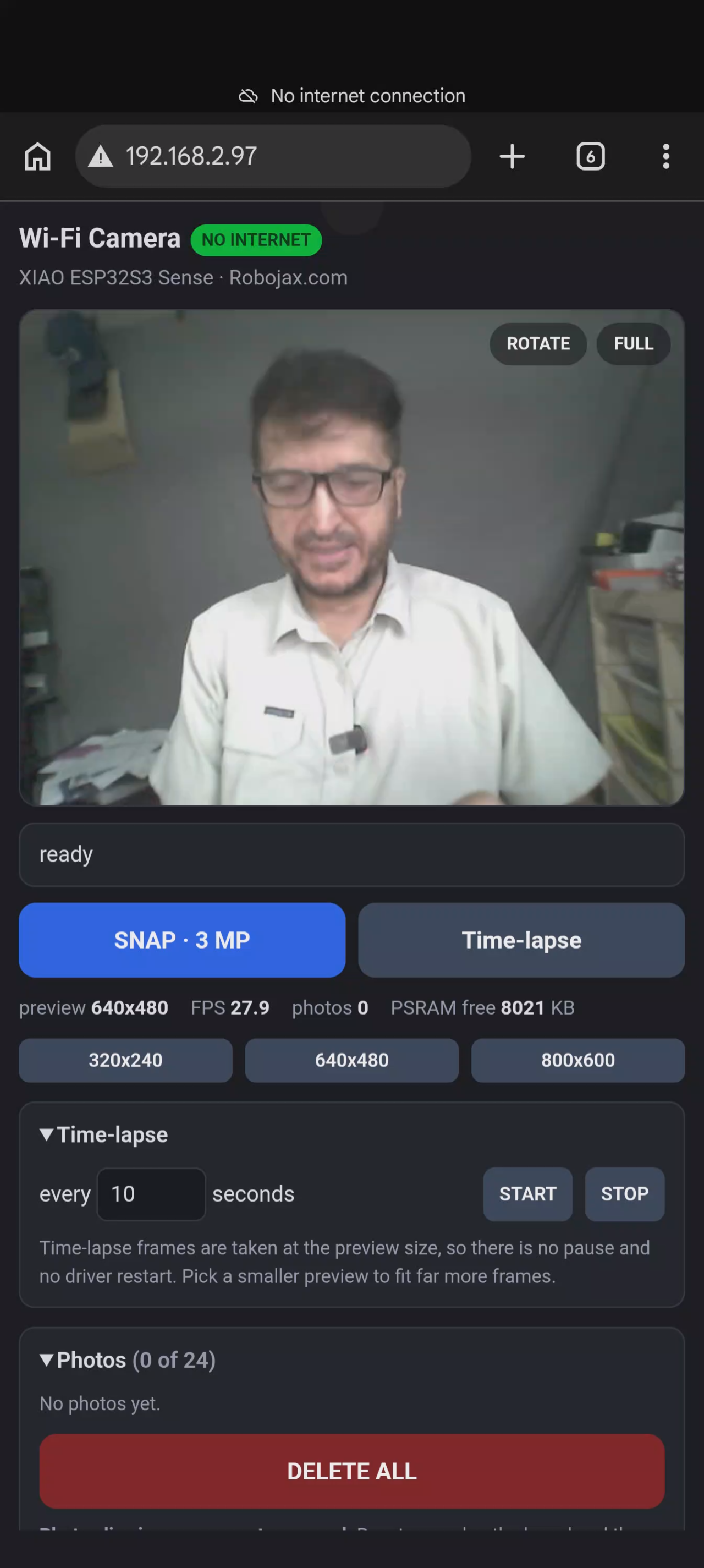
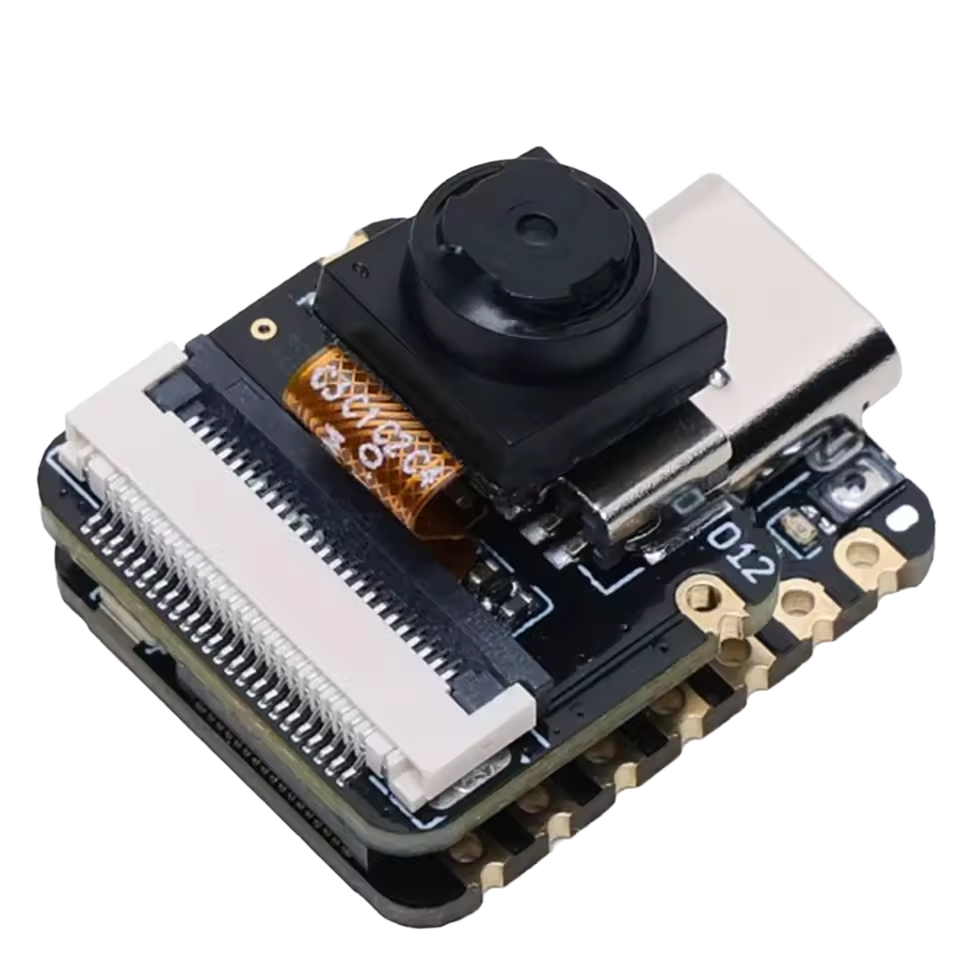
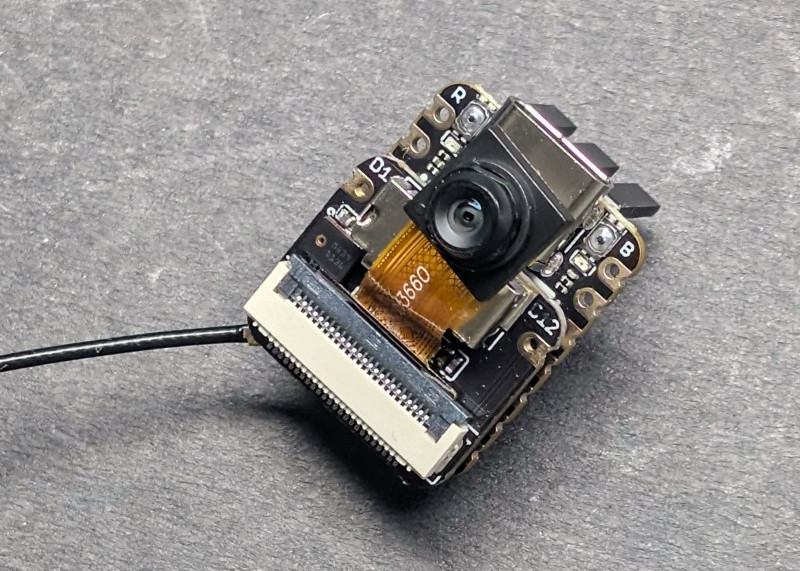
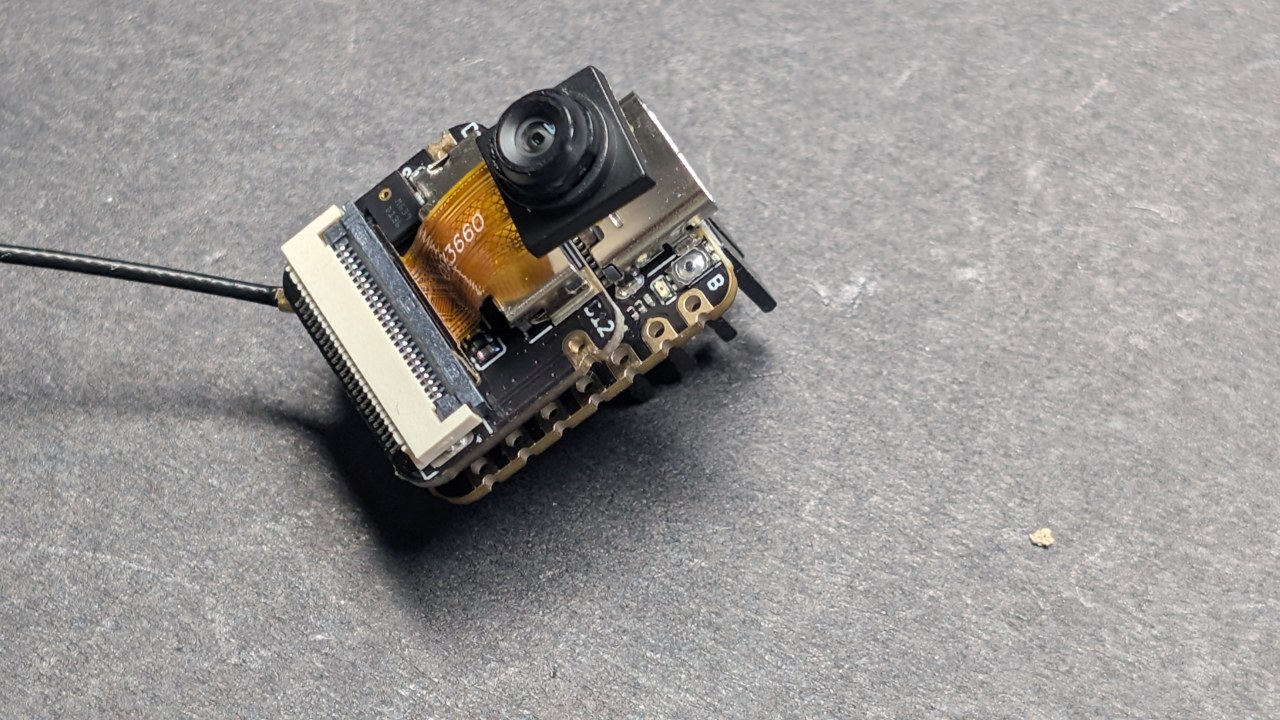
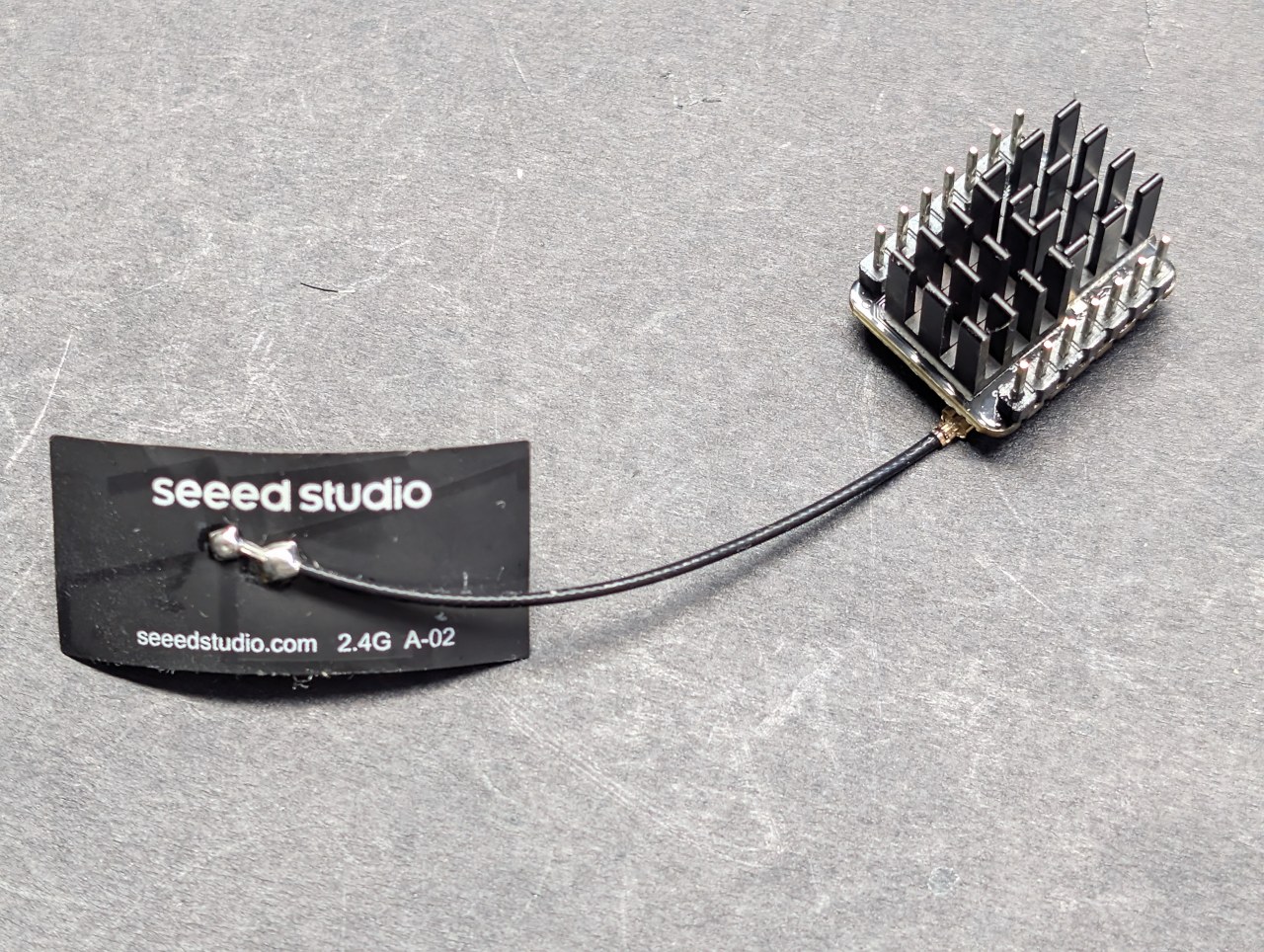
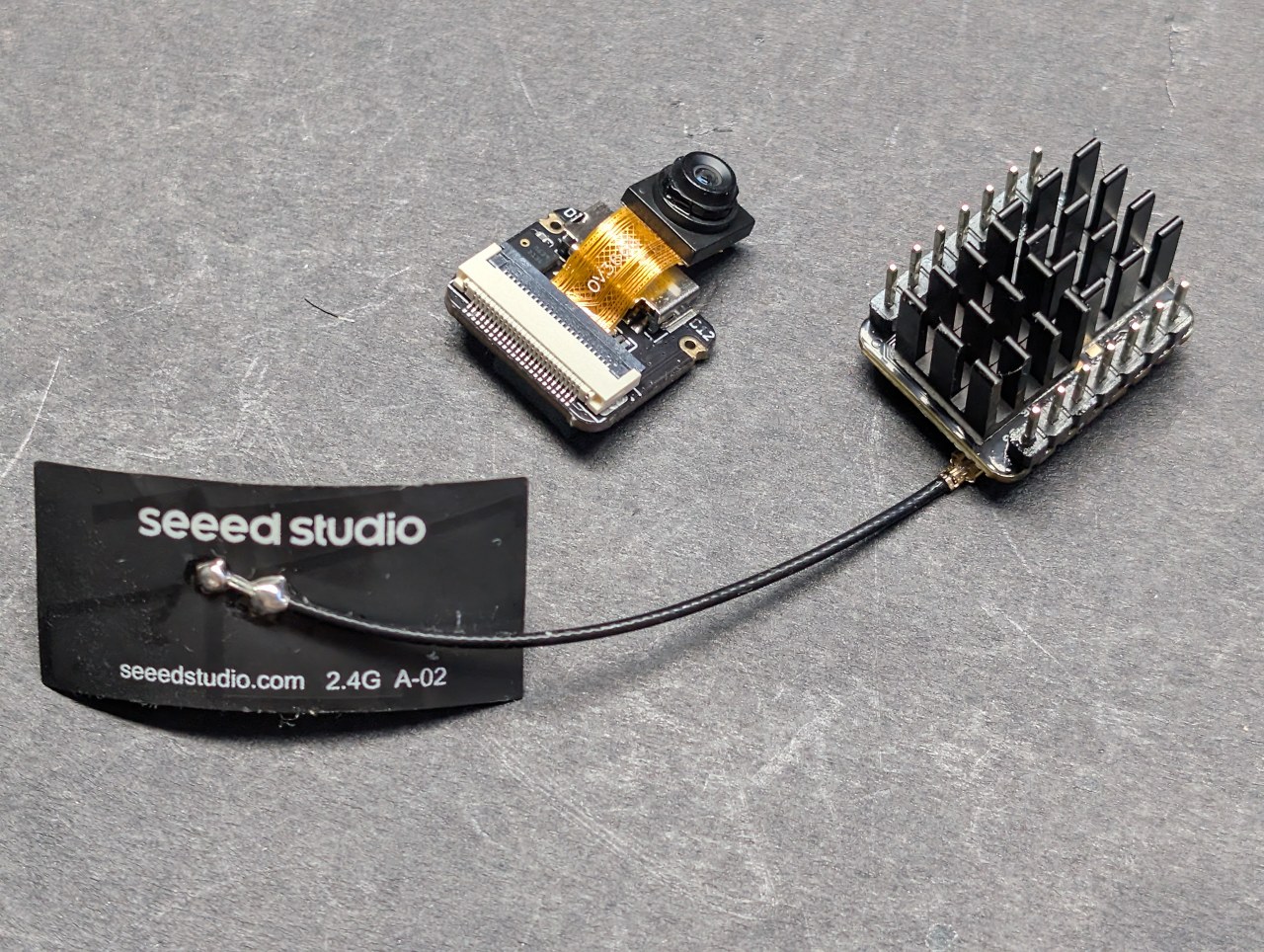
د Seeed Studio XIAO ESP32-S3 Sense د پوستې ټاپه څخه کوچنی دی او د ۳ میګاپکسله کیمره، مایکروفون او ۸ MB PSRAM لري. دا لومړنی پروژه یې د ویب کیمرې په توګه بدلوي: په هر براوزر کې ژوندۍ ویډیو، بشپړ ریزولوشن عکسونه، وخت-تېریدنه، او د خوندي کولو تڼۍ چې عکس مستقیم ستاسو تلیفون ته اچوي. د نصبولو لپاره کوم اپلیکیشن نشته او د جوړولو لپاره کوم حساب نشته.

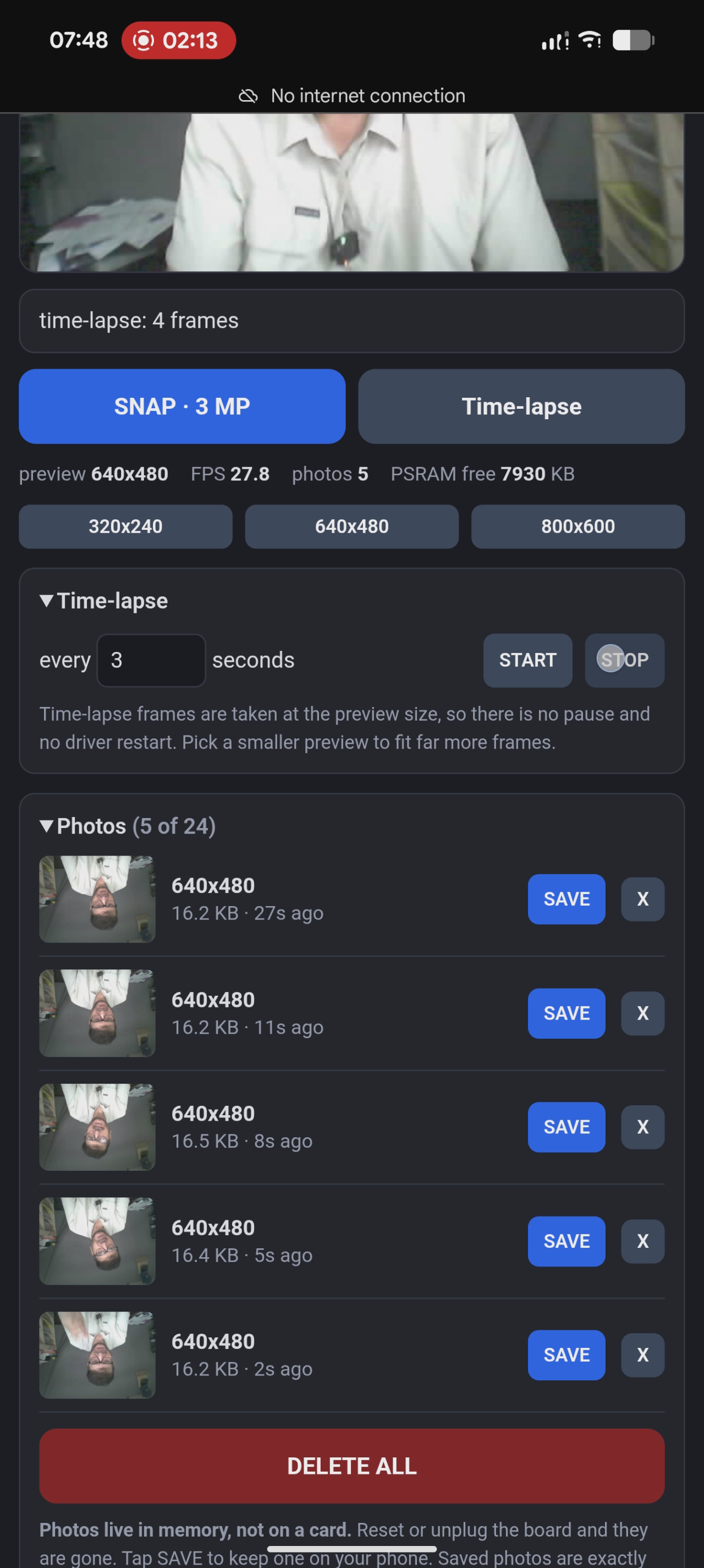
دا پروژه څه کوي
| بڼه | دا څه معنی لري |
|---|---|
| ژوندۍ ویډیو | په هر براوزر کې تر ۲۸ چوکاټونو په ثانیه پورې خپروي، اندازه شوې. |
| خپل وای-فای | بورډ شبکه جوړوي. روټر نه شته، په هر ځای کې کار کوي. |
| درې مخکتنې اندازې | ۳۲۰×۲۴۰، ۶۴۰×۴۸۰ او ۸۰۰×۶۰۰، د پاڼې څخه بدلېږي. |
| ۳ MP سنیپ شاټ | بشپړ ۲۰۴۸×۱۵۳۶ عکس، شاوخوا ۱۰۰ ms نیسي. |
| وخت-تېریدنه | هر N ثانیو کې یو چوکاټ، په حافظه کې ساتل شوی. |
| څرخول او بشپړ سکرین | عکس ۹۰° په وار سره وګرځوئ؛ سکرین یوازې د ویډیو سره ډک کړئ. |
| خپل وسیلې ته خوندي کول | SAVE ټک کړئ او عکس هغه تلیفون یا PC ته ډاونلوډ کېږي چې تاسو پرې ګورئ. |
بورډ، او هغه دوه تڼۍ چې مهمې دي
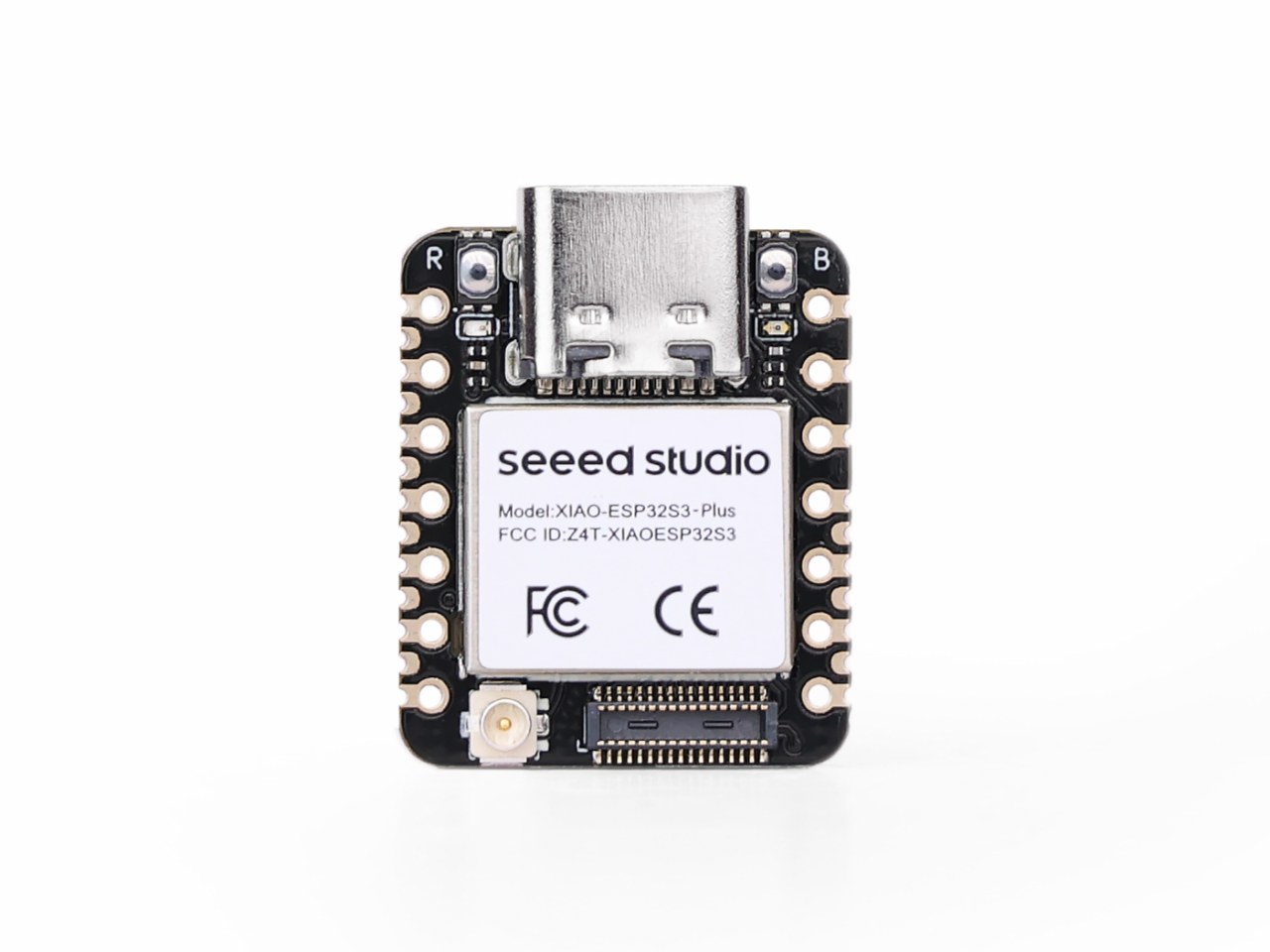
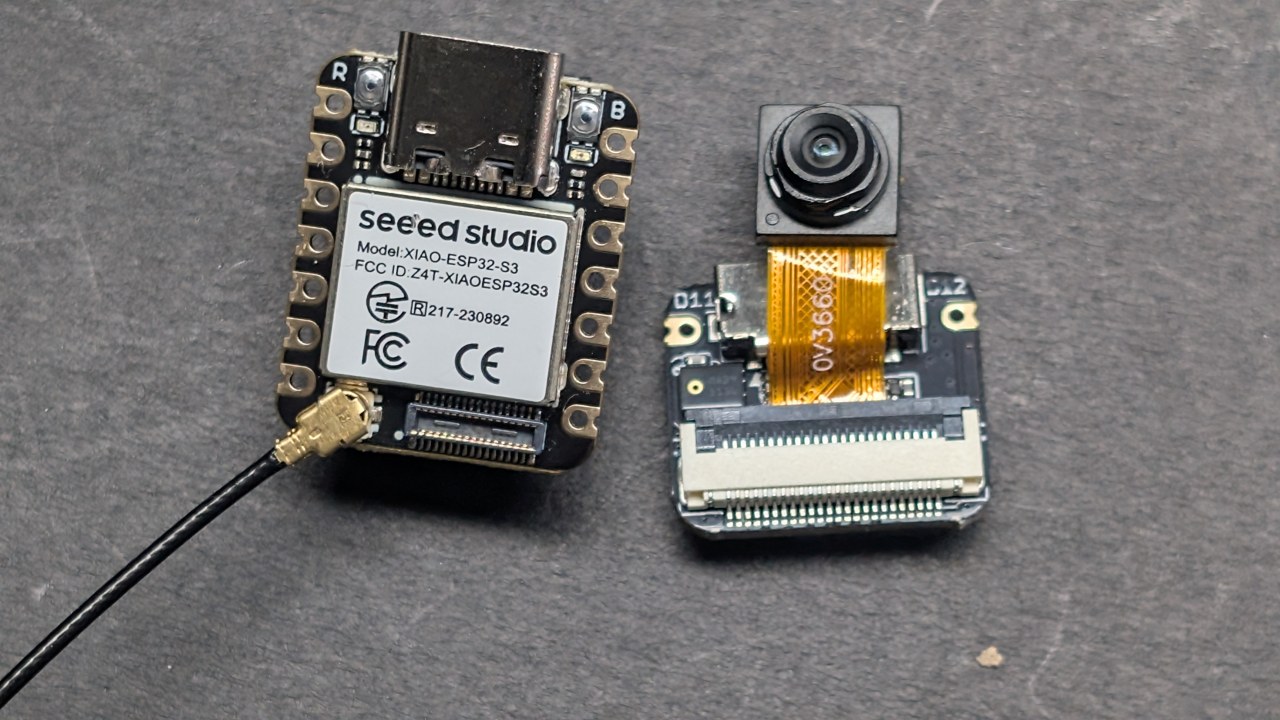
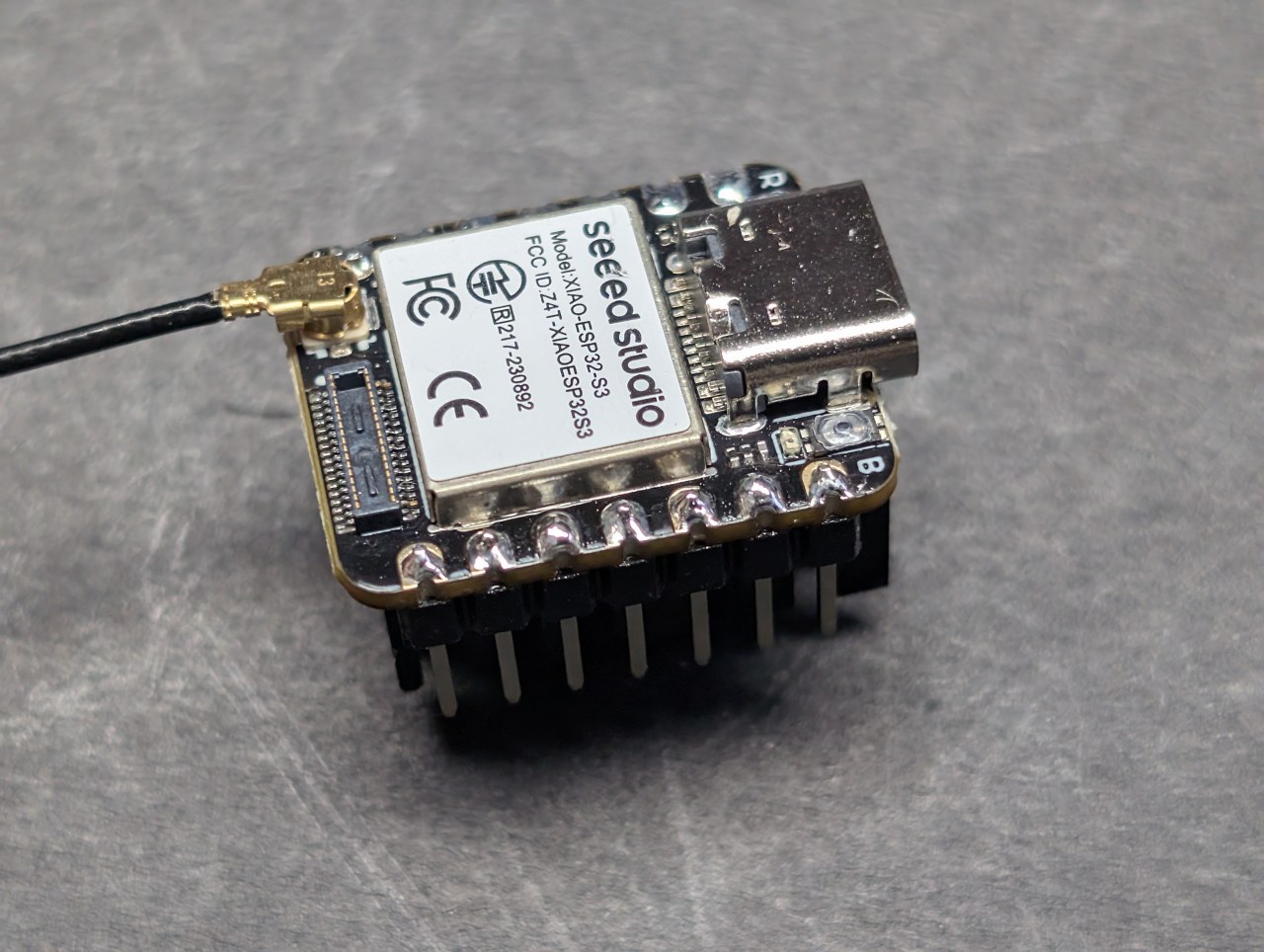
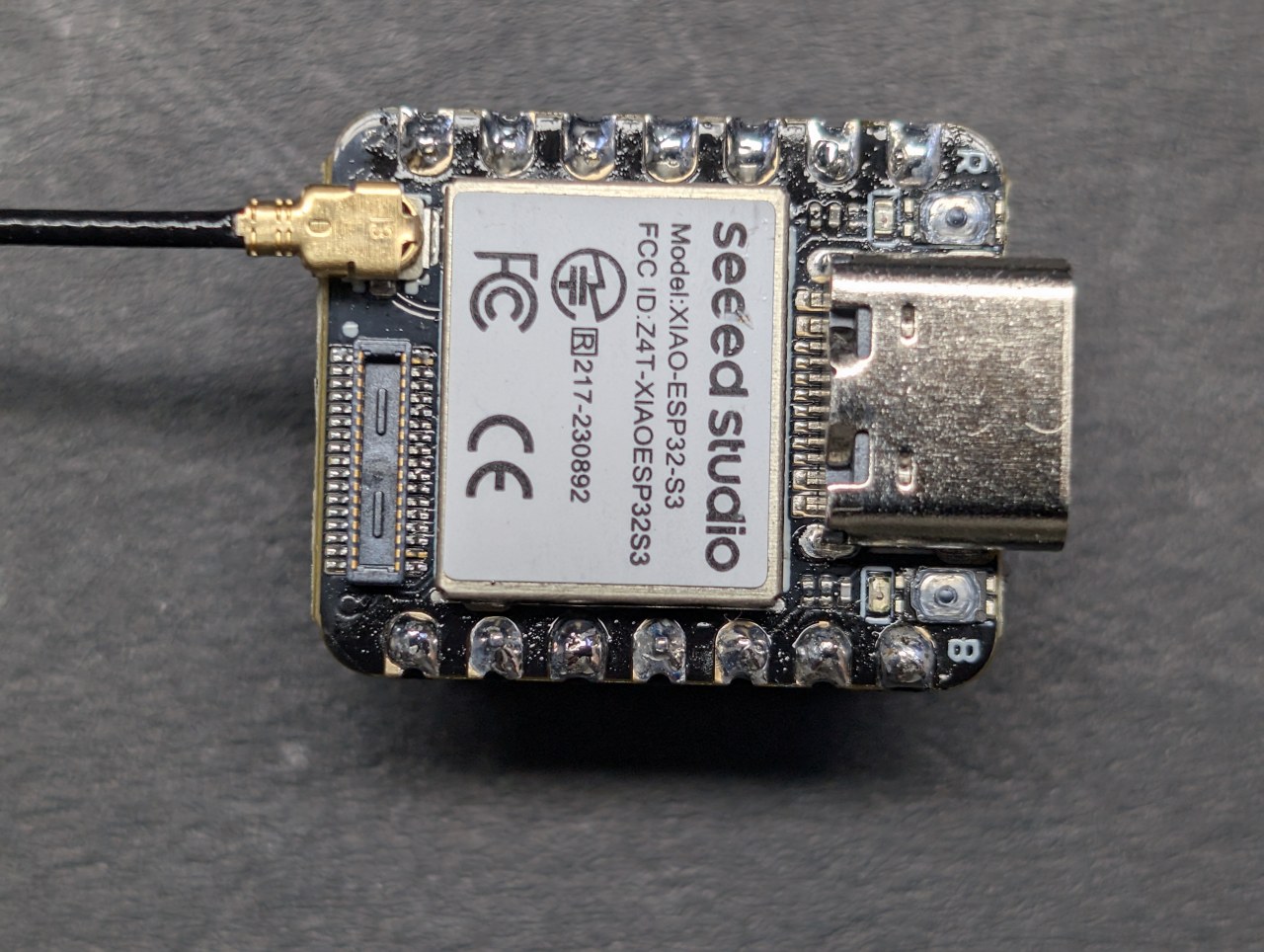
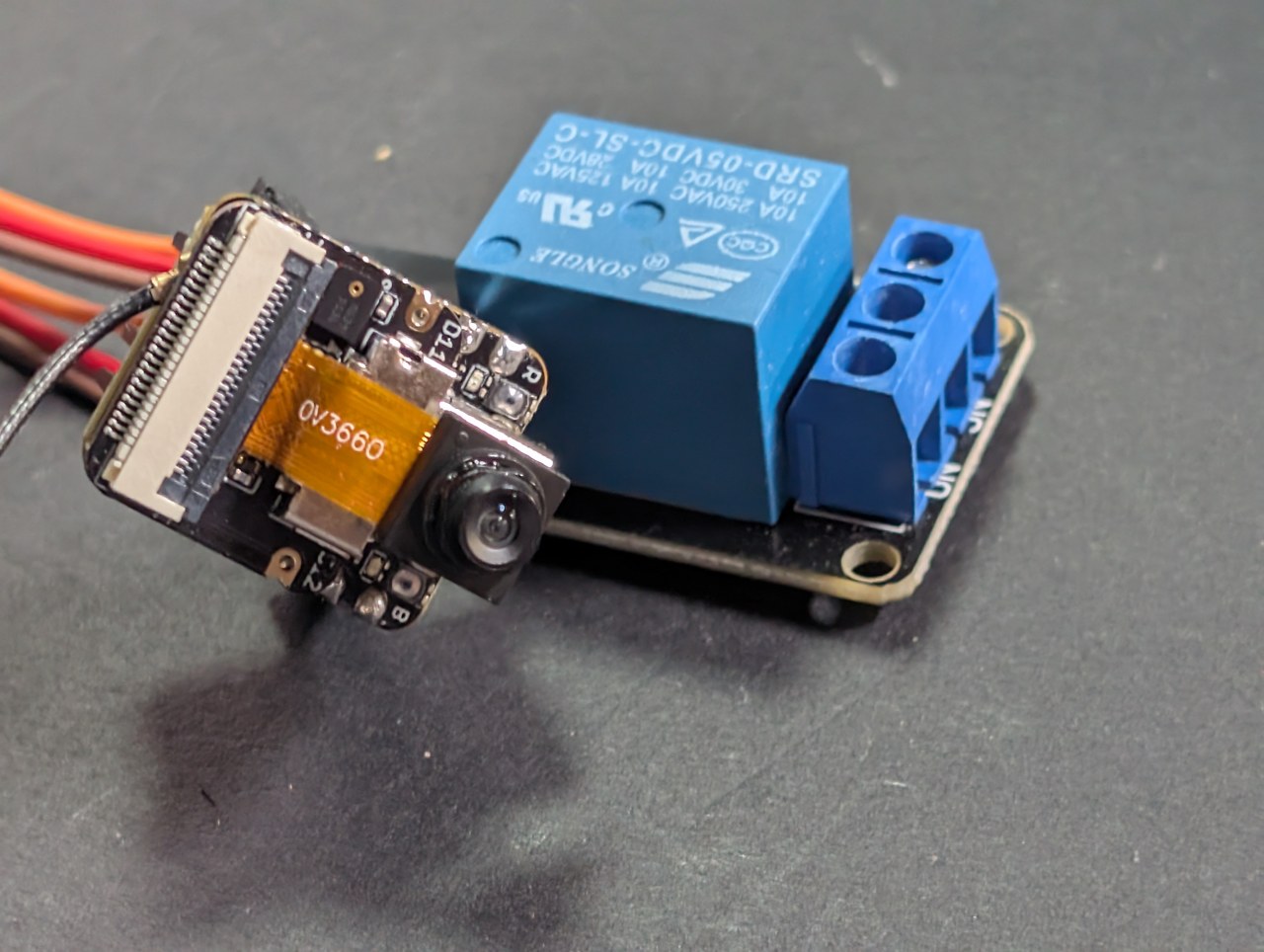
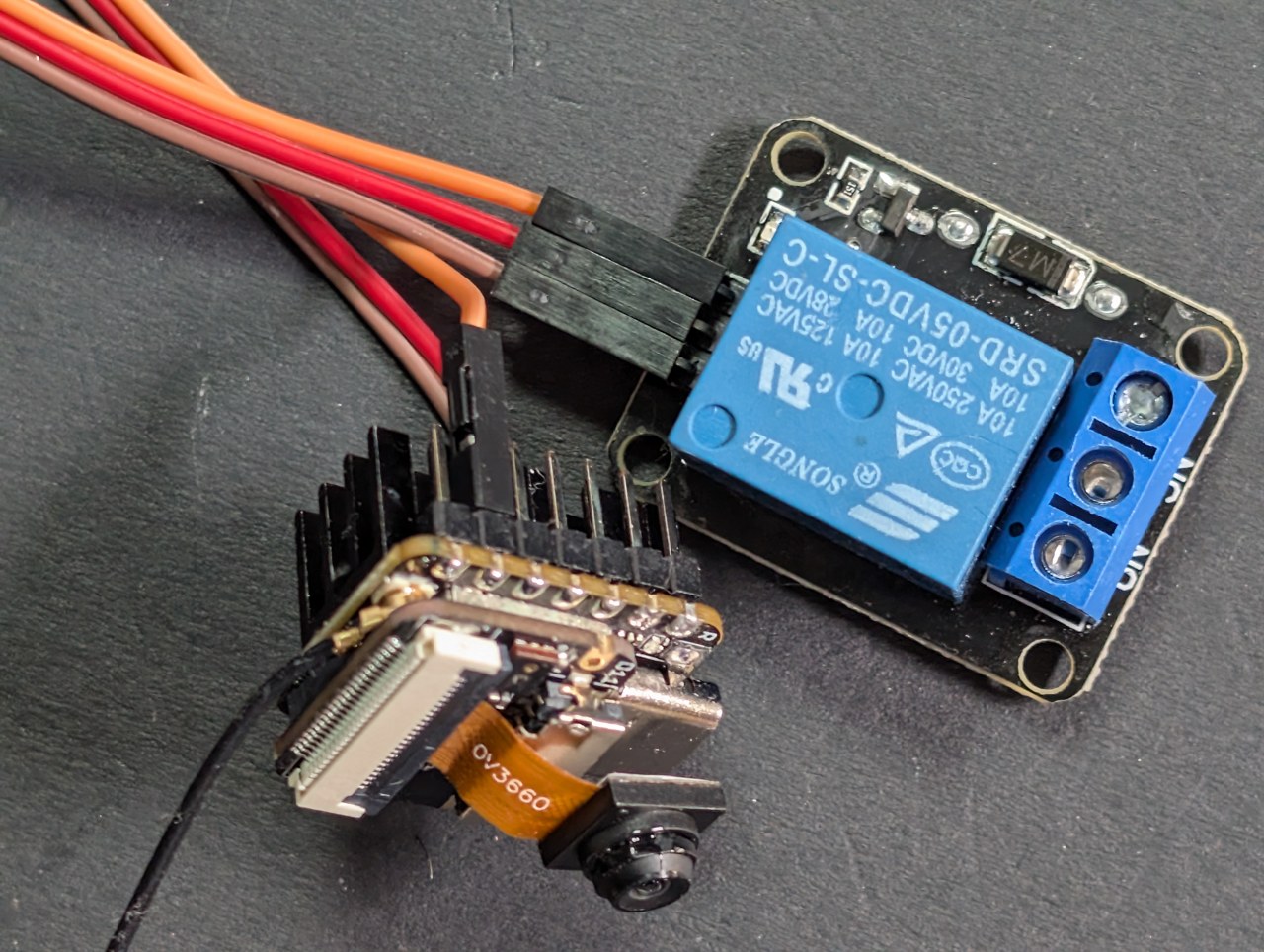
د USB-C نښلونکي تر څنګ دوه کوچنۍ تڼۍ شته، چې په سکرین کې د R او B په نښه شوې دي. دا سینګار نه دي — ژر یا وروسته به تاسو ورته اړتیا ولرئ.
| تڼۍ | دا څه ده | دا څه کوي |
|---|---|---|
| R | ری سیټ | بورډ بیا پیلوي، لکه د انپلګ او بیا پلګ کولو په څېر. |
| B | بوټ | د ری سیټ پر مهال نیول شوی، چپ دې ته اړ باسي چې خپل ROM بوټلوډر ته لاړ شي، د فلش کولو لپاره چمتو. |

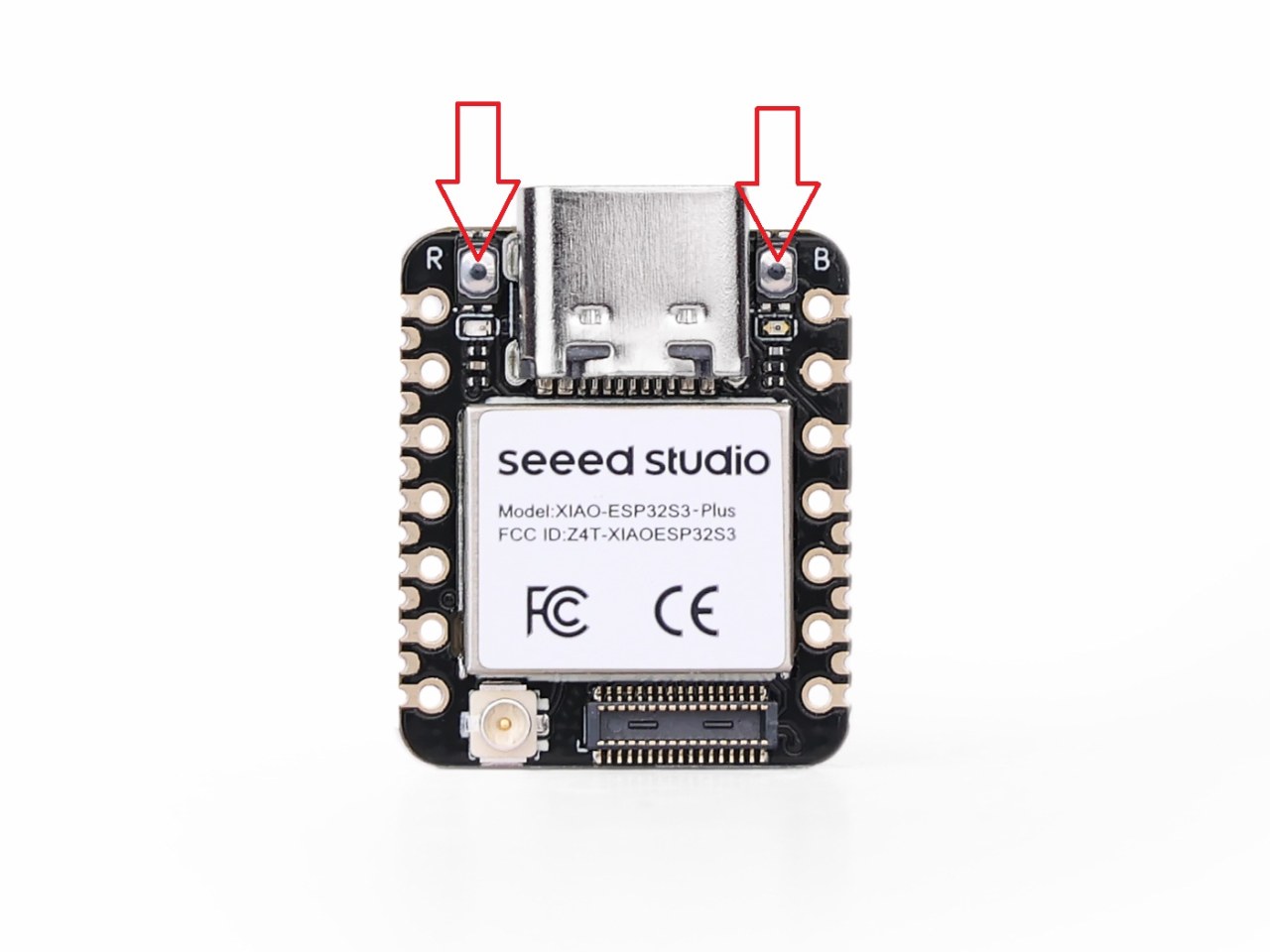
تقریباً تل، یو عادي اپلوډ کار کوي — IDE بورډ ستاسو لپاره بوټلوډر ته ری سیټ کوي. مګر دا بورډ جلا USB-to-serial چپ نه لري؛ د USB بندر پخپله پروسیسر دی. نو که په بورډ کې سکیچ کریش کوي او بیا پیلېږي، د USB بندر په ثانیه کې څو ځله ورک او بیا ښکاره کېږي، او اپلوډ به په نیمایي کې د بندر تېروتنې سره ناکام شي.
هغه وخت تاسو تڼۍ کاروئ:
- B ونیسئ او نیول یې مه پرېږدئ.
- R فشار ورکړئ او خوشې یې کړئ.
- B خوشې کړئ.
- د Tools → Port لاندې بندر بیا وټاکئ — شمېره ډېری وخت په دې حالت کې بدلېږي.
- اپلوډ کړئ. کله چې پای ته ورسېږي، یو ځل R فشار ورکړئ ترڅو نوی فرم ویئر پیل شي.
د Arduino IDE ترتیبات
دا په دې بورډ کې د ډېرو نورو په پرتله ډېر مهم دي، او دوی هر ځل چې تاسو د بورډ انتخاب بدل کړئ د بورډ اصلي حالت ته بېرته ځي. د هر بدلون وروسته یې بیا وګورئ.
| ترتیب | ارزښت |
|---|---|
| بورډ | XIAO_ESP32S3 — نه ESP32S3 Dev Module |
| PSRAM | OPI PSRAM — په تلوالیز ډول بېکاره دی، لاندې خبرداری وګورئ |
| د فلش اندازه | 8MB (64Mb) |
| د پارټیشن سکیم | Default with spiffs (3MB APP/1.5MB SPIFFS) |
| USB CDC On Boot | فعال شوی — که نه نو تاسو هیڅ سیریل مانیټر نه لرئ |
| د اپلوډ سرعت | 921600 (که اپلوډ ناکام شي 460800 ته راټیټ کړئ) |
| د اپلوډ دمخه ټول فلش پاکول | بېکاره شوی |
Disabled لومړی لیست شوی، نو یو نوی غوره شوی XIAO_ESP32S3 هیڅ PSRAM نلري. بدتر، د بورډونو بدلول په خاموشۍ سره ټول Tools اختیارونه بیا تنظیموي — نو که تاسو له بل ESP32-S3 بورډ څخه راشئ چیرې چې تاسو PSRAM فعال کړی و، تاسو دا پرته له کوم خبرداری له لاسه ورکوئ. د کیمرې بفرونه او هره خوندي شوې انځور په PSRAM کې ژوند کوي، او سکیچ به د توضیح سره ودریږي نه دا چې چل شي. Tools → PSRAM د OPI PSRAM ته وټاکئ.په بورډ باندې لیبل په کوډ کې شمېره نه ده
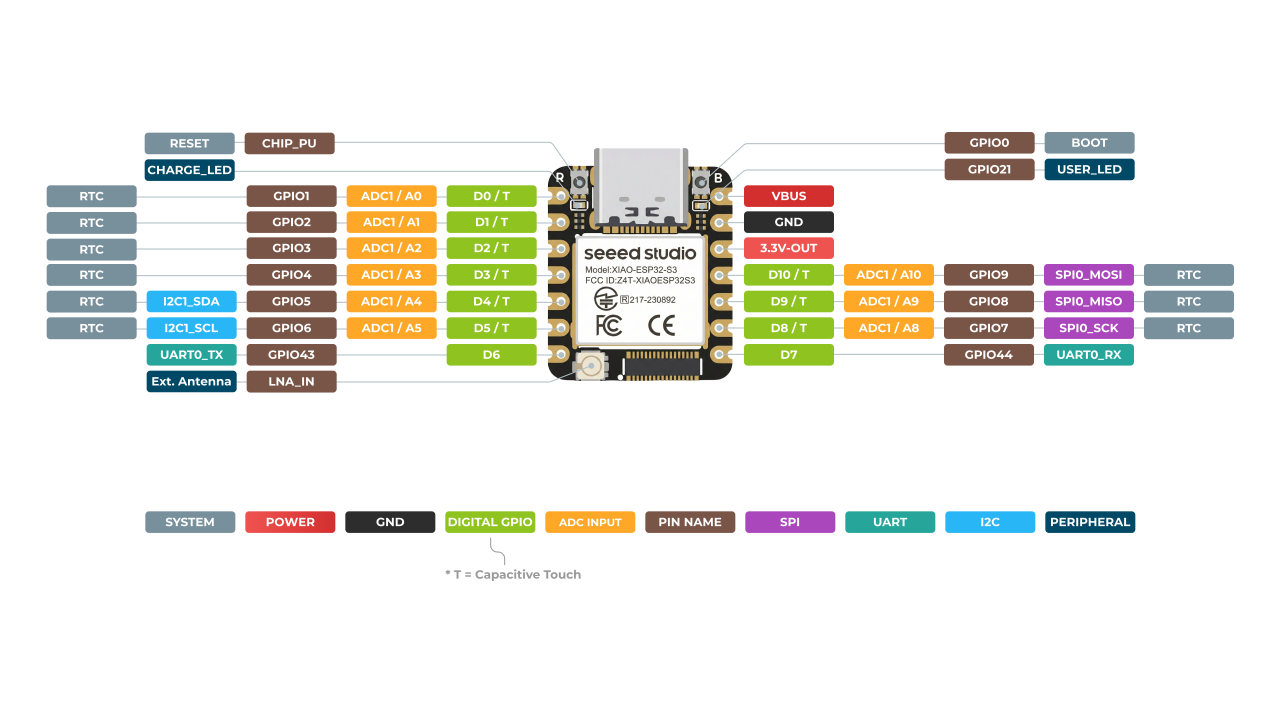
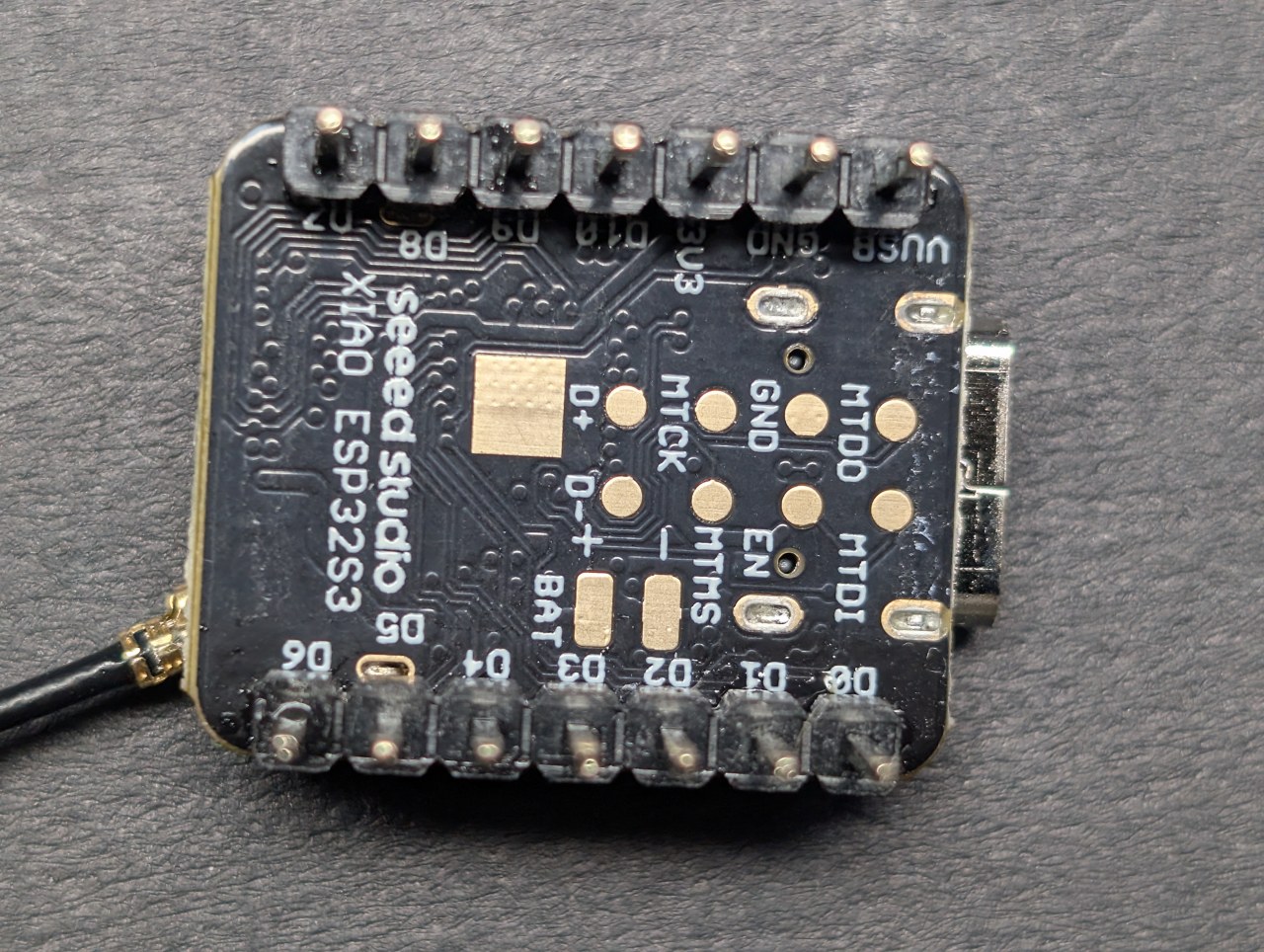
دا خلکو ته یو ساعت مصرفوي. سیلکسکرین وايي D4؛ هغه شمېره چې ستاسو کوډ ورته اړتیا لري 5 ده. دوی یو له بل څخه جلا دي، نو D4 پنځم پن دی لاندې، او دا GPIO4 نه دی. په ESP32 کې، په pinMode() او digitalWrite() کې شمېره تل د GPIO شمېره ده.
| په بورډ باندې چاپ شوی | په کوډ کې وکاروئ | یادښتونه |
|---|---|---|
D0 |
1 | هم A0 |
D1 |
2 | |
D2 |
3 | |
D3 |
4 | |
D4 |
5 | |
D5 |
6 | |
D6 |
43 | سیریل TX — مخنیوی وکړئ |
D7 |
44 | سیریل RX — مخنیوی وکړئ |
D8 |
7 | |
D9 |
8 | د SD ساکټ لخوا پورته کش شوی |
D10 |
9 | د SD ساکټ لخوا پورته کش شوی |
سیلکسکرین ولولئ. پنونه مه شمېرئ.
د secrets.h تنظیمول
یوازې یو فایل ترمیم ته اړتیا لري. د Arduino IDE کې د secrets.h ټب خلاص کړئ.
/* 1 = بورډ خپله شبکه جوړوي (هغه څه چې ویډیو ښیې)
 * 0 = بورډ ستاسو موجوده Wi-Fi سره یوځای کیږي                    */
#define USE_ACCESS_POINT   1

#define AP_SSID            "Robojax-XIAO"
#define AP_PASSWORD        "robojax123"

#define WIFI_SSID          "YOUR_WIFI_NAME"
#define WIFI_PASSWORD "YOUR_WIFI_PASSWORD"| حالت | کله یې وکاروئ |
|---|---|
USE_ACCESS_POINT 1د لاسرسي نقطه |
بورډ خپله شبکه جوړوي چې Robojax-XIAO نومیږي. له خپل تلیفون څخه ورسره یوځای شئ او http://192.168.4.1 ته لاړ شئ. د تنظیم کولو لپاره هیڅ نشته، په هر ځای کې کار کوي — یوه کوټه، موټر، د Wi-Fi پرته ورکشاپ. دا هغه څه دي چې ویډیو ښیې. |
USE_ACCESS_POINT 0سټیشن |
بورډ پرځای ستاسو کورني Wi-Fi سره یوځای کیږي. په میز کې ډیر اسانه دی، ځکه ستاسو تلیفون خپل انټرنیټ ساتي. خپل د شبکې نوم او پاسورډ دننه کړئ، او هغه پته ولولئ چې بورډ په سیریل مانیټر کې چاپوي — دا به 192.168.4.1 نه وي. |
Robojax او robojax مختلفې شبکې دي.کارول
- سکیچ اپلوډ کړئ، بیا سیریل مانیټر په 115200 کې خلاص کړئ. دا دقیقا هغه څه چاپوي چې باید وکړئ.
- په خپل تلیفون کې، د Wi-Fi شبکې Robojax-XIAO سره یوځای شئ.
- په هر براوزر کې http://192.168.4.1 خلاص کړئ.
- د 3 میګاپکسله انځور لپاره SNAP ټایپ کړئ، یا د وخت وقفې پیل کړئ.
- د هرې انځور لاندې SAVE ټایپ کړئ ترڅو دا په خپل تلیفون کې وساتئ.

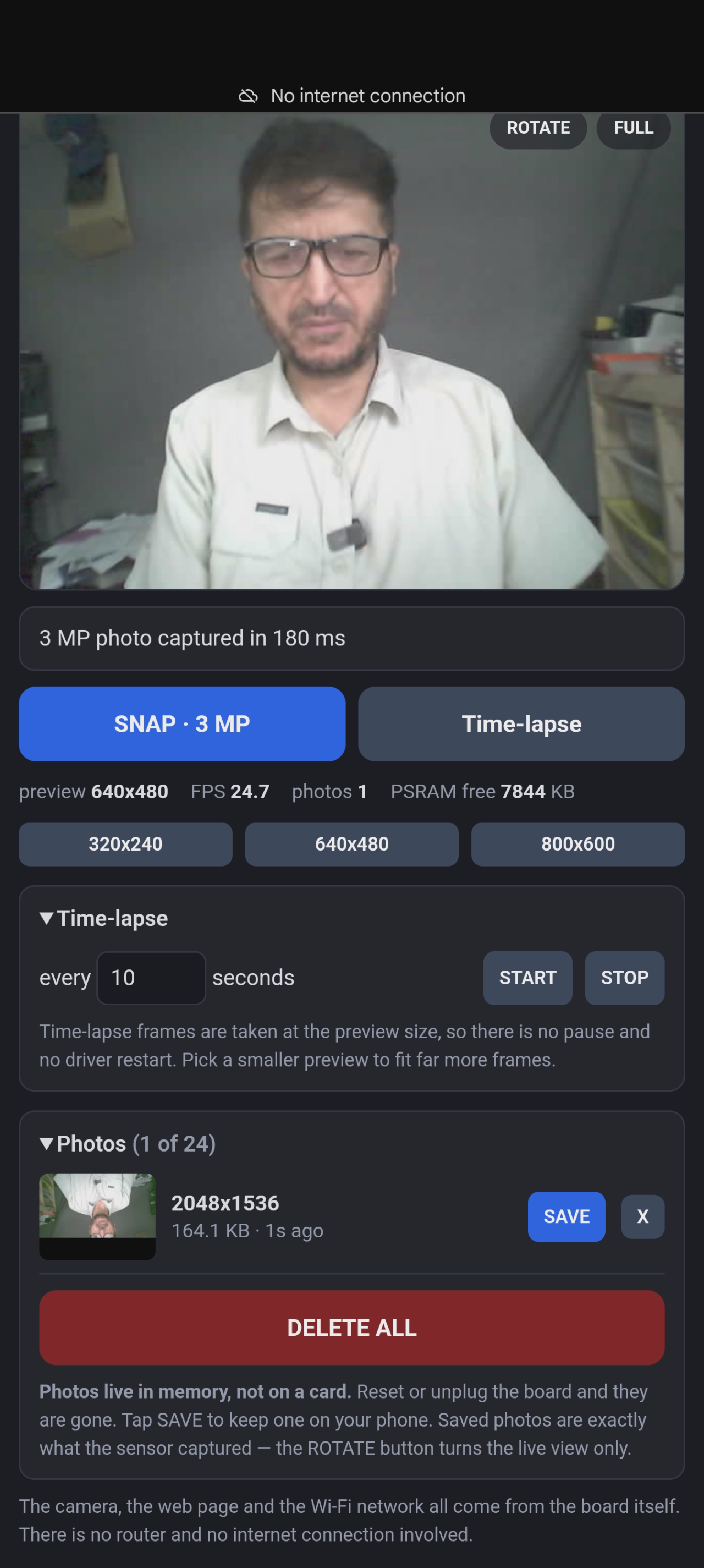
192.168.4.1 شتون نه لري، او وخت ختمیږي پداسې حال کې چې تلیفون لاهم "connected" ښیې. ګرځنده ډاټا بنده کړئ، یا کله چې تلیفون د انټرنیټ نشتوالي خبرداری ورکوي، پر stay connected ټک ووهئ.ولې ویډیو کله چې تاسو SNAP فشاروئ کنګل کیږي
د کیمرې ډرایور خپل فریم بفرونه کله چې پیل کیږي ځانګړي کوي، د هغه ریزولوشن لپاره چې په هغه سره پیل شوی، او هغه بفرونه نشي لوی کیدی. د مخکتنې څخه لوی عکس اخیستلو لپاره، ډرایور باید وتړل شي او په نوي اندازې سره بیا پیل شي — شاوخوا یوه ثانیه، چې په ترڅ کې یې ویډیو نشته.
دا بګ نه دی او د پټولو وړ نه دی. هر ESP32 کیمره دا کوي. بدیل — له سینسر څخه غوښتل چې اندازه په الوتنه کې بدله کړي — ځینې وختونه کار کوي، کوم چې د هیڅکله نه کار کولو څخه خورا خراب دی.
عکسونه په حافظه کې ژوند کوي، نه په کارت کې
په دې پروژه کې SD کارت نشته. عکسونه په PSRAM کې ساتل کیږي، کوم چې ګړندی دی او اضافي هارډویر ته اړتیا نه لري، مګر بې ثباته دی: بورډ ریسیټ کړئ او هر عکس له منځه ځي. له همدې امله د هر عکس تر څنګ د SAVE تڼۍ شته.
په اصلي بورډ کې اندازه شوی، 8 MB PSRAM نږدې لاندې ساتلی شي:
| ریزولوشن | د نیولو وخت | د فایل اندازه | څومره یې په حافظه کې ځای کیږي |
|---|---|---|---|
| 320×240 | 14–32 ms | 3.1–3.7 KB | شاوخوا 2,600 |
| 800×600 | 15 ms | 14.9 KB | شاوخوا 550 |
| 2048×1536 (3 MP) | 100 ms | 337.8 KB | یوازې 24 |
عکس واخلئ، بیا یې خوندي کړئ. دا ټوله کاري پروسه ده.
اندازه شوي شمیرې
دلته هر ارقام له اصلي بورډ څخه راغلي، نه له ډیټاشیټ څخه.
| میټریک | اندازه شوی |
|---|---|
| دوامداره مخکتنې فریم نرخ | 28.3 FPS په 320×240 کې |
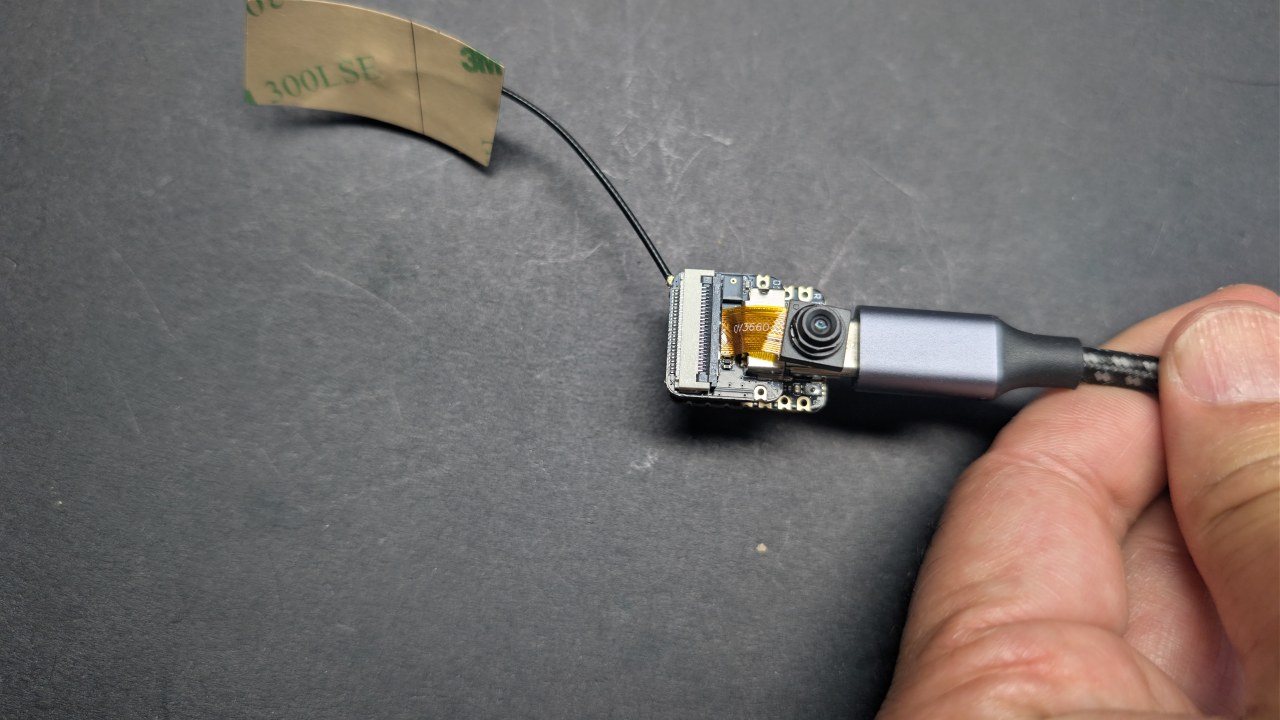
| د کیمرې سینسر | OV3660، د PID 0x3660 په توګه پیژندل شوی |
| PSRAM | 8.00 MB، 7.98 MB په بوټ کې خالي |
| فلش | 8.00 MB |
| پروسسر | ESP32-S3، دوه کورونه په 240 MHz |
| د سکیچ اندازه | 768 KB — د اپ برخې 22٪ |
ستونزې حل کول
| نښه | علت او حل |
|---|---|
بورډ بیا بیا ریبوټ کیږي، سیریل یوازې rst:0x3 پیغامونه ښیې |
PSRAM فعال نه دی. Tools → PSRAM → OPI PSRAM. سکیچ اوس د پیغام سره ودریږي، نو که تاسو په سیریل کې توضیح وینئ، دا هغه څه دي چې تاسو ته یې ویل کیږي. |
| پاڼه نه بارېږي، مګر تلیفون وايي چې وصل دی | ګرځنده ډاټا فعاله ده. یې بنده کړئ، یا د انټرنیټ نشتوالي په خبرداری کې پر "stay connected" ټک ووهئ. |
تلیفون یو پته ښیې چې له 169.254 پیل کیږي |
دا هغه وخت وصل شو چې بورډ بیا پیل کیده او هیڅکله یې پته ترلاسه نه کړه. وای-فای بنده او بیا یې فعاله کړئ، یا په وینډوز کې ipconfig /renew "Wi-Fi" پرمخ وړئ. |
| اپلوډ په نیمایي کې د پورټ تېروتنې سره ناکامیږي | د پورته B + R بوټلوډر طریقه وکاروئ، او د اپلوډ سرعت 460800 ته راټیټ کړئ. |
| د سیریل مانیټر هیڅ محصول نه لري | USB CDC On Boot غیر فعال دی. یې فعال کړئ. |
XIAO_ESP32S3 د بورډ په لیست کې نشته |
ستاسو ESP32 کور له 2.0.8 څخه زوړ دی. په Boards Manager کې یې تازه کړئ. |
| کیمره ناکامیږي او هیڅکله بیرته نه راګرځي | سینسر په دې بورډ کې د ریسیټ کرښه نه لري، نو سافټویر یې نشي بیا پیل کولی. بریښنا بنده او بیا یې فعاله کړئ — USB پرې کړئ، یوازې R فشار مه ورکوئ. هیڅکله د کیمرې ماډل مه پرې کوئ پداسې حال کې چې بورډ بریښنا لري. |
Images
This tutorial is part of: Seeed Studio XIAO ESP32-S3 AI Camera tutoial and codes
/* ===========================================================================
* 01_Web_Camera — Seeed Studio XIAO ESP32S3 Sense
* ===========================================================================
SHORT DESCRIPTION
Turns the Seeed Studio XIAO ESP32-S3 Sense into a Wi-Fi camera you watch in
any browser. The board creates its own Wi-Fi network, so no router and no
internet are needed: join it from your phone, open the page, and you get
live video at up to 28 frames per second, three preview resolutions, a full
3 megapixel snapshot, time-lapse recording, and rotate and full-screen
controls. Photos are held in the board's memory and saved to your phone
with one tap. Needs nothing but the board and a USB-C cable, and it runs on
any ESP32 core version.
*
* ---------------------------------------------------------------------------
* ROBOJAX.COM - XIAO ESP32S3 Sense project series
*
* WATCH THE VIDEO
* https://youtu.be/PuuTazJDKgA
*
* PROJECT RESOURCE PAGES - full write-up, photos, wiring and downloads
* 1 Web camera................ https://robojax.com/RTJ853
* 2 Offline face recognition.. https://robojax.com/RTJ854
* 3 What is this part?........ https://robojax.com/RTJ003
* 4 Making it talk............ https://robojax.com/RTJ004
* 5 The AI watcher............ https://robojax.com/RTJ005
*
* THE BOARD
* https://www.seeedstudio.com/XIAO-ESP32S3-Sense-p-5639.html?sensecap_affiliate=Vac9tOl&referring_service=link
* Bought at my own cost - this series is not sponsored.
*
* ARDUINO IDE SETTINGS - identical for every sketch in this series
*
* Board : XIAO_ESP32S3 (Tools > Board > esp32)
* ESP32 core : 2.0.17 <-- REQUIRED, see note below
* PSRAM : OPI PSRAM <-- required, nothing works without
* Flash Size : 8MB (64Mb)
* Partition Scheme : Default with spiffs (3MB APP/1.5MB SPIFFS)
* USB CDC On Boot : Enabled <-- the XIAO has ONE native USB
* port; Disabled = no Serial
* Upload Speed : 921600
*
* Erase All Flash Contents Before Sketch Upload : DISABLED
* Enabled wipes the flash where saved names live, on every upload.
*
* WHY CORE 2.0.17 AND NOT 3.x
* Espressif REMOVED the on-device face detection models in core 3, so
* the face project will not compile there. 2.0.17 is the last 2.x and
* the only version that has both those models and the XIAO_ESP32S3
* board definition, which was added in 2.0.8. One setting, whole series.
*
* LIBRARIES
* None to install. Camera, face models, LittleFS, Preferences and the
* web server all ship with the ESP32 core itself.
*
* All of this code is free. If it helped you, a subscribe on YouTube is
* the best way to support more of it.
* ---------------------------------------------------------------------------
*
* A web camera with no screen, no SD card and no cloud account. The board
* makes its own Wi-Fi network, your phone or laptop joins it and opens a web
* page: live video, a 3 megapixel SNAP button, time-lapse, and photos you
* save straight to the device you are watching on.
*
* Nothing here needs the internet, and there is no router in the loop at all
* - which means it works in a shed, in a field, or at a show with no Wi-Fi.
*
* IT RUNS ON ANY ESP32 CORE. There is no face detection in this sketch, so
* none of the version pinning the later projects need applies here. If you
* only ever build this one, install the newest ESP32 core and ignore the
* 2.0.17 note in the block above.
*
* THE ONE THING TO UNDERSTAND
* ---------------------------
* Photos live in PSRAM, which is memory - not a card. It is fast and it needs
* no extra hardware, but it is VOLATILE: reset the board and every photo is
* gone. Measured on this board, 8 MB of PSRAM holds roughly:
*
* 2,600 preview frames at 320x240 (3.7 KB each)
* 550 frames at 800x600 (14.9 KB each)
* 24 photos at 2048x1536 (337.8 KB each)
*
* So: take the shot, then SAVE it to your phone. That is the whole workflow,
* and it is why this sketch puts the save button next to every picture.
*
* WHY THE PREVIEW FREEZES WHEN YOU PRESS SNAP
* -------------------------------------------
* The camera driver allocates its frame buffers when it starts, sized for
* whatever resolution it started at, and they cannot grow. To take a picture
* bigger than the preview, the driver has to be shut down and restarted at
* the new size - about a second, during which there is no video.
*
* This is not a bug and it is not worth hiding. Every ESP32 camera does it.
* (We measured the alternative: calling set_framesize() to move up in size
* works *sometimes*, which is far worse than never.)
*
* HOW TO USE
* ----------
* 1. Upload, then open the Serial Monitor at 115200. It prints what to do.
* 2. On your phone, join the Wi-Fi network "Robojax-XIAO"
* (password in secrets.h), then open http://192.168.4.1
*
* >> If the page TIMES OUT, turn off mobile data (or tap "stay
* >> connected" when the phone warns there is no internet). Phones
* >> route around a no-internet network, and the board's address
* >> only exists on the Wi-Fi side. This is the #1 gotcha of every
* >> access-point project. The 'wifi' serial command shows it live:
* >> "devices connected: 1, page requests served: 0" = exactly this.
*
* 3. Tap SNAP for a full 3 MP photo, or start a time-lapse.
* 4. Tap SAVE under any photo to keep it on your phone.
* 5. On the video itself: ROTATE turns the view in 90-degree steps (the
* angle is remembered on that phone), FULL fills the screen with just
* the video - tap EXIT or press Esc to come back. Rotation happens in
* the browser: the sensor cannot rotate 90 degrees, so saved photos
* keep the sensor's own orientation.
*
* Serial commands:
* snap take a 3 MP photo
* lapse <sec> start a time-lapse, one frame every <sec> seconds
* stop stop the time-lapse
* list list the photos in memory
* free show free PSRAM
* wipe delete all photos
* help this list
*
* ---------------------------------------------------------------------------
* WIRING: none. The board and a USB-C cable, nothing else.
* ---------------------------------------------------------------------------
* FUNCTIONS IN THIS SKETCH
* camStart(size,n) (re)start the camera driver at a given resolution
* previewName() human-readable name of the current preview size
* psFreeKB() free PSRAM in KB
* photoStore(fb) copy a captured frame into the gallery in PSRAM
* photoFree(i) release one photo
* photoWipe() release all photos
* doSnap() restart at 3 MP, capture, store, restart preview
* doTimelapse() capture at the preview size on a timer
* publishFrame() copy the newest preview frame for the stream server
* handleRoot/Status/Stream/Snap/Photo/Delete/Wipe/Size/Lapse HTTP
* startWiFi() access point (default) or join your network
* startServers() page/control server (80) and stream server (81)
* pollSerial() the serial command set
* setup() / loop() boot, then run the camera forever
*
* Robojax.com
* ===========================================================================
*/
#define MAX_PHOTOS 24 // the 3 MP ceiling; smaller shots use fewer bytes
#define PSRAM_RESERVE_KB 1800 // never let the gallery starve the camera driver
#define PREVIEW_JPEG_Q 12 // 10 = better picture, 20 = smaller and faster
#define SNAP_JPEG_Q 10 // the 3 MP shot deserves the good setting
#include <WiFi.h>
#include <esp_http_server.h>
#include <esp_log.h>
#include "esp_camera.h"
#include "camera_pins.h"
#include "secrets.h"
/* --- the gallery, entirely in PSRAM --------------------------------------- */
struct Photo {
uint8_t *buf;
size_t len;
uint16_t w, h;
uint32_t at; // millis() when it was taken
};
Photo gallery[MAX_PHOTOS];
int photo_count = 0;
uint32_t shutter_no = 0; // running count, for filenames
/* --- preview state -------------------------------------------------------- */
framesize_t preview_size = FRAMESIZE_VGA; // nice on a phone, still quick
volatile bool req_snap = false;
volatile int req_size = -1; // a framesize_t, or -1 for nothing
volatile bool req_wipe = false;
uint32_t lapse_every_ms = 0; // 0 = time-lapse off
uint32_t lapse_next = 0;
uint32_t lapse_taken = 0;
float st_fps = 0;
bool cam_up = false;
char st_note[64] = "";
/* Diagnostics: counts every request that actually reaches the board. If the
* page times out on the phone but this number never moves, the requests are
* dying on the network side; if it moves, the board side is alive. */
volatile uint32_t http_hits = 0;
/* --- the shared preview frame the stream server hands out ----------------- */
static uint8_t *g_jpg = NULL;
static size_t g_jpg_len = 0;
static volatile uint32_t g_frame_no = 0;
static SemaphoreHandle_t g_jpg_mux = NULL;
httpd_handle_t srv_page = NULL, srv_stream = NULL;
char ser_line[48];
int ser_len = 0;
/* ===========================================================================
* Camera
* =========================================================================== */
bool camStart(framesize_t fs, int fb_count, int quality) {
if (cam_up) { esp_camera_deinit(); cam_up = false; delay(120); }
camera_config_t c = {};
c.ledc_channel = LEDC_CHANNEL_0;
c.ledc_timer = LEDC_TIMER_0;
c.pin_d0 = Y2_GPIO_NUM; c.pin_d1 = Y3_GPIO_NUM;
c.pin_d2 = Y4_GPIO_NUM; c.pin_d3 = Y5_GPIO_NUM;
c.pin_d4 = Y6_GPIO_NUM; c.pin_d5 = Y7_GPIO_NUM;
c.pin_d6 = Y8_GPIO_NUM; c.pin_d7 = Y9_GPIO_NUM;
c.pin_xclk = XCLK_GPIO_NUM;
c.pin_pclk = PCLK_GPIO_NUM;
c.pin_vsync = VSYNC_GPIO_NUM;
c.pin_href = HREF_GPIO_NUM;
c.pin_sscb_sda = SIOD_GPIO_NUM; // core 2.x spelling ("sscb" is their typo)
c.pin_sscb_scl = SIOC_GPIO_NUM;
c.pin_pwdn = PWDN_GPIO_NUM;
c.pin_reset = RESET_GPIO_NUM;
c.xclk_freq_hz = 20000000;
c.pixel_format = PIXFORMAT_JPEG; // no image processing here, so straight to JPEG
c.frame_size = fs;
c.jpeg_quality = quality;
c.fb_count = fb_count;
c.fb_location = CAMERA_FB_IN_PSRAM;
c.grab_mode = CAMERA_GRAB_LATEST;
esp_err_t err = esp_camera_init(&c);
cam_up = (err == ESP_OK);
if (!cam_up) Serial.printf("camera init failed at that size, error 0x%x\n", err);
else {
sensor_t *s = esp_camera_sensor_get();
if (s) { s->set_hmirror(s, 1); s->set_vflip(s, 1); }
}
return cam_up;
}
const char *sizeName(framesize_t fs) {
switch (fs) {
case FRAMESIZE_QVGA: return "320x240";
case FRAMESIZE_VGA: return "640x480";
case FRAMESIZE_SVGA: return "800x600";
case FRAMESIZE_QXGA: return "2048x1536";
default: return "?";
}
}
uint32_t psFreeKB() { return ESP.getFreePsram() / 1024; }
/* ===========================================================================
* The gallery
* =========================================================================== */
bool photoStore(camera_fb_t *fb) {
if (photo_count >= MAX_PHOTOS) {
snprintf(st_note, sizeof(st_note), "memory full - save and delete some photos");
return false;
}
if ((int)(psFreeKB() - (fb->len / 1024)) < PSRAM_RESERVE_KB) {
snprintf(st_note, sizeof(st_note), "not enough PSRAM left - delete some photos");
return false;
}
uint8_t *copy = (uint8_t *)ps_malloc(fb->len);
if (!copy) { snprintf(st_note, sizeof(st_note), "PSRAM allocation failed"); return false; }
memcpy(copy, fb->buf, fb->len);
gallery[photo_count] = { copy, fb->len, fb->width, fb->height, millis() };
photo_count++;
shutter_no++;
Serial.printf("photo %d stored: %ux%u, %.1f KB (PSRAM free %lu KB)\n",
photo_count, fb->width, fb->height, fb->len / 1024.0, psFreeKB());
return true;
}
void photoFree(int i) {
if (i < 0 || i >= photo_count) return;
free(gallery[i].buf);
for (int k = i; k < photo_count - 1; k++) gallery[k] = gallery[k + 1];
photo_count--;
}
void photoWipe() {
for (int i = 0; i < photo_count; i++) free(gallery[i].buf);
photo_count = 0;
Serial.printf("gallery wiped, PSRAM free %lu KB\n", psFreeKB());
}
/* ===========================================================================
* SNAP — full 3 MP, which means restarting the driver twice
* =========================================================================== */
void doSnap() {
snprintf(st_note, sizeof(st_note), "taking a 3 MP photo...");
Serial.println(F("SNAP: restarting the driver at 2048x1536"));
uint32_t t0 = millis();
if (!camStart(FRAMESIZE_QXGA, 1, SNAP_JPEG_Q)) {
snprintf(st_note, sizeof(st_note), "could not start the camera at 3 MP");
camStart(preview_size, 2, PREVIEW_JPEG_Q);
return;
}
/* The sensor needs a moment to settle its exposure at the new size, and the
* first frame after a restart is usually badly exposed. Throw two away. */
delay(300);
for (int i = 0; i < 2; i++) {
camera_fb_t *warm = esp_camera_fb_get();
if (warm) esp_camera_fb_return(warm);
}
uint32_t tc = millis();
camera_fb_t *fb = esp_camera_fb_get();
uint32_t capture_ms = millis() - tc;
if (fb) {
photoStore(fb);
esp_camera_fb_return(fb);
snprintf(st_note, sizeof(st_note), "3 MP photo captured in %lu ms", capture_ms);
} else {
snprintf(st_note, sizeof(st_note), "the 3 MP capture failed");
}
camStart(preview_size, 2, PREVIEW_JPEG_Q);
Serial.printf("SNAP done, preview back after %lu ms total\n", millis() - t0);
}
/* ===========================================================================
* Time-lapse — at the PREVIEW size, so no driver restart and no gap
* =========================================================================== */
void doTimelapse() {
if (!lapse_every_ms || millis() < lapse_next) return;
lapse_next = millis() + lapse_every_ms;
camera_fb_t *fb = esp_camera_fb_get();
if (!fb) return;
bool ok = photoStore(fb);
esp_camera_fb_return(fb);
if (ok) {
lapse_taken++;
snprintf(st_note, sizeof(st_note), "time-lapse: %lu frames", (unsigned long)lapse_taken);
} else {
lapse_every_ms = 0; // out of room - stop rather than spam
Serial.println(F("time-lapse stopped: out of memory"));
}
}
/* ===========================================================================
* Preview — publish the newest frame for the stream server
* =========================================================================== */
void publishFrame() {
uint32_t t0 = millis();
camera_fb_t *fb = esp_camera_fb_get();
if (!fb) { delay(5); return; }
xSemaphoreTake(g_jpg_mux, portMAX_DELAY);
uint8_t *nb = (uint8_t *)ps_realloc(g_jpg, fb->len);
if (nb) {
g_jpg = nb;
memcpy(g_jpg, fb->buf, fb->len);
g_jpg_len = fb->len;
g_frame_no++;
}
xSemaphoreGive(g_jpg_mux);
esp_camera_fb_return(fb);
uint32_t dt = millis() - t0;
if (dt < 1) dt = 1;
st_fps = st_fps * 0.85f + (1000.0f / dt) * 0.15f;
}
/* ===========================================================================
* Web page
* =========================================================================== */
static const char PAGE_HTML[] PROGMEM = R"HTML(<!doctype html><html><head>
<meta charset="utf-8"><meta name="viewport" content="width=device-width,initial-scale=1">
<title>Robojax - XIAO Wi-Fi Camera</title><style>
:root{--bg:#0f1115;--card:#181b22;--line:#2a2f3a;--tx:#e8eaf0;--dim:#98a0b0;--cy:#22d3ee}
*{box-sizing:border-box}body{margin:0;background:var(--bg);color:var(--tx);
font:16px/1.5 system-ui,-apple-system,Segoe UI,Roboto,sans-serif}
.wrap{max-width:520px;margin:0 auto;padding:12px}
h1{font-size:17px;margin:0 0 2px}.sub{color:var(--dim);font-size:13px;margin-bottom:10px}
.badge{display:inline-block;background:#0b3;color:#031;font-weight:700;font-size:11px;
padding:2px 7px;border-radius:99px;vertical-align:middle;margin-left:6px}
.view{position:relative;background:#000;border:1px solid var(--line);border-radius:12px;overflow:hidden}
.view img{display:block;position:absolute;left:50%;top:50%;transform-origin:center}
.view.fs{position:fixed;inset:0;z-index:50;border-radius:0;border:0}
.vbtns{position:absolute;top:8px;right:8px;z-index:2;display:flex;gap:6px}
.vbtn{flex:0 0 auto;padding:7px 11px;font-size:11px;font-weight:700;border:0;border-radius:99px;
color:#fff;background:rgba(15,17,21,.6)}
.strip{margin-top:10px;padding:9px 12px;border-radius:10px;background:var(--card);
border:1px solid var(--line);font-size:14px;min-height:40px;display:flex;align-items:center}
.row{display:flex;gap:8px;margin-top:10px}
button{flex:1;padding:15px 10px;font-size:15px;font-weight:700;border:0;border-radius:11px;
color:#fff;background:#2563eb}
button.sec{background:#334155}button.warn{background:#7f1d1d}button:active{filter:brightness(.85)}
.mini{padding:7px 10px;font-size:12px;font-weight:600;border-radius:7px;background:#334155;flex:0 0 auto}
.stats{display:flex;gap:14px;margin-top:10px;color:var(--dim);font-size:12.5px;flex-wrap:wrap}
.stats b{color:var(--tx)}
details{margin-top:12px;background:var(--card);border:1px solid var(--line);
border-radius:10px;padding:10px 12px}
summary{cursor:pointer;font-weight:600;font-size:14px}
input{width:70px;padding:8px;border-radius:7px;border:1px solid var(--line);
background:#0c0e13;color:var(--tx);font-size:14px}
.ph{display:flex;gap:10px;align-items:center;padding:8px 0;border-bottom:1px solid var(--line)}
.ph img{width:74px;border-radius:6px;background:#000;flex:0 0 auto}
.ph .meta{flex:1;font-size:12.5px;color:var(--dim);line-height:1.35}
.ph .meta b{color:var(--tx);display:block;font-size:13.5px}
.note{color:var(--dim);font-size:12px;margin-top:8px}
a.save{display:inline-block;padding:7px 10px;font-size:12px;font-weight:600;
border-radius:7px;background:#2563eb;color:#fff;text-decoration:none}
</style></head><body><div class="wrap">
<h1>Wi-Fi Camera<span class="badge">NO INTERNET</span></h1>
<div class="sub">XIAO ESP32S3 Sense · Robojax.com</div>
<div class="view" id="view">
<img id="cam" src="">
<div class="vbtns">
<button class="vbtn" onclick="rotate()">ROTATE</button>
<button class="vbtn" id="fsb" onclick="fs()">FULL</button>
</div>
</div>
<div class="strip" id="strip">starting...</div>
<div class="row">
<button onclick="go('/snap')">SNAP · 3 MP</button>
<button class="sec" onclick="document.getElementById('lp').scrollIntoView()">Time-lapse</button>
</div>
<div class="stats">
<span>preview <b id="sz">-</b></span>
<span>FPS <b id="fps">0</b></span>
<span>photos <b id="n">0</b></span>
<span>PSRAM free <b id="ps">-</b> KB</span>
</div>
<div class="row">
<button class="mini" style="flex:1" onclick="go('/size?v=0')">320x240</button>
<button class="mini" style="flex:1" onclick="go('/size?v=1')">640x480</button>
<button class="mini" style="flex:1" onclick="go('/size?v=2')">800x600</button>
</div>
<details id="lp" open><summary>Time-lapse</summary>
<div class="row">
<span style="flex:1;font-size:14px;align-self:center">every
<input id="iv" type="number" value="10" min="1"> seconds</span>
<button class="mini" onclick="lapse()">START</button>
<button class="mini" onclick="go('/lapse?s=0')">STOP</button>
</div>
<div class="note">Time-lapse frames are taken at the preview size, so there is no
pause and no driver restart. Pick a smaller preview to fit far more frames.</div>
</details>
<details open><summary>Photos <span id="n2" style="color:#98a0b0"></span></summary>
<div id="gal"></div>
<div class="row"><button class="warn" onclick="if(confirm('Delete every photo?'))go('/wipe')">DELETE ALL</button></div>
<div class="note"><b>Photos live in memory, not on a card.</b> Reset or unplug the
board and they are gone. Tap SAVE to keep one on your phone. Saved photos are exactly
what the sensor captured — the ROTATE button turns the live view only.</div>
</details>
<div class="note">The camera, the web page and the Wi-Fi network all come from the
board itself. There is no router and no internet connection involved.</div>
</div><script>
var view=document.getElementById('view'),cam=document.getElementById('cam');
cam.src='http://'+location.hostname+':81/stream';
/* --- rotate + fullscreen -------------------------------------------------
Rotation is done here in the browser (the sensor can only flip 180, not
90), so it turns the live view; saved photos are untouched. The chosen
angle is remembered on this phone. Fullscreen uses the real Fullscreen
API where the browser has one, and falls back to a fixed overlay where
it does not (iPhones). */
var rot=+(localStorage.getItem('rot')||0);
function isFs(){return document.fullscreenElement===view||view.classList.contains('fs')}
function layout(){
var bw,bh,odd=(rot%180)!==0;
if(isFs()){view.style.height='';bw=window.innerWidth;bh=window.innerHeight;}
else{bw=view.clientWidth;bh=odd?bw*4/3:bw*3/4;view.style.height=bh+'px';}
var L=odd?Math.min(bh,bw/0.75):Math.min(bw,bh/0.75); // stream is 4:3
cam.style.width=L+'px';
cam.style.transform='translate(-50%,-50%) rotate('+rot+'deg)';
}
function rotate(){rot=(rot+90)%360;localStorage.setItem('rot',rot);layout()}
function fsUi(){document.getElementById('fsb').textContent=isFs()?'EXIT':'FULL';layout()}
function fs(){
if(isFs()){
if(document.fullscreenElement)document.exitFullscreen();
view.classList.remove('fs');
}else if(view.requestFullscreen){
view.requestFullscreen().catch(function(){view.classList.add('fs')});
}else view.classList.add('fs');
setTimeout(fsUi,120);
}
document.addEventListener('fullscreenchange',fsUi);
window.addEventListener('resize',layout);
layout();
function go(u){fetch(u).then(tick)}
function lapse(){go('/lapse?s='+document.getElementById('iv').value)}
function del(i){go('/delete?i='+i)}
function ago(ms){var s=Math.round(ms/1000);if(s<60)return s+'s ago';
var m=Math.round(s/60);if(m<60)return m+'m ago';return Math.round(m/60)+'h ago'}
function tick(){
fetch('/status').then(r=>r.json()).then(s=>{
document.getElementById('fps').textContent=s.fps.toFixed(1);
document.getElementById('sz').textContent=s.size;
document.getElementById('n').textContent=s.n;
document.getElementById('n2').textContent='('+s.n+' of '+s.max+')';
document.getElementById('ps').textContent=s.psram;
document.getElementById('strip').textContent=s.note||'ready';
var h='';
for(var i=0;i<s.photos.length;i++){var p=s.photos[i];
h+='<div class="ph"><img src="/photo?i='+i+'" loading="lazy">'+
'<div class="meta"><b>'+p.w+'x'+p.h+'</b>'+(p.kb).toFixed(1)+' KB · '+ago(p.age)+'</div>'+
'<a class="save" href="/photo?i='+i+'&dl=1" download="robojax_'+p.w+'x'+p.h+'_'+i+'.jpg">SAVE</a>'+
'<button class="mini" onclick="del('+i+')">X</button></div>';
}
document.getElementById('gal').innerHTML=h||'<div class="note">No photos yet.</div>';
}).catch(()=>{});
}
setInterval(tick,1000);tick();
</script></body></html>)HTML";
/* ===========================================================================
* HTTP handlers
* =========================================================================== */
static esp_err_t handleRoot(httpd_req_t *req) {
http_hits++;
Serial.println(F("http: page requested"));
httpd_resp_set_type(req, "text/html");
return httpd_resp_send(req, PAGE_HTML, HTTPD_RESP_USE_STRLEN);
}
static esp_err_t handleStatus(httpd_req_t *req) {
http_hits++;
char json[1600];
int n = snprintf(json, sizeof(json),
"{\"fps\":%.1f,\"size\":\"%s\",\"n\":%d,\"max\":%d,\"psram\":%lu,"
"\"lapse\":%lu,\"note\":\"%s\",\"photos\":[",
st_fps, sizeName(preview_size), photo_count, MAX_PHOTOS,
(unsigned long)psFreeKB(), (unsigned long)(lapse_every_ms / 1000), st_note);
for (int i = 0; i < photo_count && n < (int)sizeof(json) - 120; i++)
n += snprintf(json + n, sizeof(json) - n,
"%s{\"w\":%u,\"h\":%u,\"kb\":%.1f,\"age\":%lu}",
i ? "," : "", gallery[i].w, gallery[i].h,
gallery[i].len / 1024.0, (unsigned long)(millis() - gallery[i].at));
snprintf(json + n, sizeof(json) - n, "]}");
httpd_resp_set_type(req, "application/json");
return httpd_resp_sendstr(req, json);
}
static int queryInt(httpd_req_t *req, const char *key, int fallback) {
char q[96], v[24];
if (httpd_req_get_url_query_str(req, q, sizeof(q)) != ESP_OK) return fallback;
if (httpd_query_key_value(q, key, v, sizeof(v)) != ESP_OK) return fallback;
return atoi(v);
}
static esp_err_t handleSnap(httpd_req_t *req) {
req_snap = true;
return httpd_resp_sendstr(req, "ok");
}
static esp_err_t handleSize(httpd_req_t *req) {
req_size = queryInt(req, "v", -1);
return httpd_resp_sendstr(req, "ok");
}
static esp_err_t handleLapse(httpd_req_t *req) {
int s = queryInt(req, "s", 0);
if (s <= 0) {
lapse_every_ms = 0;
snprintf(st_note, sizeof(st_note), "time-lapse stopped after %lu frames",
(unsigned long)lapse_taken);
} else {
lapse_every_ms = (uint32_t)s * 1000UL;
lapse_next = millis();
lapse_taken = 0;
snprintf(st_note, sizeof(st_note), "time-lapse running, every %d s", s);
}
return httpd_resp_sendstr(req, "ok");
}
static esp_err_t handleDelete(httpd_req_t *req) {
photoFree(queryInt(req, "i", -1));
snprintf(st_note, sizeof(st_note), "photo deleted");
return httpd_resp_sendstr(req, "ok");
}
static esp_err_t handleWipe(httpd_req_t *req) {
req_wipe = true;
return httpd_resp_sendstr(req, "ok");
}
/* Serve one photo. With &dl=1 the browser saves it instead of showing it,
* which on a phone means straight into the camera roll / Downloads. */
static esp_err_t handlePhoto(httpd_req_t *req) {
int i = queryInt(req, "i", -1);
int dl = queryInt(req, "dl", 0);
if (i < 0 || i >= photo_count) {
httpd_resp_set_status(req, "404 Not Found");
return httpd_resp_sendstr(req, "no such photo");
}
httpd_resp_set_type(req, "image/jpeg");
if (dl) {
char cd[96];
snprintf(cd, sizeof(cd), "attachment; filename=\"robojax_%ux%u_%d.jpg\"",
gallery[i].w, gallery[i].h, i);
httpd_resp_set_hdr(req, "Content-Disposition", cd);
}
return httpd_resp_send(req, (const char *)gallery[i].buf, gallery[i].len);
}
/* --- MJPEG stream --------------------------------------------------------
* Serves whatever loop() published last. The frame is copied out under the
* lock and sent afterwards, so a slow phone can never stall the camera - which
* matters because a running time-lapse must not miss frames just because
* somebody is watching the preview on a weak signal. */
#define BOUNDARY "robojaxframe"
static const char *STREAM_TYPE = "multipart/x-mixed-replace;boundary=" BOUNDARY;
static const char *STREAM_PART = "\r\n--" BOUNDARY "\r\nContent-Type: image/jpeg\r\nContent-Length: %u\r\n\r\n";
static esp_err_t handleStream(httpd_req_t *req) {
if (httpd_resp_set_type(req, STREAM_TYPE) != ESP_OK) return ESP_FAIL;
httpd_resp_set_hdr(req, "Access-Control-Allow-Origin", "*");
uint8_t *copy = NULL;
size_t cap = 0;
uint32_t seen = 0;
char part[80];
esp_err_t res = ESP_OK;
while (res == ESP_OK) {
while (g_frame_no == seen) vTaskDelay(pdMS_TO_TICKS(5));
xSemaphoreTake(g_jpg_mux, portMAX_DELAY);
seen = g_frame_no;
size_t len = g_jpg_len;
if (len > cap) {
uint8_t *nb = (uint8_t *)ps_realloc(copy, len);
if (!nb) { xSemaphoreGive(g_jpg_mux); break; }
copy = nb; cap = len;
}
if (g_jpg && len) memcpy(copy, g_jpg, len);
xSemaphoreGive(g_jpg_mux);
if (!len) continue;
size_t hl = snprintf(part, sizeof(part), STREAM_PART, (unsigned)len);
res = httpd_resp_send_chunk(req, part, hl);
if (res == ESP_OK) res = httpd_resp_send_chunk(req, (const char *)copy, len);
}
if (copy) free(copy);
return res;
}
void startServers() {
httpd_config_t cfg = HTTPD_DEFAULT_CONFIG();
cfg.server_port = 80;
cfg.ctrl_port = 32768;
cfg.max_uri_handlers = 12;
httpd_uri_t u[] = {
{ "/", HTTP_GET, handleRoot, NULL },
{ "/status", HTTP_GET, handleStatus, NULL },
{ "/snap", HTTP_GET, handleSnap, NULL },
{ "/size", HTTP_GET, handleSize, NULL },
{ "/lapse", HTTP_GET, handleLapse, NULL },
{ "/photo", HTTP_GET, handlePhoto, NULL },
{ "/delete", HTTP_GET, handleDelete, NULL },
{ "/wipe", HTTP_GET, handleWipe, NULL },
};
if (httpd_start(&srv_page, &cfg) == ESP_OK)
for (auto &h : u) httpd_register_uri_handler(srv_page, &h);
/* The stream handler never returns, so it gets its own server - otherwise
* it would block every button on the page. */
cfg.server_port = 81;
cfg.ctrl_port = 32769;
httpd_uri_t s = { "/stream", HTTP_GET, handleStream, NULL };
if (httpd_start(&srv_stream, &cfg) == ESP_OK)
httpd_register_uri_handler(srv_stream, &s);
/* Say so if either server failed - a quiet failure here looks identical to
* a network problem from the phone's side. */
Serial.printf("web page server (port 80) ....... %s\n", srv_page ? "OK" : "FAILED");
Serial.printf("video stream server (port 81) ... %s\n", srv_stream ? "OK" : "FAILED");
Serial.printf("free heap after servers ......... %u bytes\n", ESP.getFreeHeap());
}
/* ===========================================================================
* Wi-Fi
* =========================================================================== */
void startWiFi() {
#if USE_ACCESS_POINT
/* Narrate what the access point sees, so "the phone says connected" can be
* checked from this side. A healthy join prints TWO lines: first the radio
* association, then the IP hand-out. Association without an IP line means
* the phone joined the network but never asked for an address - and then
* 192.168.4.1 times out exactly as if the server were down. */
WiFi.onEvent([](WiFiEvent_t e, WiFiEventInfo_t) {
if (e == ARDUINO_EVENT_WIFI_AP_STACONNECTED)
Serial.println(F("wifi: a device joined the network"));
else if (e == ARDUINO_EVENT_WIFI_AP_STADISCONNECTED)
Serial.println(F("wifi: a device LEFT the network"));
else if (e == ARDUINO_EVENT_WIFI_AP_STAIPASSIGNED)
Serial.println(F("wifi: the device was given an IP address - it can reach the page now"));
});
WiFi.mode(WIFI_AP);
WiFi.softAP(AP_SSID, AP_PASSWORD);
delay(300);
Serial.println(F("\n---------------------------------------------"));
Serial.printf(" Join Wi-Fi network : %s\n", AP_SSID);
Serial.printf(" Password : %s\n", AP_PASSWORD);
Serial.printf(" Then open : http://%s\n", WiFi.softAPIP().toString().c_str());
Serial.println(F(" No router, no internet, nothing leaves the board."));
Serial.println(F(""));
Serial.println(F(" IF THE PAGE TIMES OUT: turn OFF mobile data on the"));
Serial.println(F(" phone (or tap 'stay connected' when it warns about"));
Serial.println(F(" no internet). Phones route around a no-internet"));
Serial.println(F(" network, and then this address is unreachable."));
Serial.println(F(" Type 'wifi' here to see devices and requests live."));
Serial.println(F("---------------------------------------------\n"));
#else
WiFi.mode(WIFI_STA);
WiFi.begin(WIFI_SSID, WIFI_PASSWORD);
Serial.print(F("joining Wi-Fi"));
uint32_t t0 = millis();
while (WiFi.status() != WL_CONNECTED && millis() - t0 < 20000) { delay(400); Serial.print('.'); }
Serial.println();
if (WiFi.status() == WL_CONNECTED)
Serial.printf(" Open: http://%s\n\n", WiFi.localIP().toString().c_str());
else {
Serial.println(F(" FAILED. The ESP32-S3 is 2.4 GHz only - it cannot see a"));
Serial.println(F(" 5 GHz network. Check secrets.h.\n"));
}
#endif
}
/* ===========================================================================
* Serial commands
* =========================================================================== */
void printHelp() {
Serial.println(F("\nCommands:"));
Serial.println(F(" snap take a 3 MP photo"));
Serial.println(F(" lapse <sec> start a time-lapse, one frame every <sec> seconds"));
Serial.println(F(" stop stop the time-lapse"));
Serial.println(F(" list list the photos in memory"));
Serial.println(F(" free show free PSRAM"));
Serial.println(F(" wifi network status: devices connected, requests served"));
Serial.println(F(" wipe delete all photos"));
Serial.println(F(" help this list\n"));
}
void handleSerialLine(char *l) {
while (*l == ' ') l++;
if (!strncmp(l, "snap", 4)) req_snap = true;
else if (!strncmp(l, "wipe", 4)) req_wipe = true;
else if (!strncmp(l, "stop", 4)) { lapse_every_ms = 0; Serial.println(F("time-lapse stopped")); }
else if (!strncmp(l, "free", 4)) Serial.printf("PSRAM free %lu KB, heap %u\n", psFreeKB(), ESP.getFreeHeap());
else if (!strncmp(l, "wifi", 4)) {
#if USE_ACCESS_POINT
Serial.printf("\nAP \"%s\" at http://%s\n", AP_SSID, WiFi.softAPIP().toString().c_str());
Serial.printf("devices connected ........ %d\n", WiFi.softAPgetStationNum());
#else
Serial.printf("\njoined \"%s\" at http://%s (%d dBm)\n", WIFI_SSID,
WiFi.localIP().toString().c_str(), WiFi.RSSI());
#endif
Serial.printf("page requests served ..... %lu\n", (unsigned long)http_hits);
Serial.printf("servers .................. page %s, stream %s\n\n",
srv_page ? "OK" : "FAILED", srv_stream ? "OK" : "FAILED");
}
else if (!strncmp(l, "lapse ", 6)) {
int s = atoi(l + 6);
if (s > 0) { lapse_every_ms = (uint32_t)s * 1000UL; lapse_next = millis(); lapse_taken = 0;
Serial.printf("time-lapse every %d s\n", s); }
else Serial.println(F("usage: lapse <seconds>"));
}
else if (!strncmp(l, "list", 4)) {
Serial.printf("\n%d photo(s), PSRAM free %lu KB\n", photo_count, psFreeKB());
for (int i = 0; i < photo_count; i++)
Serial.printf(" %2d %ux%-9u %7.1f KB %lus ago\n", i, gallery[i].w, gallery[i].h,
gallery[i].len / 1024.0, (unsigned long)((millis() - gallery[i].at) / 1000));
Serial.println();
}
else printHelp();
}
void pollSerial() {
while (Serial.available()) {
char c = Serial.read();
if (c == '\n' || c == '\r') {
if (ser_len > 0) { ser_line[ser_len] = 0; handleSerialLine(ser_line); ser_len = 0; }
} else if (ser_len < (int)sizeof(ser_line) - 1) ser_line[ser_len++] = c;
}
}
/* ===========================================================================
* SETUP / LOOP
* =========================================================================== */
void setup() {
Serial.begin(115200);
uint32_t t0 = millis();
while (!Serial && millis() - t0 < 2500) delay(10);
delay(200);
/* Silence the harmless "gdma: no peripheral is connected to the channel"
* error that the DMA layer prints every time the camera driver is stopped.
* It is red and it looks like a fault, and this sketch restarts the driver
* on purpose every time you press SNAP. */
esp_log_level_set("gdma", ESP_LOG_NONE);
Serial.println(F("\n=== 01 Web Camera | Robojax.com ==="));
if (!psramFound()) {
/* Stop with the answer on screen rather than failing confusingly later:
* the camera buffers and every stored photo live in PSRAM. */
pinMode(LED_BUILTIN, OUTPUT);
while (true) {
Serial.println();
Serial.println(F("###########################################################"));
Serial.println(F("# STOPPED: PSRAM IS NOT ENABLED #"));
Serial.println(F("###########################################################"));
Serial.println(F(" Fix it in one menu: Tools > PSRAM > \"OPI PSRAM\""));
Serial.println(F(" then upload again."));
Serial.println();
Serial.println(F(" WHY THIS HAPPENS: the XIAO_ESP32S3 board entry defaults"));
Serial.println(F(" PSRAM to \"Disabled\", and switching boards resets every"));
Serial.println(F(" Tools option to that board's defaults - silently."));
Serial.println();
Serial.println(F(" The camera buffers and every photo live in PSRAM."));
for (int i = 0; i < 20; i++) {
digitalWrite(LED_BUILTIN, !digitalRead(LED_BUILTIN));
delay(100);
}
}
}
g_jpg_mux = xSemaphoreCreateMutex();
if (!camStart(preview_size, 2, PREVIEW_JPEG_Q)) {
Serial.println(F("\nCAMERA FAILED."));
Serial.println(F(" - reseat the camera ribbon cable"));
Serial.println(F(" - check Tools > PSRAM is OPI"));
Serial.println(F(" - the sensor has no reset line: POWER CYCLE, do not just"));
Serial.println(F(" press RESET"));
while (1) delay(1000);
}
Serial.printf("preview running at %s, PSRAM free %lu KB\n",
sizeName(preview_size), psFreeKB());
startWiFi();
startServers();
printHelp();
}
void loop() {
pollSerial();
/* Requests from the web page are handled here, never inside an HTTP task -
* only one place is allowed to own the camera. */
if (req_wipe) { req_wipe = false; photoWipe(); snprintf(st_note, sizeof(st_note), "all photos deleted"); }
if (req_snap) { req_snap = false; doSnap(); }
if (req_size >= 0) {
framesize_t want = req_size == 0 ? FRAMESIZE_QVGA
: req_size == 1 ? FRAMESIZE_VGA : FRAMESIZE_SVGA;
req_size = -1;
if (want != preview_size) {
preview_size = want;
camStart(preview_size, 2, PREVIEW_JPEG_Q);
snprintf(st_note, sizeof(st_note), "preview now %s", sizeName(preview_size));
}
}
doTimelapse();
publishFrame();
}
Things you might need
-
Amazon
-
eBay
-
BanggoodBuy Seeed Studio XIAO ESP32-C3 from Banggoodbanggood.com
Resources & references
-
ExternalBuy Seeed Studio XIAO ESP32-S3 Cameraseeedstudio.com
-
ExternalBuy Seeed Studio XIAO ESP32-S3 Camera from AliExpresss.click.aliexpress.com
Files📁
Required File (.h)
-
02_Face_OfflineFace recognition running entirely on the Seeed Studio XIAO ESP32-S3 Sense, with no internet, no cloud service and no account. Two neural networks and a face recogniser run on the board itself: enrol up to eight people by name, and it greets them by name on the web page and drives an output pin you can wire to a relay for a door lock, a gate or a light. The board makes its own Wi-Fi network, so nobody's face ever leaves it. Spoken welcome clips are optional and play either through a MAX98357A amplifier on the board or through the speaker of the phone you are watching on. This is the simpler of the two face recognition sketches. If you want to upload the welcome clips from the web page instead of using an Arduino IDE plugin, use 02_Face_Offline_Wav.
02_Face_Offline.zip0.03 MB
Arduino Code (.ino)
-
02_Face_OfflineFace recognition running entirely on the Seeed Studio XIAO ESP32-S3 Sense, with no internet, no cloud service and no account. Two neural networks and a face recogniser run on the board itself: enrol up to eight people by name, and it greets them by name on the web page and drives an output pin you can wire to a relay for a door lock, a gate or a light. The board makes its own Wi-Fi network, so nobody's face ever leaves it. Spoken welcome clips are optional and play either through a MAX98357A amplifier on the board or through the speaker of the phone you are watching on. This is the simpler of the two face recognition sketches. If you want to upload the welcome clips from the web page instead of using an Arduino IDE plugin, use 02_Face_Offline_Wav.
02_Face_Offline.zip0.03 MB
Schematic
-
Seeed Studio XIAO ESP32S3_CAM_schematic
XIAO ESP32S3_CAM_schematic.pdf0.64 MB
Other files
-
01_Web_Camera
01_Web_Camera.zip0.01 MB