Deze tutorial maakt deel uit van: ESP32-S3 RGB LED-matrix
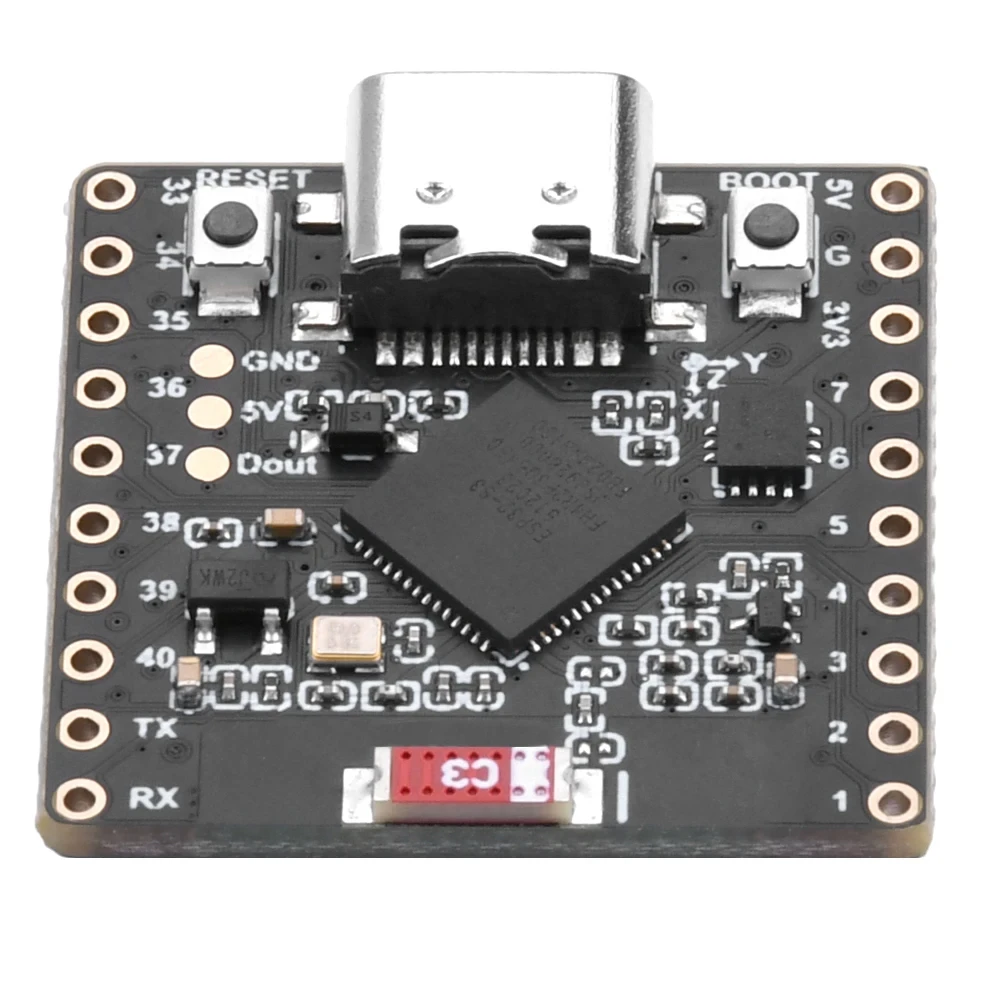
Een gaaf project om te maken voor de lol en voor praktische toepassingen met de ESP32-S3 RGB-matrixmodule. Links naar andere video's vind je onderaan dit artikel.
ESP32-S3 RGB LED-matrix internetklokproject - 4 willekeurige kleuren
ESP32-S3 internetklok met willekeurige RGB-kleuren
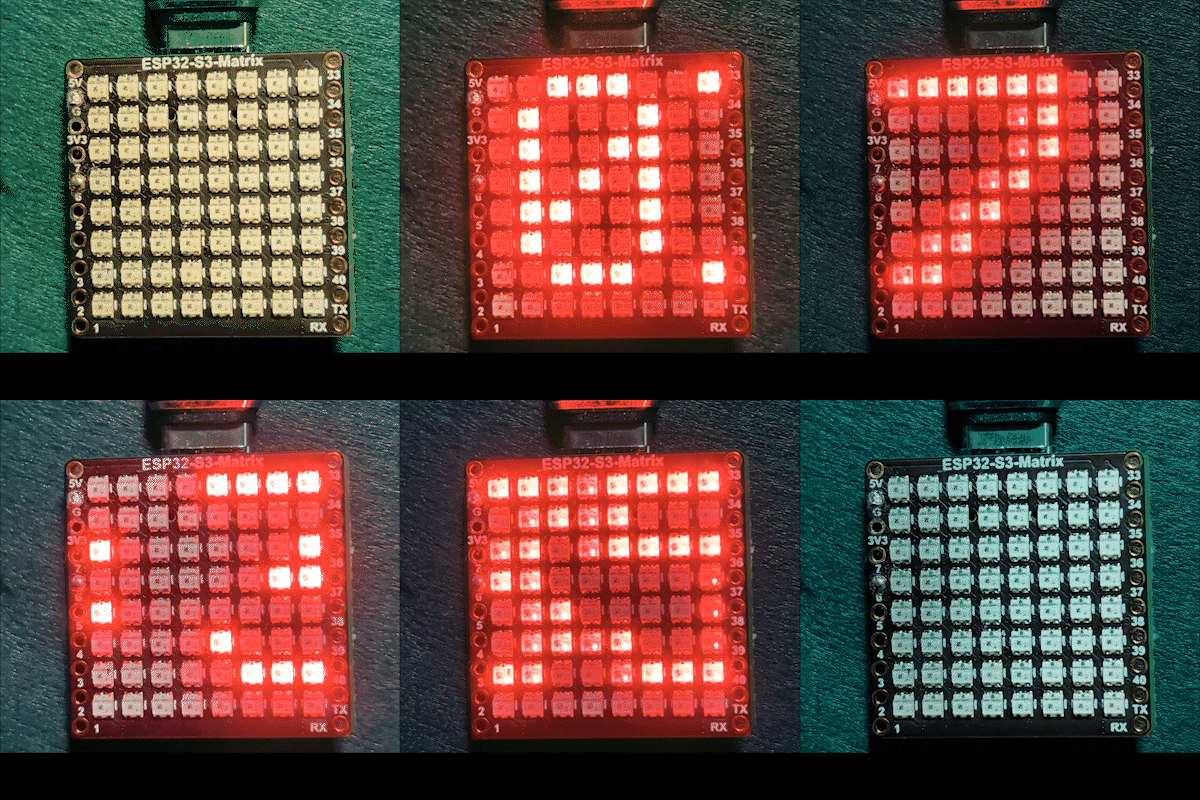
Dit project is een ESP32-S3 RGB-matrix internetklok die verbinding maakt met Wi-Fi, de lokale tijd synchroniseert vanaf een NTP-server en de tijd in HH:MM-formaat over de ingebouwde 8×8 RGB NeoMatrix laat scrollen. In deze versie worden de uren, dubbele punt en minuten elk weergegeven in willekeurige kleuren die bij elke volledige scrollcyclus worden gekozen, wat een dynamische en speelse klokweergave creëert die voortdurend verandert.

Hoe deze klok werkt
Na het voeden van het bord via USB-C maakt de ESP32-S3 verbinding met uw Wi-Fi-netwerk en haalt de huidige lokale tijd van internet op. De tijd wordt opgesplitst in drie delen—uren, dubbele punt en minuten—en elk deel wordt afzonderlijk op de RGB-matrix getekend. Wanneer de tekst volledig van het scherm is gescrold, worden er nieuwe willekeurige kleuren gekozen voor de volgende doorgang.
Gebruikte bibliotheken
Deze sketch gebruikt de volgende bibliotheken:
#include <WiFi.h>
#include "time.h"
#include <Adafruit_GFX.h>
#include <Adafruit_NeoMatrix.h>
#include <Adafruit_NeoPixel.h>
Installeer Adafruit NeoMatrix vanuit de Arduino Library Manager. Vereiste afhankelijkheden zoals Adafruit GFX Library en Adafruit NeoPixel worden automatisch geïnstalleerd.
Belangrijke gebruikersconfiguratie
Matrix-datapin (ingebouwde RGB-matrix)
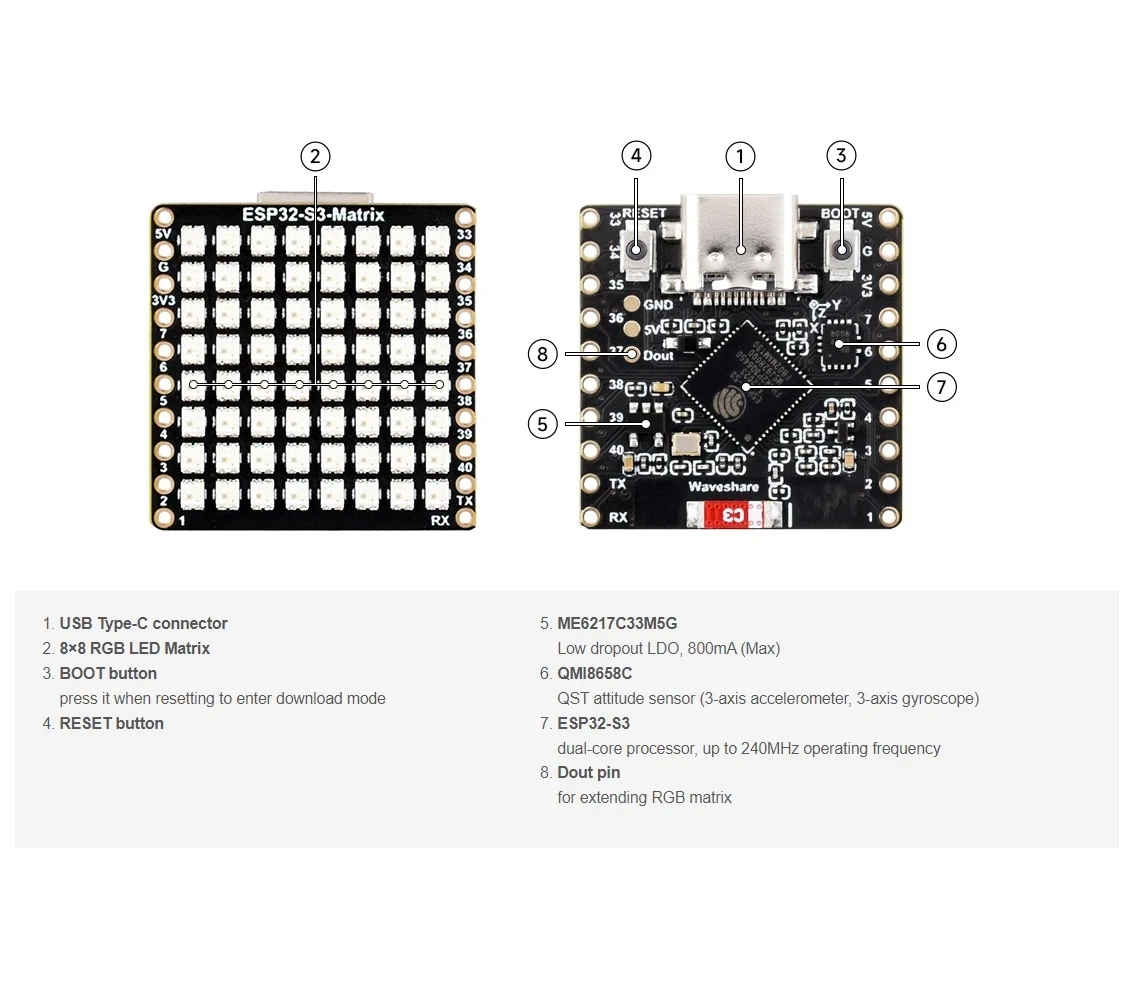
Hoewel de RGB-matrix op het bord is geïntegreerd, moet de datapin nog steeds in de code worden gedefinieerd:

#define MATRIX_PIN 14GPIO 14 wordt vaak gebruikt op ESP32-S3 RGB-matrixborden. Als uw bordvariant een andere pin gebruikt, werk deze waarde dan dienovereenkomstig bij.
Wi-Fi SSID en wachtwoord (hoofdlettergevoelig)
Vervang de Wi-Fi-referenties door de gegevens van uw eigen netwerk:
const char* WIFI_SSID     = "uw WiFi SSID";
const char* WIFI_PASSWORD = "passW0rd";
Belangrijk: Wi-Fi-SSID's zijn hoofdlettergevoelig. Een SSID met de naam "Book" is niet hetzelfde als "book". Als de hoofdletters niet exact overeenkomen, kan de ESP32-S3 geen verbinding maken.
NTP-server, tijdzone en zomertijd
Tijdsynchronisatie wordt gedaan met behulp van een internet-NTP-server:
const char* ntpServer = "pool.ntp.org";Lokale tijd wordt berekend met behulp van UTC- en zomertijd-offsets:
// Toronto-achtig: UTC-5, plus 1 uur zomertijd
const long  gmtOffset_sec     = -5 * 3600;
const int daylightOffset_sec = 3600;gmtOffset_sec: UTC-offset in seconden (pas aan voor uw locatie)daylightOffset_sec: Gebruik3600wanneer zomertijd actief is, of0anders
Deze instellingen worden toegepast met:
configTime(gmtOffset_sec, daylightOffset_sec, ntpServer);Automatische dag-/nachthelderheid
De klok past de helderheid automatisch aan op basis van het huidige uur:
const int DAY_BRIGHTNESS = 40;
const int NIGHT_BRIGHTNESS = 5;
const int NIGHT_START_HOUR = 22;
const int NIGHT_END_HOUR = 6;
Tussen 22:00 en 6:00 wordt het display gedimd om schittering in donkere omgevingen te verminderen. Tijdens daglichturen keert de matrix terug naar normale helderheid.
Willekeurig RGB-kleurgedrag
Een vooraf gedefinieerde lijst met RGB-kleuren wordt opgeslagen in een array, waarbij elke kleur wordt gedefinieerd met Rode, Groene en Blauwe waarden variërend van 0 tot 255:
uint8_t userColors[][3] = {
  {255, 0, 0},    // Rood
  {0, 255, 0},    // Groen
  {0, 0, 255},    // Blauw
  {255, 165, 0},  // Oranje
  {255, 0, 255},  // Magenta
  {0, 255, 255},  // Cyaan
  {255, 255, 0}   // Geel
};
Bij elke volledige scrollcyclus:
- De uurcijfers krijgen een willekeurige kleur toegewezen
- De dubbele punt ontvangt een andere willekeurige kleur
- De minuutcijfers ontvangen nog een andere willekeurige kleur
Dit produceert een voortdurend veranderende kleurencombinatie die de klok visueel interessant houdt. Om uw eigen aangepaste kleuren te maken, kunt u de RGB-kleurkiezer-tool gebruiken: RGB-kleurkiezer.
Tijdweergavelogica
De tijd wordt opgesplitst in drie componenten:
- Uren:
HH - Dubbele punt:
: - Minuten:
MM
Elk deel wordt afzonderlijk getekend zodat het zijn eigen kleur kan hebben, terwijl alle delen samen bewegen om een vloeiende scrollanimatie over het 8×8-display te vormen.
Willekeurige kleurgeneratie
Om kleurwillekeur te garanderen, zaait de sketch de willekeurige nummergenerator bij het opstarten met behulp van een niet-verbonden analoge pin:
randomSeed(analogRead(0));Dit zorgt ervoor dat kleurencombinaties bij elke inschakeling en elke scrollcyclus anders zijn.
Demonstratie
Na het uploaden van de sketch en het voeden van het bord via USB-C:
- De ESP32-S3 maakt verbinding met uw Wi-Fi-netwerk
- Tijd wordt gesynchroniseerd vanaf internet
- De tijd scrollt in
HH:MM-formaat - Uren, dubbele punt en minuten veranderen elke cyclus naar willekeurige kleuren
- Het display dimt automatisch 's nachts
Downloads en links
De volledige broncode wordt onder dit artikel verstrekt. Nuttige hulpmiddelen en referenties zijn onder dit artikel gelinkt.
Afbeeldingen
Deze tutorial maakt deel uit van: ESP32-S3 RGB LED-matrix
- ESP32-S3 RGB LED-matrixproject 1- Basispunt
- ESP32-S3 RGB LED-matrixproject 2 - Scrollende tekst
- ESP32-S3 RGB LED-matrixproject 3 - Tekst vanaf mobiele telefoon
- ESP32-S3 RGB LED-matrixproject 4 - Kantelpunt
- ESP32-S3 RGB LED-matrixproject 5 - Pijl altijd omhoog
- ESP32-S3 RGB LED-matrixproject 6 - Cible-spel
- ESP32-S3 RGB LED-matrix Wi-Fi + NTP-tijdklokproject -1 Basisklok
- ESP32-S3 RGB LED-matrix internetklokproject - 2 klokken multi-kleur tijd- en datumweergave
- ESP32-S3 RGB LED-matrix internetklokproject - 3 nachtkleuren met datum
- ESP32-S3 RGB LED-matrix internetklokproject - 5 Regenboogkleur
- ESP32-S3 RGB LED Matrix test for RGB, GRB setting
/*
 * =====================================================================================
 * ESP32-S3 INTERNET RGB CLOCK (8x8 Matrix) - Project 4- Random Color
 * =====================================================================================
 watch video https://youtube.com/shorts/4iWjLiD7fS8
 📚⬇️ Download and resource page https://robojax.com/RJT843
 * Author: Gemini (AI Thought Partner) & Ahmad Shamshiri (Robojax.com)
 * Date: 07 Jan 2026

 * * FEATURES:
 * 1. WiFi/NTP Time: Syncs automatically with internet time servers.
 * 2. Cycle-Based Color: Color changes ONLY after the time finishes a full scroll.
 * 3. Auto-Brightness: Dims the LEDs during night hours (User-configurable).
 * =====================================================================================
 */
/*
 * =====================================================================================
 * ESP32-S3 INTERNET CLOCK - MULTI-COLOR ELEMENTS
 * =====================================================================================
 * Each part of the time (HH : MM) gets a different random color from your list.
 * Colors only change once the full scroll cycle is finished.
 * =====================================================================================
 */

#include <WiFi.h>
#include "time.h"
#include <Adafruit_GFX.h>
#include <Adafruit_NeoMatrix.h>
#include <Adafruit_NeoPixel.h>

#define MATRIX_PIN 14

// --- CONFIGURATION ---
const int DAY_BRIGHTNESS = 40;
const int NIGHT_BRIGHTNESS = 5;
const int NIGHT_START_HOUR = 22;
const int NIGHT_END_HOUR = 6;

uint8_t userColors[][3] = {
  {255, 0, 0},    // Red
  {0, 255, 0},    // Green
  {0, 0, 255},    // Blue
  {255, 165, 0},  // Orange
  {255, 0, 255},  // Magenta
  {0, 255, 255},  // Cyan
  {255, 255, 0}   // Yellow
};
int totalColors = sizeof(userColors) / sizeof(userColors[0]);

// Variables to store the current random color indices
int hourColorIdx = 0;
int colonColorIdx = 1;
int minColorIdx = 2;

// --- GLOBALS ---
Adafruit_NeoMatrix matrix(8, 8, MATRIX_PIN,
  NEO_MATRIX_TOP    + NEO_MATRIX_LEFT +
  NEO_MATRIX_ROWS   + NEO_MATRIX_PROGRESSIVE,
  NEO_RGB           + NEO_KHZ800);

char hourText[3], minText[3];
int16_t scrollX = 8;
unsigned long lastScrollMs = 0;
const uint16_t scrollIntervalMs = 100;

// 👇 REPLACE these with your real home WiFi name & password
const char* WIFI_SSID     = "your WiFi SSID";
const char* WIFI_PASSWORD = "passW0rd";


// NTP (time) server
const char* ntpServer = "pool.ntp.org";

// Toronto-ish: UTC-5, plus 1 hour DST
const long  gmtOffset_sec     = -5 * 3600;  // -5 hours
const int   daylightOffset_sec = 3600;      // +1 hour for DST


void updateTimeParts() {
  struct tm timeinfo;
  if (!getLocalTime(&timeinfo)) return;

  snprintf(hourText, sizeof(hourText), "%02d", timeinfo.tm_hour);
  snprintf(minText, sizeof(minText), "%02d", timeinfo.tm_min);

  if (timeinfo.tm_hour >= NIGHT_START_HOUR || timeinfo.tm_hour < NIGHT_END_HOUR) {
    matrix.setBrightness(NIGHT_BRIGHTNESS);
  } else {
    matrix.setBrightness(DAY_BRIGHTNESS);
  }
}

void scrollTime() {
  matrix.fillScreen(0);

  int x = scrollX;

  // 1. Draw Hours
  matrix.setTextColor(matrix.Color(userColors[hourColorIdx][0], userColors[hourColorIdx][1], userColors[hourColorIdx][2]));
  matrix.setCursor(x, 0);
  matrix.print(hourText);
  x += 12; // Move 12 pixels (2 digits * 6px)

  // 2. Draw Colon
  matrix.setTextColor(matrix.Color(userColors[colonColorIdx][0], userColors[colonColorIdx][1], userColors[colonColorIdx][2]));
  matrix.setCursor(x, 0);
  matrix.print(":");
  x += 6; // Move 6 pixels

  // 3. Draw Minutes
  matrix.setTextColor(matrix.Color(userColors[minColorIdx][0], userColors[minColorIdx][1], userColors[minColorIdx][2]));
  matrix.setCursor(x, 0);
  matrix.print(minText);

  matrix.show();
  scrollX--;

  // Total width is roughly 30 pixels (HH=12, :=6, MM=12)
  if (scrollX < -30) {
    scrollX = matrix.width();

    // Pick NEW random colors for the next cycle
    hourColorIdx = random(0, totalColors);
    colonColorIdx = random(0, totalColors);
    minColorIdx = random(0, totalColors);
  }
}

void setup() {
  Serial.begin(115200);

  // Seed the random generator using an unconnected analog pin
  randomSeed(analogRead(0));

  WiFi.begin(WIFI_SSID, WIFI_PASSWORD);
  while (WiFi.status() != WL_CONNECTED) delay(500);

  // Configure time via NTP
  configTime(gmtOffset_sec, daylightOffset_sec, ntpServer);
  Serial.println("Waiting for time...");
  delay(2000); // small wait for initial sync

  matrix.begin();
  matrix.setTextWrap(false);
  matrix.setBrightness(DAY_BRIGHTNESS);
}

void loop() {
  if (millis() % 1000 == 0) updateTimeParts();

  if (millis() - lastScrollMs >= scrollIntervalMs) {
    lastScrollMs = millis();
    scrollTime();
  }
}
Hulpmiddelen en referenties
-
Video
-
Intern🎨 Color picker Toolrobojax.com
Bestanden📁
Fritzing-bestand
-
esp32-S3-supermini-tht fritzing part
esp32-S3-supermini-tht.fzpz0.02 MB