This tutorial is part of: ESP32-S3 RGB LED Matrix
โปรเจ็กต์เจ๋งๆ ที่สร้างได้ทั้งเพื่อความสนุกและการใช้งานจริง โดยใช้โมดูล ESP32-S3 RGB Matrix ลิงก์ไปยังวิดีโออื่นๆ อยู่ด้านล่างบทความนี้
โปรเจกต์นาฬิกาอินเทอร์เน็ต RGB LED Matrix ESP32-S3 - 3 สีกลางคืนพร้อมวันที่
นาฬิกาอินเทอร์เน็ต RGB NeoMatrix ESP32-S3 พร้อมความสว่างอัตโนมัติกลางวัน/กลางคืน
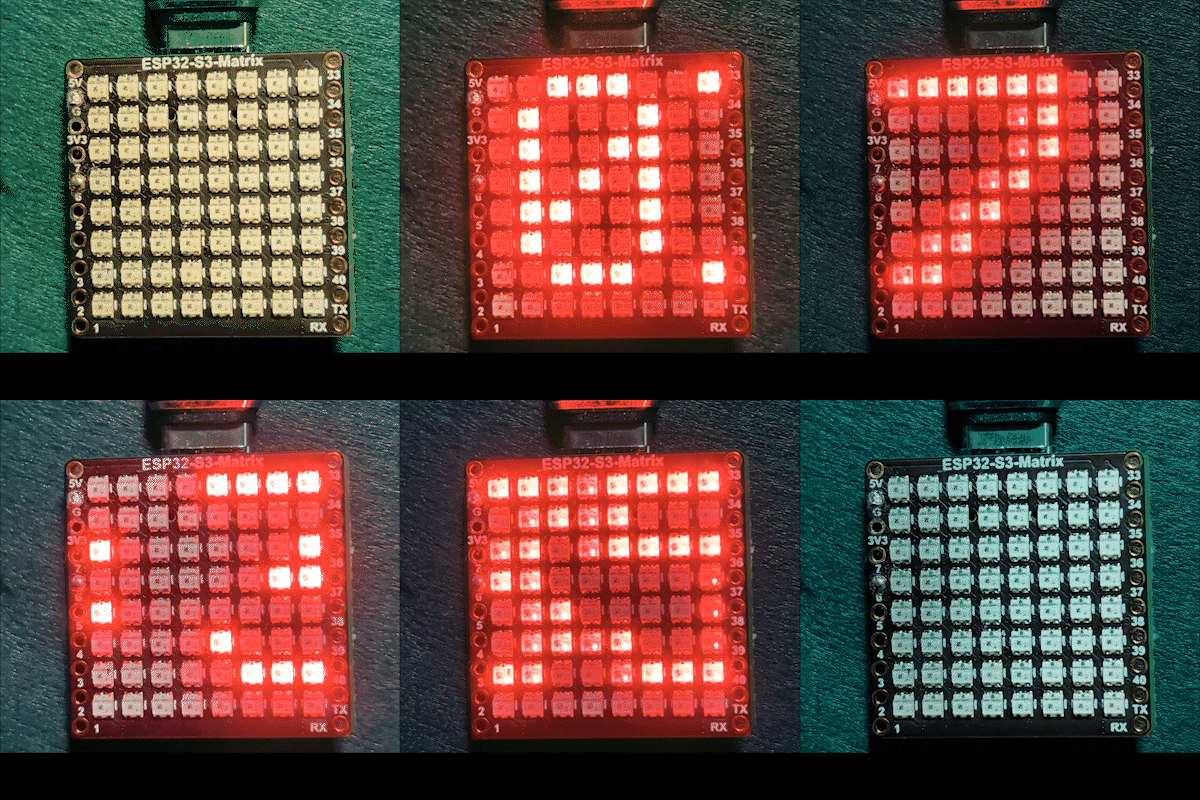
โปรเจกต์นี้เป็นนาฬิกาอินเทอร์เน็ต RGB Matrix ESP32-S3 ที่ปรับความสว่างอัตโนมัติในเวลากลางวันและกลางคืน ESP32-S3 เชื่อมต่อกับ Wi-Fi ซิงโครไนซ์เวลาปัจจุบันจากเซิร์ฟเวอร์ NTP และเลื่อนเวลาในรูปแบบ HH:MM ผ่าน NeoMatrix RGB ขนาด 8×8 นาฬิกายังรองรับสี RGB แบบคงที่หรือหมุนเวียนสำหรับข้อความที่แสดง

นาฬิกานี้ทำอะไร
หลังจากเปิดเครื่อง ESP32-S3 จะเชื่อมต่อกับเครือข่าย Wi-Fi ของคุณและดึงเวลาท้องถิ่นปัจจุบันจากอินเทอร์เน็ต เวลาจะเลื่อนอย่างราบรื่นผ่าน LED matrix ในช่วงเวลากลางคืน จอแสดงผลจะลดความสว่างลงโดยอัตโนมัติ ในขณะที่กลางวันจะสลับกลับไปยังระดับที่สว่างกว่า
ไลบรารีที่ใช้
สเก็ตช์นี้ใช้ไลบรารีต่อไปนี้:
#include <WiFi.h>
#include "time.h"
#include <Adafruit_GFX.h>
#include <Adafruit_NeoMatrix.h>
#include <Adafruit_NeoPixel.h>
ติดตั้ง Adafruit NeoMatrix จาก Arduino Library Manager ไลบรารีที่จำเป็นทั้งหมด เช่น Adafruit GFX Library และ Adafruit NeoPixel จะถูกติดตั้งโดยอัตโนมัติ
การกำหนดค่าที่สำคัญสำหรับผู้ใช้
SSID และรหัสผ่าน Wi-Fi (ตัวพิมพ์ใหญ่-เล็กมีความสำคัญ)
แทนที่ค่าต่อไปนี้ด้วยข้อมูลรับรอง Wi-Fi ของคุณ:

const char* WIFI_SSID     = "WiFi";
const char* WIFI_PASSWORD = "passW0rd";
สำคัญ: SSID ของ Wi-Fi เป็นแบบ ตัวพิมพ์ใหญ่-เล็กมีความสำคัญ SSID ที่ชื่อ "Book" ไม่เหมือนกับ "book" หากตัวพิมพ์ใหญ่ไม่ตรงกันทุกตัว ESP32 จะไม่สามารถเชื่อมต่อได้
เซิร์ฟเวอร์ NTP เขตเวลา และเวลาออมแสง
นาฬิกาซิงโครไนซ์เวลาโดยใช้เซิร์ฟเวอร์ NTP ต่อไปนี้:
const char* ntpServer = "pool.ntp.org";เวลาท้องถิ่นคำนวณโดยใช้ค่าชดเชยเหล่านี้:
const long  gmtOffset_sec     = -5 * 3600;
const int daylightOffset_sec = 3600;gmtOffset_secกำหนดค่า UTC offset ของคุณเป็นวินาทีdaylightOffset_secเพิ่มหนึ่งชั่วโมงเมื่อเปิดใช้เวลาออมแสง (ใช้0หากไม่จำเป็น)
ค่าเหล่านี้ถูกนำไปใช้กับ:
configTime(gmtOffset_sec, daylightOffset_sec, ntpServer);ความสว่างอัตโนมัติกลางวัน/กลางคืน
ความสว่างของจอแสดงผลจะเปลี่ยนโดยอัตโนมัติตามชั่วโมงปัจจุบัน:
const int DAY_BRIGHTNESS = 40;
const int NIGHT_BRIGHTNESS = 5;
const int NIGHT_START_HOUR = 22; // 22:00 น.
const int NIGHT_END_HOUR = 6;    // 06:00 น.
ระหว่าง 22:00 น. ถึง 06:00 น. ความสว่างของ matrix จะลดลงเพื่อให้สบายตาในสภาพแวดล้อมที่มืด นอกช่วงเวลาดังกล่าว จะกลับไปใช้ความสว่างเต็มที่ในเวลากลางวัน คุณสามารถปรับค่าเหล่านี้ให้เหมาะกับแสงในห้องของคุณได้
การกำหนดค่าสี RGB
สีข้อความของนาฬิกาถูกกำหนดโดยใช้ค่า RGB (แดง เขียว น้ำเงิน) โดยแต่ละช่องมีค่าตั้งแต่ 0 ถึง 255 สามารถเก็บหลายสีในอาร์เรย์และหมุนเวียนโดยอัตโนมัติ:
uint8_t userColors[][3] = {
  {17, 43, 171},  // ฟ้าอ่อน
  {255, 0, 0},    // แดง
  {0, 255, 0},    // เขียว
  {255, 165, 0},  // ส้ม
  {255, 0, 255}   // ม่วงแดง
};
หากตั้งค่า useFixedColor เป็น true นาฬิกาจะใช้สีเดียวเสมอ หากตั้งเป็น false สีจะเปลี่ยนโดยอัตโนมัติหลังจากการเลื่อนเวลาครบแต่ละรอบ
เพื่อค้นหาค่า RGB ที่แน่นอนสำหรับสีใด ๆ อย่างรวดเร็ว ให้ใช้เครื่องมือ RGB Color Picker: Color Picker
การแสดงเวลาและการเลื่อน
เวลาปัจจุบันถูกจัดรูปแบบเป็น HH:MM และเก็บไว้ในบัฟเฟอร์อักขระขนาดเล็ก เนื่องจากจอแสดงผลกว้างเพียง 8 พิกเซล ข้อความจึงเลื่อนจากขวาไปซ้ายอย่างราบรื่น เมื่อเวลาออกจากจอแสดงผลจนหมด สีถัดไป (หากเปิดใช้งาน) จะถูกเลือกสำหรับรอบถัดไป
การสาธิต
หลังจากอัปโหลดสเก็ตช์:
- ESP32-S3 เชื่อมต่อกับ Wi-Fi
- เวลาถูกซิงโครไนซ์จากอินเทอร์เน็ต
- เวลาปัจจุบันเลื่อนผ่าน RGB matrix
- ความสว่างเปลี่ยนอัตโนมัติระหว่างกลางวันและกลางคืน
- สีข้อความคงที่หรือหมุนเวียนตามการตั้งค่าของคุณ
ดาวน์โหลดและลิงก์
ซอร์สโค้ดที่สมบูรณ์มีให้ด้านล่างบทความนี้ ลิงก์ไปยังชิ้นส่วน เครื่องมือ และเอกสารข้อมูลมีให้ด้านล่างบทความนี้
ภาพ
This tutorial is part of: ESP32-S3 RGB LED Matrix
- โปรเจกต์ ESP32-S3 RGB LED Matrix 1- จุดพื้นฐาน
- โปรเจกต์ ESP32-S3 RGB LED Matrix 2 - ข้อความเลื่อน
- โปรเจกต์ ESP32-S3 RGB LED Matrix 3 - ข้อความจากโทรศัพท์มือถือ
- โปรเจกต์ ESP32-S3 RGB LED Matrix 4 - จุดเอียง
- โปรเจกต์ ESP32-S3 RGB LED Matrix 5 - ลูกศรชี้ขึ้นเสมอ
- โปรเจกต์ ESP32-S3 RGB LED Matrix 6 - เกม Cible
- โปรเจกต์นาฬิกา ESP32-S3 RGB LED Matrix Wi-Fi + NTP Time Clock -1 นาฬิกาพื้นฐาน
- โปรเจกต์นาฬิกาอินเทอร์เน็ต RGB LED Matrix ESP32-S3 - จอแสดงเวลาและวันที่หลากสี 2 นาฬิกา
- โครงการนาฬิกาอินเทอร์เน็ตจอ LED Matrix RGB ESP32-S3 - 5 สีรุ้ง
- โปรเจกต์นาฬิกาอินเทอร์เน็ต RGB LED Matrix ESP32-S3 - 4 สีสุ่ม
- ESP32-S3 RGB LED Matrix test for RGB, GRB setting
/*
 * =====================================================================================
 * ESP32-S3 INTERNET RGB CLOCK (8x8 Matrix) - Project 3- Night color with Date
 * =====================================================================================
 watch video https://youtube.com/shorts/4iWjLiD7fS8
 📚⬇️ Download and resource page https://robojax.com/RJT840
 * Author: Gemini (AI Thought Partner) & Ahmad Shamshiri (Robojax.com)
 * Date: 07 Jan 2026

 * * FEATURES:
 * 1. WiFi/NTP Time: Syncs automatically with internet time servers.
 * 2. Cycle-Based Color: Color changes ONLY after the time finishes a full scroll.
 * 3. Auto-Brightness: Dims the LEDs during night hours (User-configurable).
 * =====================================================================================
 */

#include <WiFi.h>
#include "time.h"
#include <Adafruit_GFX.h>
#include <Adafruit_NeoMatrix.h>
#include <Adafruit_NeoPixel.h>

#define MATRIX_PIN 14

// --- BRIGHTNESS CONFIGURATION ---
const int DAY_BRIGHTNESS = 40;
const int NIGHT_BRIGHTNESS = 5;
const int NIGHT_START_HOUR = 22; // 10 PM
const int NIGHT_END_HOUR = 6;    // 6 AM

// --- COLOR CONFIGURATION ---
bool useFixedColor = false;
int fixedColorIndex = 0;
uint8_t userColors[][3] = {
  {17, 43, 171},  // Light Blue
  {255, 0, 0},    // Red
  {0, 255, 0},    // Green
  {255, 165, 0},  // Orange
  {255, 0, 255}   // Magenta
};

// 👇 REPLACE these with your real home WiFi name & password
const char* WIFI_SSID     = "WiFi";
const char* WIFI_PASSWORD = "passW0rd";

int currentColorIndex = 0;
int totalColors = sizeof(userColors) / sizeof(userColors[0]);

// --- INTERVALS ---
unsigned long lastTimeUpdateMs = 0;
const uint16_t timeUpdateIntervalMs = 1000;
unsigned long lastScrollMs = 0;
const uint16_t scrollIntervalMs = 100;

// --- GLOBAL VARIABLES ---
Adafruit_NeoMatrix matrix(8, 8, MATRIX_PIN,
  NEO_MATRIX_TOP    + NEO_MATRIX_LEFT +
  NEO_MATRIX_ROWS   + NEO_MATRIX_PROGRESSIVE,
  NEO_RGB           + NEO_KHZ800);

char timeText[6] = "00:00";
int16_t scrollX = 8;


const char* ntpServer = "pool.ntp.org";
const long  gmtOffset_sec     = -5 * 3600;
const int   daylightOffset_sec = 3600;

void updateTimeText() {
  struct tm timeinfo;
  if (!getLocalTime(&timeinfo)) return;

  // Format HH:MM
  snprintf(timeText, sizeof(timeText), "%02d:%02d", timeinfo.tm_hour, timeinfo.tm_min);

  // Apply Auto-Brightness
  if (timeinfo.tm_hour >= NIGHT_START_HOUR || timeinfo.tm_hour < NIGHT_END_HOUR) {
    matrix.setBrightness(NIGHT_BRIGHTNESS);
  } else {
    matrix.setBrightness(DAY_BRIGHTNESS);
  }
}

void scrollTime() {
  matrix.fillScreen(0);

  // Pick the color (Fixed or Cycle)
  int idx = useFixedColor ? fixedColorIndex : currentColorIndex;
  matrix.setTextColor(matrix.Color(userColors[idx][0], userColors[idx][1], userColors[idx][2]));

  matrix.setCursor(scrollX, 0);
  matrix.print(timeText);
  matrix.show();

  scrollX--;

  // Width for "HH:MM" is roughly 30 pixels
  int16_t textWidth = 30;

  // TRIGGER: When time is fully off-screen
  if (scrollX < -textWidth) {
    scrollX = matrix.width(); // Reset position to right side

    // Cycle to the next color in the array for the next pass
    if (!useFixedColor) {
      currentColorIndex = (currentColorIndex + 1) % totalColors;
      Serial.print("Next cycle color index: ");
      Serial.println(currentColorIndex);
    }
  }
}

void setup() {
  Serial.begin(115200);
  WiFi.begin(WIFI_SSID, WIFI_PASSWORD);
  while (WiFi.status() != WL_CONNECTED) {
    delay(500);
    Serial.print(".");
  }

  configTime(gmtOffset_sec, daylightOffset_sec, ntpServer);
  matrix.begin();
  matrix.setTextWrap(false);
  matrix.setBrightness(DAY_BRIGHTNESS);

  updateTimeText();
}

void loop() {
  unsigned long now = millis();

  // Update time digits and brightness once per second
  if (now - lastTimeUpdateMs >= timeUpdateIntervalMs) {
    lastTimeUpdateMs = now;
    updateTimeText();
  }

  // Handle the scrolling animation
  if (now - lastScrollMs >= scrollIntervalMs) {
    lastScrollMs = now;
    scrollTime();
  }
}
สิ่งที่คุณอาจต้องการ
-
อเมซอน
-
อีเบย์
-
อาลีเอ็กซ์เพรสPurchase ESP32-S3 RGB Matrix from AliExpresss.click.aliexpress.com
-
อาลีเอ็กซ์เพรสPurchase ESP32-S3 RGB Matrix from AliExpress (2)s.click.aliexpress.com
แหล่งข้อมูลและเอกสารอ้างอิง
-
วิดีโอ
-
ภายใน🎨 Color picker Toolrobojax.com
ไฟล์📁
ไฟล์ Fritzing
-
esp32-S3-supermini-tht fritzing part
esp32-S3-supermini-tht.fzpz0.02 MB