This tutorial is part of: ESP32-S3 Matrice ya LED RGB
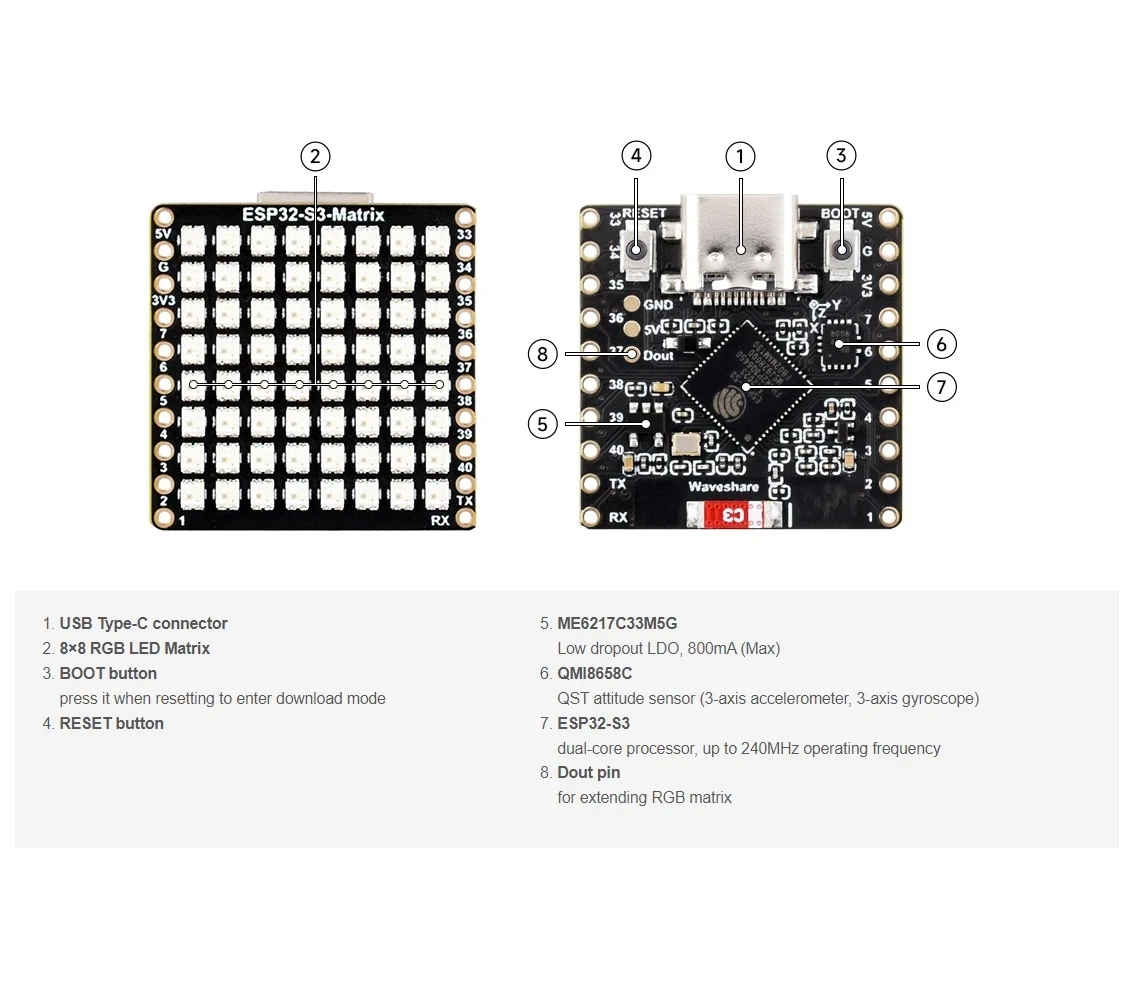
Projet cool pona ko créer pona ba applications ya esengo pe ya pratique en utilisant module ESP32-S3 RGB Matrix. Ba liens ya ba vidéos misusu ezali na se ya article oyo.
Projet ya Saa ya Intanɛti ya ESP32-S3 RGB LED Matrix - 3 Langi ya Butú elongo na Mokolo
Monganga ya Ntango ya Internet ya RGB NeoMatrix ya ESP32-S3 na Bongwana ya Pole na Butu
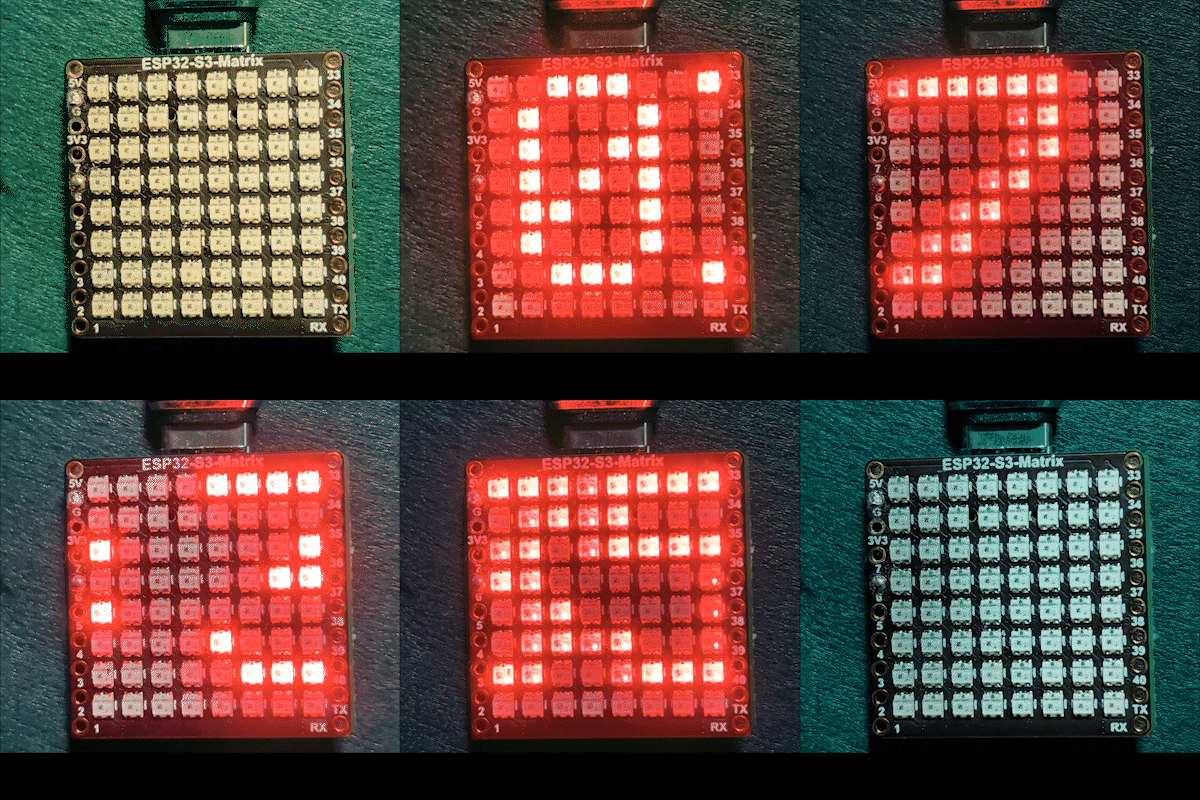
Projɛ oyo ezali motambo ya ESP32-S3 ya RGB Matrix ya Internet oyo ebongolaka pole na butu na ndenge ya auto. ESP32-S3 ekɔtaka na Wi-Fi, esangisaka ntango ya sik’oyo longwa na serveur ya NTP, mpe epalanganaka ntango na format ya HH:MM na 8×8 RGB NeoMatrix. Monganga yango esungaka mpe na ba couleurs ya RGB oyo esalelamaka na texte ya affichage, ezala ya kosala yango moko to ya kobongwana.

Nini monganga oyo esalaka
Sima ya kofungola, ESP32-S3 ekɔtaka na réseau ya Wi-Fi na yo mpe ezongisaka ntango ya local ya sik’oyo longwa na internet. Ntango yango epalanganaka na ndenge ya pete na matrice ya LED. Na ntango ya butu, affichage ekitisaka pole na ndenge ya automatique, kasi na ntango ya moyi, ezongaka na niveau ya pole ya makasi.
Ba bibliothèque oyo esalelamaka
Sketch oyo esalelaka ba bibliothèque oyo:
#include <WiFi.h>
#include "time.h"
#include <Adafruit_GFX.h>
#include <Adafruit_NeoMatrix.h>
#include <Adafruit_NeoPixel.h>
Kotiya Adafruit NeoMatrix longwa na Arduino Library Manager. Ba dépendances nyonso oyo esengeli lokola Adafruit GFX Library mpe Adafruit NeoPixel ekotiama automatiquement.
Configuration ya utilisateur oyo ezali important
SSID mpe mot de passe ya Wi-Fi (ezali na ba lettres ya minɛkɛ mpe minɛkɛ)
Bongola ba valeurs oyo na ba informations ya Wi-Fi na yo moko:

const char* WIFI_SSID     = "WiFi";
const char* WIFI_PASSWORD = "passW0rd";
Important: Ba SSID ya Wi-Fi ezali na ba lettres ya minɛkɛ mpe minɛkɛ. SSID oyo ebengami "Book" ezali te ndenge moko na "book". Soki ba lettres ya minɛkɛ mpe minɛkɛ ezali ndenge moko te, ESP32 ekokoka te kokɔta.
Serveur ya NTP, zone ya ntango, mpe bongwana ya ntango ya moyi
Monganga yango esangisaka ntango na kotalela serveur ya NTP oyo:
const char* ntpServer = "pool.ntp.org";Ntango ya local ekomputamaka na ba offsets oyo:
const long  gmtOffset_sec     = -5 * 3600;
const int daylightOffset_sec = 3600;gmtOffset_secefinaka offset ya UTC na yo na secondesdaylightOffset_secebakisaka heure moko ntango bongwana ya ntango ya moyi ezali actif (salela0soki esengeli te)
Ba valeurs oyo esalelamaka na:
configTime(gmtOffset_sec, daylightOffset_sec, ntpServer);Pole ya automatique ya moyi / butu
Pole ya affichage ebongolamaka automatiquement kolandela heure ya sik’oyo:
const int DAY_BRIGHTNESS = 40;
const int NIGHT_BRIGHTNESS = 5;
const int NIGHT_START_HOUR = 22; // 10 PM
const int NIGHT_END_HOUR = 6;    // 6 AM
Na kati ya 10 PM mpe 6 AM, pole ya matrice ekitisamaka mpo na kozala na esika ya malamu na butu. Na libanda ya ba heures wana, pole ya moyi ezongisamaka. Okoki kobongola ba valeurs oyo mpo na koyokana na pole ya chambre na yo.
Configuration ya couleur ya RGB
Couleur ya texte ya monganga efinamaka na ba valeurs ya RGB (Rouge, Vert, Bleu), epai chaque canal ezali kati na 0 mpe 255. Ba couleurs ebele ekoki kobombama na tableau mpe kobongwana automatiquement:
uint8_t userColors[][3] = {
  {17, 43, 171},  // Bleu clair
  {255, 0, 0},    // Rouge
  {0, 255, 0},    // Vert
  {255, 165, 0},  // Orange
  {255, 0, 255}   // Magenta
};
Soki useFixedColor ezali na true, monganga yango esalelaka kaka couleur moko. Soki ezali na false, couleur ebongolamaka automatiquement sima ya chaque palanganisi ya ntango.
Mpo na kozwa ba valeurs ya RGB ya couleur nyonso na ndenge ya mbangu, salela outil ya Color Picker: Color Picker .
Affichage ya ntango mpe palanganisi
Ntango ya sik’oyo eformatamaka lokola HH:MM mpe ebombamaka na buffer ya caractères moke. Lokola affichage ezali na largeur ya pixels 8 kaka, texte epalanganaka na ndenge ya pete longwa na droite tii na gauche. Ntango ntango esili kolongwa na affichage, couleur oyo elandaka (soki ezali activé) eponamaka mpo na palanganisi oyo elandaka.
Démonstration
Sima ya kotia sketch:
- ESP32-S3 ekɔtaka na Wi-Fi
- Ntango esangisamaka longwa na internet
- Ntango ya sik’oyo epalanganaka na matrice ya RGB
- Pole ebongolamaka automatiquement kati na moyi mpe butu
- Couleur ya texte etikalaka ndenge moko to ebongolamaka kolandela ba paramètres na yo
Ba téléchargements mpe ba liens
Code source ya mobimba ezwami na nse ya article oyo. Ba liens ya ba pièces, ba outils, mpe ba datasheets ezwami na nse ya article oyo.
Images
This tutorial is part of: ESP32-S3 Matrice ya LED RGB
- Projet ESP32-S3 Matrice LED RVB 1- Point de base
- Projet ESP32-S3 Matrice LED RVB 2 - Texte défilant
- Mokano ya ESP32-S3 RGB LED Matrix Projɛ́ 3 - Mokanda na phone ya mbɔ́kɔ
- ESP32-S3 RGB LED Matrix Project 4 - Tilt dot
- Projet ESP32-S3 Matrice LED RVB 5 - Flèche toujours vers le haut
- Projet ESP32-S3 Matrice LED RVB 6 - Jeu Cible
- Mokano ya ESP32-S3 RGB LED Matrix Wi-Fi + NTP Time Clock -1 Saa ya Liboso
- Projet Horloge Internet à Matrice LED RGB ESP32-S3 - Affichage de l'Heure et de la Date en 2 Horloges Multicolores
- Projet ya Monganga ya Internet ya ESP32-S3 RGB LED Matrix - 5 Loni ya Rainbow
- Mosala ya ESP32-S3 RGB LED Matrix Internet Clock - Loni ya balabala ya 4
- ESP32-S3 RGB LED Matrix test for RGB, GRB setting
/*
 * =====================================================================================
 * ESP32-S3 INTERNET RGB CLOCK (8x8 Matrix) - Project 3- Night color with Date
 * =====================================================================================
 watch video https://youtube.com/shorts/4iWjLiD7fS8
 📚⬇️ Download and resource page https://robojax.com/RJT840
 * Author: Gemini (AI Thought Partner) & Ahmad Shamshiri (Robojax.com)
 * Date: 07 Jan 2026

 * * FEATURES:
 * 1. WiFi/NTP Time: Syncs automatically with internet time servers.
 * 2. Cycle-Based Color: Color changes ONLY after the time finishes a full scroll.
 * 3. Auto-Brightness: Dims the LEDs during night hours (User-configurable).
 * =====================================================================================
 */

#include <WiFi.h>
#include "time.h"
#include <Adafruit_GFX.h>
#include <Adafruit_NeoMatrix.h>
#include <Adafruit_NeoPixel.h>

#define MATRIX_PIN 14

// --- BRIGHTNESS CONFIGURATION ---
const int DAY_BRIGHTNESS = 40;
const int NIGHT_BRIGHTNESS = 5;
const int NIGHT_START_HOUR = 22; // 10 PM
const int NIGHT_END_HOUR = 6;    // 6 AM

// --- COLOR CONFIGURATION ---
bool useFixedColor = false;
int fixedColorIndex = 0;
uint8_t userColors[][3] = {
  {17, 43, 171},  // Light Blue
  {255, 0, 0},    // Red
  {0, 255, 0},    // Green
  {255, 165, 0},  // Orange
  {255, 0, 255}   // Magenta
};

// 👇 REPLACE these with your real home WiFi name & password
const char* WIFI_SSID     = "WiFi";
const char* WIFI_PASSWORD = "passW0rd";

int currentColorIndex = 0;
int totalColors = sizeof(userColors) / sizeof(userColors[0]);

// --- INTERVALS ---
unsigned long lastTimeUpdateMs = 0;
const uint16_t timeUpdateIntervalMs = 1000;
unsigned long lastScrollMs = 0;
const uint16_t scrollIntervalMs = 100;

// --- GLOBAL VARIABLES ---
Adafruit_NeoMatrix matrix(8, 8, MATRIX_PIN,
  NEO_MATRIX_TOP    + NEO_MATRIX_LEFT +
  NEO_MATRIX_ROWS   + NEO_MATRIX_PROGRESSIVE,
  NEO_RGB           + NEO_KHZ800);

char timeText[6] = "00:00";
int16_t scrollX = 8;


const char* ntpServer = "pool.ntp.org";
const long  gmtOffset_sec     = -5 * 3600;
const int   daylightOffset_sec = 3600;

void updateTimeText() {
  struct tm timeinfo;
  if (!getLocalTime(&timeinfo)) return;

  // Format HH:MM
  snprintf(timeText, sizeof(timeText), "%02d:%02d", timeinfo.tm_hour, timeinfo.tm_min);

  // Apply Auto-Brightness
  if (timeinfo.tm_hour >= NIGHT_START_HOUR || timeinfo.tm_hour < NIGHT_END_HOUR) {
    matrix.setBrightness(NIGHT_BRIGHTNESS);
  } else {
    matrix.setBrightness(DAY_BRIGHTNESS);
  }
}

void scrollTime() {
  matrix.fillScreen(0);

  // Pick the color (Fixed or Cycle)
  int idx = useFixedColor ? fixedColorIndex : currentColorIndex;
  matrix.setTextColor(matrix.Color(userColors[idx][0], userColors[idx][1], userColors[idx][2]));

  matrix.setCursor(scrollX, 0);
  matrix.print(timeText);
  matrix.show();

  scrollX--;

  // Width for "HH:MM" is roughly 30 pixels
  int16_t textWidth = 30;

  // TRIGGER: When time is fully off-screen
  if (scrollX < -textWidth) {
    scrollX = matrix.width(); // Reset position to right side

    // Cycle to the next color in the array for the next pass
    if (!useFixedColor) {
      currentColorIndex = (currentColorIndex + 1) % totalColors;
      Serial.print("Next cycle color index: ");
      Serial.println(currentColorIndex);
    }
  }
}

void setup() {
  Serial.begin(115200);
  WiFi.begin(WIFI_SSID, WIFI_PASSWORD);
  while (WiFi.status() != WL_CONNECTED) {
    delay(500);
    Serial.print(".");
  }

  configTime(gmtOffset_sec, daylightOffset_sec, ntpServer);
  matrix.begin();
  matrix.setTextWrap(false);
  matrix.setBrightness(DAY_BRIGHTNESS);

  updateTimeText();
}

void loop() {
  unsigned long now = millis();

  // Update time digits and brightness once per second
  if (now - lastTimeUpdateMs >= timeUpdateIntervalMs) {
    lastTimeUpdateMs = now;
    updateTimeText();
  }

  // Handle the scrolling animation
  if (now - lastScrollMs >= scrollIntervalMs) {
    lastScrollMs = now;
    scrollTime();
  }
}
Nko o na nki.
-
Amazon
-
eBay
-
AliExpressPurchase ESP32-S3 RGB Matrix from AliExpresss.click.aliexpress.com
-
AliExpressPurchase ESP32-S3 RGB Matrix from AliExpress (2)s.click.aliexpress.com
Mokili na bisika
-
Vidéo
-
Interno🎨 Color picker Toolrobojax.com
Fichiers📁
Fritzing File
-
esp32-S3-supermini-tht fritzing part
esp32-S3-supermini-tht.fzpz0.02 MB