이 튜토리얼은 다음의 일부입니다: ESP32-S3 RGB LED 매트릭스
ESP32-S3 RGB 매트릭스 모듈을 활용한 재미있고 실용적인 프로젝트를 만들어 보세요. 다른 영상 링크는 이 글 아래에 있습니다.
ESP32-S3 RGB LED 매트릭스 인터넷 시계 프로젝트 - 날짜 포함 3가지 야간 색상
ESP32-S3 RGB NeoMatrix 인터넷 시계 (주/야간 자동 밝기 조절)
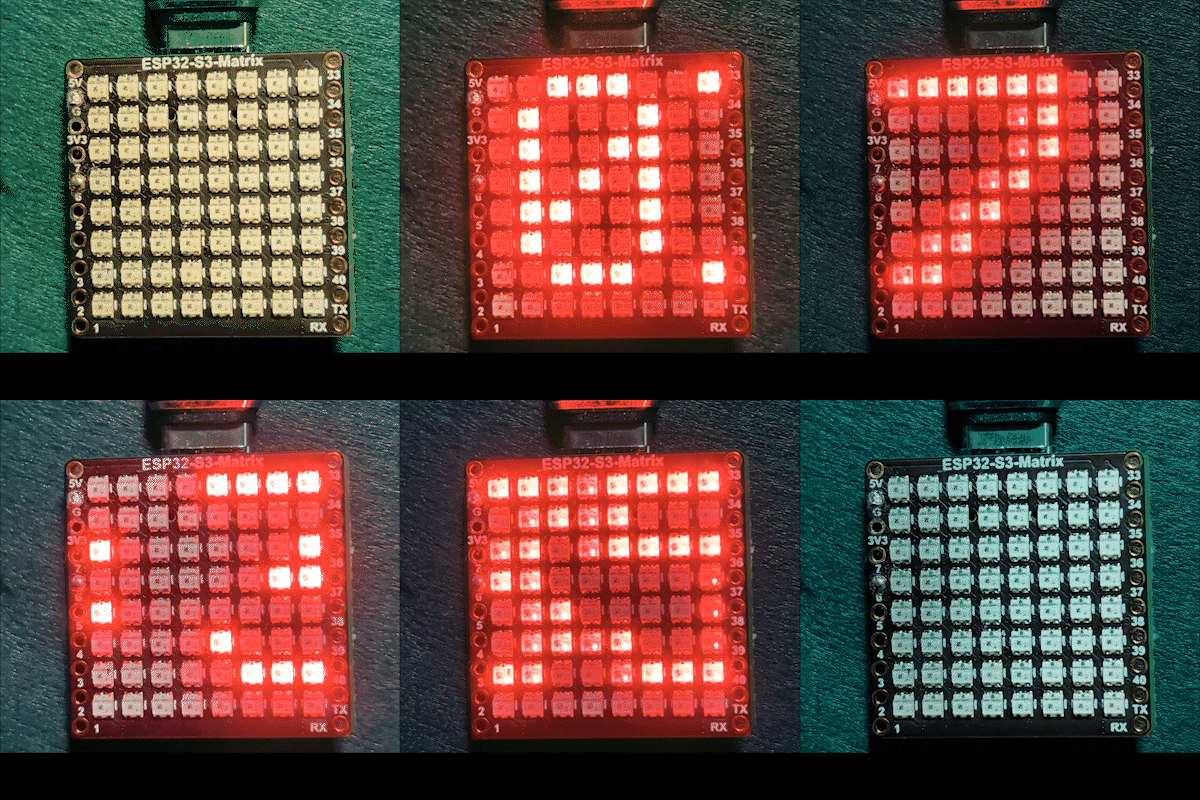
이 프로젝트는 주간과 야간에 밝기를 자동으로 조절하는 ESP32-S3 RGB 매트릭스 인터넷 시계입니다. ESP32-S3는 Wi-Fi에 연결되고, NTP 서버에서 현재 시간을 동기화하며, 8×8 RGB NeoMatrix에 HH:MM 형식으로 시간을 스크롤합니다. 이 시계는 표시 텍스트에 고정 또는 순환 RGB 색상도 지원합니다.

이 시계가 하는 일
전원을 켠 후 ESP32-S3는 Wi-Fi 네트워크에 연결되고 인터넷에서 현재 현지 시간을 가져옵니다. 시간은 LED 매트릭스에서 부드럽게 스크롤됩니다. 야간 시간에는 디스플레이가 자동으로 더 낮은 밝기로 어두워지고, 주간에는 더 밝은 수준으로 다시 전환됩니다.
사용된 라이브러리
이 스케치는 다음 라이브러리를 사용합니다:
#include <WiFi.h>
#include "time.h"
#include <Adafruit_GFX.h>
#include <Adafruit_NeoMatrix.h>
#include <Adafruit_NeoPixel.h>
Arduino 라이브러리 관리자에서 Adafruit NeoMatrix를 설치하세요. Adafruit GFX Library 및 Adafruit NeoPixel과 같은 모든 필수 종속성은 자동으로 설치됩니다.
중요한 사용자 설정
Wi-Fi SSID 및 비밀번호 (대소문자 구분)
다음 값을 자신의 Wi-Fi 자격 증명으로 교체하세요:

const char* WIFI_SSID     = "WiFi";
const char* WIFI_PASSWORD = "passW0rd";
중요: Wi-Fi SSID는 대소문자를 구분합니다. "Book"이라는 SSID는 "book"과 동일하지 않습니다. 대문자/소문자가 정확히 일치하지 않으면 ESP32는 연결에 실패합니다.
NTP 서버, 시간대 및 일광 절약 시간
시계는 다음 NTP 서버를 사용하여 시간을 동기화합니다:
const char* ntpServer = "pool.ntp.org";현지 시간은 다음 오프셋을 사용하여 계산됩니다:
const long  gmtOffset_sec     = -5 * 3600;
const int daylightOffset_sec = 3600;gmtOffset_sec은 UTC 오프셋을 초 단위로 정의합니다daylightOffset_sec은 일광 절약 시간이 적용될 때 1시간을 추가합니다 (필요 없으면0사용)
이 값들은 다음으로 적용됩니다:
configTime(gmtOffset_sec, daylightOffset_sec, ntpServer);주간/야간 자동 밝기
디스플레이 밝기는 현재 시간에 따라 자동으로 변경됩니다:
const int DAY_BRIGHTNESS = 40;
const int NIGHT_BRIGHTNESS = 5;
const int NIGHT_START_HOUR = 22; // 오후 10시
const int NIGHT_END_HOUR = 6;    // 오전 6시
오후 10시부터 오전 6시 사이에는 어두운 환경에서 편안하게 보이도록 매트릭스 밝기가 줄어듭니다. 해당 시간 외에는 주간 밝기로 복원됩니다. 방 조명에 맞게 이 값을 조정할 수 있습니다.
RGB 색상 설정
시계 텍스트 색상은 RGB(빨강, 초록, 파랑) 값으로 정의되며, 각 채널은 0~255 범위입니다. 여러 색상을 배열에 저장하고 자동으로 순환할 수 있습니다:
uint8_t userColors[][3] = {
  {17, 43, 171},  // 연한 파랑
  {255, 0, 0},    // 빨강
  {0, 255, 0},    // 초록
  {255, 165, 0},  // 주황
  {255, 0, 255}   // 자홍
};useFixedColor가 true로 설정되면 시계는 항상 하나의 색상을 사용합니다. false로 설정하면 시간이 한 번 완전히 스크롤된 후 색상이 자동으로 변경됩니다.
모든 색상의 정확한 RGB 값을 빠르게 찾으려면 RGB 색상 선택 도구를 사용하세요: 색상 선택기 .
시간 표시 및 스크롤
현재 시간은 HH:MM 형식으로 지정되어 작은 문자 버퍼에 저장됩니다. 디스플레이가 8픽셀 너비에 불과하므로 텍스트는 오른쪽에서 왼쪽으로 부드럽게 스크롤됩니다. 시간이 디스플레이에서 완전히 사라지면 다음 색상(활성화된 경우)이 다음 패스에 선택됩니다.
데모
스케치 업로드 후:
- ESP32-S3가 Wi-Fi에 연결됩니다
- 시간이 인터넷에서 동기화됩니다
- 현재 시간이 RGB 매트릭스에 스크롤됩니다
- 밝기가 주간과 야간 사이에서 자동으로 변경됩니다
- 텍스트 색상이 설정에 따라 고정되거나 순환됩니다
다운로드 및 링크
전체 소스 코드는 이 문서 아래에 제공됩니다. 부품, 도구 및 데이터시트 링크는 이 문서 아래에서 확인할 수 있습니다.
이미지
이 튜토리얼은 다음의 일부입니다: ESP32-S3 RGB LED 매트릭스
- ESP32-S3 RGB LED 매트릭스 프로젝트 1- 기본 점
- ESP32-S3 RGB LED 매트릭스 프로젝트 2 - 스크롤 텍스트
- ESP32-S3 RGB LED 매트릭스 프로젝트 3 - 휴대폰에서 텍스트 보내기
- ESP32-S3 RGB LED 매트릭스 프로젝트 4 - 기울기 점
- ESP32-S3 RGB LED 매트릭스 프로젝트 5 - 화살표는 항상 위로
- ESP32-S3 RGB LED 매트릭스 프로젝트 6 - 사격 게임
- ESP32-S3 RGB LED 매트릭스 Wi-Fi + NTP 시간 시계 프로젝트 -1 기본 시계
- ESP32-S3 RGB LED 매트릭스 인터넷 시계 프로젝트 - 2개의 시계 멀티 컬러 시간 및 날짜 표시
- ESP32-S3 RGB LED 매트릭스 인터넷 시계 프로젝트 - 5 무지개 색상
- ESP32-S3 RGB LED 매트릭스 인터넷 시계 프로젝트 - 4가지 랜덤 색상
- ESP32-S3 RGB LED Matrix test for RGB, GRB setting
/*
 * =====================================================================================
 * ESP32-S3 INTERNET RGB CLOCK (8x8 Matrix) - Project 3- Night color with Date
 * =====================================================================================
 watch video https://youtube.com/shorts/4iWjLiD7fS8
 📚⬇️ Download and resource page https://robojax.com/RJT840
 * Author: Gemini (AI Thought Partner) & Ahmad Shamshiri (Robojax.com)
 * Date: 07 Jan 2026

 * * FEATURES:
 * 1. WiFi/NTP Time: Syncs automatically with internet time servers.
 * 2. Cycle-Based Color: Color changes ONLY after the time finishes a full scroll.
 * 3. Auto-Brightness: Dims the LEDs during night hours (User-configurable).
 * =====================================================================================
 */

#include <WiFi.h>
#include "time.h"
#include <Adafruit_GFX.h>
#include <Adafruit_NeoMatrix.h>
#include <Adafruit_NeoPixel.h>

#define MATRIX_PIN 14

// --- BRIGHTNESS CONFIGURATION ---
const int DAY_BRIGHTNESS = 40;
const int NIGHT_BRIGHTNESS = 5;
const int NIGHT_START_HOUR = 22; // 10 PM
const int NIGHT_END_HOUR = 6;    // 6 AM

// --- COLOR CONFIGURATION ---
bool useFixedColor = false;
int fixedColorIndex = 0;
uint8_t userColors[][3] = {
  {17, 43, 171},  // Light Blue
  {255, 0, 0},    // Red
  {0, 255, 0},    // Green
  {255, 165, 0},  // Orange
  {255, 0, 255}   // Magenta
};

// 👇 REPLACE these with your real home WiFi name & password
const char* WIFI_SSID     = "WiFi";
const char* WIFI_PASSWORD = "passW0rd";

int currentColorIndex = 0;
int totalColors = sizeof(userColors) / sizeof(userColors[0]);

// --- INTERVALS ---
unsigned long lastTimeUpdateMs = 0;
const uint16_t timeUpdateIntervalMs = 1000;
unsigned long lastScrollMs = 0;
const uint16_t scrollIntervalMs = 100;

// --- GLOBAL VARIABLES ---
Adafruit_NeoMatrix matrix(8, 8, MATRIX_PIN,
  NEO_MATRIX_TOP    + NEO_MATRIX_LEFT +
  NEO_MATRIX_ROWS   + NEO_MATRIX_PROGRESSIVE,
  NEO_RGB           + NEO_KHZ800);

char timeText[6] = "00:00";
int16_t scrollX = 8;


const char* ntpServer = "pool.ntp.org";
const long  gmtOffset_sec     = -5 * 3600;
const int   daylightOffset_sec = 3600;

void updateTimeText() {
  struct tm timeinfo;
  if (!getLocalTime(&timeinfo)) return;

  // Format HH:MM
  snprintf(timeText, sizeof(timeText), "%02d:%02d", timeinfo.tm_hour, timeinfo.tm_min);

  // Apply Auto-Brightness
  if (timeinfo.tm_hour >= NIGHT_START_HOUR || timeinfo.tm_hour < NIGHT_END_HOUR) {
    matrix.setBrightness(NIGHT_BRIGHTNESS);
  } else {
    matrix.setBrightness(DAY_BRIGHTNESS);
  }
}

void scrollTime() {
  matrix.fillScreen(0);

  // Pick the color (Fixed or Cycle)
  int idx = useFixedColor ? fixedColorIndex : currentColorIndex;
  matrix.setTextColor(matrix.Color(userColors[idx][0], userColors[idx][1], userColors[idx][2]));

  matrix.setCursor(scrollX, 0);
  matrix.print(timeText);
  matrix.show();

  scrollX--;

  // Width for "HH:MM" is roughly 30 pixels
  int16_t textWidth = 30;

  // TRIGGER: When time is fully off-screen
  if (scrollX < -textWidth) {
    scrollX = matrix.width(); // Reset position to right side

    // Cycle to the next color in the array for the next pass
    if (!useFixedColor) {
      currentColorIndex = (currentColorIndex + 1) % totalColors;
      Serial.print("Next cycle color index: ");
      Serial.println(currentColorIndex);
    }
  }
}

void setup() {
  Serial.begin(115200);
  WiFi.begin(WIFI_SSID, WIFI_PASSWORD);
  while (WiFi.status() != WL_CONNECTED) {
    delay(500);
    Serial.print(".");
  }

  configTime(gmtOffset_sec, daylightOffset_sec, ntpServer);
  matrix.begin();
  matrix.setTextWrap(false);
  matrix.setBrightness(DAY_BRIGHTNESS);

  updateTimeText();
}

void loop() {
  unsigned long now = millis();

  // Update time digits and brightness once per second
  if (now - lastTimeUpdateMs >= timeUpdateIntervalMs) {
    lastTimeUpdateMs = now;
    updateTimeText();
  }

  // Handle the scrolling animation
  if (now - lastScrollMs >= scrollIntervalMs) {
    lastScrollMs = now;
    scrollTime();
  }
}
필요할 수 있는 것들
-
아마존
-
이베이
-
알리익스프레스Purchase ESP32-S3 RGB matrix from AliExpresss.click.aliexpress.com
-
알리익스프레스Purchase ESP32-S3 RGB matrix from AliExpress (2)s.click.aliexpress.com
자원 및 참고자료
-
비디오
-
내부🎨 Color picker Toolrobojax.com
파일📁
프리징 파일
-
esp32-S3-supermini-tht fritzing part
esp32-S3-supermini-tht.fzpz0.02 MB