This tutorial is part of: ESP32-S3 RGB LED Matrix
Cool project to create for fun and practical applications using ESP32-S3 RGB Matrix module. Links to other videos are below this article.
ESP32-S3 RGB LED Matrix Internet Clock Project - 3 Night Color with Date
ESP32-S3 RGB NeoMatrix Internet Clock with Auto Day/Night Brightness
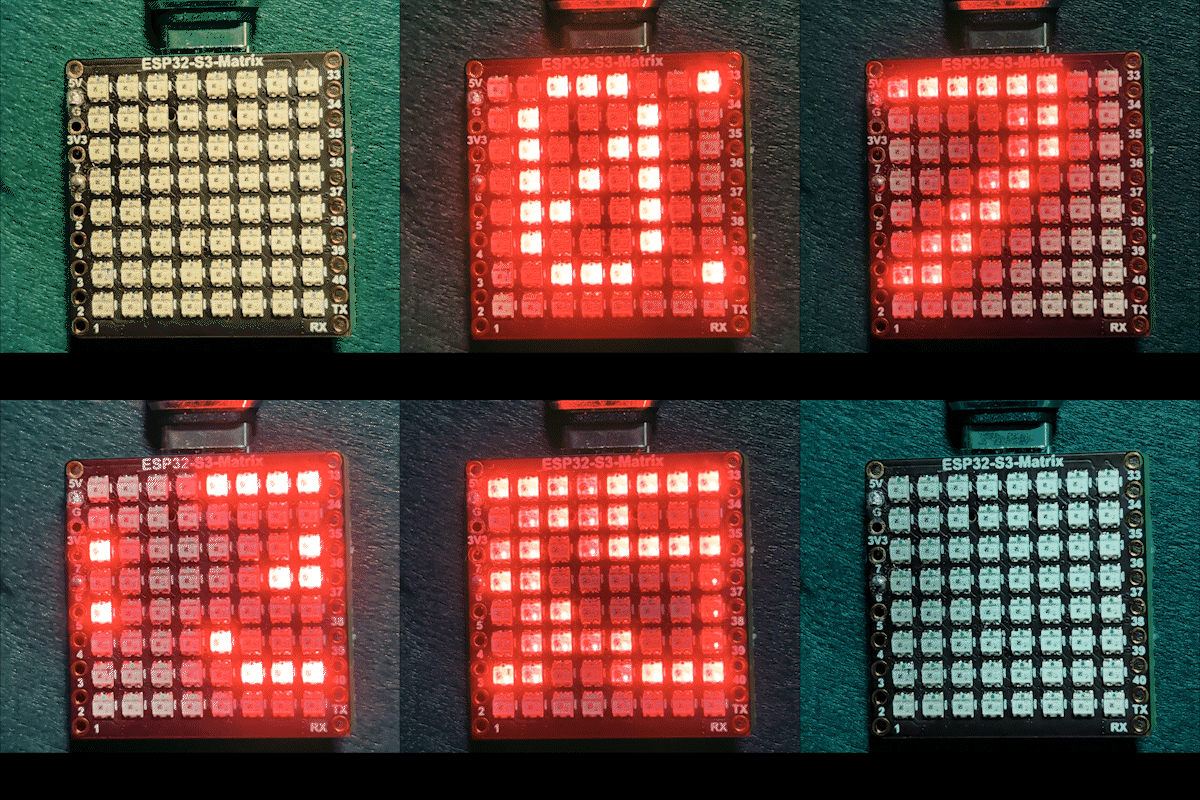
This project is an ESP32-S3 RGB Matrix Internet Clock that automatically adjusts brightness during the day and night. The ESP32-S3 connects to Wi-Fi, synchronizes the current time from an NTP server, and scrolls the time in HH:MM format across an 8×8 RGB NeoMatrix. The clock also supports fixed or cycling RGB colors for the display text.

What this clock does
After powering up, the ESP32-S3 connects to your Wi-Fi network and retrieves the current local time from the internet. The time scrolls smoothly across the LED matrix. During nighttime hours, the display automatically dims to a lower brightness, while during the day it switches back to a brighter level.
Libraries used
This sketch uses the following libraries:
#include <WiFi.h>
#include "time.h"
#include <Adafruit_GFX.h>
#include <Adafruit_NeoMatrix.h>
#include <Adafruit_NeoPixel.h>
Install Adafruit NeoMatrix from the Arduino Library Manager. All required dependencies such as Adafruit GFX Library and Adafruit NeoPixel will be installed automatically.
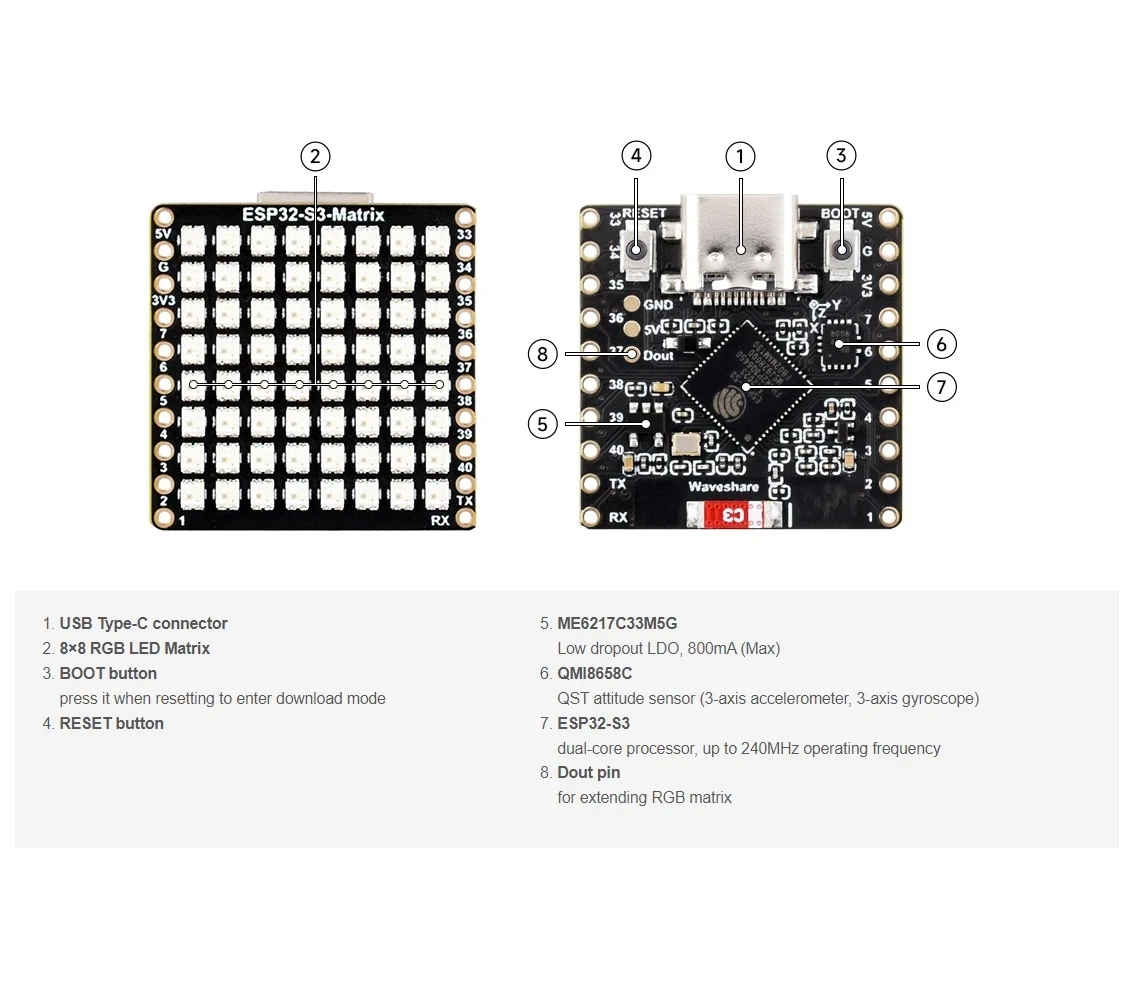
Important user configuration
Wi-Fi SSID and password (case-sensitive)
Replace the following values with your own Wi-Fi credentials:

const char* WIFI_SSID     = "WiFi";
const char* WIFI_PASSWORD = "passW0rd";
Important: Wi-Fi SSIDs are case-sensitive. An SSID named "Book" is not the same as "book". If the capitalization does not match exactly, the ESP32 will fail to connect.
NTP server, time zone, and daylight saving
The clock synchronizes time using the following NTP server:
const char* ntpServer = "pool.ntp.org";Local time is calculated using these offsets:
const long  gmtOffset_sec     = -5 * 3600;
const int daylightOffset_sec = 3600;gmtOffset_secdefines your UTC offset in secondsdaylightOffset_secadds one hour when daylight saving time is active (use0if not needed)
These values are applied with:
configTime(gmtOffset_sec, daylightOffset_sec, ntpServer);Automatic day / night brightness
The display brightness changes automatically based on the current hour:
const int DAY_BRIGHTNESS = 40;
const int NIGHT_BRIGHTNESS = 5;
const int NIGHT_START_HOUR = 22; // 10 PM
const int NIGHT_END_HOUR = 6;    // 6 AM
Between 10 PM and 6 AM, the matrix brightness is reduced to make it comfortable in dark environments. Outside of those hours, full daytime brightness is restored. You can adjust these values to suit your room lighting.
RGB color configuration
The clock text color is defined using RGB (Red, Green, Blue) values, where each channel ranges from 0 to 255. Multiple colors can be stored in an array and automatically cycled:
uint8_t userColors[][3] = {
  {17, 43, 171},  // Light Blue
  {255, 0, 0},    // Red
  {0, 255, 0},    // Green
  {255, 165, 0},  // Orange
  {255, 0, 255}   // Magenta
};
If useFixedColor is set to true, the clock always uses one color. If set to false, the color automatically changes after each full scroll of the time.
To quickly find the exact RGB values for any color, use the RGB Color Picker tool: Color Picker .
Time display and scrolling
The current time is formatted as HH:MM and stored in a small character buffer. Because the display is only 8 pixels wide, the text scrolls smoothly from right to left. Once the time fully leaves the display, the next color (if enabled) is selected for the next pass.
Demonstration
After uploading the sketch:
- The ESP32-S3 connects to Wi-Fi
- Time is synchronized from the internet
- The current time scrolls across the RGB matrix
- Brightness automatically changes between day and night
- Text color remains fixed or cycles based on your settings
Downloads and links
The complete source code is provided below this article. Links to parts, tools, and datasheets are available below this article.
Images
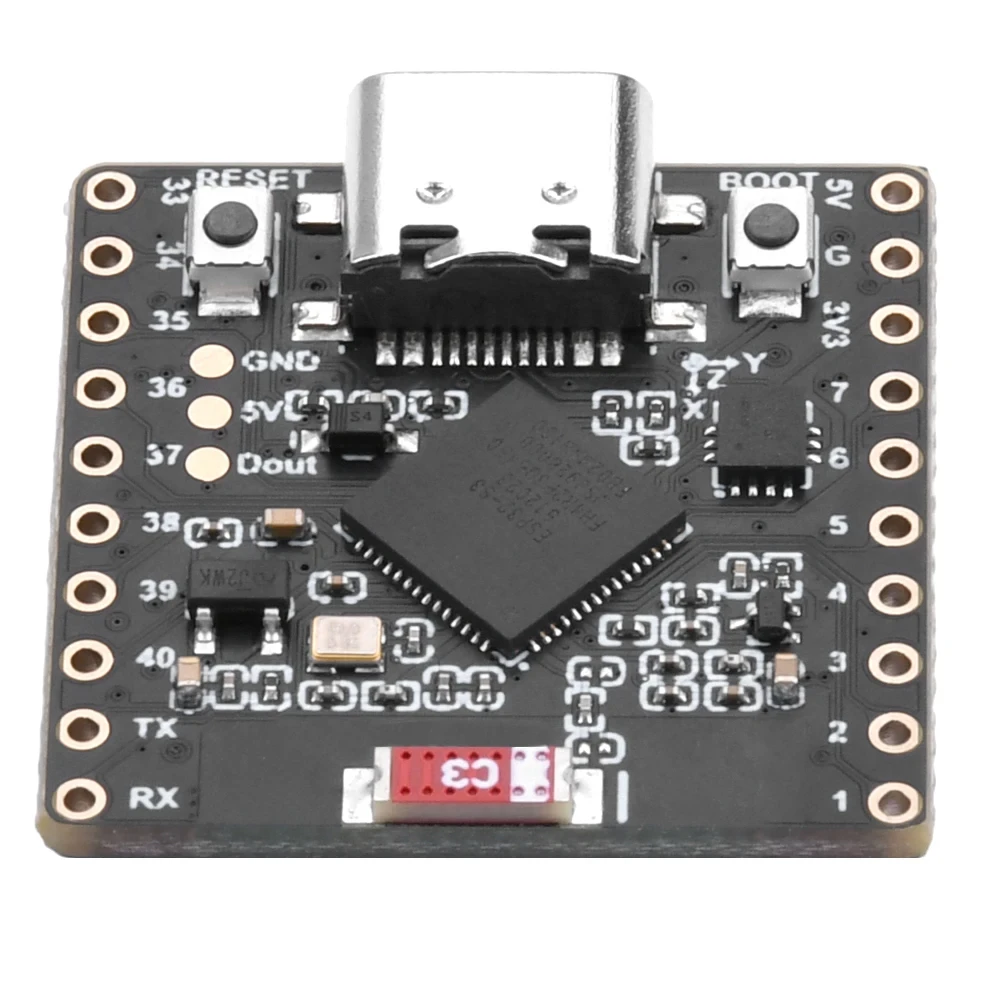
This tutorial is part of: ESP32-S3 RGB LED Matrix
- ESP32-S3 RGB LED Matrix Project 1- Basic Dot
- ESP32-S3 RGB LED Matrix Project 2 - Scrolling Text
- ESP32-S3 RGB LED Matrix Project 3 - Text from mobile phone
- ESP32-S3 RGB LED Matrix Project 4 - Tilt dot
- ESP32-S3 RGB LED Matrix Project 5 - Arrow always up
- ESP32-S3 RGB LED Matrix Project 6 - Cible game
- ESP32-S3 RGB LED Matrix Wi-Fi + NTP Time Clock Project -1 Basic Clock
- ESP32-S3 RGB LED Matrix Internet Clock Project - 2 Clock multi color Time & Date Display
- ESP32-S3 RGB LED Matrix Internet Clock Project - 5 Rainbow color
- ESP32-S3 RGB LED Matrix Internet Clock Project - 4 Random color
- ESP32-S3 RGB LED Matrix test for RGB, GRB setting
/*
 * =====================================================================================
 * ESP32-S3 INTERNET RGB CLOCK (8x8 Matrix) - Project 3- Night color with Date
 * =====================================================================================
 watch video https://youtube.com/shorts/4iWjLiD7fS8
 📚⬇️ Download and resource page https://robojax.com/RJT840
 * Author: Gemini (AI Thought Partner) & Ahmad Shamshiri (Robojax.com)
 * Date: 07 Jan 2026

 * * FEATURES:
 * 1. WiFi/NTP Time: Syncs automatically with internet time servers.
 * 2. Cycle-Based Color: Color changes ONLY after the time finishes a full scroll.
 * 3. Auto-Brightness: Dims the LEDs during night hours (User-configurable).
 * =====================================================================================
 */

#include <WiFi.h>
#include "time.h"
#include <Adafruit_GFX.h>
#include <Adafruit_NeoMatrix.h>
#include <Adafruit_NeoPixel.h>

#define MATRIX_PIN 14

// --- BRIGHTNESS CONFIGURATION ---
const int DAY_BRIGHTNESS = 40;
const int NIGHT_BRIGHTNESS = 5;
const int NIGHT_START_HOUR = 22; // 10 PM
const int NIGHT_END_HOUR = 6;    // 6 AM

// --- COLOR CONFIGURATION ---
bool useFixedColor = false;
int fixedColorIndex = 0;
uint8_t userColors[][3] = {
  {17, 43, 171},  // Light Blue
  {255, 0, 0},    // Red
  {0, 255, 0},    // Green
  {255, 165, 0},  // Orange
  {255, 0, 255}   // Magenta
};

// 👇 REPLACE these with your real home WiFi name & password
const char* WIFI_SSID     = "WiFi";
const char* WIFI_PASSWORD = "passW0rd";

int currentColorIndex = 0;
int totalColors = sizeof(userColors) / sizeof(userColors[0]);

// --- INTERVALS ---
unsigned long lastTimeUpdateMs = 0;
const uint16_t timeUpdateIntervalMs = 1000;
unsigned long lastScrollMs = 0;
const uint16_t scrollIntervalMs = 100;

// --- GLOBAL VARIABLES ---
Adafruit_NeoMatrix matrix(8, 8, MATRIX_PIN,
  NEO_MATRIX_TOP    + NEO_MATRIX_LEFT +
  NEO_MATRIX_ROWS   + NEO_MATRIX_PROGRESSIVE,
  NEO_RGB           + NEO_KHZ800);

char timeText[6] = "00:00";
int16_t scrollX = 8;


const char* ntpServer = "pool.ntp.org";
const long  gmtOffset_sec     = -5 * 3600;
const int   daylightOffset_sec = 3600;

void updateTimeText() {
  struct tm timeinfo;
  if (!getLocalTime(&timeinfo)) return;

  // Format HH:MM
  snprintf(timeText, sizeof(timeText), "%02d:%02d", timeinfo.tm_hour, timeinfo.tm_min);

  // Apply Auto-Brightness
  if (timeinfo.tm_hour >= NIGHT_START_HOUR || timeinfo.tm_hour < NIGHT_END_HOUR) {
    matrix.setBrightness(NIGHT_BRIGHTNESS);
  } else {
    matrix.setBrightness(DAY_BRIGHTNESS);
  }
}

void scrollTime() {
  matrix.fillScreen(0);

  // Pick the color (Fixed or Cycle)
  int idx = useFixedColor ? fixedColorIndex : currentColorIndex;
  matrix.setTextColor(matrix.Color(userColors[idx][0], userColors[idx][1], userColors[idx][2]));

  matrix.setCursor(scrollX, 0);
  matrix.print(timeText);
  matrix.show();

  scrollX--;

  // Width for "HH:MM" is roughly 30 pixels
  int16_t textWidth = 30;

  // TRIGGER: When time is fully off-screen
  if (scrollX < -textWidth) {
    scrollX = matrix.width(); // Reset position to right side

    // Cycle to the next color in the array for the next pass
    if (!useFixedColor) {
      currentColorIndex = (currentColorIndex + 1) % totalColors;
      Serial.print("Next cycle color index: ");
      Serial.println(currentColorIndex);
    }
  }
}

void setup() {
  Serial.begin(115200);
  WiFi.begin(WIFI_SSID, WIFI_PASSWORD);
  while (WiFi.status() != WL_CONNECTED) {
    delay(500);
    Serial.print(".");
  }

  configTime(gmtOffset_sec, daylightOffset_sec, ntpServer);
  matrix.begin();
  matrix.setTextWrap(false);
  matrix.setBrightness(DAY_BRIGHTNESS);

  updateTimeText();
}

void loop() {
  unsigned long now = millis();

  // Update time digits and brightness once per second
  if (now - lastTimeUpdateMs >= timeUpdateIntervalMs) {
    lastTimeUpdateMs = now;
    updateTimeText();
  }

  // Handle the scrolling animation
  if (now - lastScrollMs >= scrollIntervalMs) {
    lastScrollMs = now;
    scrollTime();
  }
}
Things you might need
-
Amazon
-
eBay
-
AliExpressPurchase ESP32-S3 RGB Matrix from AliExpresss.click.aliexpress.com
-
AliExpressPurchase ESP32-S3 RGB Matrix from AliExpress (2)s.click.aliexpress.com
Resources & references
-
Video
-
Internal🎨 Color picker Toolrobojax.com
Files📁
Fritzing File
-
esp32-S3-supermini-tht fritzing part
esp32-S3-supermini-tht.fzpz0.02 MB