This tutorial is part of: ESP32-S3 RGB LED Matrix
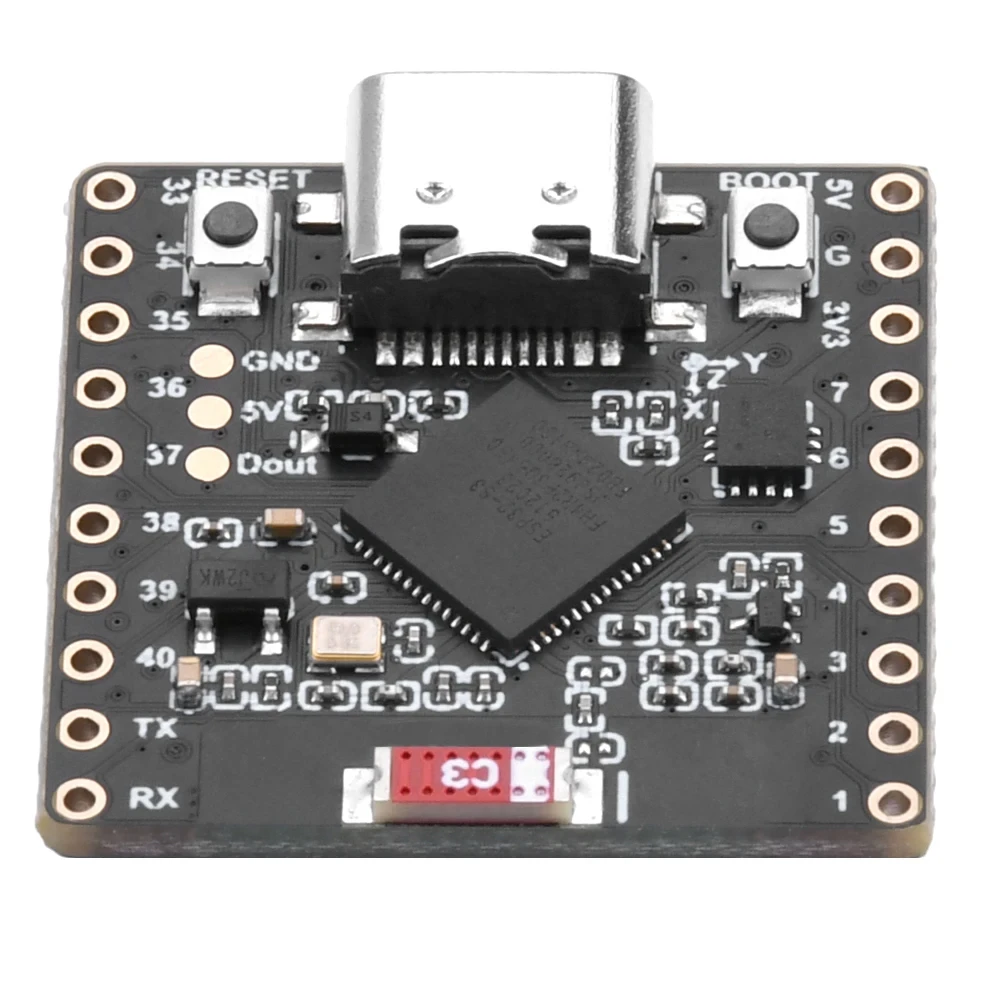
Cool project to create for fun and practical applications using ESP32-S3 RGB Matrix module. Links to other videos are below this article.
ESP32-S3 RGB LED મેટ્રિક્સ ઇન્ટરનેટ ઘડિયાળ પ્રોજેક્ટ - 2 ઘડિયાળ બહુ રંગીન સમય અને તારીખ પ્રદર્શન
ESP32-S3 RGB નિયોમેટ્રિક્સ ઈન્ટરનેટ ઘડિયાળ સમય અને તારીખ પ્રદર્શન સાથે
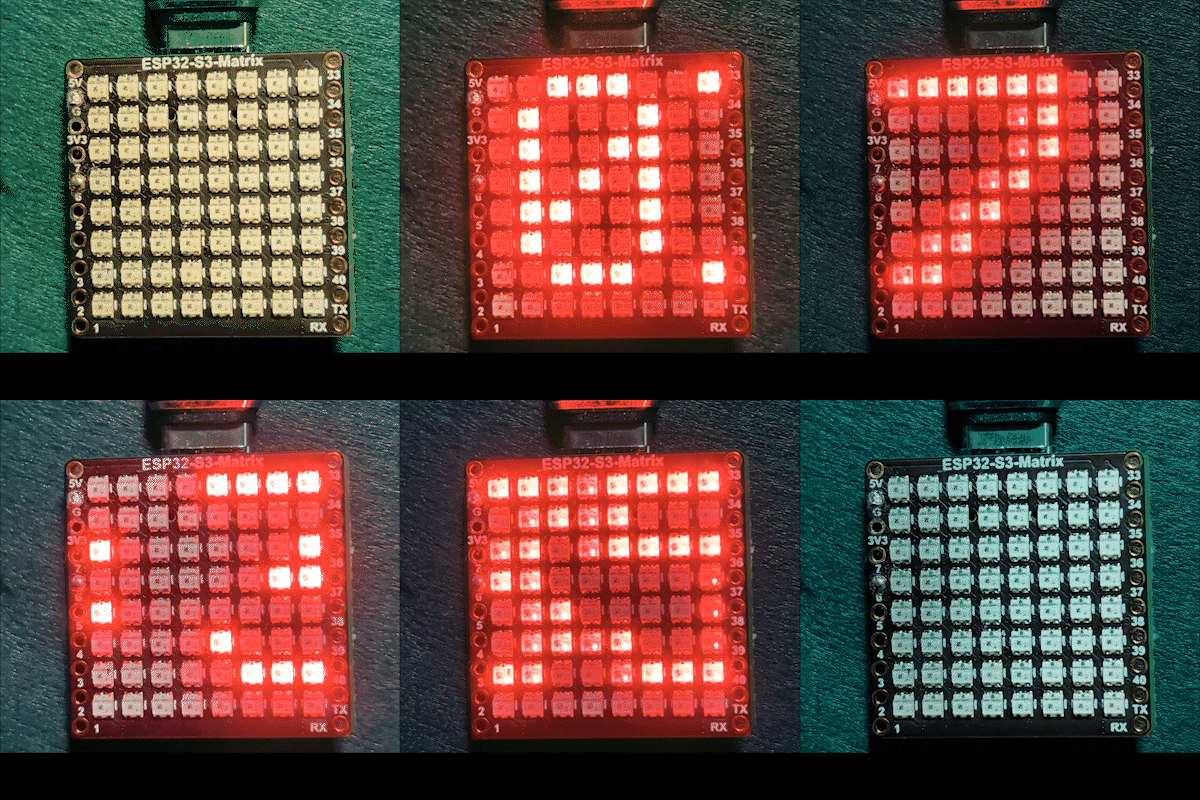
આ પ્રોજેક્ટ એક ઉન્નત ESP32-S3 RGB મેટ્રિક્સ ઈન્ટરનેટ ઘડિયાળ છે જે માત્ર વર્તમાન સમય જ નહીં પરંતુ સમયાંતરે તારીખ પણ દર્શાવે છે. ESP32-S3 Wi-Fi સાથે જોડાય છે, NTP સર્વરથી સમય સિંક્રનાઇઝ કરે છે, અને 8×8 RGB નિયોમેટ્રિક્સ પર ક્યાં તો HH:MM અથવા તારીખ (ઉદાહરણ તરીકે SEP 21) સ્ક્રોલ કરે છે. ડિસ્પ્લે સ્વચાલિત દિવસ/રાત્રિ તેજ નિયંત્રણ અને કસ્ટમાઇઝેબલ RGB રંગોને સપોર્ટ કરે છે.

આ ઘડિયાળ શું કરે છે
તમારા Wi-Fi નેટવર્ક સાથે જોડાયા પછી, ESP32-S3 ઈન્ટરનેટથી વર્તમાન સ્થાનિક સમય મેળવે છે. ઘડિયાળ સામાન્ય રીતે સમય સ્ક્રોલ કરે છે, પરંતુ નિશ્ચિત અંતરાલ પર તે તારીખ બતાવવા માટે સ્વિચ કરે છે. ટેક્સ્ટ રંગ એક રંગ પર નિશ્ચિત કરી શકાય છે અથવા બહુવિધ વપરાશકર્તા-વ્યાખ્યાયિત રંગો દ્વારા સ્વચાલિત રીતે ફરી શકે છે. રાત્રે તેજ આપમેળે ઘટાડવામાં આવે છે જેથી ડિસ્પ્લે આંખો માટે સરળ રહે.
વપરાયેલી લાઇબ્રેરીઓ
આ સ્કેચ નીચેની લાઇબ્રેરીઓ પર આધાર રાખે છે:
#include <WiFi.h>
#include "time.h"
#include <Adafruit_GFX.h>
#include <Adafruit_NeoMatrix.h>
#include <Adafruit_NeoPixel.h>
Arduino લાઇબ્રેરી મેનેજરમાંથી Adafruit NeoMatrix ઇન્સ્ટોલ કરો. Adafruit GFX Library અને Adafruit NeoPixel જેવી તમામ જરૂરી નિર્ભરતાઓ આપમેળે ઇન્સ્ટોલ થશે.
મહત્વપૂર્ણ વપરાશકર્તા રૂપરેખાંકન
Wi-Fi SSID અને પાસવર્ડ (કેસ-સંવેદનશીલ)
તમારે Wi-Fi ઓળખપત્રોને તમારી પોતાની નેટવર્ક માહિતી સાથે બદલવા આવશ્યક છે:

const char* WIFI_SSID     = "WiFi";
const char* WIFI_PASSWORD = "passW0rd";
મહત્વપૂર્ણ: Wi-Fi SSID કેસ-સંવેદનશીલ છે. ઉદાહરણ તરીકે, "Book" નામનો SSID "book" જેવો નથી. જો મોટાક્ષરો બરાબર મેળ ખાતા નથી, તો ESP32 કનેક્ટ થવામાં નિષ્ફળ જશે.
NTP સર્વર, સમય ઝોન અને ડેલાઇટ સેવિંગ
ઘડિયાળ ઈન્ટરનેટ સમય સર્વરનો ઉપયોગ કરે છે:
const char* ntpServer = "pool.ntp.org";સ્થાનિક સમય આ ઓફસેટ્સનો ઉપયોગ કરીને ગણવામાં આવે છે:
const long  gmtOffset_sec     = -5 * 3600;
const int daylightOffset_sec = 3600;gmtOffset_sec: તમારો UTC ઓફસેટ સેકંડમાં (ઉદાહરણ: UTC-5 =-5 * 3600)daylightOffset_sec: DST માટે3600અથવા જો DST વપરાતું નથી તો0વાપરો
આ સેટિંગ્સ આનો ઉપયોગ કરીને લાગુ કરવામાં આવે છે:
configTime(gmtOffset_sec, daylightOffset_sec, ntpServer);તેજ નિયંત્રણ (દિવસ / રાત્રિ)
આ પ્રોજેક્ટ દિવસના કલાકના આધારે આપમેળે તેજ સમાયોજિત કરે છે:
const int DAY_BRIGHTNESS = 40;
const int NIGHT_BRIGHTNESS = 5;
const int NIGHT_START_HOUR = 22;
const int NIGHT_END_HOUR = 6;
રાત્રે 10 વાગ્યાથી સવારે 6 વાગ્યા સુધી, અંધારાવાળા વાતાવરણમાં ડિસ્પ્લે ઓછું વિચલિત કરે તે માટે તેજ ઘટાડવામાં આવે છે. તમે તમારી પસંદગી અનુસાર આ મૂલ્યો સમાયોજિત કરી શકો છો.
RGB રંગ રૂપરેખાંકન
ઘડિયાળ નિશ્ચિત રંગ મોડ અને સ્વચાલિત રંગ ચક્ર બંનેને સપોર્ટ કરે છે. વપરાશકર્તા-વ્યાખ્યાયિત RGB રંગો એરેમાં સંગ્રહિત થાય છે:
uint8_t userColors[][3] = {
  {17, 43, 171},  // આછો વાદળી
  {255, 0, 0},    // લાલ
  {0, 255, 0},    // લીલો
  {255, 165, 0},  // નારંગી
  {255, 0, 255}   // મેજેન્ટા
};
દરેક રંગ 0 થી 255 સુધીના RGB (લાલ, લીલો, વાદળી) મૂલ્યોનો ઉપયોગ કરે છે. આ સંખ્યાઓ બદલીને, તમે ડિસ્પ્લે માટે લગભગ કોઈપણ રંગ બનાવી શકો છો. જો useFixedColor true પર સેટ હોય, તો ઘડિયાળ હંમેશા એક રંગનો ઉપયોગ કરે છે. જો false પર સેટ હોય, તો દરેક સંપૂર્ણ સ્ક્રોલ પછી રંગ આપમેળે બદલાય છે.
કોઈપણ રંગ માટે ચોક્કસ RGB મૂલ્યો ઝડપથી શોધવા માટે, RGB કલર પિકર ટૂલ કલર પિકર નો ઉપયોગ કરો.
સમય અને તારીખ ફોર્મેટિંગ
સમય HH:MM તરીકે ફોર્મેટ થાય છે અને નાના કેરેક્ટર બફરમાં સંગ્રહિત થાય છે. તારીખ SEP 21 જેવી મોટા અક્ષરોની સ્ટ્રિંગ તરીકે ફોર્મેટ થાય છે. ડિસ્પ્લે નિશ્ચિત અંતરાલ પર સમય અને તારીખ વચ્ચે આપમેળે સ્વિચ કરે છે.
8×8 ડિસ્પ્લે પર સ્ક્રોલિંગ લોજિક
કારણ કે 8×8 મેટ્રિક્સ એક સાથે સંપૂર્ણ ટેક્સ્ટ બતાવવા માટે ખૂબ નાનું છે, સ્કેચ ટેક્સ્ટને આડી રીતે સ્ક્રોલ કરે છે. એકવાર ટેક્સ્ટ સંપૂર્ણપણે ડિસ્પ્લે છોડી દે, રંગ અપડેટ થાય છે અને જરૂર પડ્યે સામગ્રી સમય અને તારીખ વચ્ચે સ્વિચ થાય છે.
પ્રદર્શન
સ્કેચ અપલોડ કર્યા પછી:
- ESP32 Wi-Fi સાથે જોડાય છે
- સમય ઈન્ટરનેટથી સિંક્રનાઇઝ થાય છે
- વર્તમાન સમય મેટ્રિક્સ પર સ્ક્રોલ થાય છે
- તારીખ સમયાંતરે દેખાય છે
- તેજ આપમેળે દિવસ અને રાત્રિ માટે સમાયોજિત થાય છે
ડાઉનલોડ્સ અને લિંક્સ
સંપૂર્ણ સ્ત્રોત કોડ આ લેખની નીચે આપેલ છે. ભાગો, સાધનો અને ડેટાશીટ્સની લિંક્સ પણ આ લેખની નીચે ઉપલબ્ધ છે.
Images
This tutorial is part of: ESP32-S3 RGB LED Matrix
- ESP32-S3 RGB LED મેટ્રિક્સ પ્રોજેક્ટ 1- મૂળભૂત ડોટ
- ESP32-S3 RGB LED મેટ્રિક્સ પ્રોજેક્ટ 2 - સ્ક્રોલિંગ ટેક્સ્ટ
- ESP32-S3 RGB LED મેટ્રિક્સ પ્રોજેક્ટ 3 - મોબાઇલ ફોનમાંથી ટેક્સ્ટ
- ESP32-S3 RGB LED મેટ્રિક્સ પ્રોજેક્ટ 4 - ટિલ્ટ ડોટ
- ESP32-S3 RGB LED મેટ્રિક્સ પ્રોજેક્ટ 5 - તીર હંમેશા ઉપર
- ESP32-S3 RGB LED મેટ્રિક્સ પ્રોજેક્ટ 6 - સિબલે ગેમ
- ESP32-S3 RGB LED મેટ્રિક્સ Wi-Fi + NTP સમય ઘડિયાળ પ્રોજેક્ટ -1 મૂળભૂત ઘડિયાળ
- ESP32-S3 RGB LED મેટ્રિક્સ ઇન્ટરનેટ ઘડિયાળ પ્રોજેક્ટ - તારીખ સાથે 3 રાત્રિ રંગ
- ESP32-S3 RGB LED મેટ્રિક્સ ઇન્ટરનેટ ઘડિયાળ પ્રોજેક્ટ - 5 મેઘધનુષ્ય રંગ
- ESP32-S3 RGB LED મેટ્રિક્સ ઇન્ટરનેટ ઘડિયાળ પ્રોજેક્ટ - 4 રેન્ડમ રંગ
- ESP32-S3 RGB LED Matrix test for RGB, GRB setting
/*
 * =====================================================================================
 * ESP32-S3 INTERNET RGB CLOCK (8x8 Matrix) - Project 2
 Multi color
 * =====================================================================================
 watch video https://youtube.com/shorts/4iWjLiD7fS8
 📚⬇️ Download and resource page https://robojax.com/RJT839
 * Author:  Ahmad Shamshiri (Robojax.com)
 * Date: 07 Jan 2026
 * * FEATURES:
 * 1. WiFi/NTP Time: Syncs automatically with internet time servers.
 * 2. Cycle-Based Color: Color changes ONLY when text finishes a full scroll.
 * 3. Auto-Brightness: Dims the LEDs during night hours (User-configurable).
 * 4. Periodic Date: Scrolls the date (e.g., "JAN 07") every 2 minutes.
 * * USER CONFIGURATION GUIDE:
 * -------------------------
 * - WiFi: Change 'WIFI_SSID' and 'WIFI_PASSWORD' to your local network.
 * - Colors: Add or remove {R, G, B} sets in the 'userColors' array.
 * - Night Mode: Adjust 'NIGHT_START_HOUR' and 'NIGHT_BRIGHTNESS'.
 * =====================================================================================
 */

#include <WiFi.h>
#include "time.h"
#include <Adafruit_GFX.h>
#include <Adafruit_NeoMatrix.h>
#include <Adafruit_NeoPixel.h>

#define MATRIX_PIN 14

// --- BRIGHTNESS CONFIGURATION ---
const int DAY_BRIGHTNESS = 40;
const int NIGHT_BRIGHTNESS = 5;
const int NIGHT_START_HOUR = 22;
const int NIGHT_END_HOUR = 6;

// --- COLOR CONFIGURATION ---
bool useFixedColor = false;
int fixedColorIndex = 0;
uint8_t userColors[][3] = {
  {17, 43, 171},  // Light Blue
  {255, 0, 0},    // Red
  {0, 255, 0},    // Green
  {255, 165, 0},  // Orange
  {255, 0, 255}   // Magenta
};

// 👇 REPLACE these with your real home WiFi name & password
const char* WIFI_SSID     = "WiFi";
const char* WIFI_PASSWORD = "passW0rd";


int currentColorIndex = 0;
int totalColors = sizeof(userColors) / sizeof(userColors[0]);

// --- DATE/TIME INTERVALS ---
unsigned long lastDateShowMs = 0;
const uint32_t dateIntervalMs = 30000; // 2 minutes
unsigned long lastTimeUpdateMs = 0;
const uint16_t timeUpdateIntervalMs = 1000;
unsigned long lastScrollMs = 0;
const uint16_t scrollIntervalMs = 100;

// --- GLOBAL VARIABLES ---
Adafruit_NeoMatrix matrix(8, 8, MATRIX_PIN,
  NEO_MATRIX_TOP    + NEO_MATRIX_LEFT +
  NEO_MATRIX_ROWS   + NEO_MATRIX_PROGRESSIVE,
  NEO_RGB           + NEO_KHZ800);

char timeText[6] = "00:00";
char dateText[10] = "";
char currentDisplayText[12] = "";
int16_t scrollX = 8;


const char* ntpServer = "pool.ntp.org";
const long  gmtOffset_sec     = -5 * 3600;
const int   daylightOffset_sec = 3600;

void updateTimeAndDate() {
  struct tm timeinfo;
  if (!getLocalTime(&timeinfo)) return;

  snprintf(timeText, sizeof(timeText), "%02d:%02d", timeinfo.tm_hour, timeinfo.tm_min);
  strftime(dateText, sizeof(dateText), "%b %d", &timeinfo);
  for (int i = 0; dateText[i]; i++) dateText[i] = toupper(dateText[i]);

  if (timeinfo.tm_hour >= NIGHT_START_HOUR || timeinfo.tm_hour < NIGHT_END_HOUR) {
    matrix.setBrightness(NIGHT_BRIGHTNESS);
  } else {
    matrix.setBrightness(DAY_BRIGHTNESS);
  }
}

void scrollDisplay() {
  matrix.fillScreen(0);

  // FIXED LOGIC: Uses currentColorIndex which only changes at the end of a scroll
  int idx = useFixedColor ? fixedColorIndex : currentColorIndex;
  matrix.setTextColor(matrix.Color(userColors[idx][0], userColors[idx][1], userColors[idx][2]));

  matrix.setCursor(scrollX, 0);
  matrix.print(currentDisplayText);
  matrix.show();

  scrollX--;

  int16_t textWidth = strlen(currentDisplayText) * 6;

  // THE TRIGGER POINT: This happens only when text is fully off-screen
  if (scrollX < -textWidth) {
    scrollX = matrix.width();

    // 1. Cycle the color now and only now
    if (!useFixedColor) {
      currentColorIndex = (currentColorIndex + 1) % totalColors;
    }

    // 2. Decide whether to switch between Time and Date
    if (millis() - lastDateShowMs > dateIntervalMs) {
      strcpy(currentDisplayText, dateText);
      lastDateShowMs = millis();
    } else {
      strcpy(currentDisplayText, timeText);
    }
  }
}

void setup() {
  Serial.begin(115200);
  WiFi.begin(WIFI_SSID, WIFI_PASSWORD);
  while (WiFi.status() != WL_CONNECTED) {
    delay(500);
    Serial.print(".");
  }

  configTime(gmtOffset_sec, daylightOffset_sec, ntpServer);
  matrix.begin();
  matrix.setTextWrap(false);
  matrix.setBrightness(DAY_BRIGHTNESS);

  updateTimeAndDate();
  strcpy(currentDisplayText, timeText);
}

void loop() {
  unsigned long now = millis();

  if (now - lastTimeUpdateMs >= timeUpdateIntervalMs) {
    lastTimeUpdateMs = now;
    updateTimeAndDate();
  }

  if (now - lastScrollMs >= scrollIntervalMs) {
    lastScrollMs = now;
    scrollDisplay();
  }
}
Things you might need
-
Amazon
-
eBay
-
AliExpressPurchase ESP32-S3 RGB Matrix from AliExpresss.click.aliexpress.com
-
AliExpressPurchase ESP32-S3 RGB Matrix from AliExpress (2)s.click.aliexpress.com
Resources & references
-
Video
Files📁
Fritzing File
-
esp32-S3-supermini-tht fritzing part
esp32-S3-supermini-tht.fzpz0.02 MB




![[BELLA] EMD-4000 humidity sensor --10pcs/lot](https://ae-pic-a1.aliexpress-media.com/kf/Sa9c28fe678484cb7b7fd12765b175fdaw.jpg)