This tutorial is part of: ESP32-S3 RGB LED Matrix
โปรเจ็กต์เจ๋งๆ ที่สร้างได้ทั้งเพื่อความสนุกและการใช้งานจริง โดยใช้โมดูล ESP32-S3 RGB Matrix ลิงก์ไปยังวิดีโออื่นๆ อยู่ด้านล่างบทความนี้
โปรเจกต์นาฬิกา ESP32-S3 RGB LED Matrix Wi-Fi + NTP Time Clock -1 นาฬิกาพื้นฐาน
นาฬิกาอินเทอร์เน็ต ESP32-S3 พร้อม NeoMatrix 8×8 (Wi-Fi + เวลา NTP)
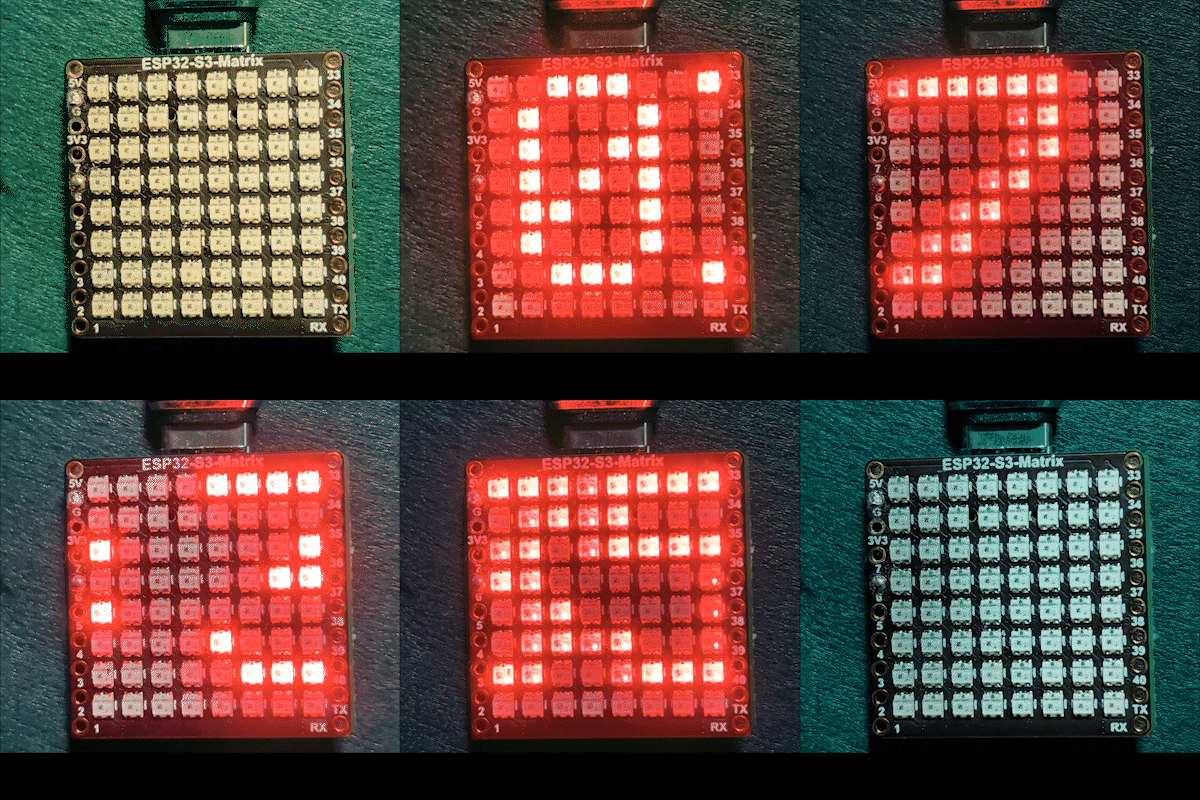
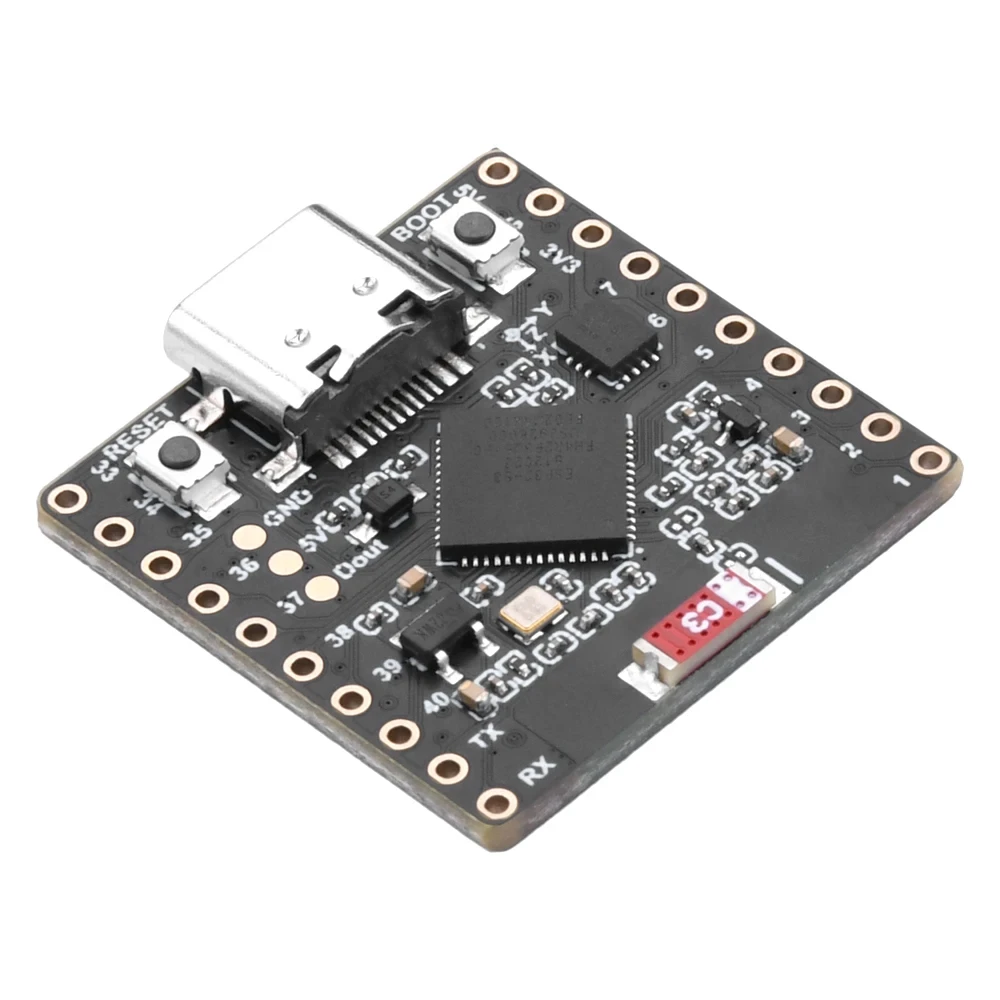
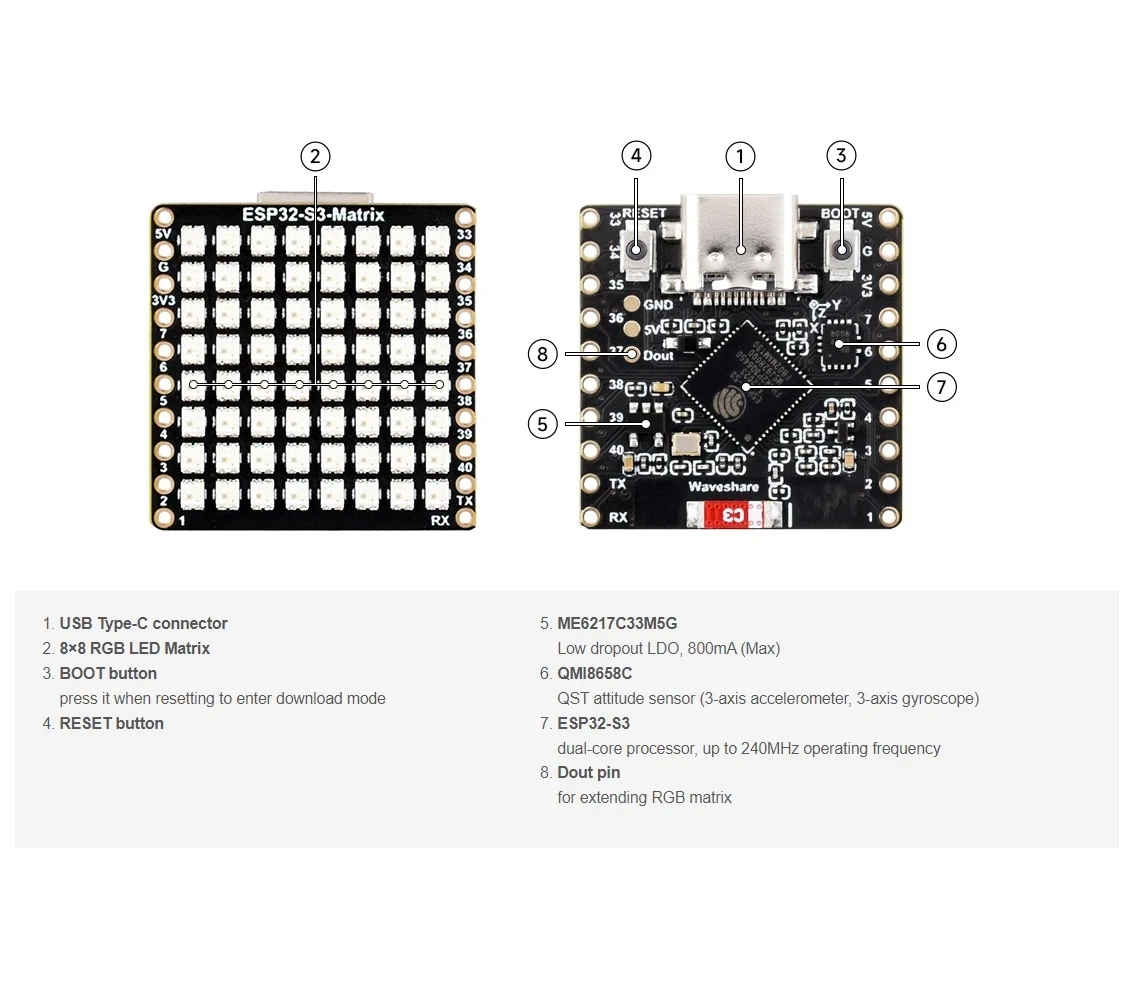
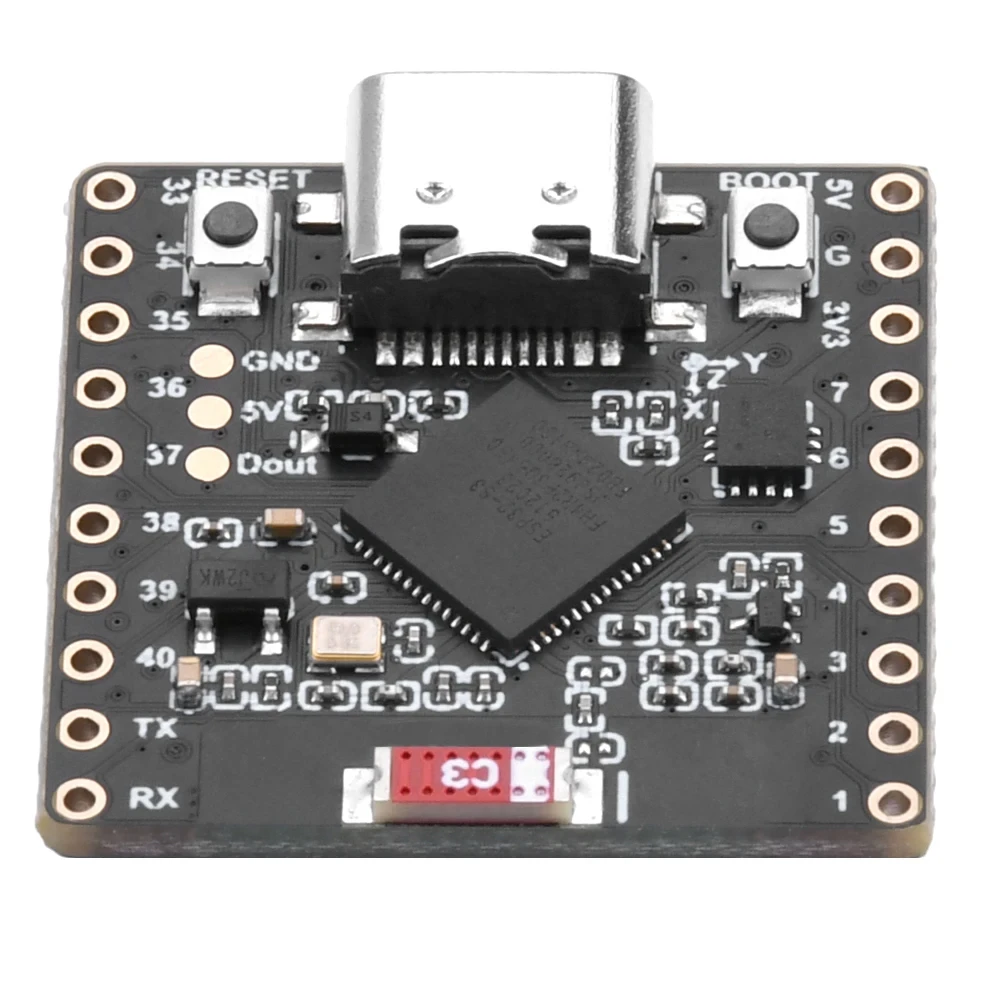
โปรเจกต์นี้เปลี่ยน ESP32-S3 และ NeoMatrix RGB 8×8 (NeoPixel/WS2812) ให้เป็นนาฬิกาอินเทอร์เน็ตขนาดเล็ก ESP32 เชื่อมต่อ Wi-Fi ซิงโครไนซ์เวลาท้องถิ่นจากเซิร์ฟเวอร์ NTP จากนั้นเลื่อนเวลาเป็น HH:MM ผ่านจอแสดงผล 8×8

วิธีการทำงาน (ระดับสูง)
1) ESP32-S3 เชื่อมต่อกับเราเตอร์ของคุณโดยใช้ <WiFi.h>
2) ซิงโครไนซ์เวลาจากเซิร์ฟเวอร์ NTP โดยใช้ "time.h" และ configTime()
3) จัดรูปแบบเวลาเป็น HH:MM และบันทึกลงในบัฟเฟอร์ข้อความขนาดเล็ก
4) NeoMatrix แสดงข้อความและเลื่อนผ่านแผง 8×8
สี RGB
สีของข้อความนาฬิกาถูกควบคุมโดยใช้ค่า RGB (แดง เขียว น้ำเงิน) โดยแต่ละช่องสีมีช่วงตั้งแต่ 0 ถึง 255 และการผสมผสานที่แตกต่างกันจะสร้างสีที่แตกต่างกันบน NeoMatrix โดยการปรับตัวแปร color_RED, color_GREEN และ color_BLUE คุณสามารถปรับแต่งรูปลักษณ์ของนาฬิกาให้เป็นสีใดก็ได้ที่คุณต้องการ หากต้องการค้นหาค่า RGB ที่แน่นอนสำหรับสีเฉพาะอย่างรวดเร็ว คุณสามารถใช้ตัวเลือกสี RGB ออนไลน์ ตัวเลือกสี
ไลบรารีที่ใช้
ส่วน include เหล่านี้บอกคุณอย่างชัดเจนว่าสเก็ตช์ขึ้นอยู่กับอะไร:

#include <WiFi.h>
#include "time.h"
#include <Adafruit_GFX.h>
#include <Adafruit_NeoMatrix.h>
#include <Adafruit_NeoPixel.h>
ติดตั้ง Adafruit NeoMatrix โดยใช้ Arduino Library Manager โดยจะดึงการพึ่งพาที่จำเป็น เช่น Adafruit GFX Library และ Adafruit NeoPixel โดยอัตโนมัติ
การตั้งค่าผู้ใช้ที่สำคัญที่คุณต้องแก้ไข
1) สีข้อความ (RGB)
ตั้งค่าสีข้อความนาฬิกาของคุณโดยใช้ค่า 0–255:
//ตั้งค่าสีของจอแสดงผลที่ประกอบด้วยแดง เขียว และน้ำเงิน
unsigned int color_RED = 17;
unsigned int color_GREEN = 43;
unsigned int color_BLUE = 171;
ค่าเหล่านี้ถูกใช้ที่นี่:
matrix.setTextColor(matrix.Color(color_RED, color_GREEN, color_BLUE));หมายเหตุ: หากคุณตั้งค่าสีทั้งหมดเป็น 0 (สีดำ) ข้อความจะมองไม่เห็น สเก็ตช์มีการตรวจสอบความปลอดภัย:
//หากผู้ใช้ตั้งค่าสีทั้งหมดเป็น 0 จอแสดงผลจะถูกปิด ดังนั้นให้ตั้งเป็นสีเขียว
if (color_RED == 0 && color_GREEN == 0 && color_BLUE == 0) {
  color_GREEN = 200;
}
เพื่อให้แน่ใจว่าเมทริกซ์จะไม่ดู “ตาย” เนื่องจากการตั้งค่าสีที่มองไม่เห็น
2) ชื่อ Wi-Fi และรหัสผ่าน
แทนที่ค่าเหล่านี้ด้วยชื่อและรหัสผ่าน Wi-Fi จริงของคุณ:
const char* WIFI_SSID     = "WiFi";
const char* WIFI_PASSWORD = "passW0rd";
ระหว่างการเริ่มต้น ESP32 จะพิมพ์ความคืบหน้าการเชื่อมต่อใน Serial Monitor และหมดเวลาหลังจากประมาณ 15 วินาที (ลอง 30 ครั้ง × 500ms)
3) เซิร์ฟเวอร์ NTP
เซิร์ฟเวอร์ NTP เริ่มต้นคือ:
const char* ntpServer = "pool.ntp.org";คุณสามารถเก็บไว้ตามเดิม หากคุณต้องการใช้เซิร์ฟเวอร์ท้องถิ่น ให้แทนที่ชื่อโฮสต์ด้วยเซิร์ฟเวอร์ NTP ที่คุณต้องการ
4) ค่าชดเชยเขตเวลาและค่าชดเชยเวลาออมแสง
การตั้งค่าสองรายการนี้ควบคุมเวลาท้องถิ่น:
//แบบโตรอนโต: UTC-5 บวก 1 ชั่วโมง DST
const long  gmtOffset_sec      = -5 * 3600;  // -5 ชั่วโมง
const int   daylightOffset_sec = 3600;       // +1 ชั่วโมงสำหรับ DST
วิธีตั้งค่า:
gmtOffset_sec= (ชั่วโมงชดเชย UTC) × 3600 ตัวอย่าง: UTC-5 →-5*3600, UTC+2 →2*3600daylightOffset_sec=0หากคุณไม่ต้องการปรับเวลาออมแสง หรือ3600หากภูมิภาคของคุณกำลังใช้เวลาออมแสง (+1 ชั่วโมง)
ค่าเหล่านี้ถูกใช้ที่นี่:
configTime(gmtOffset_sec, daylightOffset_sec, ntpServer);การกำหนดค่าจอแสดงผล
พินข้อมูลเมทริกซ์
พินข้อมูลถูกกำหนดที่นี่:
#define MATRIX_PIN 14หากการเดินสายของคุณใช้ GPIO อื่น ให้เปลี่ยนหมายเลขนี้ให้ตรงกัน
รูปแบบ NeoMatrix + ลำดับสี
เมทริกซ์ของคุณถูกเริ่มต้นดังนี้:
Adafruit_NeoMatrix matrix(8, 8, MATRIX_PIN,
  NEO_MATRIX_TOP    + NEO_MATRIX_LEFT +
  NEO_MATRIX_ROWS   + NEO_MATRIX_PROGRESSIVE,
  NEO_RGB           + NEO_KHZ800);
สองสาเหตุทั่วไปที่ทำให้จอแสดงผลดู “ผิดปกติ”:
- การหมุน / ทิศทางการเดินสาย: หากข้อความกลับหัวหรือสะท้อน ให้ปรับแฟล็ก
NEO_MATRIX_*(TOP/BOTTOM, LEFT/RIGHT, ROWS/COLUMNS, PROGRESSIVE/ZIGZAG) - ลำดับสี: โค้ดนี้ใช้
NEO_RGBบางแผงเป็นNEO_GRBหากสีแดง/เขียว/น้ำเงินไม่ตรงกัน ให้เปลี่ยนNEO_RGBเป็นลำดับที่ถูกต้อง
ความสว่าง
ความสว่างถูกตั้งค่าใน initMatrix():
matrix.setBrightness(40);เพิ่มขึ้นเพื่อจอแสดงผลที่สว่างขึ้น ลดลงเพื่อลดความร้อนและการใช้พลังงาน
วิธีสร้างเวลาเป็น HH:MM
นาฬิกาจัดเก็บเวลาที่จัดรูปแบบไว้ในบัฟเฟอร์ 6 ตัวอักษร:
char timeText[6] = "00:00";จากนั้น updateTimeText() จะอ่านเวลาท้องถิ่นที่ซิงค์กับ NTP และเขียนข้อความ:
// รูปแบบ HH:MM
snprintf(timeText, sizeof(timeText), "%02d:%02d",
         timeinfo.tm_hour,
         timeinfo.tm_min);
โค้ดนี้จะอัปเดตทุกหนึ่งวินาทีในลูปหลัก
การเลื่อนข้อความบนจอแสดงผล 8×8 ทำงานอย่างไร
เมทริกซ์ขนาด 8×8 แคบเกินไปที่จะแสดง HH:MM พร้อมกันทั้งหมด ดังนั้นสเก็ตช์จึงเลื่อนข้อความ โดยวาดเวลาที่ตำแหน่ง X ที่เปลี่ยนแปลง (scrollX) จากนั้นเลื่อนไปทางซ้ายหนึ่งพิกเซลในทุกการอัปเดต
int16_t scrollX = 8;
const uint16_t scrollIntervalMs = 120;
แต่ละขั้นตอนการเลื่อน:
matrix.fillScreen(0);
matrix.setCursor(scrollX, 0);
matrix.print(timeText);
matrix.show();
scrollX--;
เมื่อข้อความออกจากด้านซ้ายจนหมด โค้ดจะรีเซ็ตให้เริ่มจากขอบด้านขวาใหม่:
int16_t textWidth = 30;
if (scrollX < -textWidth) {
  scrollX = matrix.width();
}
ผลลัพธ์จาก Serial Monitor (การดีบัก)
สเก็ตช์นี้พิมพ์ข้อความที่เป็นประโยชน์:
- ความคืบหน้าของการเชื่อมต่อ Wi-Fi และที่อยู่ IP
- ว่าการซิงค์เวลาสำเร็จหรือไม่
- สตริงเวลาที่จัดรูปแบบแล้ว (เช่น
Time text: 14:32)
หากจอแสดงผลว่างเปล่า Serial Monitor คือจุดแรกที่ควรตรวจสอบเพื่อยืนยันว่า Wi-Fi และ NTP ทำงานอยู่
การสาธิตโปรเจกต์
หลังจากการอัปโหลดและรีเซ็ต:
- ESP32 เชื่อมต่อกับ Wi-Fi
- ซิงค์เวลาจาก
pool.ntp.org - แสดง
OKสั้นๆ บนเมทริกซ์ - เลื่อนเวลาปัจจุบันอย่างต่อเนื่องในรูปแบบ
HH:MM
ดาวน์โหลดและลิงก์
โค้ดเต็มมีให้ด้านล่างบทความนี้ อะไหล่ เครื่องมือ และเอกสารข้อมูลก็มีลิงก์อยู่ด้านล่างบทความนี้เช่นกัน
ภาพ
This tutorial is part of: ESP32-S3 RGB LED Matrix
- โปรเจกต์ ESP32-S3 RGB LED Matrix 1- จุดพื้นฐาน
- โปรเจกต์ ESP32-S3 RGB LED Matrix 2 - ข้อความเลื่อน
- โปรเจกต์ ESP32-S3 RGB LED Matrix 3 - ข้อความจากโทรศัพท์มือถือ
- โปรเจกต์ ESP32-S3 RGB LED Matrix 4 - จุดเอียง
- โปรเจกต์ ESP32-S3 RGB LED Matrix 5 - ลูกศรชี้ขึ้นเสมอ
- โปรเจกต์ ESP32-S3 RGB LED Matrix 6 - เกม Cible
- โปรเจกต์นาฬิกาอินเทอร์เน็ต RGB LED Matrix ESP32-S3 - จอแสดงเวลาและวันที่หลากสี 2 นาฬิกา
- โปรเจกต์นาฬิกาอินเทอร์เน็ต RGB LED Matrix ESP32-S3 - 3 สีกลางคืนพร้อมวันที่
- โครงการนาฬิกาอินเทอร์เน็ตจอ LED Matrix RGB ESP32-S3 - 5 สีรุ้ง
- โปรเจกต์นาฬิกาอินเทอร์เน็ต RGB LED Matrix ESP32-S3 - 4 สีสุ่ม
- ESP32-S3 RGB LED Matrix test for RGB, GRB setting
/*
This is ESP32 sketch that connects to the internet, gets the time and displays it on the RGB matrix
you must set your WiFi correctly to make sure it gets connected.
 watch video https://youtube.com/shorts/4iWjLiD7fS8
 📚⬇️ Download and resource page https://robojax.com/RJT838
 * Author:  Ahmad Shamshiri (Robojax.com)
 * Date: 07 Jan 2026
www.Robojax.com
https://youTube.com/@robojax


*/
#include <WiFi.h>
#include "time.h"
#include <Adafruit_GFX.h>
#include <Adafruit_NeoMatrix.h>
#include <Adafruit_NeoPixel.h>

//set the color of diplay make of Red, Green and Blue
unsigned int color_RED = 17;
unsigned int color_GREEN = 43;
unsigned int color_BLUE = 171;

// 👇 REPLACE these with your real home WiFi name & password
const char* WIFI_SSID     = "WiFi";
const char* WIFI_PASSWORD = "passW0rd";


#define MATRIX_PIN 14

Adafruit_NeoMatrix matrix(8, 8, MATRIX_PIN,
  NEO_MATRIX_TOP    + NEO_MATRIX_LEFT +
  NEO_MATRIX_ROWS   + NEO_MATRIX_PROGRESSIVE,
  NEO_RGB           + NEO_KHZ800);

char timeText[6] = "00:00";
int16_t scrollX = 8;
unsigned long lastScrollMs = 0;
const uint16_t scrollIntervalMs = 120;

unsigned long lastTimeUpdateMs = 0;
const uint16_t timeUpdateIntervalMs = 1000;

//prototypes
bool updateTimeText();  // forward declaration
void scrollTime();      // forward declaration


// NTP (time) server
const char* ntpServer = "pool.ntp.org";

// Toronto-ish: UTC-5, plus 1 hour DST
const long  gmtOffset_sec     = -5 * 3600;  // -5 hours
const int   daylightOffset_sec = 3600;      // +1 hour for DST


bool updateTimeText() {
  struct tm timeinfo;
  if (!getLocalTime(&timeinfo)) {
    Serial.println("Failed to obtain time for display");
    return false;
  }

  // Format HH:MM
  snprintf(timeText, sizeof(timeText), "%02d:%02d",
           timeinfo.tm_hour,
           timeinfo.tm_min);

  Serial.print("Time text: ");
  Serial.println(timeText);
  return true;
}

void scrollTime() {
  matrix.fillScreen(0);
  matrix.setCursor(scrollX, 0);
  matrix.print(timeText);
  matrix.show();

  scrollX--;

  // Rough width: 5 characters ("HH:MM") × 6 pixels each ≈ 30 px
  int16_t textWidth = 30;
  if (scrollX < -textWidth) {
    scrollX = matrix.width();  // reset to right edge (8)
  }
}


void initMatrix() {
  matrix.begin();
  matrix.setBrightness(40);        // be careful with heat
  matrix.setTextWrap(false);
  matrix.setTextColor(matrix.Color(color_RED, color_GREEN, color_BLUE)); // color of text
}

void showMessage(const char* msg) {
  matrix.fillScreen(0);
  matrix.setCursor(0, 0);  // top-left
  matrix.print(msg);
  matrix.show();
}


void printLocalTime() {
  struct tm timeinfo;
  if (!getLocalTime(&timeinfo)) {
    Serial.println("Failed to obtain time");
    return;
  }
  // Format: 2025-11-18 14:35:12
  Serial.printf("%04d-%02d-%02d %02d:%02d:%02d\n",
                timeinfo.tm_year + 1900,
                timeinfo.tm_mon + 1,
                timeinfo.tm_mday,
                timeinfo.tm_hour,
                timeinfo.tm_min,
                timeinfo.tm_sec);
}

void setup() {
  Serial.begin(115200);
  delay(1000);
  Serial.println();
  Serial.println("ESP32-S3 Internet Clock - WiFi + NTP test");

  // Connect to WiFi
  Serial.print("Connecting to WiFi: ");
  Serial.println(WIFI_SSID);
  WiFi.mode(WIFI_STA);
  WiFi.begin(WIFI_SSID, WIFI_PASSWORD);

  int retries = 0;
  while (WiFi.status() != WL_CONNECTED && retries < 30) { // ~15s timeout
    delay(500);
    Serial.print(".");
    retries++;
  }
  Serial.println();

  if (WiFi.status() != WL_CONNECTED) {
    Serial.println("WiFi connection FAILED");
  } else {
    Serial.print("WiFi connected. IP: ");
    Serial.println(WiFi.localIP());
  }

// if user set all colors to 0, the dispaly will be turned off so set it green
  if(color_RED ==0 & color_GREEN ==0 && color_BLUE ==0)
  {
    color_GREEN = 200;
  }

  // Configure time via NTP
  configTime(gmtOffset_sec, daylightOffset_sec, ntpServer);
  Serial.println("Waiting for time...");
  delay(2000); // small wait for initial sync

  printLocalTime(); // print once at startup

    // NEW: init the LED matrix and show a test message
  initMatrix();
  showMessage("OK");
}

void loop() {
  unsigned long now = millis();

  // Update the time string "HH:MM" once per second
  if (now - lastTimeUpdateMs >= timeUpdateIntervalMs) {
    lastTimeUpdateMs = now;
    updateTimeText();  // fills timeText[], e.g. "14:32"
  }

  // Scroll the time across the 8×8 every scrollIntervalMs
  if (now - lastScrollMs >= scrollIntervalMs) {
    lastScrollMs = now;
    scrollTime();      // uses timeText and scrollX
  }
}
สิ่งที่คุณอาจต้องการ
-
อเมซอน
-
อีเบย์
-
อาลีเอ็กซ์เพรสPurchase ESP32-S3 RGB Matrix from AliExpresss.click.aliexpress.com
-
อาลีเอ็กซ์เพรสPurchase ESP32-S3 RGB Matrix from AliExpress (2)s.click.aliexpress.com
แหล่งข้อมูลและเอกสารอ้างอิง
-
วิดีโอ
ไฟล์📁
ไฟล์ Fritzing
-
esp32-S3-supermini-tht fritzing part
esp32-S3-supermini-tht.fzpz0.02 MB