This tutorial is part of: ESP32-S3 RGB LED ማትሪክስ
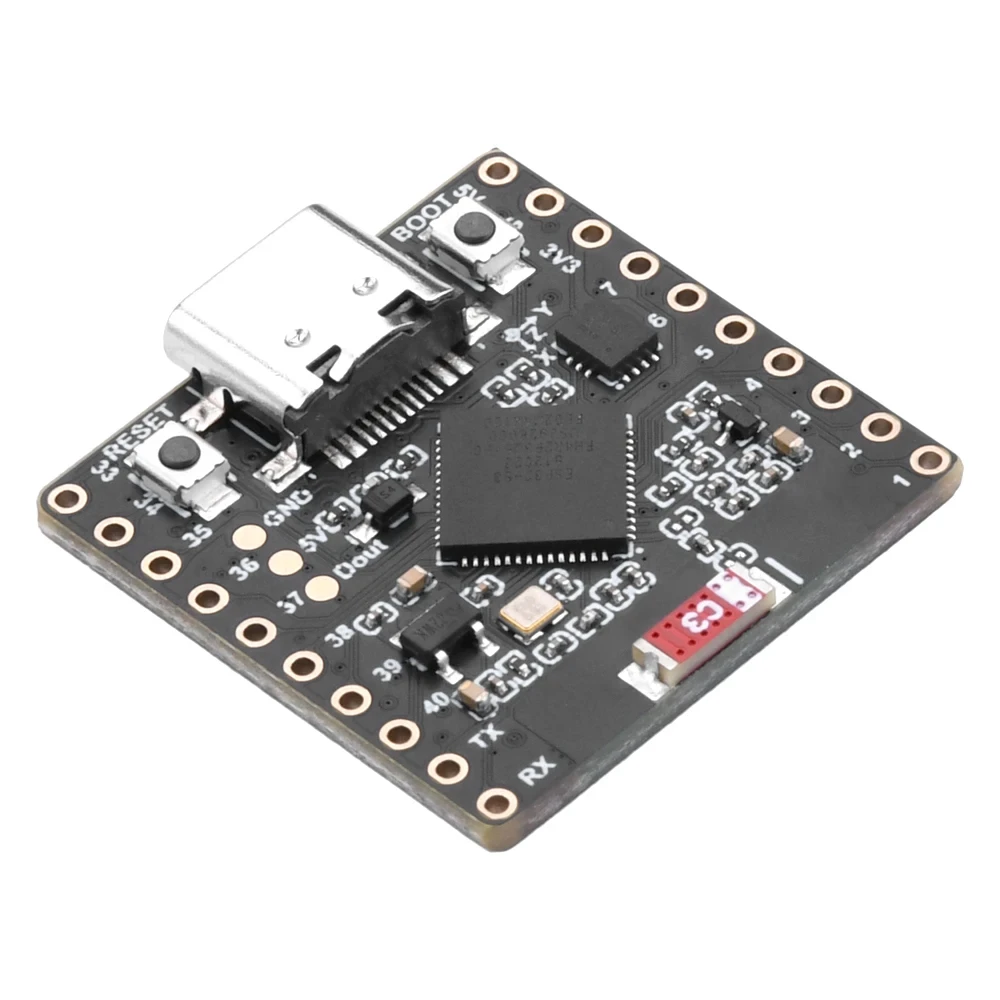
አስደሳች እና ተግባራዊ አፕሊኬሽኖችን ለመፍጠር የESP32-S3 RGB ማትሪክስ ሞጁልን በመጠቀም አሪፍ ፕሮጀክት። ወደ ሌሎች ቪዲዮዎች የሚወስዱ አገናኞች ከዚህ ጽሑፍ በታች ይገኛሉ።
ESP32-S3 RGB LED ማትሪክስ ዋይ-ፋይ + NTP የሰዓት ፕሮጀክት -1 መሰረታዊ ሰዓት
የESP32-S3 የበይነመረብ ሰዓት ከ8×8 NeoMatrix (Wi-Fi + NTP ጊዜ) ጋር
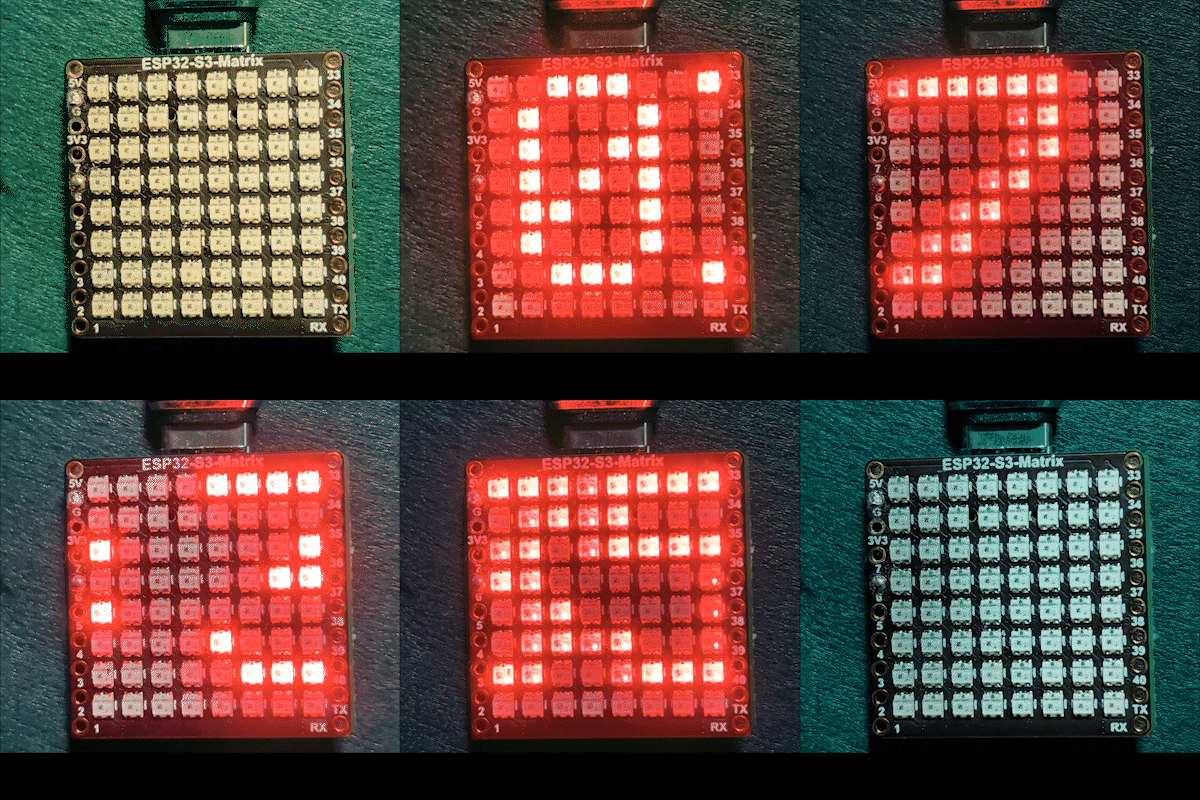
ይህ ፕሮጀክት ESP32-S3 እና 8×8 RGB NeoMatrix (NeoPixel/WS2812) ወደ ትንሽ የበይነመረብ ሰዓት ይለውጣል። ESP32 ከWi-Fi ጋር ይገናኛል፣ የአካባቢውን ጊዜ ከNTP አገልጋይ ያመሳስላል፣ ከዚያም ጊዜውን እንደ HH:MM በ8×8 ማሳያ ላይ ያንቀሳቅሳል።

እንዴት እንደሚሰራ (ከፍተኛ ደረጃ)
1) ESP32-S3 ወደ ራውተርዎ በ<WiFi.h> ይገናኛል።
2) ጊዜውን ከNTP አገልጋይ በ"time.h" እና configTime() ያመሳስላል።
3) ጊዜው እንደ HH:MM ተቀርጾ በትንሽ የጽሑፍ ቋት ውስጥ ይቀመጣል።
4) NeoMatrix ጽሑፉን በ8×8 ፓነል ላይ አቅርቦ ያንቀሳቅሳል።
RGB ቀለም
የሰዓቱ ጽሑፍ ቀለም በRGB (ቀይ፣ አረንጓዴ፣ ሰማያዊ) እሴቶች ይቆጣጠራል፣ እያንዳንዱ የቀለም ቻናል ከ0 እስከ 255 ይደርሳል እና የተለያዩ ጥምረቶች በNeoMatrix ላይ የተለያዩ ቀለሞችን ይፈጥራሉ። color_RED፣ color_GREEN እና color_BLUE ተለዋዋጮችን በማስተካከል የሰዓቱን ገጽታ ወደሚወዱት ማንኛውም ቀለም በቀላሉ ማበጀት ይችላሉ። ለአንድ የተወሰነ ቀለም ትክክለኛዎቹን RGB እሴቶች በፍጥነት ለማግኘት፣ የመስመር ላይ RGB የቀለም መራጭ የቀለም መራጭ መጠቀም ይችላሉ።
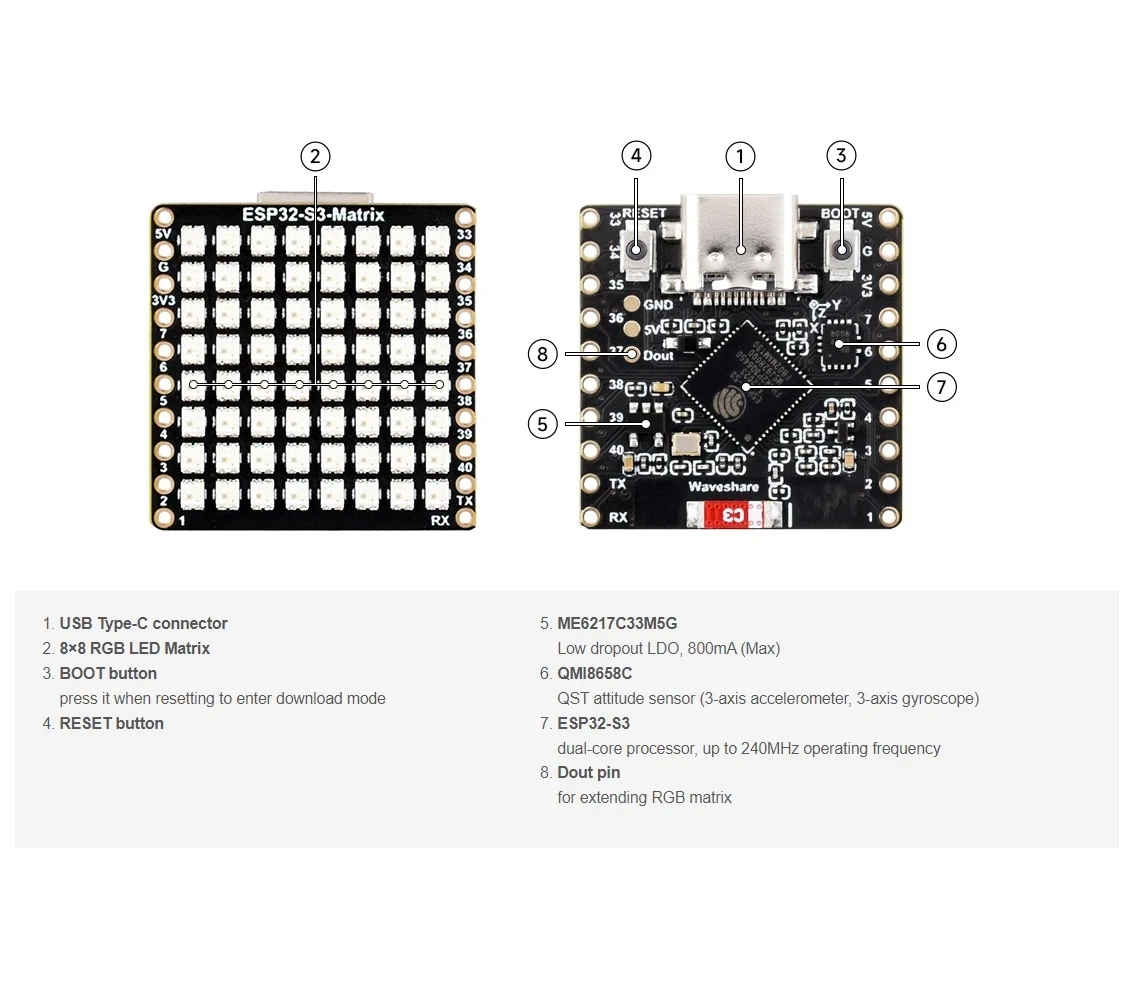
ጥቅም ላይ የዋሉ ቤተ-መጻሕፍት
እነዚህ ማካተቻዎች ስኬቹ በምን ላይ እንደሚደገፍ በትክክል ይነግሩዎታል፦

#include <WiFi.h>
#include "time.h"
#include <Adafruit_GFX.h>
#include <Adafruit_NeoMatrix.h>
#include <Adafruit_NeoPixel.h>
Adafruit NeoMatrix ን በArduino ቤተ-መጻሕፍት አስተዳዳሪ ይጫኑ። እንደ Adafruit GFX Library እና Adafruit NeoPixel ያሉ አስፈላጊ ጥገኞችንም ይጎትታል።
ማርትዕ ያለብዎት አስፈላጊ የተጠቃሚ ቅንብሮች
1) የጽሑፍ ቀለም (RGB)
የሰዓት ጽሑፍ ቀለምዎን በ0–255 እሴቶች ያዘጋጁ፦
//የማሳያውን ቀለም ከቀይ፣ አረንጓዴ እና ሰማያዊ ያዘጋጁ
unsigned int color_RED = 17;
unsigned int color_GREEN = 43;
unsigned int color_BLUE = 171;
እነዚህ እሴቶች እዚህ ጥቅም ላይ ይውላሉ፦
matrix.setTextColor(matrix.Color(color_RED, color_GREEN, color_BLUE));ማስታወሻ፦ ሁሉንም ቀለሞች ወደ 0 (ጥቁር) ካዘጋጁ፣ ጽሑፉ የማይታይ ይሆናል። ስኬቱ የደህንነት ማረጋገጫ ያካትታል፦
pre>// ተጠቃሚው ሁሉንም ቀለሞች ወደ 0 ካዘጋጀ፣ ማሳያው ይጠፋል ስለዚህ አረንጓዴ ያድርጉት
if (color_RED == 0 && color_GREEN == 0 && color_BLUE == 0) {
color_GREEN = 200;
}
ይህ ማትሪክስ በማይታይ የቀለም ቅንብር ምክንያት “የሞተ” እንዳይመስል ያረጋግጣል።
2) የWi-Fi SSID እና የይለፍ ቃል
እነዚህን በእውነተኛ የWi-Fi ስም እና የይለፍ ቃልዎ ይተኩ፦
const char* WIFI_SSID     = "WiFi";
const char* WIFI_PASSWORD = "passW0rd";
በሚነሳበት ጊዜ፣ ESP32 የግንኙነት ሂደትን በSerial Monitor ያትማል እና ከ15 ሰከንድ በኋላ (30 ሙከራዎች × 500ms) ጊዜው ያልቃል።
3) NTP አገልጋይ
ነባሩ NTP አገልጋይ፦
const char* ntpServer = "pool.ntp.org";እንዳለ ማቆየት ይችላሉ። የአካባቢ አገልጋይ መጠቀም ከፈለጉ በኋላ፣ የአስተናጋጅ ስሙን በሚመርጡት NTP አገልጋይ ይተኩ።
4) የሰዓት ሰቅ ማካካሻ እና የቀን ብርሃን ቁጠባ ማካካሻ
እነዚህ ሁለት ቅንብሮች የአካባቢ ጊዜን ይቆጣጠራሉ፦
// ቶሮንቶ-አይነት፡ UTC-5፣ ሲደመር 1 ሰዓት DST
const long  gmtOffset_sec      = -5 * 3600;  // -5 ሰዓታት
const int   daylightOffset_sec = 3600;       // +1 ሰዓት ለDST
እንዴት ማዘጋጀት እንደሚቻል፦
gmtOffset_sec= (የUTC ሰቅ ሰዓታት) × 3600። ምሳሌ፡ UTC-5 →-5*3600፣ UTC+2 →2*3600።daylightOffset_sec= የDST ማስተካከያ ካልፈለጉ0፣ ወይም ክልልዎ በአሁኑ ጊዜ DST (+1 ሰዓት) እየተመለከተ ከሆነ3600።
እነዚህ እዚህ ይተገበራሉ፦
configTime(gmtOffset_sec, daylightOffset_sec, ntpServer);የማሳያ ውቅር
የማትሪክስ ዳታ ፒን
የዳታ ፒን እዚህ ይገለጻል፦
#define MATRIX_PIN 14የእርስዎ ሽቦ የተለየ GPIO የሚጠቀም ከሆነ፣ ይህን ቁጥር በማዛመድ ይቀይሩ።
የNeoMatrix አቀማመጥ + የቀለም ቅደም ተከተል
ማትሪክስዎ እንዲህ ይጀመራል፦
Adafruit_NeoMatrix matrix(8, 8, MATRIX_PIN,
  NEO_MATRIX_TOP    + NEO_MATRIX_LEFT +
  NEO_MATRIX_ROWS   + NEO_MATRIX_PROGRESSIVE,
  NEO_RGB           + NEO_KHZ800);
ማሳያው “የተሳሳተ” እንዲመስል የሚያደርጉ ሁለት የተለመዱ ምክንያቶች፦
- ማሽከርከር / የሽቦ አቅጣጫ፦ ጽሑፉ ተገልብጦ ወይም የተንጸባረቀ ከሆነ፣ የ
NEO_MATRIX_*ባንዲራዎችን (TOP/BOTTOM፣ LEFT/RIGHT፣ ROWS/COLUMNS፣ PROGRESSIVE/ZIGZAG) ያስተካክሉ። - የቀለም ቅደም ተከተል፦ ይህ ኮድ
NEO_RGBይጠቀማል። አንዳንድ ፓነሎችNEO_GRBናቸው። ቀይ/አረንጓዴ/ሰማያዊ የማይዛመዱ ከሆነ፣NEO_RGBን ወደ ትክክለኛው ቅደም ተከተል ይቀይሩ።
ብሩህነት
ብሩህነት በinitMatrix() ውስጥ ይዘጋጃል፦
matrix.setBrightness(40);ለብሩህ ማሳያ ይጨምሩ፣ ሙቀትን እና የኃይል ፍጆታን ለመቀነስ ይቀንሱ።
ጊዜው እንደ HH:MM እንዴት እንደሚፈጠር
ሰዓቱ የተቀረጸውን ጊዜ በ6-ቁምፊ ቋት ውስጥ ያከማቻል፦
char timeText[6] = "00:00";ከዚያም updateTimeText() ከNTP ጋር የተመሳሰለ የአካባቢ ሰዓት ያነባል እና ጽሑፉን ይጽፋል፦
// ቅርጸት HH:MM
snprintf(timeText, sizeof(timeText), "%02d:%02d",
         timeinfo.tm_hour,
         timeinfo.tm_min);
ይህ በዋናው ሉፕ ውስጥ በሰከንድ አንድ ጊዜ ይዘምናል።
በ8×8 ማሳያ ላይ ማሸብለል እንዴት እንደሚሰራ
የ8×8 ማትሪክስ HH:MMን በአንድ ጊዜ ለማሳየት በጣም ጠባብ ነው፣ ስለዚህ ስኬችው ጽሑፉን ያሸብልላል። ሰዓቱን በሚቀየር የX ቦታ (scrollX) ላይ ይሳሉታል፣ ከዚያም በእያንዳንዱ ዝማኔ በአንድ ፒክሰል ወደ ግራ ያንቀሳቅሱታል።
int16_t scrollX = 8;
const uint16_t scrollIntervalMs = 120;
እያንዳንዱ የማሸብለል እርምጃ፦
matrix.fillScreen(0);
matrix.setCursor(scrollX, 0);
matrix.print(timeText);
matrix.show();
scrollX--;
ጽሑፉ ሙሉ በሙሉ ከግራ ጎን ሲወጣ፣ ኮዱ ከቀኝ ጠርዝ እንደገና ለመጀመር ይመልሰዋል፦
int16_t textWidth = 30;
if (scrollX < -textWidth) {
  scrollX = matrix.width();
}
የሴሪያል ሞኒተር ውጤት (ማረም)
ይህ ስኬች ጠቃሚ መልዕክቶችን ያትማል፦
- የWi-Fi ግንኙነት ሂደት እና የIP አድራሻ
- የሰዓት ማመሳሰል ተሳክቶ እንደሆነ
- የተቀረጸው የሰዓት ሕብረቁምፊ (ለምሳሌ፣
Time text: 14:32)
ማሳያው ባዶ ከሆነ፣ Wi-Fi እና NTP እየሰሩ መሆናቸውን ለማረጋገጥ ሴሪያል ሞኒተሩ መፈተሽ ያለበት የመጀመሪያ ቦታ ነው።
የፕሮጀክት ማሳያ
ከመጫን እና ከማብራት በኋላ፦
- ESP32 ከWi-Fi ጋር ይገናኛል
- ከ
pool.ntp.orgሰዓት ያመሳስላል - በማትሪክሱ ላይ
OKን በአጭሩ ያሳያል - የአሁኑን ሰዓት እንደ
HH:MMያለማቋረጥ ያሸብልላል
ውርዶች እና አገናኞች
ሙሉ ኮዱ ከዚህ ጽሑፍ በታች ቀርቧል። ክፍሎች፣ መሳሪያዎች እና የዳታሼቶች አገናኞችም ከዚህ ጽሑፍ በታች ተያይዘዋል።
ምስሎች
This tutorial is part of: ESP32-S3 RGB LED ማትሪክስ
- ESP32-S3 RGB LED ማትሪክስ ፕሮጀክት 1- መሰረታዊ ነጥብ
- የESP32-S3 RGB LED ማትሪክስ ፕሮጀክት 2 - የሚንቀሳቀስ ጽሑፍ
- የESP32-S3 RGB LED ማትሪክስ ፕሮጀክት 3 - ከሞባይል ስልክ የሚመጣ ጽሑፍ
- ESP32-S3 RGB LED ማትሪክስ ፕሮጀክት 4 - ዘንበል ነጥብ
- ESP32-S3 RGB LED ማትሪክስ ፕሮጀክት 5 - ቀስት ሁልጊዜ ወደ ላይ
- የESP32-S3 RGB LED ማትሪክስ ፕሮጀክት 6 - ሲብል ጨዋታ
- የESP32-S3 RGB LED ማትሪክስ የበይነመረብ ሰዓት ፕሮጀክት - 2 ሰዓት ባለብዙ ቀለም ጊዜ እና ቀን ማሳያ
- የESP32-S3 RGB LED ማትሪክስ የበይነመረብ ሰዓት ፕሮጀክት - 3 የምሽት ቀለም ከቀን ጋር
- የESP32-S3 RGB LED ማትሪክስ የበይነመረብ ሰዓት ፕሮጀክት - 5 የቀስተ ደመና ቀለም
- የESP32-S3 RGB LED ማትሪክስ የበይነመረብ ሰዓት ፕሮጀክት - 4 የዘፈቀደ ቀለም
- ESP32-S3 RGB LED Matrix test for RGB, GRB setting
/*
This is ESP32 sketch that connects to the internet, gets the time and displays it on the RGB matrix
you must set your WiFi correctly to make sure it gets connected.
 watch video https://youtube.com/shorts/4iWjLiD7fS8
 📚⬇️ Download and resource page https://robojax.com/RJT838
 * Author:  Ahmad Shamshiri (Robojax.com)
 * Date: 07 Jan 2026
www.Robojax.com
https://youTube.com/@robojax


*/
#include <WiFi.h>
#include "time.h"
#include <Adafruit_GFX.h>
#include <Adafruit_NeoMatrix.h>
#include <Adafruit_NeoPixel.h>

//set the color of diplay make of Red, Green and Blue
unsigned int color_RED = 17;
unsigned int color_GREEN = 43;
unsigned int color_BLUE = 171;

// 👇 REPLACE these with your real home WiFi name & password
const char* WIFI_SSID     = "WiFi";
const char* WIFI_PASSWORD = "passW0rd";


#define MATRIX_PIN 14

Adafruit_NeoMatrix matrix(8, 8, MATRIX_PIN,
  NEO_MATRIX_TOP    + NEO_MATRIX_LEFT +
  NEO_MATRIX_ROWS   + NEO_MATRIX_PROGRESSIVE,
  NEO_RGB           + NEO_KHZ800);

char timeText[6] = "00:00";
int16_t scrollX = 8;
unsigned long lastScrollMs = 0;
const uint16_t scrollIntervalMs = 120;

unsigned long lastTimeUpdateMs = 0;
const uint16_t timeUpdateIntervalMs = 1000;

//prototypes
bool updateTimeText();  // forward declaration
void scrollTime();      // forward declaration


// NTP (time) server
const char* ntpServer = "pool.ntp.org";

// Toronto-ish: UTC-5, plus 1 hour DST
const long  gmtOffset_sec     = -5 * 3600;  // -5 hours
const int   daylightOffset_sec = 3600;      // +1 hour for DST


bool updateTimeText() {
  struct tm timeinfo;
  if (!getLocalTime(&timeinfo)) {
    Serial.println("Failed to obtain time for display");
    return false;
  }

  // Format HH:MM
  snprintf(timeText, sizeof(timeText), "%02d:%02d",
           timeinfo.tm_hour,
           timeinfo.tm_min);

  Serial.print("Time text: ");
  Serial.println(timeText);
  return true;
}

void scrollTime() {
  matrix.fillScreen(0);
  matrix.setCursor(scrollX, 0);
  matrix.print(timeText);
  matrix.show();

  scrollX--;

  // Rough width: 5 characters ("HH:MM") × 6 pixels each ≈ 30 px
  int16_t textWidth = 30;
  if (scrollX < -textWidth) {
    scrollX = matrix.width();  // reset to right edge (8)
  }
}


void initMatrix() {
  matrix.begin();
  matrix.setBrightness(40);        // be careful with heat
  matrix.setTextWrap(false);
  matrix.setTextColor(matrix.Color(color_RED, color_GREEN, color_BLUE)); // color of text
}

void showMessage(const char* msg) {
  matrix.fillScreen(0);
  matrix.setCursor(0, 0);  // top-left
  matrix.print(msg);
  matrix.show();
}


void printLocalTime() {
  struct tm timeinfo;
  if (!getLocalTime(&timeinfo)) {
    Serial.println("Failed to obtain time");
    return;
  }
  // Format: 2025-11-18 14:35:12
  Serial.printf("%04d-%02d-%02d %02d:%02d:%02d\n",
                timeinfo.tm_year + 1900,
                timeinfo.tm_mon + 1,
                timeinfo.tm_mday,
                timeinfo.tm_hour,
                timeinfo.tm_min,
                timeinfo.tm_sec);
}

void setup() {
  Serial.begin(115200);
  delay(1000);
  Serial.println();
  Serial.println("ESP32-S3 Internet Clock - WiFi + NTP test");

  // Connect to WiFi
  Serial.print("Connecting to WiFi: ");
  Serial.println(WIFI_SSID);
  WiFi.mode(WIFI_STA);
  WiFi.begin(WIFI_SSID, WIFI_PASSWORD);

  int retries = 0;
  while (WiFi.status() != WL_CONNECTED && retries < 30) { // ~15s timeout
    delay(500);
    Serial.print(".");
    retries++;
  }
  Serial.println();

  if (WiFi.status() != WL_CONNECTED) {
    Serial.println("WiFi connection FAILED");
  } else {
    Serial.print("WiFi connected. IP: ");
    Serial.println(WiFi.localIP());
  }

// if user set all colors to 0, the dispaly will be turned off so set it green
  if(color_RED ==0 & color_GREEN ==0 && color_BLUE ==0)
  {
    color_GREEN = 200;
  }

  // Configure time via NTP
  configTime(gmtOffset_sec, daylightOffset_sec, ntpServer);
  Serial.println("Waiting for time...");
  delay(2000); // small wait for initial sync

  printLocalTime(); // print once at startup

    // NEW: init the LED matrix and show a test message
  initMatrix();
  showMessage("OK");
}

void loop() {
  unsigned long now = millis();

  // Update the time string "HH:MM" once per second
  if (now - lastTimeUpdateMs >= timeUpdateIntervalMs) {
    lastTimeUpdateMs = now;
    updateTimeText();  // fills timeText[], e.g. "14:32"
  }

  // Scroll the time across the 8×8 every scrollIntervalMs
  if (now - lastScrollMs >= scrollIntervalMs) {
    lastScrollMs = now;
    scrollTime();      // uses timeText and scrollX
  }
}
እንደሚያስፈልግዎት ይችላል
-
አማዞን
-
ኢቤይ
-
አሊኤክስፕሬስPurchase ESP32-S3 RGB Matrix from AliExpresss.click.aliexpress.com
-
አሊኤክስፕሬስPurchase ESP32-S3 RGB Matrix from AliExpress (2)s.click.aliexpress.com
ምንጮች እና ምንጮች
-
ቪዲዮ
ፋይሎች📁
ፍሪትዚንግ ፋይል
-
esp32-S3-supermini-tht fritzing part
esp32-S3-supermini-tht.fzpz0.02 MB