Ikẹkọ yii jẹ apakan ti: Matrix LED ESP32-S3 RGB
Iṣẹ́ àkànṣe láti ṣẹ̀dá fún àwọn ohun èlò ìgbádùn àti ìwúlò nípa lílo module ESP32-S3 RGB Matrix. Àwọn ìjápọ̀ sí àwọn fídíò mìíràn wà ní ìsàlẹ̀ àpilẹ̀kọ yìí.
Iṣẹ́ ESP32-S3 RGB LED Matrix Project 6 - Ere Cible
// Buzzer pin (optional)
int buzzerPin = -1;   // set to -1 to disable
If you connect a buzzer, set the pin number and the code will beep on each hit.
Project 6 – Full Code (Target Game)
The complete code is loaded below. It includes all the settings above and is ready to compile and upload.
How to Play
- Upload the code to your ESP32-S3 module.
- Hold the board flat in front of you.
- Tilt the board left/right/forward/back to move the dot.
- Guide the dot into the circle to score a hit.
- Watch the color change (and hear the buzzer if connected).
That’s it—a complete, self-contained balance game on a tiny RGB matrix.
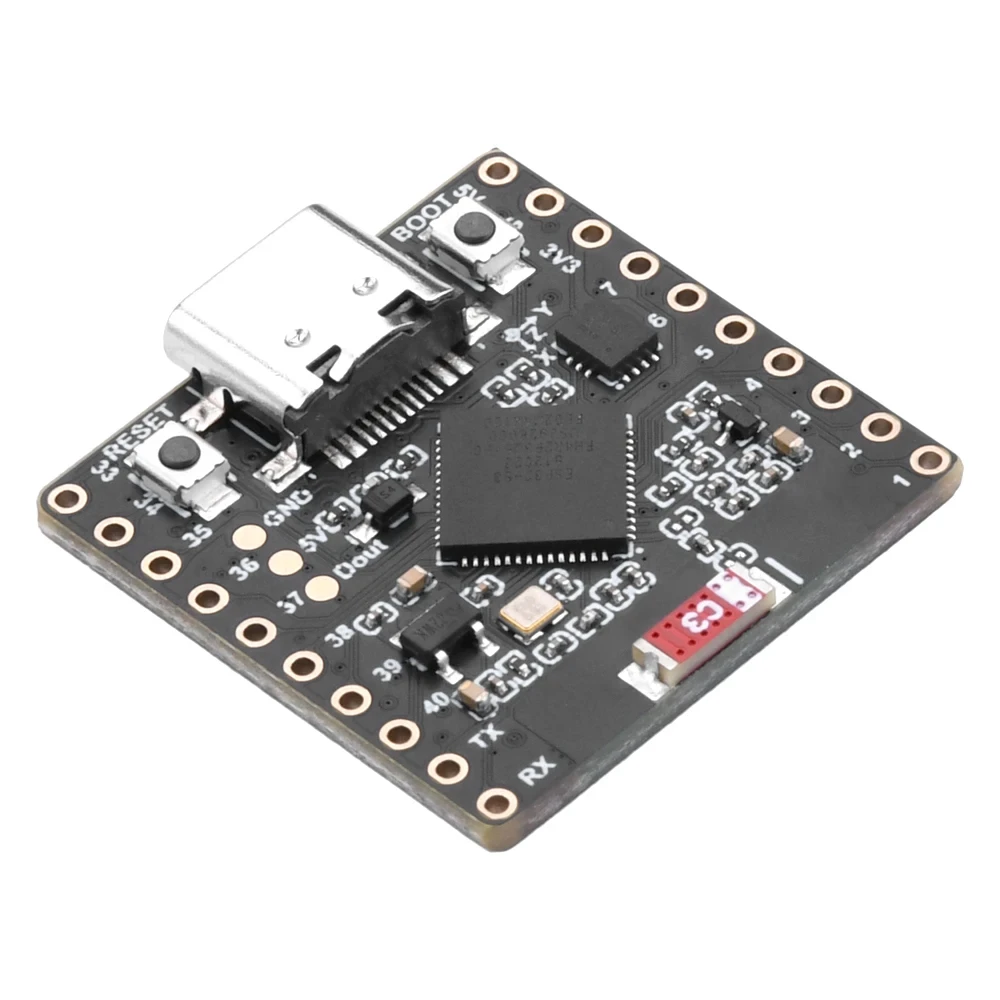
Buy the Module
If you don’t have the ESP32-S3 RGB LED Matrix module yet, you can purchase one using the affiliate links below. These links help support this channel at no extra cost to you.
Affiliate links appear here.

Conclusion
Project 6 wraps up the series with a fun, hands-on demonstration of accelerometer-based control. You now have a complete set of examples—from basic LED control to interactive games—all running on the same tiny board. If you enjoyed this series, consider subscribing for more embedded projects.
// Buzzer pin (àṣàyàn)
int buzzerPin = 6;      // so buzzer + sí pin 6, – sí GND
bool useBuzzer = true;  // ṣeto irọrun lati pa ohun dùn
Ti o ko ba so buzzer kan, ṣeto useBuzzer = false; ni irọrun.
Àkópọ̀
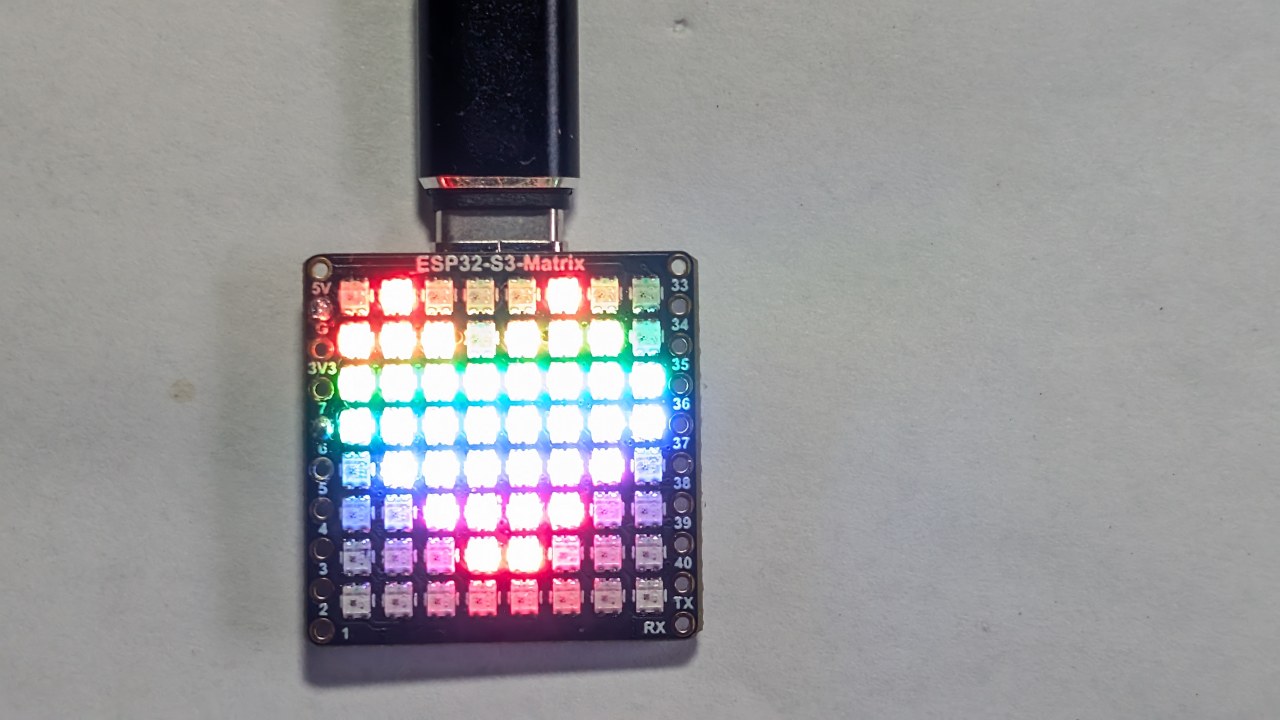
Iṣẹ́ 6 ṣàkópọ̀ ohun gbogbo tí a kọ́ láti àwọn iṣẹ́ tẹ́lẹ̀: yíya matrix, ìgbéwọlé accelerometer, ìṣàkóso àwọ̀, ìmúdùn gbígbé, àti ohun àṣàyàn. Gbígbé pákó náà máa ń gbé àmì-ọ̀nà, àti kíkọlu ìyípo náà máa ń yí àwọ̀ rẹ̀ padà àti (àṣàyàn) máa ń mú ohun beep jáde. Ó jẹ́ ìfihàn ìgbádùn ti ìmọ̀-ìgbé lórí àfihàn RGB tí kò tóbi.
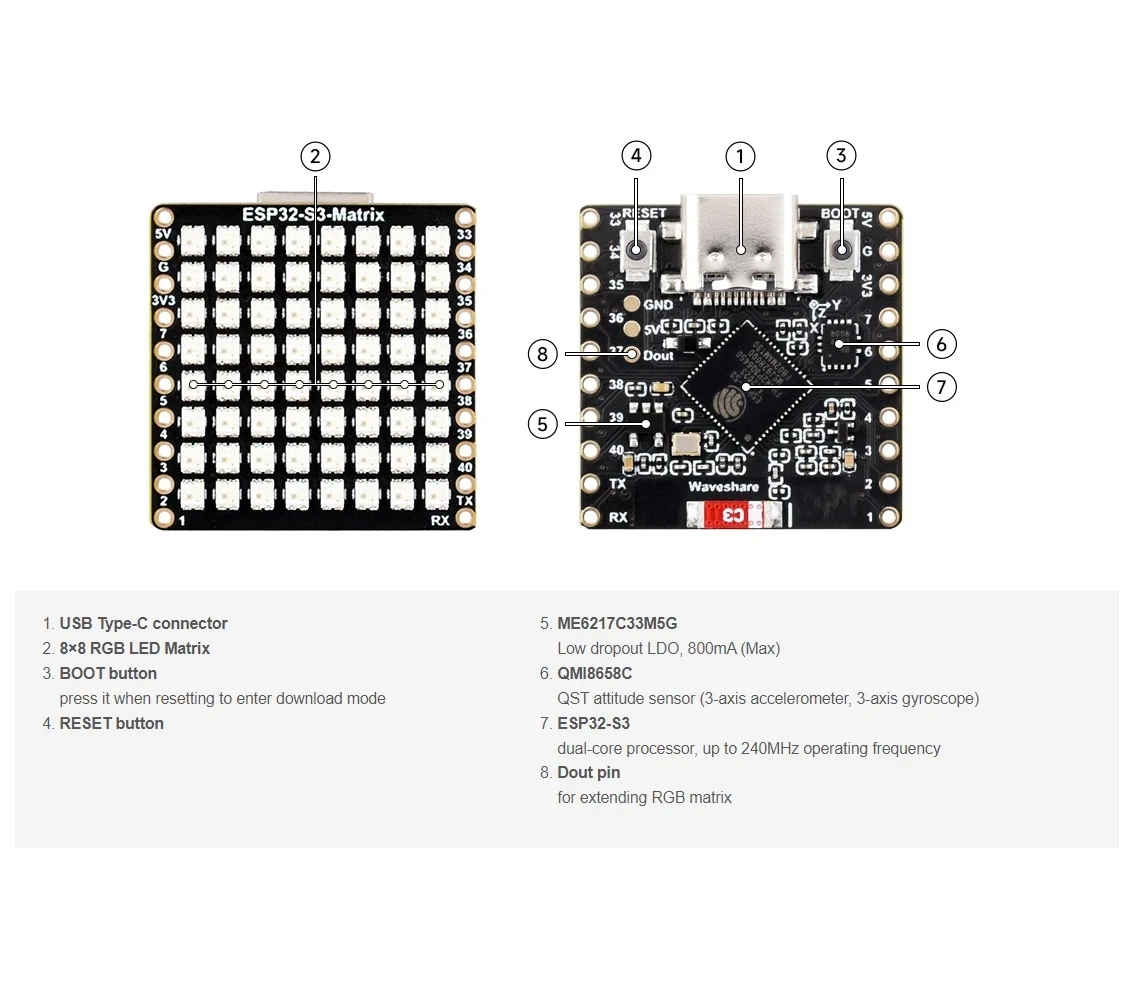
Kódù “Target Game” kíkún ni a fi hàn ní àìdábọ̀ nísàlẹ̀ àpilẹ̀kọ yìí. O tún lè wo apá Iṣẹ́ 6 ti fídíò náà láti rí bí àmì-ọ̀nà ṣe ń gbé àti bí a ṣe ń rí àwọn kíkọlu. Bí o bá fẹ́ kọ́ eré tìrẹ, àwọn ọ̀nà àjọṣepọ̀ fún rírí modulu ESP32-S3 RGB LED Matrix wà nísàlẹ̀ apá kódù náà.
Aworan

Ikẹkọ yii jẹ apakan ti: Matrix LED ESP32-S3 RGB
- Iṣẹ́ ESP32-S3 RGB LED Matrix 1- Àmì-ojú ìpilẹ̀ṣẹ̀
- Iṣẹ́ ESP32-S3 RGB LED Matrix Project 2 - Ọ̀rọ̀ Tí Ń Rìn
- Iṣẹ́ ESP32-S3 RGB LED Matrix Project 3 - Ọ̀rọ̀ láti fóónù alágbèéká
- Iṣẹ́ ESP32-S3 RGB LED Matrix Project 4 - Tilt dot
- Iṣẹ́ ESP32-S3 RGB LED Matrix Project 5 - Ọfà tí ó máa ń tọ́ka sí òkè nígbà gbogbo
- Iṣẹ́ Aago ESP32-S3 RGB LED Matrix Wi-Fi + NTP - 1 Aago Ìpìlẹ̀
- Iṣẹ́ Aago Internet Matrix LED RGB ESP32-S3 - Àfihàn Aago àti Ọjọ́ ní Àwọ̀ púpọ̀ 2
- Iṣẹ́ Aago Internet Matrix LED RGB ESP32-S3 - Àwọ̀ Alẹ́ 3 pẹ̀lú Ọjọ́
- Iṣẹ́ Aago Internet Matrix LED RGB ESP32-S3 - Àwọ̀ Òṣùwọ̀n 5
- Iṣẹ́ Aago Nẹ́tíwọọkì ESP32-S3 RGB LED Matrix - Àwọ̀ àìròtẹ́lẹ̀ mẹ́rin
- ESP32-S3 RGB LED Matrix test for RGB, GRB setting
/*
  Project 6: Tilt Circle Game – ESP32-S3 RGB LED Matrix (Waveshare)

  This sketch reads tilt from the QMI8658C IMU and smoothly moves a dot
  on the 8×8 RGB LED matrix based on board orientation.

  ▶️ Video Tutorial:
  https://youtu.be/JKLuYrRcLMI

  📚⬇️ Resources & Code Page:
  https://robojax.com/RJT829

  QMI8658_RGB_2
*/

#include <Arduino.h>
#include <math.h>

#include <Adafruit_GFX.h>
#include <Adafruit_NeoMatrix.h>
#include <Adafruit_NeoPixel.h>

#include <QMI8658.h>   // by Lahav Gahali

// -------- LED MATRIX SETUP --------
#define MATRIX_PIN    14
#define MATRIX_WIDTH  8
#define MATRIX_HEIGHT 8

// Buzzer pin – change this to your actual buzzer GPIO.
const int BUZZER_PIN = 6;   // TODO: set to your buzzer pin

// Matrix brightness (0–255)
const uint8_t MATRIX_BRIGHTNESS = 10;

Adafruit_NeoMatrix matrix = Adafruit_NeoMatrix(
  MATRIX_WIDTH, MATRIX_HEIGHT, MATRIX_PIN,
  NEO_MATRIX_TOP + NEO_MATRIX_LEFT +
  NEO_MATRIX_ROWS + NEO_MATRIX_PROGRESSIVE,
  NEO_GRB + NEO_KHZ800
);

// -------- IMU SETUP --------
QMI8658 imu;

// -------- GAME CONFIG --------

// How often the dot is allowed to move (ms).
// Bigger = slower movement.
const uint16_t MOVE_INTERVAL_MS = 150;   // try 120–250

// How much tilt (m/s^2) before the dot moves.
// Increase if it feels too sensitive.
const float ACC_TILT_THRESHOLD = 2.0f;   // about ~0.2 g

// Dot base color (RGB)
const uint8_t DOT_R = 255;
const uint8_t DOT_G = 255;
const uint8_t DOT_B = 255;


// Circle geometry (centered on 8x8)
const float CIRCLE_CENTER_X = (MATRIX_WIDTH - 1) / 2.0f;   // 3.5
const float CIRCLE_CENTER_Y = (MATRIX_HEIGHT - 1) / 2.0f;  // 3.5
const float CIRCLE_RADIUS   = 3.0f;
const float CIRCLE_THICKNESS = 0.8f; // +- thickness around radius

// -------- GAME STATE --------

// Dot position on the 8x8 grid (0..7)
int dotX = 3;
int dotY = 3;

// Colors (16-bit NeoMatrix colors)
uint16_t dotColor;
uint16_t circleColor;

// To detect “just touched circle” vs “still on circle”
bool wasOnCircle = false;

// Timer for rate-limiting movement
unsigned long lastMoveTime = 0;

// -------- HELPER FUNCTIONS --------

// Classic NeoPixel color wheel (0-255 -> rainbow)
uint16_t wheel(byte pos) {
  if (pos < 85) {
    return matrix.Color(pos * 3, 255 - pos * 3, 0);
  } else if (pos < 170) {
    pos -= 85;
    return matrix.Color(255 - pos * 3, 0, pos * 3);
  } else {
    pos -= 170;
    return matrix.Color(0, pos * 3, 255 - pos * 3);
  }
}

// Is a given pixel approximately on the circle?
bool isOnCircle(int x, int y) {
  float dx = x - CIRCLE_CENTER_X;
  float dy = y - CIRCLE_CENTER_Y;
  float d2 = dx * dx + dy * dy;

  float rMin = CIRCLE_RADIUS - CIRCLE_THICKNESS;
  float rMax = CIRCLE_RADIUS + CIRCLE_THICKNESS;

  return (d2 >= rMin * rMin) && (d2 <= rMax * rMax);
}

// Draw circle + dot
void drawScene() {
  matrix.fillScreen(0);

  // Draw circle
  for (int y = 0; y < MATRIX_HEIGHT; y++) {
    for (int x = 0; x < MATRIX_WIDTH; x++) {
      if (isOnCircle(x, y)) {
        matrix.drawPixel(x, y, circleColor);
      }
    }
  }

  // Draw dot (on top)
  matrix.drawPixel(dotX, dotY, dotColor);

  matrix.show();
}

// Simple blocking beep (short)
void buzzOnce() {
  digitalWrite(BUZZER_PIN, HIGH);
  delay(40);
  digitalWrite(BUZZER_PIN, LOW);
}

// Use accelerometer to decide dot movement
void updateDotFromTilt(float ax, float ay) {
  unsigned long now = millis();
  if (now - lastMoveTime < MOVE_INTERVAL_MS) {
    return; // too soon, wait
  }

  int dx = 0;
  int dy = 0;

  // On this board, Y tilt feels like "left/right" on the matrix,
  // and X tilt feels like "up/down" → so we swap.

  // --- Horizontal movement from AY (tilt left/right) ---
  if (ay > ACC_TILT_THRESHOLD) {
    dx = 1;   // tilt to the right → move dot to the right
  } else if (ay < -ACC_TILT_THRESHOLD) {
    dx = -1;  // tilt to the left → move dot to the left
  }

  // --- Vertical movement from AX (tilt forward/back) ---
  // This was inverted. We flip the signs:
  // ax >  threshold  = tilt "forward" (away)  → move dot UP  (dy = -1)
  // ax < -threshold  = tilt "back"    (toward)→ move dot DOWN(dy =  1)
  if (ax > ACC_TILT_THRESHOLD) {
    dy = -1;  // was +1 before
  } else if (ax < -ACC_TILT_THRESHOLD) {
    dy = 1;   // was -1 before
  }

  if (dx != 0 || dy != 0) {
    dotX = constrain(dotX + dx, 0, MATRIX_WIDTH  - 1);
    dotY = constrain(dotY + dy, 0, MATRIX_HEIGHT - 1);
    lastMoveTime = now;
  }
}


// -------- SETUP & LOOP --------

void setup() {
  Serial.begin(115200);
  delay(100);

  // Matrix init
  matrix.begin();
  matrix.setBrightness(MATRIX_BRIGHTNESS);
  matrix.fillScreen(0);
  matrix.show();

  // Buzzer init
  pinMode(BUZZER_PIN, OUTPUT);
  digitalWrite(BUZZER_PIN, LOW);

  // IMU init
if (!imu.begin(11, 12)) {
    Serial.println("Failed to initialize QMI8658!");
    while (1) {
      delay(100);
    }
  }

  // Use m/s^2 and dps (optional, but nice)
  imu.setAccelUnit_mps2(true);
  imu.setGyroUnit_dps(true);
  imu.setDisplayPrecision(3);

  Serial.println("QMI8658 initialized.");

  // Game initial state
  randomSeed((uint32_t)micros());

  dotX = MATRIX_WIDTH  / 2;
  dotY = MATRIX_HEIGHT / 2;

  dotColor    = matrix.Color(DOT_R, DOT_G, DOT_B);
  circleColor = wheel(random(256));

  drawScene();
}

void loop() {
  // Read accelerometer
  float ax, ay, az;
  if (imu.readAccelMPS2(ax, ay, az)) {
    // Debug if needed:
    // Serial.print("AX: "); Serial.print(ax);
    // Serial.print("  AY: "); Serial.print(ay);
    // Serial.print("  AZ: "); Serial.println(az);

    updateDotFromTilt(ax, ay);
  }

  // Check collision with circle
  bool onCircle = isOnCircle(dotX, dotY);
  if (onCircle && !wasOnCircle) {
    // Just touched circle: change color + beep
    circleColor = wheel(random(256));
    buzzOnce();
  }
  wasOnCircle = onCircle;

  // Redraw
  drawScene();

  // Small delay so we don’t hammer I2C too hard
  delay(10);
}
Ohun ti o le nilo
-
Amazon
-
eBay
-
AliExpressPurchase ESP32-S3 RGB matrix from AliExpresss.click.aliexpress.com
-
AliExpressPurchase ESP32-S3 RGB matrix from AliExpress (2)s.click.aliexpress.com
Orisun & itọkasi
-
Ináàbò🎨 Color picker Toolrobojax.com
Fáìlìs📁
Fayile Fritzing
-
esp32-S3-supermini-tht fritzing apakan
esp32-S3-supermini-tht.fzpz0.02 MB