DHT11, DHT22를 TM1637 디스플레이 및 릴레이와 함께 사용하여 AC 부하를 제어합니다.
이 프로젝트는 Arduino, DHT11/DHT22 온습도 센서, TM1637 디스플레이, 그리고 AC 부하를 제어하는 릴레이를 사용하여 온도 제어 시스템을 구축하는 방법을 보여줍니다. 이 구성은 매우 다재다능하며 다양한 응용 분야에 적용할 수 있습니다. 예를 들어, 다음과 같은 것을 만들 수 있습니다:


- 온도 판독값에 따라 히터나 팬을 자동으로 조절하는 소규모 온실용 스마트 온도조절기.
- 화학 공정에서 액체의 온도를 모니터링하고 제어하는 시스템.
- 파충류 사육장용 자동 온도 제어 시스템.
- 특정 임계값에 도달하면 경고를 트리거하는 온도 활성화 경보 시스템.
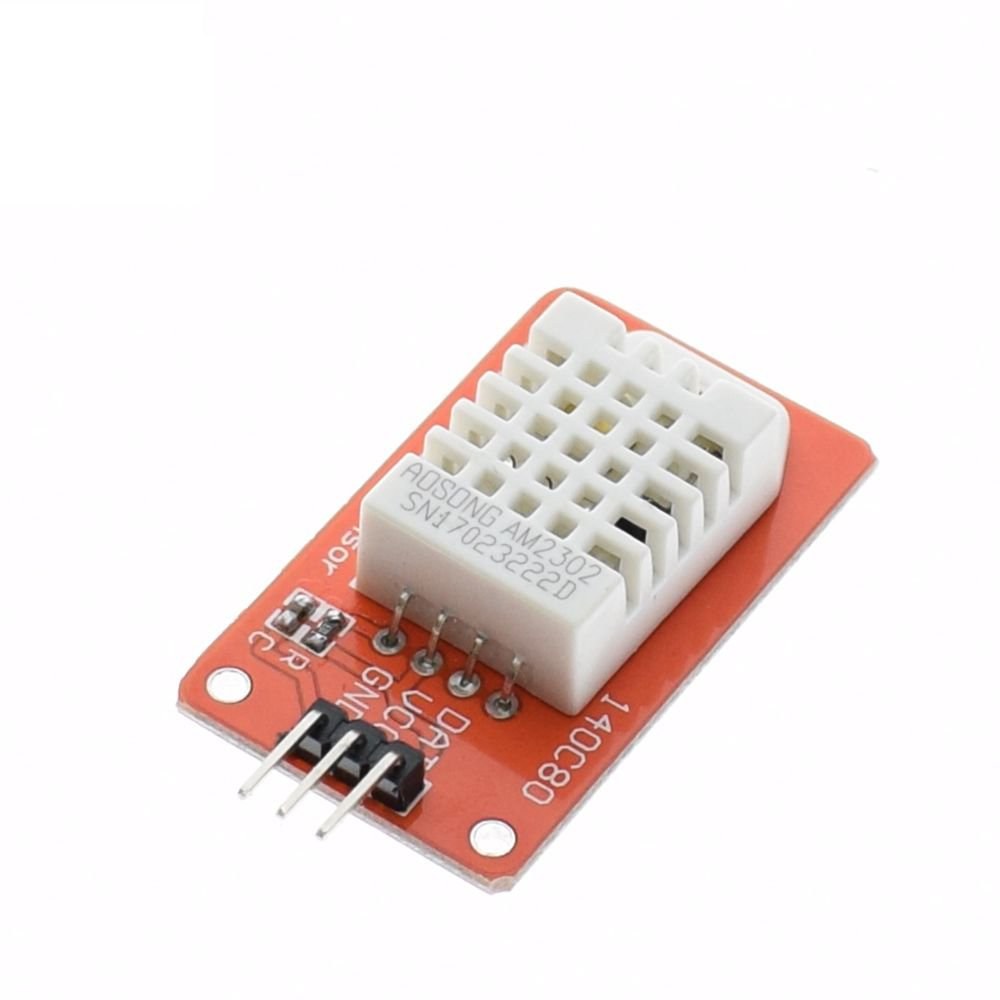
이 시스템은 DHT11 또는 DHT22 센서를 사용하여 온도와 습도를 측정합니다(비디오 00:11). TM1637 디스플레이는 현재 온도를 표시하고(비디오 00:17), 릴레이는 사전 정의된 온도 설정에 따라 AC 부하(예: 조명, 팬, 히터)를 켜거나 끕니다(비디오 00:23).
하드웨어/부품
이 프로젝트를 구축하려면 다음 구성 요소가 필요합니다:
- Arduino Uno(또는 호환 보드)
- DHT11 또는 DHT22 온습도 센서(비디오 00:11)
- TM1637 디스플레이 모듈(비디오 00:17)
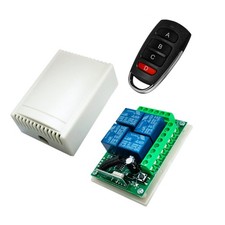
- 릴레이 모듈(비디오 00:19)
- 점퍼 와이어
- 브레드보드
- AC 부하(예: 소형 전구 또는 팬)
배선 가이드
배선은 간단하지만 프로젝트의 기능에 중요합니다. 시각적 가이드는 비디오를 참조하세요.

자세한 배선 지침과 다이어그램은 비디오(02:03~05:18)에서 확인할 수 있습니다. DHT 센서(비디오 01:44), TM1637 디스플레이(비디오 02:25), 릴레이 모듈(비디오 03:37)의 연결에 특히 주의하세요.
코드 설명
Arduino 코드는 TM1637Display 및 DHT 센서 라이브러리라는 두 개의 라이브러리를 사용합니다. Arduino IDE에 이러한 라이브러리를 설치해야 합니다. 코드에서 가장 중요한 구성 가능한 부분은 다음과 같습니다:
// 모듈 연결 핀(디지털 핀)
#define CLK 2
#define DIO 3
// 테스트 사이의 시간(밀리초)
#define TEST_DELAY   1000
// ****** TM1637 디스플레이 코드 끝

#define DHTPIN 9     // 연결된 디지털 핀
#define DHTTYPE DHT22   // DHT 22 (AM2302), AM2321
#define RELAY 7 // 릴레이에 연결된 핀
#define 문을 사용하면 TM1637 디스플레이(CLK 및 DIO), DHT 센서(DHTPIN), 릴레이(RELAY)의 핀 할당을 배선에 맞게 쉽게 변경할 수 있습니다. DHTTYPE은 사용 중인 DHT 센서(DHT11 또는 DHT22)를 정의합니다. TEST_DELAY 변수는 판독 사이의 시간을 제어합니다.
getTemp() 함수는 DHT 센서에서 온도 및 습도 데이터를 읽는 데 사용되는 사용자 정의 함수입니다. 문자열 인수를 전달하여 다양한 데이터 유형(섭씨, 화씨, 습도, 열지수)을 요청할 수 있습니다(비디오 09:01~10:34). 예: getTemp("c")는 섭씨 온도를 반환하고, getTemp("h")는 습도를 반환합니다.
if(temp >50 )
 {
  digitalWrite(RELAY, LOW);
 }else{
  digitalWrite(RELAY, HIGH);
 }
이 코드 섹션은 온도에 따라 릴레이를 제어합니다. 임계값(이 예에서는 50)을 수정하여 트리거 지점을 조정하세요(비디오 09:44~10:11).
라이브 프로젝트/데모
프로젝트의 전체 데모는 비디오(00:51~01:07)에서 확인할 수 있습니다. 비디오는 시스템이 작동하는 모습을 보여주며, TM1637 디스플레이에 온도를 표시하고 온도 판독값에 따라 AC 부하를 제어합니다.
챕터
- [00:06] 소개 및 프로젝트 개요
- [01:12] 코드 가용성 및 추가 리소스
- [01:44] DHT 센서 배선
- [02:25] TM1637 디스플레이 배선
- [02:50] AC 부하 및 릴레이 배선
- [04:33] 릴레이 핀 및 전원 연결
- [05:29] 라이브러리 설치
- [05:52] 코드 설명: TM1637 섹션
- [06:47] 코드 설명: DHT 섹션
- [07:50] 코드 설명: 릴레이 및 설정
- [08:26] 코드 설명: 루프 및 온도 제어
- [10:12] getTemp() 함수 설명
이미지


/*
 * Original code from TM1637 https://github.com/avishorp/TM1637
 * Original code and library for DHT22 https://github.com/adafruit/DHT-sensor-library
 * Watch the video for this code https://youtu.be/xD8wHXDzLkQ
 * Other Arduino library and videos https://robojax.com
 */
 /*

 * Modified for Robojax video on January 10, 2018
 * by Ahmad Nejrabi, in Ajax, Ontario, Canada
 */

// ****** Start of TM1637 Display code
#include <Arduino.h>
#include <TM1637Display.h>
// Module connection pins (Digital Pins)
#define CLK 2
#define DIO 3
// The amount of time (in milliseconds) between tests
#define TEST_DELAY   1000
TM1637Display display(CLK, DIO);
// ****** end of TM1637 Display code

// Example testing sketch for various DHT humidity/temperature sensors
// Written by ladyada, public domain
// updated by Ahmad for Robojax.com videos.
// on January 10, 2018 in Ajax, Ontario, Canada

// ****** Start of DHT code
#include "DHT.h"
#define DHTPIN 9     // what digital pin we're connected to
// Uncomment whatever type you're using!
//#define DHTTYPE DHT11   // DHT 11
#define DHTTYPE DHT22   // DHT 22  (AM2302), AM2321
//#define DHTTYPE DHT21   // DHT 21 (AM2301)
DHT dht(DHTPIN, DHTTYPE);
// ********** end of DHT22 code

#define RELAY 7 // the pin connected to relay
void setup()
{
  Serial.begin(9600);
  Serial.println("DHT22 Robojax Test with Display");
  pinMode(RELAY,OUTPUT);// set RELAY pin as output

  dht.begin();
}

void loop()
{
  delay(TEST_DELAY);// wait
  // **** TM1637 code start
  display.setBrightness(0x0f);// set brightness
  uint8_t data[] = { 0x0, 0x0, 0x0, 0x0 };// clear display values
  display.setSegments(data);//clear display
  // **** TM1637 code end


  // Robojax.com test video
  Serial.println(getTemp("c"));

  int temp = round(getTemp("c"));

  display.showNumberDec(temp, false, 3,1);
 if(temp >50 )
 {
  digitalWrite(RELAY, LOW);
 }else{
  digitalWrite(RELAY, HIGH);
 }


}// loop end


/*
 * getTemp(String req)
 * returns the temperature related parameters
 * req is string request
 * getTemp("c") will return temperature in Celsius
 * getTemp("hic") will return heat index in Celsius
 * getTemp("f") will return temperature in Fahrenheit
 * getTemp("hif") will return temperature in Fahrenheit
  * getTemp("h") will return humidity
 */
float getTemp(String req)
{

  // Reading temperature or humidity takes about 250 milliseconds!
  // Sensor readings may also be up to 2 seconds 'old' (its a very slow sensor)
  float h = dht.readHumidity();
  // Read temperature as Celsius (the default)
  float t = dht.readTemperature();
  // Read temperature as Fahrenheit (isFahrenheit = true)
  float f = dht.readTemperature(true);

  // Compute heat index in Fahrenheit (the default)
  float hif = dht.computeHeatIndex(f, h);
  // Compute heat index in Celsius (isFahreheit = false)
  float hic = dht.computeHeatIndex(t, h, false);

  // Check if any reads failed and exit early (to try again).
  if (isnan(h) || isnan(t) || isnan(f)) {
    Serial.println("Failed to read from DHT sensor!");
    return 0.0;
  }
  // Compute heat index in Kelvin
  float k = t + 273.15;
  if(req =="c"){
    return t;//return Celsius
  }else if(req =="f"){
    return f;// return Fahrenheit
  }else if(req =="h"){
    return h;// return humidity
  }else if(req =="hif"){
    return hif;// return heat index in Fahrenheit
  }else if(req =="hic"){
    return hic;// return heat index in Celsius
  }else if(req =="k"){
    return k;// return temperature in Kelvin
  }else{
    return 0.000;// if no request found, return 0.000
  }

}
필요할 수 있는 것들
-
아마존DHT22 from Amazonamzn.to
-
아마존Purchase DHT11 from Amazonamzn.to
-
이베이DHT22 from eBayebay.us
-
알리익스프레스DHT11 and DHT22 from AliExpressamzn.to
-
알리익스프레스Purchase AM2302 or DHT11 or DHT22 sensor from AliExpresss.click.aliexpress.com
-
방굿Purchase DHT11 module from Banggoodbanggood.com
-
방굿Purchase DHT22 module from Banggoodbanggood.com
자원 및 참고자료
-
외부DHT11 Manual (PDF)robojax.com
파일📁
아두이노 라이브러리 (zip)
-
DHT22 Arduino Library
robojax-DHT22_library.zip0.01 MB -
TM1637 Arduino Library
TM1637_library.zip1.36 MB -
DHT22 PCB module red
DHT22-module-red.fzpz0.01 MB
프리징 파일
-
Temperature Sensor DHT11
Temperature Sensor DHT11.fzpz0.01 MB -
DHT22 Humidity and Temperature Sensor
DHT22 Humidity and Temperature Sensor.fzpz0.01 MB -
DHT22 PCB module red
DHT22-module-red.fzpz0.01 MB -
TM1637 Seven Segment module
TM1637.fzpz0.01 MB -
TM1637 4 digit seven segment display
TM1637-1.fzpz0.01 MB -
5V Relay Module_LOW_trigger
5V Relay Module_LOW_trigger.fzpz0.08 MB -
5V RELAY 2.0
5V RELAY 2.0.fzpz0.02 MB
사용자 매뉴얼
-
DHT11 사용자 매뉴얼
robojax-DHT11_manual.pdf0.82 MB -
DHT22 Temperature and Humidity sensor user's manual
robojax-DHT22_manual.pdf0.36 MB
다른 파일들
-
DHT22 User's manual
robojax-DHT22_manual.pdf