Ẹkọ 42: Lílo Sensa Igbóná LM35 | Ẹkọ Arduino Líníṣẹ̀ẹ́ ní Ìgbésẹ̀
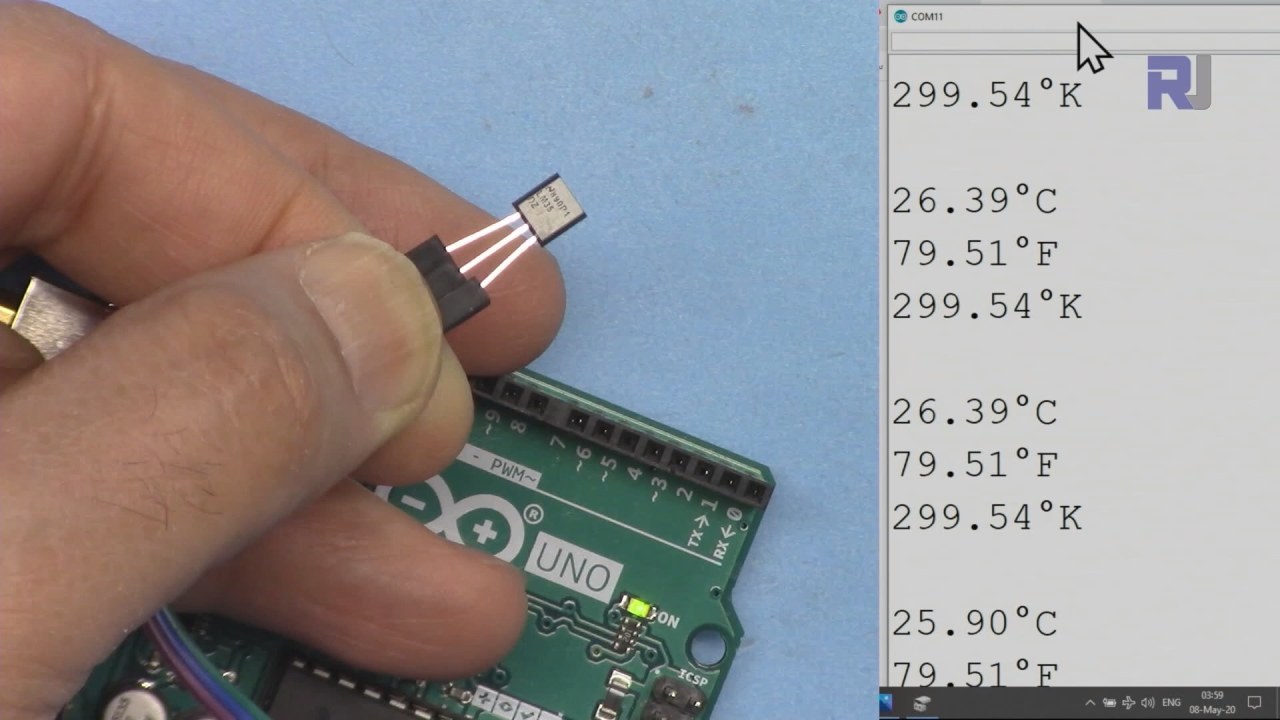
Nínú ẹ̀kọ́ yìí, a óò kọ́ bí a ṣe lè lo ẹ̀rọ̀ ìwọ̀n ìgbóná LM35 pẹ̀lú Arduino láti wọn àti láti fi ìgbóná hàn ní Celsius, Fahrenheit, àti Kelvin. Ẹ̀rọ̀ yìí máa ń mú iná jáde tí ó bá ìgbóná mu, tí ó jẹ́ kí a rọrùn láti ka àti láti ṣe àkójọpọ̀ data nínú ètò Arduino wa. Ní ìparí ẹ̀kọ́ yìí, ìwọ yóò lè ṣe àwọn ìgbésẹ̀ tí ó dá lórí ìgbóná nínú àwọn iṣẹ́ rẹ.
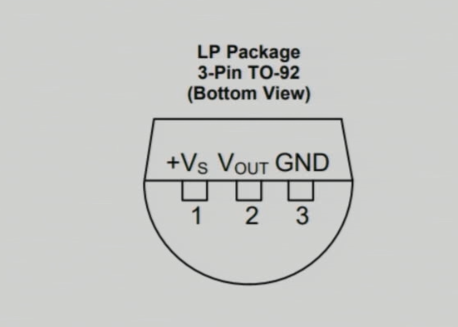
Ẹ̀rọ̀ ìwọ̀n ìgbóná LM35 ní àwọn ẹ̀yà mẹ́ta: ẹ̀yà òsì ni fún ìpèsè agbára, ẹ̀yà àárín ń mú iná jáde tí ó bá ìgbóná mu, àti ẹ̀yà ọ̀tún ni fún ilẹ̀. Ẹ̀rọ̀ náà ń ṣiṣẹ́ nínú ìwọ̀n agbára 4 sí 30 volts àti ó ń pèsè ìjàde 10 millivolts fún ìwọ̀n Celsius kọ̀ọ̀kan. Ìwọ̀n pípé yìí ń jẹ́ kí a lè gba àwọn ìwọ̀n ìgbóná tí ó péye nínú àwọn ìlò oríṣiríṣi.
Àlàyé Ohun Èlò
Ohun èlò pàtàkì nínú iṣẹ́ yìí ni ẹ̀rọ̀ ìwọ̀n ìgbóná LM35. A ṣe é láti pèsè ìjàde iná analog tí ó bá ìgbóná mu ní Celsius. Ẹ̀rọ̀ náà dára fún ọ̀pọ̀lọpọ̀ ìwọ̀n ìgbóná, láti -55°C sí +150°C, tí ó mú un wúlò fún àwọn àyíká oríṣiríṣi.
LM35 kò ní nílò agbára púpọ̀ (60 microamps) àti ó ń ṣiṣẹ́ lórí ìwọ̀n agbára gbígbòòrò. Ìjàde rẹ̀ kò ní ìdènà púpọ̀, tí ó ń jẹ́ kí ó lè sopọ̀ taara sí àwọn ẹ̀yà input analog ti Arduino láìsí àwọn ẹ̀yà afikun. Ìrọ̀rùn nínú ìṣètò yìí ń jẹ́ kí LM35 jẹ́ àṣàyàn tí ó dára fún àwọn iṣẹ́ ìwọ̀n ìgbóná.
Àwọn Àlàyé Datasheet
| Olùṣe | Texas Instruments |
|---|---|
| Nọ́mbà apá | LM35 |
| Agbára Logic/IO | 4–30 V |
| Ìjàde lọ́wọ́lọ́wọ́ (fún ikanni kọ̀ọ̀kan) | 1 mA tó pọ̀ jù |
| Ìwọ̀n ìgbóná | -55 sí +150 °C |
| Ìjàde iná | 10 mV/°C |
| Ìwọ̀n pípé | ±0.5 °C ní 25 °C |
| Àkójọpọ̀ | TO-92 |
- Rí i pé ìpèsè agbára tí ó tọ́ wà láàrin 4V àti 30V fún àwọn ìwọ̀n tí ó péye.
- Ìjàde iná jẹ́ tààràtà pẹ̀lú ìgbóná (10 mV/°C).
- Lo àwọn capacitors decoupling nítòsí ẹ̀yà agbára fún ìdúróṣinṣin.
- Máa ṣàmúlò polarity tí ó tọ̀nà nígbà tí o bá ń sopọ̀ láti yẹra fún ìbàjẹ́.
- Rí i pé àwọn ìsopọ̀ tí ó dára wà láti yẹra fún àwọn input tí ń fòfò, tí ó lè fa àwọn ìwọ̀n tí kò tọ́.
Àwọn Ìtọ́nisọ́nà Ìsopọ̀
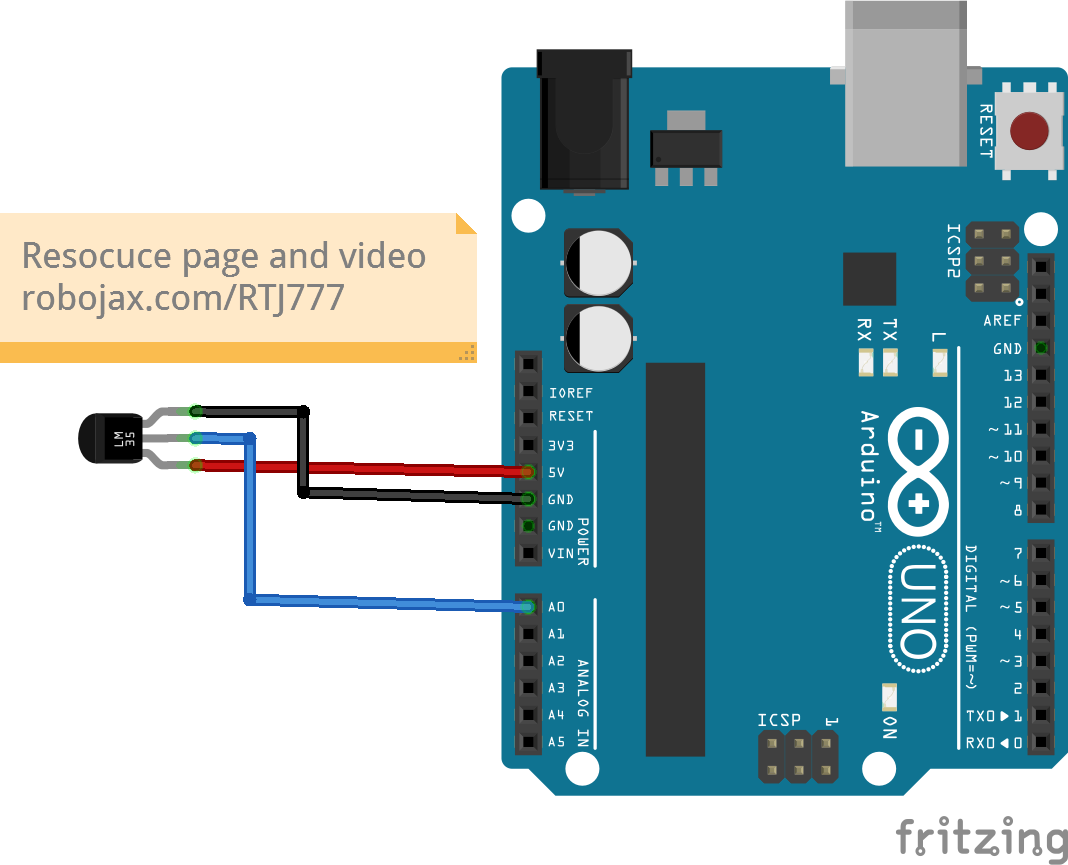
Láti sopọ̀ ẹ̀rọ̀ ìwọ̀n ìgbóná LM35, sopọ̀ ẹ̀yà òsì (VCC) sí ìjàde 5V lórí Arduino. Ẹ̀yà àárín (Output) yẹ kí ó sopọ̀ sí ẹ̀yà input analog A0, èyí tí a óò lò láti ka ìgbóná. Ní ìparí, sopọ̀ ẹ̀yà ọ̀tún (Ground) sí ọ̀kan lára àwọn ẹ̀yà ground lórí Arduino. Rí i pé gbogbo àwọn ìsopọ̀ ṣinṣin ni láti yẹra fún àwọn ìṣòro nígbà tí ẹ̀rọ̀ ń ṣiṣẹ́.
Nígbà tí o bá ń sopọ̀, rántí pé a lè fi agbára 4V sí 30V fún LM35, ṣùgbọ́n lílo 5V tó fún àwọn ìlò Arduino. Bí o bá rí àwọn ìwọ̀n ìgbóná tí kò retí, ṣàyẹ̀wò àwọn ìsopọ̀ lẹ́ẹ̀mejì kí o sì rí i pé ẹ̀rọ̀ náà ní agbára tí ó tọ́.
Àwọn Àpẹẹrẹ Kóòdù & Ìtọ́sọ́nà
Nínú kóòdù Arduino, a ṣàlàyé ẹ̀yà input analog fún kíkà ìjàde iná LM35 pẹ̀lú ìdámọ̀ inPin, èyí tí a ṣètò sí A0. Ní àfikún, a ṣàlàyé ìdámọ̀ LM35_FACTOR tí a ṣètò sí 0.01 láti ṣàfihàn ìjàde ẹ̀rọ̀ náà fún ìwọ̀n Celsius kọ̀ọ̀kan.
const int inPin = A0; // can change
const float LM35_FACTOR = 0.01; // do not change
Ìṣètò yìí ń jẹ́ kí a lè ka ìgbóná ní ọ̀nà tí ó rọrùn. Ní ìgbà tí ó tẹ̀lé, a bẹ̀rẹ̀ ìbánisọ̀rọ̀ serial nínú iṣẹ́ setup() láti bẹ̀rẹ̀ sí ní fi data ìgbóná jáde sí ibi ìṣàkóso serial.
void setup() {
  Serial.begin(9600);
  Serial.println("Robojax LM35 for Arduino");
}
Nínú iṣẹ́ loop(), a ń ka ìgbóná nígbà gbogbo àti a ń tẹ̀ é jáde ní àwọn ẹ̀yà oríṣiríṣi. Iṣẹ́ printTemperature() ń gba àmì ohun kan láti ṣàlàyé ọ̀nà ìgbóná tí a fẹ́, tí ó ń jẹ́ kí a lè fi ìgbóná hàn ní Celsius, Fahrenheit, tàbí Kelvin.
void loop() {
  printTemperature('C');
  printTemperature('F');
  printTemperature('K');
  delay(1000); // Wait for 1000ms
}
Láti ṣe ìgbésẹ̀ tí ó dá lórí ìgbóná, a lè ṣàyẹ̀wò bí ìgbóná bá ti kọjá ìwọ̀n kan pàtó tàbí kò ní lílo iṣẹ́ getTemperature(). Iṣẹ́ yìí ń ṣírò àpapọ̀ ìgbóná lórí nọ́mbà àwọn àpẹẹrẹ tí a ṣètò.
Fún àwọn àlàyé síwájú síi, wo fídíò tí ó bá mu fún ìtọ́sọ́nà kóòdù pípé (nínú fídíò ní 10:15).
Ìfihàn / Ohun Tí O Lè Retí
Nígbà tí ẹ̀rọ̀ ìwọ̀n ìgbóná LM35 bá ti sopọ̀ dáradára àti tí a ti gbé kóòdù Arduino sílẹ̀, ìwọ yóò rí ìgbóná tí a fi hàn ní Celsius, Fahrenheit, àti Kelvin lórí ibi ìṣàkóso serial. Bí o bá fi ooru sí ẹ̀rọ̀ náà, ìwọ yóò kíyèsi pé àwọn ìwọ̀n ìgbóná ń pọ̀ sí i ní ìbámu.
Mọ̀ pé ìsopọ̀ tí kò tọ̀nà lè fa àwọn ìwọ̀n ìgbóná tí kò dúró ṣinṣin, bíi àwọn iye tí ó ga jù tàbí tí ó kéré jù. Rí i pé ẹ̀rọ̀ náà ti sopọ̀ dáradára nígbà gbogbo láti yẹra fún irú àwọn ìṣòro bẹ́ẹ̀ (nínú fídíò ní 12:30).
Àwọn Àkókò Fídíò
- 00:00 - Ìfihàn sí LM35
- 02:30 - Àwọn Ìtọ́nisọ́nà Ìsopọ̀
- 05:00 - Àlàyé Kóòdù
- 10:15 - Ìfihàn àwọn Ìwọ̀n Ìgbóná
- 12:30 - Àwọn Ìṣòro Tí Ó Wọ́pọ̀ àti Ìtúnṣe
Aworan
++
/*
 * Robojax Arduino Step-by-Step Course
 * Part 4: Temperature Sensors
 * Lesson 42: Introduction to LM35
 * This Arduino sketch is to use LM35 to measure temperature
 * This code has two ways to get temperature
 * 1-To print the temperature either in C, F or K on the serial monitor
 * 2-To return the value in C, F and K
 *


  Please watch video instruction here https://youtu.be/DRIC4wDu878
 This code is available at http://robojax.com/course1/?vid=lecture37

with over 100 lectures free on YouTube. Watch it here http://robojax.com/L/?id=338
Get the code for the course: http://robojax.com/L/?id=339

 * Written by Ahmad Shamshiri on May 08, 2020 at 02:45 in Ajax, Ontario, Canada
 * in Ajax, Ontario, Canada. www.robojax.com
 *


 *  * This code is "AS IS" without warranty or liability. Free to be used as long as you keep this note intact.*
 * This code has been downloaded from Robojax.com
    This program is free software: you can redistribute it and/or modify
    it under the terms of the GNU General Public License as published by
    the Free Software Foundation, either version 3 of the License, or
    (at your option) any later version.

    This program is distributed in the hope that it will be useful,
    but WITHOUT ANY WARRANTY; without even the implied warranty of
    MERCHANTABILITY or FITNESS FOR A PARTICULAR PURPOSE.  See the
    GNU General Public License for more details.

    You should have received a copy of the GNU General Public License
    along with this program.  If not, see <https://www.gnu.org/licenses/>.


*/

const int inPin =A0;//can change
const int iteration = 1000; //can change (see video)
const float LM35_FACTOR =0.01;// do not change

// the setup routine runs once when you press reset:
void setup() {
  // initialize serial communication at 9600 bits per second:
// Robojax.com Code YouTube Watch it here http://robojax.com/L/?id=338
  Serial.begin(9600);
  Serial.println("Robojax LM35 for Arduino");
  delay(500);
}

// the loop routine runs over and over again forever:
void loop() {
 //robojax.com LM35 Code for Arduino
  printTemperature('C');
  Serial.println();
  printTemperature('F');
  Serial.println();
  printTemperature('K');
  Serial.println();
  Serial.println();
//  Serial.print(" Temperature: ");
//  printDegree();
//  Serial.print(getTemperature('C'));
if(getTemperature('C') >87)
{
 // do something here (watch video)
}
//  Serial.println();
  delay(1000);//Wait for 1000ms (change it if you want)
}

/*
 * getTemperature()
 * @brief gets the average temperature
 * @param average temperature
 * @param "type" is character
 *     C = Celsius
 *     K = Kelvin
 *     F = Fahrenheit
 * @return returns one of the values above
 * Written by Ahmad Shamshiri for robojax.com
 * on May 08, 2020 at 02:36 in Ajax, Ontario, Canada
 */
float getTemperature(char type)
{
	// Robojax.com Code YouTube Watch it here http://robojax.com/L/?id=338
    float value,voltage,temperature;//define variables
    int sensorValue;
    float averageTemperature =0;

    for(int i=0; i< iteration; i++)
    {
      sensorValue = analogRead(inPin);//read analog value
      voltage = sensorValue * (5.0 / 1023.0); //convert it to voltage
      temperature = voltage / LM35_FACTOR; //convert voltage to temperature
      averageTemperature += temperature;//add
    }

    averageTemperature /=iteration;
  if(type =='F')
   {
    value = averageTemperature *9/5 + 32;//convert to Fahrenheit
   }else if(type =='K')
   {
    value = averageTemperature + 273.15;//convert to Kelvin
   }else{
    value = averageTemperature;// return Celsius
   }
    return value ;
}//getTemperature()

/*
 * printTemperature()
 * @brief prints  temperature on serial monitor
 * @param charact type
 * @param "type" is character
 *     C = Celsius
 *     K = Kelvin
 *     F = Fahrenheit
 * @return none
 * Written by Ahmad Shamshiri for robojax.com
 * on May 08, 2020 at 02:45 in Ajax, Ontario, Canada
 */
void printTemperature(char type)
{
	// Robojax.com Code YouTube Watch it here http://robojax.com/L/?id=338
    float value;
    float temp = getTemperature(type);
   Serial.print(temp);
    printDegree();
  if(type =='F')
   {
     Serial.print("F");
    }else if(type =='K')
   {
     Serial.print("K");
   }else{
     Serial.print("C");
   }

}//printTemperature()

/*
 * @brief prints degree symbol on serial monitor
 * @param none
 * @return returns nothing
 * Written by Ahmad Shamshiri on July 13, 2019
 * for Robojax Tutorial Robojax.com
 */
void printDegree()
{
    Serial.print("\\xC2");
    Serial.print("\\xB0");
}
Ohun ti o le nilo
-
AmazonPurchase LM35 from Amazonamzn.to
-
eBayPurchase LM35 from eBayebay.us
Orisun & itọkasi
-
Iwe alayeLM35 Datasheetti.com
Fáìlìs📁
Ko si awọn faili ti o wa.