Casharka 42aad: Isticmaalka Sensor-ka Heerkulka LM35 | Koorsada Arduino Tallaabo Tallaabo
Casharka, waxaan baran doonaa sida loo isticmaalo dareemaha heerkulka LM35 ee Arduino si loo cabbiro loona muujiyo heerkulka Celsius, Fahrenheit, iyo Kelvin. Dareemahan wuxuu soo saaraa danab u dhigma heerkulka, taasoo noo ogolaanaysa in si fudud u akhrino oo u habayno xogta barnaamijkeena Arduino. Marka aad dhammayso casharkan, waxaad awoodi doontaa inaad hirgeliso ficillo ku salaysan heerkulka mashruucyadaada.
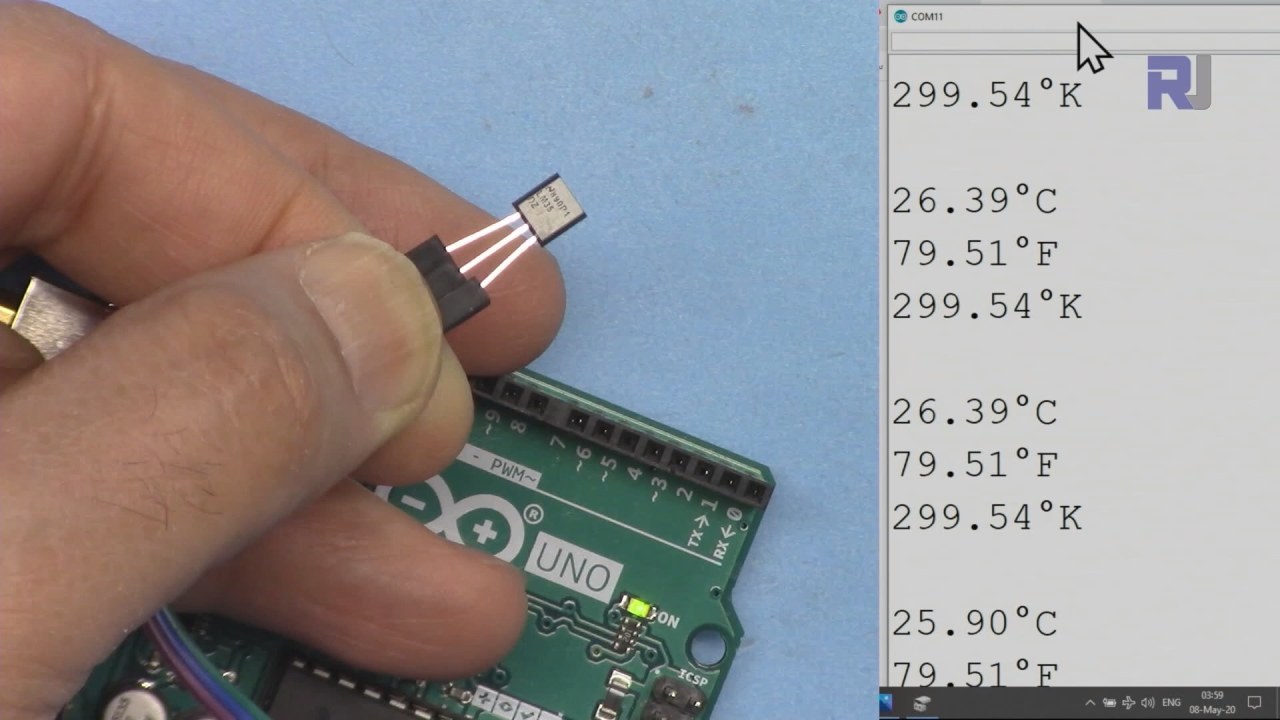
Dareemaha heerkulka LM35 wuxuu leeyahay saddex biin: biinka bidix wuxuu u yahay sahayda korontada, biinka dhexe wuxuu soo saaraa danab u dhigma heerkulka, biinka midigna wuxuu u yahay dhulka. Dareemuhu wuxuu u shaqeeyaa inta u dhaxaysa 4 ilaa 30 volt wuxuuna bixiyaa 10 millivolts heerkulkiiba degree Celsius. Saxnaantani waxay u oggolaanaysaa akhrin heerkul oo sax ah codsiyo kala duwan.
Qalabka La Sharxay
Qaybta ugu weyn mashruucan waa dareemaha heerkulka LM35. Waxaa loo qaabeeyey inuu bixiyo danab analog ah oo si toos ah ugu dhigma heerkulka degree Celsius. Dareemuhu wuxuu ku habboon yahay heerkul ballaaran, laga bilaabo -55°C ilaa +150°C, taasoo ka dhigaysa mid ku habboon deegaan kala duwan.
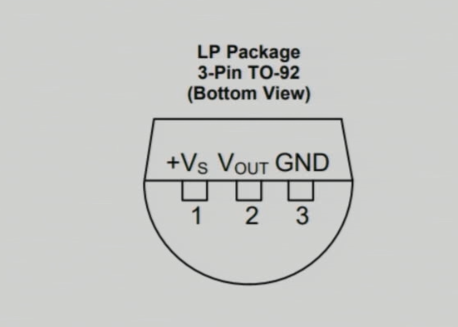
LM35 wuxuu u baahan yahay koronto yar (60 microamps) wuxuuna u shaqeeyaa inta danab ee ballaaran. Iska caabbintiisa soo saarku waa hooseysaa, taasoo u oggolaanaysa inuu si toos ah ula xiriiro biinanka gelinta analog-ga ee Arduino iyada oo aan loo baahnayn wareeg dheeri ah. Fudaydkan naqshadeed wuxuu ka dhigayaa LM35 doorasho aad u fiican hawlo cabbir heerkul ah.
Faahfaahinta Xaashida Xogta
| Soo saaraha | Texas Instruments |
|---|---|
| Nambarka qaybta | LM35 |
| Danabka Logic/IO | 4–30 V |
| Korontada soo saarka (kanal kasta) | 1 mA ugu badnaan |
| Heerkulka kala duwan | -55 ilaa +150 °C |
| Danabka soo saarka | 10 mV/°C |
| Saxnaanta | ±0.5 °C at 25 °C |
| Baakad | TO-92 |
- Hubi inay jirto sahay koronto oo ku habboon oo u dhaxaysa 4V iyo 30V si aad u hesho akhrin sax ah.
- Danabka soo saarku wuxuu si toos ah ugu dhigmaa heerkulka (10 mV/°C).
- Isticmaal capacitors-ka kala goynaya meel u dhow biinka korontada si loo xasiliyo.
- Ilaali jihada saxda ah markaad ku xirayso si aad uga fogaato waxyeello.
- Hubi inay jiraan xiriiro wanaagsan si looga fogaado gelin sabeyn ah, taasoo keeni karta akhrin khaldan.
Tilmaamaha Xirista
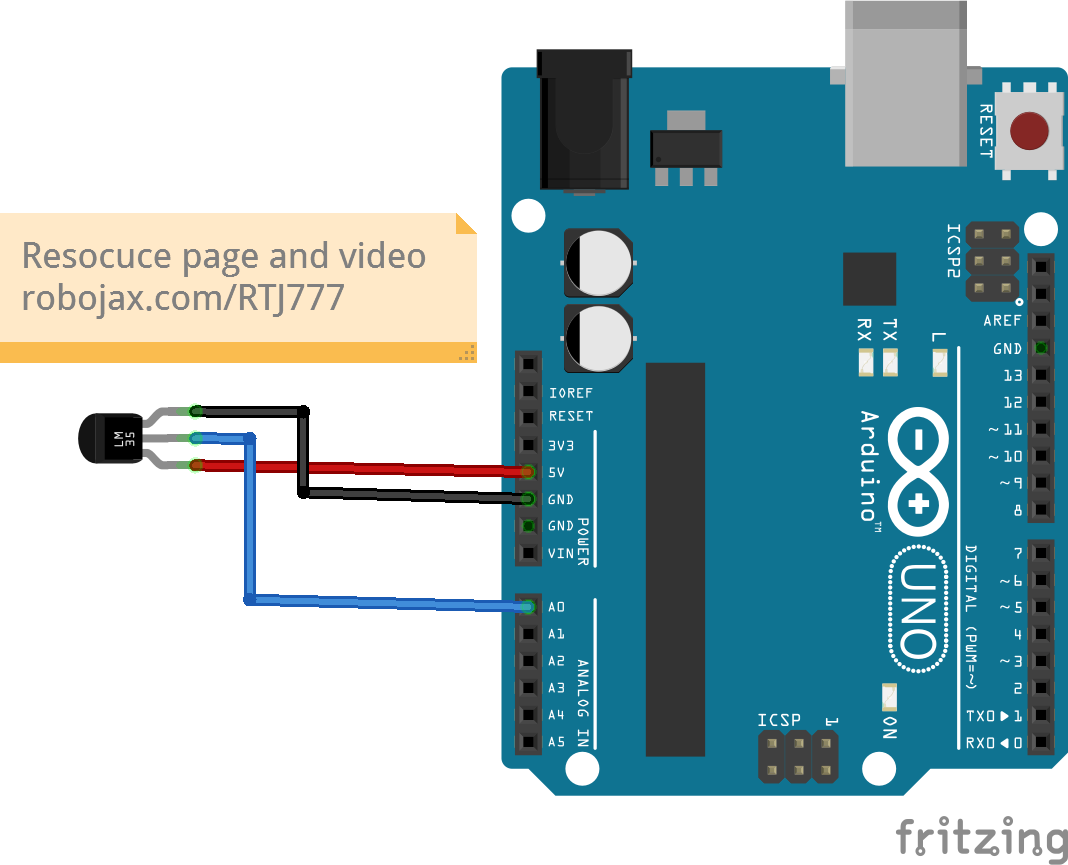
Si aad u xirto dareemaha heerkulka LM35, ku xir biinka bidix (VCC) ee soo saarka 5V ee Arduino. Biinka dhexe (Output) waa in lagu xiraa biinka gelinta analog-ga A0, kaas oo aan u isticmaali doonno inaan ku akhrino heerkulka. Ugu dambeyntii, ku xir biinka midig (Ground) mid ka mid ah biinanka dhulka ee Arduino. Hubi in dhammaan xiriiradu ay adag yihiin si looga hortago dhibaatooyin inta lagu jiro hawlgalka.
Markaad xiraysay, xusuusnow in LM35 lagu shidi karo danab sahay oo u dhaxaysa 4V iyo 30V, laakiin isticmaalka 5V waa ku filan codsiyada Arduino. Haddii aad aragto akhrin heerkul oo lama filaan ah, laba jeer hubi xiriirada oo hubi in dareemuhu si fiican u shaqeynayo.
Tusaalooyinka Koodka & Sharaxaad
Koodhka Arduino, waxaan ku qeexaynaa biinka gelinta analog-ga si aan u akhrino danabka soo saarka LM35 oo leh aqoonsiga inPin, kaas oo loo dejiyey A0. Intaa waxaa dheer, waxaan ku qeexaynaa joogto ah LM35_FACTOR oo loo dejiyey 0.01 si uu u matalo soo saarka dareemaha heerkulkiiba degree Celsius.
const int inPin = A0; // waa la beddeli karaa
const float LM35_FACTOR = 0.01; // ha beddelin
Qaabkani wuxuu noo oggolaanayaa inaan si toos ah u akhrino heerkulka. Marka xigta, waxaan bilaabaynaa isgaarsiin taxane ah shaqada setup() si aan u bilaabno soo saarista xogta heerkulka kormeeraha taxanaha ah.
void setup() {
  Serial.begin(9600);
  Serial.println("Robojax LM35 for Arduino");
}
Gudaha shaqada loop(), waxaan si joogto ah u akhrinaynaa heerkulka oo u daabacaynaa halbeegyo kala duwan. Shaqada printTemperature() waxay qaadataa halbeeg xaraf ah si ay u qeexdo qaabka heerkulka la doonayo, taasoo noo oggolaanaysa inaan ku muujinno heerkulka Celsius, Fahrenheit, ama Kelvin.
void loop() {
  printTemperature('C');
  printTemperature('F');
  printTemperature('K');
  delay(1000); // Sug 1000ms
}
Si aad u qaado tallaabo ku salaysan heerkulka, waxaan hubin karnaa haddii heerkulku ka sarreeyo xad gaar ah iyada oo la isticmaalayo shaqada getTemperature(). Shaqadani waxay xisaabisaa celceliska heerkulka tiro tijaabooyin ah oo la cayimay.
Faahfaahin dheeri ah, daawo fiidiyowga la xidhiidha si aad u hesho sharaxaad dhammaystiran oo koodhka ah (fiidiyowga 10:15).
Muuujin / Waxa Laga Filan Karaa
Marka dareemaha LM35 si fiican loo xiro oo koodhka Arduino la soo geliyo, waxaad arki doontaa heerkulka lagu muujiyey Celsius, Fahrenheit, iyo Kelvin kormeeraha taxanaha ah. Haddii aad kulul ku ridto dareemaha, waxaad arki doontaa akhrinta heerkulka oo si waafaqsan u kordheysa.
Ka war heerka xirista khaldan waxay keeni kartaa akhrin heerkul oo khaldan, sida qiimo aad u sarreeya ama hooseeya. Had iyo jeer hubi in dareemuhu si sax ah u xiran yahay si looga fogaado dhibaatooyinkaas (fiidiyowga 12:30).
Waqtiyada Fiidiyowga
- 00:00 - Hordhac ku saabsan LM35
- 02:30 - Tilmaamaha Xirista
- 05:00 - Sharaxaadda Koodhka
- 10:15 - Muujinta Akhrinta Heerkulka
- 12:30 - Dhibaatooyinka Caadiga ah iyo Xallinta
Sawirro
++
/*
 * Robojax Arduino Step-by-Step Course
 * Part 4: Temperature Sensors
 * Lesson 42: Introduction to LM35
 * This Arduino sketch is to use LM35 to measure temperature
 * This code has two ways to get temperature
 * 1-To print the temperature either in C, F or K on the serial monitor
 * 2-To return the value in C, F and K
 *


  Please watch video instruction here https://youtu.be/DRIC4wDu878
 This code is available at http://robojax.com/course1/?vid=lecture37

with over 100 lectures free on YouTube. Watch it here http://robojax.com/L/?id=338
Get the code for the course: http://robojax.com/L/?id=339

 * Written by Ahmad Shamshiri on May 08, 2020 at 02:45 in Ajax, Ontario, Canada
 * in Ajax, Ontario, Canada. www.robojax.com
 *


 *  * This code is "AS IS" without warranty or liability. Free to be used as long as you keep this note intact.*
 * This code has been downloaded from Robojax.com
    This program is free software: you can redistribute it and/or modify
    it under the terms of the GNU General Public License as published by
    the Free Software Foundation, either version 3 of the License, or
    (at your option) any later version.

    This program is distributed in the hope that it will be useful,
    but WITHOUT ANY WARRANTY; without even the implied warranty of
    MERCHANTABILITY or FITNESS FOR A PARTICULAR PURPOSE.  See the
    GNU General Public License for more details.

    You should have received a copy of the GNU General Public License
    along with this program.  If not, see <https://www.gnu.org/licenses/>.


*/

const int inPin =A0;//can change
const int iteration = 1000; //can change (see video)
const float LM35_FACTOR =0.01;// do not change

// the setup routine runs once when you press reset:
void setup() {
  // initialize serial communication at 9600 bits per second:
// Robojax.com Code YouTube Watch it here http://robojax.com/L/?id=338
  Serial.begin(9600);
  Serial.println("Robojax LM35 for Arduino");
  delay(500);
}

// the loop routine runs over and over again forever:
void loop() {
 //robojax.com LM35 Code for Arduino
  printTemperature('C');
  Serial.println();
  printTemperature('F');
  Serial.println();
  printTemperature('K');
  Serial.println();
  Serial.println();
//  Serial.print(" Temperature: ");
//  printDegree();
//  Serial.print(getTemperature('C'));
if(getTemperature('C') >87)
{
 // do something here (watch video)
}
//  Serial.println();
  delay(1000);//Wait for 1000ms (change it if you want)
}

/*
 * getTemperature()
 * @brief gets the average temperature
 * @param average temperature
 * @param "type" is character
 *     C = Celsius
 *     K = Kelvin
 *     F = Fahrenheit
 * @return returns one of the values above
 * Written by Ahmad Shamshiri for robojax.com
 * on May 08, 2020 at 02:36 in Ajax, Ontario, Canada
 */
float getTemperature(char type)
{
	// Robojax.com Code YouTube Watch it here http://robojax.com/L/?id=338
    float value,voltage,temperature;//define variables
    int sensorValue;
    float averageTemperature =0;

    for(int i=0; i< iteration; i++)
    {
      sensorValue = analogRead(inPin);//read analog value
      voltage = sensorValue * (5.0 / 1023.0); //convert it to voltage
      temperature = voltage / LM35_FACTOR; //convert voltage to temperature
      averageTemperature += temperature;//add
    }

    averageTemperature /=iteration;
  if(type =='F')
   {
    value = averageTemperature *9/5 + 32;//convert to Fahrenheit
   }else if(type =='K')
   {
    value = averageTemperature + 273.15;//convert to Kelvin
   }else{
    value = averageTemperature;// return Celsius
   }
    return value ;
}//getTemperature()

/*
 * printTemperature()
 * @brief prints  temperature on serial monitor
 * @param charact type
 * @param "type" is character
 *     C = Celsius
 *     K = Kelvin
 *     F = Fahrenheit
 * @return none
 * Written by Ahmad Shamshiri for robojax.com
 * on May 08, 2020 at 02:45 in Ajax, Ontario, Canada
 */
void printTemperature(char type)
{
	// Robojax.com Code YouTube Watch it here http://robojax.com/L/?id=338
    float value;
    float temp = getTemperature(type);
   Serial.print(temp);
    printDegree();
  if(type =='F')
   {
     Serial.print("F");
    }else if(type =='K')
   {
     Serial.print("K");
   }else{
     Serial.print("C");
   }

}//printTemperature()

/*
 * @brief prints degree symbol on serial monitor
 * @param none
 * @return returns nothing
 * Written by Ahmad Shamshiri on July 13, 2019
 * for Robojax Tutorial Robojax.com
 */
void printDegree()
{
    Serial.print("\\xC2");
    Serial.print("\\xB0");
}
Waad u baahan tahay
-
AmaazonPurchase LM35 from Amazonamzn.to
-
eBayPurchase LM35 from eBayebay.us
Kheyraadka & Tixraacyada
-
Waraaqada xogtaLM35 Datasheetti.com
Faylasha📁
Fayl la'aan.