Lis ya 42: Kosalela ya Sensor ya Temperature ya LM35 | Cours ya Arduino Etape na Etape
Na mateya oyo, tokoyekola ndenge ya kosalela sensor ya température LM35 na Arduino mpo na komeka mpe kolakisa température na Celsius, Fahrenheit, mpe Kelvin. Sensor oyo ebimisaka voltage oyo ekokani na température, oyo esalisi biso kotanga mpe kosala données na programɛ ya Arduino na biso. Na suka ya mateya oyo, okokoka kosalela misala oyo etali température na ba projets na yo.
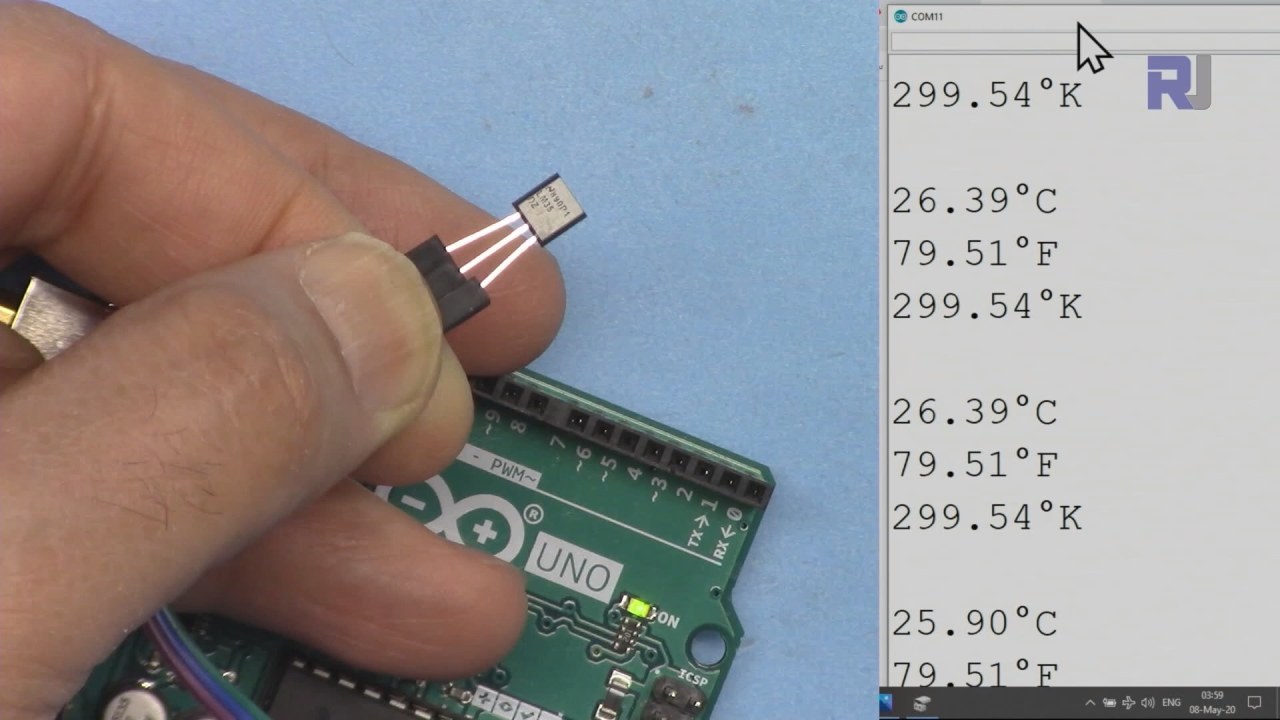
Sensor ya température LM35 ezali na ba pin misato: pin ya lobɔkɔ ya gauche ezali mpo na fourniture ya courant, pin ya kati ebimisaka voltage oyo ekokani na température, mpe pin ya lobɔkɔ ya droite ezali mpo na terre. Sensor esalaka na kati ya voltage 4 kino 30 volts mpe epesaka résultat ya 10 millivolts na degré Celsius. Précision oyo epesaka possibilité ya komeka température na ndenge ya malamu na ba applications ndenge na ndenge.
Matériel oyo elobami
Élément principal na projet oyo ezali sensor ya température LM35. Ebongisami mpo na kopesa résultat ya voltage analogique oyo ekokani na température na degré Celsius. Sensor oyo ebongi mpo na température mingi, longwa -55°C kino +150°C, oyo esalaka ete ebonga mpo na ba environnements ndenge na ndenge.
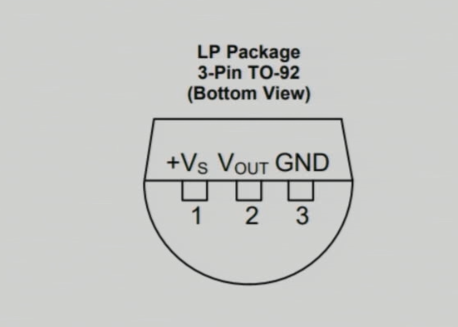
LM35 esengaka courant moke (60 microamps) mpe esalaka na kati ya voltage monene. Impédance ya sortie na yango ezali moke, oyo esalaka ete ekokana mbala moko na ba pins ya entrée analogique ya Arduino na kozanga ba circuits mosusu. Simplicité oyo na design esalaka ete LM35 ezala choix ya malamu mpo na misala ya komeka température.
Détails ya Datasheet
| Fabricant | Texas Instruments |
|---|---|
| Numéro ya partie | LM35 |
| Voltage ya logique/IO | 4–30 V |
| Courant ya sortie (na canal) | 1 mA max |
| Intervalle ya température | -55 kino +150 °C |
| Voltage ya sortie | 10 mV/°C |
| Précision | ±0.5 °C na 25 °C |
| Paquet | TO-92 |
- Kokisa ete fourniture ya courant ezala malamu kati na 4V mpe 30V mpo na komeka na ndenge ya malamu.
- Voltage ya sortie ekokani mbala moko na température (10 mV/°C).
- Salela ba condensateurs ya découplage pembeni ya pin ya courant mpo na stabilisation.
- Keba na polarité ya malamu ntango okokangisa mpo na kokima kobebisa.
- Kokisa ete ba connexions ezala malamu mpo na kokima ba entrées oyo ezali na kati ya mpɛpɛ, oyo ekoki kopesa ba résultats ya mabe.
Ba Instructions ya Câblage
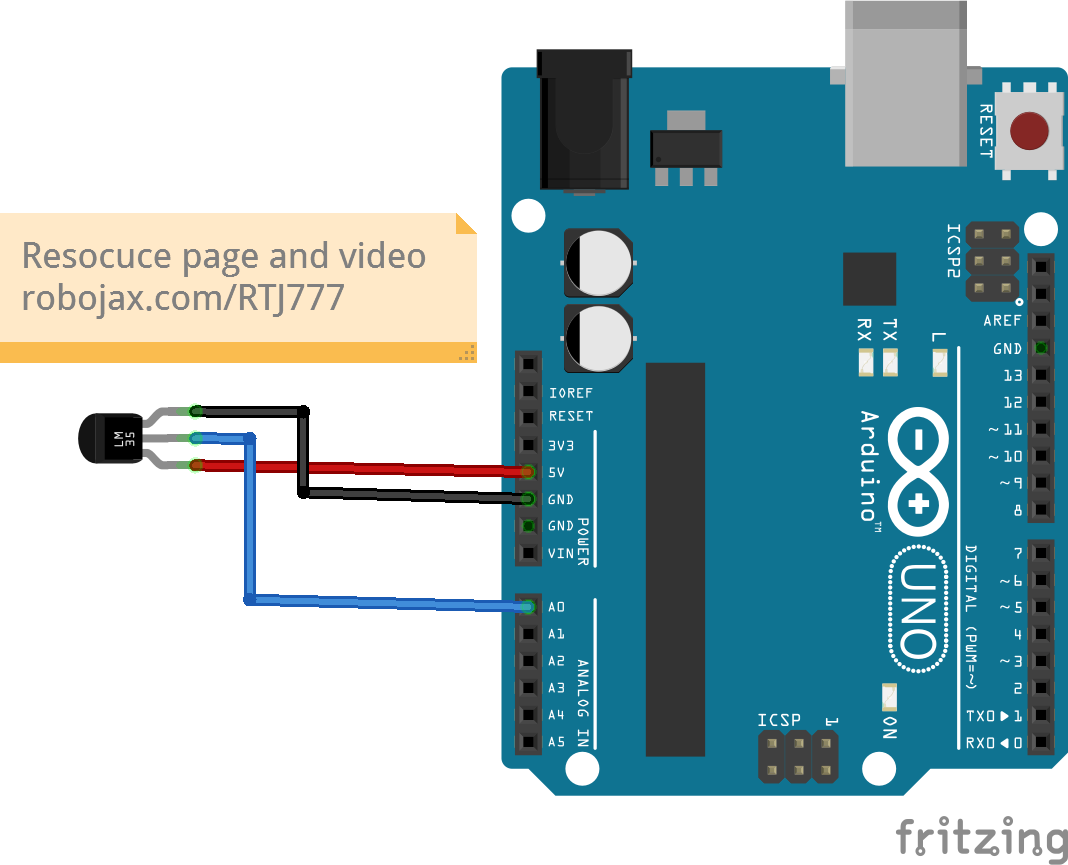
Mpo na kokangisa sensor ya température LM35, kanga pin ya gauche (VCC) na sortie 5V na Arduino. Pin ya kati (Sortie) esengeli kokangama na pin ya entrée analogique A0, oyo tokosalela mpo na kotanga température. Na suka, kanga pin ya droite (Terre) na moko ya ba pins ya terre na Arduino. Kokisa ete ba connexions nyonso ezala ya makasi mpo na kokima ba problèmes ntango esalaka.
Ntango ozali kokangisa, keba ete LM35 ekoki kopésama courant na voltage kati na 4V mpe 30V, kasi kosalela 5V ekoki mpo na ba applications ya Arduino. Soki omoni ba résultats ya température oyo ozalaki kolikya te, tala lisusu ba connexions mpe kokisa ete sensor ezali na courant ya malamu.
Ba Exemples ya Code & Explication
Na code ya Arduino, tozali kopesa définition ya pin ya entrée analogique mpo na kotanga voltage ya sortie ya LM35 na identifiant inPin, oyo esili kokomama A0. Ndenge moko, tozali kopesa définition ya constante LM35_FACTOR oyo ezali 0.01 mpo na koyika résultat ya sensor na degré Celsius.
const int inPin = A0; // ekoki kobongwana
const float LM35_FACTOR = 0.01; // kobongola te
Configuration oyo esalisi biso kotanga température na ndenge ya pete. Na sima, tozali kobanda communication série na fonction setup() mpo na kobanda kobimisa ba données ya température na moniteur série.
void setup() {
  Serial.begin(9600);
  Serial.println("Robojax LM35 mpo na Arduino");
}
Na kati ya fonction loop(), tozali kotanga température mbala na mbala mpe kobimisa yango na ba unités ndenge na ndenge. Fonction printTemperature() ezali kozwa paramètre ya caractère mpo na kolakisa format ya température oyo esengeli, oyo esalisi biso kolakisa température na Celsius, Fahrenheit, to Kelvin.
void loop() {
  printTemperature('C');
  printTemperature('F');
  printTemperature('K');
  delay(1000); // Zela mpo na 1000ms
}
Mpo na kosala likambo na ndenge ya température, tokoki kotala soki température eleki seuil moko na fonction getTemperature(). Fonction oyo ezali kokanisa température ya kati na kati na nombre ya ba échantillons oyo esili koponama.
Mpo na ba détails mosusu, tala vidéo oyo elandi mpo na explication ya code mobimba (na vidéo na 10:15).
Démonstration / Nini Okoki Kolikia
Ntango sensor ya LM35 ekangisami malamu mpe code ya Arduino esili kotombolama, okomona température elakami na Celsius, Fahrenheit, mpe Kelvin na moniteur série. Soki opesi moto na sensor, okomona ete ba résultats ya température ekobakisama na ndenge oyo esengeli.
Keba ete câblage ya mabe ekoki komemela ba résultats ya température ya mabe, lokola ba valeurs ya makasi to ya moke. Tandima ntango nyonso ete sensor ekangisami malamu mpo na kokima ba problèmes ya ndenge wana (na vidéo na 12:30).
Ba Timestamps ya Vidéo
- 00:00 - Introduction na LM35
- 02:30 - Ba Instructions ya Câblage
- 05:00 - Explication ya Code
- 10:15 - Démonstration ya Ba Résultats ya Température
- 12:30 - Ba Problèmes ya Mbala Moko mpe Ba Solutions
Images
++
/*
 * Robojax Arduino Step-by-Step Course
 * Part 4: Temperature Sensors
 * Lesson 42: Introduction to LM35
 * This Arduino sketch is to use LM35 to measure temperature
 * This code has two ways to get temperature
 * 1-To print the temperature either in C, F or K on the serial monitor
 * 2-To return the value in C, F and K
 *


  Please watch video instruction here https://youtu.be/DRIC4wDu878
 This code is available at http://robojax.com/course1/?vid=lecture37

with over 100 lectures free on YouTube. Watch it here http://robojax.com/L/?id=338
Get the code for the course: http://robojax.com/L/?id=339

 * Written by Ahmad Shamshiri on May 08, 2020 at 02:45 in Ajax, Ontario, Canada
 * in Ajax, Ontario, Canada. www.robojax.com
 *


 *  * This code is "AS IS" without warranty or liability. Free to be used as long as you keep this note intact.*
 * This code has been downloaded from Robojax.com
    This program is free software: you can redistribute it and/or modify
    it under the terms of the GNU General Public License as published by
    the Free Software Foundation, either version 3 of the License, or
    (at your option) any later version.

    This program is distributed in the hope that it will be useful,
    but WITHOUT ANY WARRANTY; without even the implied warranty of
    MERCHANTABILITY or FITNESS FOR A PARTICULAR PURPOSE.  See the
    GNU General Public License for more details.

    You should have received a copy of the GNU General Public License
    along with this program.  If not, see <https://www.gnu.org/licenses/>.


*/

const int inPin =A0;//can change
const int iteration = 1000; //can change (see video)
const float LM35_FACTOR =0.01;// do not change

// the setup routine runs once when you press reset:
void setup() {
  // initialize serial communication at 9600 bits per second:
// Robojax.com Code YouTube Watch it here http://robojax.com/L/?id=338
  Serial.begin(9600);
  Serial.println("Robojax LM35 for Arduino");
  delay(500);
}

// the loop routine runs over and over again forever:
void loop() {
 //robojax.com LM35 Code for Arduino
  printTemperature('C');
  Serial.println();
  printTemperature('F');
  Serial.println();
  printTemperature('K');
  Serial.println();
  Serial.println();
//  Serial.print(" Temperature: ");
//  printDegree();
//  Serial.print(getTemperature('C'));
if(getTemperature('C') >87)
{
 // do something here (watch video)
}
//  Serial.println();
  delay(1000);//Wait for 1000ms (change it if you want)
}

/*
 * getTemperature()
 * @brief gets the average temperature
 * @param average temperature
 * @param "type" is character
 *     C = Celsius
 *     K = Kelvin
 *     F = Fahrenheit
 * @return returns one of the values above
 * Written by Ahmad Shamshiri for robojax.com
 * on May 08, 2020 at 02:36 in Ajax, Ontario, Canada
 */
float getTemperature(char type)
{
	// Robojax.com Code YouTube Watch it here http://robojax.com/L/?id=338
    float value,voltage,temperature;//define variables
    int sensorValue;
    float averageTemperature =0;

    for(int i=0; i< iteration; i++)
    {
      sensorValue = analogRead(inPin);//read analog value
      voltage = sensorValue * (5.0 / 1023.0); //convert it to voltage
      temperature = voltage / LM35_FACTOR; //convert voltage to temperature
      averageTemperature += temperature;//add
    }

    averageTemperature /=iteration;
  if(type =='F')
   {
    value = averageTemperature *9/5 + 32;//convert to Fahrenheit
   }else if(type =='K')
   {
    value = averageTemperature + 273.15;//convert to Kelvin
   }else{
    value = averageTemperature;// return Celsius
   }
    return value ;
}//getTemperature()

/*
 * printTemperature()
 * @brief prints  temperature on serial monitor
 * @param charact type
 * @param "type" is character
 *     C = Celsius
 *     K = Kelvin
 *     F = Fahrenheit
 * @return none
 * Written by Ahmad Shamshiri for robojax.com
 * on May 08, 2020 at 02:45 in Ajax, Ontario, Canada
 */
void printTemperature(char type)
{
	// Robojax.com Code YouTube Watch it here http://robojax.com/L/?id=338
    float value;
    float temp = getTemperature(type);
   Serial.print(temp);
    printDegree();
  if(type =='F')
   {
     Serial.print("F");
    }else if(type =='K')
   {
     Serial.print("K");
   }else{
     Serial.print("C");
   }

}//printTemperature()

/*
 * @brief prints degree symbol on serial monitor
 * @param none
 * @return returns nothing
 * Written by Ahmad Shamshiri on July 13, 2019
 * for Robojax Tutorial Robojax.com
 */
void printDegree()
{
    Serial.print("\\xC2");
    Serial.print("\\xB0");
}
Nko o na nki.
-
AmazonPurchase LM35 from Amazonamzn.to
-
eBayPurchase LM35 from eBayebay.us
Mokili na bisika
-
Fiche techniqueLM35 Datasheetti.com
Fichiers📁
Aucun fichier disponible.