第78课:在LCD上显示VL53L0X的距离 | Arduino逐步课程

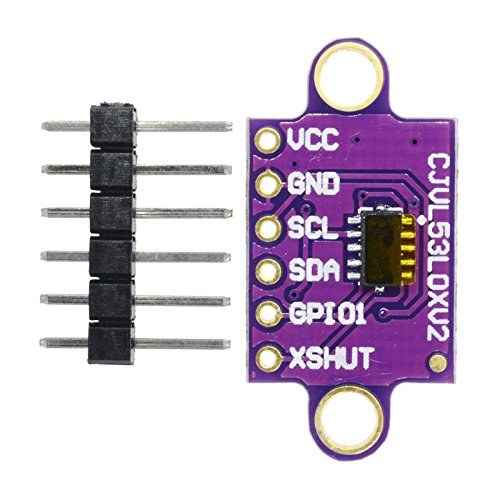
本指南演示了如何使用VL53L0X飞行时间传感器和带I2C模块的16x2 LCD显示屏构建一个精确的激光测距仪。该项目非常适合希望为自己的创作添加精确、非接触式距离测量的创客。VL53L0X使用激光测量距离,非常适合超声波传感器可能难以胜任的应用场景,例如测量水箱的填充水平或检测传送带上物体的精确位置。
以下是该项目的几种实际应用方式:
- 自动宠物喂食器:测量容器中的食物水平,以触发补充或发送通知。
- 智能垃圾桶:检测垃圾桶的满溢程度,并在需要清空时提醒您。
- DIY身高测量仪:为小物体或追踪儿童成长创建精确的测量工具。
- 停车辅助:构建传感器系统,帮助在车库或狭窄空间内精确停车。
- 机器人技术:在机器人中使用它来检测障碍物或测量到墙壁的距离以进行导航。
所需硬件
- Arduino开发板(例如Uno)
- VL53L0X激光距离传感器
- 带I2C模块的LCD 1602显示屏
- 跳线
接线指南
由于I2C协议允许LCD和传感器通过同两根线进行通信,因此该项目的接线非常简单。VL53L0X传感器需要5V电源,直接从Arduino的5V引脚获取。为确保传感器具有稳定的电源,额外使用一个引脚作为辅助VCC。(视频中00:27处)
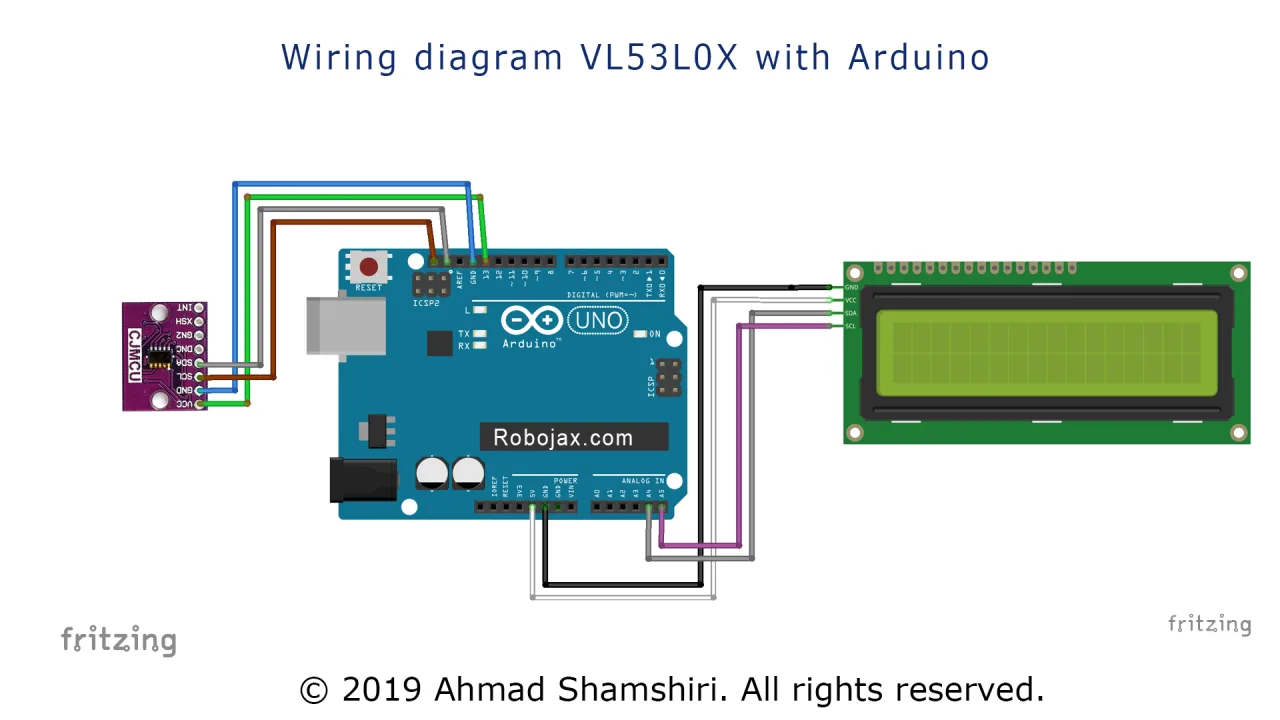
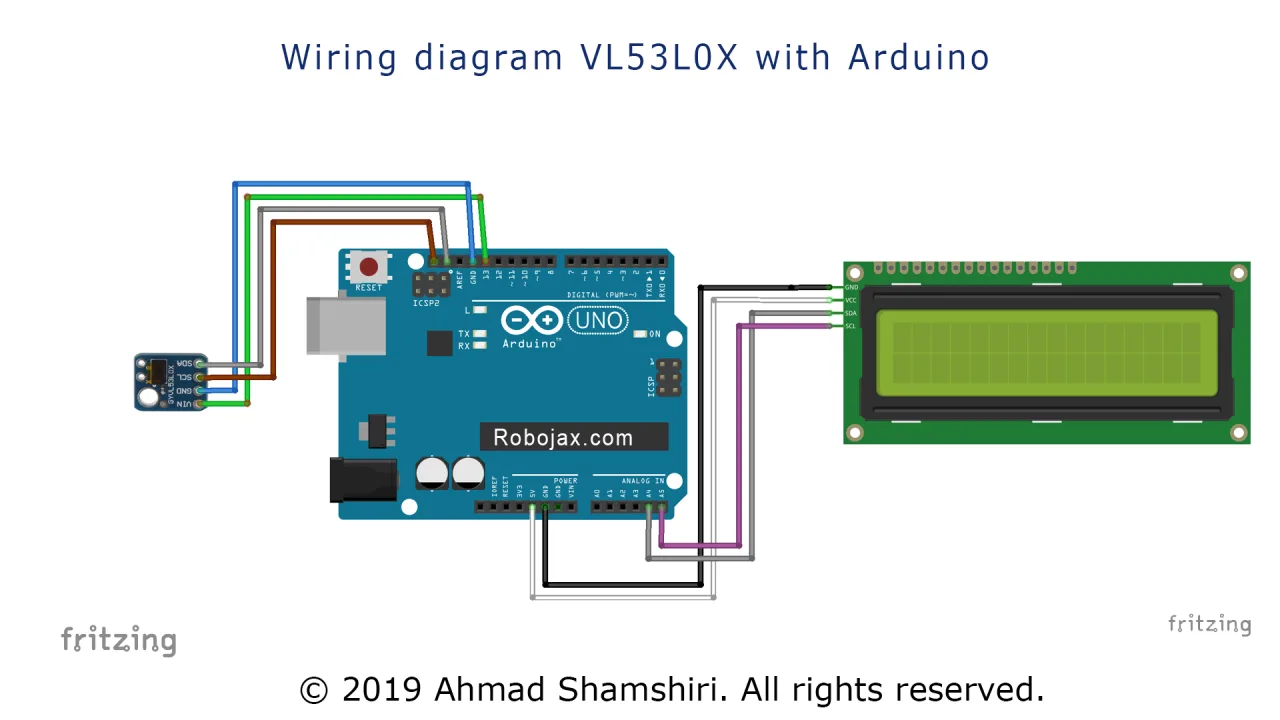
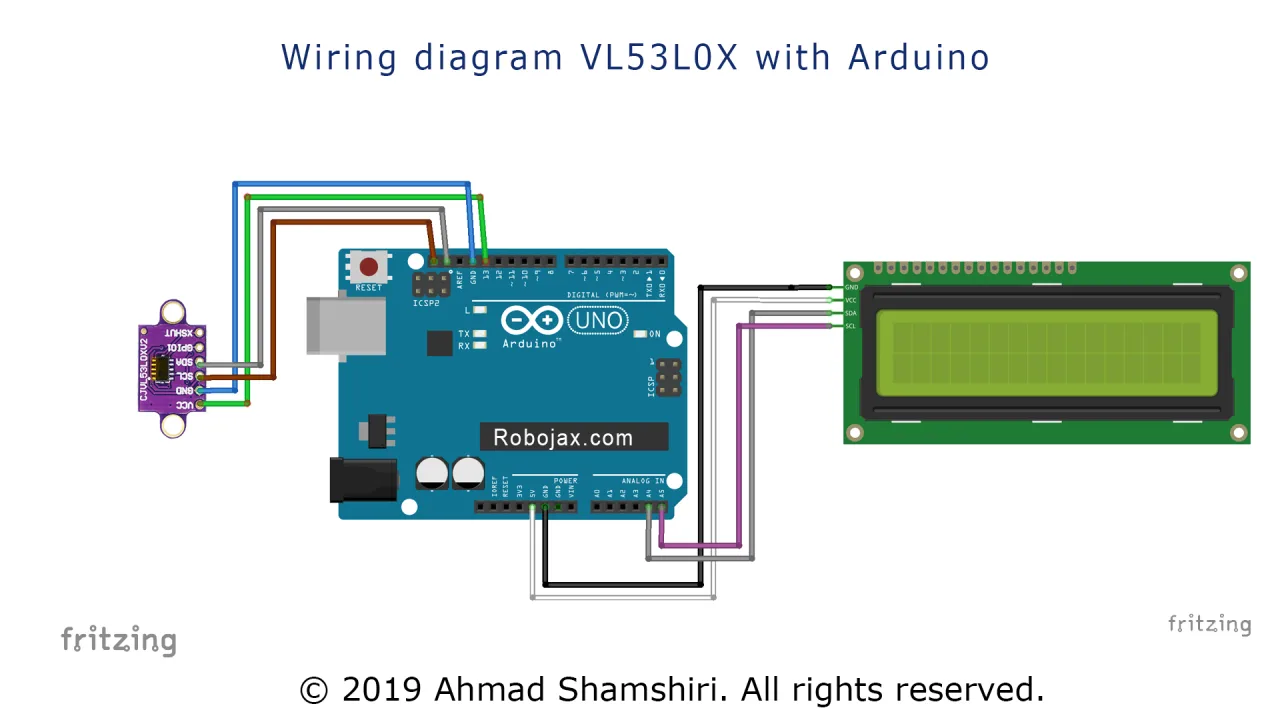
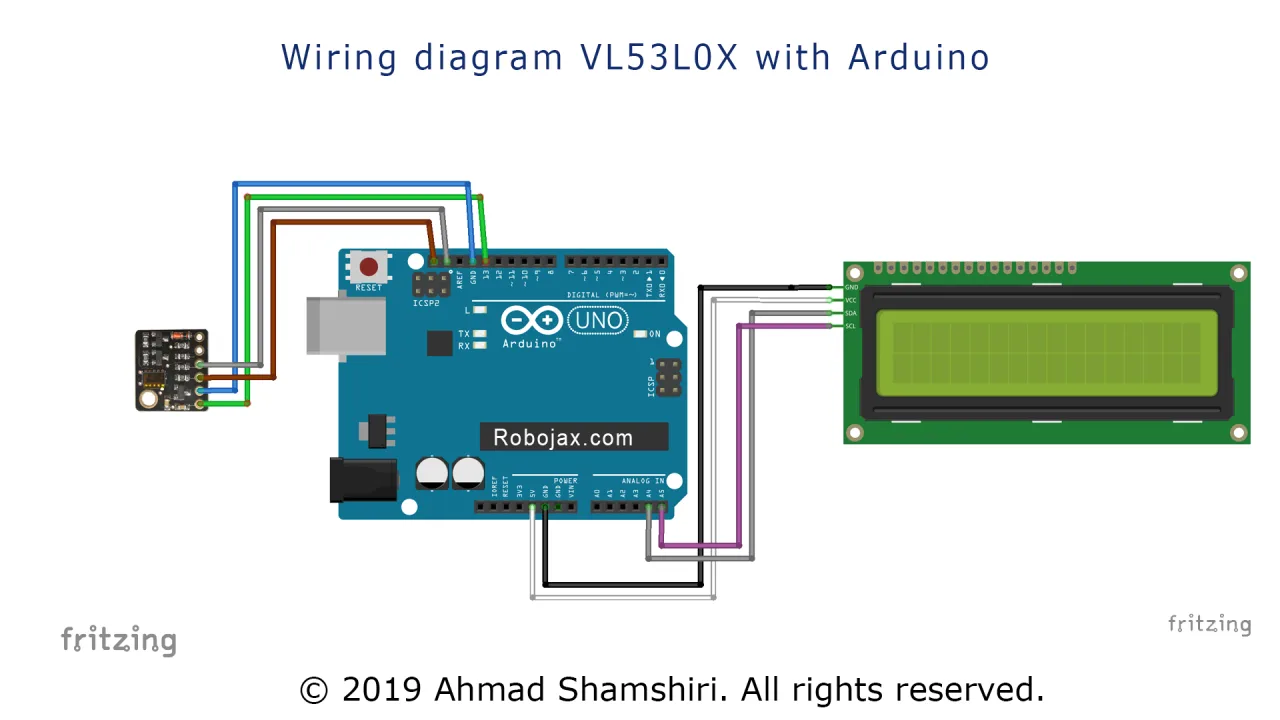
以下是连接图:

连接如下:
- VL53L0X VCC -> Arduino 5V和引脚13(引脚13设置为数字输出以提供额外的电源稳定性)。
- VL53L0X GND -> Arduino GND。
- VL53L0X SCL -> Arduino SCL(A5)。
- VL53L0X SDA -> Arduino SDA(A4)。
- LCD I2C VCC -> Arduino 5V。
- LCD I2C GND -> Arduino GND。
- LCD I2C SCL -> Arduino SCL(A5)。
- LCD I2C SDA -> Arduino SDA(A4)。
如果您使用不同的Arduino型号,I2C引脚可能位于其他位置。SDA和SCL引脚通常直接标注在板上。(视频中02:42处)
代码说明
代码设计为易于配置。主要的用户可配置部分位于代码的最顶部。(视频中04:18处)
首先,我们为额外的电源引脚定义一个常量。这用于为传感器提供干净的5V电源。
const int vcc2 = 13; // VL53L0X传感器的额外VCC引脚接下来,我们创建LCD库的一个实例并定义其I2C地址。您可以通过运行I2C扫描代码找到此地址,如视频所示。(视频中03:26处)
LiquidCrystal_I2C lcd(0x3F, 16, 2); // 将LCD地址设置为0x3F,适用于16字符2行显示最后,有一个控制测量单位的变量。您可以更改此值以毫米或厘米显示距离。
const int type = 1; // 设置为1表示毫米,2表示厘米在setup()函数中,额外的VCC引脚被配置为输出并设置为HIGH以为传感器供电。然后初始化LCD。
loop()函数中的主要逻辑从传感器读取距离,清除LCD,并打印数值及单位。当type设置为2时,距离从毫米转换为浮点值的厘米,以获得更精确的读数。(视频中06:47处)
现场项目演示
在演示中,传感器与尺子进行对比测试以验证其准确性。视频显示传感器提供了非常精确的读数,偏差仅为几毫米。(视频中08:32处)
需要注意的是,在连续测量模式下,传感器的最大范围约为1.2米。当目标超出范围时,显示屏将显示值8190。(视频中09:53处)
另一个关键观察是,该传感器在高度反光的表面上可能会给出不准确的读数。将其指向闪亮的物体可能会导致显著误差,而指向哑光表面则会提供准确的结果。(视频中10:42处)
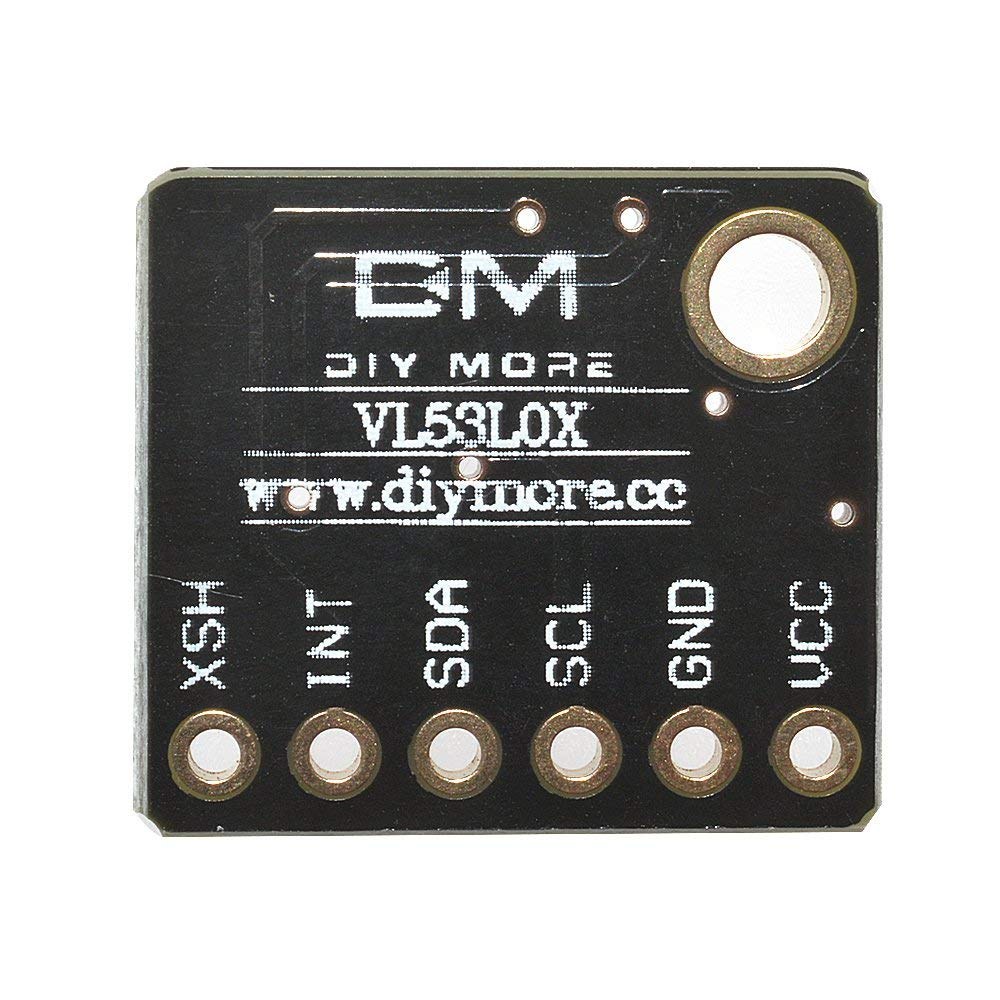
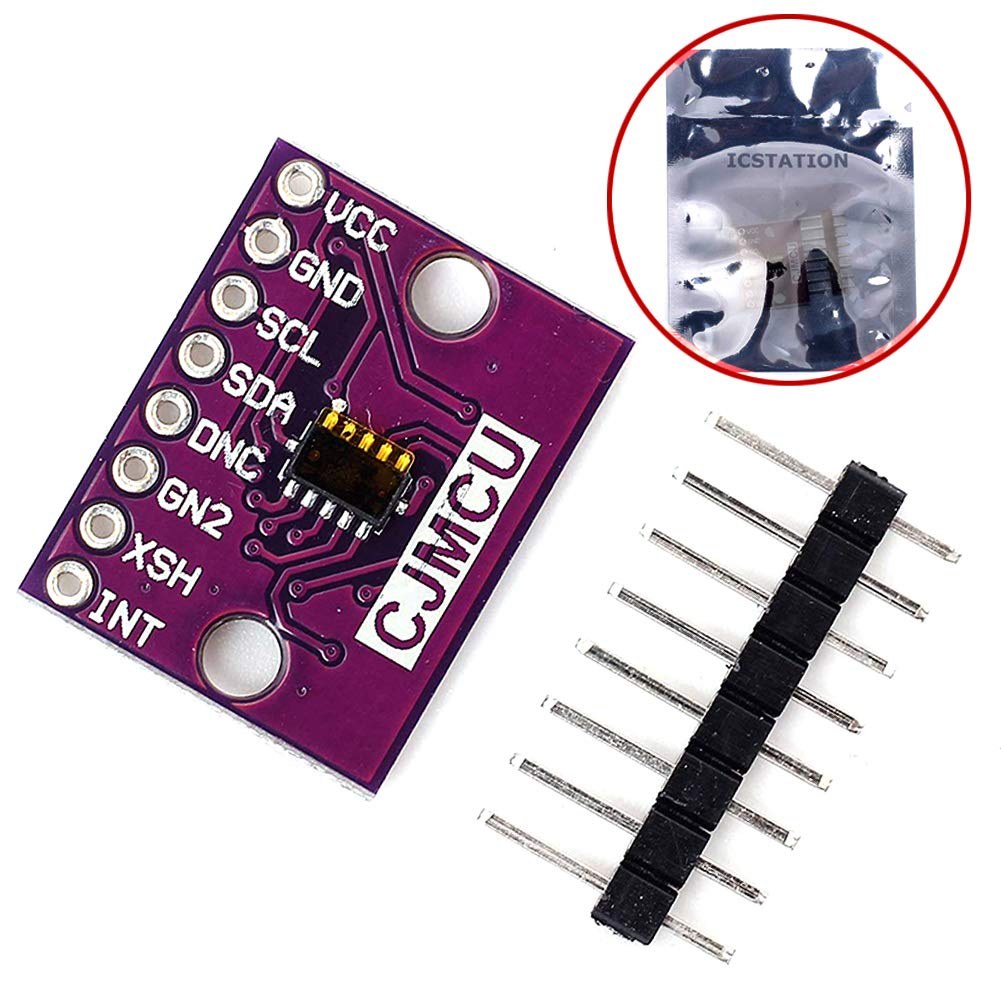
该代码还与不同的VL53L0X模块变体和更大的LCD(如2004型号)兼容,无需对接线进行任何更改。(视频中11:30处)
视频章节
- [00:05] VL53L0X与LCD项目介绍
- [00:27] VL53L0X与LCD的接线图
- [02:51] 在实际Arduino板上的详细接线
- [03:26] 扫描I2C地址
- [04:18] 代码解释与配置
- [08:32] 距离测量现场演示
- [09:53] 测试传感器的量程与限制
- [10:42] 不同表面上的精度
- [11:30] 使用不同传感器模块和更大LCD进行测试
图像

/*
* Lesson 76-1: Using One single VL6180 Laser Distance Sensor with Arduino
 * Adafruit code modified for this tutorial
 * by Ahmad Shamshiri at 22:22 on
 * March 10-11, 2021 in Ajax, ON, Canada
 Please watch video instruction of this code: https://youtu.be/_H9D0czQpSI

View code for using two or more VL6180X sensors: https://robojax.com/course1/lecture76

  This video is part of Arduino Step by Step Course which starts here: https://youtu.be/-6qSrDUA5a8


If you found this tutorial helpful, please support me so I can continue creating
content like this.

or make a donation using PayPal http://robojax.com/L/?id=64

 * This code is "AS IS" without warranty or liability. Free to be used as long as you keep this note intact. *
 * This code has been downloaded from Robojax.com
    This program is free software: you can redistribute it and/or modify
    it under the terms of the GNU General Public License as published by
    the Free Software Foundation, either version 3 of the License, or
    (at your option) any later version.

    This program is distributed in the hope that it will be useful,
    but WITHOUT ANY WARRANTY; without even the implied warranty of
    MERCHANTABILITY or FITNESS FOR A PARTICULAR PURPOSE.  See the
    GNU General Public License for more details.

    You should have received a copy of the GNU General Public License
    along with this program.  If not, see <https://www.gnu.org/licenses/>.
 */
#include <Wire.h>
#include "Adafruit_VL6180X.h"

Adafruit_VL6180X vl = Adafruit_VL6180X();

void setup() {
  Serial.begin(115200);

  // wait for serial port to open on native usb devices
  while (!Serial) {
    delay(1);
  }

  Serial.println("Adafruit VL6180x test!");
  if (! vl.begin()) {
    Serial.println("Failed to find sensor");
    while (1);
  }
  Serial.println("Sensor found!");
}

void loop() {

  uint8_t range = vl.readRange();
  uint8_t status = vl.readRangeStatus();

  if (status == VL6180X_ERROR_NONE) {
    Serial.print("Range: "); Serial.print(range);
    Serial.println("mm");
  }
//  if(range <=76)
//  {
//    //do something
//  }

  // Some error occurred, print it out!

  if  ((status >= VL6180X_ERROR_SYSERR_1) && (status <= VL6180X_ERROR_SYSERR_5)) {
    Serial.println("System error");
  }
  else if (status == VL6180X_ERROR_ECEFAIL) {
    Serial.println("ECE failure");
  }
  else if (status == VL6180X_ERROR_NOCONVERGE) {
    Serial.println("No convergence");
  }
  else if (status == VL6180X_ERROR_RANGEIGNORE) {
    Serial.println("Ignoring range");
  }
  else if (status == VL6180X_ERROR_SNR) {
    Serial.println("Signal/Noise error");
  }
  else if (status == VL6180X_ERROR_RAWUFLOW) {
    Serial.println("Raw reading underflow");
  }
  else if (status == VL6180X_ERROR_RAWOFLOW) {
    Serial.println("Raw reading overflow");
  }
  else if (status == VL6180X_ERROR_RANGEUFLOW) {
    Serial.println("Range reading underflow");
  }
  else if (status == VL6180X_ERROR_RANGEOFLOW) {
    Serial.println("Range reading overflow");
  }
  delay(50);
}
|||您可能需要的东西
-
亚马逊在亚马逊上购买VL53L0Xamzn.to
-
易趣从eBay购买VL53l0xebay.us
资源与参考
-
外部Arduino库(GitHub)github.com
-
外部VL53L0X Datasheet (PDF)st.com
-
外部从eBay购买VL53l0xebay.us
文件📁
Fritzing 文件
-
Adafruit VL6180X Time of Flight Distance SensorFritzing part for the Adafruit VL6180X Time of Flight distance sensor. This sensor measures absolute distance up to 100mm and ambient light, communicating via I2C. Includes the sensor breakout board and pin connections for use in Fritzing projects.
Adafruit VL6180X Time of Flight Distance Sensor-1.fzpz0.02 MB