如何使用Mosfet光耦合HW-532通过Arduino控制高达30V的直流电机速度或负载
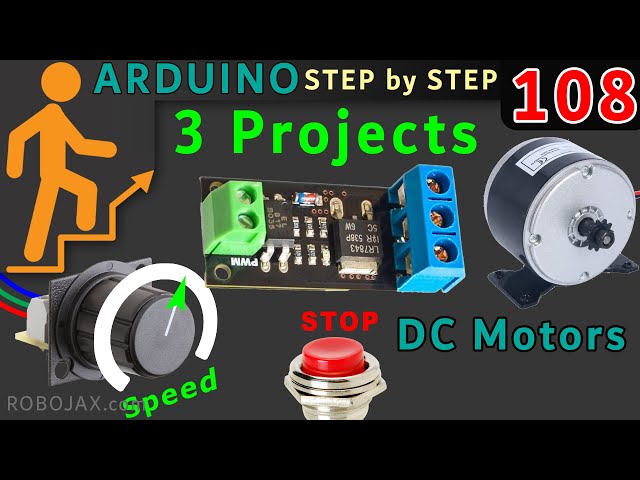
本项目指南演示了如何使用Arduino和HW-532光耦MOSFET模块构建一个多功能直流电动机速度控制器。MOSFET可能是FR120N,LR7843或D4184。这使您能够控制高达30V的直流电机的速度和开/关状态。HW-532模块提供保护和隔离,使其比直接将电机连接到Arduino更安全、更可靠。
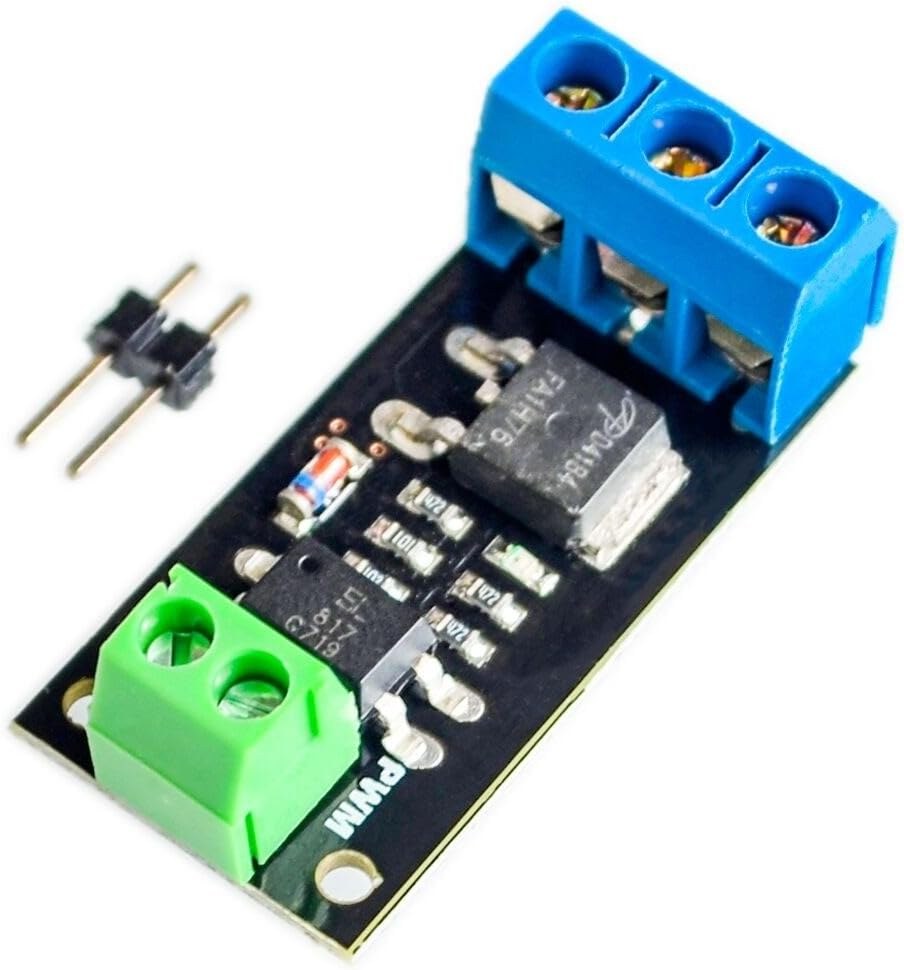
这个项目对各种应用都很有价值。以下是一些例子:
- 精确控制机械臂的速度
- 为冷却系统构建变速风扇
- 创建可调移动的自动化机器。
- 开发一种用于流体系统的电动阀门控制装置
硬件/组件
核心组件包括Arduino、HW-532光耦合MOSFET模块(带有D4184、LR7843或FR120N等MOSFET选项)、直流电动机(电压额定值≤30V)、连接线,以及可选的电位器和用于高级控制的按钮开关(视频中在19:34)。
HW-532模块中MOSFET的选择取决于您的电流需求(视频中:01:24)。视频详细比较了不同的MOSFET(视频中:06:50)及其在各种应用中的适用性(视频中:09:45)。请记得为感性负载(如直流电动机)添加二极管以保护模块(视频中:06:00 和 22:02)。
接线指南
基本接线将电机的正极连接到 HW-532 的输出,将电机的负极连接到 HW-532 的地,并将 HW-532 的控制引脚连接到 Arduino 数字引脚(视频中的 11:16)。

代码说明
提供的代码提供了三个控制级别:
- 开/关控制:这个简单的代码(在视频的15:05处)使用数字引脚来开关电机。用户可配置的部分是
MOTOR_OUT_PIN常量,定义哪个Arduino引脚控制HW-532模块。 - PWM速度控制:此代码(视频中在15:39)使用脉宽调制(PWM)来控制电机的速度。用户可以调整
SPEED_MAX和SPEED_MIN设置速度控制的上下限,以及motorControl()和stopMotor()函数用于控制电动机和停止电动机。 - 电位器和按键控制:此代码(视频中在22:12)允许使用电位器控制电机速度,并通过按钮进行启动/停止。用户可配置的部分包括
POT_PIN(电位计引脚),MOTOR_OUT_PIN(PWM控制引脚),START_STOP_PIN(按钮引脚),SPEED_MAX, 和SPEED_MIN.
现场项目/演示
该视频演示了所有三个代码示例的操作。视频中先显示了开/关控制(在视频的11:41处),然后是PWM速度控制(在视频的16:53处),最后是电位计和按钮控制(在视频的23:02处)。
章节
- [00:00] 介绍与项目概述
- [01:24] HW-532模块和MOSFET选项
- [03:23] 电路原理图及说明
- [05:11] 组件详情
- [06:50] MOSFET 数据表分析
- [11:16] 基本接线和开/关演示
- [15:05] 开/关控制的Arduino代码
- Arduino 代码用于 PWM 速度控制
- [19:34] 使用电位器和按钮开关的接线
- [22:12] 带电位器和按钮的Arduino代码
图像
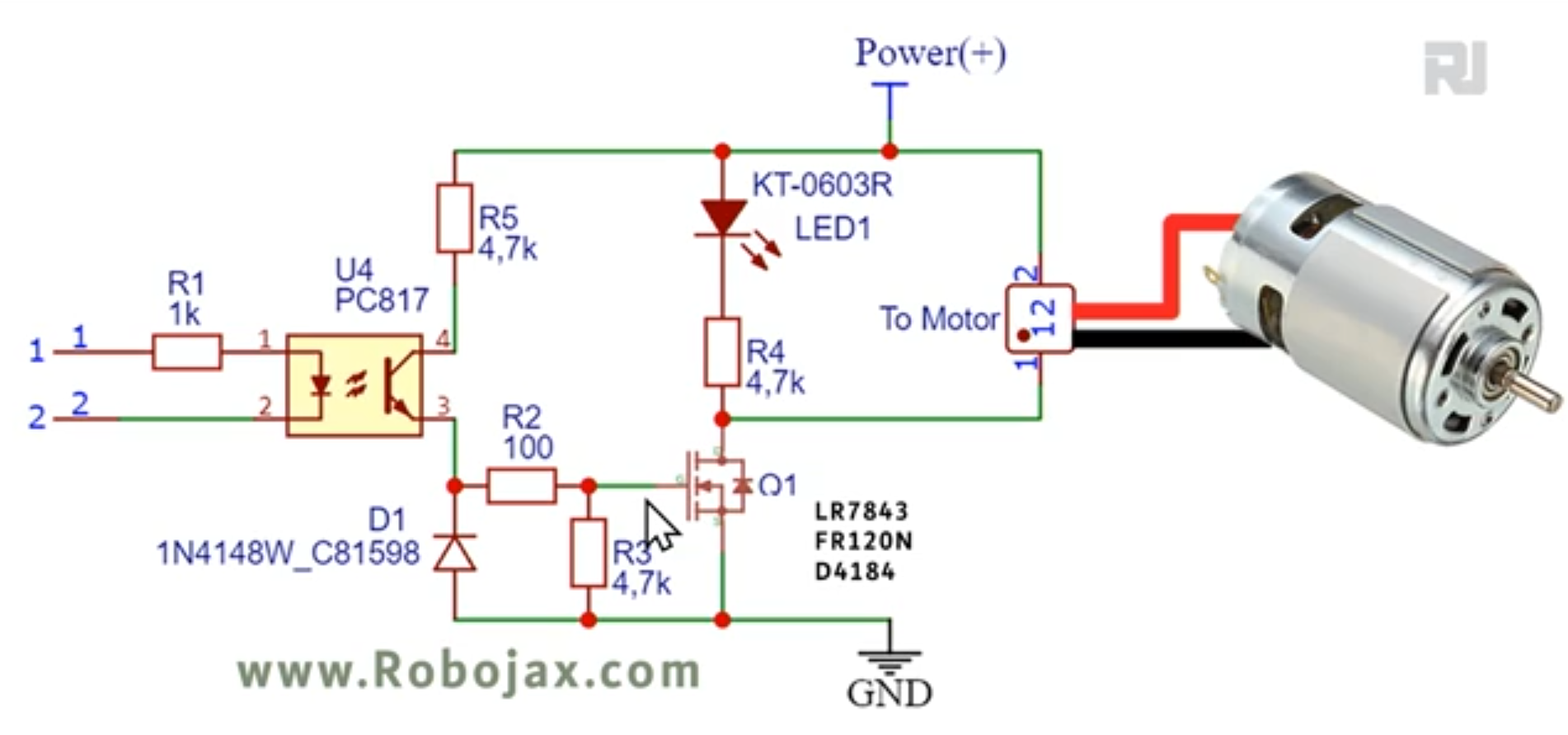
Schematic for HW-532 using FR120N MOSFET

HW-532_driver_module-1
HW-532_driver_module-2

HW-532_driver_module-4

HW-532_driver_module-5
Arduino wriing for HW-532 MOFET motor driver
792-Code 1- Switch: Optocoupled HW-532 to control using MOSFET FR120N , LR7843
语言: C++
/*
 * 第108-1课:在本课中,我们将学习如何使用FR120N、LR7843和D4184 MOSFET模块来开启/关闭直流负载,电流可达10A。HW-532光电隔离,适用于5V至30V负载,具体取决于模块。展示了电路图,解释了接线图,展示了使用按钮开关和电位器的不同接线方法。
 * 视频:https://youtu.be/eqXaqRFAWrA
 *
 * 由Ahmad Shamshiri为RoboJax.com撰写
 * // 发表时间:2022年8月25日,加拿大安大略省Aajx。
 *
 * 项目1:开启/关闭电机或负载(本项目)
 * 项目2:使用Arduino代码控制速度
 * 项目3:使用电位器和按钮开关控制速度
 *
 * 观看此代码的视频说明:https://youtu.be/eqXaqRFAWrA
 *
 * 该代码是Arduino循序渐进课程的一部分,课程从这里开始:https://youtu.be/-6qSrDUA5a8
 *
 * 有关此代码的库,请访问http://robojax.com/
 *
 * 如果您觉得本教程有帮助,请支持我,以便我能够继续创建类似的内容。通过信用卡使用PayPal捐款:https://bit.ly/donate-robojax
 *
 * 该代码是“按原样”提供,不提供任何担保或责任。只要您保持此说明的完整性,即可免费使用。*
 * 该代码已从Robojax.com下载
 * 该程序是自由软件:您可以在GNU通用公共许可证的条款下重新分发和/或修改它,许可证由自由软件基金会发布,可以选择版本3或(您选择)任何后续版本。
 *
 * 该程序是以希望它能有用而发布的,但没有任何保证;甚至没有对适销性或特定用途适用性的隐含保证。有关更多详细信息,请参阅GNU通用公共许可证。
 *
 * 您应该已经收到了该程序随附的GNU通用公共许可证的副本。如果没有,请参见<https://www.gnu.org/licenses/>。
 */
const int MOTOR_OUT_PIN=2;


void setup() {
 // Robojax  MOSFET Motor driver code
  Serial.begin(9600);
  Serial.println("Robojax LR7834 ,  Arduino");

  pinMode(MOTOR_OUT_PIN, OUTPUT);
  digitalWrite(MOTOR_OUT_PIN, HIGH);


}

 // the loop routine runs over and over again forever:
void loop() {


 // Robojax XY-GMOS MOSFET Motor driver code
} // loop end
793-Code 2- PWM: Optocoupled HW-532 to control using MOSFET FR120N , LR7843
语言: C++
# include <Arduino_LSM6DS3.h>

/*
* Lesson 108-2: In this lesson we learn how to use  the module with FR120N , LR7843 and D4184 MOSFET to turn ON/OFF DC load up to up to 10A. HW-532 optically isolated from 5V to 30V load up to 10A depending on the module. Schematic shown, wiring diagram explained, different
method of wiring with push button and potentiometer also shown.
Video https://youtu.be/eqXaqRFAWrA
Get code for this project from https://robojax.com/RJT797

Written by Ahmad Shamshiri for RoboJax.com
// Published on Aug 25, 2022 in Aajx, ON, Canada.


  Project 1: Turning ON/OFF a motor or load (this project)
  Project 2: Controlling Speed using Arduino code
  Project 3: Controlling Speed using potentiometer and a push button

  * Watch Video instruction for this code:https://youtu.be/eqXaqRFAWrA
  *
  * This code is part of Arduino Step by Step Course which starts here:  https://youtu.be/-6qSrDUA5a8
  *
  * for library of this code visit http://robojax.com/
  *
 If you found this tutorial helpful, please support me so I can continue creating
 content like this. Make a donation using PayPal by credit card https://bit.ly/donate-robojax


  *  * This code is "AS IS" without warranty or liability. Free to be used as long as you keep this note intact.*
  * This code has been download from Robojax.com
     This program is free software: you can redistribute it and/or modify
     it under the terms of the GNU General Public License as published by
     the Free Software Foundation, either version 3 of the License, or
     (at your option) any later version.

     This program is distributed in the hope that it will be useful,
     but WITHOUT ANY WARRANTY; without even the implied warranty of
     MERCHANTABILITY or FITNESS FOR A PARTICULAR PURPOSE.  See the
     GNU General Public License for more details.

     You should have received a copy of the GNU General Public License
     along with this program.  If not, see <https://www.gnu.org/licenses/>.

 */


const int MOTOR_OUT_PIN = 3;

const int SPEED_MAX = 100;// in %
const int SPEED_MIN = 0;//in %

const int STOP=0;
const int RUN=1;
int motorState=RUN;//
int motorSpeed = 0;//between 0 to 100%.
//video instruction https://youtu.be/eqXaqRFAWrA


void setup() {
    //Robojax XY-GMOS MOSFET Motor driver code
  Serial.begin(9600);
  Serial.println("Robojax XY-GMOS Motor,  Arduino");

  pinMode(MOTOR_OUT_PIN, OUTPUT);


}//setup ends

// the loop routine runs over and over again forever:
void loop() {


//video https://youtu.be/eqXaqRFAWrA
  motorControl(50);//run motor at 50%
  delay(5000);//keep it running for 5000ms or 5 seconds
   stopMotor();//stop the motor
  delay(3000);//keep it stopped for 5000ms or 5 seconds

  for(int i=0; i<100; i++)
  {
    motorControl(i);
    delay(200);
  }
  stopMotor();//stop motor
  delay(3000);//keep it stopped for 5000ms or 5 seconds

   for(int i=100; i >0; i--)
  {
    motorControl(i);
    delay(200);
  }

    //Robojax LR7843 MOSFET Motor driver code
}//loop end


/*
 * motorControl(int s)
 * @brief controls the motor with the value s
 * @param return nothing
 * @param "type" is character

 * on May 08, 2020 at 02:36 in Ajax, Ontario, Canada
 */
void motorControl(int s)
{
    //Robojax LR7843 MOSFET Motor driver code
    //video https://youtu.be/eqXaqRFAWrA
  int k = map(s, SPEED_MIN, SPEED_MAX, 0, 255);
  Serial.print("Speed: "); Serial.print(s);Serial.println("%");
  analogWrite(MOTOR_OUT_PIN, k);
}//motorControl


/*
 * stopMotor()
 * @brief stops the motor
 * @param return nothing
 * @param

 * on May 08, 2020 at 02:36 in Ajax, Ontario, Canada
 */
void stopMotor(){
    //Robojax XY-GMOS MOSFET Motor driver code
  analogWrite( MOTOR_OUT_PIN, 0);
  Serial.println("STOPPED");
}//stopMotor()
794-Code 3- Potentiometer: Optocoupled HW-532 to control using MOSFET FR120N , LR7843
语言: C++
/*
 * Lesson 108-3: Controlling Speed of motor using Variable Resistor (potentiometer) and using Start/Stop push button with Arduino.
 *
 * In this lesson we learn how to use  the module with FR120N , LR7843 and D4184 MOSFET to turn ON/OFF DC load up to up to 10A. HW-532 optically isolated from 5V to 30V load up to 10A depending on the module. Schematic shown, wiring diagram explained, different
 method of wiring with push button and potentiometer also shown.
 Video https://youtu.be/eqXaqRFAWrA
   Get codes for this project from https://robojax.com/RJT797
 Written by Ahmad Shamshiri for RoboJax.com
 // Published on Aug 25, 2022 in Aajx, ON, Canada.


   Project 1: Turning ON/OFF a motor or load -
   Project 2: Controlling Speed using Arduino code
   Project 3: Controlling Speed using potentiometer and a push button (this project)

   * Watch Video instruction for this code:https://youtu.be/eqXaqRFAWrA
   *
   * This code is part of Arduino Step by Step Course which starts here:  https://youtu.be/-6qSrDUA5a8
   *
   * for library of this code visit http://robojax.com/
   *
  If you found this tutorial helpful, please support me so I can continue creating
  content like this. Make a donation using PayPal by credit card https://bit.ly/donate-robojax


   *  * This code is "AS IS" without warranty or liability. Free to be used as long as you keep this note intact.*
   * This code has been download from Robojax.com
      This program is free software: you can redistribute it and/or modify
      it under the terms of the GNU General Public License as published by
      the Free Software Foundation, either version 3 of the License, or
      (at your option) any later version.

      This program is distributed in the hope that it will be useful,
      but WITHOUT ANY WARRANTY; without even the implied warranty of
      MERCHANTABILITY or FITNESS FOR A PARTICULAR PURPOSE.  See the
      GNU General Public License for more details.

      You should have received a copy of the GNU General Public License
      along with this program.  If not, see <https://www.gnu.org/licenses/>.

  */

const int POT_PIN =A0;//can change
const int MOTOR_OUT_PIN = 3;//~
const int START_STOP_PIN=2;//for push button switch

const int SPEED_MAX = 100;// in %
const int SPEED_MIN = 0;//in %
  //video instruction https://youtu.be/eqXaqRFAWrA

const int STOP=0;
const int RUN=1;
int motorState=RUN;//
int motorSpeed = 0;//between 0 to 100%.

void pushButton();
void setup() {
    //Robojax XY-GMOS MOSFET Motor driver code
  Serial.begin(9600);
  Serial.println("Robojax XY-GMOS Motor,  Arduino");
  pinMode(START_STOP_PIN, INPUT_PULLUP);
  pinMode(MOTOR_OUT_PIN, OUTPUT);
    //video instruction https://youtu.be/eqXaqRFAWrA


}

// the loop routine runs over and over again forever:
void loop() {

 pushButton();
 int potValue =analogRead(POT_PIN);
 int speedPercent = map(potValue, 0, 1023, 0, 100);

 if(motorState ==RUN)
 {
  motorControl(speedPercent);
 }else{
  stopMotor();
 }


  delay(500);
    //Robojax XY-GMOS MOSFET Motor driver code
      //video instruction https://youtu.be/eqXaqRFAWrA
}//loop end


/*
 * motorControl(int s)
 * @brief controls the motor with the value s
 * @param return nothing
 * @param "type" is character

 * on May 08, 2020 at 02:36 in Ajax, Ontario, Canada
 */
void motorControl(int s)
{
    //Robojax LR7843 MOSFET Motor driver code
      //video instruction https://youtu.be/eqXaqRFAWrA
  int k = map(s, SPEED_MIN, SPEED_MAX, 0, 255);
  Serial.print("Speed: "); Serial.print(s);Serial.println("%");
  analogWrite(MOTOR_OUT_PIN, k);
}//motorControl


/*
 * stopMotor()
 * @brief stops the motor
 * @param return nothing
 * @param

 * on May 08, 2020 at 02:36 in Ajax, Ontario, Canada
 */
void stopMotor(){
    //Robojax XY-GMOS MOSFET Motor driver code
      //video instruction https://youtu.be/eqXaqRFAWrA
  analogWrite( MOTOR_OUT_PIN, 0);
  Serial.println("STOPPED");
}//stopMotor()


/*
 * pushButton()
 * @brief reads the push button
 * @param return nothing
 * @param

 * on May 08, 2020 at 02:36 in Ajax, Ontario, Canada
 */
void pushButton()
{
  //Robojax XY-GMOS MOSFET Motor driver code
  //video instruction https://youtu.be/eqXaqRFAWrA
  if(digitalRead(START_STOP_PIN) ==LOW)
  {
    motorState =!motorState;
    delay(100);
  }

}//pushButton()
|||您可能需要的东西
-
亚马逊在亚马逊购买HW-532amzn.to
-
易趣从eBay购买FR120N电机驱动器ebay.us
-
全球速卖通从AliExpress购买FR120N电机驱动器s.click.aliexpress.com
资源与参考
尚无可用资源。
文件📁
数据手册 (pdf)
-
英飞凌-IRLR7843 LR7843 MOSFET 数据表
infineon-irlr7843-datasheet-en.pdf0.37 MB
Fritzing 文件
-
HW-532B Mosfot 模块
HW-532B.fzpz0.01 MB
其他文件
-
infineon-irfr120n-datasheet-en
infineon-irfr120n-datasheet-en.pdf0.39 MB -
alpha-and-Omega-AOD4184A_数据表
alpha-and-Omega-AOD4184A_datasheet.pdf0.43 MB