ESP32 Tutorial 18/55 - Detecting Tilt using ESP32 | SunFounder's ESP32 IoT Learning kit
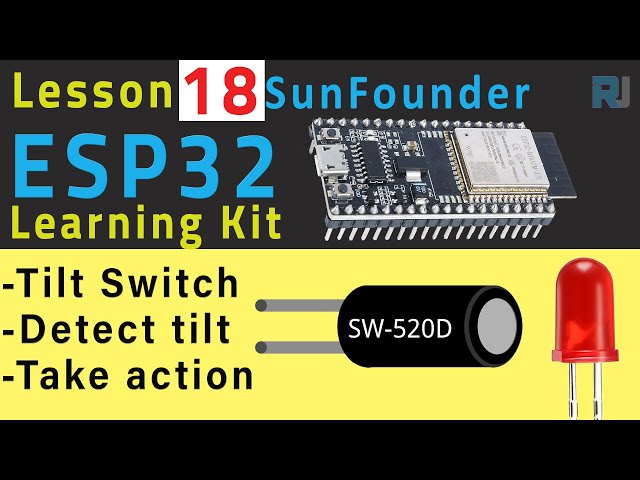
In this tutorial, we will be using the SunFounder ESP32 microcontroller to create a simple project that detects tilt using a tilt switch. When the tilt switch is activated, an LED will turn off, and when it is in its upright position, the LED will turn on. This project is not only a great introduction to working with tilt sensors but also serves as a foundation for various robotics applications. For a detailed visual guide, be sure to check the video linked above (in video at 00:00).


Hardware Explained
The primary components used in this project include the ESP32 microcontroller, a tilt switch, and an LED. The ESP32 is a powerful microcontroller with built-in Wi-Fi and Bluetooth, making it ideal for IoT applications. The tilt switch is a simple device that contains a metal ball inside a can. When tilted, the ball moves and breaks the circuit, allowing us to detect the tilt state. The LED will visually indicate the tilt status based on the switch's state. In addition to these components, we will also use resistors for current limiting and pull-down purposes. The 220-ohm resistor connected to the LED ensures that the LED operates safely without drawing too much current. The 10k-ohm resistor acts as a pull-down for the tilt switch, ensuring that the input pin reads a known state when the switch is not activated.
Datasheet Details
| Manufacturer | SunFounder |
|---|---|
| Part number | ESP32 |
| Logic/IO voltage | 3.3 V |
| Supply voltage | 5 V |
| Output current (per channel) | 12 mA |
| Peak current (per channel) | 40 mA |
| PWM frequency guidance | 1 kHz |
| Input logic thresholds | 0.8 V (low), 2.0 V (high) |
| Voltage drop / RDS(on) / saturation | 0.2 V |
| Thermal limits | 85 °C |
| Package | ESP32 Module |
| Notes / variants | Includes Wi-Fi and Bluetooth capabilities |
- Ensure proper resistor values to prevent damage to the LED.
- Keep wiring neat to avoid short circuits.
- Use pull-down resistors to ensure stable readings from the tilt switch.
- Test connections before powering the circuit to avoid component failure.
- Verify the orientation of the tilt switch for accurate functionality.
Wiring Instructions

To wire the components, start with the tilt switch, which does not have polarity, so it can be connected in either direction. Connect one pin of the tilt switch to the 3.3V supply and the other pin to pin 14 on the ESP32. To ensure pin 14 reads a known state when the switch is not activated, connect a 10k-ohm resistor from the same pin to ground. Next, take the LED and insert it into the breadboard with the longer leg (anode) connected to a 220-ohm resistor. Connect the other end of the resistor to pin 26 on the ESP32. The shorter leg (cathode) of the LED should be connected to ground. Finally, connect the ESP32's ground pin to the ground rail of your breadboard and the 3.3V pin to the power rail. Make sure to double-check all connections to prevent any shorts or incorrect readings. If you follow these steps, you should have a functional tilt sensor setup ready for programming.
Code Examples & Walkthrough
The code begins by defining the pin numbers for the tilt switch and the LED. The tilt switch is connected to pin 14, and the LED is connected to pin 26. The state of the tilt switch is stored in the variable tiltState.
// Set pin numbers
const int tiltPin = 14;  // Tilt Switch
const int ledPin = 26;   // LED

// Variable for storing the tilt status
int tiltState = 0;
This excerpt shows the pin assignments and the declaration of the variable that will track the tilt state. The tiltPin is set as an input to read the switch status. In the setup() function, the serial communication is initialized, and the pin modes are set for the tilt switch and the LED. This ensures the ESP32 can read input from the tilt switch and control the LED accordingly.
void setup() {
  Serial.begin(115200);
  // Initialize the tilt pin as an input
  pinMode(tiltPin, INPUT);
  // Initialize the LED pin as an output
  pinMode(ledPin, OUTPUT);
}
This section is crucial as it sets up the environment, allowing the ESP32 to communicate effectively and control the output based on the tilt switch status. The loop() function continuously checks the state of the tilt switch. If the switch is upright, the LED will turn on; if tilted, the LED will turn off. The current state is printed to the serial monitor for debugging.
void loop() {
  // Read the state of the tilt switch
  tiltState = digitalRead(tiltPin);

  Serial.println(tiltState);
  // If the switch is upright
  if (tiltState == HIGH) {
    // Turn LED on
    digitalWrite(ledPin, HIGH);
  } else {
    // Turn LED off
    digitalWrite(ledPin, LOW);
  }
}
This loop runs continuously, allowing real-time monitoring of the tilt switch state and corresponding LED control. The output can be observed in the serial monitor, making it easy to verify functionality.
Demonstration / What to Expect
Once everything is wired correctly and the code is uploaded, you should see the LED turn on when the tilt switch is upright, and it will turn off when tilted. This direct correlation between the tilt state and the LED response showcases the functionality of the tilt switch effectively. Common pitfalls include ensuring that the wiring is correct and verifying that the resistors are appropriately placed to avoid short circuits (in video at 12:00).
Video Timestamps
- 00:00 Start
- 1:44 Introduction Project
- 2:49 Documentation
- 6:43 Arduino Wiring explained
- 10:39 Arduino code explained
- 13:40 Selecting ESP32 board and COM port on Arduino IDE
- 15:22 Project Tilt demonstration
图像
/*
 * // 设置引脚编号
 */
const int tiltPin = 14; // 倾斜开关
const int ledPin = 26; // LED

 // 用于存储倾斜状态的变量
int tiltState = 0;

void setup() {
  Serial.begin(115200);
 // 将倾斜销初始化为输入
  pinMode(tiltPin, INPUT);
 // 将LED引脚初始化为输出。
  pinMode(ledPin, OUTPUT);
}

void loop() {
 // 读取倾斜开关的状态
  tiltState = digitalRead(tiltPin);

  Serial.println(tiltState);
 // 如果开关是竖着的
  if (tiltState == HIGH) {
 // 打开LED
    digitalWrite(ledPin, HIGH);

  } else {
 // 关闭LED
    digitalWrite(ledPin, LOW);
  }
}
Common Course Links
Common Course Files
资源与参考
-
文档ESP32教程 18/55 - SunFounder Tile传感器文档docs.sunfounder.com
文件📁
没有可用的文件。