APDS9960 Gesture, RGB and Proximity sensor for Arduino
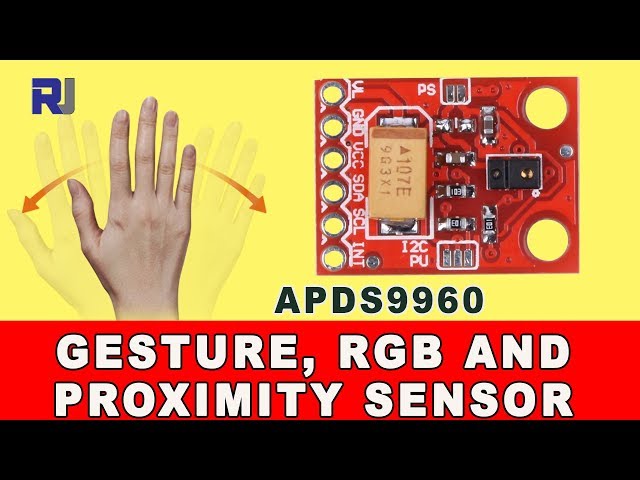
In this tutorial, we will explore how to use the APDS9960 sensor module, which combines gesture detection, RGB color sensing, and proximity sensing capabilities. This versatile sensor can detect movements in various directions and can be integrated into projects for controlling motors, lights, or other devices based on hand gestures. By the end of this tutorial, you will understand how to wire the sensor and implement basic gesture detection in your Arduino projects.

The APDS9960 module is compact and requires minimal wiring, making it an excellent choice for interactive projects. We will be using the Arduino IDE to program the sensor and display the detected gestures on the serial monitor. For a visual guide, refer to the video at (in video at 00:00).
Hardware Explained
The key component of this project is the APDS9960 sensor module. This module is capable of detecting gestures such as swipe left, swipe right, swipe up, and swipe down. It also measures RGB color values and proximity to nearby objects. The sensor communicates with the Arduino using I2C, which simplifies the wiring and coding process.
The APDS9960 contains multiple internal sensors: a gesture sensor, an RGB color sensor, and an ambient light sensor. The gesture sensor uses an infrared LED and photodetector to detect hand movements, while the RGB sensor measures red, green, and blue light intensities to identify colors. The proximity sensor determines how close an object is to the sensor, which can be useful in various applications.
Datasheet Details
| Manufacturer | Avago Technologies |
|---|---|
| Part number | APDS-9960 |
| Logic/IO voltage | 1.8 V to 3.6 V |
| Supply voltage | 3.3 V |
| Output current (per channel) | 20 mA max |
| Peak current (per channel) | 100 mA |
| PWM frequency guidance | Not applicable |
| Input logic thresholds | 0.3 V (low), 0.7 V (high) |
| Voltage drop / RDS(on) / saturation | 0.5 V max |
| Thermal limits | -40 to 85 °C |
| Package | 6-pin LGA |
| Notes / variants | None |
- Always power the APDS9960 with 3.3V; higher voltages can damage the sensor.
- Ensure proper pull-up resistors on the I2C lines if connecting multiple devices.
- Keep the sensor away from direct sunlight to avoid interference.
- Use a decoupling capacitor close to the power pins for stability.
- Be aware of the sensing range for proximity detection (typically around 20 cm).
Wiring Instructions

To wire the APDS9960 sensor module to your Arduino, follow these steps:
- Connect the
VCCpin of the APDS9960 to the 3.3V pin on the Arduino. - Connect the
GNDpin to one of the GND pins on the Arduino. - Connect the
SDApin to the Arduino'sA4pin (I2C data line). - Connect the
SCLpin to the Arduino'sA5pin (I2C clock line). - Connect the
INTpin to digital pin2on the Arduino for interrupt handling.
Note that if you are using a different Arduino model, the SDA and SCL pins may vary (e.g., on an Arduino Mega, use SDA on pin 20 and SCL on pin 21). Make sure to check the specific pin mappings for your board. For different configurations, refer to the video at (in video at 02:30).
Code Examples & Walkthrough
In the setup function, we initialize the serial communication and the APDS9960 sensor. The interrupt pin is set up to listen for gesture events. Here's a snippet of the setup code:
void setup() {
  pinMode(APDS9960_INT, INPUT);
  Serial.begin(9600);
  Serial.println(F("APDS-9960 initialization..."));
  if (apds.init()) {
    Serial.println(F("Initialization complete"));
  } else {
    Serial.println(F("Initialization failed"));
  }
}
This code sets up the necessary configurations to ensure that the sensor is ready for use and provides feedback in the serial monitor.
Next, we define how to handle the gestures detected by the sensor. The handleGesture function uses a switch statement to determine the direction of the gesture. Here’s a focused excerpt:
void handleGesture() {
  if (apds.isGestureAvailable()) {
    switch (apds.readGesture()) {
      case DIR_UP:
        Serial.println("UP");
        break;
      case DIR_DOWN:
        Serial.println("DOWN");
        break;
      // Additional cases for left, right, near, and far
    }
  }
}
This function checks if a gesture is available and reads its direction, printing the result to the serial monitor for feedback. Make sure to refer to the full code loaded below the article for complete implementation details.
Demonstration / What to Expect
When you run the program, you should see the detected gestures printed on the serial monitor as you move your hand in different directions. For instance, swiping up should display "UP," while swiping down shows "DOWN." Make sure to hold your hand steady for a second when performing near and far gestures (in video at 10:00).
Be cautious with the sensor's proximity detection; if you move your hand too quickly or too far from the sensor, it may not register the gesture accurately. This is a common issue that can affect performance.
Video Timestamps
- 00:00 - Introduction to the APDS9960 sensor
- 02:30 - Wiring instructions
- 05:15 - Code explanations
- 10:00 - Demonstration of gesture recognition
图像

++
/*
This is code for an APDS9960 Gesture, RGB, Proximity sensor module (6 pin).
 * Watch the video on how to use APDS9960: https://youtu.be/jjXx0V13rNs

 */
/*
 *  This code has been modified from the Arduino library.
 *  Explained by Ahmad S. on March 25, 2018 at 21:19
 *  in Ajax, Ontario, Canada
 *  for Robojax.com
 *
 */

 /****************************************************************
GestureTest.ino
APDS-9960 RGB and Gesture Sensor
Shawn Hymel @ SparkFun Electronics
May 30, 2014
https://github.com/sparkfun/APDS-9960_RGB_and_Gesture_Sensor

Tests the gesture sensing abilities of the APDS-9960. Configures
APDS-9960 over I2C and waits for gesture events. Calculates the
direction of the swipe (up, down, left, right) and displays it
on a serial console.

To perform a NEAR gesture, hold your hand
far above the sensor and move it close to the sensor (within 2
inches). Hold your hand there for at least 1 second and move it
away.

To perform a FAR gesture, hold your hand within 2 inches of the
sensor for at least 1 second and then move it above (out of
range) of the sensor.

Hardware Connections:

IMPORTANT: The APDS-9960 can only accept 3.3V!

 Arduino Pin  APDS-9960 Board  Function

 3.3V         VCC              Power
 GND          GND              Ground
 A4           SDA              I2C Data
 A5           SCL              I2C Clock
 2            INT              Interrupt

Resources:
Include Wire.h and SparkFun_APDS-9960.h

Development environment specifics:
Written in Arduino 1.0.5
Tested with SparkFun Arduino Pro Mini 3.3V

This code is beerware; if you see me (or any other SparkFun
employee) at the local, and you've found our code helpful, please
buy us a round!

Distributed as-is; no warranty is given.
****************************************************************/

#include <Wire.h>
#include <SparkFun_APDS9960.h>

// Pins
#define APDS9960_INT    2 // Needs to be an interrupt pin

// Constants

// Global Variables
SparkFun_APDS9960 apds = SparkFun_APDS9960();
int isr_flag = 0;

void setup() {

  // Set interrupt pin as input
  // Robojax Video Tutorial
  pinMode(APDS9960_INT, INPUT);

  // Initialize Serial port
  Serial.begin(9600);
  Serial.println();
  Serial.println(F("--------------------------------"));
  Serial.println(F("SparkFun APDS-9960 - GestureTest"));
  Serial.println(F("--------------------------------"));

  // Initialize interrupt service routine
  attachInterrupt(0, interruptRoutine, FALLING);

  // Initialize APDS-9960 (configure I2C and initial values)
  if ( apds.init() ) {
    Serial.println(F("APDS-9960 initialization complete"));
  } else {
    Serial.println(F("Something went wrong during APDS-9960 init!"));
  }

  // Robojax Video Tutorial
  // Start running the APDS-9960 gesture sensor engine
  if ( apds.enableGestureSensor(true) ) {
    Serial.println(F("Gesture sensor is now running"));
  } else {
    Serial.println(F("Something went wrong during gesture sensor init!"));
  }
}

void loop() {
  if( isr_flag == 1 ) {
    detachInterrupt(0);
    handleGesture();
    isr_flag = 0;
    attachInterrupt(0, interruptRoutine, FALLING);
    // Robojax Video Tutorial
  }
}

void interruptRoutine() {
  isr_flag = 1;
}

void handleGesture() {
    if ( apds.isGestureAvailable() ) {
      // Robojax Video Tutorial
    switch ( apds.readGesture() ) {
      case DIR_UP:
        Serial.println("UP");
        break;
      case DIR_DOWN:
        Serial.println("DOWN");
        break;
      case DIR_LEFT:
        Serial.println("LEFT");
        // Robojax Video Tutorial
        break;
      case DIR_RIGHT:
        Serial.println("RIGHT");
        break;
      case DIR_NEAR:
        Serial.println("NEAR");
        break;
      case DIR_FAR:
        Serial.println("FAR");
        break;
      default:
        Serial.println("NONE");
        // Robojax Video Tutorial
    }
  }
}
|||您可能需要的东西
-
亚马逊从亚马逊购买APDS-9960手势传感器amzn.to
-
全球速卖通从AliExpress购买AM2302或DHT11或DHT22传感器s.click.aliexpress.com
资源与参考
-
外部Adafruit APDS9960库(来自GitHub)github.com