Kika awọn folti ati Ṣiṣẹ pẹlu Potentiometers fun Arduino
Nínú ẹ̀kọ́ yìí, a óò ṣàwárí bí a ṣe lè ka àwọn iye foltiège nípa lílo potentiometer pẹ̀lú Arduino. Nígbà tí o bá parí iṣẹ́ yìí, o óò lóye bí a ṣe ń yí àwọn ìwé kíkà analog padà sí iye foltiège àti pàápàá ṣírò resistance ti potentiometer dá lórí ìwọ̀n foltiège tí ó jáde. Èyí wúlò nínú ọ̀pọ̀lọpọ̀ àwọn ohun èlò níbi tí o ti nílò láti ṣe àkíyèsí àti ìṣàkóso àwọn ipele foltiège.

Nínú iṣẹ́ yìí, a óò lo Arduino láti ka foltiège láti inú potentiometer tí a so mọ́ ọ̀kan nínú àwọn pin input analog rẹ̀. Potentiometer náà yóò jẹ́ kí a yí foltiège padà, èyí tí a óò yí padà sí ọ̀nà tí a lè kà àti ṣàfihàn rẹ̀ lórí serial monitor. Ní àfikún, a óò gbòòrò sí iṣẹ́ náà láti ṣírò iye resistance dá lórí ìwọ̀n foltiège, tí yóò pèsè òye kíkún nípa bí potentiometers ṣe ń ṣiṣẹ́ pẹ̀lú Arduino.
Fún àlàyé síwájú sí i lórí àwọn ìgbésẹ̀ àti ìmúṣẹ kóòdù, rí i dájú pé o wo fídíò náà (nínú fídíò ní 00:00).
Ohun èlò Tí A Ṣàlàyé
Àwọn èròjà pàtàkì nínú iṣẹ́ yìí ni Arduino board àti potentiometer. Arduino jẹ́ pẹ́ńfọ́ọ̀mù microcontroller tí ó gbà ọ́ láàyè láti ka àwọn àmì input àti láti ṣàkóso àwọn output ní ìrọ̀rùn. Nínú ọ̀ràn yìí, yóò ka foltiège analog láti inú potentiometer.
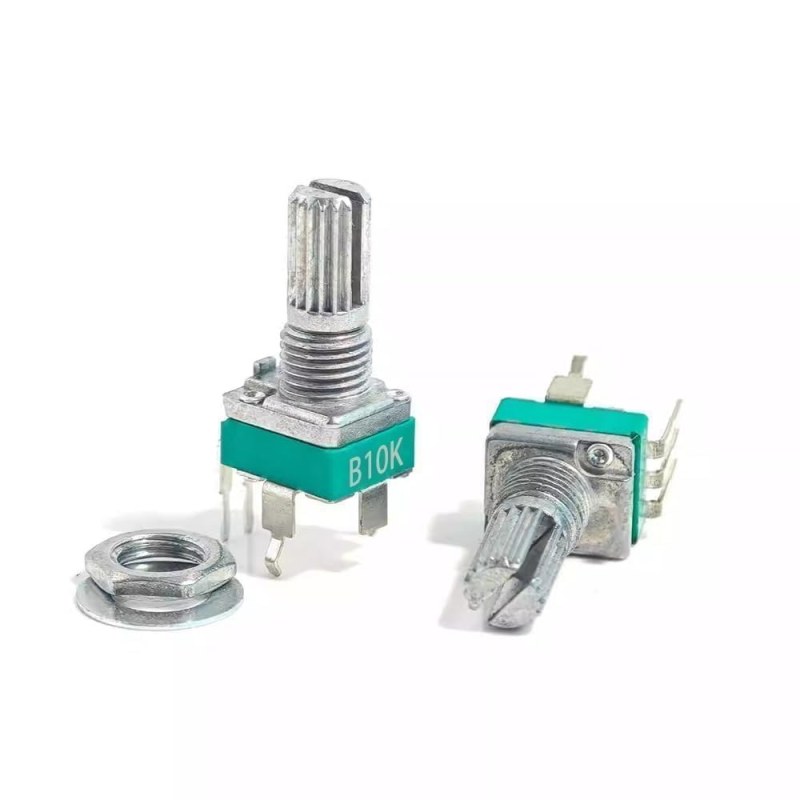
Potentiometer jẹ́ resistor tí ó yí padà tí ó lè ṣàtúnṣe resistance rẹ̀ dá lórí ipò wiper rẹ̀. Nígbà tí a bá so ọ́ mọ́ orísun foltiège, ó ń pín foltiège káàkiri àwọn terminal rẹ̀, tí ó ń jẹ́ kí o ṣe àtẹ́jáde foltiège tí ó yí padà tí Arduino lè kà nípasẹ̀ input analog rẹ̀.
Àwọn Àlàyé Datasheet
| Olùṣe | Oríṣiríṣi |
|---|---|
| Nọ́mbà apá | Potentiometer |
| Ìwọ̀n resistance | 0 – 1 MΩ |
| Ìwọ̀n agbára | 0.1 W |
| Ìwọ̀n ìgbóná | -40 sí 85 °C |
| Irú | Linear tàbí logarithmic |
- Rí i dájú pé a so potentiometer náà dáradára láti yẹ̀rá àwọn ìwọ̀n foltiège tí kò tọ́.
- Lo multimeter láti fi mọ́ iye resistance ti potentiometer kí o tó so ọ́ mọ́ Arduino.
- Pa potentiometer náà mọ́ nínú agbára tí a fún un láti yẹ̀rá gbígbóná ní àìtọ́.
- Lo àwọn capacitors decoupling tí ó tọ́ bí ó bá pọn dandan láti ṣègbà àwọn ariwo nínú ìwọ̀n.
- Ṣọ́ra nípa àwọn input tí ń fò; máa so gbogbo àwọn pin tí a kò lò mọ́ ilẹ̀.
Àwọn Ìtọ́nisọ́nà Wiring
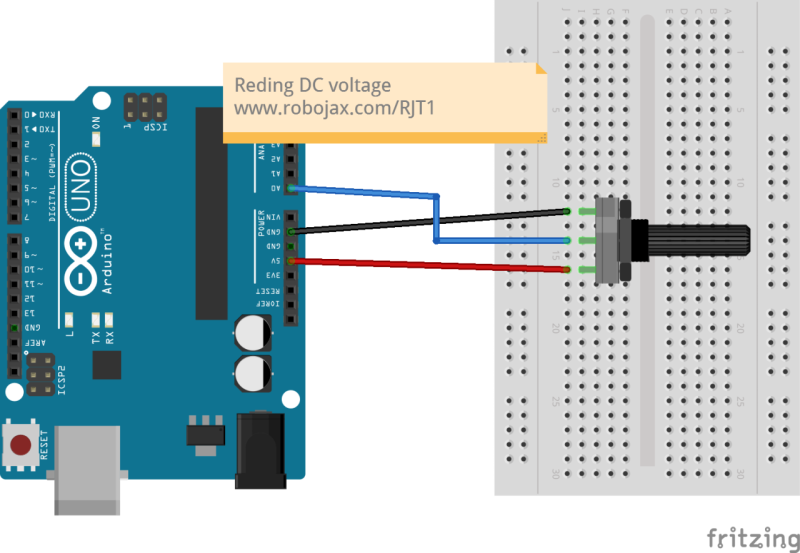
Láti so potentiometer mọ́ Arduino, bẹ̀rẹ̀ nípa sísọ òpin kan ti potentiometer mọ́ pin 5V lórí Arduino àti òpin kejì mọ́ pin ground (GND). Pin àárín ti potentiometer, èyí tí í ṣe wiper, yẹ kí a so ọ́ mọ́ pin input analog A0 lórí Arduino. Ìtòlẹ́sẹ̀ yìí jẹ́ kí Arduino ka ìwọ̀n foltiège tí ó yí padà láti inú potentiometer.
Bí o bá ń lo pin analog mìíràn, rí i dájú pé o ṣe àtúnṣe nọ́mbà pin tí ó bá mu nínú kóòdù rẹ. Fún àpẹẹrẹ, bí o bá so wiper mọ́ A1, o ní láti yí kóòdù padà láti ka láti inú A1 dípò A0.
Àwọn Àpẹẹrẹ Kóòdù & Ìtọ́sọ́nà
void setup() {
  Serial.begin(9600);          // ṣètò serial
}

void loop() {
  int sensorValue = analogRead(A0);  // Ka láti A0
  float voltage = sensorValue * (5.0 / 1023.0);  // Yí padà sí foltiège
  Serial.print("Voltage =");  // tẹ̀ ọ̀rọ̀ náà "Voltage ="
  Serial.print(voltage);
  Serial.println();
  delay(300);
}
Kóòdù yìí bẹ̀rẹ̀ ìbánisọ̀rọ̀ serial àti ń ka iye analog láti pin A0 nígbà gbogbo. Ó ń yí ìwọ̀n analog (0 sí 1023) padà sí foltiège (0 sí 5V) àti títẹ̀ ẹ sí serial monitor.
float RT = 50000; // iye potentiometer
float R; // iye R tí a kò mọ̀

void loop() {
  int sensorValue = analogRead(A0);  // Ka láti A0
  float voltage = sensorValue * (5.0 / 1023.0);  // Yí padà sí foltiège
  R = (voltage * RT) / 5.0;  // Ṣírò resistance
  Serial.print("Voltage =");  // tẹ̀ ọ̀rọ̀ náà "Voltage ="
  Serial.print(voltage);
  Serial.print("v R=");
  Serial.print(R);
  Serial.print(" ohms");
  Serial.println();
  delay(300);
}
Kóòdù kejì yìí kọ́ lórí èyí àkọ́kọ́ nípa fífi àwọn ìṣírò fún iye resistance dá lórí ìwọ̀n foltiège. Ó ń lo iye resistance tí a mọ̀ ti potentiometer RT àti ṣírò resistance tí a kò mọ̀ R nípa lílo agbekalẹ̀ tí a yọ́ láti òfin Ohm.
Ìfihàn / Ohun Tí O Yẹ Kí O Rí
Nígbà tí o bá ń ṣiṣẹ́ ètò náà, o yẹ kí o rí àwọn iye foltiège tí a tẹ̀ sí serial monitor, èyí tí yóò yí padà bí o ṣe ń ṣàtúnṣe potentiometer. Ìtẹ́jáde náà yóò tún ṣàfihàn iye resistance tí a ṣírò dá lórí ìwọ̀n foltiège. Ṣọ́ra láti yẹ̀rá àwọn ìsopọ̀ polarity tí ó yí padà, nítorí èyí lè yọrí sí àwọn ìwọ̀n tí kò tọ́ tàbí ìbàjẹ́ àwọn èròjà (nínú fídíò ní 02:30).
Àwọn Àkókò Fídíò
- 00:00 - Ìfihàn sí iṣẹ́ náà
- 01:15 - Àlàyé àwọn ohun èlò hardware
- 02:30 - Àwọn ìtọ́nisọ́nà wiring
- 03:45 - Ìtọ́sọ́nà kóòdù
- 05:00 - Ìfihàn ààyè
Aworan
//Original source:  https://www.arduino.cc/en/Tutorial/ReadAnalogVoltage

// This code is used with a video tutorial for RoboJax.com
// Published on April 24, 2017, from Ajax, ON, Canada.
// Written/Edited by A.B.S

// This Arduino code reads the value from an analog pin


void setup()

{

  Serial.begin(9600);          //  setup serial

}


void loop(){

  int sensorValue = analogRead(A0);
  // Convert the analog reading (which goes from 0 - 1023) to a voltage (0 - 5V):
  float voltage = sensorValue * (5.0 / 1023.0);
  // print out the value you read:
  Serial.print("Voltage =");// prints the text "Voltage ="
  Serial.print(voltage);
  Serial.println();
  delay(300);

}

 </code>
 <h2>Project 2 Finding the resistance value from the voltage</h2>
  <pre><code class="cpp">
//Original source:  https://www.arduino.cc/en/Tutorial/ReadAnalogVoltage
// Project: Finding the resistance value from the voltage
// This code is used with a video tutorial for RoboJax.com
// Published on April 24, 2017, from Ajax, ON, Canada.
// Written/Edited by A.B.S

float RT = 50000;// the potentiometer value
float R;// the unknown R value

void setup()

{

  Serial.begin(9600);          //  setup serial

}

void loop(){

  int sensorValue = analogRead(A0);
  // Convert the analog reading (which goes from 0 - 1023) to a voltage (0 - 5V):
  float voltage = sensorValue * (5.0 / 1023.0);
  // print out the value you read:
  R = ( voltage * RT)/5.0;
  Serial.print("Voltage =");// prints the text "Voltage ="
  Serial.print(voltage);
  Serial.print("v R=");
  Serial.print(R);
  Serial.print(" ohms");
  Serial.println();
  delay(300);

}
Orisun & itọkasi
Ko si awọn orisun sibẹsibẹ.
Fáìlìs📁
Ko si awọn faili ti o wa.