Tutoriel ESP32 44/55 - Serveur web caméra ESP32 avec flux vidéo sur Wifi CAM-2 | Kit ESP32 de SunFounder
Na boyekoli oyo, tokosala station ya meteorologie ya tango ya solo na kopesa ESP32 mpe extension ya camera na yango. Projet oyo ekolakisa ESP32 na kolakisa ba données ya météo lokola température mpe humidité na écran LCD, mpe na tango yango kozala na streaming vidéo na Wi-Fi. Na suka ya boyekoli oyo, okozala na station ya météo oyo esalaka malamu mpe oyo ebongwanaka na secondes 10 nyonso, mpe ekolakisa yo ba informations ya météo ya ntina na maboko na yo. Mpo na polele koleka, tala vidéo (na vidéo na 00:00).

Hardware Explicado
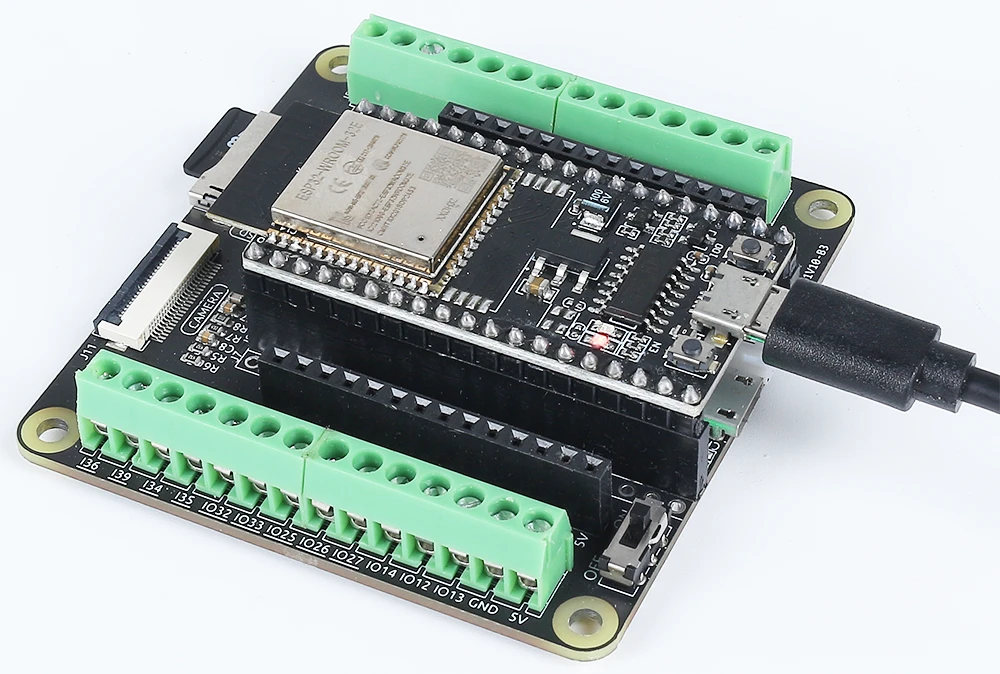
Ba composants ya liboso ya projet oyo ezali na microcontrôleur ESP32, écran LCD, mpe module ya caméra. ESP32 ezali microcontrôleur ya makasi oyo ezali na Wi-Fi mpe Bluetooth ya kati, oyo epesaka yango nguya ya kokɔta na internet mpe kosolola na ba appareils mosusu. Module ya caméra epesaka streaming vidéo, wuta écran LCD elakisi ba informations ya météo na moto oyo azali kosalela yango.
LCD oyo esalelami na projet oyo ezali écran ya ba caractères 20x4, oyo ekoki kolakisa mingi ya ba informations na mbala moko. Esangani na ESP32 mpo na kolakisa température, humidité, mpe ba données ya météo mosusu oyo ezwami na API ya internet. ESP32 ezali mpe na système ya gestion ya batterie, oyo epesaka yango nguya ya kosala na nzela ya mopepe.
Ba Détails ya Datasheet
| Fabricant | Espressif |
|---|---|
| Numéro ya pièce | ESP32-WROOM-32 |
| Tension ya logique/IO | 3.3 V |
| Tension ya alimentation | 3.0 - 3.6 V |
| Courant ya sortie (na GPIO moko) | 12 mA |
| Courant ya pointe (na GPIO moko) | 40 mA |
| Guidance ya fréquence PWM | 1 kHz |
| Ba seuils ya logique ya entrée | 0.3 * VDD to 0.7 * VDD |
| Chute ya tension / RDS(on) / saturation | 0.1 V (typ.) |
| Ba limites thermiques | 125 °C |
| Paquet | QFN48 |
| Ba notes / ba variantes | Ezali na ba options PSRAM |
- Kokamba ete alimentation ya malamu ezala (3.0 - 3.6 V).
- Salela ba dissipateurs ya chaleur mpo na ba applications ya courant ya makasi.
- Keba na ba limites ya courant GPIO (12 mA na pin moko).
- Kokɔta LCD mpe caméra malamu mpo na kokima ba problèmes ya communication.
- Vérifier ba identifiants Wi-Fi mpe ba clés API mpo na ba problèmes ya connexion.
Ba Instructions ya Câblage
Mpo na kokɔta ESP32 na LCD mpe module ya caméra, banda na kokɔta ba pins ya puissance mpe ya terre. Kokɔta pin ya terre ya ESP32 na terre ya LCD mpe caméra. Na nsima, kokɔta pin 5V ya ESP32 na VCC ya LCD. Mpo na caméra, kokɔta fil ya brun na terre, fil ya motane na 5V, fil ya jaune na GPIO 21, mpe fil ya orange na GPIO 22. Keba ete ba connexions ezala ya makasi mpo na kokima ba problèmes na tango ya fonctionnement.
Na nsima, kokɔta LCD na ba pins GPIO oyo ebongi. Ba pins spécifiques ekoki kobongwana kolanda configuration na yo, kasi mingi mingi, okokɔta ba pins ya contrôle na ba GPIO oyo eponami na ESP32. Keba na kotala datasheet to diagramme ya pins mpo na modèle ya LCD na yo mpo na kondima câblage ya malamu. Na suka ya ba connexions oyo, vérifier lisusu câblage nyonso mpo na ba connexions oyo ezali ya kokangama te to ya mabe.
Ba Exemples ya Code & Explication
Na code, tobandi na kosangisa ba bibliothèques ya ntina mpo na kosalela caméra mpe ba fonctionnalités Wi-Fi. Ba identifiants ya ntina elakemi, na ndenge ssid mpe password mpo na ba identifiants Wi-Fi. Configuration ya caméra esalemi na kopesa camera_config_t structure, epai tozali kosala ba paramètres ndenge na ndenge lokola format ya pixels mpe taille ya cadre.
const char* ssid = "SSID";
const char* password = "PASSWORD";

void setup() {
  Serial.begin(115200);
  camera_config_t config;
  // ... (ba paramètres ya configuration)
  esp_err_t err = esp_camera_init(&config);
  // Tala mpo na ba erreurs
}
Fragment oyo ebandisi caméra mpe etalaka mpo na ba erreurs na tango ya mise en place. Soki caméra elongi te na kofungola, message ya erreur ekomami na moniteur série.
Na nsima, tosalelaka connexion Wi-Fi mpe tobandisi serveur ya caméra. Boucle ya connexion ekomelaka kino connexion Wi-Fi ya malamu ezwami, oyo ezali ya ntina mpo na kozwa ba données ya météo na API.
WiFi.begin(ssid, password);
while (WiFi.status() != WL_CONNECTED) {
  delay(500);
  Serial.print(".");
}
startCameraServer();
Na eteni oyo, tobandisi connexion Wi-Fi mpe tokomaka ba points na moniteur série kino connexion ezwami. Ntango esili kokɔta, serveur ya caméra ebandisi, oyo epesaka streaming vidéo.
Code ya mobimba ekozala na nsé ya article, epai okoki komona ndenge ba parties nyonso esangani.
Démonstration / Nini Okokanela
Ntango nyonso esili kokɔta malamu mpe code esili kotombola, okokanela ete ESP32 akokɔta na réseau Wi-Fi mpe abandisa kozwa ba données ya météo na secondes 10 nyonso. Ba mesures ya température mpe humidité ekolakisa na écran LCD. Na libanda ya yango, caméra ekosala streaming vidéo na Wi-Fi, oyo ekoki kozwama na adresse IP locale oyo ekomami na moniteur série. Soki connexion Wi-Fi elongi te, ESP32 akoyebisa yo na nzela ya sortie série (na vidéo na 10:00).
Ba Timestamps ya Vidéo
- 00:00 Ebandeli
- 1:42 Introduction na ESP32-Cam
- 4:30 Code ya Arduino explicado
- 7:35 Kopona Board ya ESP32 mpe port COM na Arduino IDE
- 9:17 Démonstration
- 12:06 Démonstration na Téléphone Mobile
Images
#include "esp_camera.h"
#include <WiFi.h>

//
// WARNING!!! PSRAM IC required for UXGA resolution and high JPEG quality
//            Ensure ESP32 Wrover Module or other board with PSRAM is selected
//            Partial images will be transmitted if image exceeds buffer size
//
//            You must select partition scheme from the board menu that has at least 3MB APP space.
//            Face Recognition is DISABLED for ESP32 and ESP32-S2, because it takes up from 15
//            seconds to process single frame. Face Detection is ENABLED if PSRAM is enabled as well

// ===================
// Select camera model
// ===================
//#define CAMERA_MODEL_WROVER_KIT // Has PSRAM
// #define CAMERA_MODEL_ESP_EYE // Has PSRAM
//#define CAMERA_MODEL_ESP32S3_EYE // Has PSRAM
//#define CAMERA_MODEL_M5STACK_PSRAM // Has PSRAM
//#define CAMERA_MODEL_M5STACK_V2_PSRAM // M5Camera version B Has PSRAM
//#define CAMERA_MODEL_M5STACK_WIDE // Has PSRAM
//#define CAMERA_MODEL_M5STACK_ESP32CAM // No PSRAM
//#define CAMERA_MODEL_M5STACK_UNITCAM // No PSRAM
#define CAMERA_MODEL_AI_THINKER // Has PSRAM
//#define CAMERA_MODEL_TTGO_T_JOURNAL // No PSRAM
//#define CAMERA_MODEL_XIAO_ESP32S3 // Has PSRAM
// ** Espressif Internal Boards **
//#define CAMERA_MODEL_ESP32_CAM_BOARD
//#define CAMERA_MODEL_ESP32S2_CAM_BOARD
//#define CAMERA_MODEL_ESP32S3_CAM_LCD

#include "camera_pins.h"

// Replace the next variables with your SSID/Password combination
const char* ssid = "SSID";
const char* password = "PASSWORD";

void startCameraServer();
void setupLedFlash(int pin);

void setup() {
  Serial.begin(115200);
  Serial.setDebugOutput(true);
  Serial.println();

  camera_config_t config;
  config.ledc_channel = LEDC_CHANNEL_0;
  config.ledc_timer = LEDC_TIMER_0;
  config.pin_d0 = Y2_GPIO_NUM;
  config.pin_d1 = Y3_GPIO_NUM;
  config.pin_d2 = Y4_GPIO_NUM;
  config.pin_d3 = Y5_GPIO_NUM;
  config.pin_d4 = Y6_GPIO_NUM;
  config.pin_d5 = Y7_GPIO_NUM;
  config.pin_d6 = Y8_GPIO_NUM;
  config.pin_d7 = Y9_GPIO_NUM;
  config.pin_xclk = XCLK_GPIO_NUM;
  config.pin_pclk = PCLK_GPIO_NUM;
  config.pin_vsync = VSYNC_GPIO_NUM;
  config.pin_href = HREF_GPIO_NUM;
  config.pin_sccb_sda = SIOD_GPIO_NUM;
  config.pin_sccb_scl = SIOC_GPIO_NUM;
  config.pin_pwdn = PWDN_GPIO_NUM;
  config.pin_reset = RESET_GPIO_NUM;
  config.xclk_freq_hz = 20000000;
  config.frame_size = FRAMESIZE_UXGA;
  config.pixel_format = PIXFORMAT_JPEG; // for streaming
  // config.pixel_format = PIXFORMAT_RGB565; // for face detection/recognition
  config.grab_mode = CAMERA_GRAB_WHEN_EMPTY;
  config.fb_location = CAMERA_FB_IN_PSRAM;
  config.jpeg_quality = 12;
  config.fb_count = 1;

  // if PSRAM IC present, init with UXGA resolution and higher JPEG quality
  //                      for larger pre-allocated frame buffer.
  if(config.pixel_format == PIXFORMAT_JPEG){
    if(psramFound()){
      config.jpeg_quality = 10;
      config.fb_count = 2;
      config.grab_mode = CAMERA_GRAB_LATEST;
    } else {
      // Limit the frame size when PSRAM is not available
      config.frame_size = FRAMESIZE_SVGA;
      config.fb_location = CAMERA_FB_IN_DRAM;
    }
  } else {
    // Best option for face detection/recognition
    config.frame_size = FRAMESIZE_240X240;
#if CONFIG_IDF_TARGET_ESP32S3
    config.fb_count = 2;
#endif
  }

#if defined(CAMERA_MODEL_ESP_EYE)
  pinMode(13, INPUT_PULLUP);
  pinMode(14, INPUT_PULLUP);
#endif

  // camera init
  esp_err_t err = esp_camera_init(&config);
  if (err != ESP_OK) {
    Serial.printf("Camera init failed with error 0x%x", err);
    return;
  }

  sensor_t * s = esp_camera_sensor_get();
  // initial sensors are flipped vertically and colors are a bit saturated
  if (s->id.PID == OV3660_PID) {
    s->set_vflip(s, 1); // flip it back
    s->set_brightness(s, 1); // up the brightness just a bit
    s->set_saturation(s, -2); // lower the saturation
  }
  // drop down frame size for higher initial frame rate
  if(config.pixel_format == PIXFORMAT_JPEG){
    s->set_framesize(s, FRAMESIZE_QVGA);
  }

#if defined(CAMERA_MODEL_M5STACK_WIDE) || defined(CAMERA_MODEL_M5STACK_ESP32CAM)
  s->set_vflip(s, 1);
  s->set_hmirror(s, 1);
#endif

#if defined(CAMERA_MODEL_ESP32S3_EYE)
  s->set_vflip(s, 1);
#endif

// Setup LED FLash if LED pin is defined in camera_pins.h
#if defined(LED_GPIO_NUM)
  setupLedFlash(LED_GPIO_NUM);
#endif

  WiFi.begin(ssid, password);
  WiFi.setSleep(false);

  while (WiFi.status() != WL_CONNECTED) {
    delay(500);
    Serial.print(".");
  }
  Serial.println("");
  Serial.println("WiFi connected");

  startCameraServer();

  Serial.print("Camera Ready! Use 'http://");
  Serial.print(WiFi.localIP());
  Serial.println("' to connect");
}

void loop() {
  // Do nothing. Everything is done in another task by the web server
  delay(10000);
}
Common Course Links
Common Course Files
Mokili na bisika
-
DokumentasiESP32 Tutorial 44/55 - SunFounder doc page for camera web serverdocs.sunfounder.com
Fichiers📁
Aucun fichier disponible.