Tutoriel ESP32 42/55 - Prise de photo avec caméra enregistrée sur micro SD CAM-1 | Kit ESP32 de SunFounder
Na boyekoli oyo, tokosalela mikoloto ya ESP32 elongo na eteni na yango ya SunFounder mpo na kokamata bilili na kamera mpe kobomba yango moko na moko na kati ya mikoloto ya micro SD. Projɛ oyo esalelaka makoki ya ESP32, na ndenge ya Wi-Fi mpe Bluetooth, mpo na kosala esaleli ya kokamata bilili. Na suka ya boyekoli oyo, okozala na esaleli oyo ekoki kokamata mpe kobomba bilili, oyo ekoki kotalama na esika mosusu na komputer.

Mpo na bato oyo bayebi te ecosystème ya ESP32, kit oyo epesaka platforme ya kosalela mpo na ba projets ndenge na ndenge, na ndenge ya oyo. Kamera oyo esalelami na projɛ oyo ezali OV2640, oyo epesaka résolution ya 1600x1200 pixels. Atako ekoki kozala te na qualité ya ba téléphones ya lelo, ekoki mpo na misala ya kokamata bilili. Mpo na koyeba makambo nyonso, tala vidéo oyo elandi boyekoli oyo (na vidéo na 00:00).

Biloko ya Matériel
Biloko ya minene na projɛ oyo ezali mikoloto ya ESP32, module ya kamera (OV2640), mpe mikoloto ya micro SD mpo na kobomba. ESP32 ezali mikoloto ya makasi oyo ezali na Wi-Fi mpe Bluetooth, oyo esalaka ete ezala malamu mpo na ba applications ya IoT. Module ya kamera ekamataka bilili, oyo esalelami na ESP32.
Mikoloto ya micro SD ezali lokola esika ya kobomba bilili oyo ekamami. Na esaleli oyo, ESP32 elobelaka module ya kamera na nzela ya ba pins ya GPIO, mpe bilili ebombamaka na format ya JPEG na mikoloto ya SD. Oyo esalaka ete bilili bikoka kozwama mpe kotalama na sima.
- Keba ete kamera ezala na esika ya malamu ntango okotisi yango na board ya ESP32.
- Salela mikoloto ya micro SD oyo ezali na capacité ya 32 GB to moke mpo na kokima ba problèmes ya compatibilité.
- Kokangisa GPIO 0 na GND mpo na mode ya programmation.
- Keba na fourniture ya courant mpo na kokima ba problèmes ya brownout.
- Keba ete kamera ezala ya kozala malamu ntango okamataka bilili mpo na kokima bilili ya flou.
Ba Instructions ya Câblage
Mpo na kokangisa module ya kamera ya ESP32, liboso keba ete ESP32 ezala ya kozala na courant te. Kokangisa module ya micro SD card na ESP32 na nzela ya ba pins oyo: kokangisa pin ya CS ya SD card na GPIO 5 ya ESP32, MOSI na GPIO 23, MISO na GPIO 19, mpe SCK na GPIO 18. Na sima, kokangisa ba pins ya module ya kamera na ndenge oyo: PWDN na GPIO 32, XCLK na GPIO 0, SIOD na GPIO 26, mpe SIOC na GPIO 27. Ba pins ya données ya pixels Y2 kino Y9 esengeli kokangisama na GPIO 5 kino GPIO 39 ndenge esalemi na code na yo.
Keba ete okokangisa ba pins ya terre mpe ya courant na ndenge ya malamu. ESP32 ekoki kopelama na batterie oyo ezali na kit. Na sima ya câblage, keba ete ba connexions ezala ya makasi liboso ya kopelisa esaleli. Soki olandi ba instructions na bokebi, okomona ete kamera ebanda malamu ntango okotisi code.
Ba Exemples ya Code & Explication


Na code, tobandaka na kotya ba bibliothèques ya liboso mpe kopesa ba configurations ya ba pins ya kamera. Variable pictureNumber ebandisami mpo na kokeba motango ya bilili oyo ekamami.
int pictureNumber = 0;

void setup() {
  WRITE_PERI_REG(RTC_CNTL_BROWN_OUT_REG, 0);  // Kobongola détecteur ya brownout
  Serial.begin(115200);
  camera_config_t config;
  // Ba configurations ya kamera
  config.ledc_channel = LEDC_CHANNEL_0;
  // Ba configurations mosusu ya kamera...
}
Fonction ya setup ebandisaka communication ya série mpe esalaka configurations ya kamera. Configurations yango ezali na ba paramètres lokola ledc_channel, pin_d0, mpe xclk_freq_hz mpo na performance ya malamu.
Na sima, tosalelaka processus ya kokamata bilili na nzela ya boucle mpo na kokamata ba bilili ebele. Ba données ya image ebombamaka na SD card na nkombo oyo euti na pictureNumber.
for (int shoot = 0; shoot < 5; shoot++) {
    camera_fb_t *fb = esp_camera_fb_get(); // Kokamata elilingi
    String path = "/picture" + String(pictureNumber) + ".jpg"; // Nzela ya fisyé
    File file = fs.open(path.c_str(), FILE_WRITE); // Kofungola fisyé mpo na kokoma
    // Kokoma ba données ya image na fisyé
    file.write(fb->buf, fb->len);
    // Kobongola motango ya elilingi na EEPROM
    EEPROM.write(0, pictureNumber);
}
Boucle oyo ekamataka kino ba bilili mitano, mpo na elilingi na yango ebombamaka na nkombo ya unique. Kosalela EEPROM esalaka ete programme ekoka kokanisa motango ya suka ya elilingi, mpo na kopesa na elilingi ya sika nkombo ya unique.
Démonstration / Nini Okomona
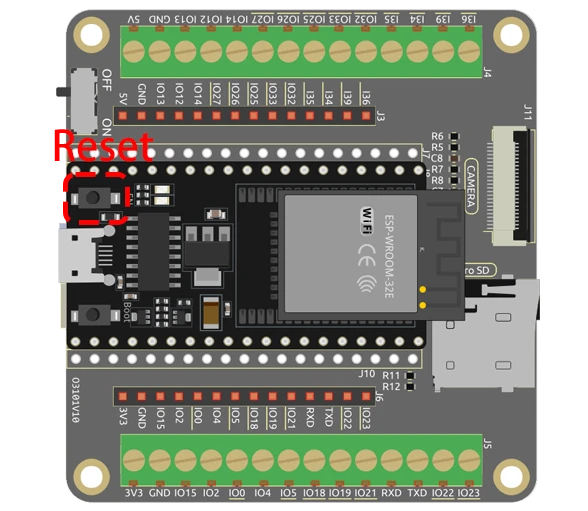
Ntango okoki kosala code yango, ESP32 ekozwa camera mpe carte SD. Nsima ya kobeta bouton ya reset na ESP32, ekozwa ba photos ebele, oyo ekotalama na ba numéro kolanda na EEPROM value, longwa na 0 kino na 255. Nsima ya kozwa ba images yango, okoki kolongola micro SD card mpe kotala ba photos na ordinatɛrɛ na yo.
Ba erreurs ya mbala mingi ezali na kotalela ete micro SD card ezali bien formaté mpe ekomami, mpe kozala na position ya caméra ya malembe mpo na kokima ba images ya flou. Soki ozali na problème ya caméra ete ezali kozwa ba images te, tala lisusu ba connexions mpe ba configurations oyo ezali na code (na vidéo na 06:45).
Ba Timestamps ya Vidéo
- 00:00 Ebandeli
- 1:39 Introduction
- 5:19 Explication ya Code ya ESP32 Camera
- 11:10 Kopona carte ya ESP32 mpe COM port na Arduino IDE
- 12:52 Kozwa ba photos na intérieur mpe extérieur - test
Images
/*********
  Rui Santos
  Complete project details at https://RandomNerdTutorials.com/esp32-cam-take-photo-save-microsd-card

  IMPORTANT!!!
   - Select Board "AI Thinker ESP32-CAM"
   - GPIO 0 must be connected to GND to upload a sketch
   - After connecting GPIO 0 to GND, press the ESP32-CAM on-board RESET button to put your board in flashing mode

  Permission is hereby granted, free of charge, to any person obtaining a copy
  of this software and associated documentation files.
  The above copyright notice and this permission notice shall be included in all
  copies or substantial portions of the Software.
*********/

#include "esp_camera.h"
#include "Arduino.h"
#include "FS.h"                // SD Card ESP32
#include "SD_MMC.h"            // SD Card ESP32
#include "soc/soc.h"           // Disable brownour problems
#include "soc/rtc_cntl_reg.h"  // Disable brownour problems
#include "driver/rtc_io.h"
#include <EEPROM.h>  // read and write from flash memory

// define the number of bytes you want to access
#define EEPROM_SIZE 1

// Pin definition for CAMERA_MODEL_AI_THINKER
#define PWDN_GPIO_NUM 32
#define RESET_GPIO_NUM -1
#define XCLK_GPIO_NUM 0
#define SIOD_GPIO_NUM 26
#define SIOC_GPIO_NUM 27

#define Y9_GPIO_NUM 35
#define Y8_GPIO_NUM 34
#define Y7_GPIO_NUM 39
#define Y6_GPIO_NUM 36
#define Y5_GPIO_NUM 21
#define Y4_GPIO_NUM 19
#define Y3_GPIO_NUM 18
#define Y2_GPIO_NUM 5
#define VSYNC_GPIO_NUM 25
#define HREF_GPIO_NUM 23
#define PCLK_GPIO_NUM 22

int pictureNumber = 0;

void setup() {
  WRITE_PERI_REG(RTC_CNTL_BROWN_OUT_REG, 0);  //disable brownout detector

  Serial.begin(115200);
  //Serial.setDebugOutput(true);
  //Serial.println();

  camera_config_t config;
  config.ledc_channel = LEDC_CHANNEL_0;
  config.ledc_timer = LEDC_TIMER_0;
  config.pin_d0 = Y2_GPIO_NUM;
  config.pin_d1 = Y3_GPIO_NUM;
  config.pin_d2 = Y4_GPIO_NUM;
  config.pin_d3 = Y5_GPIO_NUM;
  config.pin_d4 = Y6_GPIO_NUM;
  config.pin_d5 = Y7_GPIO_NUM;
  config.pin_d6 = Y8_GPIO_NUM;
  config.pin_d7 = Y9_GPIO_NUM;
  config.pin_xclk = XCLK_GPIO_NUM;
  config.pin_pclk = PCLK_GPIO_NUM;
  config.pin_vsync = VSYNC_GPIO_NUM;
  config.pin_href = HREF_GPIO_NUM;
  config.pin_sscb_sda = SIOD_GPIO_NUM;
  config.pin_sscb_scl = SIOC_GPIO_NUM;
  config.pin_pwdn = PWDN_GPIO_NUM;
  config.pin_reset = RESET_GPIO_NUM;
  config.xclk_freq_hz = 20000000;
  config.pixel_format = PIXFORMAT_JPEG;

  if (psramFound()) {
    config.frame_size = FRAMESIZE_UXGA;  // FRAMESIZE_ + QVGA|CIF|VGA|SVGA|XGA|SXGA|UXGA
    config.jpeg_quality = 10;
    config.fb_count = 2;
  } else {
    config.frame_size = FRAMESIZE_SVGA;
    config.jpeg_quality = 12;
    config.fb_count = 1;
  }

  // Init Camera
  esp_err_t err = esp_camera_init(&config);
  if (err != ESP_OK) {
    Serial.printf("Camera init failed with error 0x%x", err);
    return;
  }

  //Serial.println("Starting SD Card");
  if (!SD_MMC.begin()) {
    Serial.println("SD Card Mount Failed");
    return;
  }

  uint8_t cardType = SD_MMC.cardType();
  if (cardType == CARD_NONE) {
    Serial.println("No SD Card attached");
    return;
  }

  // initialize EEPROM with predefined size
  EEPROM.begin(EEPROM_SIZE);
  pictureNumber = EEPROM.read(0) + 1;

  for (int shoot = 0; shoot < 5; shoot++) {
    camera_fb_t *fb = NULL;

    // Take Picture with Camera
    fb = esp_camera_fb_get();
    if (!fb) {
      Serial.println("Camera capture failed");
      return;
    }

    // Path where new picture will be saved in SD Card
    String path = "/picture" + String(pictureNumber) + ".jpg";

    fs::FS &fs = SD_MMC;
    // Serial.printf("Picture file name: %s\n", path.c_str());

    File file = fs.open(path.c_str(), FILE_WRITE);
    if (!file) {
      Serial.println("Failed to open file in writing mode");
    } else {
      file.write(fb->buf, fb->len);  // Write image data to file
      if (shoot == 4) {
        Serial.printf("Saved file to path: %s\n", path.c_str());
      }else{
        Serial.printf("Shooting... \n");
      }
      EEPROM.write(0, pictureNumber);  // Update the picture number in EEPROM
      EEPROM.commit();
    }
    file.close();                      // Close the file
    esp_camera_fb_return(fb);          // Return the frame buffer back to the camera driver
    delay(200);                        // Short delay between shots
  }
  // Turns off the ESP32-CAM white on-board LED (flash) connected to GPIO 4
  pinMode(4, OUTPUT);
  digitalWrite(4, LOW);
  rtc_gpio_hold_en(GPIO_NUM_4);

  // Put the ESP32-CAM to deep sleep
  delay(2000);
  Serial.println("Going to sleep now");
  delay(2000);
  esp_deep_sleep_start();
  Serial.println("This will never be printed");
}

void loop() {
  // Empty loop as we are putting the ESP32-CAM to deep sleep
}
Common Course Links
Common Course Files
Mokili na bisika
-
DokumentasiESP32 Tutorial 42/55- SunFounder doc page taking photodocs.sunfounder.com
Fichiers📁
Aucun fichier disponible.