ESP32 教學 48/55 - 遠程溫度監控同 LED 控制 MQTT | SunFounder 嘅 ESP32 IoT 套件
喺呢個教學入面,我哋會探討點樣利用ESP32模組,配合SunFounder嘅ESP32擴展板,透過Adafruit IO平台遠端監測溫度同濕度。另外,我哋仲會實現透過網頁介面控制LED嘅功能。完成呢個項目之後,你就可以喺瀏覽器度睇到即時嘅溫度同濕度數據,仲可以開關LED。
呢個項目利用MQTT協議,令ESP32同Adafruit IO服務之間可以高效通訊。MQTT輕量級,好適合物聯網應用,等我哋可以輕鬆發佈感測器數據,同時訂閱指令嚟控制LED。如果想更清楚了解程式碼同接線,記得睇吓呢個教學附帶嘅影片(影片喺00:00位置)。
硬件解說
呢個項目嘅主要組件包括ESP32微控制器、DHT11溫度濕度感測器,同埋一個LED。ESP32係一個功能強大嘅微控制器,內置Wi-Fi同藍牙功能,係物聯網項目嘅理想選擇。佢可以處理多個任務,並且無縫連接到互聯網。
DHT11感測器負責測量溫度同濕度。佢輸出數碼訊號,畀ESP32讀取。LED就作為指示燈,可以遠端控制,用嚟示範MQTT協議喺透過互聯網管理設備方面嘅效能。
數據表詳情
| 製造商 | Adafruit |
|---|---|
| 零件編號 | DHT11 |
| 邏輯/IO電壓 | 3.3 V |
| 供電電壓 | 3.3 V |
| 輸出電流(每通道) | 20 mA |
| 峰值電流(每通道) | 50 mA |
| PWM頻率指引 | 不適用 |
| 輸入邏輯閾值 | 0.3 V(低),0.7 V(高) |
| 電壓降 / RDS(on) / 飽和 | 不適用 |
| 熱限制 | 0至50 °C |
| 封裝 | 3針 |
| 備註 / 變體 | 如需更高精度,可使用DHT22。 |
- 確保接線正確,以免損壞。
- LED要加220歐姆電阻嚟限流。
- 如有需要,DHT11數據腳要加上拉電阻。
- 檢查Wi-Fi憑證嘅大小寫。
- 監察串列輸出,用嚟偵測連接問題。
- 保持MQTT主題唯一,避免衝突。
- 測試感測器讀數,確保有效。
- 留意DHT11嘅響應時間;讀數可能需要時間先至穩定。
LED = 控制LED;temperature = 發佈溫度數據;humidity = 發佈濕度數據。
接線說明
要接駁組件,首先連接DHT11感測器。用紅色線將DHT11左邊嘅針腳連接到麵包板上嘅3.3V電源軌。DHT11中間嘅針腳就用黃色線連接到ESP32上嘅第13腳。最後,用藍色線將DHT11右邊嘅針腳連接到接地軌。
跟住,對於LED,將陽極(較長嘅腳)透過220歐姆電阻連接到ESP32嘅第15腳。將陰極(較短嘅腳)直接連接到麵包板上嘅接地軌。確保所有連接穩固,並再三檢查有冇鬆脫嘅線。
設定儀表板
-
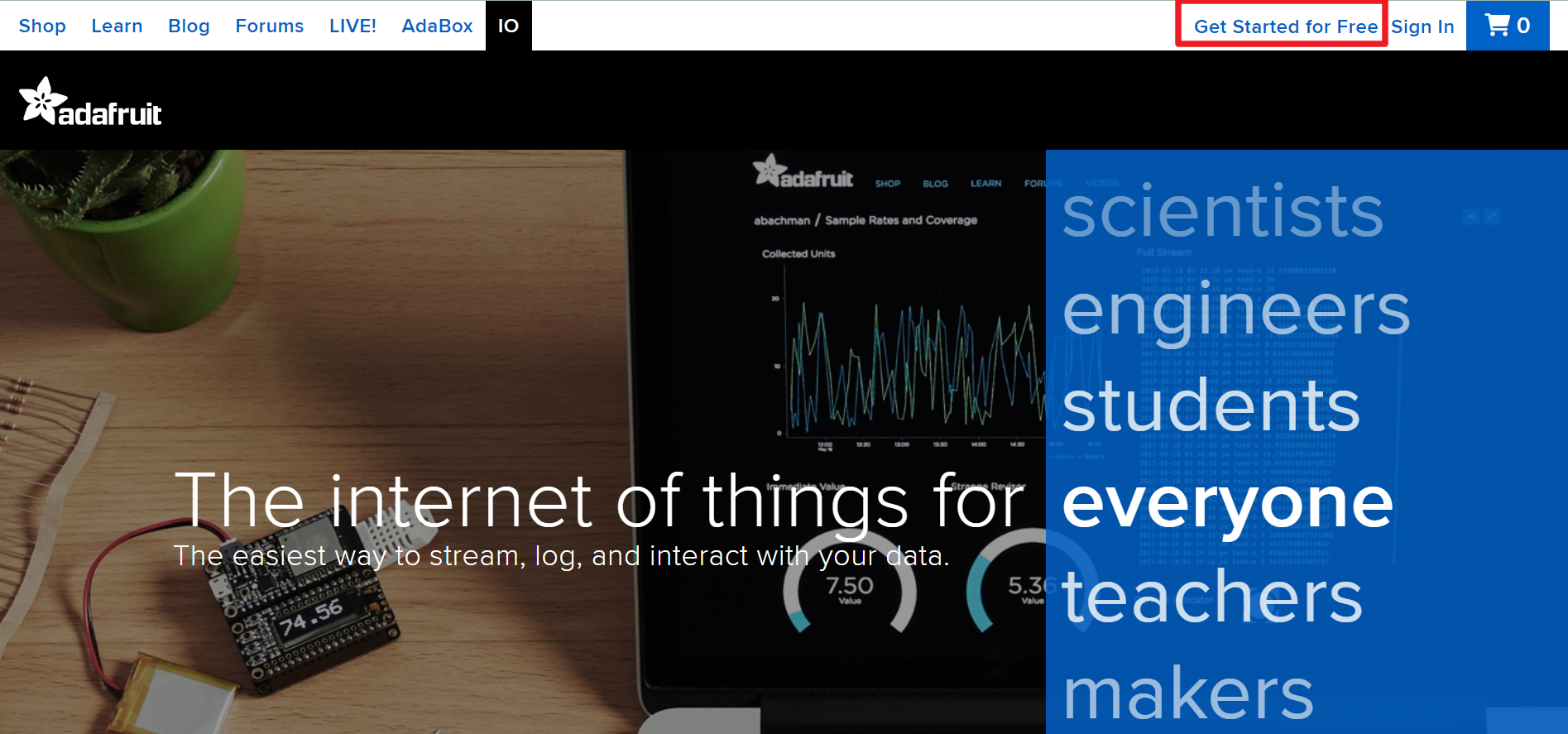
去 Adafruit IO,然後撳 Start for free 嚟建立一個免費帳戶。
-
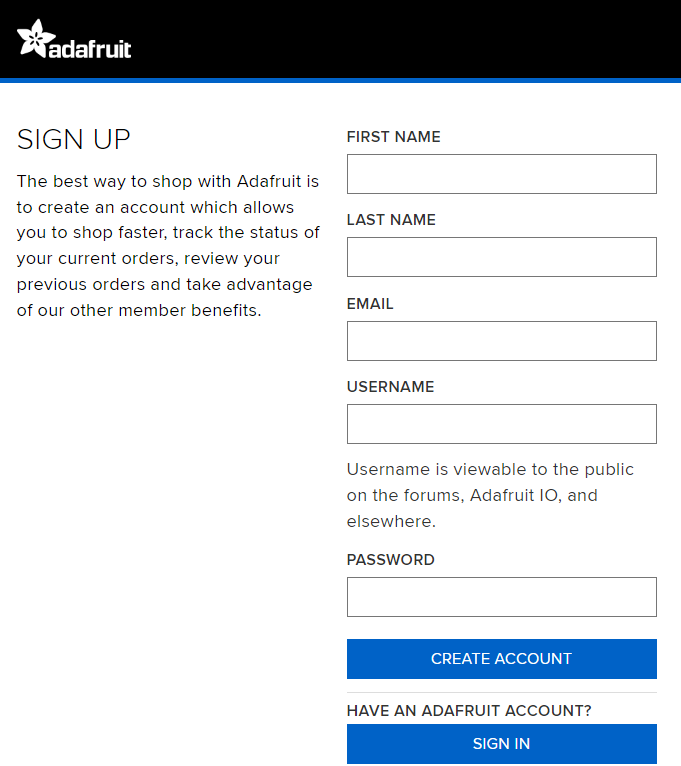
填寫表格嚟建立帳戶。
-
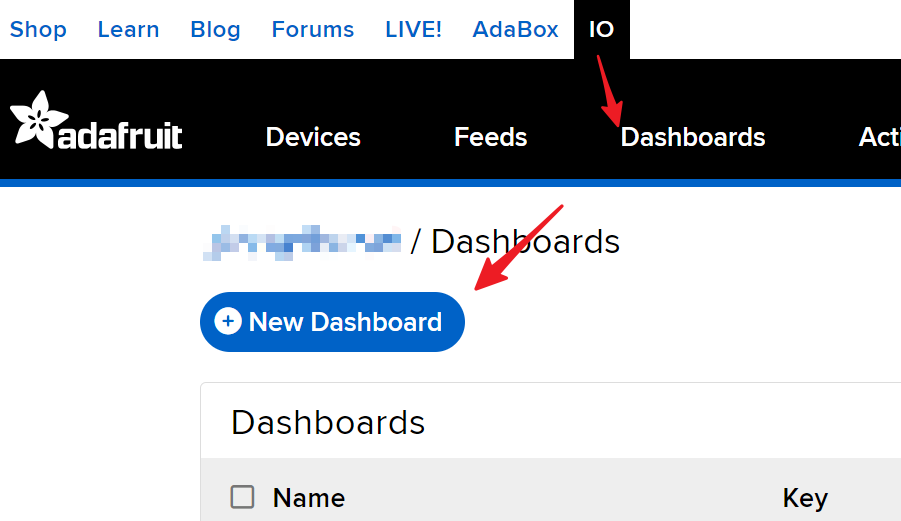
建立咗 Adafruit 帳戶之後,你需要重新打開 Adafruit IO。撳 Dashboards,然後撳 New Dashboard。
-
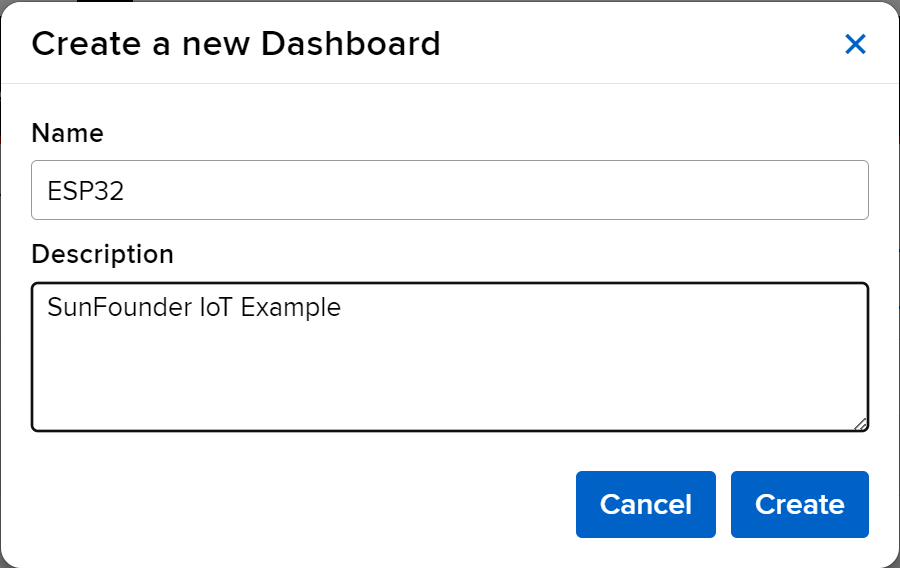
建立一個 New Dashboard。
-
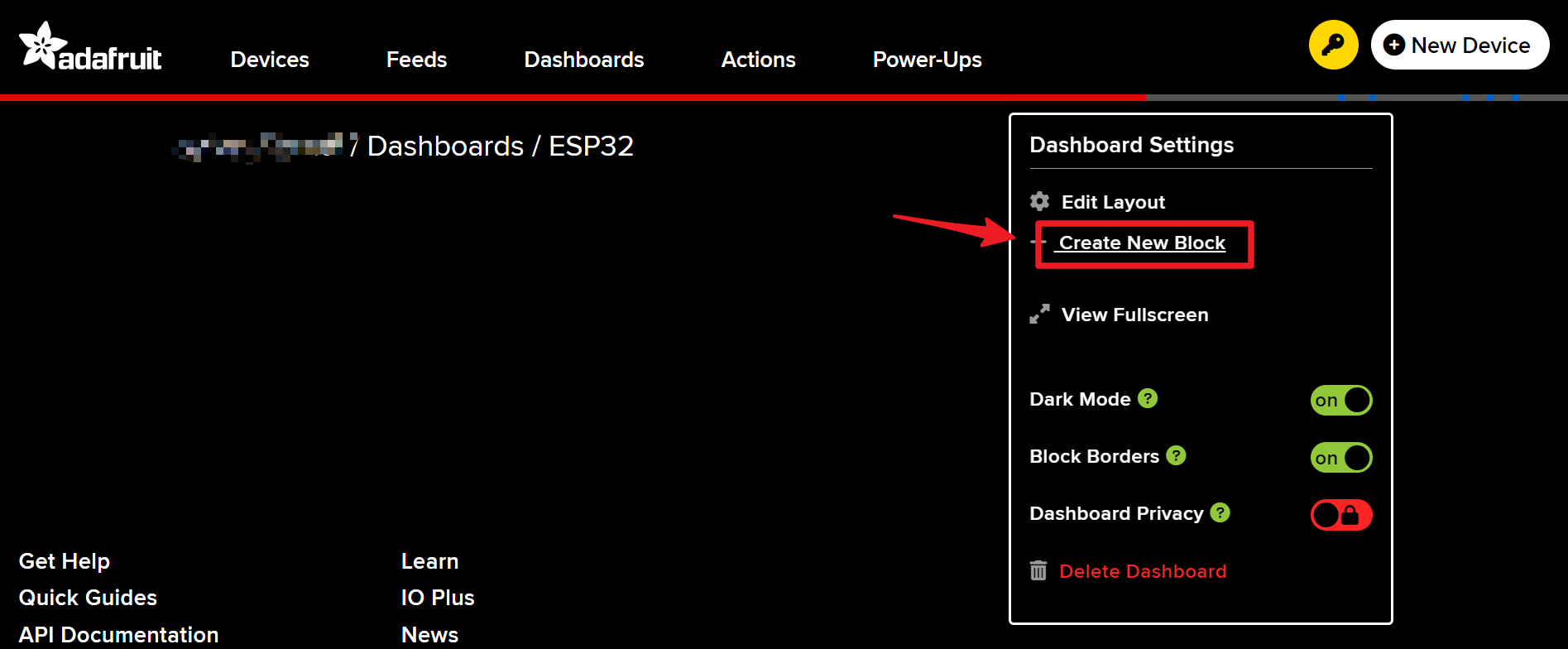
入去新建立嘅 Dashboard,然後建立一個新區塊。
-
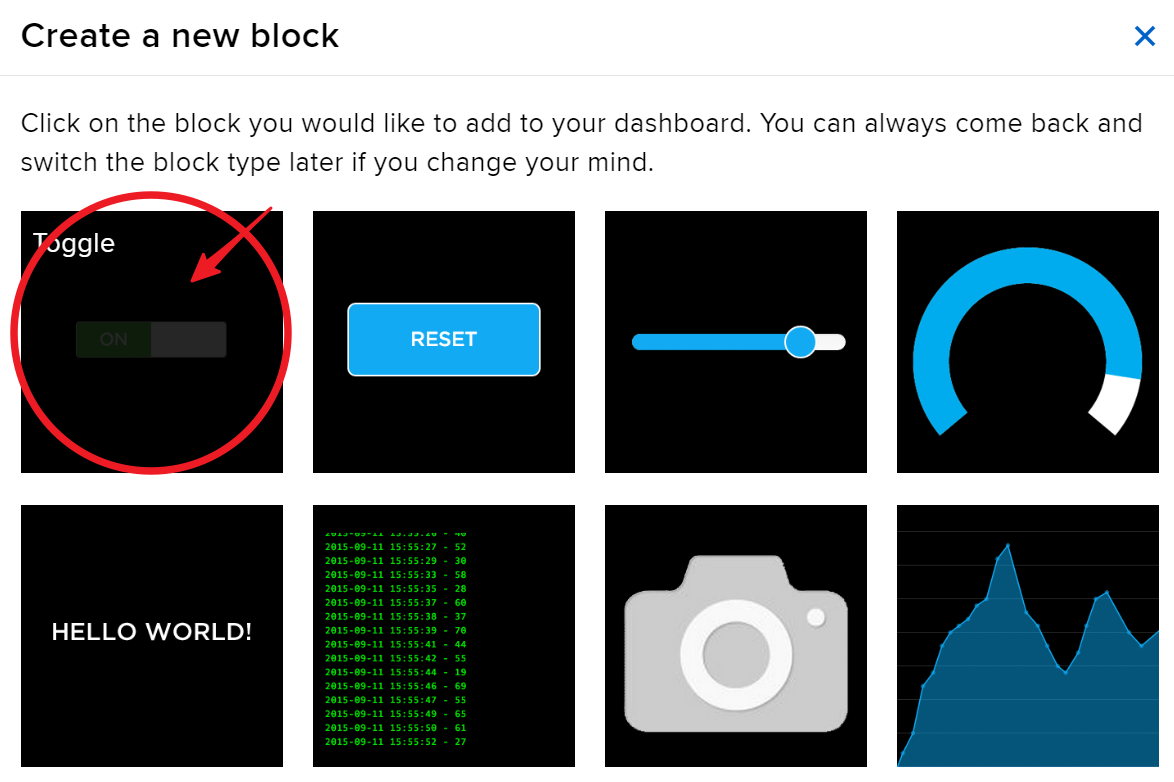
建立 1 個 Toggle 區塊。
-
跟住,你需要喺呢度建立一個新 feed。呢個 toggle 會用嚟控制 LED,我哋會將呢個 feed 命名為 “LED”。
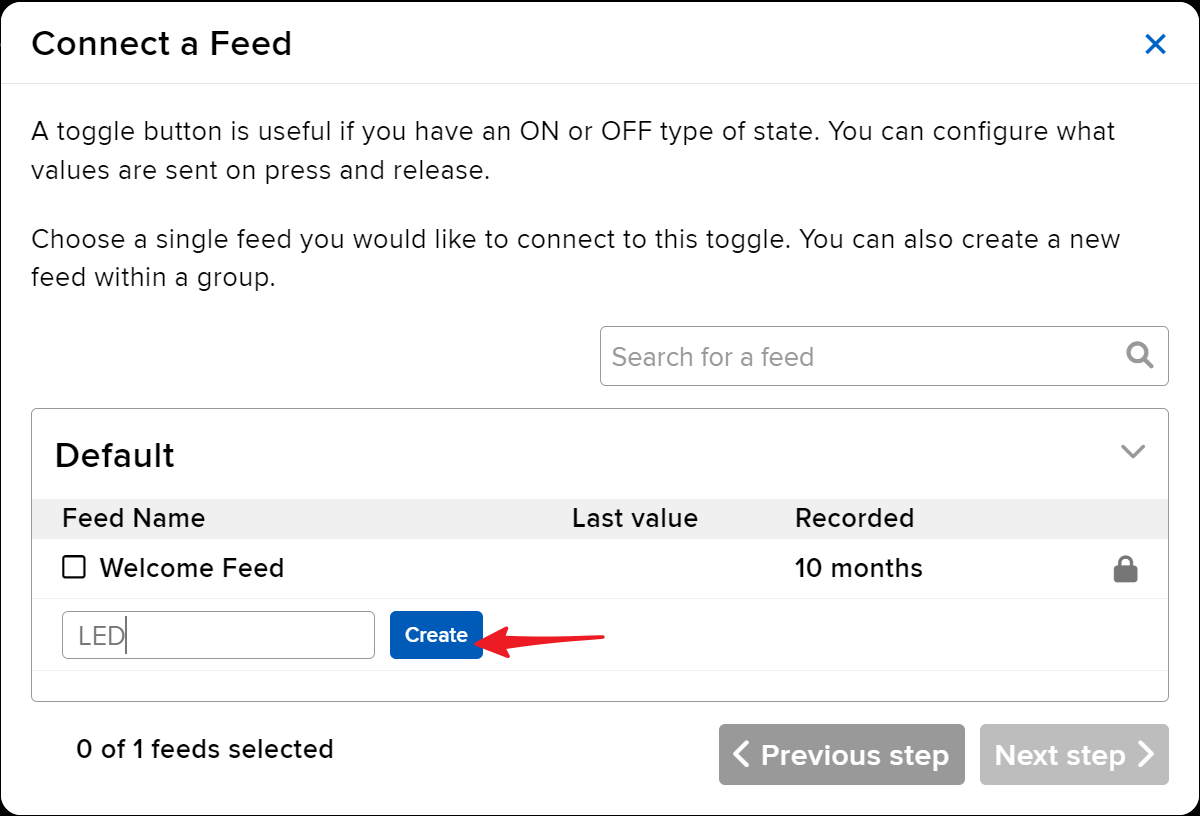
-
勾選 LED feed,然後去下一步。
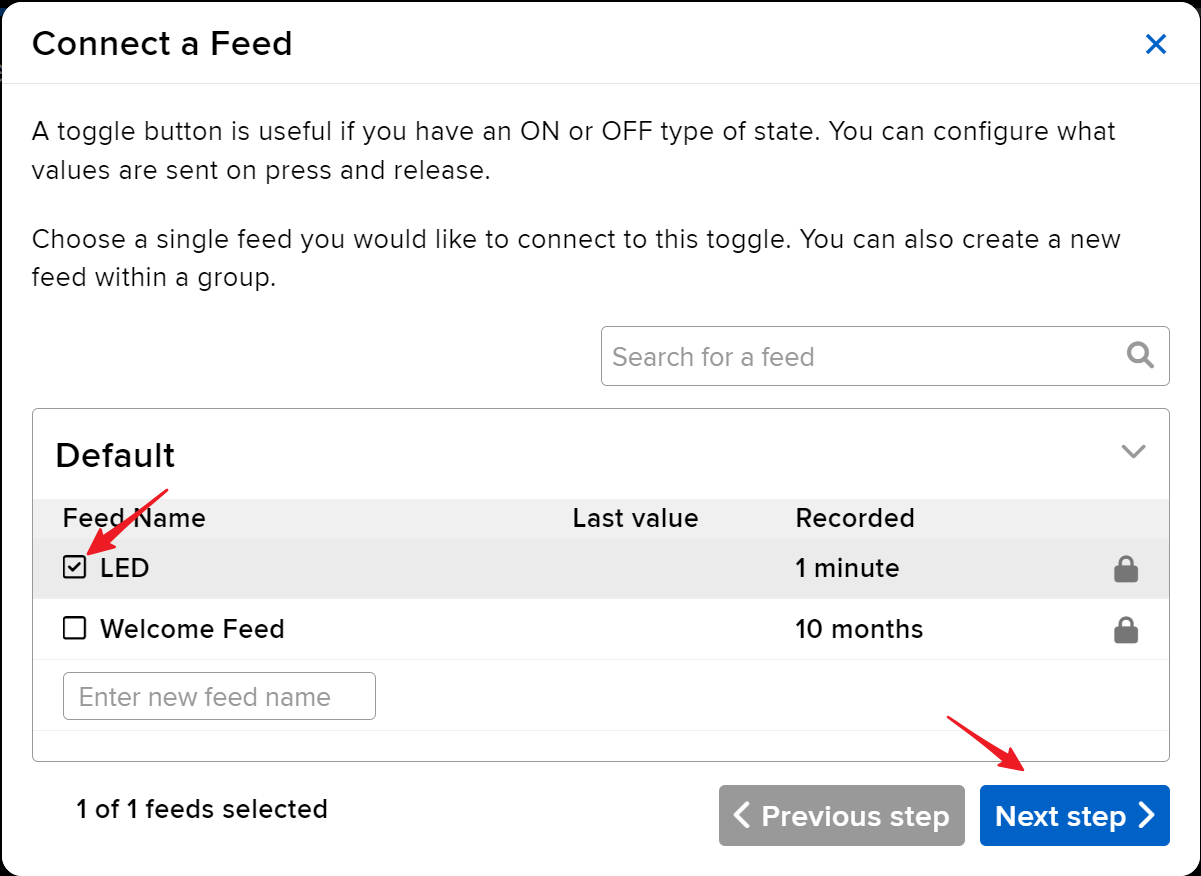
-
完成區塊設定(主要係 Block Title、On Text 同 Off Text),然後撳右下角嘅 Create block 按鈕嚟完成。
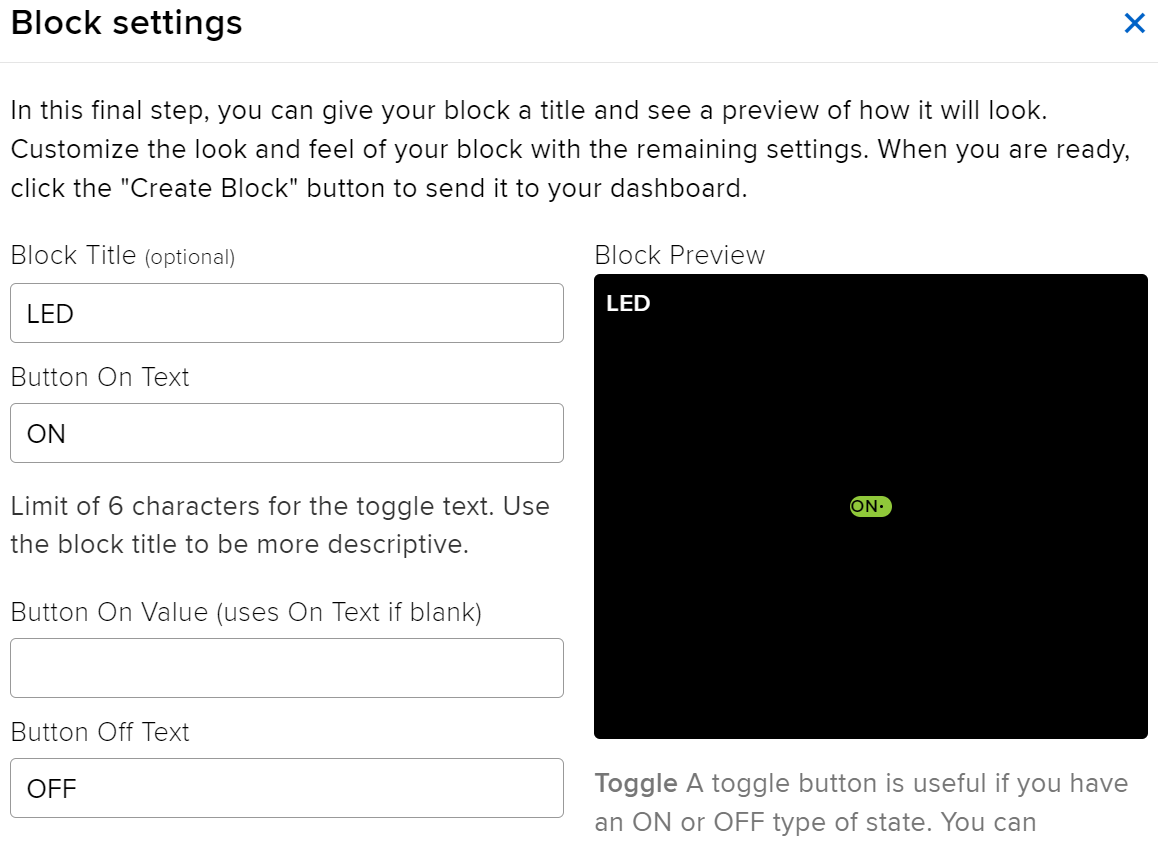
-
我哋仲需要建立兩個 Text Blocks。佢哋會用嚟顯示溫度同濕度。所以,建立兩個 feed,命名為 temperature 同 humidity。
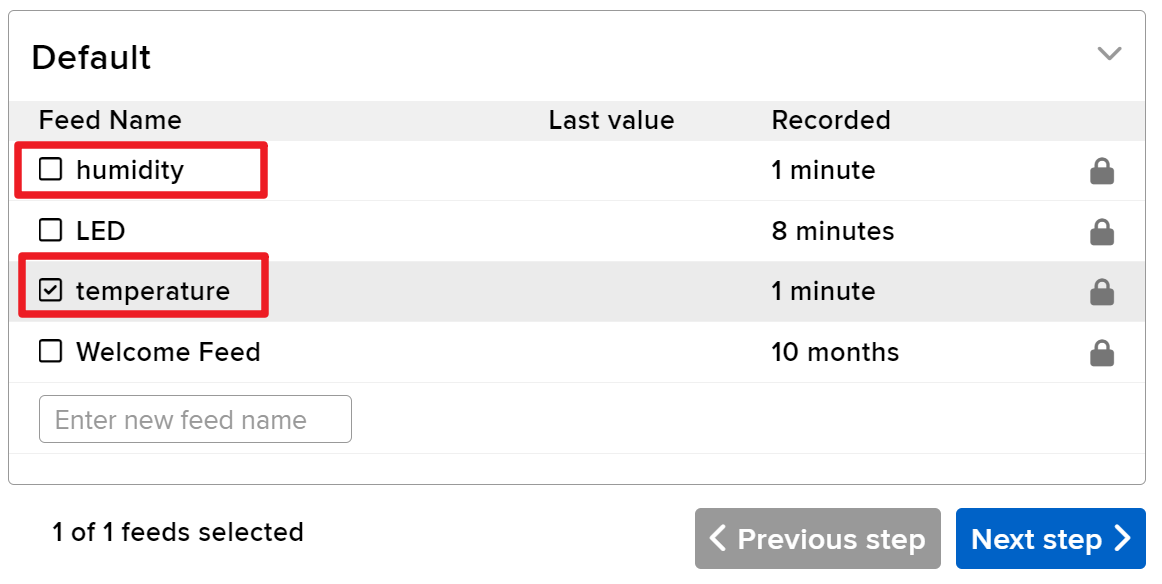
-
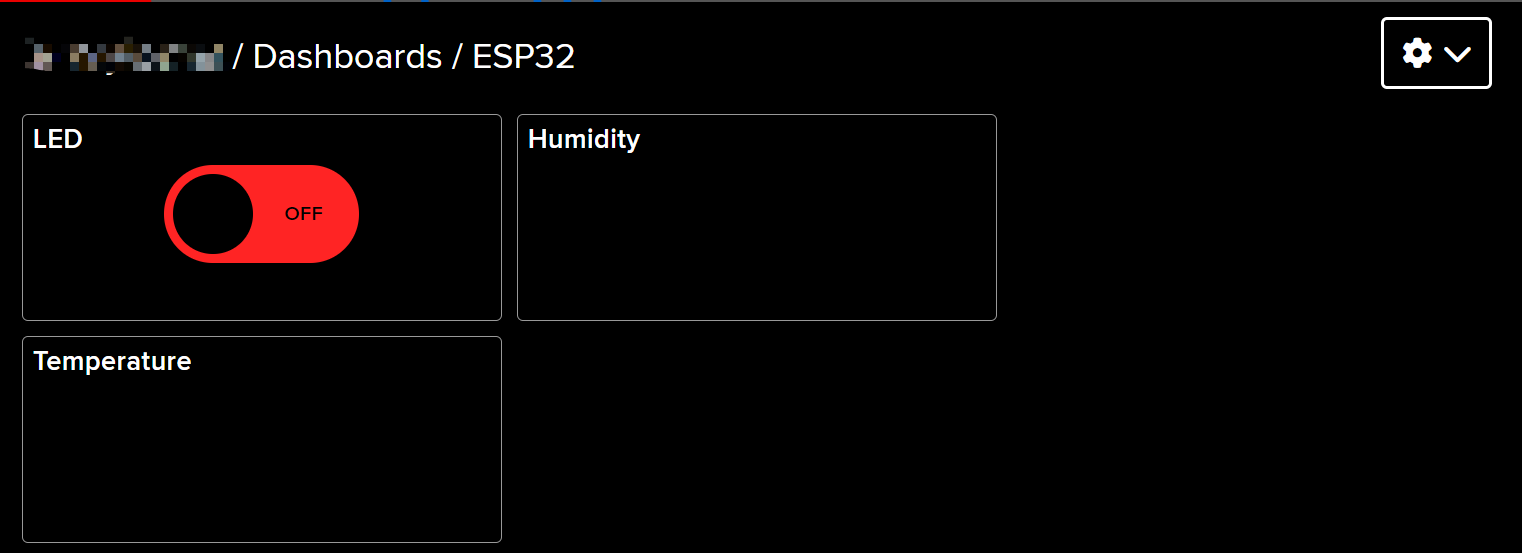
建立之後,你嘅 Dashboard 應該會好似咁樣:
-
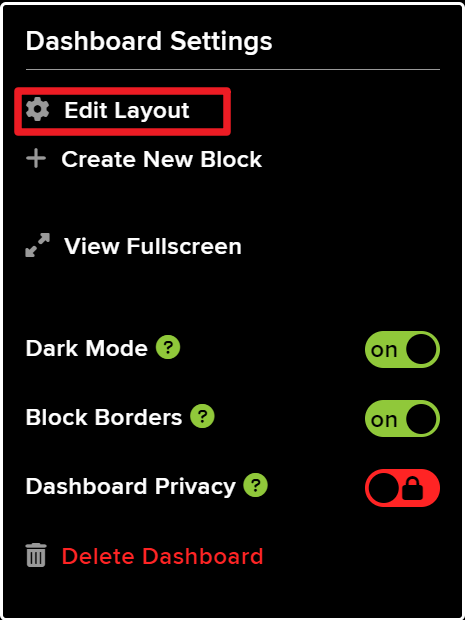
你可以用 Dashboard 上面嘅 Edit Layout 選項嚟調整版面。
-
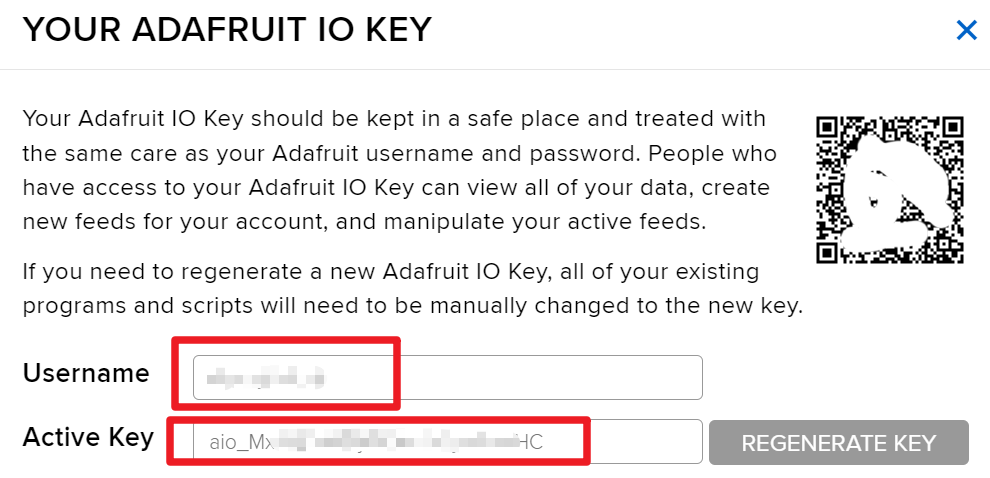
撳 API KEY,你就會見到你嘅用戶名同 API KEY 顯示出嚟。記低呢啲資料,因為你寫程式碼嘅時候會用到。
程式碼範例同講解
程式碼一開始就包含所需嘅函式庫、設定 Wi-Fi 憑證,同定義 MQTT 參數。好似 AIO_USERNAME 同 AIO_KEY 呢啲關鍵識別碼會用嚟同 Adafruit IO 服務進行認證。
#define AIO_USERNAME "YourUsername"
#define AIO_KEY "YourKey"
呢兩行定義咗你嘅 Adafruit IO 用戶名同金鑰,呢啲係連接 MQTT broker 嘅必要資料。確保呢啲值正確,先可以成功建立連接。
喺 setup() 函數入面,會初始化 Wi-Fi 連接,並用 root CA 證書設定 MQTT client,以進行安全通訊。
WiFi.begin(WLAN_SSID, WLAN_PASS);
client.setCACert(adafruitio_root_ca);
呢段程式碼將 ESP32 連接到指定嘅 Wi-Fi 網絡,並設定 root CA 用於安全嘅 MQTT 連接。正確處理呢啲連接對可靠嘅數據傳輸好重要。
最後,loop() 函數負責管理 MQTT 連接,並定期發佈溫度同濕度讀數。
mqtt.processPackets(5000);呢行容許 ESP32 處理訂閱主題嘅傳入訊息,確保裝置對網頁介面發出嘅指令保持反應。
至於完整程式碼,請參考文章下面載入嘅完整程式。
示範/預期效果
成功設定之後,你應該會喺 Adafruit IO 儀表板上見到溫度和濕度嘅即時更新。你亦都可以透過網頁介面開關 LED。如果 LED 冇按預期反應,檢查吓你嘅接線,並確保 MQTT 主題名稱同代碼入面定義嘅一致。
要注意,某啲 MQTT 連接錯誤可能係因為證書過期而發生。確保你嘅代碼入面有最新嘅 root CA 證書,以避免呢啲問題(影片 15:30 位置)。
影片時間戳
- 00:00 開始
- 1:50 項目介紹
- 3:16 咩係 MQTT
- 6:36 Adafruit IO 設定
- 11:13 接線
- 13:38 Arduino 代碼講解
- 22:03 選擇 ESP32 開發板同 COM 埠
- 23:44 項目示範
- 27:05 更新儀表板
/***********************************************************************
  Adafruit MQTT Library ESP32 Adafruit IO SSL/TLS example

  Use the latest version of the ESP32 Arduino Core:
    https://github.com/espressif/arduino-esp32

  Works great with Adafruit Huzzah32 Feather and Breakout Board:
    https://www.adafruit.com/product/3405
    https://www.adafruit.com/products/4172

  Adafruit invests time and resources providing this open source code,
  please support Adafruit and open-source hardware by purchasing
  products from Adafruit!

  Written by Tony DiCola for Adafruit Industries.
  Modified by Brent Rubell for Adafruit Industries
  MIT license, all text above must be included in any redistribution
 **********************************************************************/


/// ref: https://www.electronicwings.com/esp32/esp32-mqtt-client

#include <WiFi.h>
#include "WiFiClientSecure.h"
#include "Adafruit_MQTT.h"
#include "Adafruit_MQTT_Client.h"

/************************* WiFi Access Point *********************************/

#define WLAN_SSID "SSID"
#define WLAN_PASS "PASSWORD"

/************************* Adafruit.io Setup *********************************/

#define AIO_SERVER "io.adafruit.com"

// Using port 8883 for MQTTS
#define AIO_SERVERPORT 8883

// Adafruit IO Account Configuration
// (to obtain these values, visit https://io.adafruit.com and click on Active Key)
// #define AIO_USERNAME "YOUR_ADAFRUIT_IO_USERNAME"
// #define AIO_KEY      "YOUR_ADAFRUIT_IO_KEY"

#define AIO_USERNAME "JimmyKernel"
#define AIO_KEY "aio_Mxiv12i74b5jKfKNSKLYjlhPmoHC"

/************ Global State (you don't need to change this!) ******************/

// WiFiFlientSecure for SSL/TLS support
WiFiClientSecure client;

// Setup the MQTT client class by passing in the WiFi client and MQTT server and login details.
Adafruit_MQTT_Client mqtt(&client, AIO_SERVER, AIO_SERVERPORT, AIO_USERNAME, AIO_KEY);


// io.adafruit.com root CA
const char* adafruitio_root_ca = \
      "-----BEGIN CERTIFICATE-----\n"
      "MIIEjTCCA3WgAwIBAgIQDQd4KhM/xvmlcpbhMf/ReTANBgkqhkiG9w0BAQsFADBh\n"
      "MQswCQYDVQQGEwJVUzEVMBMGA1UEChMMRGlnaUNlcnQgSW5jMRkwFwYDVQQLExB3\n"
      "d3cuZGlnaWNlcnQuY29tMSAwHgYDVQQDExdEaWdpQ2VydCBHbG9iYWwgUm9vdCBH\n"
      "MjAeFw0xNzExMDIxMjIzMzdaFw0yNzExMDIxMjIzMzdaMGAxCzAJBgNVBAYTAlVT\n"
      "MRUwEwYDVQQKEwxEaWdpQ2VydCBJbmMxGTAXBgNVBAsTEHd3dy5kaWdpY2VydC5j\n"
      "b20xHzAdBgNVBAMTFkdlb1RydXN0IFRMUyBSU0EgQ0EgRzEwggEiMA0GCSqGSIb3\n"
      "DQEBAQUAA4IBDwAwggEKAoIBAQC+F+jsvikKy/65LWEx/TMkCDIuWegh1Ngwvm4Q\n"
      "yISgP7oU5d79eoySG3vOhC3w/3jEMuipoH1fBtp7m0tTpsYbAhch4XA7rfuD6whU\n"
      "gajeErLVxoiWMPkC/DnUvbgi74BJmdBiuGHQSd7LwsuXpTEGG9fYXcbTVN5SATYq\n"
      "DfbexbYxTMwVJWoVb6lrBEgM3gBBqiiAiy800xu1Nq07JdCIQkBsNpFtZbIZhsDS\n"
      "fzlGWP4wEmBQ3O67c+ZXkFr2DcrXBEtHam80Gp2SNhou2U5U7UesDL/xgLK6/0d7\n"
      "6TnEVMSUVJkZ8VeZr+IUIlvoLrtjLbqugb0T3OYXW+CQU0kBAgMBAAGjggFAMIIB\n"
      "PDAdBgNVHQ4EFgQUlE/UXYvkpOKmgP792PkA76O+AlcwHwYDVR0jBBgwFoAUTiJU\n"
      "IBiV5uNu5g/6+rkS7QYXjzkwDgYDVR0PAQH/BAQDAgGGMB0GA1UdJQQWMBQGCCsG\n"
      "AQUFBwMBBggrBgEFBQcDAjASBgNVHRMBAf8ECDAGAQH/AgEAMDQGCCsGAQUFBwEB\n"
      "BCgwJjAkBggrBgEFBQcwAYYYaHR0cDovL29jc3AuZGlnaWNlcnQuY29tMEIGA1Ud\n"
      "HwQ7MDkwN6A1oDOGMWh0dHA6Ly9jcmwzLmRpZ2ljZXJ0LmNvbS9EaWdpQ2VydEds\n"
      "b2JhbFJvb3RHMi5jcmwwPQYDVR0gBDYwNDAyBgRVHSAAMCowKAYIKwYBBQUHAgEW\n"
      "HGh0dHBzOi8vd3d3LmRpZ2ljZXJ0LmNvbS9DUFMwDQYJKoZIhvcNAQELBQADggEB\n"
      "AIIcBDqC6cWpyGUSXAjjAcYwsK4iiGF7KweG97i1RJz1kwZhRoo6orU1JtBYnjzB\n"
      "c4+/sXmnHJk3mlPyL1xuIAt9sMeC7+vreRIF5wFBC0MCN5sbHwhNN1JzKbifNeP5\n"
      "ozpZdQFmkCo+neBiKR6HqIA+LMTMCMMuv2khGGuPHmtDze4GmEGZtYLyF8EQpa5Y\n"
      "jPuV6k2Cr/N3XxFpT3hRpt/3usU/Zb9wfKPtWpoznZ4/44c1p9rzFcZYrWkj3A+7\n"
      "TNBJE0GmP2fhXhP1D/XVfIW/h0yCJGEiV9Glm/uGOa3DXHlmbAcxSyCRraG+ZBkA\n"
      "7h4SeM6Y8l/7MBRpPCz6l8Y=\n"
      "-----END CERTIFICATE-----\n";


/****************************** Feeds ***************************************/

// Setup a feed called 'test' for publishing and 'test2' for subscription.
// Notice MQTT paths for AIO follow the form: <username>/feeds/<feedname>
Adafruit_MQTT_Subscribe LED = Adafruit_MQTT_Subscribe(&mqtt, AIO_USERNAME "/feeds/LED");
Adafruit_MQTT_Publish humidity = Adafruit_MQTT_Publish(&mqtt, AIO_USERNAME "/feeds/humidity");
Adafruit_MQTT_Publish temperature = Adafruit_MQTT_Publish(&mqtt, AIO_USERNAME "/feeds/temperature");

/*************************** Sketch Code ************************************/

// set pin numbers
const int ledPin = 15;  // the number of the led pin

#include "DHT.h"

#define DHTPIN 13      // Set the pin connected to the DHT11 data pin
#define DHTTYPE DHT11  // DHT 11

DHT dht(DHTPIN, DHTTYPE);

void setup() {
  Serial.begin(115200);
  delay(10);

  Serial.println(F("Adafruit IO MQTTS (SSL/TLS) Example"));

  // Connect to WiFi access point.
  Serial.println();
  Serial.println();
  Serial.print("Connecting to ");
  Serial.println(WLAN_SSID);

  delay(1000);

  WiFi.begin(WLAN_SSID, WLAN_PASS);
  delay(2000);

  while (WiFi.status() != WL_CONNECTED) {
    delay(500);
    Serial.print(".");
  }
  Serial.println();

  Serial.println("WiFi connected");
  Serial.println("IP address: ");
  Serial.println(WiFi.localIP());

  // Set Adafruit IO's root CA
  client.setCACert(adafruitio_root_ca);

  // register callback for feed
  LED.setCallback(ledCallback);
  // Setup MQTT subscription for time feed.
  mqtt.subscribe(&LED);

  // initialize the LED pin as an output
  pinMode(ledPin, OUTPUT);

  // Initialize the dht11
  dht.begin();
}

// uint32_t x=0;


void loop() {

  // Ensure the connection to the MQTT server is alive (this will make the first
  // connection and automatically reconnect when disconnected).  See the MQTT_connect
  // function definition further below.
  MQTT_connect();

  indicatorPublish();

  // wait 10 seconds for subscription messages
  mqtt.processPackets(5000);

  // wait a couple seconds to avoid rate limit
  //delay(2000);
}

void ledCallback(char* message, uint16_t len) {
  char messageBuffer[40];
  snprintf(messageBuffer, sizeof(messageBuffer), "LED status is :: %s, len :: %u", message, len);
  Serial.println(messageBuffer);
  if (strcmp(message, "ON") == 0) {
    Serial.println("Turning ON LED");
    digitalWrite(ledPin, HIGH);
  } else {
    Serial.println("Turning OFF LED");
    digitalWrite(ledPin, LOW);
  }
}

void indicatorPublish() {

  // Reading temperature or humidity takes about 250 milliseconds!
  // Sensor readings may also be up to 2 seconds 'old' (it's a very slow sensor)
  float humValue = dht.readHumidity();
  float tempValue = dht.readTemperature();

  if (isnan(humValue) || isnan(tempValue)) {
    Serial.println("Failed to read from DHT sensor!");
    return;
  }

  if (!temperature.publish(tempValue)) {
    Serial.println(F("Failed"));
  } else {
    Serial.print("Temperature: ");
    Serial.println(tempValue);
  }
  if (!humidity.publish(humValue)) {
    Serial.println(F("Failed"));
  } else {
    Serial.print("Humidity: ");
    Serial.println(humValue);
  }
}

// Function to connect and reconnect as necessary to the MQTT server.
// Should be called in the loop function and it will take care if connecting.
void MQTT_connect() {
  int8_t ret;
  // Stop if already connected.
  if (mqtt.connected()) {
    return;
  }
  Serial.print("Connecting to MQTT... ");
  uint8_t retries = 3;
  while ((ret = mqtt.connect()) != 0) {  // connect will return 0 for connected
    Serial.println(mqtt.connectErrorString(ret));
    Serial.println("Retrying MQTT connection in 5 seconds...");
    mqtt.disconnect();
    delay(5000);  // wait 5 seconds
    retries--;
    if (retries == 0) {
      // basically die and wait for WDT to reset me
      while (1)
        ;
    }
  }
  Serial.println("MQTT Connected!");
}
/***********************************************************************
  Adafruit MQTT Basic lesson 1
Watch video instruction for this code on YouTube https://youtu.be/M9BQweAsHJM
Resource page for this lesson and code:
📚⬇️ Download and resource page https://robojax.com/RJT670
Tutoril by https://youTube.com/@robojax

  Adafruit MQTT Library ESP32 Adafruit IO SSL/TLS example

  Use the latest version of the ESP32 Arduino Core:
    https://github.com/espressif/arduino-esp32

  Works great with Adafruit Huzzah32 Feather and Breakout Board:
    https://www.adafruit.com/product/3405
    https://www.adafruit.com/products/4172

  Adafruit invests time and resources providing this open source code,
  please support Adafruit and open-source hardware by purchasing
  products from Adafruit!

  Written by Tony DiCola for Adafruit Industries.
  Modified by Brent Rubell for Adafruit Industries
  MIT license, all text above must be included in any redistribution
 **********************************************************************/


/// ref: https://www.electronicwings.com/esp32/esp32-mqtt-client

#include <WiFi.h>
#include "WiFiClientSecure.h"
#include "Adafruit_MQTT.h"
#include "Adafruit_MQTT_Client.h"

/************************* WiFi Access Point *********************************/

#define WLAN_SSID "dars"
#define WLAN_PASS "5152535455"

/************************* Adafruit.io Setup *********************************/

#define AIO_SERVER "io.adafruit.com"

// Using port 8883 for MQTTS
#define AIO_SERVERPORT 8883

// Adafruit IO Account Configuration
// (to obtain these values, visit https://io.adafruit.com and click on Active Key)
// #define AIO_USERNAME "YOUR_ADAFRUIT_IO_USERNAME"
// #define AIO_KEY      "YOUR_ADAFRUIT_IO_KEY"

#define AIO_USERNAME "robojax"
#define AIO_KEY "aio_wCyL33EVKLcGoAotGNEQ4dGQYOLZ"

/************ Global State (you don't need to change this!) ******************/

// WiFiFlientSecure for SSL/TLS support
WiFiClientSecure client;

// Setup the MQTT client class by passing in the WiFi client and MQTT server and login details.
Adafruit_MQTT_Client mqtt(&client, AIO_SERVER, AIO_SERVERPORT, AIO_USERNAME, AIO_KEY);


// io.adafruit.com root CA
const char* adafruitio_root_ca =
  "-----BEGIN CERTIFICATE-----\n"
  "MIIDrzCCApegAwIBAgIQCDvgVpBCRrGhdWrJWZHHSjANBgkqhkiG9w0BAQUFADBh\n"
  "MQswCQYDVQQGEwJVUzEVMBMGA1UEChMMRGlnaUNlcnQgSW5jMRkwFwYDVQQLExB3\n"
  "d3cuZGlnaWNlcnQuY29tMSAwHgYDVQQDExdEaWdpQ2VydCBHbG9iYWwgUm9vdCBD\n"
  "QTAeFw0wNjExMTAwMDAwMDBaFw0zMTExMTAwMDAwMDBaMGExCzAJBgNVBAYTAlVT\n"
  "MRUwEwYDVQQKEwxEaWdpQ2VydCBJbmMxGTAXBgNVBAsTEHd3dy5kaWdpY2VydC5j\n"
  "b20xIDAeBgNVBAMTF0RpZ2lDZXJ0IEdsb2JhbCBSb290IENBMIIBIjANBgkqhkiG\n"
  "9w0BAQEFAAOCAQ8AMIIBCgKCAQEA4jvhEXLeqKTTo1eqUKKPC3eQyaKl7hLOllsB\n"
  "CSDMAZOnTjC3U/dDxGkAV53ijSLdhwZAAIEJzs4bg7/fzTtxRuLWZscFs3YnFo97\n"
  "nh6Vfe63SKMI2tavegw5BmV/Sl0fvBf4q77uKNd0f3p4mVmFaG5cIzJLv07A6Fpt\n"
  "43C/dxC//AH2hdmoRBBYMql1GNXRor5H4idq9Joz+EkIYIvUX7Q6hL+hqkpMfT7P\n"
  "T19sdl6gSzeRntwi5m3OFBqOasv+zbMUZBfHWymeMr/y7vrTC0LUq7dBMtoM1O/4\n"
  "gdW7jVg/tRvoSSiicNoxBN33shbyTApOB6jtSj1etX+jkMOvJwIDAQABo2MwYTAO\n"
  "BgNVHQ8BAf8EBAMCAYYwDwYDVR0TAQH/BAUwAwEB/zAdBgNVHQ4EFgQUA95QNVbR\n"
  "TLtm8KPiGxvDl7I90VUwHwYDVR0jBBgwFoAUA95QNVbRTLtm8KPiGxvDl7I90VUw\n"
  "DQYJKoZIhvcNAQEFBQADggEBAMucN6pIExIK+t1EnE9SsPTfrgT1eXkIoyQY/Esr\n"
  "hMAtudXH/vTBH1jLuG2cenTnmCmrEbXjcKChzUyImZOMkXDiqw8cvpOp/2PV5Adg\n"
  "06O/nVsJ8dWO41P0jmP6P6fbtGbfYmbW0W5BjfIttep3Sp+dWOIrWcBAI+0tKIJF\n"
  "PnlUkiaY4IBIqDfv8NZ5YBberOgOzW6sRBc4L0na4UU+Krk2U886UAb3LujEV0ls\n"
  "YSEY1QSteDwsOoBrp+uvFRTp2InBuThs4pFsiv9kuXclVzDAGySj4dzp30d8tbQk\n"
  "CAUw7C29C79Fv1C5qfPrmAESrciIxpg0X40KPMbp1ZWVbd4=\n"
  "-----END CERTIFICATE-----\n";

/****************************** Feeds ***************************************/

// Setup a feed called 'test' for publishing and 'test2' for subscription.
// Notice MQTT paths for AIO follow the form: <username>/feeds/<feedname>
Adafruit_MQTT_Subscribe LED = Adafruit_MQTT_Subscribe(&mqtt, AIO_USERNAME "/feeds/LED");
//Adafruit_MQTT_Publish humidity = Adafruit_MQTT_Publish(&mqtt, AIO_USERNAME "/feeds/humidity");
//Adafruit_MQTT_Publish temperature = Adafruit_MQTT_Publish(&mqtt, AIO_USERNAME "/feeds/temperature");

/*************************** Sketch Code ************************************/

// set pin numbers
const int ledPin = 15;  // the number of the led pin


void setup() {
  Serial.begin(115200);
  delay(10);

  Serial.println(F("Adafruit IO MQTTS (SSL/TLS) Example"));

  // Connect to WiFi access point.
  Serial.println();
  Serial.println();
  Serial.print("Connecting to ");
  Serial.println(WLAN_SSID);

  delay(1000);

  WiFi.begin(WLAN_SSID, WLAN_PASS);
  delay(2000);

  while (WiFi.status() != WL_CONNECTED) {
    delay(500);
    Serial.print(".");
  }
  Serial.println();

  Serial.println("WiFi connected");
  Serial.println("IP address: ");
  Serial.println(WiFi.localIP());

  // Set Adafruit IO's root CA
  client.setCACert(adafruitio_root_ca);

  // register callback for feed
  LED.setCallback(ledCallback);
  // Setup MQTT subscription for time feed.
  mqtt.subscribe(&LED);

  // initialize the LED pin as an output
  pinMode(ledPin, OUTPUT);


}

// uint32_t x=0;


void loop() {

  // Ensure the connection to the MQTT server is alive (this will make the first
  // connection and automatically reconnect when disconnected).  See the MQTT_connect
  // function definition further below.
  MQTT_connect();

 // indicatorPublish();

  // wait 10 seconds for subscription messages
  mqtt.processPackets(10000);

  // wait a couple seconds to avoid rate limit
  //delay(2000);
}

void ledCallback(char* message, uint16_t len) {
  char messageBuffer[40];
  snprintf(messageBuffer, sizeof(messageBuffer), "LED status is :: %s, len :: %u", message, len);
  Serial.println(messageBuffer);
  if (strcmp(message, "ON") == 0) {
    Serial.println("Turning ON LED");
    digitalWrite(ledPin, LOW);
  } else {
    Serial.println("Turning OFF LED");
    digitalWrite(ledPin, HIGH);
  }
}


// Function to connect and reconnect as necessary to the MQTT server.
// Should be called in the loop function and it will take care if connecting.
void MQTT_connect() {
  int8_t ret;
  // Stop if already connected.
  if (mqtt.connected()) {
    return;
  }
  Serial.print("Connecting to MQTT... ");
  uint8_t retries = 3;
  while ((ret = mqtt.connect()) != 0) {  // connect will return 0 for connected
    Serial.println(mqtt.connectErrorString(ret));
    Serial.println("Retrying MQTT connection in 5 seconds...");
    mqtt.disconnect();
    delay(5000);  // wait 5 seconds
    retries--;
    if (retries == 0) {
      // basically die and wait for WDT to reset me
      while (1)
        ;
    }
  }
  Serial.println("MQTT Connected!");
}
Common Course Links
Common Course Files
資源與參考資料
-
文件记录
文件📁
冇文件可用。