Návod ESP32 45/55 - Vlastný streamovací server s ovládaním LED CAM-3 l SunFounder's ESP32 Learning kit
V tomto návode si ukážeme, ako nastaviť vlastný streamovací server pomocou ESP32 rozširujúcej dosky od SunFounder. Projekt vám umožňuje streamovať živé video do prehliadača a zároveň ovládať LED priamo z rozhrania. Táto kombinácia funkcií poskytuje praktické učenie sa s IoT a webovými technológiami.
Použijeme vstavané Wi-Fi možnosti ESP32 na vytvorenie webového servera, ktorý streamuje video a spracúva príkazy na ovládanie LED. Projekt zahŕňa programovanie, zapájanie a pochopenie interakcie komponentov. Ak chcete lepšie pochopiť nastavenie, určite si pozrite video (vo videu o 00:00).
Vysvetlenie hardvéru
Hlavné komponenty tohto projektu zahŕňajú mikrokontrolér ESP32, kamerový modul, LED a rezistor. ESP32 je všestranný mikrokontrolér so vstavaným Wi-Fi a Bluetooth, čo ho robí ideálnym pre IoT aplikácie. Kamerový modul nám umožňuje zachytávať video, zatiaľ čo LED poskytuje jednoduché výstupné zariadenie na ovládanie.
LED je pripojená cez rezistor na obmedzenie prúdu, čím sa predchádza poškodeniu LED aj mikrokontroléra. Toto nastavenie nám umožní zapínať a vypínať LED cez webové rozhranie, čo ukazuje schopnosti ESP32 pri spracúvaní vstupov a výstupov cez sieť.
Podrobnosti z datasheetu
| Výrobca | Espressif |
|---|---|
| Označenie dielu | ESP32-WROOM-32 |
| Logické/IO napätie | 3,3 V |
| Napájacie napätie | 3,0–3,6 V |
| Výstupný prúd (na kanál) | 12 mA |
| Špičkový prúd (na kanál) | 40 mA |
| Odporúčaná frekvencia PWM | 1 kHz |
| Logické prahové hodnoty vstupu | 0,2 V (nízka) / 0,8 V (vysoká) |
| Pokles napätia / RDS(on) / saturácia | 0,2 V (typ.) |
| Tepelné limity | Maximálna teplota prechodu: 125 °C |
| Puzdro | QFN48 |
| Poznámky / varianty | Dostupné v rôznych konfiguráciách |
- Uistite sa, že ESP32 je napájaný regulovaným napätím 3,3 V.
- Použite odpor obmedzujúci prúd (220 Ohm) s LED, aby ste predišli poškodeniu.
- Udržiavajte správne pripojenia, aby ste predišli plávajúcim vstupom.
- Skontrolujte, či sú prihlasovacie údaje Wi-Fi správne a rozlišujú malé a veľké písmená.
- Použite stabilný zdroj napájania pre konzistentný výkon.
- Zvážte odvod tepla v uzavretých priestoroch.
Pokyny na zapojenie
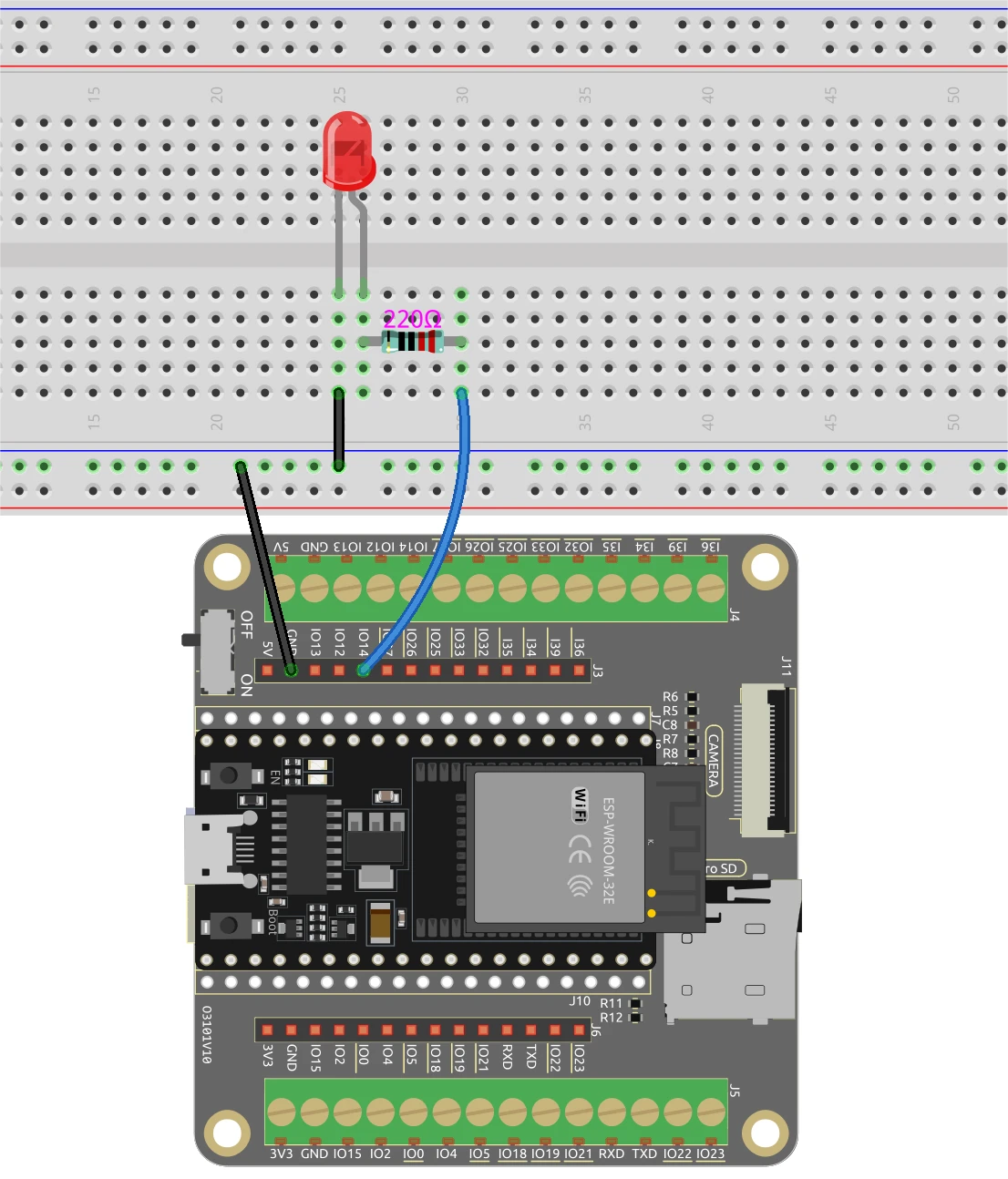
Na zapojenie ESP32 a LED začnite pripojením dlhšieho pinu LED k vhodnému GPIO pinu, v tomto prípade použijeme pin 14. Kratší pin by mal byť pripojený k uzemňovacej linke na breadboarde. Potom umiestnite 220 Ohm odpor do série s LED, pričom jeden koniec pripojíte k GPIO pinu (pin 14) a druhý koniec k zemi. Uistite sa, že ESP32 je správne napájaný, buď cez micro USB port alebo pomocou 18650 lítiovej batérie.
Pre kamerový modul pripojte potrebné piny podľa modelu kamery, ktorý používate, pretože zapojenie sa môže mierne líšiť. ESP32 bude spracúvať video stream pomocou svojich vstavaných schopností a ovládanie LED bude riadené cez webové rozhranie, ktoré nastavíme v kóde.
Príklady kódu a vysvetlenie
Program začína zahrnutím potrebných knižníc a definovaním prihlasovacích údajov Wi-Fi. Budete musieť nahradiť ssid a password vašimi skutočnými prihlasovacími údajmi Wi-Fi, aby sa ESP32 pripojil k vašej sieti.
const char* ssid = "SSID";
const char* password = "PASSWORD";
Ďalej definujeme pin LED a nastavíme konfigurácie kamery. Pin použitý pre LED je definovaný ako LED_PIN, ktorý sa použije neskôr v kóde na ovládanie stavu LED.
#define LED_PIN    14
pinMode(LED_PIN, OUTPUT);
V obsluhe požiadaviek na ovládanie LED skontrolujeme príkaz prijatý z webového rozhrania. V závislosti od toho, či je príkaz "on" alebo "off", použijeme digitalWrite(LED_PIN, 1); na zapnutie LED a digitalWrite(LED_PIN, 0); na jej vypnutie.
if(!strcmp(variable, "on")) {
  Serial.println("ON");
  digitalWrite(LED_PIN, 1);
}
else if(!strcmp(variable, "off")) {
  Serial.println("OFF");
  digitalWrite(LED_PIN, 0);
}
Táto logika umožňuje webovému rozhraniu efektívne komunikovať s ESP32, čo umožňuje ovládanie LED v reálnom čase na základe interakcií používateľa. Celý kód sa načíta pod článkom na ďalšie preskúmanie.
Demonštrácia / Čo očakávať
Keď je všetko nastavené a kód je nahraný, mali by ste byť schopní získať prístup k IP adrese ESP32 vo vašom webovom prehliadači. Zobrazí sa streamované video a LED môžete ovládať pomocou tlačidiel v rozhraní. Kliknutím na "ON" sa LED rozsvieti, zatiaľ čo "OFF" ju vypne. Uistite sa, že ESP32 a váš počítač sú pripojené k rovnakej sieti, aby všetko fungovalo správne (vo videu o 12:30).
Časové značky videa
- 00:00 Začiatok
- 1:51 Úvod do projektu
- 2:31 Dokumentačná stránka
- 3:33 Vysvetlenie zapojenia
- 5:08 Vysvetlenie Arduino kódu
- 13:28 Výber dosky ESP32 a COM portu v Arduino IDE
- 15:10 Demonštrácia
Images
/*********
  Permission is hereby granted, free of charge,
  to any person obtaining a copy of this software and associated documentation files.
  The above copyright notice and this permission
  notice shall be included in all copies or substantial portions of the Software.
*********/

#include "esp_camera.h"
#include <WiFi.h>
#include "esp_timer.h"
#include "img_converters.h"
#include "Arduino.h"
#include "fb_gfx.h"
#include "soc/soc.h"             // disable brownout problems
#include "soc/rtc_cntl_reg.h"    // disable brownout problems
#include "esp_http_server.h"

// Replace the next variables with your SSID/Password combination
const char* ssid = "SSID";
const char* password = "PASSWORD";

#define PART_BOUNDARY "123456789000000000000987654321"

#define CAMERA_MODEL_AI_THINKER
//#define CAMERA_MODEL_M5STACK_PSRAM
//#define CAMERA_MODEL_M5STACK_WITHOUT_PSRAM
//#define CAMERA_MODEL_M5STACK_PSRAM_B
//#define CAMERA_MODEL_WROVER_KIT

#if defined(CAMERA_MODEL_WROVER_KIT)
  #define PWDN_GPIO_NUM    -1
  #define RESET_GPIO_NUM   -1
  #define XCLK_GPIO_NUM    21
  #define SIOD_GPIO_NUM    26
  #define SIOC_GPIO_NUM    27

  #define Y9_GPIO_NUM      35
  #define Y8_GPIO_NUM      34
  #define Y7_GPIO_NUM      39
  #define Y6_GPIO_NUM      36
  #define Y5_GPIO_NUM      19
  #define Y4_GPIO_NUM      18
  #define Y3_GPIO_NUM       5
  #define Y2_GPIO_NUM       4
  #define VSYNC_GPIO_NUM   25
  #define HREF_GPIO_NUM    23
  #define PCLK_GPIO_NUM    22

#elif defined(CAMERA_MODEL_M5STACK_PSRAM)
  #define PWDN_GPIO_NUM     -1
  #define RESET_GPIO_NUM    15
  #define XCLK_GPIO_NUM     27
  #define SIOD_GPIO_NUM     25
  #define SIOC_GPIO_NUM     23

  #define Y9_GPIO_NUM       19
  #define Y8_GPIO_NUM       36
  #define Y7_GPIO_NUM       18
  #define Y6_GPIO_NUM       39
  #define Y5_GPIO_NUM        5
  #define Y4_GPIO_NUM       34
  #define Y3_GPIO_NUM       35
  #define Y2_GPIO_NUM       32
  #define VSYNC_GPIO_NUM    22
  #define HREF_GPIO_NUM     26
  #define PCLK_GPIO_NUM     21

#elif defined(CAMERA_MODEL_M5STACK_WITHOUT_PSRAM)
  #define PWDN_GPIO_NUM     -1
  #define RESET_GPIO_NUM    15
  #define XCLK_GPIO_NUM     27
  #define SIOD_GPIO_NUM     25
  #define SIOC_GPIO_NUM     23

  #define Y9_GPIO_NUM       19
  #define Y8_GPIO_NUM       36
  #define Y7_GPIO_NUM       18
  #define Y6_GPIO_NUM       39
  #define Y5_GPIO_NUM        5
  #define Y4_GPIO_NUM       34
  #define Y3_GPIO_NUM       35
  #define Y2_GPIO_NUM       17
  #define VSYNC_GPIO_NUM    22
  #define HREF_GPIO_NUM     26
  #define PCLK_GPIO_NUM     21

#elif defined(CAMERA_MODEL_AI_THINKER)
  #define PWDN_GPIO_NUM     32
  #define RESET_GPIO_NUM    33
  #define XCLK_GPIO_NUM      0
  #define SIOD_GPIO_NUM     26
  #define SIOC_GPIO_NUM     27

  #define Y9_GPIO_NUM       35
  #define Y8_GPIO_NUM       34
  #define Y7_GPIO_NUM       39
  #define Y6_GPIO_NUM       36
  #define Y5_GPIO_NUM       21
  #define Y4_GPIO_NUM       19
  #define Y3_GPIO_NUM       18
  #define Y2_GPIO_NUM        5
  #define VSYNC_GPIO_NUM    25
  #define HREF_GPIO_NUM     23
  #define PCLK_GPIO_NUM     22

#elif defined(CAMERA_MODEL_M5STACK_PSRAM_B)
  #define PWDN_GPIO_NUM     -1
  #define RESET_GPIO_NUM    15
  #define XCLK_GPIO_NUM     27
  #define SIOD_GPIO_NUM     22
  #define SIOC_GPIO_NUM     23

  #define Y9_GPIO_NUM       19
  #define Y8_GPIO_NUM       36
  #define Y7_GPIO_NUM       18
  #define Y6_GPIO_NUM       39
  #define Y5_GPIO_NUM        5
  #define Y4_GPIO_NUM       34
  #define Y3_GPIO_NUM       35
  #define Y2_GPIO_NUM       32
  #define VSYNC_GPIO_NUM    25
  #define HREF_GPIO_NUM     26
  #define PCLK_GPIO_NUM     21

#else
  #error "Camera model not selected"
#endif

#define LED_PIN    14

static const char* _STREAM_CONTENT_TYPE = "multipart/x-mixed-replace;boundary=" PART_BOUNDARY;
static const char* _STREAM_BOUNDARY = "\r\n--" PART_BOUNDARY "\r\n";
static const char* _STREAM_PART = "Content-Type: image/jpeg\r\nContent-Length: %u\r\n\r\n";

httpd_handle_t camera_httpd = NULL;
httpd_handle_t stream_httpd = NULL;

static const char PROGMEM INDEX_HTML[] = R"rawliteral(
<html>
  <head>
    <title>ESP32-CAM Robot</title>
    <meta name="viewport" content="width=device-width, initial-scale=1">
    <style>
      body { font-family: Arial; text-align: center; margin:0px auto; padding-top: 30px;}
      table { margin-left: auto; margin-right: auto; }
      td { padding: 8 px; }
      .button {
        background-color: #2f4468;
        border: none;
        color: white;
        padding: 10px 20px;
        text-align: center;
        text-decoration: none;
        display: inline-block;
        font-size: 18px;
        margin: 6px 3px;
        cursor: pointer;
        -webkit-touch-callout: none;
        -webkit-user-select: none;
        -khtml-user-select: none;
        -moz-user-select: none;
        -ms-user-select: none;
        user-select: none;
        -webkit-tap-highlight-color: rgba(0,0,0,0);
      }
      img {  width: auto ;
        max-width: 100% ;
        height: auto ;
        transform: rotate(180deg);
      }
    </style>
  </head>
  <body>
    <h1>ESP32 CAMERA</h1>
    <img src="" id="photo" >
    <table>
      <tr><td align="center"><button class="button" onmousedown="toggleCheckbox('on');" ontouchstart="toggleCheckbox('on');onmouseup="toggleCheckbox('on');" ontouchend="toggleCheckbox('on');">ON</button></td>
      <td align="center"><button class="button" onmousedown="toggleCheckbox('off');" ontouchstart="toggleCheckbox('off');onmouseup="toggleCheckbox('off');" ontouchend="toggleCheckbox('off');">OFF</button></td></tr>
    </table>
   <script>
   function toggleCheckbox(x) {
     var xhr = new XMLHttpRequest();
     xhr.open("GET", "/action?go=" + x, true);
     xhr.send();
   }
   window.onload = document.getElementById("photo").src = window.location.href.slice(0, -1) + ":81/stream";
  </script>
  </body>
</html>
)rawliteral";

static esp_err_t index_handler(httpd_req_t *req){
  httpd_resp_set_type(req, "text/html");
  return httpd_resp_send(req, (const char *)INDEX_HTML, strlen(INDEX_HTML));
}

static esp_err_t stream_handler(httpd_req_t *req){
  camera_fb_t * fb = NULL;
  esp_err_t res = ESP_OK;
  size_t _jpg_buf_len = 0;
  uint8_t * _jpg_buf = NULL;
  char * part_buf[64];

  res = httpd_resp_set_type(req, _STREAM_CONTENT_TYPE);
  if(res != ESP_OK){
    return res;
  }

  while(true){
    fb = esp_camera_fb_get();
    if (!fb) {
      Serial.println("Camera capture failed");
      res = ESP_FAIL;
    } else {
      if(fb->width > 400){
        if(fb->format != PIXFORMAT_JPEG){
          bool jpeg_converted = frame2jpg(fb, 80, &_jpg_buf, &_jpg_buf_len);
          esp_camera_fb_return(fb);
          fb = NULL;
          if(!jpeg_converted){
            Serial.println("JPEG compression failed");
            res = ESP_FAIL;
          }
        } else {
          _jpg_buf_len = fb->len;
          _jpg_buf = fb->buf;
        }
      }
    }
    if(res == ESP_OK){
      size_t hlen = snprintf((char *)part_buf, 64, _STREAM_PART, _jpg_buf_len);
      res = httpd_resp_send_chunk(req, (const char *)part_buf, hlen);
    }
    if(res == ESP_OK){
      res = httpd_resp_send_chunk(req, (const char *)_jpg_buf, _jpg_buf_len);
    }
    if(res == ESP_OK){
      res = httpd_resp_send_chunk(req, _STREAM_BOUNDARY, strlen(_STREAM_BOUNDARY));
    }
    if(fb){
      esp_camera_fb_return(fb);
      fb = NULL;
      _jpg_buf = NULL;
    } else if(_jpg_buf){
      free(_jpg_buf);
      _jpg_buf = NULL;
    }
    if(res != ESP_OK){
      break;
    }
    //Serial.printf("MJPG: %uB\n",(uint32_t)(_jpg_buf_len));
  }
  return res;
}

static esp_err_t cmd_handler(httpd_req_t *req){
  char*  buf;
  size_t buf_len;
  char variable[32] = {0,};

  buf_len = httpd_req_get_url_query_len(req) + 1;
  if (buf_len > 1) {
    buf = (char*)malloc(buf_len);
    if(!buf){
      httpd_resp_send_500(req);
      return ESP_FAIL;
    }
    if (httpd_req_get_url_query_str(req, buf, buf_len) == ESP_OK) {
      if (httpd_query_key_value(buf, "go", variable, sizeof(variable)) == ESP_OK) {
      } else {
        free(buf);
        httpd_resp_send_404(req);
        return ESP_FAIL;
      }
    } else {
      free(buf);
      httpd_resp_send_404(req);
      return ESP_FAIL;
    }
    free(buf);
  } else {
    httpd_resp_send_404(req);
    return ESP_FAIL;
  }

  sensor_t * s = esp_camera_sensor_get();
  int res = 0;

  if(!strcmp(variable, "on")) {
    Serial.println("ON");
    digitalWrite(LED_PIN, 1);
  }
  else if(!strcmp(variable, "off")) {
    Serial.println("OFF");
    digitalWrite(LED_PIN, 0);
  }
  else {
    res = -1;
  }

  if(res){
    return httpd_resp_send_500(req);
  }

  httpd_resp_set_hdr(req, "Access-Control-Allow-Origin", "*");
  return httpd_resp_send(req, NULL, 0);
}

void startCameraServer(){
  httpd_config_t config = HTTPD_DEFAULT_CONFIG();
  config.server_port = 80;
  httpd_uri_t index_uri = {
    .uri       = "/",
    .method    = HTTP_GET,
    .handler   = index_handler,
    .user_ctx  = NULL
  };

  httpd_uri_t cmd_uri = {
    .uri       = "/action",
    .method    = HTTP_GET,
    .handler   = cmd_handler,
    .user_ctx  = NULL
  };
  httpd_uri_t stream_uri = {
    .uri       = "/stream",
    .method    = HTTP_GET,
    .handler   = stream_handler,
    .user_ctx  = NULL
  };
  if (httpd_start(&camera_httpd, &config) == ESP_OK) {
    httpd_register_uri_handler(camera_httpd, &index_uri);
    httpd_register_uri_handler(camera_httpd, &cmd_uri);
  }
  config.server_port += 1;
  config.ctrl_port += 1;
  if (httpd_start(&stream_httpd, &config) == ESP_OK) {
    httpd_register_uri_handler(stream_httpd, &stream_uri);
  }
}

void setup() {
  WRITE_PERI_REG(RTC_CNTL_BROWN_OUT_REG, 0); //disable brownout detector

  pinMode(LED_PIN, OUTPUT);

  Serial.begin(115200);
  Serial.setDebugOutput(false);

  camera_config_t config;
  config.ledc_channel = LEDC_CHANNEL_0;
  config.ledc_timer = LEDC_TIMER_0;
  config.pin_d0 = Y2_GPIO_NUM;
  config.pin_d1 = Y3_GPIO_NUM;
  config.pin_d2 = Y4_GPIO_NUM;
  config.pin_d3 = Y5_GPIO_NUM;
  config.pin_d4 = Y6_GPIO_NUM;
  config.pin_d5 = Y7_GPIO_NUM;
  config.pin_d6 = Y8_GPIO_NUM;
  config.pin_d7 = Y9_GPIO_NUM;
  config.pin_xclk = XCLK_GPIO_NUM;
  config.pin_pclk = PCLK_GPIO_NUM;
  config.pin_vsync = VSYNC_GPIO_NUM;
  config.pin_href = HREF_GPIO_NUM;
  config.pin_sscb_sda = SIOD_GPIO_NUM;
  config.pin_sscb_scl = SIOC_GPIO_NUM;
  config.pin_pwdn = PWDN_GPIO_NUM;
  config.pin_reset = RESET_GPIO_NUM;
  config.xclk_freq_hz = 20000000;
  config.pixel_format = PIXFORMAT_JPEG;

  if(psramFound()){
    config.frame_size = FRAMESIZE_VGA;
    config.jpeg_quality = 10;
    config.fb_count = 2;
  } else {
    config.frame_size = FRAMESIZE_SVGA;
    config.jpeg_quality = 12;
    config.fb_count = 1;
  }

  // Camera init
  esp_err_t err = esp_camera_init(&config);
  if (err != ESP_OK) {
    Serial.printf("Camera init failed with error 0x%x", err);
    return;
  }
  // Wi-Fi connection
  WiFi.begin(ssid, password);
  while (WiFi.status() != WL_CONNECTED) {
    delay(500);
    Serial.print(".");
  }
  Serial.println("");
  Serial.println("WiFi connected");

  Serial.print("Camera Stream Ready! Go to: http://");
  Serial.println(WiFi.localIP());

  // Start streaming web server
  startCameraServer();
}

void loop() {

}
Common Course Links
Common Course Files
Resources & references
-
DocumentationESP32 Tutorial 45/55- SunFounder doc page for Custom Streamign Serverdocs.sunfounder.com
Files📁
No files available.