Tutoriel ESP32 45/55 - Serveur de streaming personnalisé avec contrôle LED CAM-3 l Kit d'apprentissage ESP32 de SunFounder
Na boyekoli oyo, tokotala ndenge ya kosala serveur ya streaming oyo esengeli na extension board ya ESP32 oyo ewuti na SunFounder. Projet oyo epesaka yo nzela ya kotala video na tango ya solo na navigateur na yo mpe kozala na bokonzi ya kozongisa mpe kozimisa LED moko kaka na interface. Kosangisa makambo oyo esalaka ete oyekola na mabɔkɔ na makambo ya IoT mpe ya web.
Tokosalela makoki ya Wi-Fi oyo ezali na kati ya ESP32 mpo na kosala serveur ya web oyo ekotambwisa video mpe ekoyamba mitindo ya kokamba LED. Projet oyo esengeli kosala code, kosangisa ba fils, mpe kososola ndenge ba composants esanganaka. Soki olingi kososola malamu ndenge makambo esalemi, tala video na (na video na 00:00).
Makambo ya Hardware
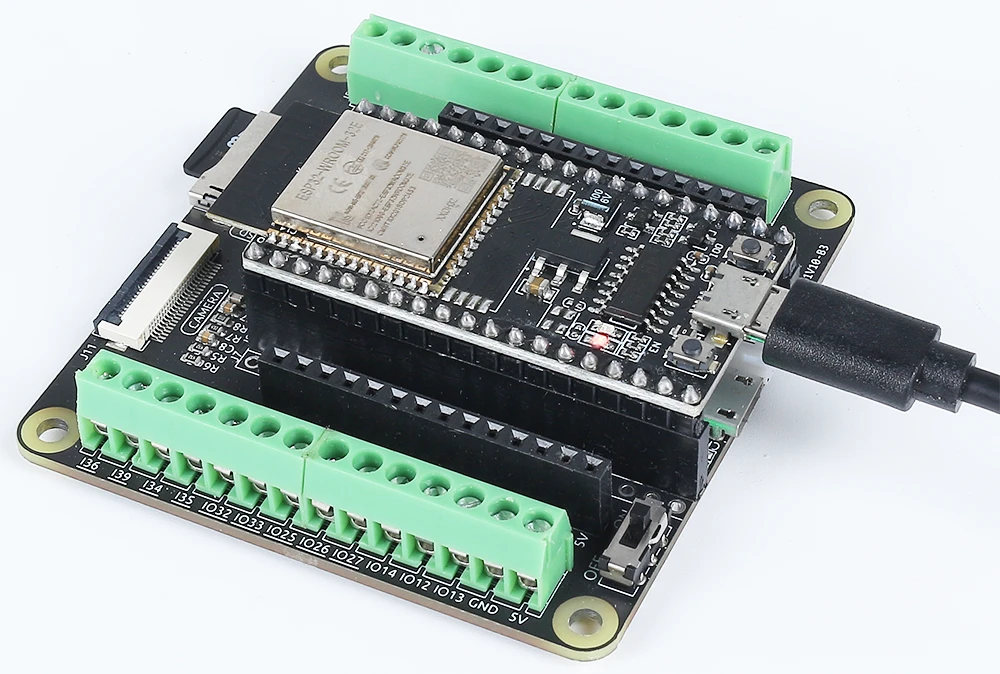
Ba composants ya minene mpo na projet oyo ezali na microcontrôleur ESP32, module ya caméra, LED moko, mpe résistor moko. ESP32 ezali microcontrôleur oyo ezali na makoki mingi, ezali na Wi-Fi mpe Bluetooth na kati, mpo na yango ezali malamu mpo na ba applications ya IoT. Module ya caméra epesaka biso nzela ya kokanga video, kasi LED epesaka biso esaleli ya kobimisa makambo mpo na kokamba.
LED esangisami na résistor mpo na kokitisa courant, mpo na kobatela LED mpe microcontrôleur. Makambo oyo makopesa biso nzela ya kozongisa mpe kozimisa LED na interface na biso ya web, mpe kolakisa makoki ya ESP32 na kokamba ba entrées mpe ba sorties na réseau.
Makambo ya Datasheet
| Mosali | Espressif |
|---|---|
| Numéro ya partie | ESP32-WROOM-32 |
| Tension ya logique/IO | 3.3 V |
| Tension ya alimentation | 3.0–3.6 V |
| Courant ya kobimisa (na canal moko) | 12 mA |
| Courant ya suka (na canal moko) | 40 mA |
| Liyebisi ya fréquence PWM | 1 kHz |
| Ba seuils ya logique ya entrée | 0.2 V (moké) / 0.8 V (monene) |
| Kokita ya tension / RDS(on) / saturation | 0.2 V (typ.) |
| Ba limites ya température | Température maximum ya jonction: 125 °C |
| Paquet | QFN48 |
| Ba notes / ba variantes | Ezali na ba configurations ndenge na ndenge |
- Kokamba ete ESP32 ezali na tension ya 3.3 V oyo esengeli.
- Salela résistor ya kokitisa courant (220 Ohm) na LED mpo na kobatela yango.
- Keba na ba connexions mpo na kokitisa ba entrées oyo ezali na kati na pamba.
- Vérifier ete ba identifiants ya Wi-Fi ezali malamu mpe ezali na ba lettres ya minene mpe miké.
- Salela source ya courant ya makasi mpo na kosala malamu.
- Tala ndenge ya kokitisa chaleur na ba espaces oyo ezali ya kokangama.
Ba Instructions ya Wiring
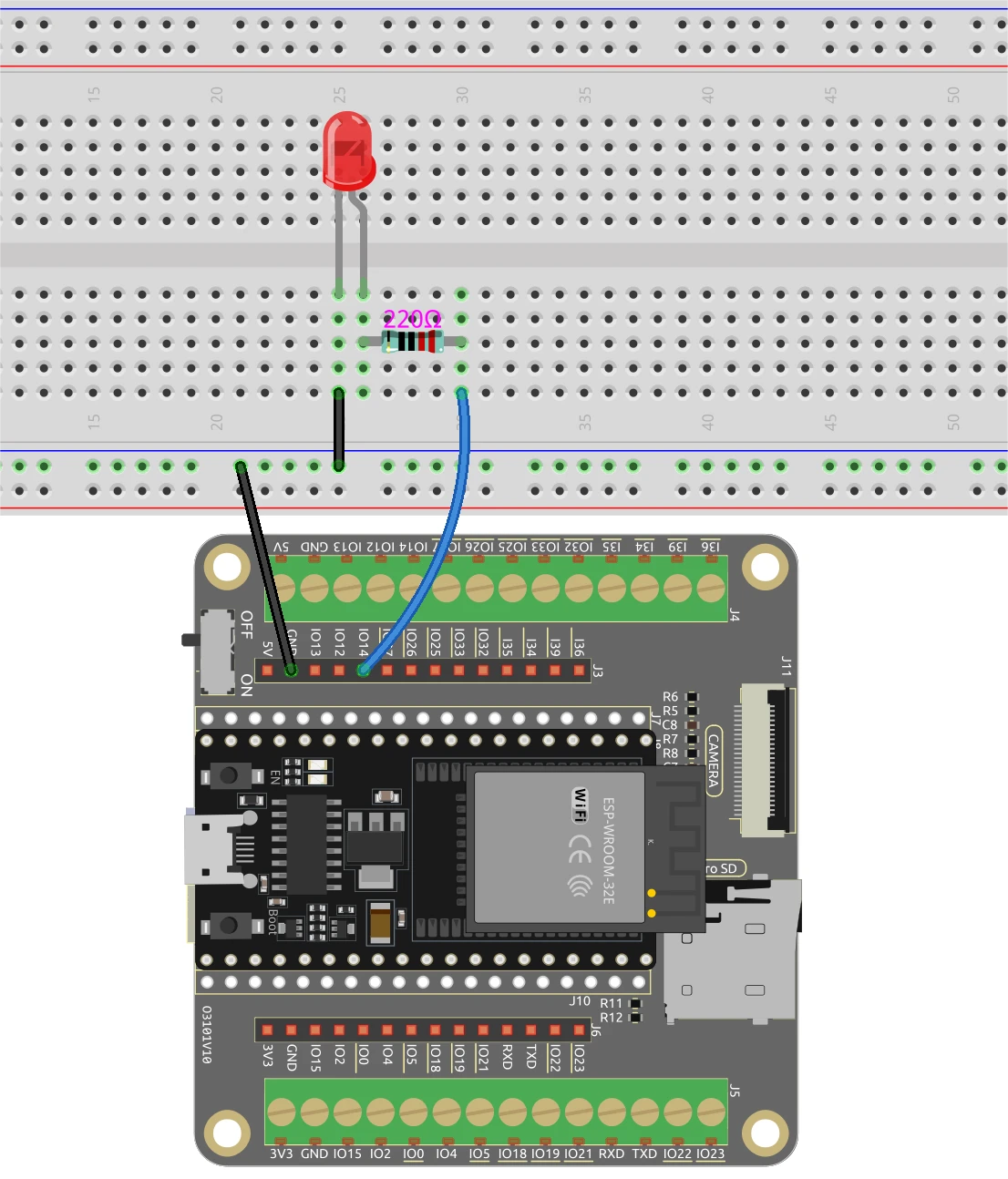
Mpo na kosangisa ESP32 mpe LED, banda na kosangisa pin ya molai ya LED na pin ya GPIO oyo ebongi, na likambo oyo tokosalela pin 14. Pin ya moké esengeli kosangisama na ligne ya terre na breadboard na yo. Na nsima, tia résistor ya 220 Ohm na série na LED, kosangisa esika moko na pin ya GPIO (pin 14) mpe esika mosusu na terre. Keba ete ESP32 ezali na courant ya malamu, to na port ya micro USB to na batterie ya lithium 18650.
Mpo na module ya caméra, keba ete osangisa ba pins oyo esengeli kolanda modèle ya caméra oyo ozali kosalela, mpo ete ba connexions ekoki kokesene mua. ESP32 ekotambwisa video na makoki na yango ya kati, mpe kokamba LED ekosalema na interface ya web oyo tokosala na code.
Ba Exemples ya Code & Explication
Programme ebandi na kosangisa ba bibliothèques oyo esengeli mpe na kopesa ba identifiants ya Wi-Fi. Okoki kobongola ssid mpe password na ba identifiants ya Wi-Fi na yo mpo na kosangisa ESP32 na réseau na yo.
const char* ssid = "SSID";
const char* password = "PASSWORD";
Na nsima, tozali kopesa pin ya LED mpe kosala ba configurations ya caméra. Pin oyo esalelami mpo na LED ebengami LED_PIN, oyo ekosalelama na nsima na code mpo na kokamba état ya LED.
#define LED_PIN    14
pinMode(LED_PIN, OUTPUT);
Na handler ya ba demandes mpo na kokamba LED, tozali kotala commande oyo ewuti na interface ya web. Kolanda soki commande ezali "on" to "off", tozali kosalela digitalWrite(LED_PIN, 1); mpo na kozongisa LED mpe digitalWrite(LED_PIN, 0); mpo na kozimisa yango.
if(!strcmp(variable, "on")) {
  Serial.println("ON");
  digitalWrite(LED_PIN, 1);
}
else if(!strcmp(variable, "off")) {
  Serial.println("OFF");
  digitalWrite(LED_PIN, 0);
}
Logique oyo epesaka interface ya web nzela ya kosolola malamu na ESP32, mpo na kokamba LED na tango ya solo kolanda makambo ya mosaleli. Code mobimba ekomami na nsé ya article mpo na kotala yango mingi.
Démonstration / Nini Okomona
Ntango makambo nyonso esalemi mpe code ekomisami, okoki kokota na adresse IP ya ESP32 na navigateur na yo. Video ya streaming ekobima, mpe okoki kokamba LED na ba boutons oyo ezali na interface. Kobeta "ON" ekopelisa LED, kasi "OFF" ekokimisa yango. Keba ete ESP32 mpe ordinateur na yo bazala na réseau moko mpo na kosala malamu (na video na 12:30).
Ba Timestamps ya Video
- 00:00 Ebandeli
- 1:51 Introduction na projet
- 2:31 Page ya documentation
- 3:33 Wiring Explication
- 5:08 Code ya Arduino explicada
- 13:28 Kopona Board ya ESP32 mpe port COM na Arduino IDE
- 15:10 Démonstration
Images
/*********
  Permission is hereby granted, free of charge,
  to any person obtaining a copy of this software and associated documentation files.
  The above copyright notice and this permission
  notice shall be included in all copies or substantial portions of the Software.
*********/

#include "esp_camera.h"
#include <WiFi.h>
#include "esp_timer.h"
#include "img_converters.h"
#include "Arduino.h"
#include "fb_gfx.h"
#include "soc/soc.h"             // disable brownout problems
#include "soc/rtc_cntl_reg.h"    // disable brownout problems
#include "esp_http_server.h"

// Replace the next variables with your SSID/Password combination
const char* ssid = "SSID";
const char* password = "PASSWORD";

#define PART_BOUNDARY "123456789000000000000987654321"

#define CAMERA_MODEL_AI_THINKER
//#define CAMERA_MODEL_M5STACK_PSRAM
//#define CAMERA_MODEL_M5STACK_WITHOUT_PSRAM
//#define CAMERA_MODEL_M5STACK_PSRAM_B
//#define CAMERA_MODEL_WROVER_KIT

#if defined(CAMERA_MODEL_WROVER_KIT)
  #define PWDN_GPIO_NUM    -1
  #define RESET_GPIO_NUM   -1
  #define XCLK_GPIO_NUM    21
  #define SIOD_GPIO_NUM    26
  #define SIOC_GPIO_NUM    27

  #define Y9_GPIO_NUM      35
  #define Y8_GPIO_NUM      34
  #define Y7_GPIO_NUM      39
  #define Y6_GPIO_NUM      36
  #define Y5_GPIO_NUM      19
  #define Y4_GPIO_NUM      18
  #define Y3_GPIO_NUM       5
  #define Y2_GPIO_NUM       4
  #define VSYNC_GPIO_NUM   25
  #define HREF_GPIO_NUM    23
  #define PCLK_GPIO_NUM    22

#elif defined(CAMERA_MODEL_M5STACK_PSRAM)
  #define PWDN_GPIO_NUM     -1
  #define RESET_GPIO_NUM    15
  #define XCLK_GPIO_NUM     27
  #define SIOD_GPIO_NUM     25
  #define SIOC_GPIO_NUM     23

  #define Y9_GPIO_NUM       19
  #define Y8_GPIO_NUM       36
  #define Y7_GPIO_NUM       18
  #define Y6_GPIO_NUM       39
  #define Y5_GPIO_NUM        5
  #define Y4_GPIO_NUM       34
  #define Y3_GPIO_NUM       35
  #define Y2_GPIO_NUM       32
  #define VSYNC_GPIO_NUM    22
  #define HREF_GPIO_NUM     26
  #define PCLK_GPIO_NUM     21

#elif defined(CAMERA_MODEL_M5STACK_WITHOUT_PSRAM)
  #define PWDN_GPIO_NUM     -1
  #define RESET_GPIO_NUM    15
  #define XCLK_GPIO_NUM     27
  #define SIOD_GPIO_NUM     25
  #define SIOC_GPIO_NUM     23

  #define Y9_GPIO_NUM       19
  #define Y8_GPIO_NUM       36
  #define Y7_GPIO_NUM       18
  #define Y6_GPIO_NUM       39
  #define Y5_GPIO_NUM        5
  #define Y4_GPIO_NUM       34
  #define Y3_GPIO_NUM       35
  #define Y2_GPIO_NUM       17
  #define VSYNC_GPIO_NUM    22
  #define HREF_GPIO_NUM     26
  #define PCLK_GPIO_NUM     21

#elif defined(CAMERA_MODEL_AI_THINKER)
  #define PWDN_GPIO_NUM     32
  #define RESET_GPIO_NUM    33
  #define XCLK_GPIO_NUM      0
  #define SIOD_GPIO_NUM     26
  #define SIOC_GPIO_NUM     27

  #define Y9_GPIO_NUM       35
  #define Y8_GPIO_NUM       34
  #define Y7_GPIO_NUM       39
  #define Y6_GPIO_NUM       36
  #define Y5_GPIO_NUM       21
  #define Y4_GPIO_NUM       19
  #define Y3_GPIO_NUM       18
  #define Y2_GPIO_NUM        5
  #define VSYNC_GPIO_NUM    25
  #define HREF_GPIO_NUM     23
  #define PCLK_GPIO_NUM     22

#elif defined(CAMERA_MODEL_M5STACK_PSRAM_B)
  #define PWDN_GPIO_NUM     -1
  #define RESET_GPIO_NUM    15
  #define XCLK_GPIO_NUM     27
  #define SIOD_GPIO_NUM     22
  #define SIOC_GPIO_NUM     23

  #define Y9_GPIO_NUM       19
  #define Y8_GPIO_NUM       36
  #define Y7_GPIO_NUM       18
  #define Y6_GPIO_NUM       39
  #define Y5_GPIO_NUM        5
  #define Y4_GPIO_NUM       34
  #define Y3_GPIO_NUM       35
  #define Y2_GPIO_NUM       32
  #define VSYNC_GPIO_NUM    25
  #define HREF_GPIO_NUM     26
  #define PCLK_GPIO_NUM     21

#else
  #error "Camera model not selected"
#endif

#define LED_PIN    14

static const char* _STREAM_CONTENT_TYPE = "multipart/x-mixed-replace;boundary=" PART_BOUNDARY;
static const char* _STREAM_BOUNDARY = "\r\n--" PART_BOUNDARY "\r\n";
static const char* _STREAM_PART = "Content-Type: image/jpeg\r\nContent-Length: %u\r\n\r\n";

httpd_handle_t camera_httpd = NULL;
httpd_handle_t stream_httpd = NULL;

static const char PROGMEM INDEX_HTML[] = R"rawliteral(
<html>
  <head>
    <title>ESP32-CAM Robot</title>
    <meta name="viewport" content="width=device-width, initial-scale=1">
    <style>
      body { font-family: Arial; text-align: center; margin:0px auto; padding-top: 30px;}
      table { margin-left: auto; margin-right: auto; }
      td { padding: 8 px; }
      .button {
        background-color: #2f4468;
        border: none;
        color: white;
        padding: 10px 20px;
        text-align: center;
        text-decoration: none;
        display: inline-block;
        font-size: 18px;
        margin: 6px 3px;
        cursor: pointer;
        -webkit-touch-callout: none;
        -webkit-user-select: none;
        -khtml-user-select: none;
        -moz-user-select: none;
        -ms-user-select: none;
        user-select: none;
        -webkit-tap-highlight-color: rgba(0,0,0,0);
      }
      img {  width: auto ;
        max-width: 100% ;
        height: auto ;
        transform: rotate(180deg);
      }
    </style>
  </head>
  <body>
    <h1>ESP32 CAMERA</h1>
    <img src="" id="photo" >
    <table>
      <tr><td align="center"><button class="button" onmousedown="toggleCheckbox('on');" ontouchstart="toggleCheckbox('on');onmouseup="toggleCheckbox('on');" ontouchend="toggleCheckbox('on');">ON</button></td>
      <td align="center"><button class="button" onmousedown="toggleCheckbox('off');" ontouchstart="toggleCheckbox('off');onmouseup="toggleCheckbox('off');" ontouchend="toggleCheckbox('off');">OFF</button></td></tr>
    </table>
   <script>
   function toggleCheckbox(x) {
     var xhr = new XMLHttpRequest();
     xhr.open("GET", "/action?go=" + x, true);
     xhr.send();
   }
   window.onload = document.getElementById("photo").src = window.location.href.slice(0, -1) + ":81/stream";
  </script>
  </body>
</html>
)rawliteral";

static esp_err_t index_handler(httpd_req_t *req){
  httpd_resp_set_type(req, "text/html");
  return httpd_resp_send(req, (const char *)INDEX_HTML, strlen(INDEX_HTML));
}

static esp_err_t stream_handler(httpd_req_t *req){
  camera_fb_t * fb = NULL;
  esp_err_t res = ESP_OK;
  size_t _jpg_buf_len = 0;
  uint8_t * _jpg_buf = NULL;
  char * part_buf[64];

  res = httpd_resp_set_type(req, _STREAM_CONTENT_TYPE);
  if(res != ESP_OK){
    return res;
  }

  while(true){
    fb = esp_camera_fb_get();
    if (!fb) {
      Serial.println("Camera capture failed");
      res = ESP_FAIL;
    } else {
      if(fb->width > 400){
        if(fb->format != PIXFORMAT_JPEG){
          bool jpeg_converted = frame2jpg(fb, 80, &_jpg_buf, &_jpg_buf_len);
          esp_camera_fb_return(fb);
          fb = NULL;
          if(!jpeg_converted){
            Serial.println("JPEG compression failed");
            res = ESP_FAIL;
          }
        } else {
          _jpg_buf_len = fb->len;
          _jpg_buf = fb->buf;
        }
      }
    }
    if(res == ESP_OK){
      size_t hlen = snprintf((char *)part_buf, 64, _STREAM_PART, _jpg_buf_len);
      res = httpd_resp_send_chunk(req, (const char *)part_buf, hlen);
    }
    if(res == ESP_OK){
      res = httpd_resp_send_chunk(req, (const char *)_jpg_buf, _jpg_buf_len);
    }
    if(res == ESP_OK){
      res = httpd_resp_send_chunk(req, _STREAM_BOUNDARY, strlen(_STREAM_BOUNDARY));
    }
    if(fb){
      esp_camera_fb_return(fb);
      fb = NULL;
      _jpg_buf = NULL;
    } else if(_jpg_buf){
      free(_jpg_buf);
      _jpg_buf = NULL;
    }
    if(res != ESP_OK){
      break;
    }
    //Serial.printf("MJPG: %uB\n",(uint32_t)(_jpg_buf_len));
  }
  return res;
}

static esp_err_t cmd_handler(httpd_req_t *req){
  char*  buf;
  size_t buf_len;
  char variable[32] = {0,};

  buf_len = httpd_req_get_url_query_len(req) + 1;
  if (buf_len > 1) {
    buf = (char*)malloc(buf_len);
    if(!buf){
      httpd_resp_send_500(req);
      return ESP_FAIL;
    }
    if (httpd_req_get_url_query_str(req, buf, buf_len) == ESP_OK) {
      if (httpd_query_key_value(buf, "go", variable, sizeof(variable)) == ESP_OK) {
      } else {
        free(buf);
        httpd_resp_send_404(req);
        return ESP_FAIL;
      }
    } else {
      free(buf);
      httpd_resp_send_404(req);
      return ESP_FAIL;
    }
    free(buf);
  } else {
    httpd_resp_send_404(req);
    return ESP_FAIL;
  }

  sensor_t * s = esp_camera_sensor_get();
  int res = 0;

  if(!strcmp(variable, "on")) {
    Serial.println("ON");
    digitalWrite(LED_PIN, 1);
  }
  else if(!strcmp(variable, "off")) {
    Serial.println("OFF");
    digitalWrite(LED_PIN, 0);
  }
  else {
    res = -1;
  }

  if(res){
    return httpd_resp_send_500(req);
  }

  httpd_resp_set_hdr(req, "Access-Control-Allow-Origin", "*");
  return httpd_resp_send(req, NULL, 0);
}

void startCameraServer(){
  httpd_config_t config = HTTPD_DEFAULT_CONFIG();
  config.server_port = 80;
  httpd_uri_t index_uri = {
    .uri       = "/",
    .method    = HTTP_GET,
    .handler   = index_handler,
    .user_ctx  = NULL
  };

  httpd_uri_t cmd_uri = {
    .uri       = "/action",
    .method    = HTTP_GET,
    .handler   = cmd_handler,
    .user_ctx  = NULL
  };
  httpd_uri_t stream_uri = {
    .uri       = "/stream",
    .method    = HTTP_GET,
    .handler   = stream_handler,
    .user_ctx  = NULL
  };
  if (httpd_start(&camera_httpd, &config) == ESP_OK) {
    httpd_register_uri_handler(camera_httpd, &index_uri);
    httpd_register_uri_handler(camera_httpd, &cmd_uri);
  }
  config.server_port += 1;
  config.ctrl_port += 1;
  if (httpd_start(&stream_httpd, &config) == ESP_OK) {
    httpd_register_uri_handler(stream_httpd, &stream_uri);
  }
}

void setup() {
  WRITE_PERI_REG(RTC_CNTL_BROWN_OUT_REG, 0); //disable brownout detector

  pinMode(LED_PIN, OUTPUT);

  Serial.begin(115200);
  Serial.setDebugOutput(false);

  camera_config_t config;
  config.ledc_channel = LEDC_CHANNEL_0;
  config.ledc_timer = LEDC_TIMER_0;
  config.pin_d0 = Y2_GPIO_NUM;
  config.pin_d1 = Y3_GPIO_NUM;
  config.pin_d2 = Y4_GPIO_NUM;
  config.pin_d3 = Y5_GPIO_NUM;
  config.pin_d4 = Y6_GPIO_NUM;
  config.pin_d5 = Y7_GPIO_NUM;
  config.pin_d6 = Y8_GPIO_NUM;
  config.pin_d7 = Y9_GPIO_NUM;
  config.pin_xclk = XCLK_GPIO_NUM;
  config.pin_pclk = PCLK_GPIO_NUM;
  config.pin_vsync = VSYNC_GPIO_NUM;
  config.pin_href = HREF_GPIO_NUM;
  config.pin_sscb_sda = SIOD_GPIO_NUM;
  config.pin_sscb_scl = SIOC_GPIO_NUM;
  config.pin_pwdn = PWDN_GPIO_NUM;
  config.pin_reset = RESET_GPIO_NUM;
  config.xclk_freq_hz = 20000000;
  config.pixel_format = PIXFORMAT_JPEG;

  if(psramFound()){
    config.frame_size = FRAMESIZE_VGA;
    config.jpeg_quality = 10;
    config.fb_count = 2;
  } else {
    config.frame_size = FRAMESIZE_SVGA;
    config.jpeg_quality = 12;
    config.fb_count = 1;
  }

  // Camera init
  esp_err_t err = esp_camera_init(&config);
  if (err != ESP_OK) {
    Serial.printf("Camera init failed with error 0x%x", err);
    return;
  }
  // Wi-Fi connection
  WiFi.begin(ssid, password);
  while (WiFi.status() != WL_CONNECTED) {
    delay(500);
    Serial.print(".");
  }
  Serial.println("");
  Serial.println("WiFi connected");

  Serial.print("Camera Stream Ready! Go to: http://");
  Serial.println(WiFi.localIP());

  // Start streaming web server
  startCameraServer();
}

void loop() {

}
Common Course Links
Common Course Files
Mokili na bisika
-
DokumentasiESP32 Tutorial 45/55 - SunFounder doc page for Custom Streaming Serverdocs.sunfounder.com
Fichiers📁
Aucun fichier disponible.