第27課:使用DHT11溫度感測器同LCD屏幕 | Arduino逐步課程
呢份指南會帶你由零開始,用DHT11感應器同I2C LCD屏幕,整一個溫度同濕度監測系統,係跟Robojax Arduino逐步課程第27課嘅內容。雖然影片入面提到嘅係HTU21DF感應器,但呢度講嘅程式碼同原理,直接適用於更常見、更平價嘅DHT11模組,呢個係環境感應項目嘅基本配件。呢個項目好啱初學者,想由閃吓LED燈,進階到讀取真實世界數據嘅人。

呢個項目嘅實際價值好大。你可以用呢個設定做好多實際應用,包括:
- 整一個簡單嘅數碼溫度計同濕度計,放喺屋企或者辦公室。
- 為爬蟲類飼養箱或者植物溫室,整一個氣候監測器。
- 開發一個基本氣象站,透過序列埠監控器,將數據記錄到電腦。
- 加入基於溫度嘅自動化,例如當溫度超過某個臨界值時,自動開風扇或者暖爐。
呢個教學會指導你接線、所需嘅程式庫同程式碼,等你都可以整到自己嘅環境監測系統。
硬件同零件
要整呢個項目,你需要以下零件:
- 一塊Arduino板(例如Uno、Nano)。
- 一個DHT11溫度同濕度感應器模組。
- 一個有I2C介面模組嘅LCD1602顯示屏。
- 杜邦線。
- 一塊麵包板(可選,但建議用,方便接線)。
接線指南
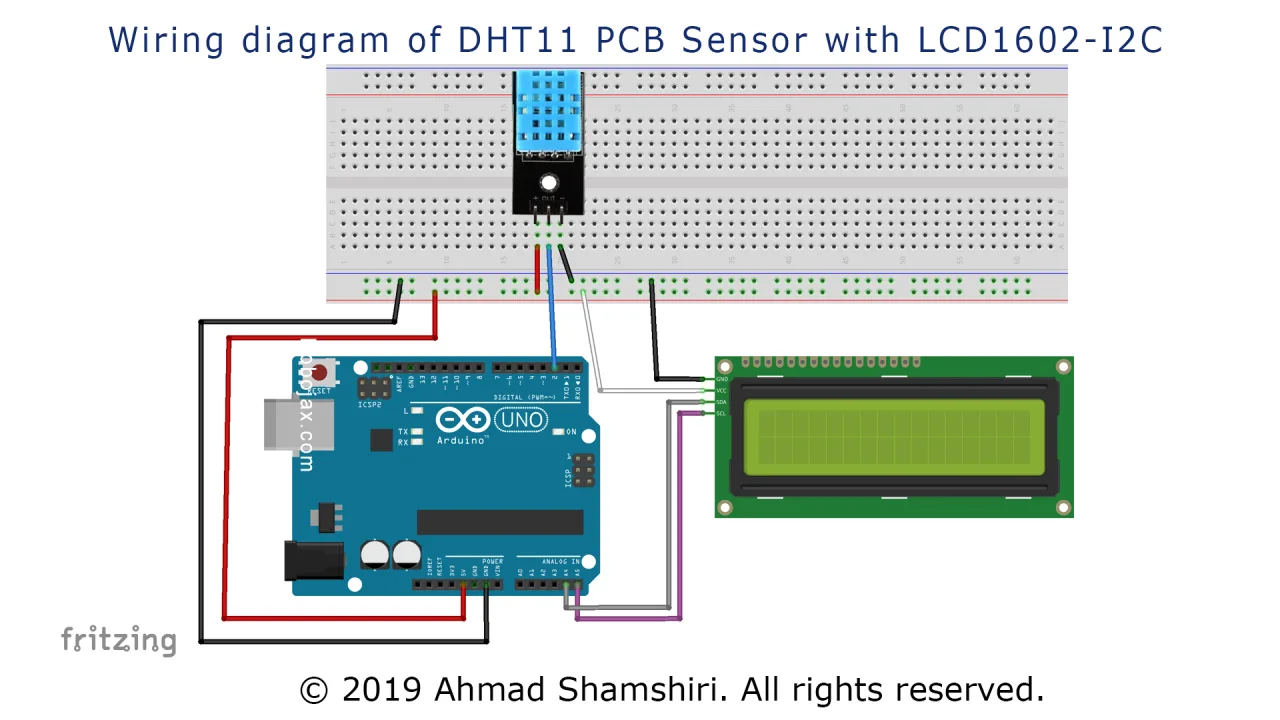
呢個項目嘅接線好簡單,全靠LCD嘅I2C介面同DHT11嘅簡單數碼輸出。I2C LCD只需要兩條數據線(SDA同SCL)同兩條電源線,大大簡化咗接線。DHT11感應器都係簡單嘅三針介面。
以下係項目嘅連接圖:
按照以下方式連接零件:
- DHT11感應器:將VCC(或者+)針腳連接到Arduino嘅5V針腳,GND(-)針腳連接到Arduino嘅GND,DATA(或者OUT)針腳連接到Arduino嘅數碼針腳2。
- I2C LCD(LCD1602):將VCC針腳連接到Arduino嘅5V針腳,GND針腳連接到Arduino嘅GND,SDA針腳連接到Arduino嘅模擬針腳A4,SCL針腳連接到Arduino嘅模擬針腳A5。
呢啲連接就係你需要嘅全部,用嚟為感應器同顯示屏供電,同埋令零件之間可以通訊。
程式碼解釋
呢段程式碼嘅設計,係讀取DHT11感應器嘅溫度同濕度,然後將數值顯示喺I2C LCD屏幕上。佢亦都會將數據打印到序列埠監控器,方便你喺電腦上查看。
等我哋拆解吓程式碼入面你可以自行設定嘅部分,你可能想根據自己嘅項目調整呢啲設定。
// header file from GitHub: https://github.com/adidax/dht11
#include <dht11.h>

dht11 DHT11; // create object of DHT11
#define dhtpin 2 // set the pin to connect to DHT11

// start of settings for LCD1602-I2C
#include <Wire.h>
#include <LiquidCrystal_I2C.h>
// Set the LCD address to 0x3F for a 16 chars and 2 line display
LiquidCrystal_I2C lcd(0x3F, 16, 2);
// end of settings for LCD1602-I2C
- #define dhtpin 2:呢行定義咗Arduino嘅數碼針腳,用嚟連接DHT11感應器嘅DATA針腳。如果你連接到其他針腳,就要改呢個數字。
- LiquidCrystal_I2C lcd(0x3F, 16, 2):呢行初始化LCD。第一個參數
0x3F係你特定LCD模組嘅I2C地址。呢個地址有時會係0x27,視乎製造商而定。另外兩個參數16同2,定義咗你LCD屏幕嘅行數同列數。
喺loop()入面,程式碼用咗一個自訂函數叫getTemp(),用嚟讀取同轉換溫度。呢個函數係一個好好嘅例子,示範點樣令程式碼更簡潔同可以重用。
float getTemp(char type) {
    float temp = (float)DHT11.temperature;//get temp
  if(type =='F')
  {
    return temp * 1.8 + 32;// convert to fahrenheit
  }else if(type =='K')
  {
    return temp + 274.15;// convert to Kelvin
  }else{
   return temp;
  }

}
要用呢個函數,你只需要呼叫佢,然後傳入一個字符去指定想要嘅單位。例如getTemp('C')會返回攝氏溫度,getTemp('F')返回華氏,getTemp('K')返回開爾文。咁樣就好容易用多種溫度標度顯示溫度,好似影片入面示範咁。
實際項目示範
當你組裝好電路同上載咗程式碼之後,你會見到LCD屏幕顯示「DHT11 Sensor」兩秒,然後顯示即時溫度同濕度讀數。屏幕會同時顯示攝氏同華氏溫度。你亦都可以打開序列埠監控器(設定為9600 baud)查看數據,入面會包括開爾文溫度同相對濕度百分比。
喺影片入面,示範者用熱風槍加熱,展示感應器嘅反應。你會見到LCD上嘅溫度讀數快速上升,而濕度讀數就下降,展示咗感應器嘅即時能力。呢個係一個好好嘅方法去測試你嘅設定,確認一切運作正常。
章節
- [00:00] DHT11同HTU21DF溫度感測器簡介
- [01:38] 感測器規格同數據手冊概覽
- [02:28] 感測器詳細接線指南
- [03:03] 安裝所需嘅Arduino函式庫
- [04:05] 解釋原始示例代碼
- [07:34] 示範感測器實際運作
- [08:33] 介紹帶自訂函數嘅修改版代碼
- [10:22] getTemp()函數點樣運作
- [12:19] 現場示範:以攝氏、華氏同開爾文顯示溫度
- [13:01] 測試感測器嘅最高溫度限制
圖片
/*
 * Robojax Arduino Step-by-Step Course
 * Lesson 26 DHT11 with LCD1602-I2C display


 * This is the Arduino code for the DHT11 module to read temperature and humidity.
 * This code can display temperature in:
 * C is used to get Celsius.
 * F is used to get Fahrenheit.
 * K is used for Kelvin.

 *  *
 * Written by Ahmad Shamshiri for Robojax
 * on January 4, 2018
 * Robojax.com

   Please watch video instructions here: https://youtu.be/0XMLnCYkvbE
 This code is available at: http://robojax.com/course1/?vid=lecture11

with over 100 lectures free on YouTube. Watch it here: http://robojax.com/L/?id=338
Get the code for the course: http://robojax.com/L/?id=339


 * This code is "AS IS" without warranty or liability. Free to be used as long as you keep this note intact.
 * This code has been downloaded from Robojax.com
    This program is free software: you can redistribute it and/or modify
    it under the terms of the GNU General Public License as published by
    the Free Software Foundation, either version 3 of the License, or
    (at your option) any later version.

    This program is distributed in the hope that it will be useful,
    but WITHOUT ANY WARRANTY; without even the implied warranty of
    MERCHANTABILITY or FITNESS FOR A PARTICULAR PURPOSE.  See the
    GNU General Public License for more details.

    You should have received a copy of the GNU General Public License
    along with this program.  If not, see <https://www.gnu.org/licenses/>.
 */

// header file from GitHub: https://github.com/adidax/dht11
#include <dht11.h>

dht11 DHT11; // create object of DHT11
#define dhtpin 2 // set the pin to connect to DHT11

// start of settings for LCD1602-I2C
#include <Wire.h>
#include <LiquidCrystal_I2C.h>
// Set the LCD address to 0x3F for a 16 chars and 2 line display
LiquidCrystal_I2C lcd(0x3F, 16, 2);
// end of settings for LCD1602-I2C


void setup() {
    Serial.begin(9600);// setting up serial monitor

  // initialize the LCD,
  lcd.begin();
  // Turn on the backlight and print a message.
  lcd.backlight();
  lcd.clear();
  lcd.setCursor (0,0); //
  lcd.print("DHT11 Sensor");
  delay(2000);
}

void loop() {
	//Robojax Step-by-Step Arduino Course YouTube Watch it here: http://robojax.com/L/?id=338
  DHT11.read(dhtpin);// initialize the reading
  int humidity = DHT11.humidity;// get humidity

  lcd.clear();// clear previous values from screen
  lcd.setCursor (0,0); //character zero, line 1
  lcd.print("LCD1602 DHT11"); // print text

  // print distance in degrees C
  lcd.setCursor (0,1); //character 0, line 2
  lcd.print(getTemp('C'));// print Temperature Celsius
  lcd.setCursor (4,1); //character 5, line 2
  lcd.print((char)223);// print degree
  lcd.setCursor (5,1); //character 6, line 2
  lcd.print("C");// print C

   // print distance degrees F
  lcd.setCursor (7,1); //character 8, line 2
  lcd.print(getTemp('F'));// print distance in cm
  lcd.setCursor (13,1); //character 14, line 2
  lcd.print((char)223);// print degree
  lcd.setCursor (14,1); //character 16, line 2
  lcd.print("F");// print F


  //code for Robojax.com video
   Serial.print(getTemp('C'));
   Serial.print("C ");
   Serial.print(getTemp('F'));
   Serial.print("F ");
   Serial.print(getTemp('K'));
   Serial.print("K ");
   Serial.print(" humidity:");
   Serial.print (humidity);
   Serial.print("% ");
   Serial.println();
 delay(500);
}


/*
 * getTemp(char type)
 * type: character of upper case
 * C is used to get Celsius.
 * F is used to get Fahrenheit.
 * K is used for Kelvin.
 */
float getTemp(char type) {
	//Robojax Step-by-Step Arduino Course YouTube Watch it here: http://robojax.com/L/?id=338
    float temp = (float)DHT11.temperature;//get temp
  if(type =='F')
  {
    return temp * 1.8 + 32;// convert to fahrenheit
  }else if(type =='K')
  {
    return temp + 274.15;// convert to Kelvin
  }else{
   return temp;
  }

}
你可能需要嘅嘢
-
亞馬遜Buy LCD1602-I2C from Amazonamzn.to
-
亞馬遜Purchase DHT11 from Amazonamzn.to
-
易贝Purchase LCD1602-I2C from eBayebay.us
-
阿里巴巴速卖通DHT11 and DHT22 from AliExpressamzn.to
-
阿里巴巴速卖通Purchase 10pcs LCD1602-I2C from AliExpresss.click.aliexpress.com
-
阿里巴巴速卖通Purchase LCD1602-I2C from AliExpresss.click.aliexpress.com
-
邦购Purchase DHT11 module from Banggoodbanggood.com
資源與參考資料
-
外部DHT11 library on GitHubgithub.com
-
外部DHT11 Manual (PDF)robojax.com
-
外部LCD library from Robojax.com (ZIP)robojax.com
文件📁
Fritzing 文件
-
Temperature Sensor DHT11
Temperature Sensor DHT11.fzpz0.01 MB -
DHT11 Humitidy and Temperature Sensor (3 pins)
DHT11 Humitidy and Temperature Sensor (3 pins).fzpz0.20 MB
用户手册
-
DHT11 用户手册
robojax-DHT11_manual.pdf0.82 MB
其他文件
-
DHT11 Simple Arduino Library
robojax-DHT11-simple_library.zip