Ikẹkọ yii jẹ apakan ti: Ẹ̀rọ Ìrírí Ọrinrin àti Ìwọ̀n Òtútù Oní-nọ́ńbà HTU21D
Àwọn fídíò tó jọmọ́ ẹ̀rọ Díjítàlì Relativational Humidity & Temperature Sensor HTU21D. Àwọn ìjápọ̀ sí àwọn fídíò mìíràn wà ní ìsàlẹ̀ àpilẹ̀kọ yìí.
Ẹ̀kọ́ 35-2: Lílò Kóòdù Àṣàtúnṣe Sensa Ìwọ̀n-otútù HTU21D
Nínú ẹ̀kọ́ yìí, a óò ṣàwárí bí a ṣe lè lo ẹ̀rọ ìwọ̀n ìgbóná HTU21D pẹ̀lú Arduino láti wọn ìgbóná àti ọ̀rinrin. HTU21D jẹ́ ẹ̀rọ tí ó gbẹ́kẹ̀lé, tí ó ní agbára kékeré, tí ó sì ń báni sọ̀rọ̀ nípasẹ̀ I2C, tí ó mú kí ìsopọ̀ rẹ̀ rọrùn nínú àwọn iṣẹ́ rẹ. Ní ìparí ẹ̀kọ́ yìí, ìwọ óò ní kóòdù tí ó ṣiṣẹ́ tí ó ń ka ìgbóná nínú Celsius, Fahrenheit, àti Kelvin, àti pẹ̀lú ọ̀rinrin ojúbọ.

Kí a tó wọ inú ìsopọ̀ àti kóòdù, ó ṣe pàtàkì láti lóye àwọn ohun èlò tí ó wà nínú rẹ̀. Ẹ̀rọ HTU21D nílò àwọn ìsopọ̀ tí ó kéré: agbára, ilẹ̀, àti àwọn okun I2C méjì fún gbígbé data. Ìrọrùn yìí mú kí ó jẹ́ àṣàyàn tí ó dára fún ọ̀pọ̀lọpọ̀ àwọn ìlò, láti àwọn ibùdó ojú ọjọ́ dé àwọn ẹ̀rọ ilé olóye. Fún ìtọ́sọ́nà ojú, wo fídíò ní àkókò 03:45.
Àlàyé Ohun Èlò
Ohun èlò pàtàkì nínú iṣẹ́ yìí ni ẹ̀rọ HTU21D, tí ó ń wọn ìgbóná àti ọ̀rinrin. Ẹ̀rọ yìí lè ṣiṣẹ́ pẹ̀lú agbára láti 1.5V sí 3.6V, tí ó mú kí ó wúlò fún ọ̀pọ̀lọpọ̀ àwọn ìlò. Ó ń pèsè àwọn ìwọ̀n tí ó ga, pẹ̀lú àwọn ìwọ̀n ìgbóná láti -40°C sí +125°C àti àwọn ìwọ̀n ọ̀rinrin pẹ̀lú ìpinnu 0.04%.
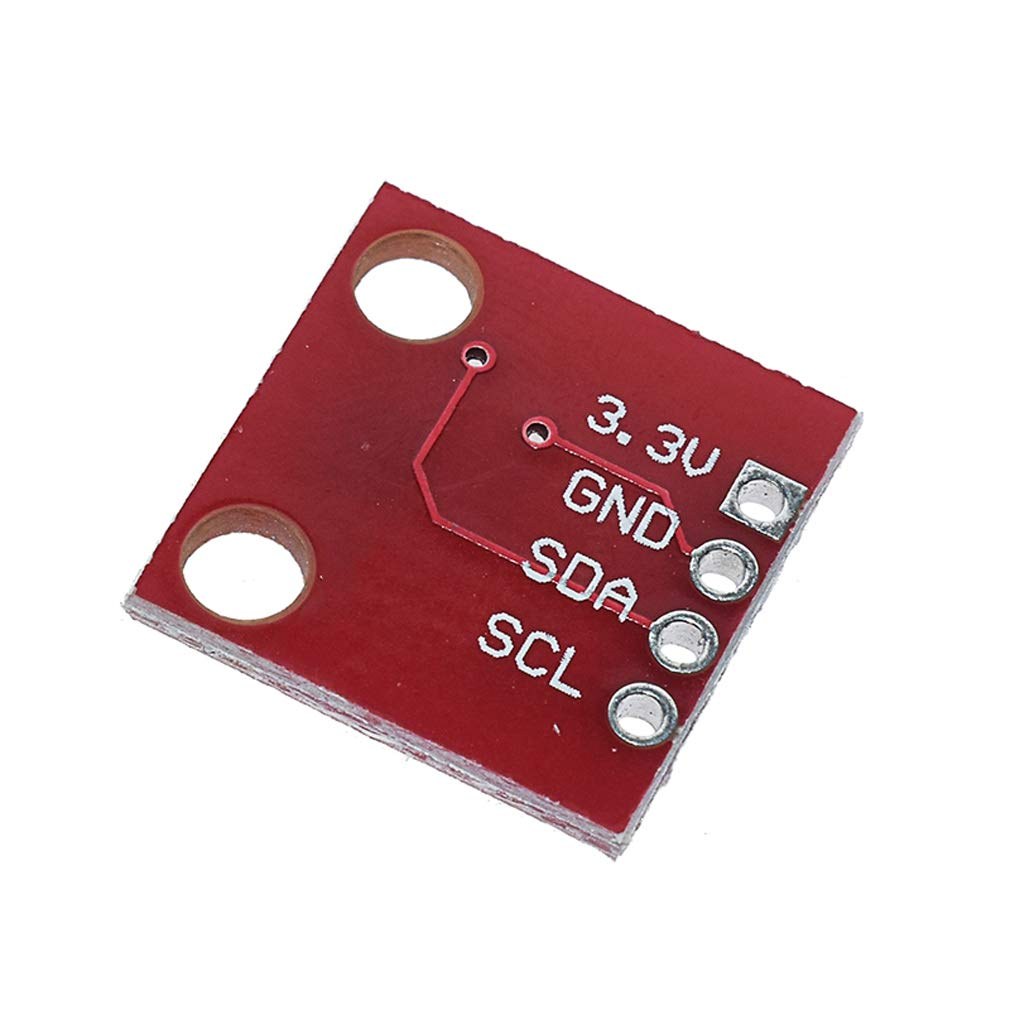
Ní àfikún, ẹ̀rọ náà ń lo ìbánisọ̀rọ̀ I2C, tí ó nílò àwọn pin méjì: SDA (okun data) àti SCL (okun aago). Èyí gba ìsopọ̀ rọrùn pẹ̀lú Arduino àti àwọn microcontroller mìíràn láìní ìsopọ̀ díjú. Adafruit library ṣe ìrọrùn ìbánisọ̀rọ̀ pẹ̀lú ẹ̀rọ náà, tí ó ń ṣe àkójọ data àti àwọn ìlànà ìbánisọ̀rọ̀ láìsí ìṣòro.
Àwọn Àlàyé Datasheet
| Olùṣelọ́pọ̀ | TE Connectivity |
|---|---|
| Nọ́mbà apá | HTU21D-F |
| Agbára Logic/IO | 1.5 – 3.6 V |
| Agbára ìpèsè | 3.3 V |
| Ìwọ̀n agbára tí ń jẹ (ìsinmi) | 0.02 µA (typ.) |
| Ìwọ̀n agbára tí ń jẹ (ìgbòkègbodò) | 450 µA (typ.) |
| Ìwọ̀n ìgbóná | -40 sí +125 °C |
| Ìwọ̀n ọ̀rinrin | 0 sí 100 %RH |
| Ìpinnu | 0.04 %RH; 0.01 °C |
| Àpótí | 6-pin DFN |
- Rí i dájú pé agbára ìpèsè tọ́nà láti yẹra fún ìbàjẹ́ ẹ̀rọ.
- Lo àwọn resistor ìfà sókè lórí àwọn okun SDA àti SCL bí wọn kò bá ti wà nínú rẹ̀.
- Jẹ́ kí àwọn ìsopọ̀ ẹ̀rọ kúrú láti dín àríyànjiyàn kù.
- Ṣe àbójútó agbára nígbà tí ẹ̀rọ ń ṣiṣẹ́ láti mú ìdúróṣinṣin.
- Rò nípa lílo capacitor fún ìyọ̀nú níbẹ̀ nítòsí àwọn pin agbára.
Àwọn Ìtọ́sọ́nà Ìsopọ̀
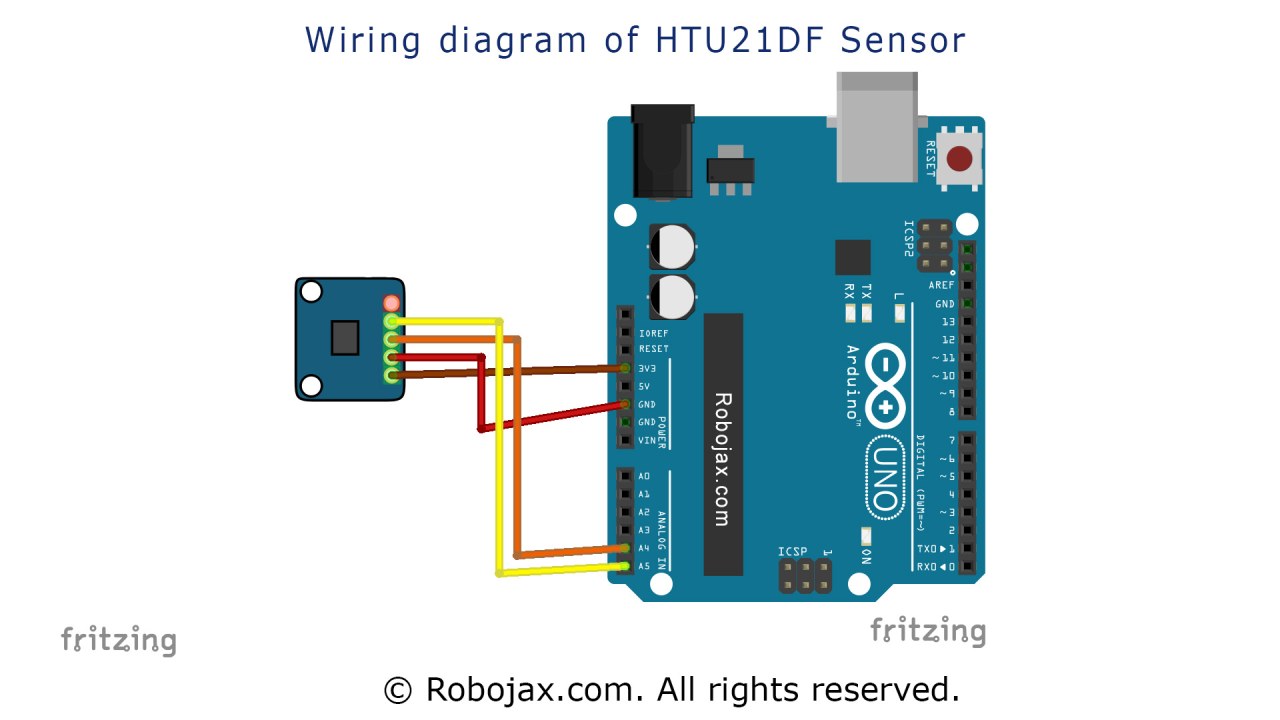
Láti so ẹ̀rọ ìwọ̀n ìgbóná HTU21D, bẹ̀rẹ̀ nípa sísopọ̀ agbára àti ilẹ̀. So pin òsì ti ẹ̀rọ náà sí orísun 3.3V, rí i dájú pé ó lè gba agbára tí a nílò. Pin kejì, tí a sábà máa ń fi pupa sàmì sí, yẹ kí ó lọ sí ilẹ̀.
Lẹ́yìn náà, so pin SDA ti ẹ̀rọ náà sí pin A4 lórí Arduino, tí ó jẹ́ okun data fún ìbánisọ̀rọ̀ I2C. Lẹ́yìn náà, so pin SCL sí pin A5, tí ó jẹ́ okun aago. Rí i dájú pé àwọn ìsopọ̀ wọ̀nyí dúró ṣinṣin, nítorí àwọn okun tí kò dúró lè yọrí sí àwọn ìwọ̀n tí ń yí padà tàbí àìṣe àjọṣepọ̀ pẹ̀lú ẹ̀rọ náà.
Àwọn Àpẹẹrẹ Kóòdù & Ìtọ́sọ́nà
Nínú kóòdù náà, a bẹ̀rẹ̀ nípa fífi àwọn library tí a nílò sílẹ̀ àti ṣíṣe ìbẹ̀rẹ̀ ẹ̀rọ náà. Ìlà Adafruit_HTU21DF htu = Adafruit_HTU21DF(); dá àpẹẹrẹ kan ti ẹ̀ka ẹ̀rọ náà. Nínú ìṣiṣẹ́ setup(), a bẹ̀rẹ̀ ìbánisọ̀rọ̀ serial àti ṣàyẹ̀wò bí ẹ̀rọ náà bá ti sopọ̀ dáradára.
void setup() {
  Serial.begin(9600);
  if (!htu.begin()) {
    Serial.println("A kò rí ẹ̀rọ náà!");
    while (1);
  }
}
Apá yìí ṣàyẹ̀wò bí ẹ̀rọ náà bá ń ṣiṣẹ́ dáradára. Bí kò bá ṣiṣẹ́, ó tẹ̀ jáde ìsọfúnni àṣìṣe àti dá ètò náà dúró. Nínú ìṣiṣẹ́ loop(), a ń ka àwọn iye ìgbóná àti ọ̀rinrin nígbà gbogbo.
void loop() {
    Serial.print(getHTU('C'));
    Serial.print("C");
    Serial.print(getHTU('H'));
    Serial.println("%");
    delay(1000);
}
Níhìn-ín, ìṣiṣẹ́ getHTU() ni a ń pè pẹ̀lú àwọn àyọkà tí ó yàtọ̀ láti gba ìgbóná ní Celsius àti ọ̀rinrin. Ìdúró náà ṣe àmúlò láti rí i dájú pé a ń ka àwọn ìwọ̀n ní gbogbo ìṣẹ́jú àáyá, tí ó ń fúnni ní àbájáde tí ó dán ní ojú ìṣàkóso serial. Kóòdù kíkún wà fún ìtọ́kasí nísàlẹ̀ àpilẹ̀kọ yìí.
Ìfihàn / Ohun Tí Ó Yẹ Kí O Rí
Nígbà tí ohun gbogbo bá ti sopọ̀ dáradára àti tí a ti gbé kóòdù náà sílẹ̀, ìwọ yẹ kí o rí àwọn ìwọ̀n ìgbóná àti ọ̀rinrin tí a tẹ̀ jáde ní ojú ìṣàkóso serial. Ìgbóná yóò hàn ní Celsius, tí ìpín ọ̀rinrin tí ó bá mu yóò tẹ̀lé e. Bí o bá fi ooru sí ẹ̀rọ náà, ìwọ yẹ kí o rí ìgbóná tí ń pọ̀ sí i ní ìbámu (nínú fídíò ní 10:15).
Ṣọ́ra fún àwọn ààlà ẹ̀rọ náà; bí ìgbóná bá ju 125°C lọ, ó lè dá àbájáde tí kò tọ́ padà tàbí fi òdo hàn. Rí i dájú nígbà gbogbo pé àwọn ìsopọ̀ rẹ dúró ṣinṣin àti pé a fi agbára tọ́nà fún ẹ̀rọ náà láti yẹra fún àwọn ìṣòro nígbà ìṣiṣẹ́.
Àwọn Àkókò Fídíò
- 00:00 Ìfihàn
- 03:45 Sísopọ̀ Ẹ̀rọ Náà
- 05:30 Ìtọ́sọ́nà Kóòdù
- 10:15 Ìfihàn
- 12:00 Ìparí
Aworan
Ikẹkọ yii jẹ apakan ti: Ẹ̀rọ Ìrírí Ọrinrin àti Ìwọ̀n Òtútù Oní-nọ́ńbà HTU21D
- Ẹ̀kọ́ 35-1: Lílò Sensa Ìwọ̀n-otútù HTU21D
- Ẹkọ 35: Lílo HTU21D Sensor Ìwọ̀n-otútù pẹ̀lú Arduino
- Ẹ̀kọ́ 36: Lílò HTU21D Sensor Ìwọ̀n-otútù pẹ̀lú LCD Arduino Ẹ̀kọ́-ọ̀kọ̀ọ̀kan-ọ̀kọ̀ọ̀kan Arduino
- Using Two More HTU21DF Humidity and Temperature Sensors with Arduino
- Displaying Temperature from an HTU21D on an LCD
- Displaying Temperature from an HTU21D as a Bar Graph on an LCD
- How to Use the HTU21DF Humidity and Temperature Sensor with Arduino (Basic Code)
- How to Use the HTU21DF Humidity and Temperature Sensor with Arduino (Custom Code)
/*
 * Robojax Arduino Step-by-Step Course
 * Part 4: Temperature Sensors
 * Lesson 35: HTU21D Temperature Sensor Custom code

 * Written/Updated by Ahmad Shamshiri on July 13, 2019
 * in Ajax, Ontario, Canada


  Please watch video instructions here https://youtu.be/LyA0yAKlf9E
 This code is available at http://robojax.com/course1/?vid=lecture35

with over 100 lectures free on YouTube. Watch it here http://robojax.com/L/?id=338
Get the code for the course: http://robojax.com/L/?id=339
If you found this tutorial helpful, please support me so I can continue creating.
Make a donation using PayPal http://robojax.com/L/?id=64

 * Code is available at http://robojax.com/learn/arduino

 * This code is "AS IS" without warranty or liability. Free to be used as long as you keep this note intact.
 * This code has been downloaded from Robojax.com
    This program is free software: you can redistribute it and/or modify
    it under the terms of the GNU General Public License as published by
    the Free Software Foundation, either version 3 of the License, or
    (at your option) any later version.

    This program is distributed in the hope that it will be useful,
    but WITHOUT ANY WARRANTY; without even the implied warranty of
    MERCHANTABILITY or FITNESS FOR A PARTICULAR PURPOSE.  See the
    GNU General Public License for more details.

    You should have received a copy of the GNU General Public License
    along with this program.  If not, see <https://www.gnu.org/licenses/>.


 */
 /*


**************************************************
*
  This is an example for the HTU21D-F Humidity & Temperature Sensor

  Designed specifically to work with the HTU21D-F sensor from Adafruit
  ----> https://www.adafruit.com/products/1899

  These displays use I2C to communicate; 2 pins are required to
  interface
 ***************************************************
*/

#include <Wire.h>
#include "Adafruit_HTU21DF.h"

// Connect Vin to 3-5VDC
// Connect GND to ground
// Connect SCL to I2C clock pin (A5 on UNO)
// Connect SDA to I2C data pin (A4 on UNO)

Adafruit_HTU21DF htu = Adafruit_HTU21DF();

void setup() {
//Get the code for the course: http://robojax.com/L/?id=339
  Serial.begin(9600);
  Serial.println("Robojax.com");
  Serial.println("HTU21D-F test");

  if (!htu.begin()) {
    Serial.println("Couldn't find sensor!");
    while (1);
  }
}

void loop() {
//Get the code for the course: http://robojax.com/L/?id=339
    Serial.print(getHTU('C'));
    printDegree();
    Serial.println("C");

    Serial.print(getHTU('F'));
    printDegree();
    Serial.println("F");

    Serial.print(getHTU('K'));
    Serial.println("K");
    Serial.println(" ");

    Serial.print("Humidity:");
    Serial.print(getHTU('H'));
    Serial.println("%");

    if(getHTU('C') <81)
    {
      //digitalWrite(5, LOW);

    }
    delay(1000);
}


/*
 * @brief returns temperature or relative humidity
 * @param "type" is character
 *     C = Celsius
 *     K = Kelvin
 *     F = Fahrenheit
 *     H = Humidity
 * @return returns one of the values above
 * Usage: to get Fahrenheit type: getHTU('F')
 * to print it on serial monitor Serial.println(getHTU('F'));
 * Written by Ahmad Shamshiri on July 13, 2019
 * in Ajax, Ontario, Canada
 * www.Robojax.com
 */
float getHTU(char type)
{
	//Get the code for the course: http://robojax.com/L/?id=339
  float value;
    float temp = htu.readTemperature();
    float rel_hum = htu.readHumidity();
   if(type =='F')
   {
    value = temp *9/5 + 32;//convert to Fahrenheit
   }else if(type =='K')
   {
    value = temp + 273.15;//convert to Kelvin
   }else if(type =='H')
   {
    value = rel_hum;//return relative humidity
   }else{
    value = temp;// return Celsius
   }
   return value;
}//


/*
 * @brief prints degree symbol on serial monitor
 * @param none
 * @return returns nothing
 * Written by Ahmad Shamshiri on July 13, 2019
 * for Robojax Tutorial Robojax.com
 */
 void printDegree()
{
    Serial.print("\xC2");
    Serial.print("\xB0");
}
Ohun ti o le nilo
-
Amazon
-
eBayPurchase HTU21D from eBayebay.us
-
AliExpressPurchase HTU21D or SHT21 from AliExpresss.click.aliexpress.com
Orisun & itọkasi
-
Ita gbangbaAdafruit HTU21D Library (GitHub)github.com
-
Ita gbangbaDifference between HTU21DF and HTU21D (image)robojax.com
-
Ita gbangba
-
Ita gbangbaHTU21D Datasheet (PDF)cdn-shop.adafruit.com
Fáìlìs📁
Fọọmu data (pdf)
-
HTU21D_temerature_humidity_datasheet
HTU21D_temerature_humidity_datasheet.pdf0.96 MB