本教程是的一部分: 数字式相对湿度和温度传感器 HTU21D
本文下方提供了与数字式相对湿度和温度传感器 HTU21D 相关的视频链接。

第35-1课:使用HTU21D温度传感器
在本教程中,我们将探索如何使用HTU21D温湿度传感器与Arduino进行配合。HTU21D是一种紧凑型传感器,通过I2C进行通信,使其与微控制器的接口变得简单。到本节结束时,您将能够读取温度和湿度值并通过Arduino串行监视器显示它们。

对于这个项目,我们将使用专门为HTU21D传感器设计的Adafruit库。该库简化了读取传感器数据的过程,使我们能够专注于将传感器集成到我们的项目中。您可以期待在视频中看到传感器的温度读数,包括摄氏度、华氏度和开尔文,以及相对湿度百分比(在视频的03:15)。
硬件说明
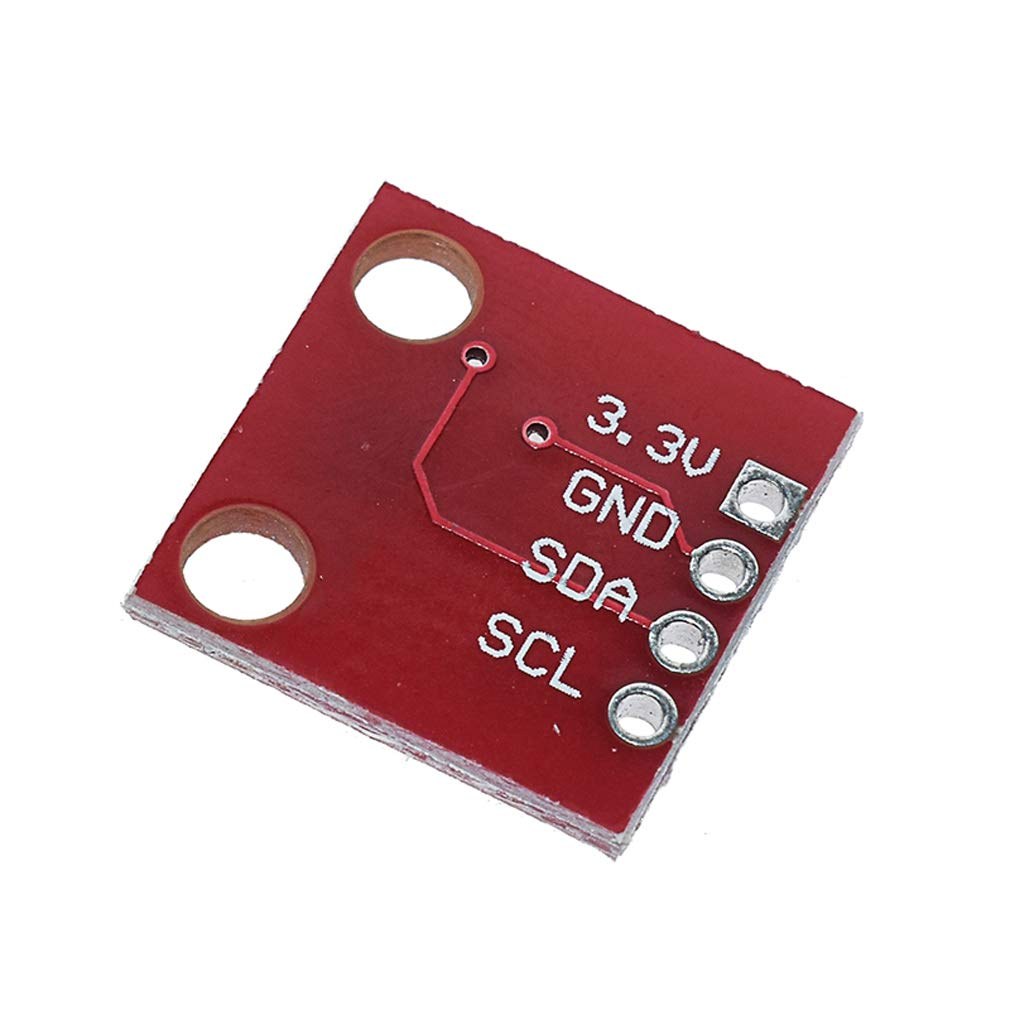
该项目的主要组件是HTU21D温湿度传感器。该传感器的供电电压为1.5至3.6伏特,功耗极低,非常适合电池供电的设备。它通过I2C协议与Arduino通信,只需要两条数据线:SDA用于数据,SCL用于时钟。
为了为传感器供电,我们将其连接到3.3V或5V的电源,具体取决于您使用的模块。Adafruit版本包括一个电压稳定器,使其能够在这两种电压水平下无缝工作。这种灵活性使其成为各种应用的理想选择。
数据表详情
| 制造商 | TE 连接器 |
|---|---|
| 部件编号 | HTU21D-F |
| 逻辑/IO电压 | 1.5 - 3.6 V |
| 供电电压 | 3.3 V(典型) |
| 当前消费(空闲) | 0.02 微安培 |
| 当前消耗(测量) | 450 µA (典型) |
| 温度范围 | -40至+125°C |
| 湿度分辨率 | 0.04 % |
| 包裹 | 6引脚DFN |
- 确保电压水平适当,以避免损坏传感器。
- 如果模块中未包含,则在I2C线路上使用上拉电阻。
- 保持电线短,以减少与I2C通信的干扰。
- 在高温环境中使用时,请考虑散热。
- 检查传感器的方向以确保引脚连接正确。
接线说明
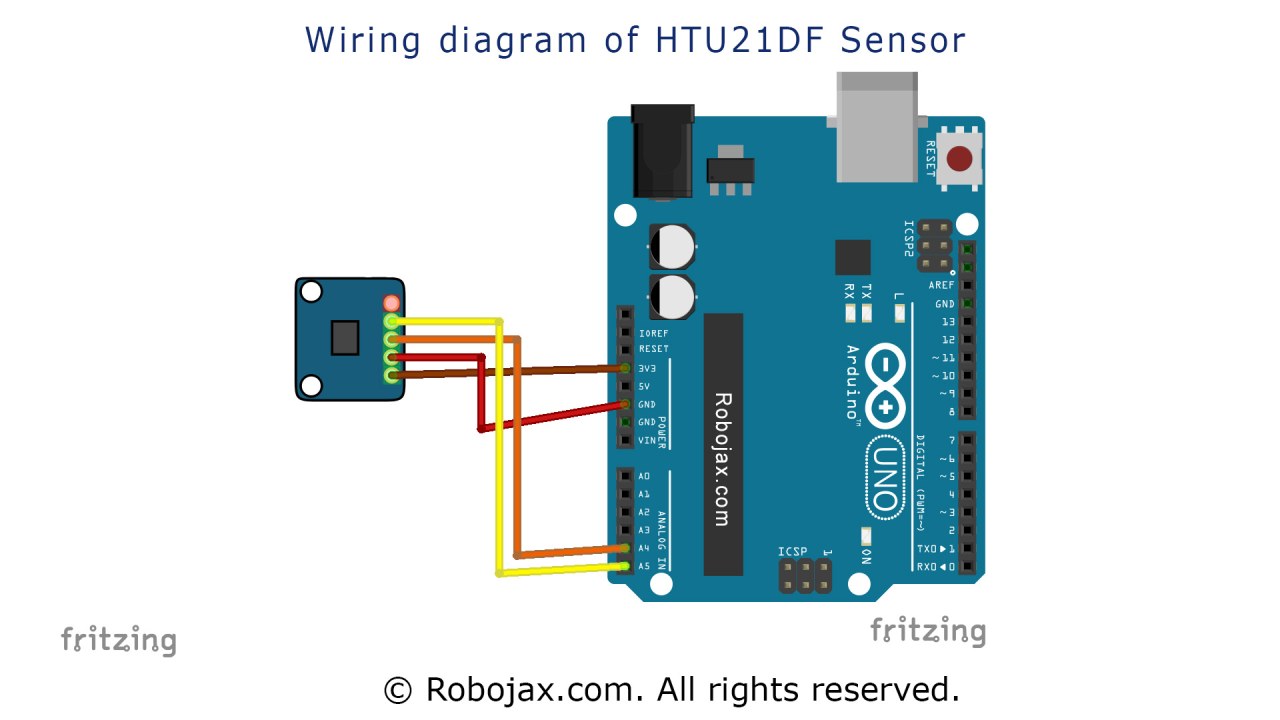
要将HTU21D传感器接线到您的Arduino,首先将传感器的VCC引脚连接到Arduino的3.3V电源引脚。接下来,将传感器的GND引脚连接到Arduino的地(GND)引脚。然后,将传感器的SDA引脚连接到Arduino的模拟引脚A4,该引脚作为I2C数据线。最后,将传感器的SCL引脚连接到模拟引脚A5,该引脚作为I2C时钟线。确保您的连接牢固,以避免间歇性读数。
为清晰起见,如果您使用的是不同的电路板,请确保识别SDA和SCL的正确引脚,因为它们可能会有所不同。该接线设置将使Arduino能够有效地与HTU21D传感器进行通信(视频中为05:00)。
代码示例与教程
以下是初始化串行通信并检查传感器是否找到的设置函数的摘录:
void setup() {
  Serial.begin(9600);
  if (!htu.begin()) {
    Serial.println("Couldn't find sensor!");
    while (1);
  }
}
此代码以9600的波特率开始串行通信,并尝试初始化HTU21D传感器。如果未检测到传感器,将打印错误信息并停止进一步执行。
程序的主循环不断读取温度和湿度值:
void loop() {
    Serial.print(getHTU('C'));
    Serial.println("C");
    Serial.print("Humidity:");
    Serial.print(getHTU('H'));
    Serial.println("%");
    delay(1000);
}在这个循环中,我们调用函数getHTU使用'C'来获取摄氏温度,使用'H'来获取湿度。结果每秒打印到串口监视器。这允许实时观察传感器读数。
此外,我们有一个功能getHTU根据字符输入返回温度或湿度:
float getHTU(char type) {
    float temp = htu.readTemperature();
    float rel_hum = htu.readHumidity();
    return (type == 'H') ? rel_hum : temp;
}
此功能从传感器读取温度和湿度,并根据指定的类型返回适当的值。这种模块化的方法使代码保持简洁,易于维护。
演示 / 期待什么
成功设置并执行代码后,您应该会看到温度和湿度值打印到串口监视器上。如果您对传感器施加热量,温度读数应相应增加,而湿度可能会降低。如果温度超出传感器的最大范围,可能会显示意外结果,例如零(视频在 :00)。
视频时间戳
- 00:00- 介绍
- 03:15传感器概述
- 05:00- Wiring instructions
- 10:00代码演示
- 12:00- 演示
图像
/*
 * Robojax Arduino Step-by-Step Course
 * Part 4: Temperature Sensors
 * Lesson 35: HTU21D Temperature Sensor


 * Updated by Ahmad Shamshiri on July 13, 2019
 * in Ajax, Ontario, Canada

  Please watch video instructions here https://youtu.be/LyA0yAKlf9E
 This code is available at http://robojax.com/course1/?vid=lecture35

with over 100 lectures free on YouTube. Watch it here http://robojax.com/L/?id=338
Get the code for the course: http://robojax.com/L/?id=339
If you found this tutorial helpful, please support me so I can continue creating.
Make a donation using PayPal http://robojax.com/L/?id=64

 * Code is available at http://robojax.com/learn/arduino

 * This code is "AS IS" without warranty or liability. Free to be used as long as you keep this note intact.
 * This code has been downloaded from Robojax.com
    This program is free software: you can redistribute it and/or modify
    it under the terms of the GNU General Public License as published by
    the Free Software Foundation, either version 3 of the License, or
    (at your option) any later version.

    This program is distributed in the hope that it will be useful,
    but WITHOUT ANY WARRANTY; without even the implied warranty of
    MERCHANTABILITY or FITNESS FOR A PARTICULAR PURPOSE.  See the
    GNU General Public License for more details.

    You should have received a copy of the GNU General Public License
    along with this program.  If not, see <https://www.gnu.org/licenses/>.


 */
/*

**************************************************
*
  This is an example for the HTU21D-F Humidity & Temp Sensor

  Designed specifically to work with the HTU21D-F sensor from Adafruit
  ----> https://www.adafruit.com/products/1899

  These displays use I2C to communicate; 2 pins are required to
  interface
 ****************************************************/

#include <Wire.h>
#include "Adafruit_HTU21DF.h"

// Connect Vin to 3-5VDC
// Connect GND to ground
// Connect SCL to I2C clock pin (A5 on UNO)
// Connect SDA to I2C data pin (A4 on UNO)

Adafruit_HTU21DF htu = Adafruit_HTU21DF();

void setup() {
  Serial.begin(9600);
  Serial.println("Robojax.com");
  Serial.println("HTU21D-F test");

  if (!htu.begin()) {
    Serial.println("Couldn't find sensor!");
    while (1);
  }
}

void loop() {
//Get the code for the course: http://robojax.com/L/?id=339
    Serial.print(getHTU('C'));
    printDegree();
    Serial.println("C");

    Serial.print(getHTU('F'));
    printDegree();
    Serial.println("F");

    Serial.print(getHTU('K'));
    Serial.println("K");
    Serial.println(" ");

    Serial.print("Humidity:");
    Serial.print(getHTU('H'));
    Serial.println("%");

    if(getHTU('C') <81)
    {
      //digitalWrite(5, LOW);

    }
    delay(1000);
}

/*
 * @brief returns temperature or relative humidity
 * @param "type" is character
 *     C = Celsius
 *     K = Kelvin
 *     F = Fahrenheit
 *     H = Humidity
 * @return returns one of the values above
 * Usage: to get Fahrenheit type: getHTU('F')
 * to print it on serial monitor Serial.println(getHTU('F'));
 * Written by Ahmad Shamshiri on July 13, 2019
 * in Ajax, Ontario, Canada
 * www.Robojax.com
 */
float getHTU(char type)
{
	//Get the code for the course: http://robojax.com/L/?id=339
  float value;
    float temp = htu.readTemperature();
    float rel_hum = htu.readHumidity();
   if(type =='F')
   {
    value = temp *9/5 + 32;//convert to Fahrenheit
   }else if(type =='K')
   {
    value = temp + 273.15;//convert to Kelvin
   }else if(type =='H')
   {
    value = rel_hum;//return relative humidity
   }else{
    value = temp;// return Celsius
   }
   return value;
}//

/*
 * @brief prints degree symbol on serial monitor
 * @param none
 * @return returns nothing
 * Written by Ahmad Shamshiri on July 13, 2019
 * for Robojax Tutorial Robojax.com
 */
void printDegree()
{
    Serial.print("\\xC2");
    Serial.print("\\xB0");
}
|||您可能需要的东西
-
亚马逊从亚马逊购买HTU21D模块amzn.to
-
易趣在eBay上购买HTU21Debay.us
-
全球速卖通从AliExpress购买HTU21D或SHT21s.click.aliexpress.com
资源与参考
-
外部HTU21DF 和 HTU21D 的区别(图片)robojax.com
-
外部在Arduino上通过LCD以条形图形式显示HTU21D的温度robojax.com
文件📁
数据手册 (pdf)
-
HTU21D温湿度数据表
HTU21D_temerature_humidity_datasheet.pdf0.96 MB -
HTU31D HTU31V 温湿度传感器数据表
HTU31_Sensors_Datasheet.pdf0.67 MB