Code ya Arduino mpe Transmetter ya Vidéo mpe Senseur ya Laser
Na boyekoli oyo, tokoyekola ndenge ya kosalela émeteur ya laser mpe récepteur mpo na koyeba nzela ya mwinda ya laser mpe kopelisa buzzer to eloko mosusu. Esaleli oyo ekoki kosalelama na misala mingi, kati na yango automation mpe robotique. Na suka ya boyekoli oyo, okososola ndenge ya kosangisa ba composants mpe kokoma code ya Arduino mpo na kosala ete nyonso esala malamu.


Na boyekoli oyo mobimba, tokolobela ba composants ya ntina oyo esalelami na projet oyo, kati na yango ndenge ya kosangisa yango malamu mpe ndenge code esalaka. Tala vidéo mpo na ndenge ya kosala yango na bozindo (na vidéo na 02:00).
Matoko ya Hardware
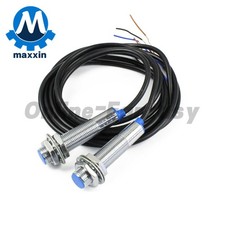
Ba composants ya ntina ya projet oyo ezali na émeteur ya laser, récepteur ya laser, mpe buzzer. Émeteur ya laser ebimisaka mwinda, wana récepteur emonanaka mwinda yango. Soki mwinda yango ekatami, récepteur atindaka signal na Arduino, oyo ekoki kopelisa buzzer to kosala eloko mosusu.
Module ya émeteur esalaka na 5 volts mpe ezali na résistance mpo na kokitisa courant. Module ya récepteur ekoki kosangisama na nsinga ya libanda mpo na bopemi na kotia yango. Buzzer mpe ezali na 5 volts mpe ezali na ba pins mibale: moko ya positif mpe moko ya terre.
Biloko ya Datasheet
| Fabricant | Ebayebani te |
|---|---|
| Numéro ya partie | Module Émeteur/Récepteur ya Laser |
| Tension ya fonctionnement | 5 V |
| Consommation ya courant | 5 mA typ. |
| Type ya sortie | Signal numérique |
| Étendue ya détection | Ekesenaka na environnement |
| Boyenga | Émeteur: 14.8 mm x 18.8 mm, Récepteur: 15.4 mm x 23.4 mm |
- Kokamba tension malamu mpo na kopekisa kobebisama.
- Salela ba nsinga mikuse mpo na kokitisa kozanga ya signal.
- Kokanola récepteur na émeteur mpo na détection ya semba.
- Meka esaleli na ba conditions ya pole ndenge na ndenge.
- Keba na ba réflexions oyo ekoki kobimisa ba détections ya lokuta.
Bilenge ya Wiring

Mpo na kosangisa émeteur ya laser, sangisa pin na yango ya terre na GND ya Arduino mpe pin ya positif na 5V ya Arduino. Pin ya kati ya émeteur esalelami te. Mpo na récepteur ya laser, sangisa pin na yango ya terre na GND, pin ya positif na 5V, mpe pin ya sortie na pin ya Arduino 2. Pin oyo ya sortie ekotanga signal oyo ewuti na récepteur ya laser.
Na sima, sangisa buzzer: pin na yango ya molai (positif) esengeli kosangisama na pin ya Arduino 8, wana pin ya mokuse (terre) esangisami na GND. Tika ete ba connexions nyonso ezala ya semba mpo na kopekisa ba problèmes ya mbala na mbala na ntango ya fonctionnement.
Ba Exemples ya Code & Explication
Code ya Arduino ebandi na kopesa ba pins ya capteur ya laser mpe ya action (buzzer) na kosalela ba identifiants DETECT mpe ACTION. Code ebandisaka communication ya série mpo na débogage mpe esengelaka ba modes ya pins na fonction setup().
#define DETECT 2 // pin 2 mpo na capteur
#define ACTION 8 // pin 8 mpo na action ya kosala eloko

void setup() {
  Serial.begin(9600);
  pinMode(DETECT, INPUT); // définir pin ya détection lokola entrée
  pinMode(ACTION, OUTPUT); // définir pin ya ACTION lokola sortie
}
Extrait oyo emonisi ndenge ya kosala configuration ya ba pins mpo na entrée mpe sortie, oyo ezali ya ntina mingi mpo na fonctionnement ya esaleli. Commande Serial.begin(9600) epesaka nzela ya communication na moniteur ya série, mpo na kotala ba messages ya débogage.
Na fonction loop(), code etalaka mbala na mbala état ya capteur ya laser. Soki mwinda ya laser emonani, epelisaka buzzer mpe ekomaka "Detected!" na moniteur ya série.
void loop() {
  int detected = digitalRead(DETECT); // tanga capteur ya Laser
  if(detected == HIGH) {
    digitalWrite(ACTION, HIGH); // pelisa buzzer
    Serial.println("Detected!");
  } else {
    digitalWrite(ACTION, LOW); // zimisa buzzer
    Serial.println("No laser");
  }
  delay(200); // zela ba millisecondes 200
}
Extrait oyo emonisi logique ya ntina ya programme. Variable detected ebombaka résultat ya fonction digitalRead(), oyo etalaka soki mwinda ya laser ezali. Kolanda état yango, buzzer epelisami to ezimisami.
Démonstration / Nini Okokanela
Soki esaleli esangisami malamu mpe code ekomami na Arduino, système esengeli kosala ndenge ezali kolobela. Moniteur ya série ekolakisa "Detected!" soki mwinda ya laser ekweyi na récepteur, mpe buzzer ekoyoka. Soki mwinda ekatami to emonani te, ekolakisa "No laser" mpe buzzer ekokufa.
Ezali ya ntina mingi ete mwinda ya laser esangisama malamu na récepteur mpo na fonctionnement ya semba. Keba na ba réflexions oyo ekoki kobimisa ba résultats ya lokuta, ndenge tokolobelaki na vidéo (na vidéo na 08:00).
Ba Timestamps ya Vidéo
- 00:00 - Introduction
- 02:00 - Explication ya Hardware
- 04:30 - Bilenge ya Wiring
- 06:15 - Explication ya Code
- 08:00 - Démonstration
Images


++
/*
 * Laser Sensor module for Arduino
 * Turns ON a buzzer or you can control a motor or servo or any other action.

 * Watch the video https://youtu.be/h_y1y6eUvIY

 *  *
Laser Sensor module for Arduino
Written by Ahmad Shamshiri for Robojax.com
on Feb 02, 2018 at 18:24 in Ajax, Ontario, Canada
 * Permission granted to share this code given that this
 * note is kept with the code.
 * Disclaimer: this code is "AS IS" and for educational purposes only.
* This code is "AS IS" without warranty or liability. Free to be used as long as you keep this note intact.*
 * This code has been downloaded from Robojax.com
    This program is free software: you can redistribute it and/or modify
    it under the terms of the GNU General Public License as published by
    the Free Software Foundation, either version 3 of the License, or
    (at your option) any later version.

    This program is distributed in the hope that it will be useful,
    but WITHOUT ANY WARRANTY; without even the implied warranty of
    MERCHANTABILITY or FITNESS FOR A PARTICULAR PURPOSE.  See the
    GNU General Public License for more details.

    You should have received a copy of the GNU General Public License
    along with this program.  If not, see <https://www.gnu.org/licenses/>.
 /*
/*


 */
  // Laser Sensor code for Robojax.com
#define DETECT 2 // pin 2 for  sensor
#define ACTION 8 // pin 8 for action to do something


void setup() {
  Serial.begin(9600);
  Serial.println("Robojax.com Laser Module Test");
  pinMode(DETECT, INPUT);//define detect input pin
  pinMode(ACTION, OUTPUT);//define ACTION output pin

  // Laser sensor code for Robojax.com

}

void loop() {
     // Laser Sensor code for Robojax.com

  int detected = digitalRead(DETECT);// read Laser sensor

  if( detected == HIGH)
  {
    digitalWrite(ACTION,HIGH);// set the buzzer ON
    Serial.println("Detected!");

  }else{
    digitalWrite(ACTION,LOW); // Set the buzzer OFF
    Serial.println("No laser");
     // Laser Sensor code for Robojax.com

  }
  delay(200);
}
Nko o na nki.
-
Amazon
Mokili na bisika
Pas encore de ressources.
Fichiers📁
Aucun fichier disponible.