Ẹ̀kọ́ 76-1: Lílò VL6180 Laser Distance Sensor kan ṣoṣo pẹ̀lú Arduino
Ẹ̀kọ́ 76-1: Lílo Sensa Jìnà Láṣẹ̀ VL6180 kan pẹ̀lú Arduino
Nínú ẹ̀kọ́ yìí, a ó kọ́ bí a ṣe le lo sensa jìnà láṣẹ̀ VL6180X pẹ̀lú bọọdi Arduino. Sensa kékeré yìí lè wọn jìnà déédéé títí di sẹntímítà 20, tí ó sì mú un dára fún ọ̀pọ̀lọpọ̀ àwọn ohun èlò nínú róbọ́ọ̀tì àti ìwárí ohun. Ní ìparí ẹ̀kọ́ yìí, ìwọ yóò ní òye pípé nípa bí a ṣe le so sensa pọ̀, fi ìkàwé tí a nílò sílẹ̀, àti ṣe ìmúṣẹ kóòdù láti gba àwọn ìwọ̀n jìnà.
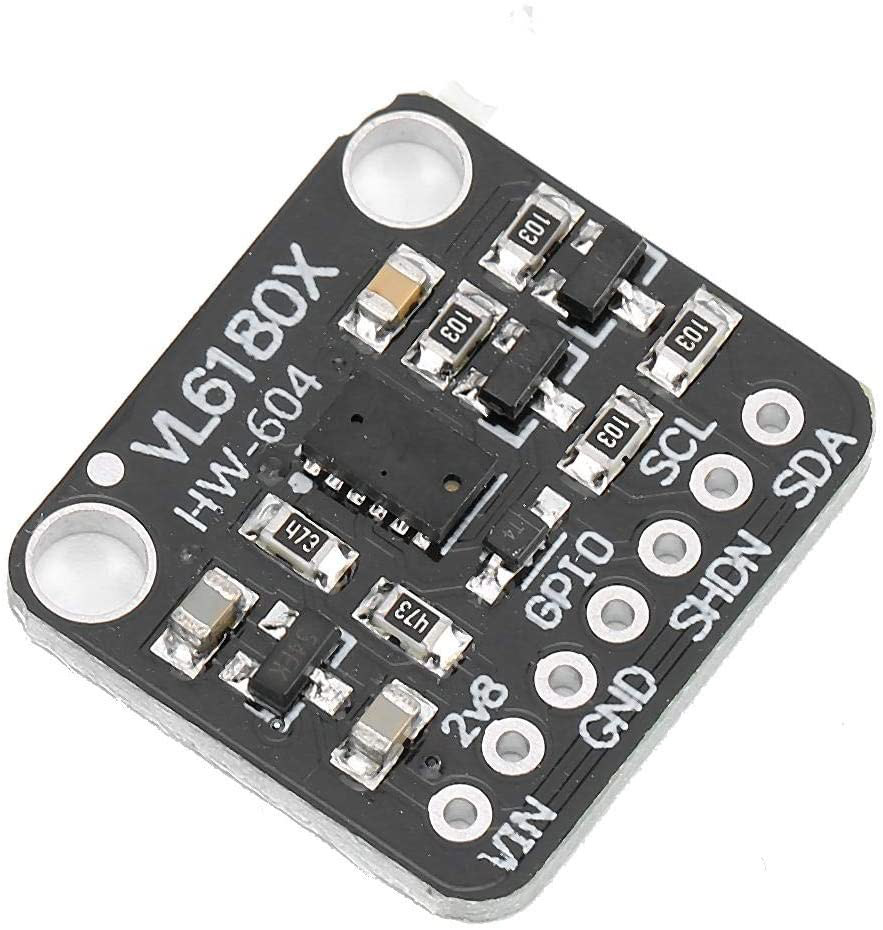
Sensa VL6180X ń ṣiṣẹ́ nípa lílo ìlànà àkókò-ìrìn (ToF), tí ó ń tujade láṣẹ̀ kan tí ó sì ń wọn àkókò tí ìmọ́lẹ̀ yóò fi padà dé lẹ́yìn tí ó bá ti lu ohun kan. Ọ̀nà yìí ń fún wa ní àwọn ìwọ̀n jìnà pípéye, tí a sì ń lò ó lọ́pọ̀lọpọ̀ nínú àwọn fóónù alágbèéká àti róbọ́ọ̀tì. Nínú àwọn apá tí ó tẹ̀le, a ó jíròrò àwọn ẹ̀yà hárńdíwẹ̀ẹ̀, àwọn ìtọ́nisọ́nà ìsopọ̀, àti ìmúṣẹ kóòdù.
Àlàyé Hárńdíwẹ̀ẹ̀
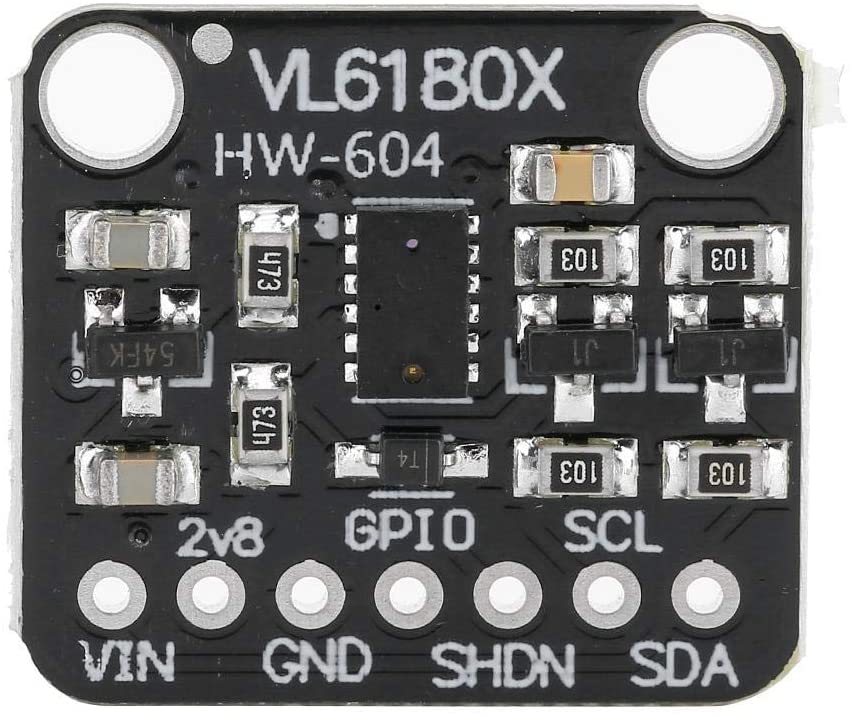
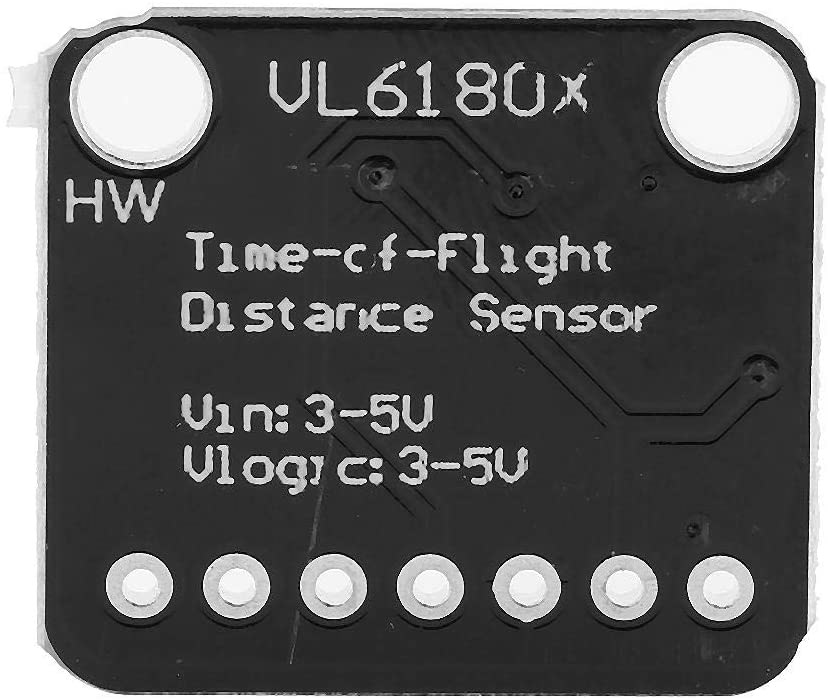
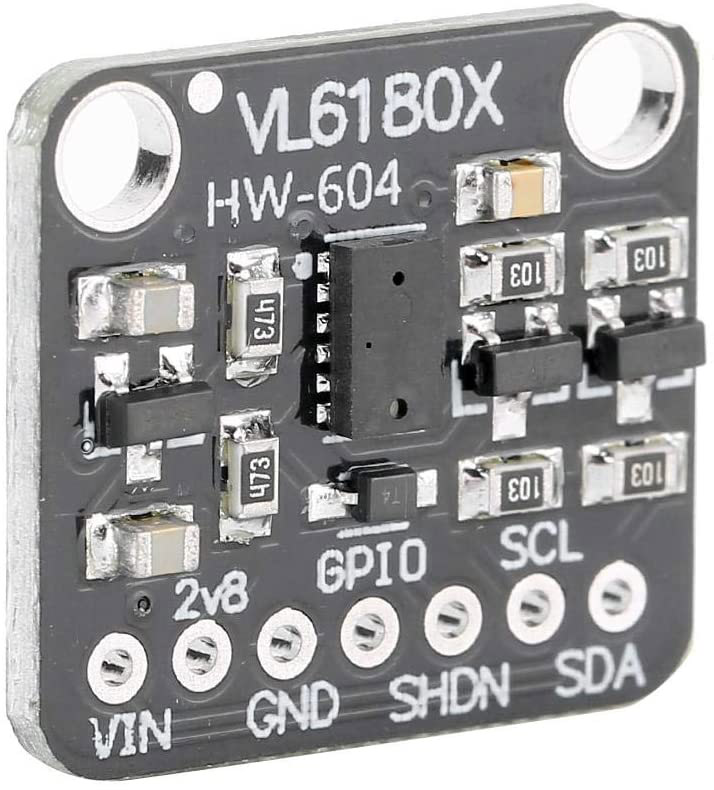
Ẹ̀yà pàtàkì nínú iṣẹ́ yìí ni sensa jìnà láṣẹ̀ VL6180X. Sensa yìí ní àkójọpọ̀ I2C, tí ó sì rọrùn láti sopọ̀ mọ́ Arduino. Ó ní ọ̀pọ̀lọpọ̀ pin, pẹ̀lú agbára, ilẹ̀, àti àwọn laini dátà. Sensa ń ṣiṣẹ́ nínú ìwọ̀n foltáìjì 2.6 sí 3.6 volts, tí ó sì lè wọn àwọn jìnà pẹ̀lú ìpéye gíga.
Ní àfikún, bọọdi Arduino ń ṣiṣẹ́ gẹ́gẹ́ bí olùdarí micro tí ó ń kà dátà láti ọ̀dọ̀ sensa tí ó sì ń ṣe àkójọpọ̀ rẹ̀. Ìtòlẹ́sẹ̀ yìí nílò àwọn ẹ̀yà itanna ìpìlẹ̀ bíi àwọn okun ìsopọ̀ àti bíédìbọ́ọ̀dù fún àwọn ìsopọ̀. Òye bí ẹ̀yà kọ̀ọ̀kan ṣe ń bá ara wọn ṣiṣẹ́ ṣe pàtàkì fún ìmúṣẹ àṣeyọrí.
Àwọn Àlàyé Dátáṣítì
| Olùṣelọ́pọ̀ | STMicroelectronics |
|---|---|
| Nọ́mbà apá | VL6180X |
| Foltáìjì Logic/IO | 2.6 - 3.6 V |
| Foltáìjì ìpèsè | 2.6 - 3.6 V |
| Ìwọ̀n ìjàde | 1.7 mA (typ.) |
| Ìwọ̀n gíga jùlọ | 10 mA (max.) |
| Ìtọ́sọ́nà ìgbohùnsáfẹ́fẹ́ PWM | N/A |
| Àwọn ìpele ìwọ̀n ìkóhùn | N/A |
| Ìrẹwẹ̀sì foltáìjì / RDS(on) / ìkún | N/A |
| Àwọn ìwọ̀n ooru | -20 sí 70 °C |
| Àpótí | 4.8 x 2.8 x 1 mm |
| Àwọn àkíyèsí / àwọn oríṣi | Sensa ìsúnmọ́ àti ìwọ̀n jìnà |
- Rí i dájú pé ìpèsè agbára wà nínú ìwọ̀n tí a sọ̀tọ́ láti má ba à sensa ba jẹ́.
- Lo àwọn resistor ìfà sókè lórí àwọn laini I2C bí ó bá pọn dandan fún ìbánisọ̀rọ̀ tí ó gbẹkẹ̀le.
- Jẹ́ kí sensa yàtọ̀ sí ìmọ́lẹ̀ oòrùn tààrà fún àwọn ìwọ̀n tí ó péye.
- Ròyìn nípa lílo bíédìbọ́ọ̀dù fún àwọn ìsopọ̀ tí ó rọrùn àti àwọn àtúnṣe.
- Ṣàyẹ̀wò ìwé àṣẹ ìkàwé fún àwọn ìlò iṣẹ́ pàtó àti àwọn agbára.
Àwọn Ìtọ́nisọ́nà Ìsopọ̀

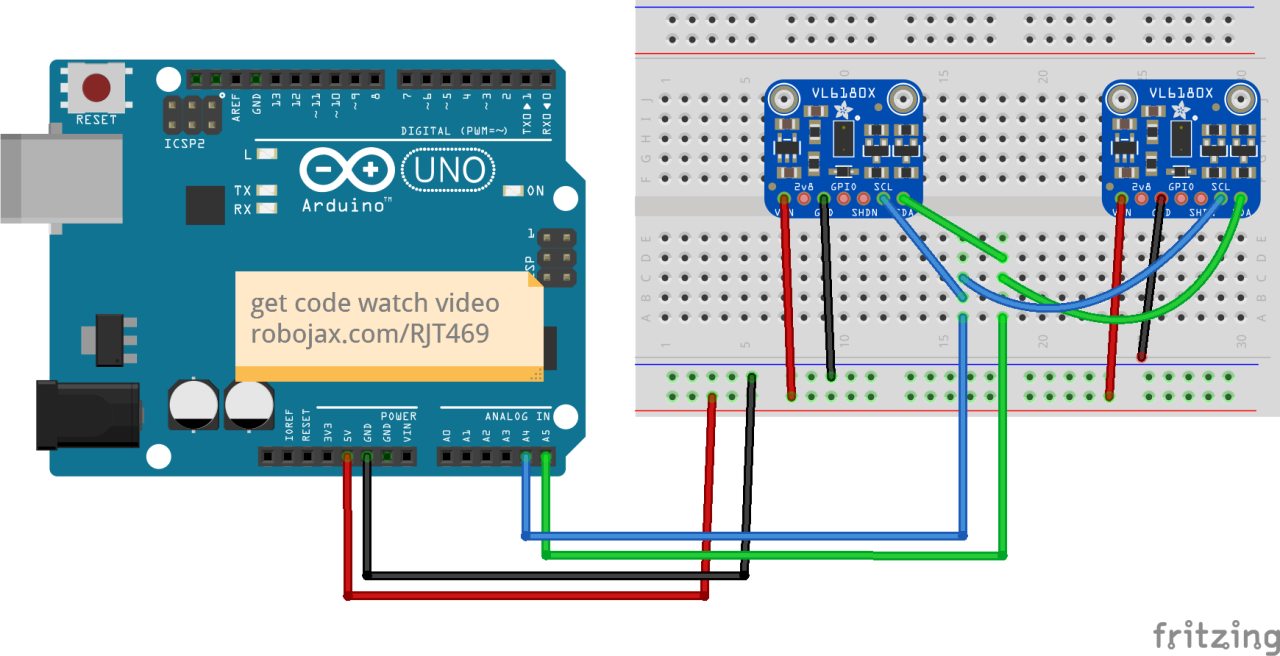
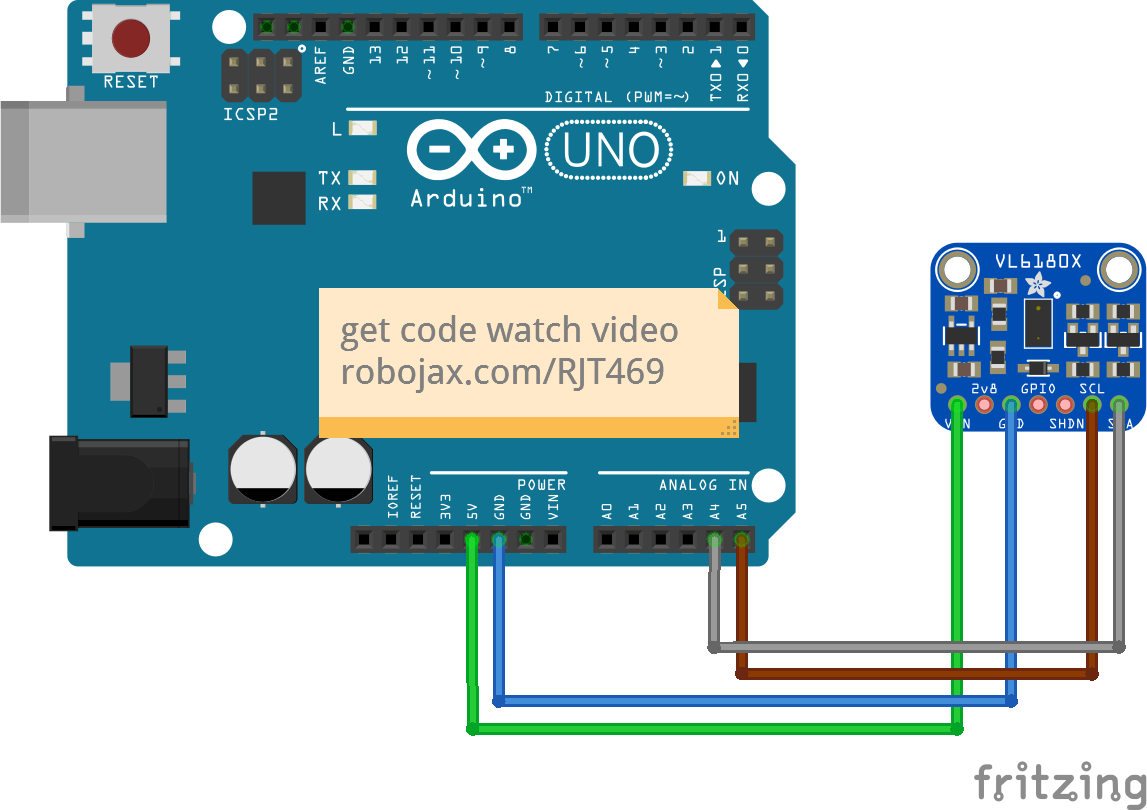
Láti so sensa VL6180X pọ̀ mọ́ Arduino, bẹ̀rẹ̀ nípa sísopọ̀ pin VCC ti sensa sí pin 5V lórí Arduino. Lẹ́yìn náà, so pin GND ti sensa sí pin GND lórí Arduino. Pin SCL ti sensa yẹ kí ó sopọ̀ sí A5, nígbà tí pin SDA yẹ kí ó sopọ̀ sí A4 lórí Arduino.
Rí i dájú pé o so sensa pọ̀ ní ìtòlẹ́sẹ̀ yìí: VCC sí 5V, GND sí GND, SDA sí A4, àti SCL sí A5. Bí o bá ń gbèrò láti lo ọ̀pọ̀lọpọ̀ sensa, rí i dájú pé ọ̀kọ̀ọ̀kan ní àdírẹ́sì I2C tí ó yàtọ̀ àti pé àwọn pin ìparí ẹ̀rọ ni a ń bójú tó dáradára.
Àwọn Àpẹẹrẹ Kóòdù & Ìtọ́sọ́nà
Nínú kóòdù, a bẹ̀rẹ̀ nípa fífi àwọn ìkàwé tí a nílò sílẹ̀ àti ṣíṣe ìpilẹ̀ṣẹ̀ ẹ̀yà sensa. Àpẹẹrẹ tí ó tẹ̀le yìí fi hàn bí a ṣe le tò ìbánisọ̀rọ̀ I2C sílẹ̀ àti ṣàyẹ̀wò bí a bá ti rí sensa:
void setup() {
  Serial.begin(115200);
  while (!Serial) { delay(1); }

  if (! vl.begin()) {
    Serial.println("Kò rí sensa");
    while (1);
  }
  Serial.println("A ti rí sensa!");
}
Kóòdù yìí ń ṣe ìpilẹ̀ṣẹ̀ mónítọ́ serial àti ó ń gbìyànjú láti bẹ̀rẹ̀ ìbánisọ̀rọ̀ pẹ̀lú sensa VL6180X. Bí a kò bá rí sensa, yóò tẹ ìròyìn àṣìṣe jáde àti yóò dá ètò dúró.
Lẹ́yìn náà, a ń ka jìnà láti ọ̀dọ̀ sensa àti ṣàyẹ̀wò fún àwọn àṣìṣe:
void loop() {
  uint8_t range = vl.readRange();
  uint8_t status = vl.readRangeStatus();

  if (status == VL6180X_ERROR_NONE) {
    Serial.print("Jìnà: "); Serial.print(range);
    Serial.println("mm");
  }
}
Àpẹẹrẹ yìí ń ka jìnà tí sensa wọn àti tí ó ń tẹ́ ẹ sí mónítọ́ serial. Bí àwọn àṣìṣe bá wà, a lè tẹ àwọn ìròyìn àṣìṣe tí ó bá mu jáde nípa lílo ipò tí ó padà.
Ìfihàn / Ohun Tí O Yẹ Kí O Rí
Lẹ́yìn tí o bá ti parí ìsopọ̀ àti gbé kóòdù sí Arduino, o yẹ kí o rí àwọn ìwọ̀n jìnà lórí mónítọ́ serial. Nígbà tí a bá gbé ohun kan sí ibi tí ó wà nínú ìwọ̀n sensa, jìnà ní mílímítà yóò hàn. Bí ohun bá jìnnà jù tàbí súnmọ́ jù, sensa yóò padà pẹ̀lú ìròyìn àṣìṣe. Ìwà yìí ni a lè fìdí rẹ̀ múlẹ̀ nínú ìfihàn fídíò (nínú fídíò ní 19:30).
Àwọn Àkókò Fídíò
- 00:00 Ìbẹ̀rẹ̀
- 00:56 Ìfihàn
- 04:30 Dátáṣítì VL6080V tí a wò
- 06:58 Ìsopọ̀ tí a fi hàn
- 07:32 Ìsopọ̀ fún àwọn sensa méjì tàbí jù bẹ́ẹ̀ lọ
- 09:22 Fífi ìkàwé sílẹ̀
- 10:30 Kóòdù Arduino tí a ṣàlàyé (sensa kan)
- 12:57 Kóòdù fún àwọn sensa méjì tàbí jù bẹ́ẹ̀ lọ
- 19:35 Ìfihàn pẹ̀lú sensa kan
- 22:05 Ìfihàn pẹ̀lú àwọn sensa méjì
Aworan
/*
 *  Arduino code
Using a single VL6180X 20cm Time-of-Flight proximity sensor with Arduino

View code for using a single VL6180X sensor: https://robojax.com?vid=robojax_VL6180X_laser2

 * Original code and library by https://github.com/adafruit/Adafruit_VL6180X
 *
 * Written/updated by Ahmad Shamshiri for Robojax Robojax.com
 * on Mar 10, 2021  in Ajax, Ontario, Canada
Watch the video instruction for this sketch: https://youtu.be/_H9D0czQpSI


If you found this tutorial helpful, please support me so I can continue creating
content like this.
or make a donation using PayPal http://robojax.com/L/?id=64

*
 * Code is available at http://robojax.com/learn/arduino

 * This code is "AS IS" without warranty or liability. Free to be used as long as you keep this note intact.
 * This code has been downloaded from Robojax.com
    This program is free software: you can redistribute it and/or modify
    it under the terms of the GNU General Public License as published by
    the Free Software Foundation, either version 3 of the License, or
    (at your option) any later version.

    This program is distributed in the hope that it will be useful,
    but WITHOUT ANY WARRANTY; without even the implied warranty of
    MERCHANTABILITY or FITNESS FOR A PARTICULAR PURPOSE.  See the
    GNU General Public License for more details.

    You should have received a copy of the GNU General Public License
    along with this program.  If not, see <https://www.gnu.org/licenses/>.

*/
#include <Wire.h>
#include "Adafruit_VL6180X.h"

Adafruit_VL6180X vl = Adafruit_VL6180X();

void setup() {
  Serial.begin(115200);

  // wait for serial port to open on native usb devices
  while (!Serial) {
    delay(1);
  }

  Serial.println("Adafruit VL6180x test!");
  if (! vl.begin()) {
    Serial.println("Failed to find sensor");
    while (1);
  }
  Serial.println("Sensor found!");
}

void loop() {

  uint8_t range = vl.readRange();
  uint8_t status = vl.readRangeStatus();

  if (status == VL6180X_ERROR_NONE) {
    Serial.print("Range: "); Serial.print(range);
    Serial.println("mm");
  }
//  if(range <=76)
//  {
//    //do something
//  }

  // Some error occurred, print it out!

  if  ((status >= VL6180X_ERROR_SYSERR_1) && (status <= VL6180X_ERROR_SYSERR_5)) {
    Serial.println("System error");
  }
  else if (status == VL6180X_ERROR_ECEFAIL) {
    Serial.println("ECE failure");
  }
  else if (status == VL6180X_ERROR_NOCONVERGE) {
    Serial.println("No convergence");
  }
  else if (status == VL6180X_ERROR_RANGEIGNORE) {
    Serial.println("Ignoring range");
  }
  else if (status == VL6180X_ERROR_SNR) {
    Serial.println("Signal/Noise error");
  }
  else if (status == VL6180X_ERROR_RAWUFLOW) {
    Serial.println("Raw reading underflow");
  }
  else if (status == VL6180X_ERROR_RAWOFLOW) {
    Serial.println("Raw reading overflow");
  }
  else if (status == VL6180X_ERROR_RANGEUFLOW) {
    Serial.println("Range reading underflow");
  }
  else if (status == VL6180X_ERROR_RANGEOFLOW) {
    Serial.println("Range reading overflow");
  }
  delay(50);
}/*
* Lesson 76-1: Using one VL6180 laser distance sensor with Arduino
* Adafruit code modified for this tutorial
* by Ahmad Shamshiri at 22:22 on
* March 10-11, 2021 in Ajax, ON, Canada
Please watch video instruction of this code: https://youtu.be/_H9D0czQpSI
View code for using two or more VL6180X sensors: https://robojax.com/course1/lecture76
This video is part of the Arduino Step by Step Course, which starts here: https://youtu.be/-6qSrDUA5a8
If you found this tutorial helpful, please support me so I can continue creating
content like this. You can support me on Patreon: http://robojax.com/L/?id=63
or make a donation using PayPal: http://robojax.com/L/?id=64
* This code is "AS IS" without warranty or liability. Free to be used as long as you keep this note intact. *
* This code has been downloaded from Robojax.com
This program is free software: you can redistribute it and/or modify
it under the terms of the GNU General Public License as published by
the Free Software Foundation, either version 3 of the License, or
(at your option) any later version.
This program is distributed in the hope that it will be useful,
but WITHOUT ANY WARRANTY; without even the implied warranty of
MERCHANTABILITY or FITNESS FOR A PARTICULAR PURPOSE. See the
GNU General Public License for more details.
You should have received a copy of the GNU General Public License
along with this program. If not, see <https://www.gnu.org/licenses/>.
*/
#include <Wire.h>
#include "Adafruit_VL6180X.h"
Adafruit_VL6180X vl = Adafruit_VL6180X();
void setup() {
Serial.begin(115200);
// wait for serial port to open on native usb devices
while (!Serial) {
delay(1);
}
Serial.println("Adafruit VL6180x test!");
if (! vl.begin()) {
Serial.println("Failed to find sensor");
while (1);
}
Serial.println("Sensor found!");
}
void loop() {
uint8_t range = vl.readRange();
uint8_t status = vl.readRangeStatus();
if (status == VL6180X_ERROR_NONE) {
Serial.print("Range: "); Serial.print(range);
Serial.println("mm");
}
// if(range <=76)
// {
// //do something
// }
// Some error occurred, print it out!
if ((status >= VL6180X_ERROR_SYSERR_1) && (status <= VL6180X_ERROR_SYSERR_5)) {
Serial.println("System error");
}
else if (status == VL6180X_ERROR_ECEFAIL) {
Serial.println("ECE failure");
}
else if (status == VL6180X_ERROR_NOCONVERGE) {
Serial.println("No convergence");
}
else if (status == VL6180X_ERROR_RANGEIGNORE) {
Serial.println("Ignoring range");
}
else if (status == VL6180X_ERROR_SNR) {
Serial.println("Signal/Noise error");
}
else if (status == VL6180X_ERROR_RAWUFLOW) {
Serial.println("Raw reading underflow");
}
else if (status == VL6180X_ERROR_RAWOFLOW) {
Serial.println("Raw reading overflow");
}
else if (status == VL6180X_ERROR_RANGEUFLOW) {
Serial.println("Range reading underflow");
}
else if (status == VL6180X_ERROR_RANGEOFLOW) {
Serial.println("Range reading overflow");
}
delay(50);
}/*
* Arduino code
* Lesson 76-2: Using two or more VL6180 Laser Distance Sensors with Arduino
* Adafruit code modified for this tutorial
* Using two or more VL6180X 20cm Time-of-Flight proximity sensors with Arduino
*
* View code for using single VL6180X sensors: https://robojax.com/course1/lecture76
*
* Original code and library by https://github.com/adafruit/Adafruit_VL6180X
*
* Written/updated by Ahmad Shamshiri for Robojax Robojax.com
* on Mar 12, 2021 in Ajax, Ontario, Canada
* Watch the video instruction for this sketch: https://youtu.be/_H9D0czQpSI
*
*
* Please watch video instruction for this code: https://youtu.be/_H9D0czQpSI
*
* This video is part of Arduino Step by Step Course which starts here: https://youtu.be/-6qSrDUA5a8
*
*
* If you found this tutorial helpful, please support me so I can continue creating
* content like this.
*
* or make a donation using PayPal http://robojax.com/L/?id=64
*
* This code is "AS IS" without warranty or liability. Free to be used as long as you keep this note intact.
* This code has been downloaded from Robojax.com
* This program is free software: you can redistribute it and/or modify
* it under the terms of the GNU General Public License as published by
* the Free Software Foundation, either version 3 of the License, or
* (at your option) any later version.
*
* This program is distributed in the hope that it will be useful,
* but WITHOUT ANY WARRANTY; without even the implied warranty of
* MERCHANTABILITY or FITNESS FOR A PARTICULAR PURPOSE. See the
* GNU General Public License for more details.
*
* You should have received a copy of the GNU General Public License
* along with this program. If not, see <https://www.gnu.org/licenses/>.
*
*/
#include <Adafruit_VL6180X.h>
// address we will assign if dual sensor is present
#define LOX1_ADDRESS 0x30
#define LOX2_ADDRESS 0x31
// set the pins to shutdown
#define SHT_LOX1 7
#define SHT_LOX2 6
// Optional define GPIO pins to check to see if complete
#define GPIO_LOX1 4
#define GPIO_LOX2 3
#define TIMING_PIN 13
// objects for the VL6180X
Adafruit_VL6180X lox1 = Adafruit_VL6180X();
Adafruit_VL6180X lox2 = Adafruit_VL6180X();
// Setup mode for doing reads
typedef enum {RUN_MODE_DEFAULT, RUN_MODE_TIMED, RUN_MODE_ASYNC, RUN_MODE_GPIO, RUN_MODE_CONT} runmode_t;
runmode_t run_mode = RUN_MODE_DEFAULT;
uint8_t show_command_list = 1;
//==========================================================================
// Define some globals used in the continuous range mode
// Note: going to start table drive this part, may back up and do the rest later
Adafruit_VL6180X *sensors[] = {&lox1, &lox2};
const uint8_t COUNT_SENSORS = sizeof(sensors) / sizeof(sensors[0]);
const int sensor_gpios[COUNT_SENSORS] = {GPIO_LOX1, GPIO_LOX2}; // if any are < 0 will poll instead
uint8_t tempRange;
uint8_t sensor_ranges[COUNT_SENSORS];
uint8_t sensor_status[COUNT_SENSORS];
// Could do with uint8_t for 8 sensors, but just in case...
const uint16_t ALL_SENSORS_PENDING = ((1 << COUNT_SENSORS) - 1);
uint16_t sensors_pending = ALL_SENSORS_PENDING;
uint32_t sensor_last_cycle_time;
/*
Reset all sensors by setting all of their XSHUT pins low for delay(10), then set all XSHUT high to bring out of reset
Keep sensor #1 awake by keeping XSHUT pin high
Put all other sensors into shutdown by pulling XSHUT pins low
Initialize sensor #1 with lox.begin(new_i2c_address) Pick any number but 0x29 and it must be under 0x7F. Going with 0x30 to 0x3F is probably OK.
Keep sensor #1 awake, and now bring sensor #2 out of reset by setting its XSHUT pin high.
Initialize sensor #2 with lox.begin(new_i2c_address) Pick any number but 0x29 and whatever you set the first sensor to
*/
void setID() {
// all reset
digitalWrite(SHT_LOX1, LOW);
digitalWrite(SHT_LOX2, LOW);
delay(10);
// all unreset
digitalWrite(SHT_LOX1, HIGH);
digitalWrite(SHT_LOX2, HIGH);
delay(10);
// activating LOX1 and reseting LOX2
digitalWrite(SHT_LOX1, HIGH);
digitalWrite(SHT_LOX2, LOW);
// initing LOX1
if (!lox1.begin()) {
Serial.println(F("Failed to boot first VL6180X"));
while (1);
}
lox1.setAddress(LOX1_ADDRESS);
delay(10);
// activating LOX2
digitalWrite(SHT_LOX2, HIGH);
delay(10);
//initing LOX2
if (!lox2.begin()) {
Serial.println(F("Failed to boot second VL6180X"));
while (1);
}
lox2.setAddress(LOX2_ADDRESS);
delay(10);
}
void readSensor(Adafruit_VL6180X &vl) {
float lux = vl.readLux(VL6180X_ALS_GAIN_5);
uint8_t range = vl.readRange();
uint8_t status = vl.readRangeStatus();
if (status == VL6180X_ERROR_NONE) {
tempRange = range;//save it for the moment
}
// Some error occurred, print it out!
if ((status >= VL6180X_ERROR_SYSERR_1) && (status <= VL6180X_ERROR_SYSERR_5)) {
Serial.print("(System error)");
}
else if (status == VL6180X_ERROR_ECEFAIL) {
Serial.print("(ECE failure)");
}
else if (status == VL6180X_ERROR_NOCONVERGE) {
Serial.print("(No convergence)");
}
else if (status == VL6180X_ERROR_RANGEIGNORE) {
Serial.print("(Ignoring range)");
}
else if (status == VL6180X_ERROR_SNR) {
Serial.print("Signal/Noise error");
}
else if (status == VL6180X_ERROR_RAWUFLOW) {
Serial.print("Raw reading underflow");
}
else if (status == VL6180X_ERROR_RAWOFLOW) {
Serial.print("Raw reading overflow");
}
else if (status == VL6180X_ERROR_RANGEUFLOW) {
Serial.print("Range reading underflow");
}
else if (status == VL6180X_ERROR_RANGEOFLOW) {
Serial.print("Range reading overflow");
}
}
void read_sensors() {
readSensor(lox1);
sensor_ranges[0]=tempRange;//save it now
readSensor(lox2);
sensor_ranges[1]=tempRange; //save it now
Serial.println();
}
//===============================================================
// Setup
//===============================================================
void setup() {
Serial.begin(115200);
// wait until serial port opens for native USB devices
while (! Serial) {
delay(1);
}
pinMode(SHT_LOX1, OUTPUT);
pinMode(SHT_LOX2, OUTPUT);
// Enable timing pin so easy to see when pass starts and ends
pinMode(TIMING_PIN, OUTPUT);
#ifdef GPIO_LOX1
// If we defined GPIO pins, enable them as PULL UP
pinMode(GPIO_LOX1, INPUT_PULLUP);
pinMode(GPIO_LOX2, INPUT_PULLUP);
#endif
Serial.println("Shutdown pins inited...");
digitalWrite(SHT_LOX1, LOW);
digitalWrite(SHT_LOX2, LOW);
digitalWrite(TIMING_PIN, LOW);
Serial.println("All in reset mode...(pins are low)");
Serial.println("Starting...");
setID();
}
//===============================================================
// Loop
//===============================================================
void loop() {
read_sensors();
for(int i=0; i<COUNT_SENSORS; i++)
{
Serial.print("Sensor ");
Serial.print(i);
Serial.print(" :");
Serial.print(sensor_ranges[i]);
Serial.print("mm");
Serial.println();
}
// if(sensor_ranges[1] >=76)
// {
// //do something here
// }
delay(100);
}Ohun ti o le nilo
-
eBayPurchase VL618X sensor from eBayebay.us
-
AliExpressPurchase VL618X sensor from AliExpresss.click.aliexpress.com
-
BanggoodPurchase VL618X sensor from Banggoodbanggood.com
Orisun & itọkasi
-
Ita gbangba
-
Ita gbangba
-
Ita gbangbaPurchase VL6180X from Amazon USAamzn.to
-
Ita gbangbaVL6080X datasheetst.com
Fáìlìs📁
Ko si awọn faili ti o wa.