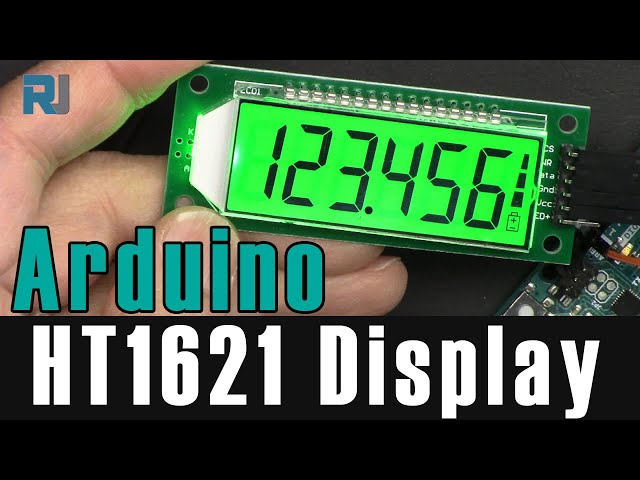
Lesson 103: Using the HT1621 Six-Digit Seven-Segment LCD Display
In this lesson, we learn how to use an HT1621 six-digit seven-segment display with five wires. We learn how to display integers like 2345 or floating-point values like 234.987, or temperature. Wiring diagrams and how to wire it to an Arduino are shown, and the Arduino library and code are explained.
407-Lesson 103: Using HT1621 6-Digit Seven-Segment LCD Display
语言: C++
/*
 * Lesson 103: Using HT1621 4-digit LCD Display with Arduino
 *
 * Full video details: https://youtu.be/Q5enXzaNXZk

 * Arduino Library is located: https://github.com/valerionew/ht1621-7-seg
 * Written by Ahmad Shamshiri for Arduino Step by Step Course by Robojax
 * www.Robojax.com
 * on March 29, 2022

 *
 * This code is part of Arduino Step by Step Course which starts here:  https://youtu.be/-6qSrDUA5a8
 *
 * For the library of this code, visit http://robojax.com/
 *
If you found this tutorial helpful, please support me so I can continue creating
content like this. Make a donation using PayPal by credit card https://bit.ly/donate-robojax

 * This code is "AS IS" without warranty or liability. Free to be used as long as you keep this note intact.
 * This code has been downloaded from Robojax.com
    This program is free software: you can redistribute it and/or modify
    it under the terms of the GNU General Public License as published by
    the Free Software Foundation, either version 3 of the License, or
    (at your option) any later version.

    This program is distributed in the hope that it will be useful,
    but WITHOUT ANY WARRANTY; without even the implied warranty of
    MERCHANTABILITY or FITNESS FOR A PARTICULAR PURPOSE.  See the
    GNU General Public License for more details.

    You should have received a copy of the GNU General Public License
    along with this program.  If not, see <https://www.gnu.org/licenses/>.
 */

 #include <HT1621.h>
#define LCD_CS_PIN 6
#define LCD_WR_PIN 7
#define LCD_DATA_PIN 8
#define DELAY_SINK 1000

HT1621 lcd;
void setup() {
  lcd.begin(LCD_CS_PIN, LCD_WR_PIN, LCD_DATA_PIN);
  lcd.backlight();
  lcd.clear();
  lcd.setBatteryLevel(3);
}

void loop(){
  lcd.clear();
  lcd.print("AaBbCc");
  delay(DELAY_SINK);
  lcd.clear();
  lcd.print("DdEeFf");
  delay(DELAY_SINK);
  lcd.clear();
  lcd.print("GgHhIi");
  delay(DELAY_SINK);
  lcd.clear();
  lcd.print("JjKkLl");
  delay(DELAY_SINK);
  lcd.clear();
  lcd.print("MmNnOo");
  delay(DELAY_SINK);
  lcd.clear();
  lcd.print("PpQqRr");
  delay(DELAY_SINK);
  lcd.clear();
  lcd.print("SsTtUu");
  delay(DELAY_SINK);
  lcd.clear();
  lcd.print("VvWwXx");
  delay(DELAY_SINK);
  lcd.clear();
  lcd.print("YyZz  ");
  delay(DELAY_SINK);
  lcd.clear();
  lcd.print("123456");
  delay(DELAY_SINK);
  lcd.clear();
  lcd.print("7890", true); // left padded
  delay(DELAY_SINK);
  lcd.clear();
  lcd.print("  _-|*"); // Spaces
  delay(DELAY_SINK);
  lcd.clear();
  lcd.print("HELLO");
  delay(DELAY_SINK);
  lcd.clear();
  lcd.print("HT1621");
  delay(DELAY_SINK);
  lcd.clear();
  lcd.print("bye");
  delay(DELAY_SINK);
  lcd.clear();
  lcd.print("123*", true); // Degrees
  delay(DELAY_SINK);
  lcd.clear();
  lcd.print((long)123456);
  delay(DELAY_SINK);
  lcd.clear();
  lcd.print(1234.10, 2);
  delay(DELAY_SINK);
  lcd.clear();
  lcd.print(999.123234);
  delay(DELAY_SINK);
  lcd.clear();
  lcd.print(1250.0, 3);
  delay(DELAY_SINK);
  lcd.clear();
  lcd.print(111.1111, 3);
  delay(DELAY_SINK);
}
|||您可能需要的东西
-
全球速卖通Purchase an HT1621 display from AliExpresss.click.aliexpress.com
-
BanggoodPurchase an HT1621 display from Amazon UKbanggood.com
资源与参考
-
外部Purchase an HT1621 display from AliExpresss.click.aliexpress.com
-
外部Purchase an HT1621 display from Amazon UKbanggood.com
-
外部
文件📁
没有可用的文件。