This tutorial is part of: Àwọn ẹ̀kọ́ WiFi LoRa 32
Gbogbo awọn fidio ti o ni ibatan si Heltec WiFi LoRa 32 ni o ni ibatan nipasẹ ẹgbẹ yii. Awọn ọna asopọ si awọn fidio miiran wa ni isalẹ nkan yii.
Lilo Heltec WiFi LoRa 32 V3 lati gbe iwọn otutu ran nipa lilo DHT22 si 1.4km
Nínú ẹ̀kọ́ yìí, a óò ṣàwárí bí a ṣe le lo module Heltec WiFi LoRa 32 V3 láti gbé data iwọn otutu láti ẹ̀rọ DHT22 sensor lọ sí àwọn ibi tí ó jìnà, tí a óò dé àwọn ibi tí ó tó 1.4 kilometers. Agbára yìí ṣeé ṣe nípasẹ̀ lílo LoRa technology, èyí tí ó gba fún ìbánisọ̀rọ̀ tí kò ní agbára púpọ̀, ṣùgbọ́n tí ó lè dé ọ̀nà jíjìn. Ní ìparí ìtọ́sọ́nà yìí, ìwọ óò ní ètò tí ó ń ṣiṣẹ́ tí ó lè fi àwọn ìwọ̀n otutu ránṣẹ́ láìsí okun.
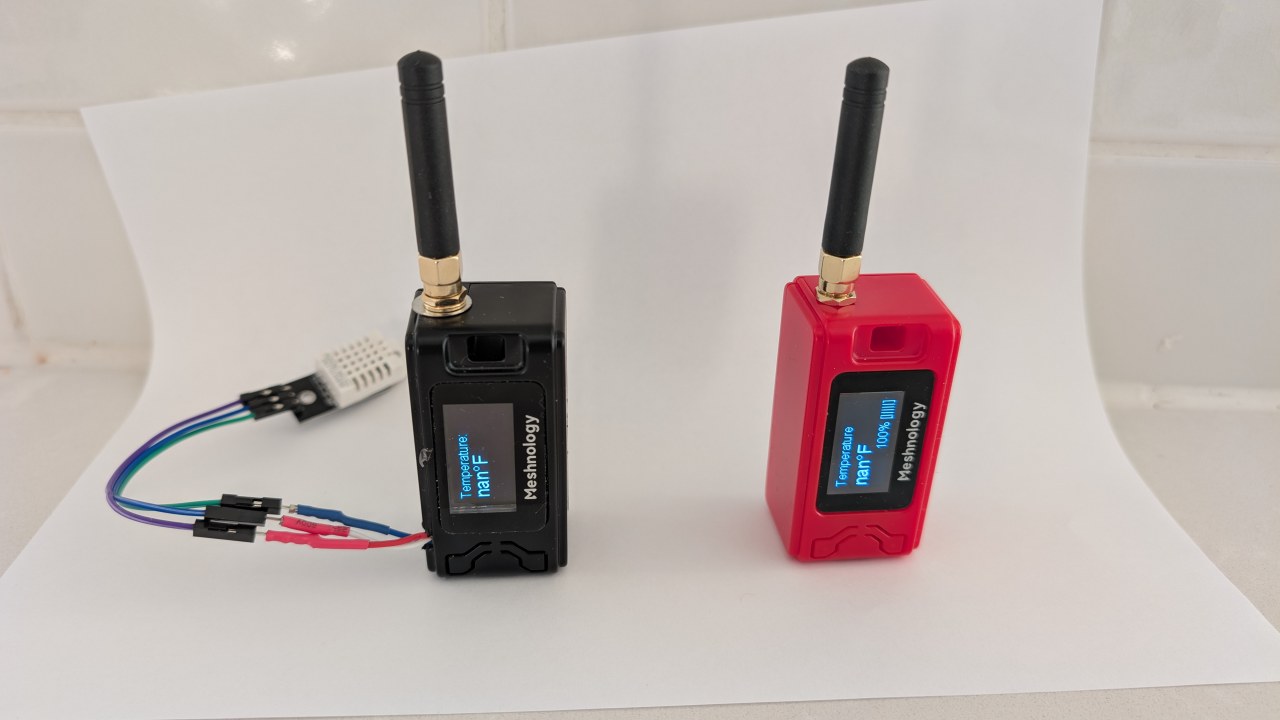
A óò bẹ̀rẹ̀ pẹ̀lú àkópọ̀ àwọn ẹ̀yà hardware tí ó wà nínú iṣẹ́ yìí, pẹ̀lú module Heltec WiFi LoRa 32 V3 àti DHT22 sensor. Lẹ́yìn náà, a óò tẹ̀síwájú sí àwọn ìtọ́sọ́nà wiring, níbi tí ìwọ óò ti kọ́ bí a ṣe le so àwọn ẹ̀yà wọ̀nyí pọ̀. Ní ìkẹyìn, a óò ṣàlàyé code tí a nílò láti mú ètò yìí ṣiṣẹ́. Fún ìtọ́sọ́nà ojú, jọ̀wọ́ wo fídíò ní àwọn àkókò oríṣiríṣi (nínú fídíò ní 00:00).
Àlàyé Hardware
Àwọn ẹ̀yà pàtàkì fún iṣẹ́ yìí ni module Heltec WiFi LoRa 32 V3 àti DHT22 temperature àti humidity sensor. Module Heltec ní ESP32 microcontroller, èyí tí ó pèsè Wi-Fi àti Bluetooth agbára pẹ̀lú ìbánisọ̀rọ̀ LoRa. Èyí gba fún àwọn ọ̀nà ìgbé data tí ó rọ̀rùn.
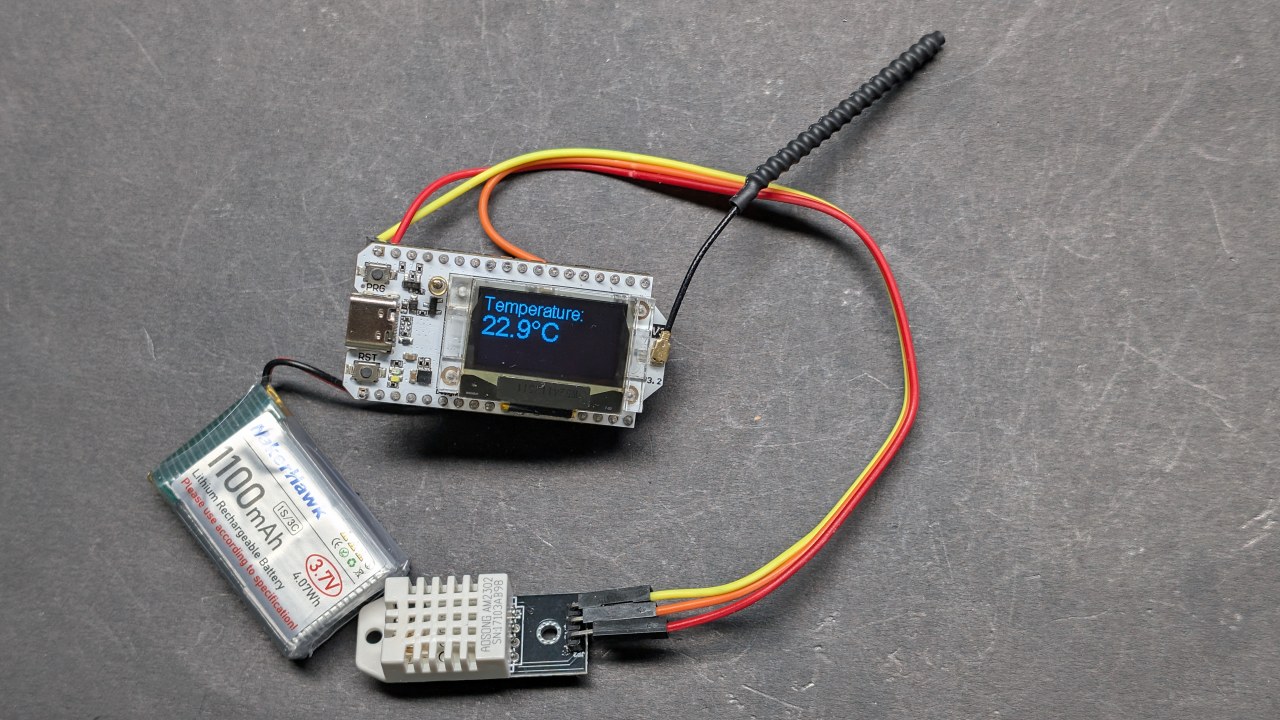
DHT22 sensor jẹ́ sensor oní nọ́ḿbà tí ó ń pèsè àwọn ìwọ̀n otutu àti ọ̀rinrin tí ó péye. Ó ń bá ESP32 sọ̀rọ̀ nípasẹ̀ ẹ̀yà pin kan ṣoṣo tí ó ń jáde oní nọ́ḿbà, tí ó mú kí ó rọ̀rùn láti so àti láti lò nínú àwọn iṣẹ́ rẹ. Pọ̀ pẹ̀lú, àwọn ẹ̀yà wọ̀nyí ṣe ètò tí ó lágbára fún ìṣàkíyèsí otutu láìsí okun.
Àwọn Àlàyé Datasheet
| Olùṣe | Heltec Automation |
|---|---|
| Nọ́ḿbà apá | WiFi LoRa 32 V3 |
| Logic/IO voltage | 3.3 V |
| Supply voltage | 3.7–4.2 V |
| Output current (per channel) | ~1 A |
| Peak current (per channel) | ~2 A |
| PWM frequency guidance | 1 kHz (typ.) |
| Input logic thresholds | 0.7 V (high), 0.3 V (low) |
| Voltage drop / RDS(on) / saturation | 0.3 V (max) |
| Thermal limits | 85 °C (max) |
| Package | PCB module |
| Notes / variants | Àwọn àṣàyàn frequency oríṣiríṣi wà (bíi 433 MHz, 868 MHz, 915 MHz) |
- Rí i pé o fi 3.3V ṣe agbára DHT22, kì í ṣe 5V.
- Lo àwọn ìpele logic tí ó yẹ fún ìbánisọ̀rọ̀ láàrin ESP32 àti DHT22.
- Rò nípa heat-sinking bí o bá ń ṣiṣẹ́ pẹ̀lú àwọn current gíga fún àwọn àkókò pípẹ́.
- Ṣàyẹ̀wò ìsopọ̀ antenna fún LoRa láti mú range pọ̀ sí i.
- Kíyèsi àwọn ìlànà frequency LoRa ní ẹkùn rẹ.
Àwọn Ìtọ́sọ́nà Wiring
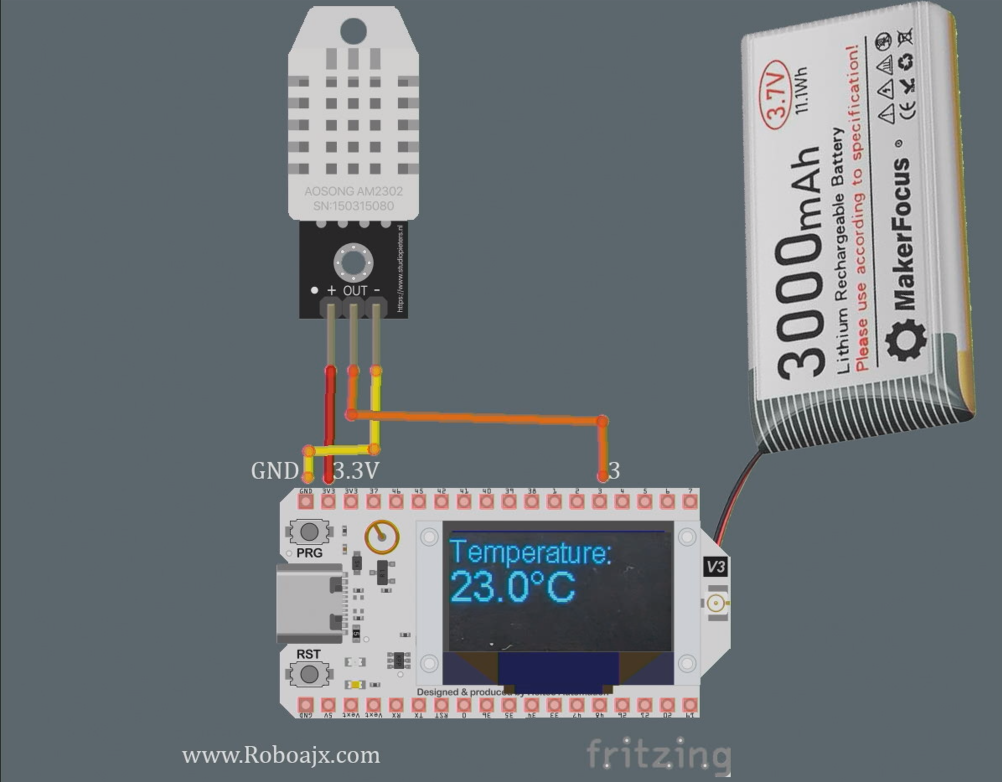
Láti so Heltec WiFi LoRa 32 V3 pọ̀ pẹ̀lú DHT22 sensor, bẹ̀rẹ̀ nípa sísopọ̀ pin VCC sensor sí pin 3.3V lórí module Heltec. Lẹ́yìn náà, so pin GND ti DHT22 sí ọ̀kan lára àwọn pin GND lórí Heltec. Pin data ti DHT22 yẹ kí ó so sí GPIO pin 3 lórí Heltec.
Rí i pé o lo pull-up resistor (nínà 10kΩ) láàrin pin data àti VCC fún àwọn ìwọ̀n tí ó dúró ṣinṣin. Ní àfikún, rí i pé antenna LoRa ti so ṣinṣin láti mú range ìgbé pọ̀ sí i. Bí o bá ń lo agbára òde, rí i pé module Heltec ti ní agbára tí ó tọ́ láti yẹ̀yẹ́ àwọn ìṣòro ìṣiṣẹ́.
Fífi Heltec ESP32 Boards Sórí
Fi ọ̀nà yìí kún àwọn ààyò nínú Arduino IDE rẹ gẹ́gẹ́ bí a ṣe fi hàn nínú fídíò:https://resource.heltec.cn/download/package_heltec_esp32_index.json
Fífi àwọn Heltec ESP32 Libraries Sórí
Nínú Arduino IDE nígbà tí ó bá ṣí, jọ̀wọ́ tẹ àmì Library (1), lẹ́yìn náà kọ "Heltec" sínú ìwádi (2) àti tẹ Install (3) wo àwòrán.

Àwọn Àpẹẹrẹ Code & Ìṣàlàyé
Àwọn ìsokọ́ra code wọ̀nyí ṣàlàyé bí a ṣe le ṣètò module Heltec láti ka data otutu láti DHT22 sensor àti láti gbé e jáde nípasẹ̀ LoRa. Code náà bẹ̀rẹ̀ display àti ṣètò DHT sensor.
#include
#define DHTPIN 3         // GPIO pin fún DHT22
#define DHTTYPE DHT22    // Ṣàlàyé irú DHT
DHT dht(DHTPIN, DHTTYPE);
void setup() {
  Serial.begin(115200);
  dht.begin(); // Bẹ̀rẹ̀ DHT sensor
}
Nínú ìsokọ́ra yìí, a ṣàlàyé pin tí DHT22 sensor ti so sí àti bẹ̀rẹ̀ rẹ̀ nínú ìṣiṣẹ́ setup(). Ìlà Serial.begin(115200) wà fún ìjáde debugging.
void loop() {
  float tempC = dht.readTemperature(); // Ka otutu ní Celsius
  float tempF = dht.convertCtoF(tempC); // Yípadà sí Fahrenheit
  sendData(tempC, tempF); // Ìṣiṣẹ́ láti gbé data otutu jáde
}
Ìyọkúrà yìí fi hàn bí a ṣe ka data otutu nínú ìṣiṣẹ́ loop(). A ń pe ìṣiṣẹ́ sendData() láti gbé àwọn ìwọ̀n otutu jáde nípasẹ̀ LoRa.
void sendData(float tempC, float tempF) {
  String data = "Iwọn otutu: " + String(tempC) + "°C"; // Ṣẹda okun data
  Radio.Send(data.c_str(), data.length()); // Firanṣẹ data
}
Níhìn-ín, a ṣẹ̀dá okun data tí ó ní iwọn otutu nínú, a sì fi ọ̀nà Radio.Send() rán an. Èyí yóò gbé data náà jáde lọ́nà aláìlókun sí ẹ̀rọ tí ń gbà á.
Jọ̀wọ́ wo kóòdù kíkún tí a kọ sí ìsàlẹ̀ àpilẹ̀kọ fún ìmúṣẹ aláyàwòrán.
Ìfihàn / Ohun Tí O Lè Retí
Nígbà tí ohun gbogbo bá ti ṣètò, tí a sì ti gbé kóòdù sí ẹ̀rọ Heltec, o yẹ kí o rí àwọn ìwọ̀n iwọn otutu tí ó hàn lórí ojú iboju OLED. Ètò náà yóò gbé data iwọn otutu jáde, èyí tí ẹ̀rọ Heltec mìíràn tí a ṣètò láti ka data náà lè gbà. O lè dánnu ibi tí ó ti ń ṣiṣẹ́ dé nípa gbígbé ẹ̀rọ tí ń gbà kúrò lọ́dọ̀ ẹ̀rọ tí ń rán, kí o sì fi ìwọ̀n tí ó pọ̀ jùlọ hàn (nínú fídíò ní 1:30).
Ṣọ́ra fún àwọn ìṣòro tí ó wọ́pọ̀ bíi ṣíṣe àṣìṣe ìsopọ̀, àìpé agbára iná, tàbí lílo ìgbohùnsáfẹ́fẹ́ LoRa tí kò tọ́. Rí i dájú pé DHT22 ń ṣiṣẹ́ dáradára, tí a sì ti so eriali pọ̀ láti mú ibi tí ó ń ṣiṣẹ́ pọ̀ sí i.
Àkókò Nínú Fídíò
- 00:00 Ìbẹ̀rẹ̀
- 3:51 Àwọn ìwọ̀n
- 8:32 Ojú ewé ìwé
- 9:52 Àpò àti bátírì
- 12:58 Mímú un ṣiṣẹ́ fún ìgbà àkọ́kọ́
- 16:37 Fífi Library sílè
- 18:19 Kóòdù ìpìlẹ̀ fún Ẹ̀rọ Tí ń Rán
- 19:43 Kóòdù ìpìlẹ̀ fún Ẹ̀rọ Tí ń Gbà
- 20:39 Ìfihàn ríráǹpẹ̀ ọ̀rọ̀
- 23:02 Kóòdù àpẹẹrẹ OLED
- 24:06 Kóòdù ọ̀rọ̀ ìpìlẹ̀ lórí ojú iboju OLED
- 26:26 Ìfihàn ọ̀rọ̀ ìpìlẹ̀ lórí OLED
- 26:58 Kíkà iwọn otutu pẹ̀lú DHT22
- 28:49 LoRa Ẹ̀rọ Tí ń Rán Iwọn Otutu àti Ìfihàn
- 30:07 LoRa Ẹ̀rọ Tí ń Gbà Iwọn Otutu àti Ìfihàn
- 32:13 Mímú LED ṣiṣẹ́ nígbà tí iwọn otutu bá pọ̀ sí i
- 22:26 Ìdánwò Ibèrè LoRa
- 35:01 dBm àti Milli Watt
Aworan
This tutorial is part of: Àwọn ẹ̀kọ́ WiFi LoRa 32
- 13 Miles 20km with NO WiFi? How LoRa Sent Voltage Across Crazy Distances! (Heltec WiFi LoRa 32 V3)
- Turn On a Device from 13 mile 21km Away – The Ultimate Off-Grid LoRa Project with WiFi LoRa 32!
- Remote Door Alert System from 13 mile 21 km Away With LoRa – Off the Grid! (Heltec WiFi LoRa 32 V3)
- Ṣàkóso ẹ̀rọ Servo kan láti ibi tó jìnnà! Ẹ̀kọ́ Arduino Heltec WiFi LoRa 32 V3 (TX)
- Iṣẹ́ ìkọ́kọ̀ọ́ Remote Relay: 13 Mile Láìsí Wi-Fi/Láìsí SIM Heltec LoRa 32 Module
- How to Use the Heltec LoRa CubeCell Development Board HTCC-AB01
/*
This is a simple code to display text on the OLED display
WiFi LoRa 32 V3 ESP32 module
Written by Ahmad Shamshiri 02 April 2025
Watch full video explanation https://youtu.be/WkyQMXkQhE8
Resources page https://robojax.com/tutorial_view.php?id=387
*/
#include <Wire.h>
#include "HT_SSD1306Wire.h"


static SSD1306Wire  display(0x3c, 500000, SDA_OLED, SCL_OLED, GEOMETRY_128_64, RST_OLED); // addr , freq , i2c group , resolution , rst


void setup() {
  Serial.begin(115200);
  Serial.println();
  Serial.println();
  VextON();
  delay(100);

  // Initialising the UI will init the display too.
  display.init();

  display.setFont(ArialMT_Plain_10);

}


void displayTemperature(double temperature, int unit) {
    display.clear();  // Clear display before new content

    // Line 1: "Temperature:" in 16pt font
    display.setTextAlignment(TEXT_ALIGN_LEFT);
    display.setFont(ArialMT_Plain_16);
    display.drawString(0, 0, "Temperature:");

    // Line 2: Temperature value in 24pt font
    display.setFont(ArialMT_Plain_24);

    // Format temperature with correct unit symbol
    String tempString = String(temperature, 1); // 1 decimal place
    switch(unit) {
        case 1:  tempString += "�C"; break;  // Celsius
        case 2:  tempString += "�F"; break;  // Fahrenheit
        default: tempString += "�U"; break;  // Unknown unit
    }

    display.drawString(0, 20, tempString);  // Display at Y=20 (below label)
    display.display();  // Update OLED
}


void VextON(void)
{
  pinMode(Vext,OUTPUT);
  digitalWrite(Vext, LOW);
}

void VextOFF(void) //Vext default OFF
{
  pinMode(Vext,OUTPUT);
  digitalWrite(Vext, HIGH);
}


void loop() {
  // clear the display
  display.clear();
  displayTemperature(23.5, 1); // Displays "23.5�C" /1
  delay(2000);

}/*
written on March 27, 2025
written by Ahmad Shamshiri for www.Robojax.com
Transmits Temperature and Humidity over LoRa RF using ESP32 LoRA 32 V3 module.
and displays the information on the screen.
Watch full video explanation https://youtu.be/WkyQMXkQhE8
Resources page: https://robojax.com/tutorial_view.php?id=387
*/
#include <Wire.h>
#include "HT_SSD1306Wire.h"
static SSD1306Wire display(0x3c, 500000, SDA_OLED, SCL_OLED, GEOMETRY_128_64, RST_OLED); // addr , freq , i2c group , resolution , rst
#include <DHT.h>
#define DHTPIN 3 // GPIO21
#define DHTTYPE DHT22 // DHT22 (AM2302)
DHT dht(DHTPIN, DHTTYPE);
float tempC, tempF;
int humidity ;
//1=C
//2=F
//3=C, Humidity //only for display not for transmission
//4=F, Humidity //only for display not for transmission
//5=Humidity only
int dataType = 2;
String labelTemp = "Temperature";
String labelHumidity = "Humidity";
const int TX_POWER = 2;//dBm from 2 to 20. when powered via battery 2 to 14dBm is the best option
#include "mbedtls/aes.h"
#include <cstring> // For memset, memcpy
mbedtls_aes_context aes;
const char *userKey = "hyhT676#h~_876s"; //Security key.
#include "LoRaWan_APP.h"
#include "Arduino.h"
#define RF_FREQUENCY 915000000 // Hz
#define TX_OUTPUT_POWER TX_POWER // dBm from 2 to 20. when powered via battery 2 to 14dBm
#define LORA_BANDWIDTH 0 // [0: 125 kHz,
// 1: 250 kHz,
// 2: 500 kHz,
// 3: Reserved]
#define LORA_SPREADING_FACTOR 7 // [SF7..SF12]
#define LORA_CODINGRATE 1 // [1: 4/5,
// 2: 4/6,
// 3: 4/7,
// 4: 4/8]
#define LORA_PREAMBLE_LENGTH 8 // Same for Tx and Rx
#define LORA_SYMBOL_TIMEOUT 0 // Symbols
#define LORA_FIX_LENGTH_PAYLOAD_ON false
#define LORA_IQ_INVERSION_ON false
#define RX_TIMEOUT_VALUE 1000
#define BUFFER_SIZE 30 // Define the payload size here
char txpacket[BUFFER_SIZE];
char rxpacket[BUFFER_SIZE];
double txNumber;
bool lora_idle=true;
static RadioEvents_t RadioEvents;
unsigned long lastTxTime = 0;
void OnTxDone( void );
void OnTxTimeout( void );
void decryptAES(uint8_t *data, const char *key);
void encryptAES(uint8_t *data, const char *key);
void processKey(const char *userKey, uint8_t *processedKey, size_t keySize);
void setup() {
Serial.begin(115200);
Serial.println();
VextON();
delay(100);
// Initialising the UI will init the display too.
display.init();
display.setFont(ArialMT_Plain_10);
dht.begin();
//LoRa stuff
Mcu.begin(HELTEC_BOARD,SLOW_CLK_TPYE);
txNumber=0;
RadioEvents.TxDone = OnTxDone;
RadioEvents.TxTimeout = OnTxTimeout;
Radio.Init( &RadioEvents );
Radio.SetChannel( RF_FREQUENCY );
Radio.SetTxConfig( MODEM_LORA, TX_OUTPUT_POWER, 0, LORA_BANDWIDTH,
LORA_SPREADING_FACTOR, LORA_CODINGRATE,
LORA_PREAMBLE_LENGTH, LORA_FIX_LENGTH_PAYLOAD_ON,
true, 0, 0, LORA_IQ_INVERSION_ON, 3000 );
}
void displayTemperature(int unit) {
display.clear(); // Clear display before new content
// Line 1: "Temperature:" in 16pt font
display.setTextAlignment(TEXT_ALIGN_LEFT);
// Line 2: Temperature value in 24pt font
display.setFont(ArialMT_Plain_24);
// Format temperature with correct unit symbol
String tempStringC = String(tempC, 1) + "°C"; // 1 decimal place
String tempStringF = String(tempF, 1)+ "°F"; // 1 decimal place
String tempStringHumidity = String(humidity)+ "% RH";
String tempString;
switch(unit) {
case 1:
tempString =tempStringC;
display.setFont(ArialMT_Plain_16);
display.drawString(0, 0, "Temperature:");
display.setFont(ArialMT_Plain_24);
display.drawString(0, 15, tempString);
break; // Celsius
case 2: tempString =tempStringF;
display.setFont(ArialMT_Plain_16);
display.drawString(0, 0, "Temperature:");
display.setFont(ArialMT_Plain_24);
display.drawString(0, 15, tempString);
break; // Fahrenheit
case 3: tempString =tempStringC;
display.setFont(ArialMT_Plain_16);
display.drawString(0, 0, "Temperature:");
display.setFont(ArialMT_Plain_24);
display.drawString(0, 15, tempString);
display.setFont(ArialMT_Plain_16);
display.drawString(0, 40, "Humidity:");
display.drawString(70, 40, tempStringHumidity);
break; // Celsius
case 4: tempString =tempStringF;
display.setFont(ArialMT_Plain_16);
display.drawString(0, 0, "Temperature:");
display.setFont(ArialMT_Plain_24);
display.drawString(0, 15, tempString);
display.setFont(ArialMT_Plain_16);
display.drawString(0, 40, "Humidity:");
display.drawString(70, 40, tempStringHumidity );
break; // Celsius
case 5:
display.setFont(ArialMT_Plain_16);
display.drawString(0, 0, "Humidity:");
display.setFont(ArialMT_Plain_24);
display.drawString(0, 20, tempStringHumidity);
break; // Celsius
default: tempString =tempStringC + "°C"; break;; // default
}
display.display(); // Update OLED
}
void readSensor()
{
tempC = dht.readTemperature();
humidity = dht.readHumidity();
tempF = dht.convertCtoF(tempC);
}
void VextON(void)
{
pinMode(Vext,OUTPUT);
digitalWrite(Vext, LOW);
}
void VextOFF(void) //Vext default OFF
{
pinMode(Vext,OUTPUT);
digitalWrite(Vext, HIGH);
}
void sendData()
{
String tempStringC = String(tempC, 1) + " °C"; // 1 decimal place
String tempStringF = String(tempF, 1)+ " °F"; // 1 decimal place
String tempStringHumidity = String(humidity)+ " % RH";
String txData;
//1=C
//2=F
//3=C, Humidity
//4=F, Humidity
//5=Humidity only
switch(dataType) {
case 1:
txData = labelTemp + " " + tempStringC;
break;
case 2:
txData = labelTemp + " " + tempStringF;
break;
case 3:
txData = labelHumidity + " " + tempStringHumidity;
break;
default:
txData = labelTemp + " " + tempStringC;
break;
}
uint8_t data[32];
memset(data, 0, sizeof(data)); // Zero-padding
strncpy((char*)data, txData.c_str(), sizeof(data) - 1); // Copy string safely
encryptAES(data, userKey); // Encrypt before sending
if(lora_idle == true)
{
delay(1000);
Radio.Send(data, sizeof(data));
Serial.print("Sending: ");
Serial.println((char *)data);
lora_idle = false;
}
Radio.IrqProcess( );
}
void loop() {
readSensor();//read the data
// clear the display
display.clear();
displayTemperature(dataType); //
sendData();
delay(100);
}
void OnTxDone( void )
{
Serial.println("TX done......");
lora_idle = true;
}
void OnTxTimeout( void )
{
Radio.Sleep( );
Serial.println("TX Timeout......");
lora_idle = true;
}
/**
* Converts a user-provided plaintext key into a fixed-length 16-byte (128-bit)
* or 32-byte (256-bit) key.
*/
void processKey(const char *userKey, uint8_t *processedKey, size_t keySize) {
memset(processedKey, 0, keySize); // Fill with zeros
size_t len = strlen(userKey);
if (len > keySize) len = keySize; // Truncate if too long
memcpy(processedKey, userKey, len); // Copy valid key part
}
/**
* Encrypts a 16-byte (one block) message using AES-128.
*/
void encryptAES(uint8_t *data, const char *key) {
uint8_t processedKey[16]; // 128-bit key
processKey(key, processedKey, 16);
mbedtls_aes_init(&aes);
mbedtls_aes_setkey_enc(&aes, processedKey, 128);
mbedtls_aes_crypt_ecb(&aes, MBEDTLS_AES_ENCRYPT, data, data);
mbedtls_aes_free(&aes);
}
/**
* Decrypts a 16-byte (one block) message using AES-128.
*/
void decryptAES(uint8_t *data, const char *key) {
uint8_t processedKey[16]; // 128-bit key
processKey(key, processedKey, 16);
mbedtls_aes_init(&aes);
mbedtls_aes_setkey_dec(&aes, processedKey, 128);
mbedtls_aes_crypt_ecb(&aes, MBEDTLS_AES_DECRYPT, data, data);
mbedtls_aes_free(&aes);
}/*
Written on April 01, 2025
written by Ahmad Shamshiri for www.Robojax.com
this sktech receives the secure temperature or humidity from WiFi LoRa 32 and decrypts it
and displays it on the OLED. There is action feature to triggerd if the temperature is below triggerdValue
Watch full video explaination https://youtu.be/WkyQMXkQhE8
Resources page: https://robojax.com/tutorial_view.php?id=387
*/
#include <Arduino.h>
// Alert configuration
const String triggerdText = "Too High"; // Correct String type
const float triggerdValue = 90.0f; // exclusive (this value is not included)
const int triggerdYpos = 45;
const bool triggerdType = true;//true is > (greter than triggerdValue) and false is < (less than triggerdValue)
const int triggerdOutputPin = 7;//GPIO07 goes HIGH when triggered
const bool triggerdBlink4Me= true;//should blink or not
#include "mbedtls/aes.h"
#include <cstring> // For memset, memcpy
mbedtls_aes_context aes;
const char *userKey = "hyhT676#h~_876s"; //Security key
#define MIN_RSSI -120 // Worst possible signal
#define MAX_RSSI -50 // Best possible signal
// For a connection via I2C using the Arduino Wire include:
#include <Wire.h>
#include "HT_SSD1306Wire.h"
static SSD1306Wire display(0x3c, 500000, SDA_OLED, SCL_OLED, GEOMETRY_128_64, RST_OLED); // addr , freq , i2c group , resolution , rst
#include "LoRaWan_APP.h"
#include "Arduino.h"
#define RF_FREQUENCY 915000000 // Hz
#define TX_OUTPUT_POWER 14 // dBm
#define LORA_BANDWIDTH 0 // [0: 125 kHz,
// 1: 250 kHz,
// 2: 500 kHz,
// 3: Reserved]
#define LORA_SPREADING_FACTOR 7 // [SF7..SF12]
#define LORA_CODINGRATE 1 // [1: 4/5,
// 2: 4/6,
// 3: 4/7,
// 4: 4/8]
#define LORA_PREAMBLE_LENGTH 8 // Same for Tx and Rx
#define LORA_SYMBOL_TIMEOUT 0 // Symbols
#define LORA_FIX_LENGTH_PAYLOAD_ON false
#define LORA_IQ_INVERSION_ON false
#define RX_TIMEOUT_VALUE 1000
#define BUFFER_SIZE 30 // Define the payload size here
char txpacket[BUFFER_SIZE];
char rxpacket[BUFFER_SIZE];
static RadioEvents_t RadioEvents;
int16_t txNumber;
int16_t rssi,rxSize;
bool lora_idle = true;
unsigned long lastRxTime = 0;
const unsigned long SIGNAL_TIMEOUT = 5000; // 5 seconds
void decryptAES(uint8_t *data, const char *key);
void encryptAES(uint8_t *data, const char *key);
void processKey(const char *userKey, uint8_t *processedKey, size_t keySize);
void setup() {
Serial.begin(115200);
Serial.println();
Serial.println();
VextON();
delay(100);
// Initialising the UI will init the display too.
display.init();
display.setFont(ArialMT_Plain_10);
pinMode(triggerdOutputPin, OUTPUT);
//LoRa stuff blow this line
Mcu.begin(HELTEC_BOARD,SLOW_CLK_TPYE);
txNumber=0;
rssi=0;
RadioEvents.RxDone = OnRxDone;
Radio.Init( &RadioEvents );
Radio.SetChannel( RF_FREQUENCY );
Radio.SetRxConfig( MODEM_LORA, LORA_BANDWIDTH, LORA_SPREADING_FACTOR,
LORA_CODINGRATE, 0, LORA_PREAMBLE_LENGTH,
LORA_SYMBOL_TIMEOUT, LORA_FIX_LENGTH_PAYLOAD_ON,
0, true, 0, 0, LORA_IQ_INVERSION_ON, true );
}
void displayTemperature(String data1, String data2) {
display.clear(); // Clear display before new content
// Line 1: "Temperature:" in 16pt font
display.setTextAlignment(TEXT_ALIGN_LEFT);
display.setFont(ArialMT_Plain_16);
display.drawString(0, 0, data1);
// Line 2: Temperature value in 24pt font
display.setFont(ArialMT_Plain_24);
display.drawString(0, 20, data2); //
displaySignalStrength(rssi);
// display.display(); // Update OLED
}
void displayLine(String data, int y) {
// Line 1: "Temperature:" in 16pt font
display.setTextAlignment(TEXT_ALIGN_LEFT);
display.setFont(ArialMT_Plain_10);
if (triggerdBlink4Me) {
// Blink effect: Display text, wait, clear text, wait, then return
display.drawString(0, y, data);
display.display();
delay(500); // Keep text visible for 500ms
display.clear(); // Clear the screen
display.display();
delay(500); // Keep screen blank for 500ms
}
else {
// Normal display without blinking
display.drawString(0, y, data);
display.display();
}
}
void VextON(void)
{
pinMode(Vext,OUTPUT);
digitalWrite(Vext, LOW);
}
void VextOFF(void) //Vext default OFF
{
pinMode(Vext,OUTPUT);
digitalWrite(Vext, HIGH);
}
void loop() {
RaIrqProcessdio( );
if(lora_idle)
{
lora_idle = false;
Serial.println("into RX mode");
Radio.Rx(0);
}
noSignalCheck();
delay(100);
}
void displaySignalStrength(int16_t rssi) {
// Convert RSSI to percentage (0-100%)
int percent = map(constrain(rssi, MIN_RSSI, MAX_RSSI), MIN_RSSI, MAX_RSSI, 0, 100);
// Display at bottom right corner
display.setTextAlignment(TEXT_ALIGN_RIGHT);
display.setFont(ArialMT_Plain_16);
// Create signal strength indicator
String strength = String(percent) + "% [";
for (int i = 0; i < 5; i++) {
strength += (percent > (i * 20)) ? "|" : " ";
}
strength += "]";
display.drawString(128, 45, strength); // Position at bottom-right
}
void noSignalCheck()
{
// Automatic "No Signal" after timeout
if (millis() - lastRxTime > SIGNAL_TIMEOUT) {
display.clear();
display.setTextAlignment(TEXT_ALIGN_CENTER);
display.setFont(ArialMT_Plain_16);
display.drawString(64, 20, "No Signal");
display.display();
}
}
/**
* Triggers an action based on a threshold comparison.
*
* @param type - If true, triggers when floatValue **exceeds** triggerdValue.
* If false, triggers when floatValue **falls below** triggerdValue.
* @param floatValue - The current measured value to compare.
* @param triggerdValue - The threshold value that determines the trigger condition.
*/
void triggerAction(float floatValue)
{
if(triggerdType)
{
if (floatValue > triggerdValue) {
displayLine(triggerdText, triggerdYpos);
Serial.println(triggerdText);
digitalWrite(triggerdOutputPin, HIGH);//turns triggerdOutputPin to HIGH
}else{
digitalWrite(triggerdOutputPin, LOW);
}
}else{
if (floatValue < triggerdValue) {
displayLine(triggerdText, triggerdYpos);
Serial.println(triggerdText);
digitalWrite(triggerdOutputPin, HIGH);//turns triggerdOutputPin to HIGH
} else{
digitalWrite(triggerdOutputPin, LOW);//turns triggerdOutputPin to LOW
}
}
}
void OnRxDone( uint8_t *payload, uint16_t size, int16_t rssi, int8_t snr )
{
lastRxTime = millis(); // Reset timer on new data
rssi=rssi;
rxSize=size;
memcpy(rxpacket, payload, size );
rxpacket[size]='\0';
Radio.Sleep( );
Serial.printf("\r\nreceived packet \"%s\" with rssi %d , length %d\r\n",rxpacket,rssi,rxSize);
// Serial.println("Encrypted Data (Hex):");
// for (int i = 0; i < 16; i++) {
// Serial.printf("%02X ", rxpacket[i]);
// }
// Serial.println();
decryptAES((uint8_t *)rxpacket, userKey);
// Split the received packet into parts
String receivedStr = String((char*)rxpacket);
int firstSpacePos = receivedStr.indexOf(' ');
if (firstSpacePos != -1) {
// First part (before first space)
String part1 = receivedStr.substring(0, firstSpacePos); // "Temperature"
// Find second space (after the number)
int secondSpacePos = receivedStr.indexOf(' ', firstSpacePos + 1);
if (secondSpacePos != -1) {
// Second part (numeric value)
String part2 = receivedStr.substring(firstSpacePos + 1, secondSpacePos); // "34.5"
float floatValue = part2.toFloat(); // Convert to float 34.5
// Third part (unit)
String part3 = receivedStr.substring(secondSpacePos + 1); // "°C"
displayTemperature(part1, part2+part3);
display.display();
Serial.print("part1: " + part1);
Serial.print(" part2: " + part2);
Serial.println(" part3: " + part3);
Serial.println("floatValue " + String(floatValue));
//to trigger an action.
triggerAction(floatValue);
} else {
Serial.println("No second space found for unit");
}
}else {
Serial.println("No space found in packet - can't split");
}
lora_idle = true;
}
/**
* Converts a user-provided plaintext key into a fixed-length 16-byte (128-bit)
* or 32-byte (256-bit) key.
*/
void processKey(const char *userKey, uint8_t *processedKey, size_t keySize) {
memset(processedKey, 0, keySize); // Fill with zeros
size_t len = strlen(userKey);
if (len > keySize) len = keySize; // Truncate if too long
memcpy(processedKey, userKey, len); // Copy valid key part
}
/**
* Encrypts a 16-byte (one block) message using AES-128.
*/
void encryptAES(uint8_t *data, const char *key) {
uint8_t processedKey[16]; // 128-bit key
processKey(key, processedKey, 16);
mbedtls_aes_init(&aes);
mbedtls_aes_setkey_enc(&aes, processedKey, 128);
mbedtls_aes_crypt_ecb(&aes, MBEDTLS_AES_ENCRYPT, data, data);
mbedtls_aes_free(&aes);
}
/**
* Decrypts a 16-byte (one block) message using AES-128.
*/
void decryptAES(uint8_t *data, const char *key) {
uint8_t processedKey[16]; // 128-bit key
processKey(key, processedKey, 16);
mbedtls_aes_init(&aes);
mbedtls_aes_setkey_dec(&aes, processedKey, 128);
mbedtls_aes_crypt_ecb(&aes, MBEDTLS_AES_DECRYPT, data, data);
mbedtls_aes_free(&aes);
}Common Course Links
Common Course Files
Orisun & itọkasi
-
Ita gbangba
-
Ita gbangba
-
Ita gbangba
-
Ita gbangba
-
Ita gbangbaPurchase a WiFi LoRa 32 V3 from AliExpresss.click.aliexpress.com
-
Ita gbangbaPurchase a WiFi LoRa 32 V3 from AliExpress-2s.click.aliexpress.com
-
Ita gbangba
-
Ita gbangbaPurchase Wi-Fi LoRa 32 from Meshnologymeshnology.com
Fáìlìs📁
Awọn ile-ikawe Arduino (zip)
-
Heltec ESP32 libraries 2.1.5Libraries for all Heltec ESP32 boards. This is version 2.1.5.
Heltec_ESP32-master.zip3.86 MB
Awọn faili miiran
-
Heltec WiFi LoRa 32 V3 Schematic Diagram (V3.1)
Heltec_WiFiLoRAV3_Schematic_Diagram.pdf0.18 MB