Mateya oyo ezali eteni ya: WiFi LoRa 32 Mateya ya kosala
Ba vidéos nionso oyo etali Heltec WiFi LoRa 32 ezali na boyokani na kosalela groupe oyo. Ba liens ya ba vidéos misusu ezali na se ya article oyo.
Kosakolisa na Heltec WiFi LoRa 32 V3 mpo na kotinda motindo ya molunge na DHT22 kino na 1.4 km
Na boyekoli oyo, tokotala ndenge ya kosalela module ya Heltec WiFi LoRa 32 V3 mpo na kotinda ba données ya température longwa na capteur DHT22 na mosika, kozwa ba kilomètres kino 1.4. Likoki oyo ezali possible na nzela ya technologie ya LoRa, oyo epesaka possibilité ya communication ya mosika na ba consommations ya courant moke. Na suka ya bokambi oyo, okozala na système oyo ekoki kotinda ba lectures ya température na nzela ya mopepe.
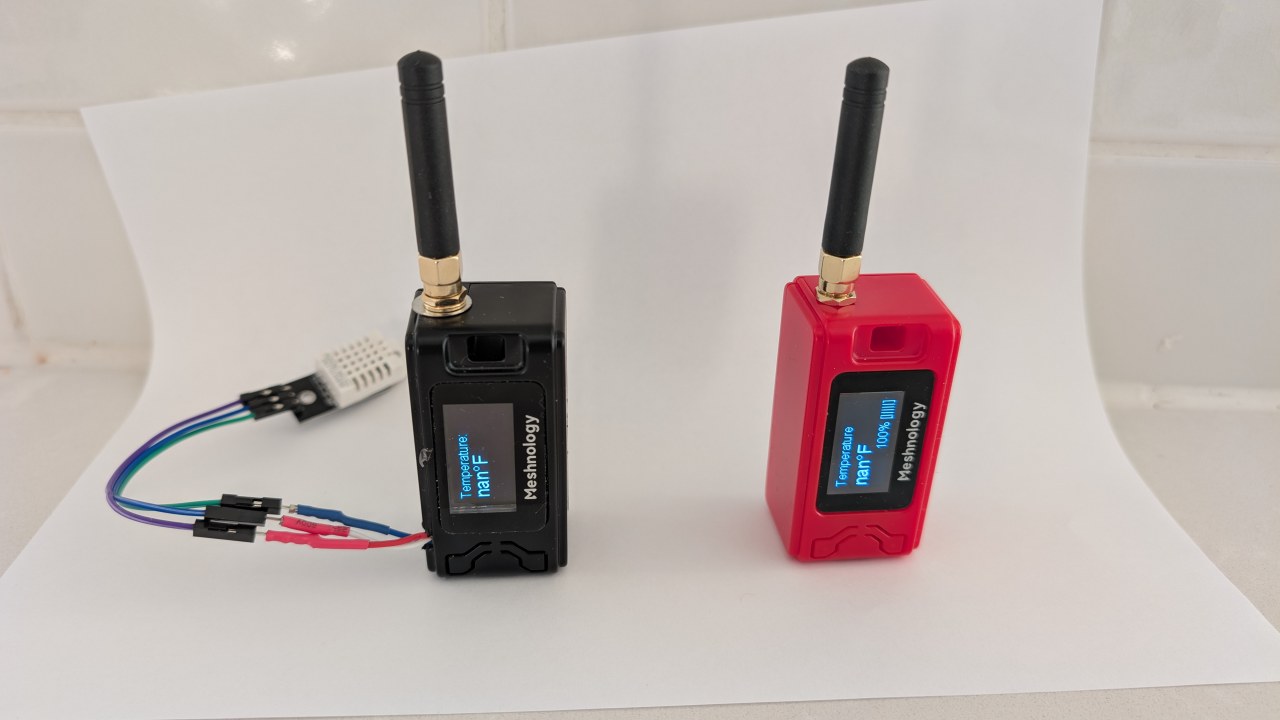
Tokobanda na elilingi ya ba composants ya hardware oyo esalelami na projet oyo, kozala na module ya Heltec WiFi LoRa 32 V3 mpe capteur ya DHT22. Na sima, tokokende na ba instructions ya câblage, epai okoyekola ndenge ya kosangisa ba composants oyo. Na suka, tokotala code oyo esengeli mpo na système oyo ekomi fonctionner. Mpo na lisungi ya visual, tala vidéo na ba moments ndenge na ndenge (na vidéo na 00:00).
Hardware Explication
Ba composants ya liboso mpo na projet oyo ezali module ya Heltec WiFi LoRa 32 V3 mpe capteur ya température mpe humidité DHT22. Module ya Heltec ezali na microcontrôleur ya ESP32, oyo epesaka ba possibilités ya Wi-Fi mpe Bluetooth elongo na communication ya LoRa. Oyo epesaka ba options ya transmission ya ba données na ndenge ya libres.
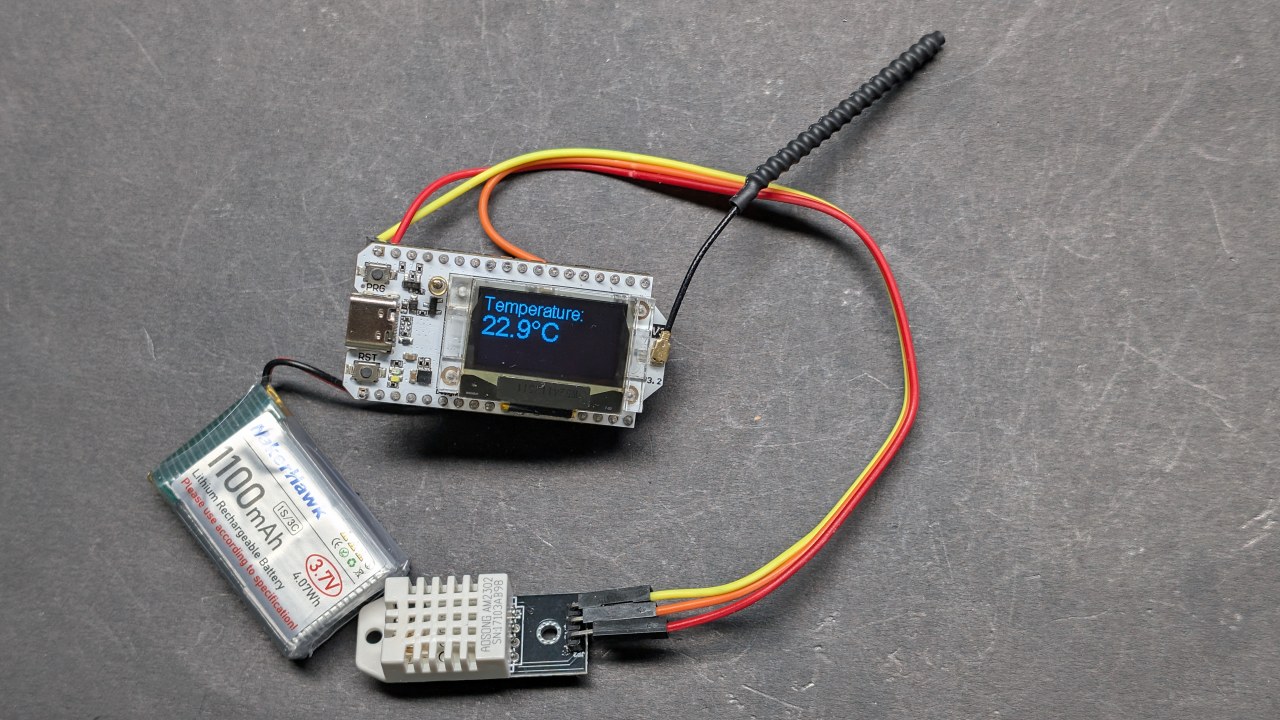
Capteur ya DHT22 ezali capteur ya numérique oyo epesaka ba lectures ya température mpe humidité ya précise. Esololaka na ESP32 na nzela ya pin moko ya sortie ya numérique, oyo esalisaka na connexion mpe na usage na ba projets na yo. Elongo, ba composants oyo basala système ya solide mpo na surveillance ya température na nzela ya mopepe.
Ba Détails ya Datasheet
| Fabricant | Heltec Automation |
|---|---|
| Numéro ya partie | WiFi LoRa 32 V3 |
| Tension ya logique/IO | 3.3 V |
| Tension ya alimentation | 3.7–4.2 V |
| Courant ya sortie (na canal) | ~1 A |
| Courant ya pointe (na canal) | ~2 A |
| Guidance ya fréquence PWM | 1 kHz (typ.) |
| Ba seuils ya logique ya entrée | 0.7 V (élevé), 0.3 V (faible) |
| Chute ya tension / RDS(on) / saturation | 0.3 V (max) |
| Ba limites thermiques | 85 °C (max) |
| Paquet | Module PCB |
| Ba notes / ba variantes | Ba options ya fréquence ndenge na ndenge ezali (ex., 433 MHz, 868 MHz, 915 MHz) |
- Kokanola na kopesa DHT22 na 3.3V, te na 5V.
- Salela ba niveaux ya logique oyo ebongi mpo na communication kati na ESP32 mpe DHT22.
- Kanola na refroidissement soki ozali kosalela ba courants ya makasi mpo na ba périodes ya molai.
- Vérifier connexion ya antenne mpo na LoRa mpo na kokitisa mosika.
- Zala na likebi na ba règlements ya fréquence ya LoRa na région na yo.
Ba Instructions ya Câblage
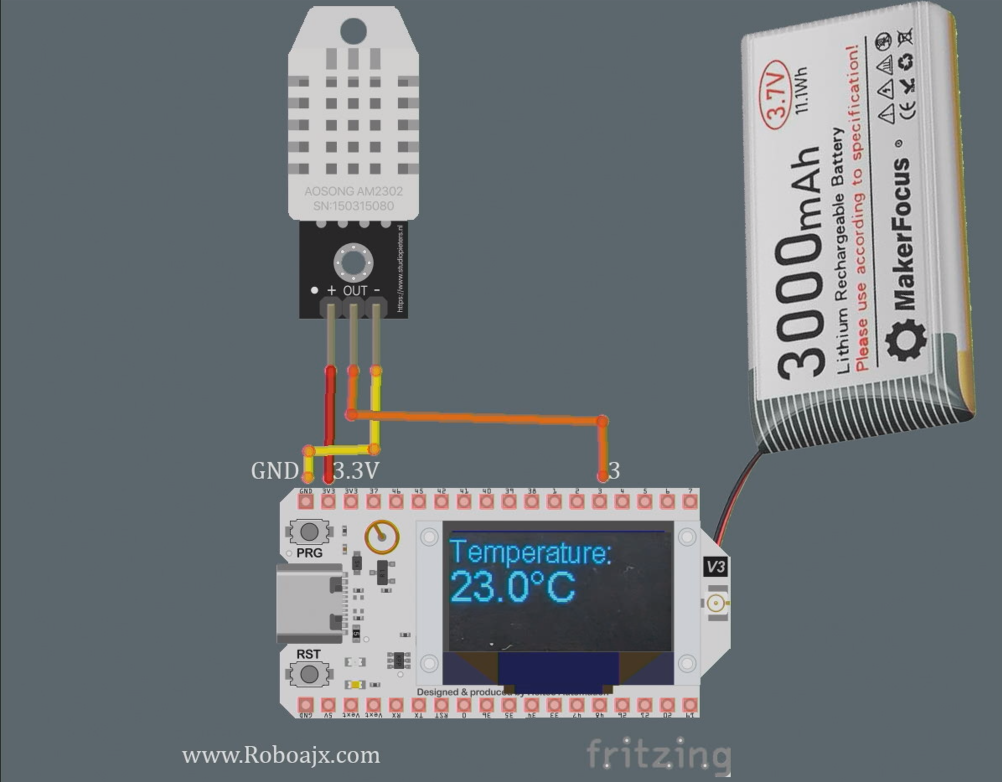
Mpo na kosala câblage ya Heltec WiFi LoRa 32 V3 na capteur ya DHT22, banda na kosangisa pin ya VCC ya capteur na pin ya 3.3V na module ya Heltec. Na sima, sangisa pin ya GND ya DHT22 na moko ya ba pins ya GND na Heltec. Pin ya données ya DHT22 esengeli kosangisama na pin ya GPIO 3 na Heltec.
Kokanola na kosalela résistance ya pull-up (pene na 10kΩ) kati na pin ya données mpe VCC mpo na ba lectures ya stable. Na lisusu, kanola ete antenne ya LoRa esengeli kosangisama na ndenge ya malamu mpo na kokitisa portée ya transmission. Soki ozali kosalela alimentation ya libanda, kanola ete module ya Heltec ezali na puissance ya malamu mpo na kokitisa ba problèmes ya fonctionnement.
Kotiya ba Boards ya Heltec ESP32
Kotisa nzela oyo na ba préférences ya Arduino IDE na yo lokola emonami na vidéo:https://resource.heltec.cn/download/package_heltec_esp32_index.json
Kotiya ba Bibliothèques ya Heltec ESP32
Na Arduino IDE soki efungwami, pesa likebi na icône ya Bibliothèque (1), na sima type "Heltec" na recherche (2) mpe pesa likebi na Installer (3) tala elilingi.

Ba Exemples ya Code & Explication
Ba extraits ya code oyo elandi emonisi ndenge ya kosala setup ya module ya Heltec mpo na kotanga ba données ya température longwa na capteur ya DHT22 mpe kotinda yango na nzela ya LoRa. Code yango ebandisaka affichage mpe esalaka setup ya capteur ya DHT.
#include
#define DHTPIN 3         // GPIO pin mpo na DHT22
#define DHTTYPE DHT22    // Definir type ya DHT
DHT dht(DHTPIN, DHTTYPE);
void setup() {
  Serial.begin(115200);
  dht.begin(); // Bandisa capteur ya DHT
}
Na extrait oyo, tozali koyebisa pin oyo capteur ya DHT22 esangisami na yango mpe tozali koyebisa yango na fonction setup(). Ligne ya Serial.begin(115200) ezali mpo na sortie ya débogage.
void loop() {
  float tempC = dht.readTemperature(); // Tanga température na Celsius
  float tempF = dht.convertCtoF(tempC); // Bongola na Fahrenheit
  sendData(tempC, tempF); // Fonction mpo na kotinda ba données ya température
}
Extrait oyo emonisi ndenge ya kotanga ba données ya température na fonction loop(). Fonction ya sendData() ebengami mpo na kotinda ba lectures ya température na nzela ya LoRa.
void sendData(float tempC, float tempF) {
  String data = "Température : " + String(tempC) + "°C"; // Créer la chaîne de données
  Radio.Send(data.c_str(), data.length()); // Envoyer les données
}
Ici, nous créons la chaîne de données contenant la température et l'envoyons à l'aide de la méthode Radio.Send(). Cela transmettra les données sans fil au module récepteur.
Veuillez vous référer au code complet chargé sous l'article pour une implémentation détaillée.
Démonstration / À quoi s'attendre
Une fois que tout est configuré et que le code est téléchargé sur le module Heltec, vous devriez voir les lectures de température affichées sur l'écran OLED. Le système transmettra les données de température, qui peuvent être reçues par un autre module Heltec configuré pour lire les données. Vous pouvez tester la portée en éloignant le récepteur de l'émetteur, confirmant ainsi la distance maximale atteinte (dans la vidéo à 1:30).
Soyez prudent face aux pièges courants tels qu'un câblage incorrect, une alimentation insuffisante ou l'utilisation d'une mauvaise fréquence LoRa. Assurez-vous que le DHT22 fonctionne correctement et que l'antenne est connectée pour maximiser la portée.
Horodatages de la vidéo
- 00:00 Début
- 3:51 Spécifications
- 8:32 Page de documentation
- 9:52 Paquet et batterie
- 12:58 Première mise sous tension
- 16:37 Installation de la bibliothèque
- 18:19 Code de base de l'émetteur
- 19:43 Code de base du récepteur
- 20:39 Démonstration de l'envoi et de la réception de texte
- 23:02 Code de démonstration OLED
- 24:06 Code de texte de base sur l'affichage OLED
- 26:26 Démonstration de texte de base sur OLED
- 26:58 Lecture de la température avec DHT22
- 28:49 Émetteur LoRa de température et affichage
- 30:07 Récepteur LoRa de température et affichage
- 32:13 Déclenchement de la LED lorsque la température augmente
- 22:26 Test de portée de transmission LoRa
- 35:01 dBm et Milli Watt
Images
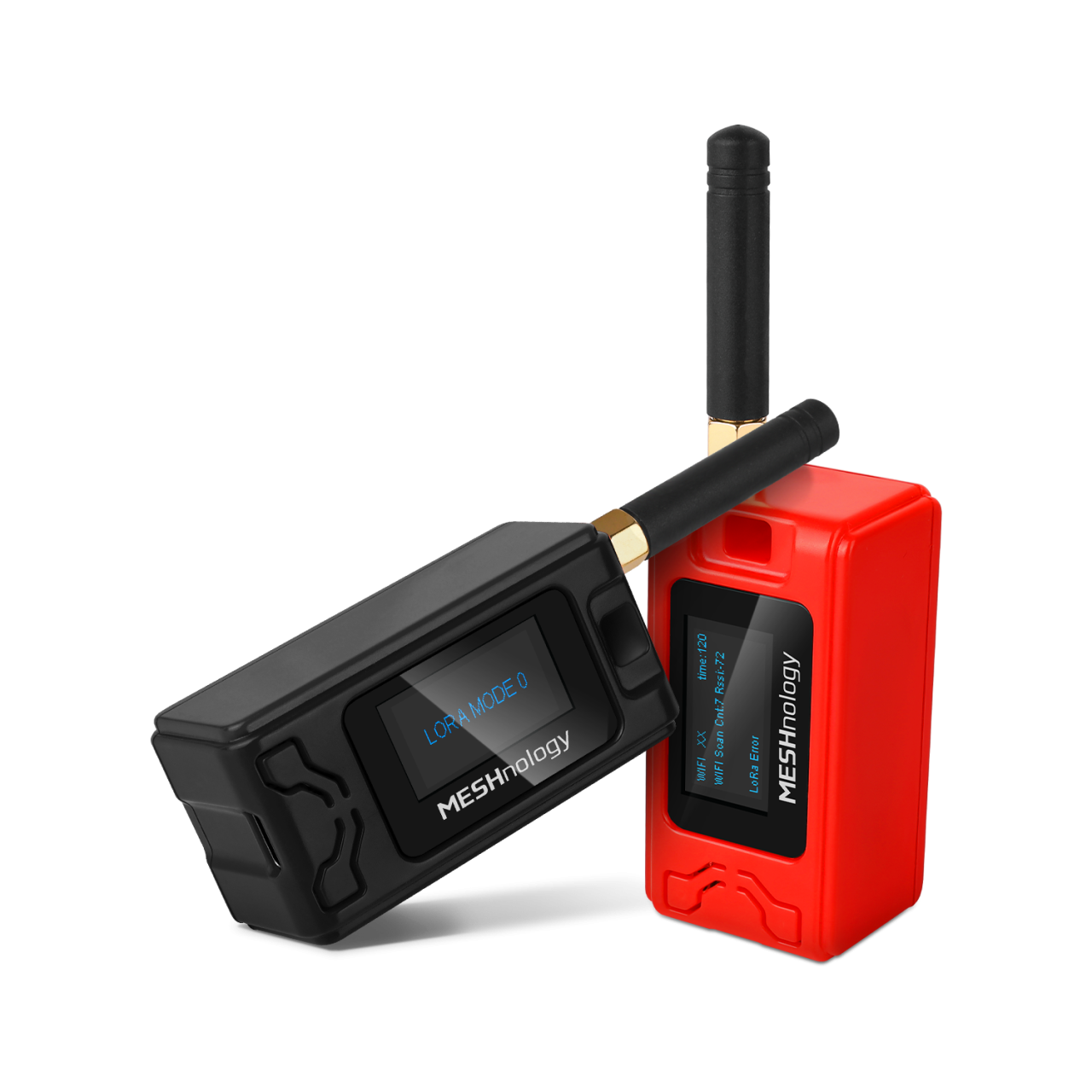
Mateya oyo ezali eteni ya: WiFi LoRa 32 Mateya ya kosala
- Kilomɛtrɛ 13 (20 km) na WiFi te? Ndenge nini LoRa atindaki voltage na mosika makasi! (Heltec WiFi LoRa 32 V3)
- Fungisa Ekipema na mosika ya 13 mile (21 km) – Projet ya LoRa ya Off-Grid oyo eleki nyonso na WiFi LoRa 32!
- Système d'alerte de porte à distance depuis 13 miles (21 km) avec LoRa – Hors réseau ! (Heltec WiFi LoRa 32 V3)
- Kokamba motɛ́ ya Servo na mosíká! Lisakoli ya Heltec WiFi LoRa 32 V3 na Arduino (TX)
- Projet ya Remote Relay ya DIY: Kilomètre 13, Module Heltec LoRa 32 na Wi-Fi te, na SIM te.
- How to Use the Heltec LoRa CubeCell Development Board HTCC-AB01
/*
This is a simple code to display text on the OLED display
WiFi LoRa 32 V3 ESP32 module
Written by Ahmad Shamshiri 02 April 2025
Watch full video explanation https://youtu.be/WkyQMXkQhE8
Resources page https://robojax.com/tutorial_view.php?id=387
*/
#include <Wire.h>
#include "HT_SSD1306Wire.h"


static SSD1306Wire  display(0x3c, 500000, SDA_OLED, SCL_OLED, GEOMETRY_128_64, RST_OLED); // addr , freq , i2c group , resolution , rst


void setup() {
  Serial.begin(115200);
  Serial.println();
  Serial.println();
  VextON();
  delay(100);

  // Initialising the UI will init the display too.
  display.init();

  display.setFont(ArialMT_Plain_10);

}


void displayTemperature(double temperature, int unit) {
    display.clear();  // Clear display before new content

    // Line 1: "Temperature:" in 16pt font
    display.setTextAlignment(TEXT_ALIGN_LEFT);
    display.setFont(ArialMT_Plain_16);
    display.drawString(0, 0, "Temperature:");

    // Line 2: Temperature value in 24pt font
    display.setFont(ArialMT_Plain_24);

    // Format temperature with correct unit symbol
    String tempString = String(temperature, 1); // 1 decimal place
    switch(unit) {
        case 1:  tempString += "�C"; break;  // Celsius
        case 2:  tempString += "�F"; break;  // Fahrenheit
        default: tempString += "�U"; break;  // Unknown unit
    }

    display.drawString(0, 20, tempString);  // Display at Y=20 (below label)
    display.display();  // Update OLED
}


void VextON(void)
{
  pinMode(Vext,OUTPUT);
  digitalWrite(Vext, LOW);
}

void VextOFF(void) //Vext default OFF
{
  pinMode(Vext,OUTPUT);
  digitalWrite(Vext, HIGH);
}


void loop() {
  // clear the display
  display.clear();
  displayTemperature(23.5, 1); // Displays "23.5�C" /1
  delay(2000);

}/*
written on March 27, 2025
written by Ahmad Shamshiri for www.Robojax.com
Transmits Temperature and Humidity over LoRa RF using ESP32 LoRA 32 V3 module.
and displays the information on the screen.
Watch full video explanation https://youtu.be/WkyQMXkQhE8
Resources page: https://robojax.com/tutorial_view.php?id=387
*/
#include <Wire.h>
#include "HT_SSD1306Wire.h"
static SSD1306Wire display(0x3c, 500000, SDA_OLED, SCL_OLED, GEOMETRY_128_64, RST_OLED); // addr , freq , i2c group , resolution , rst
#include <DHT.h>
#define DHTPIN 3 // GPIO21
#define DHTTYPE DHT22 // DHT22 (AM2302)
DHT dht(DHTPIN, DHTTYPE);
float tempC, tempF;
int humidity ;
//1=C
//2=F
//3=C, Humidity //only for display not for transmission
//4=F, Humidity //only for display not for transmission
//5=Humidity only
int dataType = 2;
String labelTemp = "Temperature";
String labelHumidity = "Humidity";
const int TX_POWER = 2;//dBm from 2 to 20. when powered via battery 2 to 14dBm is the best option
#include "mbedtls/aes.h"
#include <cstring> // For memset, memcpy
mbedtls_aes_context aes;
const char *userKey = "hyhT676#h~_876s"; //Security key.
#include "LoRaWan_APP.h"
#include "Arduino.h"
#define RF_FREQUENCY 915000000 // Hz
#define TX_OUTPUT_POWER TX_POWER // dBm from 2 to 20. when powered via battery 2 to 14dBm
#define LORA_BANDWIDTH 0 // [0: 125 kHz,
// 1: 250 kHz,
// 2: 500 kHz,
// 3: Reserved]
#define LORA_SPREADING_FACTOR 7 // [SF7..SF12]
#define LORA_CODINGRATE 1 // [1: 4/5,
// 2: 4/6,
// 3: 4/7,
// 4: 4/8]
#define LORA_PREAMBLE_LENGTH 8 // Same for Tx and Rx
#define LORA_SYMBOL_TIMEOUT 0 // Symbols
#define LORA_FIX_LENGTH_PAYLOAD_ON false
#define LORA_IQ_INVERSION_ON false
#define RX_TIMEOUT_VALUE 1000
#define BUFFER_SIZE 30 // Define the payload size here
char txpacket[BUFFER_SIZE];
char rxpacket[BUFFER_SIZE];
double txNumber;
bool lora_idle=true;
static RadioEvents_t RadioEvents;
unsigned long lastTxTime = 0;
void OnTxDone( void );
void OnTxTimeout( void );
void decryptAES(uint8_t *data, const char *key);
void encryptAES(uint8_t *data, const char *key);
void processKey(const char *userKey, uint8_t *processedKey, size_t keySize);
void setup() {
Serial.begin(115200);
Serial.println();
VextON();
delay(100);
// Initialising the UI will init the display too.
display.init();
display.setFont(ArialMT_Plain_10);
dht.begin();
//LoRa stuff
Mcu.begin(HELTEC_BOARD,SLOW_CLK_TPYE);
txNumber=0;
RadioEvents.TxDone = OnTxDone;
RadioEvents.TxTimeout = OnTxTimeout;
Radio.Init( &RadioEvents );
Radio.SetChannel( RF_FREQUENCY );
Radio.SetTxConfig( MODEM_LORA, TX_OUTPUT_POWER, 0, LORA_BANDWIDTH,
LORA_SPREADING_FACTOR, LORA_CODINGRATE,
LORA_PREAMBLE_LENGTH, LORA_FIX_LENGTH_PAYLOAD_ON,
true, 0, 0, LORA_IQ_INVERSION_ON, 3000 );
}
void displayTemperature(int unit) {
display.clear(); // Clear display before new content
// Line 1: "Temperature:" in 16pt font
display.setTextAlignment(TEXT_ALIGN_LEFT);
// Line 2: Temperature value in 24pt font
display.setFont(ArialMT_Plain_24);
// Format temperature with correct unit symbol
String tempStringC = String(tempC, 1) + "°C"; // 1 decimal place
String tempStringF = String(tempF, 1)+ "°F"; // 1 decimal place
String tempStringHumidity = String(humidity)+ "% RH";
String tempString;
switch(unit) {
case 1:
tempString =tempStringC;
display.setFont(ArialMT_Plain_16);
display.drawString(0, 0, "Temperature:");
display.setFont(ArialMT_Plain_24);
display.drawString(0, 15, tempString);
break; // Celsius
case 2: tempString =tempStringF;
display.setFont(ArialMT_Plain_16);
display.drawString(0, 0, "Temperature:");
display.setFont(ArialMT_Plain_24);
display.drawString(0, 15, tempString);
break; // Fahrenheit
case 3: tempString =tempStringC;
display.setFont(ArialMT_Plain_16);
display.drawString(0, 0, "Temperature:");
display.setFont(ArialMT_Plain_24);
display.drawString(0, 15, tempString);
display.setFont(ArialMT_Plain_16);
display.drawString(0, 40, "Humidity:");
display.drawString(70, 40, tempStringHumidity);
break; // Celsius
case 4: tempString =tempStringF;
display.setFont(ArialMT_Plain_16);
display.drawString(0, 0, "Temperature:");
display.setFont(ArialMT_Plain_24);
display.drawString(0, 15, tempString);
display.setFont(ArialMT_Plain_16);
display.drawString(0, 40, "Humidity:");
display.drawString(70, 40, tempStringHumidity );
break; // Celsius
case 5:
display.setFont(ArialMT_Plain_16);
display.drawString(0, 0, "Humidity:");
display.setFont(ArialMT_Plain_24);
display.drawString(0, 20, tempStringHumidity);
break; // Celsius
default: tempString =tempStringC + "°C"; break;; // default
}
display.display(); // Update OLED
}
void readSensor()
{
tempC = dht.readTemperature();
humidity = dht.readHumidity();
tempF = dht.convertCtoF(tempC);
}
void VextON(void)
{
pinMode(Vext,OUTPUT);
digitalWrite(Vext, LOW);
}
void VextOFF(void) //Vext default OFF
{
pinMode(Vext,OUTPUT);
digitalWrite(Vext, HIGH);
}
void sendData()
{
String tempStringC = String(tempC, 1) + " °C"; // 1 decimal place
String tempStringF = String(tempF, 1)+ " °F"; // 1 decimal place
String tempStringHumidity = String(humidity)+ " % RH";
String txData;
//1=C
//2=F
//3=C, Humidity
//4=F, Humidity
//5=Humidity only
switch(dataType) {
case 1:
txData = labelTemp + " " + tempStringC;
break;
case 2:
txData = labelTemp + " " + tempStringF;
break;
case 3:
txData = labelHumidity + " " + tempStringHumidity;
break;
default:
txData = labelTemp + " " + tempStringC;
break;
}
uint8_t data[32];
memset(data, 0, sizeof(data)); // Zero-padding
strncpy((char*)data, txData.c_str(), sizeof(data) - 1); // Copy string safely
encryptAES(data, userKey); // Encrypt before sending
if(lora_idle == true)
{
delay(1000);
Radio.Send(data, sizeof(data));
Serial.print("Sending: ");
Serial.println((char *)data);
lora_idle = false;
}
Radio.IrqProcess( );
}
void loop() {
readSensor();//read the data
// clear the display
display.clear();
displayTemperature(dataType); //
sendData();
delay(100);
}
void OnTxDone( void )
{
Serial.println("TX done......");
lora_idle = true;
}
void OnTxTimeout( void )
{
Radio.Sleep( );
Serial.println("TX Timeout......");
lora_idle = true;
}
/**
* Converts a user-provided plaintext key into a fixed-length 16-byte (128-bit)
* or 32-byte (256-bit) key.
*/
void processKey(const char *userKey, uint8_t *processedKey, size_t keySize) {
memset(processedKey, 0, keySize); // Fill with zeros
size_t len = strlen(userKey);
if (len > keySize) len = keySize; // Truncate if too long
memcpy(processedKey, userKey, len); // Copy valid key part
}
/**
* Encrypts a 16-byte (one block) message using AES-128.
*/
void encryptAES(uint8_t *data, const char *key) {
uint8_t processedKey[16]; // 128-bit key
processKey(key, processedKey, 16);
mbedtls_aes_init(&aes);
mbedtls_aes_setkey_enc(&aes, processedKey, 128);
mbedtls_aes_crypt_ecb(&aes, MBEDTLS_AES_ENCRYPT, data, data);
mbedtls_aes_free(&aes);
}
/**
* Decrypts a 16-byte (one block) message using AES-128.
*/
void decryptAES(uint8_t *data, const char *key) {
uint8_t processedKey[16]; // 128-bit key
processKey(key, processedKey, 16);
mbedtls_aes_init(&aes);
mbedtls_aes_setkey_dec(&aes, processedKey, 128);
mbedtls_aes_crypt_ecb(&aes, MBEDTLS_AES_DECRYPT, data, data);
mbedtls_aes_free(&aes);
}/*
Written on April 01, 2025
written by Ahmad Shamshiri for www.Robojax.com
this sktech receives the secure temperature or humidity from WiFi LoRa 32 and decrypts it
and displays it on the OLED. There is action feature to triggerd if the temperature is below triggerdValue
Watch full video explaination https://youtu.be/WkyQMXkQhE8
Resources page: https://robojax.com/tutorial_view.php?id=387
*/
#include <Arduino.h>
// Alert configuration
const String triggerdText = "Too High"; // Correct String type
const float triggerdValue = 90.0f; // exclusive (this value is not included)
const int triggerdYpos = 45;
const bool triggerdType = true;//true is > (greter than triggerdValue) and false is < (less than triggerdValue)
const int triggerdOutputPin = 7;//GPIO07 goes HIGH when triggered
const bool triggerdBlink4Me= true;//should blink or not
#include "mbedtls/aes.h"
#include <cstring> // For memset, memcpy
mbedtls_aes_context aes;
const char *userKey = "hyhT676#h~_876s"; //Security key
#define MIN_RSSI -120 // Worst possible signal
#define MAX_RSSI -50 // Best possible signal
// For a connection via I2C using the Arduino Wire include:
#include <Wire.h>
#include "HT_SSD1306Wire.h"
static SSD1306Wire display(0x3c, 500000, SDA_OLED, SCL_OLED, GEOMETRY_128_64, RST_OLED); // addr , freq , i2c group , resolution , rst
#include "LoRaWan_APP.h"
#include "Arduino.h"
#define RF_FREQUENCY 915000000 // Hz
#define TX_OUTPUT_POWER 14 // dBm
#define LORA_BANDWIDTH 0 // [0: 125 kHz,
// 1: 250 kHz,
// 2: 500 kHz,
// 3: Reserved]
#define LORA_SPREADING_FACTOR 7 // [SF7..SF12]
#define LORA_CODINGRATE 1 // [1: 4/5,
// 2: 4/6,
// 3: 4/7,
// 4: 4/8]
#define LORA_PREAMBLE_LENGTH 8 // Same for Tx and Rx
#define LORA_SYMBOL_TIMEOUT 0 // Symbols
#define LORA_FIX_LENGTH_PAYLOAD_ON false
#define LORA_IQ_INVERSION_ON false
#define RX_TIMEOUT_VALUE 1000
#define BUFFER_SIZE 30 // Define the payload size here
char txpacket[BUFFER_SIZE];
char rxpacket[BUFFER_SIZE];
static RadioEvents_t RadioEvents;
int16_t txNumber;
int16_t rssi,rxSize;
bool lora_idle = true;
unsigned long lastRxTime = 0;
const unsigned long SIGNAL_TIMEOUT = 5000; // 5 seconds
void decryptAES(uint8_t *data, const char *key);
void encryptAES(uint8_t *data, const char *key);
void processKey(const char *userKey, uint8_t *processedKey, size_t keySize);
void setup() {
Serial.begin(115200);
Serial.println();
Serial.println();
VextON();
delay(100);
// Initialising the UI will init the display too.
display.init();
display.setFont(ArialMT_Plain_10);
pinMode(triggerdOutputPin, OUTPUT);
//LoRa stuff blow this line
Mcu.begin(HELTEC_BOARD,SLOW_CLK_TPYE);
txNumber=0;
rssi=0;
RadioEvents.RxDone = OnRxDone;
Radio.Init( &RadioEvents );
Radio.SetChannel( RF_FREQUENCY );
Radio.SetRxConfig( MODEM_LORA, LORA_BANDWIDTH, LORA_SPREADING_FACTOR,
LORA_CODINGRATE, 0, LORA_PREAMBLE_LENGTH,
LORA_SYMBOL_TIMEOUT, LORA_FIX_LENGTH_PAYLOAD_ON,
0, true, 0, 0, LORA_IQ_INVERSION_ON, true );
}
void displayTemperature(String data1, String data2) {
display.clear(); // Clear display before new content
// Line 1: "Temperature:" in 16pt font
display.setTextAlignment(TEXT_ALIGN_LEFT);
display.setFont(ArialMT_Plain_16);
display.drawString(0, 0, data1);
// Line 2: Temperature value in 24pt font
display.setFont(ArialMT_Plain_24);
display.drawString(0, 20, data2); //
displaySignalStrength(rssi);
// display.display(); // Update OLED
}
void displayLine(String data, int y) {
// Line 1: "Temperature:" in 16pt font
display.setTextAlignment(TEXT_ALIGN_LEFT);
display.setFont(ArialMT_Plain_10);
if (triggerdBlink4Me) {
// Blink effect: Display text, wait, clear text, wait, then return
display.drawString(0, y, data);
display.display();
delay(500); // Keep text visible for 500ms
display.clear(); // Clear the screen
display.display();
delay(500); // Keep screen blank for 500ms
}
else {
// Normal display without blinking
display.drawString(0, y, data);
display.display();
}
}
void VextON(void)
{
pinMode(Vext,OUTPUT);
digitalWrite(Vext, LOW);
}
void VextOFF(void) //Vext default OFF
{
pinMode(Vext,OUTPUT);
digitalWrite(Vext, HIGH);
}
void loop() {
RaIrqProcessdio( );
if(lora_idle)
{
lora_idle = false;
Serial.println("into RX mode");
Radio.Rx(0);
}
noSignalCheck();
delay(100);
}
void displaySignalStrength(int16_t rssi) {
// Convert RSSI to percentage (0-100%)
int percent = map(constrain(rssi, MIN_RSSI, MAX_RSSI), MIN_RSSI, MAX_RSSI, 0, 100);
// Display at bottom right corner
display.setTextAlignment(TEXT_ALIGN_RIGHT);
display.setFont(ArialMT_Plain_16);
// Create signal strength indicator
String strength = String(percent) + "% [";
for (int i = 0; i < 5; i++) {
strength += (percent > (i * 20)) ? "|" : " ";
}
strength += "]";
display.drawString(128, 45, strength); // Position at bottom-right
}
void noSignalCheck()
{
// Automatic "No Signal" after timeout
if (millis() - lastRxTime > SIGNAL_TIMEOUT) {
display.clear();
display.setTextAlignment(TEXT_ALIGN_CENTER);
display.setFont(ArialMT_Plain_16);
display.drawString(64, 20, "No Signal");
display.display();
}
}
/**
* Triggers an action based on a threshold comparison.
*
* @param type - If true, triggers when floatValue **exceeds** triggerdValue.
* If false, triggers when floatValue **falls below** triggerdValue.
* @param floatValue - The current measured value to compare.
* @param triggerdValue - The threshold value that determines the trigger condition.
*/
void triggerAction(float floatValue)
{
if(triggerdType)
{
if (floatValue > triggerdValue) {
displayLine(triggerdText, triggerdYpos);
Serial.println(triggerdText);
digitalWrite(triggerdOutputPin, HIGH);//turns triggerdOutputPin to HIGH
}else{
digitalWrite(triggerdOutputPin, LOW);
}
}else{
if (floatValue < triggerdValue) {
displayLine(triggerdText, triggerdYpos);
Serial.println(triggerdText);
digitalWrite(triggerdOutputPin, HIGH);//turns triggerdOutputPin to HIGH
} else{
digitalWrite(triggerdOutputPin, LOW);//turns triggerdOutputPin to LOW
}
}
}
void OnRxDone( uint8_t *payload, uint16_t size, int16_t rssi, int8_t snr )
{
lastRxTime = millis(); // Reset timer on new data
rssi=rssi;
rxSize=size;
memcpy(rxpacket, payload, size );
rxpacket[size]='\0';
Radio.Sleep( );
Serial.printf("\r\nreceived packet \"%s\" with rssi %d , length %d\r\n",rxpacket,rssi,rxSize);
// Serial.println("Encrypted Data (Hex):");
// for (int i = 0; i < 16; i++) {
// Serial.printf("%02X ", rxpacket[i]);
// }
// Serial.println();
decryptAES((uint8_t *)rxpacket, userKey);
// Split the received packet into parts
String receivedStr = String((char*)rxpacket);
int firstSpacePos = receivedStr.indexOf(' ');
if (firstSpacePos != -1) {
// First part (before first space)
String part1 = receivedStr.substring(0, firstSpacePos); // "Temperature"
// Find second space (after the number)
int secondSpacePos = receivedStr.indexOf(' ', firstSpacePos + 1);
if (secondSpacePos != -1) {
// Second part (numeric value)
String part2 = receivedStr.substring(firstSpacePos + 1, secondSpacePos); // "34.5"
float floatValue = part2.toFloat(); // Convert to float 34.5
// Third part (unit)
String part3 = receivedStr.substring(secondSpacePos + 1); // "°C"
displayTemperature(part1, part2+part3);
display.display();
Serial.print("part1: " + part1);
Serial.print(" part2: " + part2);
Serial.println(" part3: " + part3);
Serial.println("floatValue " + String(floatValue));
//to trigger an action.
triggerAction(floatValue);
} else {
Serial.println("No second space found for unit");
}
}else {
Serial.println("No space found in packet - can't split");
}
lora_idle = true;
}
/**
* Converts a user-provided plaintext key into a fixed-length 16-byte (128-bit)
* or 32-byte (256-bit) key.
*/
void processKey(const char *userKey, uint8_t *processedKey, size_t keySize) {
memset(processedKey, 0, keySize); // Fill with zeros
size_t len = strlen(userKey);
if (len > keySize) len = keySize; // Truncate if too long
memcpy(processedKey, userKey, len); // Copy valid key part
}
/**
* Encrypts a 16-byte (one block) message using AES-128.
*/
void encryptAES(uint8_t *data, const char *key) {
uint8_t processedKey[16]; // 128-bit key
processKey(key, processedKey, 16);
mbedtls_aes_init(&aes);
mbedtls_aes_setkey_enc(&aes, processedKey, 128);
mbedtls_aes_crypt_ecb(&aes, MBEDTLS_AES_ENCRYPT, data, data);
mbedtls_aes_free(&aes);
}
/**
* Decrypts a 16-byte (one block) message using AES-128.
*/
void decryptAES(uint8_t *data, const char *key) {
uint8_t processedKey[16]; // 128-bit key
processKey(key, processedKey, 16);
mbedtls_aes_init(&aes);
mbedtls_aes_setkey_dec(&aes, processedKey, 128);
mbedtls_aes_crypt_ecb(&aes, MBEDTLS_AES_DECRYPT, data, data);
mbedtls_aes_free(&aes);
}Common Course Links
Common Course Files
Mokili na bisika
-
L'extérieur
-
L'extérieur
-
L'extérieur
-
L'extérieur
-
L'extérieurPurchase a WiFi LoRa 32 V3 from AliExpresss.click.aliexpress.com
-
L'extérieurPurchase a WiFi LoRa 32 V3 from AliExpress-2s.click.aliexpress.com
-
L'extérieur
-
L'extérieurPurchase Wi-Fi LoRa 32 from Meshnologymeshnology.com
Fichiers📁
Maktabat ya Arduino (zip)
-
Heltec ESP32 libraries 2.1.5Libraries for all Heltec ESP32 boards. This is version 2.1.5.
Heltec_ESP32-master.zip3.86 MB
Mabala a mangwe
-
Heltec WiFi LoRa 32 V3 Schematic Diagram (V3.1)
Heltec_WiFiLoRAV3_Schematic_Diagram.pdf0.18 MB