このチュートリアルはの一部です: Arduinoを使ったリレー制御
リレー関連の動画グループです。他の動画へのリンクはこの記事の下にあります。
2チャンネル5Vリレー用のArduinoコードと動画
このチュートリアルでは、Arduinoを使ってデュアルチャンネルの5Vリレーで交流および直流の負荷を制御する方法を学びます。リレーは交流電球や直流モーターなど、2つの異なる負荷を切り替えることができ、さまざまな用途に対して柔軟に対応します。このガイドの終わりまでに、自分のリレーシステムをセットアップして、簡単なArduinoコードで制御できるようになります。

このプロセスを通して、必要な部品、配線手順、そしてリレーを制御するためのArduinoコードの解説を行います。このプロジェクトは電子工作や自動化の世界を探りたい初心者に最適です。視覚的なガイドとして、関連するビデオ(ビデオ内の00:00)もぜひご覧ください。
ハードウェア解説
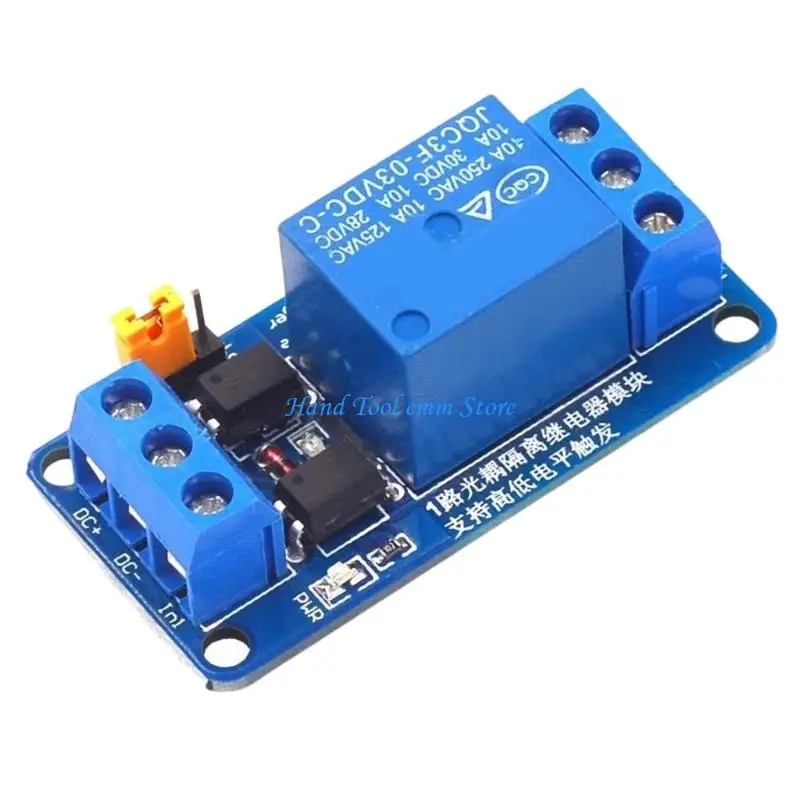
このプロジェクトの主要なコンポーネントはデュアルチャンネルの5Vリレーです。このリレーは別々の負荷を制御できる2つの独立したスイッチで構成されています。各リレーは3つの接点を持ちます:常閉(NC)、常開(NO)、および共通端子(COM)。リレーが作動すると常開(NO)接点が閉じて負荷に電流が流れるようになります。
その他の必須部品には、デジタルピンを使ってリレーを制御するArduinoボードが含まれます。リレーモジュールには、リレーが作動したときに点灯するインジケータLEDも搭載されています。さらに、リレーは光絶縁されており、制御回路と負荷回路を分離することで安全性が確保されています。
データシートの詳細
| 製造元 | ソングル |
|---|---|
| 部品番号 | SRD-05VDC-SL-C |
| ロジック/入出力電圧 | 5ボルト |
| 電源電圧 | 5 V |
| 出力電流(チャンネルあたり) | 10 A |
| ピーク電流(チャンネルあたり) | 10 A |
| PWM周波数に関する指針 | 該当なし |
| 入力ロジック閾値 | 2.5 V(最小) |
| 電圧降下 / Rドレイン・ソース(オン)/ 彩度 | 80ミリオーム |
| 熱的限界 | 摂氏70度 |
| パッケージ | モジュール |
| 備考 / バリエーション | 光絶縁 |
- 交流負荷を接続する際は、適切な絶縁を確保してください。
- 高負荷時の安全のため、適切なヒューズを使用してください。
- リレーモジュールを湿気から遠ざけてください。
- 高出力用途では放熱対策を検討してください。
- 損傷を避けるため、電源を入れる前に配線を確認してください。
- 必要に応じて、高電流機器には別の電源を使用してください。
配線手順

デュアルチャネルリレーをArduinoに配線するには、まずリレーモジュールのVCCピンをArduinoの5Vピンに接続します。リレーのGNDピンをArduinoのGNDピンに接続します。これによりリレーモジュールに電力が供給されます。
次に、制御ピンを接続します:それらをつなげてIN1リレーのピンをArduinoのデジタルピン7に接続し、IN2ピンをデジタルピン8に接続します。この設定により、両方のリレーを独立して制御できます。最後に、必要に応じて交流(AC)または直流(DC)の負荷をリレーの接点に接続してください。交流電圧を扱う場合は、適切な安全対策を必ず講じてください。
コード例と解説
Arduinoのコードでは、まずシリアル通信を初期化し、リレー制御用ピンのピンモードを設定します。変数relay1Pinそしてrelay2Pin各リレーに接続されたピンを表すように定義されています。これらのピンの出力状態はループ内で切り替えられます。
const int relay1Pin = 7; // define pin for relay 1
const int relay2Pin = 8; // define pin for relay 2

void setup() {
  Serial.begin(9600); // setup Serial Monitor to display information
  pinMode(relay1Pin, OUTPUT); // connected to Relay 1
  pinMode(relay2Pin, OUTPUT); // connected to Relay 2
}
この抜粋では、シリアルモニタを初期化してデバッグ情報を出力し、リレー制御ピンを出力として設定します。これは、リレーを必要に応じてオン・オフできるようにするために重要です。
void loop() {
  digitalWrite(relay2Pin, LOW); // turn relay 2 OFF
  Serial.print("Pin 8 LOW");
  digitalWrite(relay1Pin, HIGH); // turn relay 1 ON
  Serial.println(" Pin 7 HIGH");
  delay(3000); // keep in relay 2 OFF and relay 1 On for 3 seconds
  digitalWrite(relay1Pin, LOW); // turn relay 1 OFF
  digitalWrite(relay2Pin, HIGH); // turn relay 2 ON
  Serial.print("Pin 7 LOW");
  Serial.println(" Pin 8 HIGH");
  delay(3000); // keep in relay 1 OFF and relay 2 On for 3 seconds
}
このコードはリレーを3秒ごとに切り替え、一方をオンにしながらもう一方をオフにします。シリアルモニタはピンの状態を出力し、それがリレーの動作のデバッグや理解に役立ちます。
デモンストレーション/当日の流れ
セットアップが完了すると、リレーが接続された負荷を3秒ごとに切り替えているのが見えるはずです。リレーは接続された交流電球または直流モーターを交互に作動させます。交流負荷を扱う際は注意してください。不適切な取り扱いは危険な状況につながることがあり(ビデオの12:34を参照)、十分な注意が必要です。
動画のタイムスタンプ
- 00:00- デュアルチャネルリレーの紹介
- 04:15- 配線手順
- 08:30- コードの説明
- 10:45- リレーの実演
画像


/*
 * This is the Arduino code for Dual Channel 5V Relay
 * to control turning ON or OFF AC or DC loads. You can control 2 different loads such as bulbs, or a heater, or other machines.
  Watch the video instruction for this code: https://youtu.be/EclIomn_3dI

 *  *
 * Written by Ahmad Shamshiri for Robojax Video
 * Date: December 26, 2017, in Ajax, Ontario, Canada
 * Permission granted to share this code given that this
 * note is kept with the code.
 * Disclaimer: this code is "AS IS" and for educational purposes only.


Get this code and other Arduino codes from Robojax.com
Learn Arduino step by step in a structured course with all materials, wiring diagrams and libraries
all in one place. Purchase my course on Udemy.com: http://robojax.com/L/?id=62

If you found this tutorial helpful, please support me so I can continue creating
content like this. You can support me on Patreon: http://robojax.com/L/?id=63

or make a donation using PayPal: http://robojax.com/L/?id=64


 *
  * This code is "AS IS" without warranty or liability. Free to be used as long as you keep this note intact.*
 * This code has been downloaded from Robojax.com
    This program is free software: you can redistribute it and/or modify
    it under the terms of the GNU General Public License as published by
    the Free Software Foundation, either version 3 of the License, or
    (at your option) any later version.

    This program is distributed in the hope that it will be useful,
    but WITHOUT ANY WARRANTY; without even the implied warranty of
    MERCHANTABILITY or FITNESS FOR A PARTICULAR PURPOSE.  See the
    GNU General Public License for more details.

    You should have received a copy of the GNU General Public License
    along with this program.  If not, see <https://www.gnu.org/licenses/>.
 */


void setup() {

  Serial.begin(9600);// setup Serial Monitor to display information
  pinMode(7, OUTPUT);// connected to Relay 1
  pinMode(8, OUTPUT);// connected to Relay 2

}

void loop() {
  digitalWrite(8, LOW); // turn relay 2 OFF
      Serial.print("Pin 8 LOW");
  digitalWrite(7,HIGH);// turn relay 1 ON
      Serial.println(" Pin 7 HIGH");
  delay(3000);// keep in relay 2 OFF and relay 1 On for 3 seconds
  digitalWrite(7, LOW);// turn relay 1 OFF
  digitalWrite(8,HIGH);// turn relay 2 ON
      Serial.print("Pin 7 LOW");
      Serial.println(" Pin 8 HIGH");
  delay(3000);// keep in relay 1 OFF and relay 2 On for 3 seconds


}/*
* This is the Arduino code for a dual-channel 5V relay
* to control turning ON or OFF AC or DC loads. You can control 2 different loads such as bulbs, a heater, or other machines.
Watch the video instruction for this code: https://youtu.be/EclIomn_3dI
* *
* Written by Ahmad Shamshiri for Robojax Video
* Date: December 26, 2017, in Ajax, Ontario, Canada
* Permission granted to share this code, given that this
* note is kept with the code.
* Disclaimer: This code is "AS IS" and for educational purposes only.
Get this code and other Arduino codes from Robojax.com
Learn Arduino step by step in a structured course with all materials, wiring diagrams, and libraries
all in one place. Purchase my course on Udemy.com: http://robojax.com/L/?id=62
If you find this tutorial helpful, please support me so I can continue creating
content like this. You can support me on Patreon: http://robojax.com/L/?id=63
or make a donation using PayPal: http://robojax.com/L/?id=64
*
* This code is "AS IS" without warranty or liability. Free to be used as long as you keep this note intact.
* This code has been downloaded from Robojax.com
This program is free software: you can redistribute it and/or modify
it under the terms of the GNU General Public License as published by
the Free Software Foundation, either version 3 of the License, or
(at your option) any later version.
This program is distributed in the hope that it will be useful,
but WITHOUT ANY WARRANTY; without even the implied warranty of
MERCHANTABILITY or FITNESS FOR A PARTICULAR PURPOSE. See the
GNU General Public License for more details.
You should have received a copy of the GNU General Public License
along with this program. If not, see <https://www.gnu.org/licenses/>.
*/
const int relay1Pin =7;// define pin for relay 1
const int relay2Pin =8; // define pin for relay 2
void setup() {
Serial.begin(9600);// setup Serial Monitor to display information
pinMode(relay1Pin, OUTPUT);// connected to Relay 1
pinMode(relay2Pin, OUTPUT);// connected to Relay 2
}
void loop() {
digitalWrite(relay2Pin, LOW); // turn relay 2 OFF
Serial.print("Pin 8 LOW");
digitalWrite(relay1Pin,HIGH);// turn relay 1 ON
Serial.println(" Pin 7 HIGH");
delay(3000);// keep in relay 2 OFF and relay 1 On for 3 seconds
digitalWrite(relay1Pin, LOW);// turn relay 1 OFF
digitalWrite(relay2Pin,HIGH);// turn relay 2 ON
Serial.print("Pin 7 LOW");
Serial.println(" Pin 8 HIGH");
delay(3000);// keep in relay 1 OFF and relay 2 On for 3 seconds
}必要かもしれないもの
-
アリエクスプレス5v 12v 1 2 4 6 8チャンネルリレーモジュールを購入するs.click.aliexpress.com
リソースと参考文献
まだリソースはありません。
ファイル📁
ファイルは利用できません。