使用MAX7219 Arduino模块的8x8 LED矩阵
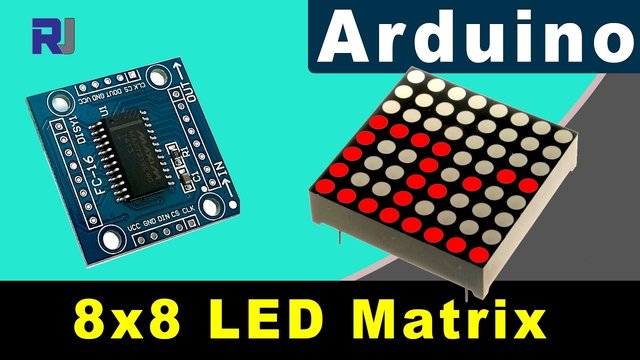
在本教程中,我们将学习如何使用MAX7219模块和Arduino控制一个8x8 LED矩阵。MAX7219简化了多个LED的控制,使我们能够轻松显示字符和图案。在这个项目结束时,您将能够在矩阵上显示单词“ROBOJAX”。
为此,我们将使用专门为与 MAX7219 进行接口而设计的 LedControl 库。该库使我们能够以最小的努力将数据发送到 LED 矩阵。如果您想更清楚地了解接线和代码,请务必查看相关视频(视频在 0:30)。
硬件解析
该项目的主要组件包括MAX7219模块和8x8 LED矩阵。MAX7219是一个集成电路,负责管理LED的显示,处理来自Arduino的通信和控制信号。它使用串行接口,这意味着我们可以仅用Arduino的几个引脚控制许多LED。
8x8 LED矩阵由64个单独的LED组成,排列成一个网格。通过MAX7219发送适当的命令,可以打开或关闭每个LED。这使得在矩阵上显示各种字符和图形成为可能。
数据表详情
| 制造商 | 美信集成 |
|---|---|
| 零件编号 | MAX7219 |
| 逻辑/IO电压 | 3.3V 到 5.5V |
| 供电电压 | 4.0V 到 5.5V |
| 输出电流(每通道) | 最大40毫安 |
| 峰值电流(每通道) | 100 毫安最大 |
| PWM频率指导 | 100 赫兹 |
| 输入逻辑阈值 | 2.0V(高)/ 0.8V(低) |
| 电压降 / RDS(开)/ 饱和度 | 0.2V典型值。 |
| 热限制 | 150°C |
| 包裹 | 16-DIP |
| 备注 / 变体 | 共阳极配置 |
- 确保适当的电源供应(4.0V至5.5V)。
- 为每个LED使用限流电阻以防止损坏。
- 保持接线短,以避免干扰。
- 监控散热;如有必要,请使用散热器。
- 仔细检查引脚连接以避免误通信。
接线说明
将MAX7219连接到Arduino,连接以下引脚:
- 连接
VCC将MAX7219的引脚连接到Arduino的5V。 - 连接
GND连接到Arduino的接地。 - 连接
DIN将(数据输入)引脚连接到Arduino引脚12。 - 连接
CLK将(时钟)引脚连接到Arduino引脚11。 - 连接
CS将引脚(芯片选择)连接到Arduino的引脚10。
在通电电路之前,请确保检查所有连接是否牢固。接线很简单,但如果遇到问题,请仔细检查连接(视频中在1:45)。
代码示例与演练
在代码中,我们首先包含了 LedControl 库,这是与 MAX7219 通信所必需的。以下摘录初始化了 LedControl 对象:
LedControl lc=LedControl(12,11,10,1);这一行设置数据引脚、时钟引脚、芯片选择引脚以及设备数量(在这种情况下为1)。接下来,在setup()我们唤醒MAX7219并设置显示强度:
lc.shutdown(0,false);
lc.setIntensity(0,8);
lc.clearDisplay(0);这确保了显示器处于活动状态,并准备好显示字符。驱动显示的主要功能是writeArduinoOnMatrix(),依次点亮矩阵的行以显示字母。
演示 / 期待什么
一旦所有连接完成并且代码上传,LED矩阵应该显示“ROBOJAX”这个词。如果显示不正常,请检查松动的连接或错误的引脚分配等问题。此外,请确保电源充足(视频中在2:30)。
章节
- 介绍 (0:00)
- 硬件概述 (0:30)
- 接线说明 (1:45)
- 代码演示 (2:15)
- 演示 (3:00)
/*
 * This video shows you how to use the MAX7219 module with an 8x8 LED matrix to display text or any characters on the LED.
 * Watch YouTube video: https://youtu.be/AAiDwBKs9uE
 *
 * Written by Ahmad Shamshiri for Robojax.com
 * on February 26, 2017 in Ajax, Ontario, Canada
 * Get this code and other Arduino codes from Robojax.com
 * Learn Arduino step by step in a structured course with all materials, wiring diagrams, and libraries
 * all in one place.

 ****************************
 * Get early access to my videos via Patreon and have your name mentioned at the end of every
 * video I publish on YouTube here: http://robojax.com/L/?id=63 (watch until the end of this video for a list of my Patrons)
 ****************************

 * Or make a donation using PayPal http://robojax.com/L/?id=64

 * This code is "AS IS" without warranty or liability. Free to be used as long as you keep this note intact.
 * This code has been downloaded from Robojax.com
    This program is free software: you can redistribute it and/or modify
    it under the terms of the GNU General Public License as published by
    the Free Software Foundation, either version 3 of the License, or
    (at your option) any later version.

    This program is distributed in the hope that it will be useful,
    but WITHOUT ANY WARRANTY; without even the implied warranty of
    MERCHANTABILITY or FITNESS FOR A PARTICULAR PURPOSE.  See the
    GNU General Public License for more details.

    You should have received a copy of the GNU General Public License
    along with this program.  If not, see <https://www.gnu.org/licenses/>.
*/


// We always have to include the library
// Based on a project posted https://github.com/wayoda/LedControl
#include "LedControl.h"

 /*
  Now we need a LedControl to work with.
  // Customized for RoboJax.com on February 26, 2017 in Ajax, Ontario, Canada.
  ***** These pin numbers will probably not work with your hardware *****
  pin 12 is connected to the DataIn
  pin 11 is connected to the CLK
  pin 10 is connected to CS
  We have only a single MAX72XX.
  */
 LedControl lc=LedControl(12,11,10,1);

 /* we always wait a bit between updates of the display */
 unsigned long delaytime=600;

 void setup() {
   /*
    The MAX72XX is in power-saving mode on startup,
    we have to do a wakeup call
    */
   lc.shutdown(0,false);
   /* Set the brightness to a medium value */
   lc.setIntensity(0,8);
   /* and clear the display */
   lc.clearDisplay(0);
 }

 /*
  This method will display the characters for the
  word "Arduino" one after the other on the matrix.
  (you need at least 5x7 LEDs to see the whole characters)
  */
 void writeArduinoOnMatrix() {
   /* here is the data for the characters */

   // K
   byte R[8]={B11111100,B10000100,B10000100,B11111000,B10100000,B10010000,B10001000,B10000100};
   byte O[8]={B00011000,B00100100,B01000010,B01000010,B01000010,B01000010,B00100100,B00011000};
   byte B[8]={B11111100,B10000100,B10000100,B11111000,B10001000,B10000100,B10000100,B11111100};
   byte J[8]={B00011110,B00000100,B00000100,B00000100,B10000100,B10000100,B01000100,B00111000};
   byte A[8]={B00111000,B01000100,B10000010,B11111110,B10000010,B10000010,B10000010,B10000010};
   byte X[8]={ B10000001,B01000010,B00100100,B00011000,B00011000,B00100100,B01000010,B10000001};
   byte love[8]={ B00000000,B01100110,B10011001,B10011001,B10000001,B01000010,B00100100,B00011000};


   /* Letter R */
   for (int i=0; i<8; i++){
   lc.setRow(0,i,R[i]);

   }

   delay(delaytime);
   for(int i=0; i<8; i++){
       lc.setRow(0,i,0);// this is for blank
   }
 //////////////// END of Letter R ///////

   /* Letter O */
   for (int i=0; i<8; i++){
   lc.setRow(0,i,O[i]);

   }

   delay(delaytime);
   for(int i=0; i<8; i++){
       lc.setRow(0,i,0);// this is for blank
   }
 //////////////// END of Letter O ///////


   /* Letter B */
   for (int i=0; i<8; i++){
   lc.setRow(0,i,B[i]);

   }

   delay(delaytime);
   for(int i=0; i<8; i++){
       lc.setRow(0,i,0);// this is for blank
   }
 //////////////// END of Letter B ///////

   /* Letter O */
   for (int i=0; i<8; i++){
   lc.setRow(0,i,O[i]);

   }

   delay(delaytime);
   for(int i=0; i<8; i++){
       lc.setRow(0,i,0);// this is for blank
   }
 //////////////// END of Letter O ///////

   /* Letter J */
   for (int i=0; i<8; i++){
   lc.setRow(0,i,J[i]);

   }

   delay(delaytime);
   for(int i=0; i<8; i++){
       lc.setRow(0,i,0);// this is for blank
   }
 //////////////// END of Letter J ///////

   /* Letter A */
   for (int i=0; i<8; i++){
   lc.setRow(0,i,A[i]);

   }

   delay(delaytime);
   for(int i=0; i<8; i++){
       lc.setRow(0,i,0);// this is for blank
   }
 //////////////// END of Letter A ///////

   /* Letter X */
   for (int i=0; i<8; i++){
   lc.setRow(0,i,X[i]);

   }

   delay(delaytime);
   for(int i=0; i<8; i++){
       lc.setRow(0,i,0);// this is for blank
   }
 //////////////// END of Letter X ///////


   /* love */
   for (int i=0; i<8; i++){
   lc.setRow(0,i,love[i]);

   }

   delay(delaytime);
   delay(delaytime);
   for(int i=0; i<8; i++){
       lc.setRow(0,i,0);// this is for blank
   }
 //////////////// END of Letter love ///////

 }// writeArduinoOnMatrix()  end


 void loop() {
   writeArduinoOnMatrix();

}/*
* 这段视频向您展示如何使用MAX7219模块与8x8 LED矩阵在LED上显示文本或任何字符。
* 观看YouTube视频:https://youtu.be/AAiDwBKs9uE
*
* 由Ahmad S.为Robojax.com撰写
* 于2017年2月26日在加拿大安大略省Ajax
* 授权共享此代码,前提是保留此备注。
* 免责声明:此代码为“按原样”,仅用于教育目的。
*
* /
*
* // 我们始终需要包含库
* // 基于发布在https://github.com/wayoda/LedControl上的项目
*/
#include "LedControl.h"
/*
* Now we need a LedControl object to work with.
* // Customized for RoboJax.com on February 26, 2017 in Ajax, Ontario, Canada.
* **** These pin numbers will probably not work with your hardware *****
* pin 1 is connected to the DataIn
* pin 4 is connected to the CLK
* pin 53 is connected to CS
* We have only a single MAX72XX.
*/
LedControl lc=LedControl(1,4,53,1); // this line determines if this code can work with Arduino Mega or Arduino UNO
/*
* we always wait a bit between updates of the display */
* unsigned long delaytime=600;
*
* void setup() {
* /*
* The MAX72XX is in power-saving mode on startup,
* we have to do a wakeup call
*/
lc.shutdown(0,false);
/*
* Set the brightness to a medium value */
* lc.setIntensity(0,8);
* /* and clear the display
*/
lc.clearDisplay(0);
}
/*
* This method will display the characters for the
* word "Arduino" one after the other on the matrix.
* (you need at least 5x7 LEDs to see the whole characters)
*/
void writeArduinoOnMatrix() {
/*
* here is the data for the characters */
*
* // K
* byte R[8]={B11111100,B10000100,B10000100,B11111000,B10100000,B10010000,B10001000,B10000100};
* byte O[8]={B00011000,B00100100,B01000010,B01000010,B01000010,B01000010,B00100100,B00011000};
* byte B[8]={B11111100,B10000100,B10000100,B11111000,B10001000,B10000100,B10000100,B11111100};
* byte J[8]={B00011110,B00000100,B00000100,B00000100,B10000100,B10000100,B01000100,B00111000};
* byte A[8]={B00111000,B01000100,B10000010,B11111110,B10000010,B10000010,B10000010,B10000010};
* byte X[8]={ B10000001,B01000010,B00100100,B00011000,B00011000,B00100100,B01000010,B10000001};
* byte love[8]={ B00000000,B01100110,B10011001,B10011001,B10000001,B01000010,B00100100,B00011000};
*
*
* /* Letter R
*/
for (int i=0; i<8; i++){
lc.setRow(0,i,R[i]);
}
delay(delaytime);
for(int i=0; i<8; i++){
lc.setRow(0,i,0); // this is for blank
}
// ///////////// END of Letter R ///////
/*
* Letter O */
* for (int i=0; i<8; i++){
* lc.setRow(0,i,O[i]);
*
* }
*
* delay(delaytime);
* for(int i=0; i<8; i++){
* lc.setRow(0,i,0);// this is for blank
* }
* /////////////// END of Letter O ///////
*
*
* /* Letter B
*/
for (int i=0; i<8; i++){
lc.setRow(0,i,B[i]);
}
delay(delaytime);
for(int i=0; i<8; i++){
lc.setRow(0,i,0); // this is for blank
}
// ///////////// END of Letter B ///////
/*
* Letter O */
* for (int i=0; i<8; i++){
* lc.setRow(0,i,O[i]);
*
* }
*
* delay(delaytime);
* for(int i=0; i<8; i++){
* lc.setRow(0,i,0);// this is for blank
* }
* /////////////// END of Letter O ///////
*
* /* Letter J
*/
for (int i=0; i<8; i++){
lc.setRow(0,i,J[i]);
}
delay(delaytime);
for(int i=0; i<8; i++){
lc.setRow(0,i,0); // this is for blank
}
// ///////////// END of Letter J ///////
/*
* Letter A */
* for (int i=0; i<8; i++){
* lc.setRow(0,i,A[i]);
*
* }
*
* delay(delaytime);
* for(int i=0; i<8; i++){
* lc.setRow(0,i,0);// this is for blank
* }
* /////////////// END of Letter A ///////
*
* /* Letter X
*/
for (int i=0; i<8; i++){
lc.setRow(0,i,X[i]);
}
delay(delaytime);
for(int i=0; i<8; i++){
lc.setRow(0,i,0); // this is for blank
}
// ///////////// END of Letter X ///////
资源与参考
-
文档查看SPI的不同电路板引脚分配设置arduino.cc
-
外部从GitHub下载库。Arduino的8x8 LED矩阵库。github.com
文件📁
没有可用的文件。