8x8 LED Matrix Pẹlu MAX7219 Arduino Module
Ninu ikẹkọ yii, a yoo kọ bi a ṣe le ṣakoso matrix LED 8x8 nipa lilo modulu MAX7219 pẹlu Arduino. MAX7219 n jẹ ki iṣakoso awọn LED pupọ rọrun, n jẹ ki a le fi awọn ohun kikọ ati awọn ilana han ni irọrun. Ni ipari iṣẹ akanṣe yii, iwọ yoo ni anfani lati fi ọrọ "ROBOJAX" han lori matrix.
Lati le e ṣe, a yoo lo ile-ikawe LedControl, eyiti a ṣe pataki fun ibaraenisepo pẹlu MAX7219. Ile-ikawe yii gba wa laaye lati fi data ranṣẹ si matiriksi LED pẹlu akitiyan to kere. Ti o ba fẹ oye ti o mọ diẹ sii nipa awọn asopọ ati koodu, rii daju lati ṣayẹwo fidio ti o ni ibatan (ni fidio ni 0:30).
Itumọ Ẹrọ
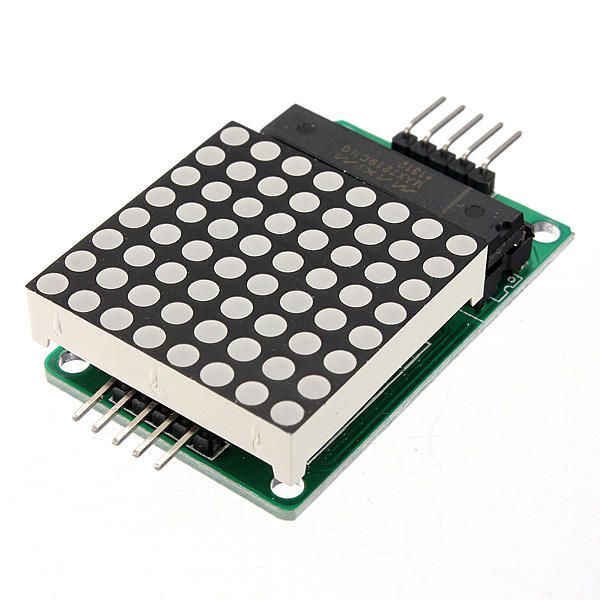
Awọn eroja pataki ti iṣẹ akanṣe yii ni modulu MAX7219 ati matirisi LED 8x8. MAX7219 jẹ iyika ti a ṣepọ ti o n ṣakoso ifihan ti awọn LED, n ṣakoso ibaraẹnisọrọ ati awọn ifihan agbara iṣakoso lati ọdọ Arduino. O nlo ibudo aṣẹ, eyi ti o tumọ si pe a le ṣakoso ọpọlọpọ awọn LED pẹlu diẹ ninu awọn pin lati ọdọ Arduino.
Matriki LED 8x8 naa awọn LED 64 ti a ṣeto ni nẹtiwọọki. LED kọọkan le tan-an tabi pa nipa fifiranṣẹ awọn aṣẹ to yẹ nipasẹ MAX7219. Eyi gba laaye fun ifihan awọn ohun kikọ ati awọn aworan oriṣiriṣi lori matriki naa.
Alaye iwe data
| Olùgbéejáde | Maxim Integrated |
|---|---|
| Nọmba apakan | MAX7219 |
| Iwọn folti logic/IO | 3.3V si 5.5V |
| Iwọn folti ipese | 4.0V si 5.5V |
| Iwọn lọwọlọwọ (nipasẹ ikanni) | 40 mA to pọ julọ |
| Iwọn lọwọlọwọ to ga julọ (fun ikanni kọọkan) | 100 mA to pọ julọ |
| Itọsọna igbohunsafẹfẹ PWM | 100 Hz |
| Iwọn aala iṣiro input | 2.0V (giga) / 0.8V (kekere) |
| Iwọn folti / RDS(on)/ idapọ | 0.2V típ. |
| Iwọn otutu ti o pọ julọ | 150°C |
| Pàkàjì | 16-DIP |
| Akọsilẹ / awọn iyatọ | Ipo anode ti o wọpọ |
- Rii daju pe ipese agbara to pe (4.0V si 5.5V).
- Lo lo resistors ti o ni ihamọ lọwọlọwọ fun LED kọọkan lati dena ibajẹ.
- Pa awọn waya kuru lati yago fun idiwọ.
- Ṣọ́ra fun itankalẹ́ ooru; lo heatsink ti o ba jẹ dandan.
- Ṣayẹwo awọn asopọ pin lẹmeji lati yago fun ibaraẹnisọrọ ti ko tọ.
Ilana Asopọ
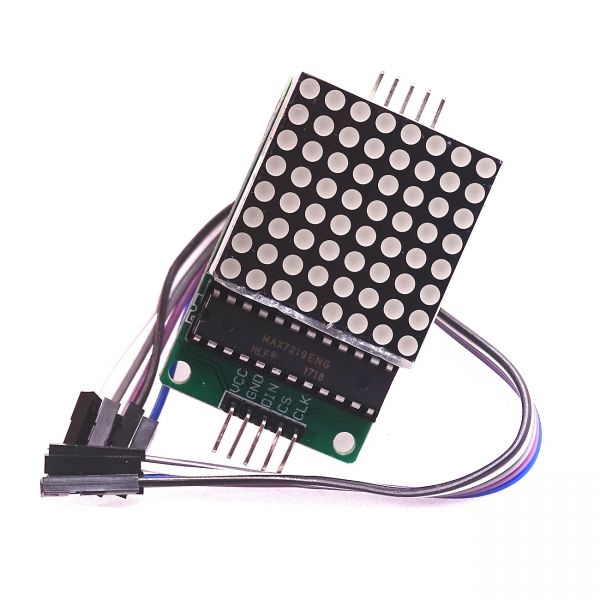
Lati so MAX7219 si Arduino, so awọn pin wọnyi:
- So pọ mọ
VCCpin ti MAX7219 si 5V Arduino. - Sopọ awọn
GNDpin si ilẹ̀ Arduino. - So pọ mọ
DINpin (Data In) si Arduino pin 12. - So pọ mọ
CLKpin (Aago) si pin Arduino 11. - Sopọ awọn
CSpin (Iṣakoso Chip) si pin Arduino 10.
Rii daju pe ki o ṣayẹwo pe gbogbo awọn asopọ jẹ aabo ṣaaju ki o to tan ina si iyika naa. Wiring naa rọrun, ṣugbọn ti o ba pade awọn iṣoro, ṣe atunyẹwo awọn asopọ ni pẹkipẹki (ni fidio ni 1:45).
Àpẹẹrẹ Kóòdù & Irin-ajo
Ninu koodu, a bẹrẹ nipa fifi ile-ikawe LedControl kun, eyiti o jẹ pataki fun ibaraẹnisọrọ pẹlu MAX7219. Apakan ti o tẹle n ṣe ipilẹṣẹ ohun LedControl:
LedControl lc=LedControl(12,11,10,1);Iwọn yii ṣeto pin data, pin aago, pin yiyan chip, ati nọmba awọn ẹrọ (1, ni ọran yii). Lẹhinna, ni thesetup()iṣẹ, a ji MAX7219 ati ṣeto agbara ifihan:
lc.shutdown(0,false);
lc.setIntensity(0,8);
lc.clearDisplay(0);
Eyi n jẹ́ kí àfihàn náà ṣiṣẹ́ àti pé ó ti ṣetan láti fi àwọn àkóónú hàn. Iṣẹ́ pàtàkì tó ń fa àfihàn náà niwriteArduinoOnMatrix(), ti o nṣiṣẹ ni atẹle lati tan imọlẹ awọn ila ti matrix lati ṣe afihan awọn lẹta.
Iṣafihan / Ohun ti a le reti
Lọ́pọ̀ àkókò tí gbogbo rẹ̀ bá ti wíra, àti pé kóòdù náà ti kó, àkópọ̀ LED yẹ kí o fi ọrọ "ROBOJAX" hàn. Bí àfihàn náà kò bá ṣiṣẹ́, ṣàyẹwo fún àwọn iṣoro bíi ìjápọ̀ tó rọrùn tàbí àtúnṣe pin tó kọ́. Pẹlú rẹ̀, jẹ́ kó dájú pé ipese agbara tó péye ni (ní fídíò ní 2:30).
Iwe akọsilẹ
- Ifáhàn (0:00)
- Iṣiro Hardware (0:30)
- Itọsọna Wiring (1:45)
- Iṣiro Koodu (2:15)
- Iṣafihan (3:00)
Aworan
/*
 * This video shows you how to use the MAX7219 module with an 8x8 LED matrix to display text or any characters on the LED.
 * Watch YouTube video: https://youtu.be/AAiDwBKs9uE
 *
 * Written by Ahmad Shamshiri for Robojax.com
 * on February 26, 2017 in Ajax, Ontario, Canada
 * Get this code and other Arduino codes from Robojax.com
 * Learn Arduino step by step in a structured course with all materials, wiring diagrams, and libraries
 * all in one place.

 ****************************
 * Get early access to my videos via Patreon and have your name mentioned at the end of every
 * video I publish on YouTube here: http://robojax.com/L/?id=63 (watch until the end of this video for a list of my Patrons)
 ****************************

 * Or make a donation using PayPal http://robojax.com/L/?id=64

 * This code is "AS IS" without warranty or liability. Free to be used as long as you keep this note intact.
 * This code has been downloaded from Robojax.com
    This program is free software: you can redistribute it and/or modify
    it under the terms of the GNU General Public License as published by
    the Free Software Foundation, either version 3 of the License, or
    (at your option) any later version.

    This program is distributed in the hope that it will be useful,
    but WITHOUT ANY WARRANTY; without even the implied warranty of
    MERCHANTABILITY or FITNESS FOR A PARTICULAR PURPOSE.  See the
    GNU General Public License for more details.

    You should have received a copy of the GNU General Public License
    along with this program.  If not, see <https://www.gnu.org/licenses/>.
*/


// We always have to include the library
// Based on a project posted https://github.com/wayoda/LedControl
#include "LedControl.h"

 /*
  Now we need a LedControl to work with.
  // Customized for RoboJax.com on February 26, 2017 in Ajax, Ontario, Canada.
  ***** These pin numbers will probably not work with your hardware *****
  pin 12 is connected to the DataIn
  pin 11 is connected to the CLK
  pin 10 is connected to CS
  We have only a single MAX72XX.
  */
 LedControl lc=LedControl(12,11,10,1);

 /* we always wait a bit between updates of the display */
 unsigned long delaytime=600;

 void setup() {
   /*
    The MAX72XX is in power-saving mode on startup,
    we have to do a wakeup call
    */
   lc.shutdown(0,false);
   /* Set the brightness to a medium value */
   lc.setIntensity(0,8);
   /* and clear the display */
   lc.clearDisplay(0);
 }

 /*
  This method will display the characters for the
  word "Arduino" one after the other on the matrix.
  (you need at least 5x7 LEDs to see the whole characters)
  */
 void writeArduinoOnMatrix() {
   /* here is the data for the characters */

   // K
   byte R[8]={B11111100,B10000100,B10000100,B11111000,B10100000,B10010000,B10001000,B10000100};
   byte O[8]={B00011000,B00100100,B01000010,B01000010,B01000010,B01000010,B00100100,B00011000};
   byte B[8]={B11111100,B10000100,B10000100,B11111000,B10001000,B10000100,B10000100,B11111100};
   byte J[8]={B00011110,B00000100,B00000100,B00000100,B10000100,B10000100,B01000100,B00111000};
   byte A[8]={B00111000,B01000100,B10000010,B11111110,B10000010,B10000010,B10000010,B10000010};
   byte X[8]={ B10000001,B01000010,B00100100,B00011000,B00011000,B00100100,B01000010,B10000001};
   byte love[8]={ B00000000,B01100110,B10011001,B10011001,B10000001,B01000010,B00100100,B00011000};


   /* Letter R */
   for (int i=0; i<8; i++){
   lc.setRow(0,i,R[i]);

   }

   delay(delaytime);
   for(int i=0; i<8; i++){
       lc.setRow(0,i,0);// this is for blank
   }
 //////////////// END of Letter R ///////

   /* Letter O */
   for (int i=0; i<8; i++){
   lc.setRow(0,i,O[i]);

   }

   delay(delaytime);
   for(int i=0; i<8; i++){
       lc.setRow(0,i,0);// this is for blank
   }
 //////////////// END of Letter O ///////


   /* Letter B */
   for (int i=0; i<8; i++){
   lc.setRow(0,i,B[i]);

   }

   delay(delaytime);
   for(int i=0; i<8; i++){
       lc.setRow(0,i,0);// this is for blank
   }
 //////////////// END of Letter B ///////

   /* Letter O */
   for (int i=0; i<8; i++){
   lc.setRow(0,i,O[i]);

   }

   delay(delaytime);
   for(int i=0; i<8; i++){
       lc.setRow(0,i,0);// this is for blank
   }
 //////////////// END of Letter O ///////

   /* Letter J */
   for (int i=0; i<8; i++){
   lc.setRow(0,i,J[i]);

   }

   delay(delaytime);
   for(int i=0; i<8; i++){
       lc.setRow(0,i,0);// this is for blank
   }
 //////////////// END of Letter J ///////

   /* Letter A */
   for (int i=0; i<8; i++){
   lc.setRow(0,i,A[i]);

   }

   delay(delaytime);
   for(int i=0; i<8; i++){
       lc.setRow(0,i,0);// this is for blank
   }
 //////////////// END of Letter A ///////

   /* Letter X */
   for (int i=0; i<8; i++){
   lc.setRow(0,i,X[i]);

   }

   delay(delaytime);
   for(int i=0; i<8; i++){
       lc.setRow(0,i,0);// this is for blank
   }
 //////////////// END of Letter X ///////


   /* love */
   for (int i=0; i<8; i++){
   lc.setRow(0,i,love[i]);

   }

   delay(delaytime);
   delay(delaytime);
   for(int i=0; i<8; i++){
       lc.setRow(0,i,0);// this is for blank
   }
 //////////////// END of Letter love ///////

 }// writeArduinoOnMatrix()  end


 void loop() {
   writeArduinoOnMatrix();

}/*
* This video shows you how to use the MAX7219 module with an 8x8 LED matrix to display text or any characters on the LED.
* Watch YouTube video: https://youtu.be/AAiDwBKs9uE
*
* Written by Ahmad S. for Robojax.com
* on February 26, 2017 in Ajax, Ontario, Canada
* Permission granted to share this code, given that this
* note is kept with the code.
* Disclaimer: This code is "AS IS" and for educational purposes only.
*/
// We always have to include the library
// Based on a project posted on https://github.com/wayoda/LedControl
#include "LedControl.h"
/*
Now we need a LedControl object to work with.
// Customized for RoboJax.com on February 26, 2017 in Ajax, Ontario, Canada.
***** These pin numbers will probably not work with your hardware *****
pin 1 is connected to the DataIn
pin 4 is connected to the CLK
pin 53 is connected to CS
We have only a single MAX72XX.
*/
LedControl lc=LedControl(1,4,53,1);// this line determines if this code can work with Arduino Mega or Arduino UNO
/* we always wait a bit between updates of the display */
unsigned long delaytime=600;
void setup() {
/*
The MAX72XX is in power-saving mode on startup,
we have to do a wakeup call
*/
lc.shutdown(0,false);
/* Set the brightness to a medium value */
lc.setIntensity(0,8);
/* and clear the display */
lc.clearDisplay(0);
}
/*
This method will display the characters for the
word "Arduino" one after the other on the matrix.
(you need at least 5x7 LEDs to see the whole characters)
*/
void writeArduinoOnMatrix() {
/* here is the data for the characters */
// K
byte R[8]={B11111100,B10000100,B10000100,B11111000,B10100000,B10010000,B10001000,B10000100};
byte O[8]={B00011000,B00100100,B01000010,B01000010,B01000010,B01000010,B00100100,B00011000};
byte B[8]={B11111100,B10000100,B10000100,B11111000,B10001000,B10000100,B10000100,B11111100};
byte J[8]={B00011110,B00000100,B00000100,B00000100,B10000100,B10000100,B01000100,B00111000};
byte A[8]={B00111000,B01000100,B10000010,B11111110,B10000010,B10000010,B10000010,B10000010};
byte X[8]={ B10000001,B01000010,B00100100,B00011000,B00011000,B00100100,B01000010,B10000001};
byte love[8]={ B00000000,B01100110,B10011001,B10011001,B10000001,B01000010,B00100100,B00011000};
/* Letter R */
for (int i=0; i<8; i++){
lc.setRow(0,i,R[i]);
}
delay(delaytime);
for(int i=0; i<8; i++){
lc.setRow(0,i,0);// this is for blank
}
/////////////// END of Letter R ///////
/* Letter O */
for (int i=0; i<8; i++){
lc.setRow(0,i,O[i]);
}
delay(delaytime);
for(int i=0; i<8; i++){
lc.setRow(0,i,0);// this is for blank
}
/////////////// END of Letter O ///////
/* Letter B */
for (int i=0; i<8; i++){
lc.setRow(0,i,B[i]);
}
delay(delaytime);
for(int i=0; i<8; i++){
lc.setRow(0,i,0);// this is for blank
}
/////////////// END of Letter B ///////
/* Letter O */
for (int i=0; i<8; i++){
lc.setRow(0,i,O[i]);
}
delay(delaytime);
for(int i=0; i<8; i++){
lc.setRow(0,i,0);// this is for blank
}
/////////////// END of Letter O ///////
/* Letter J */
for (int i=0; i<8; i++){
lc.setRow(0,i,J[i]);
}
delay(delaytime);
for(int i=0; i<8; i++){
lc.setRow(0,i,0);// this is for blank
}
/////////////// END of Letter J ///////
/* Letter A */
for (int i=0; i<8; i++){
lc.setRow(0,i,A[i]);
}
delay(delaytime);
for(int i=0; i<8; i++){
lc.setRow(0,i,0);// this is for blank
}
/////////////// END of Letter A ///////
/* Letter X */
for (int i=0; i<8; i++){
lc.setRow(0,i,X[i]);
}
delay(delaytime);
for(int i=0; i<8; i++){
lc.setRow(0,i,0);// this is for blank
}
/////////////// END of Letter X ///////
/* love */
for (int i=0; i<8; i++){
lc.setRow(0,i,love[i]);
}
delay(delaytime);
delay(delaytime);
for(int i=0; i<8; i++){
lc.setRow(0,i,0);// this is for blank
}
/////////////// END of love ///////
}// writeArduinoOnMatrix() end
void loop() {
writeArduinoOnMatrix();
}Ohun ti o le nilo
-
AmazonMax7219 8x8 Matrix on Amazonamzn.to
-
eBayMax7219 8x8 Matrix on eBayebay.us
-
AliExpressMax7219 8x8 Matrix on AliExpresss.click.aliexpress.com
Orisun & itọkasi
-
Iwe-ẹriView different board pin assignments for SPIarduino.cc
-
Ita gbangba
Fáìlìs📁
Awọn faili miiran
-
MAX7219 Iwe ika lati Robojax
robojax-MAX7219-matrix.zip0.01 MB -
8-Digit LED Display Library (from Robojax.com)
robojax_MAX7291_8_digits.zip