8x8 LED ማትሪክስ በ MAX7219 Arduino ሞጁል በመጠቀም
በዚህ ትምህርት፣ MAX7219 ሞጁልን ከአርዱኖ ጋር በመጠቀም ባለ 8x8 LED ማትሪክስ እንዴት መቆጣጠር እንደምንችል እንማራለን። MAX7219 የበርካታ LEDs ቁጥጥርን ያቃልላል፣ ይህም ቁምፊዎችን እና ቅጦችን በቀላሉ እንድናሳይ ያስችለናል። በዚህ ፕሮጀክት መጨረሻ፣ "ROBOJAX" የሚለውን ቃል በማትሪክስ ላይ ማሳየት ይችላሉ።
ይህንን ለማሳካት፣ ከMAX7219 ጋር ለመገናኘት በተለይ የተነደፈውን LedControl ቤተ-መጻሕፍትን እንጠቀማለን። ይህ ቤተ-መጻሕፍት በትንሽ ጥረት ወደ LED ማትሪክስ መረጃ እንድንልክ ያስችለናል። ስለ ሽቦ አያያዥነት እና ኮድ የበለጠ ግልጽ ግንዛቤ ከፈለጉ፣ ተያያዥውን ቪዲዮ መመልከትዎን ያረጋግጡ (በቪዲዮ 0:30 ላይ)።
ሃርድዌር ተብራርቷል
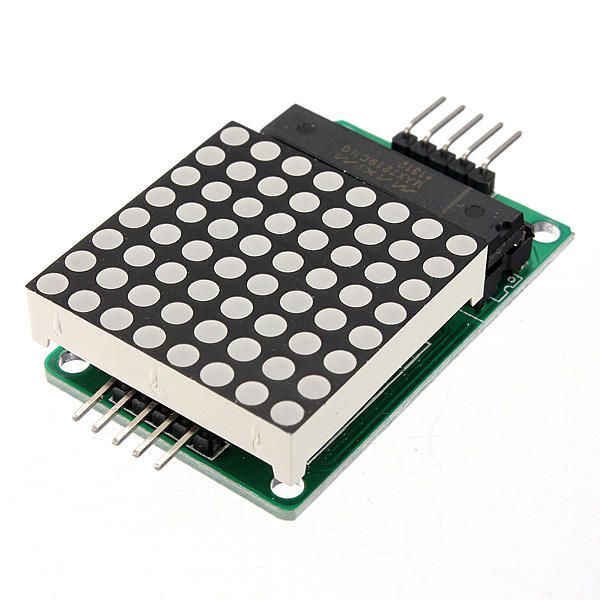
የዚህ ፕሮጀክት ዋና ክፍሎች MAX7219 ሞጁል እና ባለ 8x8 LED ማትሪክስ ያካትታሉ። MAX7219 የ LEDs ማሳያን የሚያስተዳድር፣ ከአርዱኖ የሚመጡ የግንኙነት እና የቁጥጥር ምልክቶችን የሚያስተናግድ የተቀናጀ ወረዳ ነው። ተከታታይ በይነገጽ ይጠቀማል፣ ይህም ማለት ከአርዱኖ ጥቂት ፒኖች ብቻ በመጠቀም ብዙ LEDs መቆጣጠር እንችላለን ማለት ነው።
ባለ 8x8 LED ማትሪክስ በፍርግርግ የተደረደሩ 64 የተለያዩ LEDs ያካትታል። እያንዳንዱ LED በMAX7219 በኩል ተገቢ ትዕዛዞችን በመላክ ማብራት ወይም ማጥፋት ይቻላል። ይህ በማትሪክስ ላይ የተለያዩ ቁምፊዎችን እና ግራፊክስን ለማሳየት ያስችላል።
የዳታሼት ዝርዝሮች
| አምራች | Maxim Integrated |
|---|---|
| የክፍል ቁጥር | MAX7219 |
| የሎጂክ/IO ቮልቴጅ | 3.3V እስከ 5.5V |
| የአቅርቦት ቮልቴጅ | 4.0V እስከ 5.5V |
| የውጤት ጅረት (በአንድ ቻናል) | 40 mA ከፍተኛ |
| ከፍተኛ ጅረት (በአንድ ቻናል) | 100 mA ከፍተኛ |
| የPWM ድግግሞሽ መመሪያ | 100 Hz |
| የግቤት ሎጂክ ገደቦች | 2.0V (ከፍተኛ) / 0.8V (ዝቅተኛ) |
| የቮልቴጅ ጠብታ / RDS(on) / ሙሌት | 0.2V በተለምዶ |
| የሙቀት ገደቦች | 150°C |
| ፓኬጅ | 16-DIP |
| ማስታወሻዎች / ልዩነቶች | የጋራ አኖድ ውቅር |
- ትክክለኛ የኃይል አቅርቦት (4.0V እስከ 5.5V) ያረጋግጡ።
- ጉዳትን ለመከላከል ለእያንዳንዱ LED የጅረት መገደቢያ ተቃዋሚዎችን ይጠቀሙ።
- ጣልቃ ገብነትን ለማስቀረት ሽቦዎችን አጭር ያድርጉ።
- የሙቀት መበታተንን ይቆጣጠሩ; አስፈላጊ ከሆነ የሙቀት መስጫ ይጠቀሙ።
- የተሳሳተ ግንኙነትን ለማስቀረት የፒን ግንኙነቶችን በድጋሚ ያረጋግጡ።
የሽቦ አያያዥነት መመሪያዎች
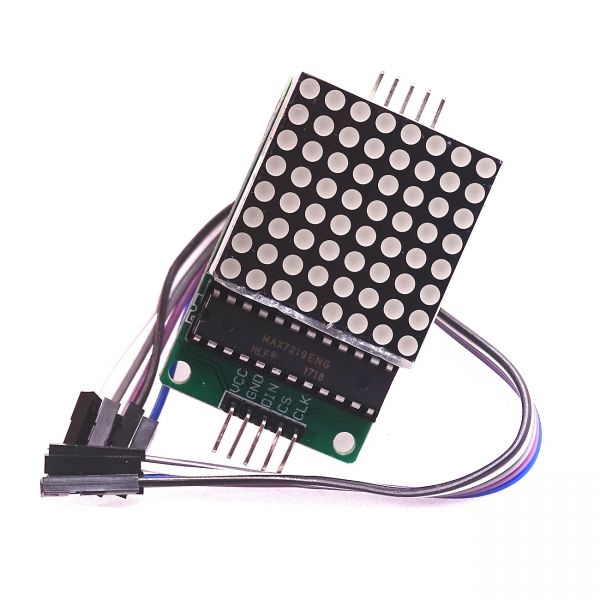
MAX7219ን ከአርዱኖ ጋር ለማገናኘት የሚከተሉትን ፒኖች ያገናኙ፦
- የMAX7219ን
VCCፒን ከአርዱኖው 5V ጋር ያገናኙ። GNDፒንን ከአርዱኖው መሬት ጋር ያገናኙ።DINፒንን (የውሂብ ግቤት) ከአርዱኖ ፒን 12 ጋር ያገናኙ።CLKፒንን (ሰዓት) ከአርዱኖ ፒን 11 ጋር ያገናኙ።CSፒንን (ቺፕ ምረጥ) ከአርዱኖ ፒን 10 ጋር ያገናኙ።
ወረዳውን ከማብራትዎ በፊት ሁሉም ግንኙነቶች ደህንነታቸው የተጠበቀ መሆኑን ማረጋገጥዎን ያስታውሱ። ሽቦው ቀላል ነው፣ ነገር ግን ችግሮች ካጋጠሙዎት ግንኙነቶቹን በጥንቃቄ ይገምግሙ (በቪዲዮ 1:45 ላይ)።
የኮድ ምሳሌዎች እና ጉዞ
በኮዱ ውስጥ፣ ከMAX7219 ጋር ለመገናኘት አስፈላጊ የሆነውን LedControl ቤተ-መጻሕፍትን በማካተት እንጀምራለን። የሚከተለው ቅንጥብ የLedControl ነገርን ያስጀምራል፦
LedControl lc=LedControl(12,11,10,1);ይህ መስመር የውሂብ ፒን፣ የሰዓት ፒን፣ የቺፕ ምረጥ ፒን እና የመሣሪያዎችን ብዛት (በዚህ ጉዳይ 1) ያዘጋጃል። በመቀጠል፣ በsetup() ተግባር ውስጥ፣ MAX7219ን እናነቃለን እና የማሳያ ጥንካሬን እናዘጋጃለን፦
lc.shutdown(0,false);
lc.setIntensity(0,8);
lc.clearDisplay(0);
ይህ ማሳያው ንቁ እና ቁምፊዎችን ለማሳየት ዝግጁ መሆኑን ያረጋግጣል። ማሳያውን የሚያሽከረክረው ዋናው ተግባር writeArduinoOnMatrix() ሲሆን፣ ፊደላትን ለማሳየት የማትሪክሱን ረድፎች በቅደም ተከተል ያበራል።
ማሳያ / ምን እንደሚጠበቅ
ሁሉም ነገር በሽቦ ከተገናኘ እና ኮዱ ከተጫነ በኋላ፣ የLED ማትሪክስ "ROBOJAX" የሚለውን ቃል ማሳየት አለበት። ማሳያው ካልሰራ፣ እንደ ልቅ ግንኙነቶች ወይም የተሳሳተ የፒን ምደባ ያሉ ችግሮችን ይፈትሹ። በተጨማሪም፣ የኃይል አቅርቦቱ በቂ መሆኑን ያረጋግጡ (በቪዲዮ 2:30 ላይ)።
ምዕራፎች
- መግቢያ (0:00)
- የሃርድዌር አጠቃላይ እይታ (0:30)
- የሽቦ አያያዥነት መመሪያዎች (1:45)
- የኮድ ጉዞ (2:15)
- ማሳያ (3:00)
ምስሎች
/*
 * This video shows you how to use the MAX7219 module with an 8x8 LED matrix to display text or any characters on the LED.
 * Watch YouTube video: https://youtu.be/AAiDwBKs9uE
 *
 * Written by Ahmad Shamshiri for Robojax.com
 * on February 26, 2017 in Ajax, Ontario, Canada
 * Get this code and other Arduino codes from Robojax.com
 * Learn Arduino step by step in a structured course with all materials, wiring diagrams, and libraries
 * all in one place.

 ****************************
 * Get early access to my videos via Patreon and have your name mentioned at the end of every
 * video I publish on YouTube here: http://robojax.com/L/?id=63 (watch until the end of this video for a list of my Patrons)
 ****************************

 * Or make a donation using PayPal http://robojax.com/L/?id=64

 * This code is "AS IS" without warranty or liability. Free to be used as long as you keep this note intact.
 * This code has been downloaded from Robojax.com
    This program is free software: you can redistribute it and/or modify
    it under the terms of the GNU General Public License as published by
    the Free Software Foundation, either version 3 of the License, or
    (at your option) any later version.

    This program is distributed in the hope that it will be useful,
    but WITHOUT ANY WARRANTY; without even the implied warranty of
    MERCHANTABILITY or FITNESS FOR A PARTICULAR PURPOSE.  See the
    GNU General Public License for more details.

    You should have received a copy of the GNU General Public License
    along with this program.  If not, see <https://www.gnu.org/licenses/>.
*/


// We always have to include the library
// Based on a project posted https://github.com/wayoda/LedControl
#include "LedControl.h"

 /*
  Now we need a LedControl to work with.
  // Customized for RoboJax.com on February 26, 2017 in Ajax, Ontario, Canada.
  ***** These pin numbers will probably not work with your hardware *****
  pin 12 is connected to the DataIn
  pin 11 is connected to the CLK
  pin 10 is connected to CS
  We have only a single MAX72XX.
  */
 LedControl lc=LedControl(12,11,10,1);

 /* we always wait a bit between updates of the display */
 unsigned long delaytime=600;

 void setup() {
   /*
    The MAX72XX is in power-saving mode on startup,
    we have to do a wakeup call
    */
   lc.shutdown(0,false);
   /* Set the brightness to a medium value */
   lc.setIntensity(0,8);
   /* and clear the display */
   lc.clearDisplay(0);
 }

 /*
  This method will display the characters for the
  word "Arduino" one after the other on the matrix.
  (you need at least 5x7 LEDs to see the whole characters)
  */
 void writeArduinoOnMatrix() {
   /* here is the data for the characters */

   // K
   byte R[8]={B11111100,B10000100,B10000100,B11111000,B10100000,B10010000,B10001000,B10000100};
   byte O[8]={B00011000,B00100100,B01000010,B01000010,B01000010,B01000010,B00100100,B00011000};
   byte B[8]={B11111100,B10000100,B10000100,B11111000,B10001000,B10000100,B10000100,B11111100};
   byte J[8]={B00011110,B00000100,B00000100,B00000100,B10000100,B10000100,B01000100,B00111000};
   byte A[8]={B00111000,B01000100,B10000010,B11111110,B10000010,B10000010,B10000010,B10000010};
   byte X[8]={ B10000001,B01000010,B00100100,B00011000,B00011000,B00100100,B01000010,B10000001};
   byte love[8]={ B00000000,B01100110,B10011001,B10011001,B10000001,B01000010,B00100100,B00011000};


   /* Letter R */
   for (int i=0; i<8; i++){
   lc.setRow(0,i,R[i]);

   }

   delay(delaytime);
   for(int i=0; i<8; i++){
       lc.setRow(0,i,0);// this is for blank
   }
 //////////////// END of Letter R ///////

   /* Letter O */
   for (int i=0; i<8; i++){
   lc.setRow(0,i,O[i]);

   }

   delay(delaytime);
   for(int i=0; i<8; i++){
       lc.setRow(0,i,0);// this is for blank
   }
 //////////////// END of Letter O ///////


   /* Letter B */
   for (int i=0; i<8; i++){
   lc.setRow(0,i,B[i]);

   }

   delay(delaytime);
   for(int i=0; i<8; i++){
       lc.setRow(0,i,0);// this is for blank
   }
 //////////////// END of Letter B ///////

   /* Letter O */
   for (int i=0; i<8; i++){
   lc.setRow(0,i,O[i]);

   }

   delay(delaytime);
   for(int i=0; i<8; i++){
       lc.setRow(0,i,0);// this is for blank
   }
 //////////////// END of Letter O ///////

   /* Letter J */
   for (int i=0; i<8; i++){
   lc.setRow(0,i,J[i]);

   }

   delay(delaytime);
   for(int i=0; i<8; i++){
       lc.setRow(0,i,0);// this is for blank
   }
 //////////////// END of Letter J ///////

   /* Letter A */
   for (int i=0; i<8; i++){
   lc.setRow(0,i,A[i]);

   }

   delay(delaytime);
   for(int i=0; i<8; i++){
       lc.setRow(0,i,0);// this is for blank
   }
 //////////////// END of Letter A ///////

   /* Letter X */
   for (int i=0; i<8; i++){
   lc.setRow(0,i,X[i]);

   }

   delay(delaytime);
   for(int i=0; i<8; i++){
       lc.setRow(0,i,0);// this is for blank
   }
 //////////////// END of Letter X ///////


   /* love */
   for (int i=0; i<8; i++){
   lc.setRow(0,i,love[i]);

   }

   delay(delaytime);
   delay(delaytime);
   for(int i=0; i<8; i++){
       lc.setRow(0,i,0);// this is for blank
   }
 //////////////// END of Letter love ///////

 }// writeArduinoOnMatrix()  end


 void loop() {
   writeArduinoOnMatrix();

}/*
* This video shows you how to use the MAX7219 module with an 8x8 LED matrix to display text or any characters on the LED.
* Watch YouTube video: https://youtu.be/AAiDwBKs9uE
*
* Written by Ahmad S. for Robojax.com
* on February 26, 2017 in Ajax, Ontario, Canada
* Permission granted to share this code, given that this
* note is kept with the code.
* Disclaimer: This code is "AS IS" and for educational purposes only.
*/
// We always have to include the library
// Based on a project posted on https://github.com/wayoda/LedControl
#include "LedControl.h"
/*
Now we need a LedControl object to work with.
// Customized for RoboJax.com on February 26, 2017 in Ajax, Ontario, Canada.
***** These pin numbers will probably not work with your hardware *****
pin 1 is connected to the DataIn
pin 4 is connected to the CLK
pin 53 is connected to CS
We have only a single MAX72XX.
*/
LedControl lc=LedControl(1,4,53,1);// this line determines if this code can work with Arduino Mega or Arduino UNO
/* we always wait a bit between updates of the display */
unsigned long delaytime=600;
void setup() {
/*
The MAX72XX is in power-saving mode on startup,
we have to do a wakeup call
*/
lc.shutdown(0,false);
/* Set the brightness to a medium value */
lc.setIntensity(0,8);
/* and clear the display */
lc.clearDisplay(0);
}
/*
This method will display the characters for the
word "Arduino" one after the other on the matrix.
(you need at least 5x7 LEDs to see the whole characters)
*/
void writeArduinoOnMatrix() {
/* here is the data for the characters */
// K
byte R[8]={B11111100,B10000100,B10000100,B11111000,B10100000,B10010000,B10001000,B10000100};
byte O[8]={B00011000,B00100100,B01000010,B01000010,B01000010,B01000010,B00100100,B00011000};
byte B[8]={B11111100,B10000100,B10000100,B11111000,B10001000,B10000100,B10000100,B11111100};
byte J[8]={B00011110,B00000100,B00000100,B00000100,B10000100,B10000100,B01000100,B00111000};
byte A[8]={B00111000,B01000100,B10000010,B11111110,B10000010,B10000010,B10000010,B10000010};
byte X[8]={ B10000001,B01000010,B00100100,B00011000,B00011000,B00100100,B01000010,B10000001};
byte love[8]={ B00000000,B01100110,B10011001,B10011001,B10000001,B01000010,B00100100,B00011000};
/* Letter R */
for (int i=0; i<8; i++){
lc.setRow(0,i,R[i]);
}
delay(delaytime);
for(int i=0; i<8; i++){
lc.setRow(0,i,0);// this is for blank
}
/////////////// END of Letter R ///////
/* Letter O */
for (int i=0; i<8; i++){
lc.setRow(0,i,O[i]);
}
delay(delaytime);
for(int i=0; i<8; i++){
lc.setRow(0,i,0);// this is for blank
}
/////////////// END of Letter O ///////
/* Letter B */
for (int i=0; i<8; i++){
lc.setRow(0,i,B[i]);
}
delay(delaytime);
for(int i=0; i<8; i++){
lc.setRow(0,i,0);// this is for blank
}
/////////////// END of Letter B ///////
/* Letter O */
for (int i=0; i<8; i++){
lc.setRow(0,i,O[i]);
}
delay(delaytime);
for(int i=0; i<8; i++){
lc.setRow(0,i,0);// this is for blank
}
/////////////// END of Letter O ///////
/* Letter J */
for (int i=0; i<8; i++){
lc.setRow(0,i,J[i]);
}
delay(delaytime);
for(int i=0; i<8; i++){
lc.setRow(0,i,0);// this is for blank
}
/////////////// END of Letter J ///////
/* Letter A */
for (int i=0; i<8; i++){
lc.setRow(0,i,A[i]);
}
delay(delaytime);
for(int i=0; i<8; i++){
lc.setRow(0,i,0);// this is for blank
}
/////////////// END of Letter A ///////
/* Letter X */
for (int i=0; i<8; i++){
lc.setRow(0,i,X[i]);
}
delay(delaytime);
for(int i=0; i<8; i++){
lc.setRow(0,i,0);// this is for blank
}
/////////////// END of Letter X ///////
/* love */
for (int i=0; i<8; i++){
lc.setRow(0,i,love[i]);
}
delay(delaytime);
delay(delaytime);
for(int i=0; i<8; i++){
lc.setRow(0,i,0);// this is for blank
}
/////////////// END of love ///////
}// writeArduinoOnMatrix() end
void loop() {
writeArduinoOnMatrix();
}እንደሚያስፈልግዎት ይችላል
-
አማዞንMax7219 8x8 Matrix on Amazonamzn.to
-
ኢቤይMax7219 8x8 Matrix on eBayebay.us
-
አሊኤክስፕሬስMax7219 8x8 Matrix on AliExpresss.click.aliexpress.com
ምንጮች እና ምንጮች
-
ሰነዶችView different board pin assignments for SPIarduino.cc
-
ውስጥ
ፋይሎች📁
ሌላ ፋይሎች
-
MAX7219 ማትሪክስ ቤተ መዋቅር ከሮቦጃክስ
robojax-MAX7219-matrix.zip0.01 MB -
8-Digit LED Display Library (from Robojax.com)
robojax_MAX7291_8_digits.zip