本教程是的一部分: 使用 PCA9685 控制 16 或 32 伺服电机
这套包含视频教程的合集将帮助您使用 Arduino UNO、Nano、Mini 或 ESP32 控制 32 个或更多伺服电机。所有代码均已提供。

使用PCA9685模块和ESP32 V4控制32个伺服电机
在本教程中,您将学习如何使用连接到 PCA9685 模块的 ESP32 微控制器控制多达 32 个舵机电机。这对于需要多个舵机电机同时操作的项目尤其有用,而无需使用 Wi-Fi。最终将实现一个完全功能的设置,您可以单独操控每个舵机电机的位置。

本教程将指导您了解所需的硬件组件、接线说明以及实现此控制所需的代码概述。如需详细演示,请考虑观看相关视频(视频在00:00)。
硬件解析
本项目中使用的主要组件是ESP32微控制器和PCA9685 PWM驱动模块。ESP32作为主控制器,向PCA9685模块发送信号,该模块反过来控制伺服电机。PCA9685每个模块可以处理多达16个伺服电机,允许连接两个模块以控制总共32个伺服电机。
PCA9685模块使用I2C通信操作,这意味着它有两根主要的数据传输线:SDA(数据线)和SCL(时钟线)。它还需要电源来操作伺服电机,通常为5V。ESP32作为主设备,提供必要的控制信号给从属的PCA9685模块。
数据表详情
| 制造商 | Adafruit |
|---|---|
| 部件号 | PCA9685 |
| 逻辑/IO 电压 | 3.3 V 到 5.5 V |
| 供电电压 | 5 V |
| 每个通道的输出电流 | ~20 毫安 |
| 峰值电流(每通道) | 约25毫安 |
| PWM频率指导 | 60赫兹 |
| 输入逻辑阈值 | 0.3*VDD(低),0.7*VDD(高) |
| 电压降 / RDS(开)/ 饱和度 | 最大0.5伏 |
| 热极限 | 125 °C |
| 包裹 | HTSSOP-28 |
| 备注 / 变体 | 16通道PWM控制器 |
- 为伺服电机使用外部电源(建议5V,2A)。
- 确保ESP32与PCA9685之间正确接地。
- 检查PWM频率设置以获得最佳伺服性能。
- 根据伺服规格调整脉冲宽度限制。
- 在多个伺服电机同时工作时,要注意电流消耗。
接线说明
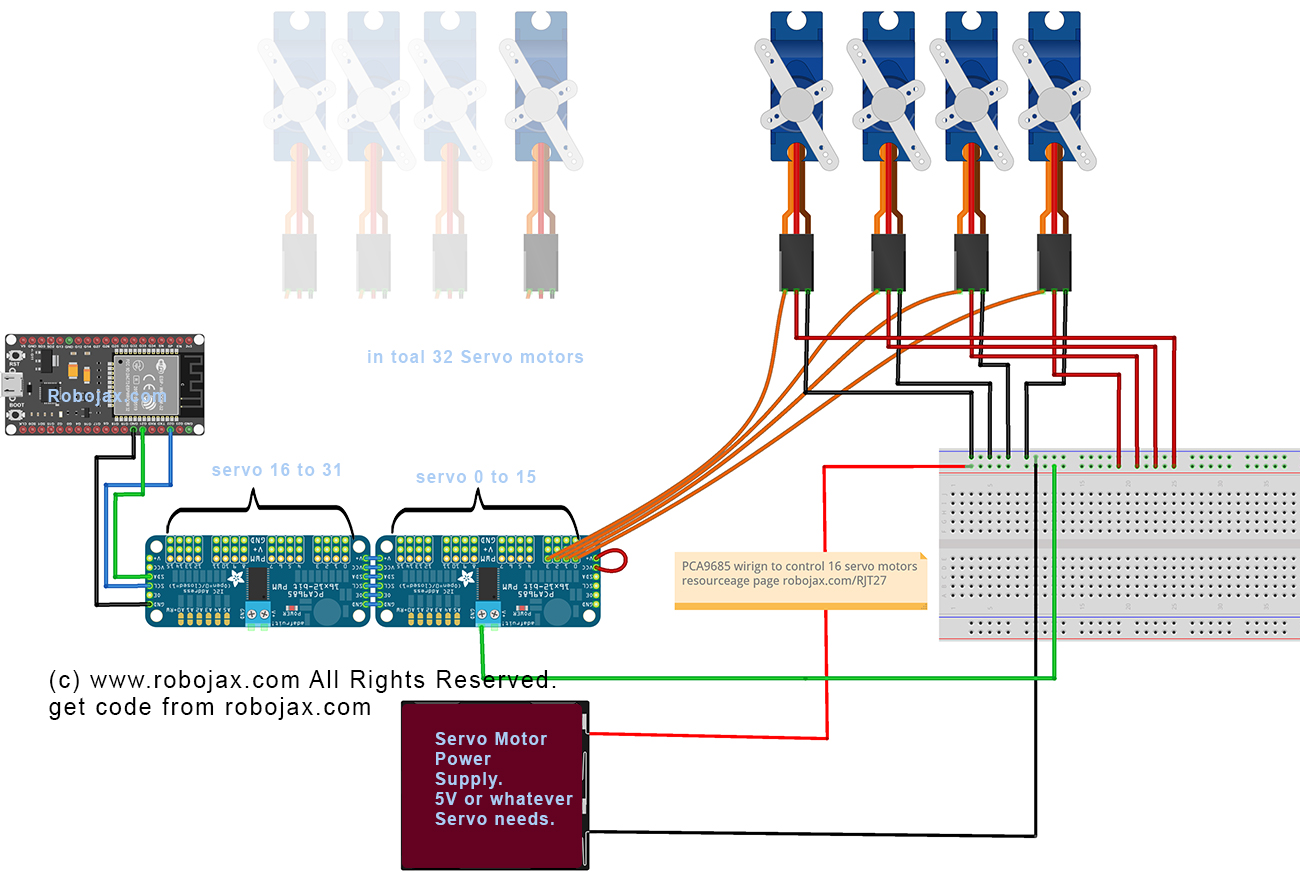
要将PCA9685连接到ESP32,首先连接电源和接地。连接VCC将PCA9685上的引脚连接到5V电源,并将GND引脚连接到ESP32上的一个GND引脚。这确保模块和ESP32共享一个公共接地。
接下来,对于I2C通信,将PCA9685上的SDA引脚连接到ESP32的GPIO 21,将SCL引脚连接到GPIO 22。此设置使ESP32能够正确与PCA9685模块通信。确保使用短线以避免通信线路中的噪声,尤其是在使用多个伺服电机时。
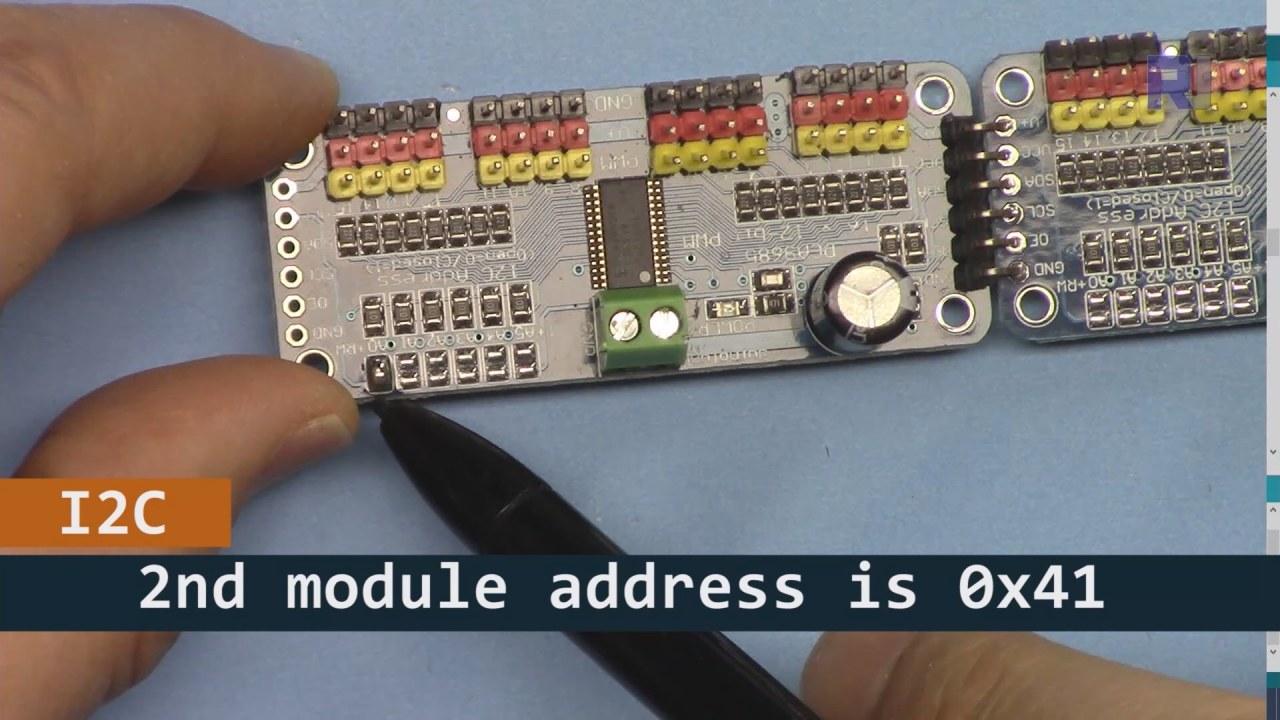
如上图所示,对于PCA9685板2(左侧),请确保焊接该路径以设置I2C地址,使其与板1(右侧)不同。
代码示例与演练
代码初始化了PCA9685模块并设置了PWM频率。代码中的关键标识符包括board1和board2,代表连接到ESP32的两个PCA9685模块。setup()函数初始化串行监视器并设置两个电路板的PWM频率。
void setup() {
  Serial.begin(9600);
  Serial.println("32 channel Servo test!");

  board1.begin();
  board2.begin();
  board1.setPWMFreq(60);  // Analog servos run at ~60 Hz updates
  board2.setPWMFreq(60);
}该摘录展示了设置过程,其中初始化了串行通信,并为伺服驱动器设置了PWM频率。setPWMFreq(60)该功能确保伺服电机接收到正确的频率,以便顺利运作。
在循环中,一个for循环遍历从0到180度的角度,向连接到两个PCA9685板的舵机发送脉宽命令。该函数angleToPulse将角度转换为相应的脉宽。
void loop() {
    for(int angle = 0; angle < 181; angle += 10) {
        for(int i = 0; i < 16; i++) {
            board2.setPWM(i, 0, angleToPulse(angle));
            board1.setPWM(i, 0, angleToPulse(angle));
        }
    }
    delay(100);
}此代码片段演示了伺服如何在循环中控制。伺服角度每次增加10度,接下来setPWM该函数在两个电路板上被调用,以将伺服电机移动到指定角度。延迟使移动之间有一个短暂的暂停。
演示 / 期待什么
完成接线并上传代码后,您应该会看到伺服电机从0到180度逐渐移动。所有连接到两个PCA9685模块的32个伺服电机将同时发生这种情况。如果有任何伺服电机没有响应,请检查电源并确保所有连接都牢固(视频中在12:30)。

视频时间戳
- 00:00 开始
- 00:36 介绍
- 04:01 接线说明(仅限ESP32)
- 06:26 为ESP32准备Arduino IDE
- 08:34 代码解释
- 13:40 演示运行32个伺服电机
图像


本教程是……的一部分: 使用 PCA9685 控制 16 或 32 伺服电机
/*
 * Original library source: https://github.com/adafruit/Adafruit-PWM-Servo-Driver-Library
 *
 * This is the Arduino code PCA6985 16 channel servo controller
 * to control 32 Servo Motors with ESP32 board without WiFi

  get this code and wiring from for this video:  http://robojax.com/RJT268
 *
 * This is V4 Video on PCA9685: https://youtu.be/JFdXB8Za5Os
 *
 * watch the video for details (V1) and demo http://youtu.be/y8X9X10Tn1k

 *

 * Written/updated by Ahmad Shamshiri for Robojax Video channel www.Robojax.com
 * Date: Dec 15, 2019, in Ajax, Ontario, Canada

 * Disclaimer: this code is "AS IS" and for educational purpose only.


or make donation using PayPal http://robojax.com/L/?id=64

 *  * This code is "AS IS" without warranty or liability. Free to be used as long as you keep this note intact.*
 * This code has been download from Robojax.com
    This program is free software: you can redistribute it and/or modify
    it under the terms of the GNU General Public License as published by
    the Free Software Foundation, either version 3 of the License, or
    (at your option) any later version.

    This program is distributed in the hope that it will be useful,
    but WITHOUT ANY WARRANTY; without even the implied warranty of
    MERCHANTABILITY or FITNESS FOR A PARTICULAR PURPOSE.  See the
    GNU General Public License for more details.

    You should have received a copy of the GNU General Public License
    along with this program.  If not, see <https://www.gnu.org/licenses/>.
 */
#include <Wire.h>

#include <Adafruit_PWMServoDriver.h>

// called this way, it uses the default address 0x40
Adafruit_PWMServoDriver board1 = Adafruit_PWMServoDriver(0x40);
Adafruit_PWMServoDriver board2 = Adafruit_PWMServoDriver(0x41);

// Depending on your servo make, the pulse width min and max may vary, you
// want these to be as small/large as possible without hitting the hard stop
// for max range. You'll have to tweak them as necessary to match the servos you
// have!
// Watch video V1 to understand the two lines below: http://youtu.be/y8X9X10Tn1k
#define SERVOMIN  125 // this is the 'minimum' pulse length count (out of 4096)
#define SERVOMAX  575 // this is the 'maximum' pulse length count (out of 4096)


int servoNumber = 0;

void setup() {
  Serial.begin(9600);
  Serial.println("32 channel Servo test!");

  board1.begin();
  board2.begin();
  board1.setPWMFreq(60);  // Analog servos run at ~60 Hz updates
  board2.setPWMFreq(60);
  //yield();
}

// the code inside loop() has been updated by Robojax
void loop() {


    for( int angle =0; angle<181; angle +=10){
      for(int i=0; i<16; i++)
        {
            board2.setPWM(i, 0, angleToPulse(angle) );
            board1.setPWM(i, 0, angleToPulse(angle) );
        }
    }

// robojax PCA9865 16 channel Servo control
  delay(100);

}

/*
 * angleToPulse(int ang)
 * gets angle in degree and returns the pulse width
 * also prints the value on seial monitor
 * written by Ahmad Shamshiri for Robojax, Robojax.com
 */
int angleToPulse(int ang){
   int pulse = map(ang,0, 180, SERVOMIN,SERVOMAX);// map angle of 0 to 180 to Servo min and Servo max
   Serial.print("Angle: ");Serial.print(ang);
   Serial.print(" pulse: ");Serial.println(pulse);
   return pulse;
}
|||您可能需要的东西
-
亚马逊从亚马逊购买PCA9685amzn.to
-
易趣在eBay上购买PCA9685ebay.us
-
全球速卖通从AliExpress购买PCA9685s.click.aliexpress.com
-
Banggood从Bangood购买PCA9685banggood.com
资源与参考
尚无可用资源。
文件📁
Arduino 库(zip 格式)
-
Adafruit-PWM-舵机驱动库-主文件
Adafruit-PWM-Servo-Driver-Library-master.zip0.02 MB