使用VL53L1X激光测距传感器测量最长可达4米的距离
VL53L1X是一款飞行时间激光距离传感器,能够高精度地测量最长可达4米的距离。该传感器通过I2C进行通信,适用于各种应用,如机器人技术和自动化。在本教程中,我们将探讨如何与Arduino一起设置VL53L1X传感器,并有效读取距离值。
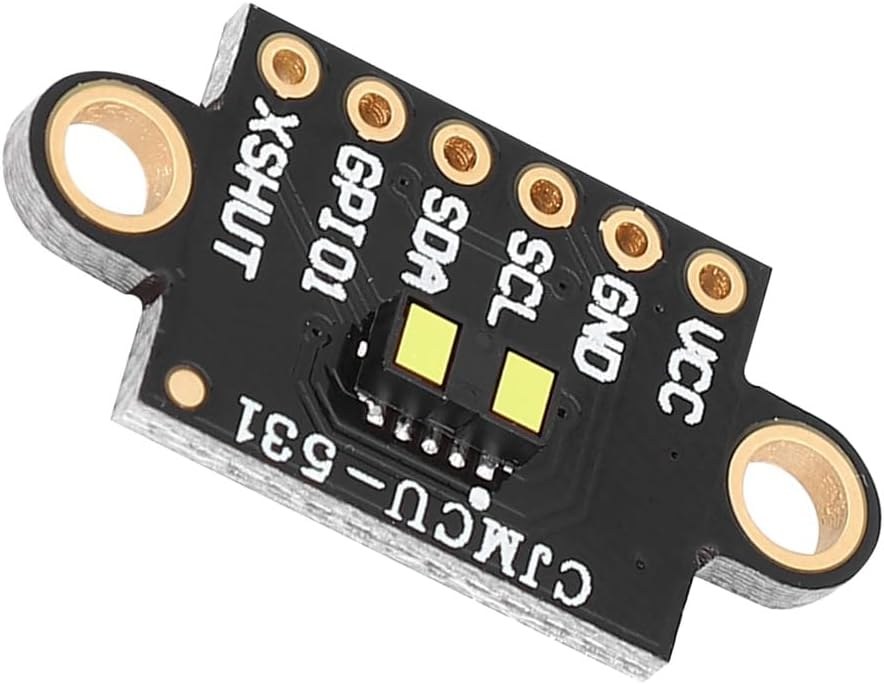
传感器可以由3.3V或5V供电,并且拥有多个用于I2C通信的引脚,包括SDA和SCL。传感器可以以50Hz的频率测量距离,从而实现快速的距离读取。本教程将引导您完成接线过程以及操作传感器所需的代码。如需进一步澄清,可以查看视频(在视频的00:00处)。
硬件解析
该项目的主要组件是 VL53L1X 激光距离传感器,它利用一种称为飞行时间(ToF)的技术来测量距离。这意味着它通过计时激光脉冲在击中物体后返回所需的时间来计算与物体的距离。传感器具有 I2C 通信功能,便于与 Arduino 等微控制器集成。除了传感器,您还需要一个 Arduino 主板进行处理。Arduino 将处理与 VL53L1X 的通信并显示测量的距离。设置非常简单,因为传感器可以直接从 Arduino 的输出引脚供电。
数据表详情
| 制造商 | 意法半导体 |
|---|---|
| 零件号码 | VL53L1X |
| 逻辑/输入输出电压 | 3.3 - 5 V |
| 供电电压 | 2.6 - 5.5 伏 |
| 每个通道的输出电流 | 不适用 |
| 峰值电流(每通道) | 不适用 |
| PWM频率指导 | 不适用 |
| 输入逻辑阈值 | 0.3 × VCC (低), 0.7 × VCC (高) |
| 电压降 / RDS(开启)/ 饱和度 | 不适用 |
| 热限制 | 0 到 85 °C |
| 包裹 | 4.9 x 2.5 x 1.6 毫米 |
| 备注 / 变体 | 长距离飞行时间传感器 |
- 根据需要使用3.3V或5V为传感器供电。
- 使用I2C引脚SDA和SCL进行通信。
- 根据您的需要设置距离模式(短、中、长)。
- 确保传感器经过校准,以获得准确的距离读数。
- 在处理环境光条件时请小心,因为它们可能会影响测量结果。
接线说明
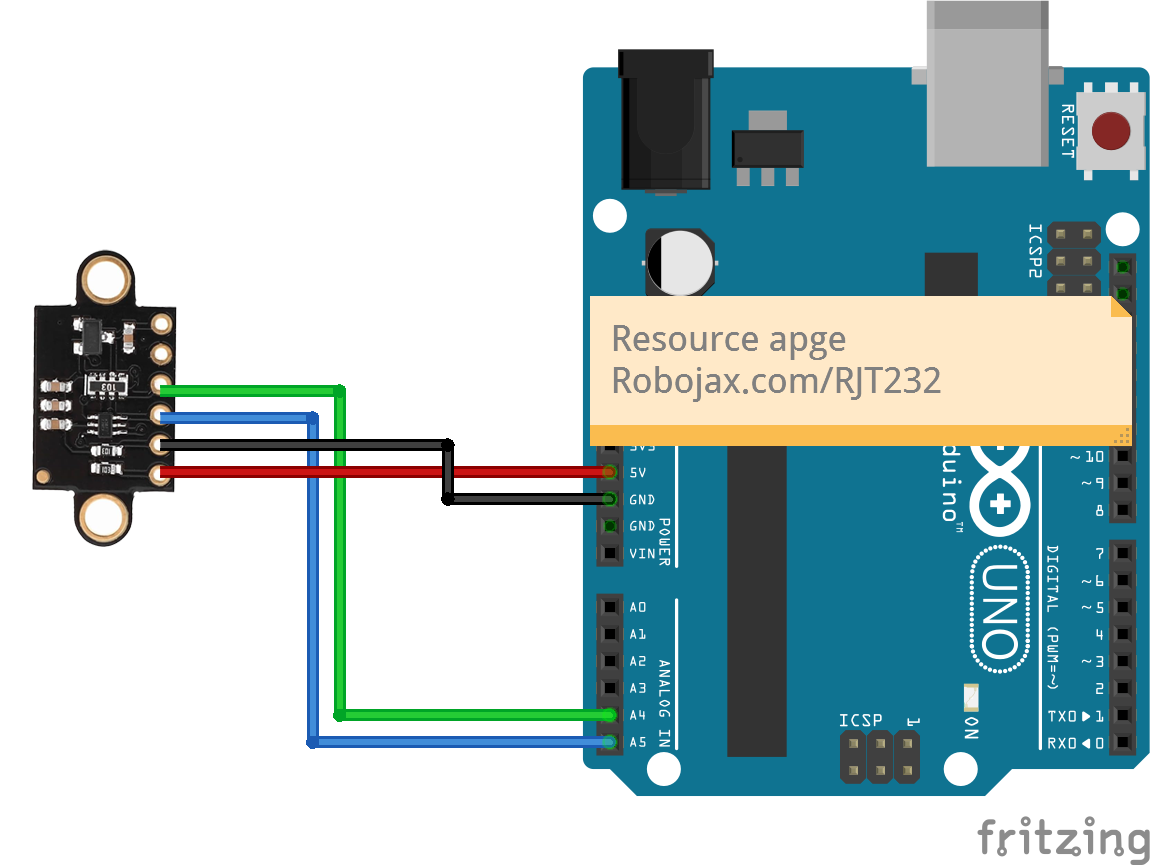
要将VL53L1X传感器接线到Arduino,请使用红色线将传感器的VCC引脚连接到Arduino的5V引脚。使用棕色线将传感器的接地引脚(GND)连接到Arduino的GND。对于I2C通信,使用黄色线将传感器的SDA引脚连接到Arduino的A4引脚,使用绿色线将SCL引脚连接到A5引脚。如果您想使用可选的中断和关机引脚,请将关机引脚连接到数字引脚2,将中断引脚连接到数字引脚3,但这些对于基本操作并不是必需的。
代码示例和操作指南
在代码中,我们首先包含必要的库,并定义传感器的引脚。我们用以下行创建传感器的实例:
SFEVL53L1X distanceSensor;这一行初始化传感器,允许我们在程序后面的部分调用它的方法。接下来,我们设置I2C通信并初始化传感器:
void setup(void)
{
  Wire.begin();
  Serial.begin(9600);
  Serial.println("VL53L1X Qwiic Test");

  if (distanceSensor.begin() == 0) //Begin returns 0 on a good init
  {
    Serial.println("Sensor online!");
  }
}在这段摘录中,我们开始了I2C通信与Wire.begin()并检查传感器是否成功初始化。最后,为了读取距离,我们在循环中使用以下代码:
void loop(void)
{
  int distance = distanceSensor.getDistance(); // Get distance
  Serial.print("Distance: ");
  Serial.println(distance);
}
这段代码获取距离测量值并将其打印到串口监视器。循环持续读取距离,实现实时更新。有关完整代码示例,请参阅文章下方加载的完整代码。
示范 / 期待什么
当传感器正确设置时,您可以期待它提供准确的距离测量,范围可达 4 米。您可能会注意到读数的轻微波动,特别是在不同的光照条件下(视频中在 10:30)。确保传感器清洁且没有阻碍对于获得精确结果至关重要。如果您遇到任何异常读数,请检查传感器是否正确供电,并确保 I2C 连接牢固。传感器的性能可能会受到环境的影响,特别是在强光或反射表面下。
视频时间戳
- 00:00 开始
- 00:40 介绍
- 03:42 数据表已访问
- 06:48 士兵别针标头
- 08:22 电线连接说明
- 09:06 代码说明
- 11:53 演示
- 16:03 完全黑暗中的示范
图像

/*

 * This is a code example using the VL53L1X Laser Range Sensor from STMicroelectronics
 * Using a library from SparkFun (see below)
 *
 * Watch a video instruction for this code: https://youtu.be/Sc_iVfeocvg
 * A wiring diagram is available at https://robojax.com/RJT232


 * Updated by Ahmad Shamshiri on November 4, 2019
 * in Ajax, Ontario, Canada. www.robojax.com
 *

 * Get this code and other Arduino codes from Robojax.com.
Learn Arduino step by step in a structured course with all materials, wiring diagrams and libraries
all in one place.

If you found this tutorial helpful, please support me so I can continue creating
content like this.

or make a donation using PayPal http://robojax.com/L/?id=64

 *
 * https://www.st.com/content/ccc/resource/technical/document/user_manual/group0/98/0d/38/38/5d/84/49/1f/DM00474730/files/DM00474730.pdf/jcr:content/translations/en.DM00474730.pdf
 * https://www.st.com/resource/en/datasheet/vl53l1x.pdf
 *
  Reading distance from the laser-based VL53L1X
  By: Nathan Seidle
  Revised by: Andy England
  SparkFun Electronics
  Date: April 4th, 2018
  License: This code is public domain but you buy me a beer if you use this and we meet someday (Beerware license).

  SparkFun labored with love to create this code. Feel like supporting open-source hardware?
  Buy a board from SparkFun! https://www.sparkfun.com/products/14667

  This example prints the distance to an object.

  Are you getting weird readings? Be sure the vacuum tape has been removed from the sensor.

 *  * This code is "AS IS" without warranty or liability. Free to be used as long as you keep this note intact.*
 * This code has been downloaded from Robojax.com
    This program is free software: you can redistribute it and/or modify
    it under the terms of the GNU General Public License as published by
    the Free Software Foundation, either version 3 of the License, or
    (at your option) any later version.

    This program is distributed in the hope that it will be useful,
    but WITHOUT ANY WARRANTY; without even the implied warranty of
    MERCHANTABILITY or FITNESS FOR A PARTICULAR PURPOSE.  See the
    GNU General Public License for more details.

    You should have received a copy of the GNU General Public License
    along with this program.  If not, see <https://www.gnu.org/licenses/>.


   Copyright (c) 2015, Majenko Technologies
   All rights reserved.

   Redistribution and use in source and binary forms, with or without modification,
   are permitted provided that the following conditions are met:

 * * Redistributions of source code must retain the above copyright notice, this
     list of conditions and the following disclaimer.

 * * Redistributions in binary form must reproduce the above copyright notice, this
     list of conditions and the following disclaimer in the documentation and/or
     other materials provided with the distribution.

 * * Neither the name of Majenko Technologies nor the names of its
     contributors may be used to endorse or promote products derived from
     this software without specific prior written permission.

   THIS SOFTWARE IS PROVIDED BY THE COPYRIGHT HOLDERS AND CONTRIBUTORS "AS IS" AND
   ANY EXPRESS OR IMPLIED WARRANTIES, INCLUDING, BUT NOT LIMITED TO, THE IMPLIED
   WARRANTIES OF MERCHANTABILITY AND FITNESS FOR A PARTICULAR PURPOSE ARE
   DISCLAIMED. IN NO EVENT SHALL THE COPYRIGHT HOLDER OR CONTRIBUTORS BE LIABLE FOR
   ANY DIRECT, INDIRECT, INCIDENTAL, SPECIAL, EXEMPLARY, OR CONSEQUENTIAL DAMAGES
   (INCLUDING, BUT NOT LIMITED TO, PROCUREMENT OF SUBSTITUTE GOODS OR SERVICES;
   LOSS OF USE, DATA, OR PROFITS; OR BUSINESS INTERRUPTION) HOWEVER CAUSED AND ON
   ANY THEORY OF LIABILITY, WHETHER IN CONTRACT, STRICT LIABILITY, OR TORT
   (INCLUDING NEGLIGENCE OR OTHERWISE) ARISING IN ANY WAY OUT OF THE USE OF THIS
   SOFTWARE, EVEN IF ADVISED OF THE POSSIBILITY OF SUCH DAMAGE.
*/

#include <Wire.h>
#include "SparkFun_VL53L1X.h"

//Optional interrupt and shutdown pins.
#define SHUTDOWN_PIN 2
#define INTERRUPT_PIN 3

SFEVL53L1X distanceSensor;
//Uncomment the following line to use the optional shutdown and interrupt pins.
//SFEVL53L1X distanceSensor(Wire, SHUTDOWN_PIN, INTERRUPT_PIN);

void setup(void)
{
  Wire.begin();

  Serial.begin(9600);
  Serial.println("VL53L1X Qwiic Test");

  if (distanceSensor.begin() == 0) //Begin returns 0 on a good init
  {
    Serial.println("Sensor online Robojax Says!");
  }
  Serial.print("I2C Address of VL53L1X:");
  Serial.println(distanceSensor.getI2CAddress());

// set distance mode to Short or long
  distanceSensor.setDistanceModeShort();
  //distanceSensor.setDistanceModeLong();

}
资源与参考
-
外部VL53L0X Pololu 库(GitHub)github.com
文件📁
没有可用的文件。