Using a VL53L1X Laser Distance Sensor to Measure Distances Up to 4 Meters
The VL53L1X is a time-of-flight laser distance sensor capable of measuring distances up to 4 meters with high accuracy. This sensor communicates via I2C and is versatile for various applications, such as robotics and automation. In this tutorial, we will explore how to set up the VL53L1X sensor with an Arduino and read distance values effectively.
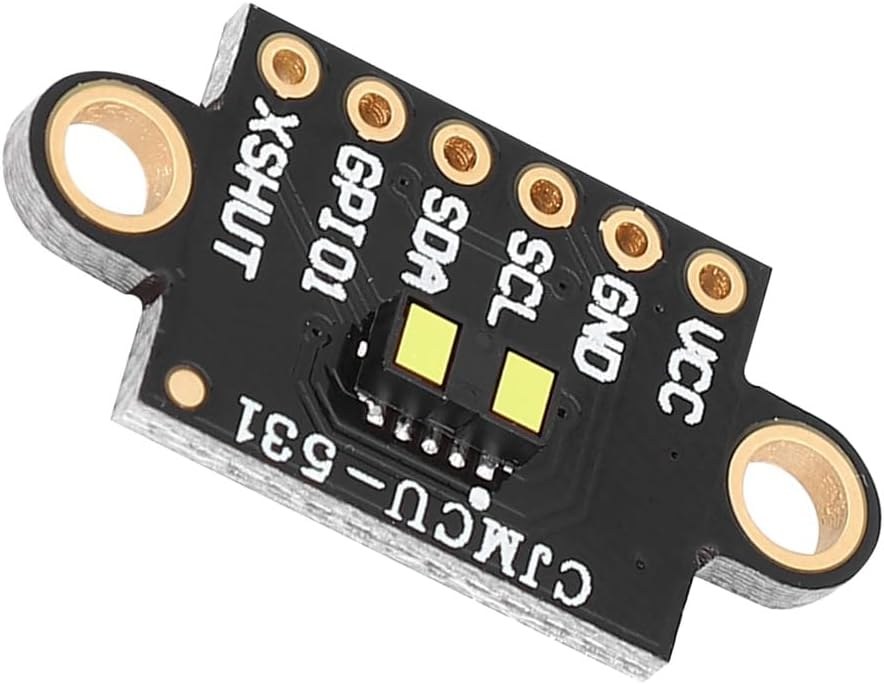
The sensor is powered by either 3.3V or 5V, and it has multiple pins for I2C communication, including SDA and SCL. The sensor can measure distances at a frequency of 50Hz, allowing for rapid distance readings. This tutorial will guide you through the wiring process and the code necessary to operate the sensor smoothly. For further clarification, you can check the video (in video at 00:00).
Hardware Explained
The main component of this project is the VL53L1X laser distance sensor, which utilizes a technology known as time-of-flight (ToF) to measure distances. This means it calculates the distance to an object by timing how long it takes for a laser pulse to return after hitting an object. The sensor features I2C communication, which allows for easy integration with microcontrollers like Arduino. In addition to the sensor, you will need an Arduino board for processing. The Arduino will handle the communication with the VL53L1X and display the measured distances. The setup is straightforward, as the sensor can be powered directly from the Arduino's output pins.
Datasheet Details
| Manufacturer | STMicroelectronics |
|---|---|
| Part number | VL53L1X |
| Logic/IO voltage | 3.3 – 5 V |
| Supply voltage | 2.6 – 5.5 V |
| Output current (per channel) | Not applicable |
| Peak current (per channel) | Not applicable |
| PWM frequency guidance | Not applicable |
| Input logic thresholds | 0.3 × VCC (low), 0.7 × VCC (high) |
| Voltage drop / RDS(on) / saturation | Not applicable |
| Thermal limits | 0 to 85 °C |
| Package | 4.9 x 2.5 x 1.6 mm |
| Notes / variants | Long-distance time-of-flight sensor |
- Power the sensor with 3.3V or 5V as required.
- Use the I2C pins, SDA and SCL, for communication.
- Set the distance mode according to your needs (short, medium, long).
- Ensure the sensor is calibrated for accurate distance readings.
- Handle ambient light conditions carefully as they can affect measurements.
Wiring Instructions
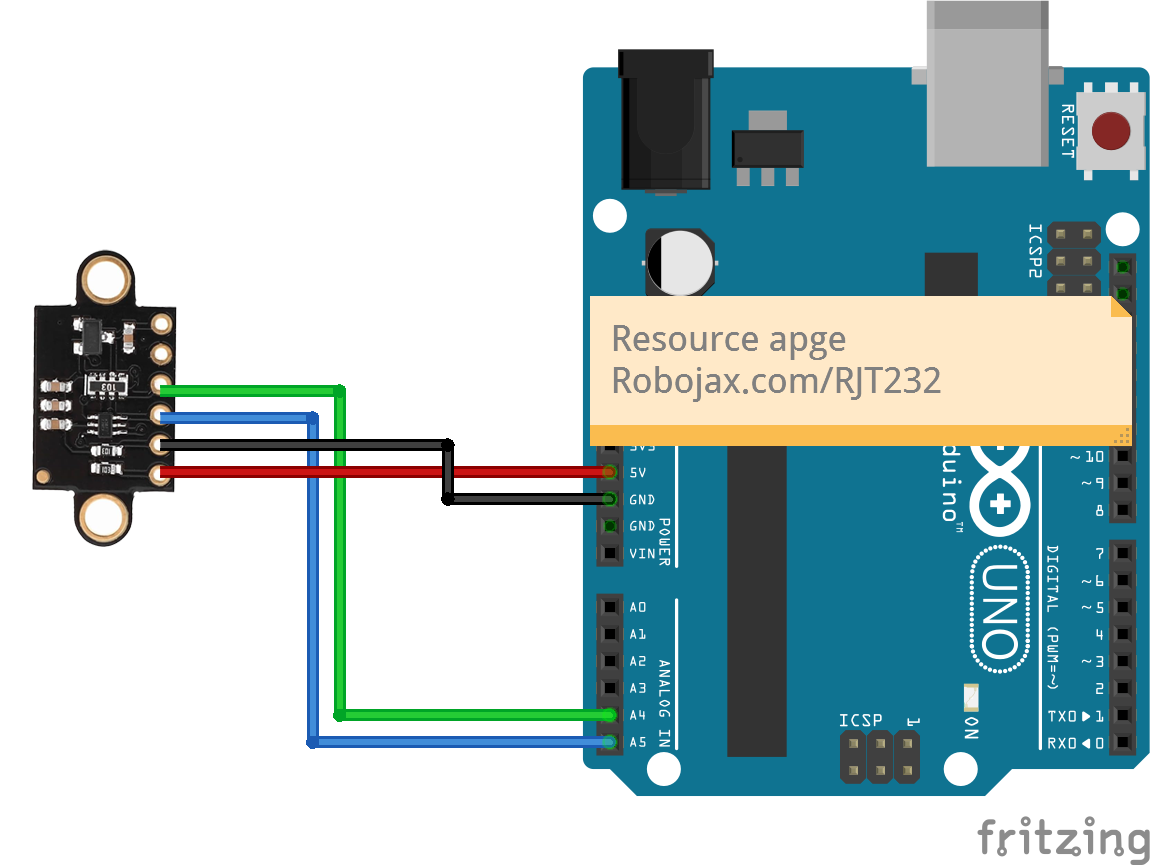
To wire the VL53L1X sensor to an Arduino, connect the VCC pin of the sensor to the 5V pin on the Arduino using a red wire. Connect the ground pin (GND) of the sensor to the Arduino's GND using a brown wire. For the I2C communication, connect the SDA pin of the sensor to the Arduino's A4 pin using a yellow wire and the SCL pin to the A5 pin using a green wire. If you want to use the optional interrupt and shutdown pins, connect the shutdown pin to digital pin 2 and the interrupt pin to digital pin 3, but these are not necessary for basic operation.
Code Examples & Walkthrough
In the code, we first include the necessary libraries and define the pins for the sensor. We create an instance of the sensor with the line:
SFEVL53L1X distanceSensor;This line initializes the sensor, allowing us to call its methods later in the program. Next, we set up the I2C communication and initialize the sensor:
void setup(void)
{
  Wire.begin();
  Serial.begin(9600);
  Serial.println("VL53L1X Qwiic Test");

  if (distanceSensor.begin() == 0) //Begin returns 0 on a good init
  {
    Serial.println("Sensor online!");
  }
}
In this excerpt, we start the I2C communication with Wire.begin() and check if the sensor is successfully initialized. Finally, to read the distance, we use the following code in the loop:
void loop(void)
{
  int distance = distanceSensor.getDistance(); // Get distance
  Serial.print("Distance: ");
  Serial.println(distance);
}
This code retrieves the distance measurement and prints it to the serial monitor. The loop continuously reads the distance, allowing for real-time updates. For a complete code example, please refer to the full code loaded below the article.
Demonstration / What to Expect
When the sensor is set up correctly, you can expect it to provide accurate distance measurements up to 4 meters. You may observe slight fluctuations in readings, especially in varying lighting conditions (in video at 10:30). It is essential to ensure that the sensor is clean and unobstructed to get precise results. If you encounter any unusual readings, verify that the sensor is powered correctly and that the I2C connections are secure. The sensor's performance may be affected by the environment, particularly in bright light or reflective surfaces.
Video Timestamps
- 00:00 Start
- 00:40 Introduction
- 03:42 Datasheet Visited
- 06:48 Soldiering Pin headers
- 08:22 Wiring explained
- 09:06 Code explained
- 11:53 Demonstration
- 16:03 Demonstration in Complete Dark
Изображения

/*

 * This is a code example using the VL53L1X Laser Range Sensor from STMicroelectronics
 * Using a library from SparkFun (see below)
 *
 * Watch a video instruction for this code: https://youtu.be/Sc_iVfeocvg
 * A wiring diagram is available at https://robojax.com/RJT232


 * Updated by Ahmad Shamshiri on November 4, 2019
 * in Ajax, Ontario, Canada. www.robojax.com
 *

 * Get this code and other Arduino codes from Robojax.com.
Learn Arduino step by step in a structured course with all materials, wiring diagrams and libraries
all in one place.

If you found this tutorial helpful, please support me so I can continue creating
content like this.

or make a donation using PayPal http://robojax.com/L/?id=64

 *
 * https://www.st.com/content/ccc/resource/technical/document/user_manual/group0/98/0d/38/38/5d/84/49/1f/DM00474730/files/DM00474730.pdf/jcr:content/translations/en.DM00474730.pdf
 * https://www.st.com/resource/en/datasheet/vl53l1x.pdf
 *
  Reading distance from the laser-based VL53L1X
  By: Nathan Seidle
  Revised by: Andy England
  SparkFun Electronics
  Date: April 4th, 2018
  License: This code is public domain but you buy me a beer if you use this and we meet someday (Beerware license).

  SparkFun labored with love to create this code. Feel like supporting open-source hardware?
  Buy a board from SparkFun! https://www.sparkfun.com/products/14667

  This example prints the distance to an object.

  Are you getting weird readings? Be sure the vacuum tape has been removed from the sensor.

 *  * This code is "AS IS" without warranty or liability. Free to be used as long as you keep this note intact.*
 * This code has been downloaded from Robojax.com
    This program is free software: you can redistribute it and/or modify
    it under the terms of the GNU General Public License as published by
    the Free Software Foundation, either version 3 of the License, or
    (at your option) any later version.

    This program is distributed in the hope that it will be useful,
    but WITHOUT ANY WARRANTY; without even the implied warranty of
    MERCHANTABILITY or FITNESS FOR A PARTICULAR PURPOSE.  See the
    GNU General Public License for more details.

    You should have received a copy of the GNU General Public License
    along with this program.  If not, see <https://www.gnu.org/licenses/>.


   Copyright (c) 2015, Majenko Technologies
   All rights reserved.

   Redistribution and use in source and binary forms, with or without modification,
   are permitted provided that the following conditions are met:

 * * Redistributions of source code must retain the above copyright notice, this
     list of conditions and the following disclaimer.

 * * Redistributions in binary form must reproduce the above copyright notice, this
     list of conditions and the following disclaimer in the documentation and/or
     other materials provided with the distribution.

 * * Neither the name of Majenko Technologies nor the names of its
     contributors may be used to endorse or promote products derived from
     this software without specific prior written permission.

   THIS SOFTWARE IS PROVIDED BY THE COPYRIGHT HOLDERS AND CONTRIBUTORS "AS IS" AND
   ANY EXPRESS OR IMPLIED WARRANTIES, INCLUDING, BUT NOT LIMITED TO, THE IMPLIED
   WARRANTIES OF MERCHANTABILITY AND FITNESS FOR A PARTICULAR PURPOSE ARE
   DISCLAIMED. IN NO EVENT SHALL THE COPYRIGHT HOLDER OR CONTRIBUTORS BE LIABLE FOR
   ANY DIRECT, INDIRECT, INCIDENTAL, SPECIAL, EXEMPLARY, OR CONSEQUENTIAL DAMAGES
   (INCLUDING, BUT NOT LIMITED TO, PROCUREMENT OF SUBSTITUTE GOODS OR SERVICES;
   LOSS OF USE, DATA, OR PROFITS; OR BUSINESS INTERRUPTION) HOWEVER CAUSED AND ON
   ANY THEORY OF LIABILITY, WHETHER IN CONTRACT, STRICT LIABILITY, OR TORT
   (INCLUDING NEGLIGENCE OR OTHERWISE) ARISING IN ANY WAY OUT OF THE USE OF THIS
   SOFTWARE, EVEN IF ADVISED OF THE POSSIBILITY OF SUCH DAMAGE.
*/

#include <Wire.h>
#include "SparkFun_VL53L1X.h"

//Optional interrupt and shutdown pins.
#define SHUTDOWN_PIN 2
#define INTERRUPT_PIN 3

SFEVL53L1X distanceSensor;
//Uncomment the following line to use the optional shutdown and interrupt pins.
//SFEVL53L1X distanceSensor(Wire, SHUTDOWN_PIN, INTERRUPT_PIN);

void setup(void)
{
  Wire.begin();

  Serial.begin(9600);
  Serial.println("VL53L1X Qwiic Test");

  if (distanceSensor.begin() == 0) //Begin returns 0 on a good init
  {
    Serial.println("Sensor online Robojax Says!");
  }
  Serial.print("I2C Address of VL53L1X:");
  Serial.println(distanceSensor.getI2CAddress());

// set distance mode to Short or long
  distanceSensor.setDistanceModeShort();
  //distanceSensor.setDistanceModeLong();

}
Ресурсы и ссылки
-
ВнешнийБиблиотека VL53L0X Pololu (GitHub)github.com
Файлы📁
Нет доступных файлов.


![[Military-Grade Accelerometer+Inclinometer] HWT905-TTL MPU-9250 9-axis Gyrosc...](https://i.ebayimg.com/images/g/q1EAAOSwRT5lvV2U/s-l225.jpg)