4メートルまでの距離を測定するためのVL53L1Xレーザー距離センサーの使用
VL53L1Xは、高精度で最大4メートルの距離を測定できる飛行時間レーザー距離センサーです。このセンサーはI2Cを介して通信し、ロボティクスや自動化など、さまざまなアプリケーションに対応しています。このチュートリアルでは、VL53L1XセンサーをArduinoとセットアップし、距離値を効果的に読み取る方法を探ります。
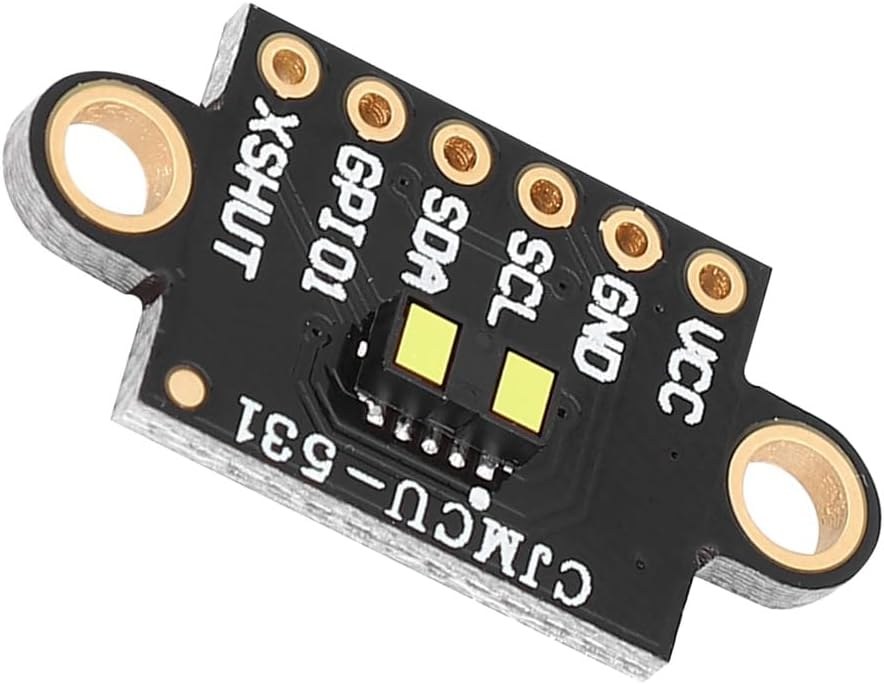
センサーは3.3Vまたは5Vで動作し、SDAおよびSCLを含むI2C通信のための複数のピンを備えています。センサーは50Hzの周波数で距離を測定でき、迅速な距離測定が可能です。このチュートリアルでは、配線プロセスとセンサーをスムーズに動作させるために必要なコードを案内します。さらなる確認のために、ビデオをチェックすることができます(ビデオは00:00で)。
ハードウェアの解説
このプロジェクトの主なコンポーネントは、距離を測定するために飛行時間(ToF)という技術を利用したVL53L1Xレーザー距離センサーです。これは、レーザーパルスが物体に当たった後に戻ってくるまでの時間を計測することによって、物体までの距離を計算します。センサーはI2C通信を特徴としており、Arduinoのようなマイクロコントローラとの統合が容易です。センサーに加えて、処理用にArduinoボードが必要です。ArduinoはVL53L1Xとの通信を処理し、測定した距離を表示します。セットアップは簡単で、センサーはArduinoの出力ピンから直接電源を供給できます。
データシートの詳細
| 製造業者 | STマイクロエレクトロニクス |
|---|---|
| 部品番号 | VL53L1X |
| ロジック/IO電圧 | 3.3 - 5 V |
| 供給電圧 | 2.6 - 5.5 V |
| 出力電流(チャンネルごと) | 該当なし |
| ピーク電流(チャネルごと) | 該当なし |
| PWM周波数ガイダンス | 該当なし |
| 入力ロジック閾値 | 0.3 × VCC(低)、0.7 × VCC(高) |
| 電圧降下 / RDS(on)/ 飽和度 | 該当しません |
| 熱的限界 | 0から85°C |
| パッケージ | 4.9 x 2.5 x 1.6 mm |
| ノート / バリアント | 長距離飛行時間センサー |
- 必要に応じてセンサーに3.3Vまたは5Vで電源を供給してください。
- I2Cピン、SDAとSCLを通信に使用します。
- ニーズに応じて距離モードを設定してください(短,中,長)。
- センサーが正確な距離測定のためにキャリブレーションされていることを確認してください。
- 周囲の光の条件には注意を払ってください。測定に影響を与える可能性があります。
配線手順
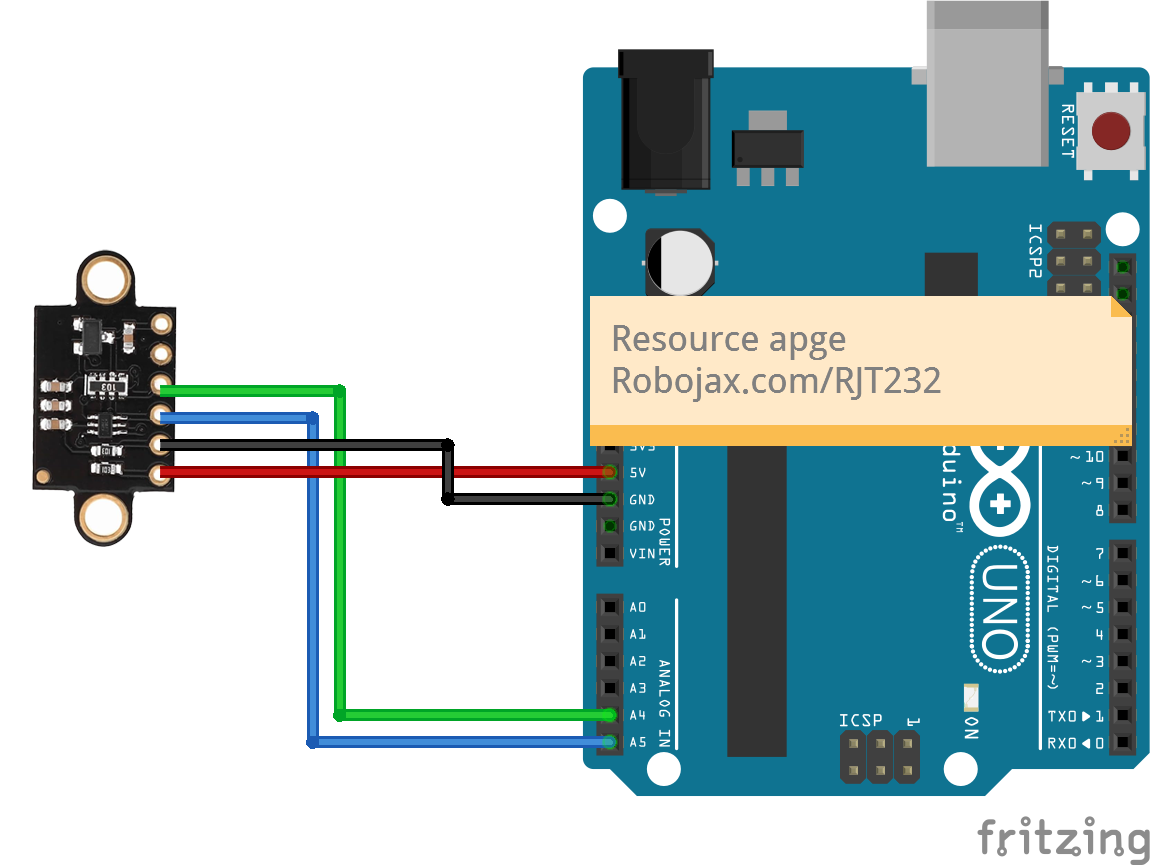
VL53L1XセンサーをArduinoに接続するには、センサーのVCCピンを赤いワイヤーを使ってArduinoの5Vピンに接続します。センサーのグラウンドピン(GND)を茶色のワイヤーでArduinoのGNDに接続します。I2C通信のために、センサーのSDAピンを黄色いワイヤーを使ってArduinoのA4ピンに接続し、SCLピンを緑のワイヤーでA5ピンに接続します。オプションの割り込みピンとシャットダウンピンを使用したい場合は、シャットダウンピンをデジタルピン2に、割り込みピンをデジタルピン3に接続しますが、基本的な動作には必要ありません。
コード例とウォークスルー
コードでは、まず必要なライブラリをインクルードし、センサーのピンを定義します。次の行でセンサーのインスタンスを作成します。
SFEVL53L1X distanceSensor;この行はセンサーを初期化し、プログラムの後でそのメソッドを呼び出せるようにします。次に、I2C通信を設定し、センサーを初期化します:
void setup(void)
{
  Wire.begin();
  Serial.begin(9600);
  Serial.println("VL53L1X Qwiic Test");

  if (distanceSensor.begin() == 0) //Begin returns 0 on a good init
  {
    Serial.println("Sensor online!");
  }
}この抜粋では、I2C通信を開始します。Wire.begin()センサーが正常に初期化されているか確認します。最後に、距離を測定するために、ループ内で以下のコードを使用します:
void loop(void)
{
  int distance = distanceSensor.getDistance(); // Get distance
  Serial.print("Distance: ");
  Serial.println(distance);
}
このコードは距離測定を取得し、それをシリアルモニターに出力します。ループは距離を継続的に読み取るため、リアルタイムでの更新が可能です。完全なコード例については、記事の下に読み込まれた完全なコードを参照してください。
デモンストレーション / 期待できること
センサーが正しく設定されていると、最大4メートルまでの正確な距離測定が行えることが期待できます。特に照明条件が変わる場合には、読み取り値にわずかな変動が見られることがあります(ビデオの10:30で)。正確な結果を得るためには、センサーが清潔で妨げられていないことを確認することが重要です。異常な読み取り値が表示された場合は、センサーが正しく電源が供給されているか、I2C接続が確実であるかを確認してください。センサーの性能は、特に明るい光や反射面では環境の影響を受ける可能性があります。
ビデオのタイムスタンプ
- 00:00 スタート
- 00:40 イントロダクション
- 03:42 データシート訪問
- 06:48 兵士のピンヘッダー
- 08:22 配線の説明
- 09:06 コードの説明
- 11:53 デモンストレーション
- 16:03 完全な暗闇でのデモンストレーション
画像

/*

 * This is a code example using the VL53L1X Laser Range Sensor from STMicroelectronics
 * Using a library from SparkFun (see below)
 *
 * Watch a video instruction for this code: https://youtu.be/Sc_iVfeocvg
 * A wiring diagram is available at https://robojax.com/RJT232


 * Updated by Ahmad Shamshiri on November 4, 2019
 * in Ajax, Ontario, Canada. www.robojax.com
 *

 * Get this code and other Arduino codes from Robojax.com.
Learn Arduino step by step in a structured course with all materials, wiring diagrams and libraries
all in one place.

If you found this tutorial helpful, please support me so I can continue creating
content like this.

or make a donation using PayPal http://robojax.com/L/?id=64

 *
 * https://www.st.com/content/ccc/resource/technical/document/user_manual/group0/98/0d/38/38/5d/84/49/1f/DM00474730/files/DM00474730.pdf/jcr:content/translations/en.DM00474730.pdf
 * https://www.st.com/resource/en/datasheet/vl53l1x.pdf
 *
  Reading distance from the laser-based VL53L1X
  By: Nathan Seidle
  Revised by: Andy England
  SparkFun Electronics
  Date: April 4th, 2018
  License: This code is public domain but you buy me a beer if you use this and we meet someday (Beerware license).

  SparkFun labored with love to create this code. Feel like supporting open-source hardware?
  Buy a board from SparkFun! https://www.sparkfun.com/products/14667

  This example prints the distance to an object.

  Are you getting weird readings? Be sure the vacuum tape has been removed from the sensor.

 *  * This code is "AS IS" without warranty or liability. Free to be used as long as you keep this note intact.*
 * This code has been downloaded from Robojax.com
    This program is free software: you can redistribute it and/or modify
    it under the terms of the GNU General Public License as published by
    the Free Software Foundation, either version 3 of the License, or
    (at your option) any later version.

    This program is distributed in the hope that it will be useful,
    but WITHOUT ANY WARRANTY; without even the implied warranty of
    MERCHANTABILITY or FITNESS FOR A PARTICULAR PURPOSE.  See the
    GNU General Public License for more details.

    You should have received a copy of the GNU General Public License
    along with this program.  If not, see <https://www.gnu.org/licenses/>.


   Copyright (c) 2015, Majenko Technologies
   All rights reserved.

   Redistribution and use in source and binary forms, with or without modification,
   are permitted provided that the following conditions are met:

 * * Redistributions of source code must retain the above copyright notice, this
     list of conditions and the following disclaimer.

 * * Redistributions in binary form must reproduce the above copyright notice, this
     list of conditions and the following disclaimer in the documentation and/or
     other materials provided with the distribution.

 * * Neither the name of Majenko Technologies nor the names of its
     contributors may be used to endorse or promote products derived from
     this software without specific prior written permission.

   THIS SOFTWARE IS PROVIDED BY THE COPYRIGHT HOLDERS AND CONTRIBUTORS "AS IS" AND
   ANY EXPRESS OR IMPLIED WARRANTIES, INCLUDING, BUT NOT LIMITED TO, THE IMPLIED
   WARRANTIES OF MERCHANTABILITY AND FITNESS FOR A PARTICULAR PURPOSE ARE
   DISCLAIMED. IN NO EVENT SHALL THE COPYRIGHT HOLDER OR CONTRIBUTORS BE LIABLE FOR
   ANY DIRECT, INDIRECT, INCIDENTAL, SPECIAL, EXEMPLARY, OR CONSEQUENTIAL DAMAGES
   (INCLUDING, BUT NOT LIMITED TO, PROCUREMENT OF SUBSTITUTE GOODS OR SERVICES;
   LOSS OF USE, DATA, OR PROFITS; OR BUSINESS INTERRUPTION) HOWEVER CAUSED AND ON
   ANY THEORY OF LIABILITY, WHETHER IN CONTRACT, STRICT LIABILITY, OR TORT
   (INCLUDING NEGLIGENCE OR OTHERWISE) ARISING IN ANY WAY OUT OF THE USE OF THIS
   SOFTWARE, EVEN IF ADVISED OF THE POSSIBILITY OF SUCH DAMAGE.
*/

#include <Wire.h>
#include "SparkFun_VL53L1X.h"

//Optional interrupt and shutdown pins.
#define SHUTDOWN_PIN 2
#define INTERRUPT_PIN 3

SFEVL53L1X distanceSensor;
//Uncomment the following line to use the optional shutdown and interrupt pins.
//SFEVL53L1X distanceSensor(Wire, SHUTDOWN_PIN, INTERRUPT_PIN);

void setup(void)
{
  Wire.begin();

  Serial.begin(9600);
  Serial.println("VL53L1X Qwiic Test");

  if (distanceSensor.begin() == 0) //Begin returns 0 on a good init
  {
    Serial.println("Sensor online Robojax Says!");
  }
  Serial.print("I2C Address of VL53L1X:");
  Serial.println(distanceSensor.getI2CAddress());

// set distance mode to Short or long
  distanceSensor.setDistanceModeShort();
  //distanceSensor.setDistanceModeLong();

}
リソースと参考文献
-
外部VL53L0X Pololuライブラリ (GitHub)github.com
ファイル📁
他のファイル
-
VL53L1X データシート
robojax-VL53L0X_datasheet.pdf0.90 MB